

Google and Microsoft disclosed CVE-2026-7898 on May 6, 2026, as a critical Chromium use-after-free flaw in Chromoting affecting Google Chrome on Linux before version 148.0.7778.96, where malicious network traffic could enable remote code execution. That one sentence is the operational answer; the more interesting story is what it says about modern browser risk. The bug sits not in the page-rendering hot zone most admins instinctively watch, but in the remote-access plumbing bundled into the Chromium ecosystem. For WindowsForum readers, the lesson is blunt: browser patching is no longer just browser patching.
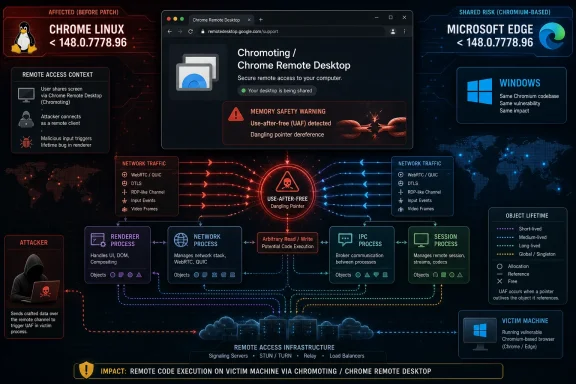
CVE-2026-7898 is described as a use-after-free vulnerability in Chromoting, the Chromium component behind Chrome Remote Desktop. The affected Google Chrome build line is Linux prior to 148.0.7778.96, and the reported attack path is malicious network traffic leading to arbitrary code execution with user interaction required.
That “Linux” qualifier matters, but it should not lull Windows and Edge administrators into skipping the advisory. Chromium is an upstream platform, not a single product. When Google fixes a flaw in a shared component, Microsoft Edge, Brave, Vivaldi, Opera, Electron-based software, and Linux distribution packages all enter the same familiar race: consume the patch, ship the rebuild, and get endpoints to restart.
Microsoft’s Security Update Guide entry for CVE-2026-7898 is therefore less an oddity than a reminder of how Edge inherits risk from the Chromium project. Even when the originally described vulnerable configuration is Chrome on Linux, Microsoft has to track the CVE because Edge is a Chromium-based browser and enterprise customers expect one place to inventory Microsoft exposure.
This is the bargain Microsoft made when it moved Edge to Chromium. It gained compatibility, developer goodwill, and a faster-moving engine. It also accepted that some of its security bulletin calendar would now be driven by Google’s release train, Chromium’s component map, and bugs found in code that many admins never associate with “Windows browsing.”
Browsers are especially hostile terrain for this class of flaw. They juggle renderers, network stacks, media decoders, GPU processes, extensions, IPC channels, profiles, sync services, and remote-control features. Each boundary is supposed to reduce blast radius; each boundary also increases the number of lifecycle transitions that must be correct.
Chromoting is an especially interesting place for a use-after-free because remote desktop software is built around sessions, streams, authentication states, transport events, and device redirection. These are precisely the kinds of moving parts that create complex lifetime problems. A remote-access component must treat network input as hostile while also maintaining persistent state across an interactive session.
The advisory language says malicious network traffic could trigger arbitrary code execution, with no privileges required but user interaction required. That is not the same thing as a fully wormable, one-packet internet meltdown. It is still serious because “user interaction” in browser CVEs can be a low bar, especially when the affected component is tied to remote connectivity rather than a conventional web page alone.
Chromoting muddies that model. Chrome Remote Desktop is not the tab strip. It is the browser ecosystem extending into remote administration, support workflows, unattended access, and personal device hopping. It is the sort of capability that begins as convenience and quietly becomes infrastructure.
That is why the location of CVE-2026-7898 matters. The browser has become a delivery vehicle for functions once handled by separate applications: password management, passkeys, PDF rendering, conferencing, endpoint identity, app launchers, web USB, and remote desktop. Every added capability expands the security perimeter while retaining the comforting iconography of a browser.
For sysadmins, this is the awkward part. A fleet may be “only running Chrome” or “only running Edge,” but the installed browser package includes code paths that look more like remote-management tooling than passive web viewing. If those code paths are reachable in a given configuration, policy matters as much as version number.
This is not a trivial paperwork complaint. Vulnerability scanners, asset platforms, SBOM tools, and patch dashboards often depend on CPE mappings to decide whether an endpoint is exposed. A slightly awkward CPE expression can create false positives, false negatives, or at least confusion in the morning triage meeting.
The user-facing question — “Are we missing a CPE here?” — is exactly the right one. A clean representation would identify Google Chrome as the vulnerable application and constrain the platform to Linux without implying that the kernel itself is vulnerable. In practice, vulnerability databases often struggle to model platform-specific application flaws without producing odd logical combinations.
That matters for WindowsForum’s audience because many organizations now run mixed fleets. Windows laptops, Linux developer workstations, macOS executives, VDI pools, containers, kiosks, and remote support hosts all report into the same vulnerability management process. When a CVE says “Chrome on Linux,” the scanner has to distinguish a Linux workstation with Google Chrome from a Windows system with Edge from a server image with a Chromium dependency no one remembers installing.
The answer, then, is yes: the CPE deserves scrutiny. But the deeper answer is that CPE was built for a simpler world than the one Chromium now occupies. A modern browser component can be upstreamed into multiple products, packaged by multiple vendors, and exposed differently depending on operating system, policy, feature flags, and runtime configuration.
Chromium’s internal severity is heavily influenced by the kind of bug and what it can plausibly do inside the browser’s security model. A memory corruption flaw that can lead to code execution in a network-reachable component is exactly the kind of thing browser vendors tend to treat with urgency. Whether the public CVSS score lands at 8.8 or 9.8 is less important than the operational fact that the fix shipped in a stable release.
The CVSS vector includes network attack vector, low attack complexity, no privileges required, user interaction required, unchanged scope, and high impacts to confidentiality, integrity, and availability. In human terms, an attacker does not need an account, the exploit path is not considered especially complex, but some user-side condition must be satisfied. If exploitation succeeds, the impact can be total for the affected security context.
Administrators should resist the temptation to overfit the score. A 10.0 rating does not magically patch faster, and an 8.8 rating does not make remote code execution leisurely. In browser security, the practical threshold is often simpler: if the vendor shipped a stable security update for a memory-corruption flaw, deploy it quickly and verify restart.
In managed environments, the browser update itself is rarely the bottleneck. Chrome and Edge can download updates quietly, but the vulnerable binary may remain in use until the browser restarts. Users leave sessions open for days; VDI images get snapshotted; remote support machines sit unattended; Linux desktops may rely on package managers whose cadence differs from Google’s direct channel.
That is where browser patch compliance becomes a behavioral problem masquerading as software distribution. A dashboard that says the update is installed is not the same as a dashboard that says the old process is gone. The meaningful question is whether the running browser version has crossed the fixed threshold.
For Linux fleets, this also means checking the packaging source. Google’s own Chrome package, distro-maintained Chromium builds, Snap packages, Flatpaks, and enterprise repositories can all move on different schedules. The CVE names Google Chrome on Linux, but operationally the question is whether the Chromium code containing the Chromoting fix is present in the browser actually running on the endpoint.
That does not mean every Chromium CVE affects Edge in the same way or on the same platforms. Component exposure can differ, build flags can matter, and Microsoft may have mitigations or code differences in its product. But from an enterprise management point of view, waiting for that nuance to become perfectly clear is often the wrong strategy.
Windows shops should check Edge release status through their normal channels, especially where Edge is the default browser, WebView2 runtime is widely deployed, or remote access features are enabled. WebView2 deserves special mention because it embeds the Chromium engine into Windows applications. Even when users think they are not “using the browser,” Chromium may be rendering content inside line-of-business software.
The bigger Windows angle is governance. Microsoft has made Edge a core part of the Windows endpoint experience, not a removable afterthought. That means Chromium CVEs are now part of Windows endpoint hygiene, even when the vulnerable product named first is Google Chrome on another operating system.
That inconsistency is dangerous. If an enterprise forbids unmanaged remote-control software but allows users to sign into consumer browser profiles and enable remote desktop features, the policy has a hole. The logo on the executable should not decide the control plane.
Remote access features deserve explicit decisions. They should be allowed, blocked, or constrained by policy, not discovered during incident response. Browser management templates, extension controls, account restrictions, and network egress policies can all help turn an accidental feature into an intentional one.
The uncomfortable truth is that browsers have become privileged brokers. They hold tokens, sync credentials, identity sessions, device permissions, clipboard access, and sometimes remote desktop capability. Calling them “user applications” undersells their role in the enterprise threat model.
This has changed the economics of patch management. In the old model, organizations could debate each application update on its own merits. In the browser model, the cadence is continuous, the exploit window is short, and the application is internet-facing by design. Slow testing rings still matter, but long deferrals are increasingly hard to defend.
The right enterprise pattern is not reckless auto-update everywhere. It is fast rings, telemetry, rollback readiness, and aggressive restart enforcement after security fixes. Browsers should be treated more like endpoint security agents than like office productivity software.
For enthusiasts, the advice is even simpler. If Chrome or Edge says an update is ready, take the restart. Browser restarts are annoying; arbitrary code execution is worse.
This leaves admins with an information gap. We know the component, the vulnerability class, the affected version threshold, the general attack vector, and the impact. We do not know the exact trigger, the exploit reliability, or whether any particular enterprise configuration reduces exposure.
That uncertainty is not an argument for waiting. It is an argument for patching before the exploit write-ups arrive. Browser vulnerabilities often become more dangerous after disclosure precisely because the fix points skilled attackers toward the broken code.
There is no public indication in the provided record that CVE-2026-7898 is being actively exploited in the wild. That is good news, but not a reprieve. For critical browser memory-safety bugs, “not known exploited” should mean “patch promptly,” not “schedule for next quarter.”
That is not because Chromium engineers are careless. It is because C and C++ codebases at browser scale are brutally difficult to make memory safe. Every new feature, performance optimization, and platform abstraction creates another place where object lifetime has to be perfect.
The industry’s gradual shift toward memory-safe languages is real, but browsers cannot be rewritten overnight. Chromium’s deepest components have decades of accumulated architecture and platform-specific behavior. Security progress therefore comes in layers: safer coding patterns, better fuzzers, sandbox hardening, MiraclePtr-like mitigations, faster updates, and eventually more memory-safe implementation where feasible.
CVE-2026-7898 fits that long arc. It is not a shocking anomaly. It is another data point showing that the browser remains the most aggressively defended and aggressively attacked application most people run.
Source: NVD / Chromium Security Update Guide - Microsoft Security Response Center
 A Chrome Remote Desktop Bug Becomes Everyone’s Browser Problem
CVE-2026-7898 is described as a use-after-free vulnerability in Chromoting, the Chromium component behind Chrome Remote Desktop. The affected Google Chrome build line is Linux prior to 148.0.7778.96, and the reported attack path is malicious network traffic leading to arbitrary code execution with user interaction required.That “Linux” qualifier matters, but it should not lull Windows and Edge administrators into skipping the advisory. Chromium is an upstream platform, not a single product. When Google fixes a flaw in a shared component, Microsoft Edge, Brave, Vivaldi, Opera, Electron-based software, and Linux distribution packages all enter the same familiar race: consume the patch, ship the rebuild, and get endpoints to restart.
Microsoft’s Security Update Guide entry for CVE-2026-7898 is therefore less an oddity than a reminder of how Edge inherits risk from the Chromium project. Even when the originally described vulnerable configuration is Chrome on Linux, Microsoft has to track the CVE because Edge is a Chromium-based browser and enterprise customers expect one place to inventory Microsoft exposure.
This is the bargain Microsoft made when it moved Edge to Chromium. It gained compatibility, developer goodwill, and a faster-moving engine. It also accepted that some of its security bulletin calendar would now be driven by Google’s release train, Chromium’s component map, and bugs found in code that many admins never associate with “Windows browsing.”
The Dangerous Part Is Not the Acronym, It Is the Object Lifetime
A use-after-free vulnerability is one of the oldest memory-safety failure modes in software, and it remains stubbornly relevant because modern applications are sprawling collections of asynchronous subsystems. In plain English, the program frees memory and later keeps using a reference to it. If an attacker can shape what occupies that memory afterward, a crash can become control.Browsers are especially hostile terrain for this class of flaw. They juggle renderers, network stacks, media decoders, GPU processes, extensions, IPC channels, profiles, sync services, and remote-control features. Each boundary is supposed to reduce blast radius; each boundary also increases the number of lifecycle transitions that must be correct.
Chromoting is an especially interesting place for a use-after-free because remote desktop software is built around sessions, streams, authentication states, transport events, and device redirection. These are precisely the kinds of moving parts that create complex lifetime problems. A remote-access component must treat network input as hostile while also maintaining persistent state across an interactive session.
The advisory language says malicious network traffic could trigger arbitrary code execution, with no privileges required but user interaction required. That is not the same thing as a fully wormable, one-packet internet meltdown. It is still serious because “user interaction” in browser CVEs can be a low bar, especially when the affected component is tied to remote connectivity rather than a conventional web page alone.
Chromoting Is the Feature Hiding in the Footnotes
Most Chrome security stories are easy to narrate. A renderer bug affects web pages. A V8 bug affects JavaScript. A Skia or ANGLE bug affects graphics. Those map neatly to the mental model of “visit a bad site, get owned.”Chromoting muddies that model. Chrome Remote Desktop is not the tab strip. It is the browser ecosystem extending into remote administration, support workflows, unattended access, and personal device hopping. It is the sort of capability that begins as convenience and quietly becomes infrastructure.
That is why the location of CVE-2026-7898 matters. The browser has become a delivery vehicle for functions once handled by separate applications: password management, passkeys, PDF rendering, conferencing, endpoint identity, app launchers, web USB, and remote desktop. Every added capability expands the security perimeter while retaining the comforting iconography of a browser.
For sysadmins, this is the awkward part. A fleet may be “only running Chrome” or “only running Edge,” but the installed browser package includes code paths that look more like remote-management tooling than passive web viewing. If those code paths are reachable in a given configuration, policy matters as much as version number.
The CPE Weirdness Is a Symptom of a Bigger Inventory Problem
The NVD change history for CVE-2026-7898 shows a configuration that combines Google Chrome versions before 148.0.7778.96 with the Linux kernel CPE. That may look strange at first glance: the vulnerability is in Chrome, not the Linux kernel. The likely intent is to express “Chrome on Linux,” but the result illustrates how machine-readable vulnerability metadata can be both useful and misleading.This is not a trivial paperwork complaint. Vulnerability scanners, asset platforms, SBOM tools, and patch dashboards often depend on CPE mappings to decide whether an endpoint is exposed. A slightly awkward CPE expression can create false positives, false negatives, or at least confusion in the morning triage meeting.
The user-facing question — “Are we missing a CPE here?” — is exactly the right one. A clean representation would identify Google Chrome as the vulnerable application and constrain the platform to Linux without implying that the kernel itself is vulnerable. In practice, vulnerability databases often struggle to model platform-specific application flaws without producing odd logical combinations.
That matters for WindowsForum’s audience because many organizations now run mixed fleets. Windows laptops, Linux developer workstations, macOS executives, VDI pools, containers, kiosks, and remote support hosts all report into the same vulnerability management process. When a CVE says “Chrome on Linux,” the scanner has to distinguish a Linux workstation with Google Chrome from a Windows system with Edge from a server image with a Chromium dependency no one remembers installing.
The answer, then, is yes: the CPE deserves scrutiny. But the deeper answer is that CPE was built for a simpler world than the one Chromium now occupies. A modern browser component can be upstreamed into multiple products, packaged by multiple vendors, and exposed differently depending on operating system, policy, feature flags, and runtime configuration.
Severity Ratings Tell You Urgency, Not Exposure
Google classified CVE-2026-7898 as critical in Chromium severity terms, while CISA-ADP supplied a CVSS 3.1 score of 8.8, rated high. That mismatch is not a contradiction. It is a reminder that severity systems measure different things and are written for different audiences.Chromium’s internal severity is heavily influenced by the kind of bug and what it can plausibly do inside the browser’s security model. A memory corruption flaw that can lead to code execution in a network-reachable component is exactly the kind of thing browser vendors tend to treat with urgency. Whether the public CVSS score lands at 8.8 or 9.8 is less important than the operational fact that the fix shipped in a stable release.
The CVSS vector includes network attack vector, low attack complexity, no privileges required, user interaction required, unchanged scope, and high impacts to confidentiality, integrity, and availability. In human terms, an attacker does not need an account, the exploit path is not considered especially complex, but some user-side condition must be satisfied. If exploitation succeeds, the impact can be total for the affected security context.
Administrators should resist the temptation to overfit the score. A 10.0 rating does not magically patch faster, and an 8.8 rating does not make remote code execution leisurely. In browser security, the practical threshold is often simpler: if the vendor shipped a stable security update for a memory-corruption flaw, deploy it quickly and verify restart.
The Patch Is Simple; The Restart Is the Hard Part
For unmanaged users, the remediation is boring in the best possible way: update Chrome to 148.0.7778.96 or later on Linux. On Windows and macOS, the same Chrome 148 desktop update line shipped as 148.0.7778.96 or 148.0.7778.97, addressing a large batch of security fixes. Google’s stable channel update included more than one critical Chromium issue, so treating this as a single-CVE patch understates the value of moving.In managed environments, the browser update itself is rarely the bottleneck. Chrome and Edge can download updates quietly, but the vulnerable binary may remain in use until the browser restarts. Users leave sessions open for days; VDI images get snapshotted; remote support machines sit unattended; Linux desktops may rely on package managers whose cadence differs from Google’s direct channel.
That is where browser patch compliance becomes a behavioral problem masquerading as software distribution. A dashboard that says the update is installed is not the same as a dashboard that says the old process is gone. The meaningful question is whether the running browser version has crossed the fixed threshold.
For Linux fleets, this also means checking the packaging source. Google’s own Chrome package, distro-maintained Chromium builds, Snap packages, Flatpaks, and enterprise repositories can all move on different schedules. The CVE names Google Chrome on Linux, but operationally the question is whether the Chromium code containing the Chromoting fix is present in the browser actually running on the endpoint.
Microsoft Edge Makes This a Windows Story Even When Linux Is Named
At first glance, CVE-2026-7898 looks like a Linux-only Chrome item. Yet Microsoft’s presence in the advisory chain is exactly why Windows administrators should pay attention. Edge’s security posture is tied to Chromium’s, and Microsoft routinely ships Edge stable updates that incorporate Chromium security fixes.That does not mean every Chromium CVE affects Edge in the same way or on the same platforms. Component exposure can differ, build flags can matter, and Microsoft may have mitigations or code differences in its product. But from an enterprise management point of view, waiting for that nuance to become perfectly clear is often the wrong strategy.
Windows shops should check Edge release status through their normal channels, especially where Edge is the default browser, WebView2 runtime is widely deployed, or remote access features are enabled. WebView2 deserves special mention because it embeds the Chromium engine into Windows applications. Even when users think they are not “using the browser,” Chromium may be rendering content inside line-of-business software.
The bigger Windows angle is governance. Microsoft has made Edge a core part of the Windows endpoint experience, not a removable afterthought. That means Chromium CVEs are now part of Windows endpoint hygiene, even when the vulnerable product named first is Google Chrome on another operating system.
Remote Access Features Should Not Be Treated as Browser Decoration
CVE-2026-7898 should push organizations to revisit how they classify browser-adjacent remote access. Chrome Remote Desktop is convenient, cross-platform, and often beloved by power users. It can also slip beneath the policy radar in environments that have strict rules for RDP, VPN, SSH, or commercial remote monitoring tools.That inconsistency is dangerous. If an enterprise forbids unmanaged remote-control software but allows users to sign into consumer browser profiles and enable remote desktop features, the policy has a hole. The logo on the executable should not decide the control plane.
Remote access features deserve explicit decisions. They should be allowed, blocked, or constrained by policy, not discovered during incident response. Browser management templates, extension controls, account restrictions, and network egress policies can all help turn an accidental feature into an intentional one.
The uncomfortable truth is that browsers have become privileged brokers. They hold tokens, sync credentials, identity sessions, device permissions, clipboard access, and sometimes remote desktop capability. Calling them “user applications” undersells their role in the enterprise threat model.
The Browser Release Train Is Now Security Infrastructure
Chrome 148’s desktop stable update reportedly fixed more than 100 security issues, including three critical flaws. CVE-2026-7898 was only one of them. That is the point: modern browser updates are dense security bundles, not occasional feature drops.This has changed the economics of patch management. In the old model, organizations could debate each application update on its own merits. In the browser model, the cadence is continuous, the exploit window is short, and the application is internet-facing by design. Slow testing rings still matter, but long deferrals are increasingly hard to defend.
The right enterprise pattern is not reckless auto-update everywhere. It is fast rings, telemetry, rollback readiness, and aggressive restart enforcement after security fixes. Browsers should be treated more like endpoint security agents than like office productivity software.
For enthusiasts, the advice is even simpler. If Chrome or Edge says an update is ready, take the restart. Browser restarts are annoying; arbitrary code execution is worse.
The CVE Record Is Sparse Because That Is the Point
The public Chromium issue for CVE-2026-7898 is restricted, which is normal for serious browser bugs shortly after disclosure. Vendors often limit bug details until a majority of users have updated. That frustrates defenders who want technical clarity, but it also slows attackers who would otherwise turn a patch diff into an exploit tutorial.This leaves admins with an information gap. We know the component, the vulnerability class, the affected version threshold, the general attack vector, and the impact. We do not know the exact trigger, the exploit reliability, or whether any particular enterprise configuration reduces exposure.
That uncertainty is not an argument for waiting. It is an argument for patching before the exploit write-ups arrive. Browser vulnerabilities often become more dangerous after disclosure precisely because the fix points skilled attackers toward the broken code.
There is no public indication in the provided record that CVE-2026-7898 is being actively exploited in the wild. That is good news, but not a reprieve. For critical browser memory-safety bugs, “not known exploited” should mean “patch promptly,” not “schedule for next quarter.”
Memory Safety Keeps Haunting the Fastest Software on Earth
Chromium is one of the most sophisticated software projects in the world. It has sandboxing, fuzzing, site isolation, exploit mitigations, bug bounties, hardened allocators, process boundaries, and an enormous security engineering apparatus. And still, use-after-free bugs keep appearing.That is not because Chromium engineers are careless. It is because C and C++ codebases at browser scale are brutally difficult to make memory safe. Every new feature, performance optimization, and platform abstraction creates another place where object lifetime has to be perfect.
The industry’s gradual shift toward memory-safe languages is real, but browsers cannot be rewritten overnight. Chromium’s deepest components have decades of accumulated architecture and platform-specific behavior. Security progress therefore comes in layers: safer coding patterns, better fuzzers, sandbox hardening, MiraclePtr-like mitigations, faster updates, and eventually more memory-safe implementation where feasible.
CVE-2026-7898 fits that long arc. It is not a shocking anomaly. It is another data point showing that the browser remains the most aggressively defended and aggressively attacked application most people run.
What Administrators Should Do Before This Becomes Just Another Green Checkmark
The immediate response is to verify that Chrome on Linux is at 148.0.7778.96 or later and that old browser processes have been restarted. The broader response is to treat this CVE as a prompt to inspect remote access policy, Chromium-derived software inventory, and scanner logic around platform-specific application flaws.- Confirm that Linux systems running Google Chrome have updated to version 148.0.7778.96 or later and that users have restarted the browser.
- Check Microsoft Edge and other Chromium-based browsers through their vendor-specific release channels rather than assuming Chrome’s version number maps cleanly to every product.
- Review whether Chrome Remote Desktop or related Chromoting functionality is permitted in your environment and enforce that decision with browser policy.
- Validate vulnerability scanner findings carefully, because the NVD CPE expression may represent “Chrome on Linux” in a way that looks odd in asset tools.
- Treat browser update completion as a running-process problem, not merely an installer or package-version problem.
- Prioritize this alongside the rest of the Chrome 148 security bundle, because the release fixed many issues beyond CVE-2026-7898.
Source: NVD / Chromium Security Update Guide - Microsoft Security Response Center
