

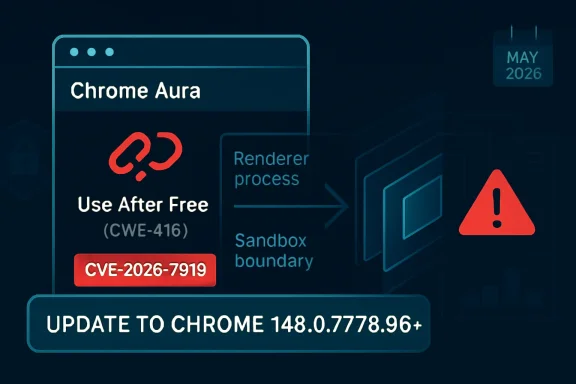
CVE-2026-7919 is a high-severity use-after-free vulnerability in Chrome’s Aura user-interface framework, fixed in Google Chrome 148.0.7778.96 for Linux and 148.0.7778.96/97 for Windows and macOS after disclosure on May 6, 2026, with Microsoft also tracking it in MSRC. The short version for administrators is simple: if Chrome or Chromium-based browser management is not already forcing this update, it should be. The longer version is more interesting, because this is not just another memory-safety bug in a browser that ships fixes every few weeks. It is a reminder that the browser sandbox is no longer a single wall; it is a layered political compromise between speed, compatibility, rendering complexity, and the grim fact that attackers only need one weak seam.
The phrase “use after free in Aura” sounds almost comically narrow. Aura is not V8, not Blink, not WebGPU, not the flashy subsystem most people associate with remote browser compromise. It is part of Chromium’s windowing and UI infrastructure, the scaffolding that helps Chrome draw and manage interface elements across platforms.
That is exactly why CVE-2026-7919 deserves attention. Modern browser exploitation does not always begin and end in the JavaScript engine. Once an attacker has compromised the renderer process, the next goal is to escape the constraints that keep that renderer from becoming a beachhead on the host. A flaw in the browser’s UI plumbing can become part of that second stage.
The vulnerability description is precise: a remote attacker who had already compromised the renderer process could potentially perform a sandbox escape via a crafted HTML page. That wording matters. This is not described as a one-click, from-zero-to-system compromise on its own. It is a bug that becomes dangerous in a chain, and browser exploit chains are the normal form of serious Chrome attacks.
That distinction should not comfort enterprise defenders too much. In 2026, “requires renderer compromise” is less of a barrier than it sounds. Attackers targeting browsers routinely combine renderer code execution with a sandbox escape, and the boundary between “high severity” and “catastrophic in practice” often depends on whether a second bug is available.
CVE-2026-7919 sits in that second category of risk. It does not merely threaten the renderer; it threatens the containment model around the renderer. The CVSS vector assigned by CISA’s ADP enrichment captures the shape of that risk: network attack vector, high attack complexity, no privileges required, user interaction required, changed scope, and high impact to confidentiality, integrity, and availability.
The “user interaction required” field should be read in browser terms. It usually means the user has to visit or be persuaded to load a malicious page, not that they must approve a scary dialog box. In the real world, that can be an email link, a compromised legitimate site, a poisoned ad chain, or a targeted watering-hole page.
The “attack complexity high” field is also worth parsing carefully. High complexity does not mean impractical. It means exploitation depends on conditions that are harder to line up reliably. For targeted operations, high complexity is an engineering cost, not a wall.
Use-after-free vulnerabilities are especially treacherous in this environment. The basic mistake is conceptually simple: software continues to use memory after it has been freed. In mature exploit development, that stale reference can sometimes be turned into control over what the program reads, writes, or executes.
Chromium has spent years pushing memory-safety mitigations into its codebase, including allocator hardening and projects intended to reduce the exploitability of exactly these bug classes. Yet the persistence of use-after-free CVEs shows the central tension of C++ at browser scale. You can reduce the blast radius, you can make exploitation harder, and you can move some code toward safer patterns, but you cannot wish away decades of performance-sensitive native code.
That is why the component name matters less than the exploit position. A vulnerability in Aura that supports sandbox escape is not “just UI.” It is a route from an already-hostile renderer toward more privileged browser territory.
That context cuts two ways. On one hand, CVE-2026-7919 is only one entry in a large patch train, and there is no public indication in the advisory text that it was being exploited in the wild at disclosure. On the other hand, large Chrome security updates are exactly where defenders can lose track of which bug matters most to their environment.
A critical renderer bug and a high-severity sandbox escape bug in the same broad release are not automatically a working exploit chain. Public advisories rarely provide enough detail to make that conclusion. But from a risk-management perspective, the combination is enough to accelerate deployment rather than wait for a leisurely browser maintenance window.
This is where vulnerability management often gets browser risk wrong. Teams sort by CVSS, mark “critical” items red, and treat “high” as the next queue. But a high-severity sandbox escape can be the missing half of a critical exploit chain. Severity scores are useful metadata; they are not the attack graph.
For Windows administrators, the Chrome advisory is only one side of the operational question. Edge, Chrome, embedded Chromium runtimes, third-party Chromium builds, and Electron applications all complicate the inventory picture. A CVE that appears simple in the NVD can become messy once the question turns from “is Google Chrome fixed?” to “where does Chromium-derived code exist in this estate?”
That does not mean every Chromium-based product is automatically affected in the same way or on the same timeline. Vendors integrate upstream Chromium changes differently. Some ship quickly; some lag; some expose different attack surfaces depending on which components they use. The responsible approach is to treat the Chrome fixed version as the starting point, then verify each Chromium-derived product through its vendor’s own advisory stream.
Microsoft’s presence in the advisory ecosystem matters because many Windows administrators do not read Chrome release notes every week. They do read MSRC, Defender portal alerts, Intune recommendations, and vulnerability dashboards that ingest Microsoft data. When a Chrome CVE appears there, it is a nudge to stop thinking of browser patching as a consumer-app hygiene task.
If a CPE is missing, too broad, or represented awkwardly, downstream tools may misclassify affected assets. One scanner might flag only Windows Chrome installs. Another might flag Chrome on Linux but not recognize managed macOS packages. A third might produce noise because it interprets platform CPEs too expansively.
The “are we missing a CPE?” prompt in vulnerability databases has become a quiet admission that the software supply chain has outgrown the old taxonomy. Browsers are applications, update channels, embedded runtimes, enterprise-managed packages, mobile apps, container images, and upstream projects all at once. CPE was designed to normalize product identity; modern software keeps making product identity slippery.
For CVE-2026-7919, the immediate affected product is Google Chrome before the fixed desktop version. But the operational question is broader: which assets run a vulnerable Chromium build, which assets receive automatic updates, which ones are pinned, and which ones live outside central browser management entirely?
Renderer bugs are common enough that attackers plan around them. The renderer processes untrusted web content at enormous scale. It handles HTML, CSS, JavaScript, images, fonts, media, WebAssembly, GPU-adjacent workloads, and a long tail of web platform features that exist because the modern web is an application runtime pretending to be a document viewer.
A sandbox escape is the second door. Once a renderer exploit runs code inside the constrained process, the attacker looks for an inter-process communication flaw, a broker weakness, a privileged service bug, or a logic error in a component that the sandboxed renderer can still reach. CVE-2026-7919’s description places Aura in that second-stage territory.
That is why the crafted HTML page detail is important. The web page is the delivery vehicle, but the exploit path likely depends on carefully steering browser state. The page does not need to look sinister. It needs to place the browser into the right sequence of allocations, frees, object lifetimes, UI events, or cross-process interactions.
That delay is where a high-severity browser CVE becomes a fleet problem. An update can be available globally and still not be effective on endpoints. In Chrome, the version number in inventory is only part of the story; the running browser process must actually restart into the patched build.
For WindowsForum readers, this is the practical heart of the matter. The browser has become the primary exposure surface for many endpoints, but it is still often governed like an accessory. Organizations that would never tolerate a month-old unpatched VPN appliance sometimes allow browsers to drift because the update mechanism is nominally automatic.
Automatic does not mean immediate. It means the vendor has removed one class of manual work. Administrators still need policy, telemetry, restart enforcement, and exception visibility.
The Chrome 148 release also matters for Extended Stable users on Windows and macOS, where the fixed version line includes 148.0.7778.97. In practice, administrators should check the exact channel and version, not merely assume that “stable” and “extended stable” map neatly onto the same build number.
This is one of the recurring frustrations of browser management. Version strings are precise, but the administrative mental model is often fuzzy. Users say they are “on Chrome 148.” Vulnerability scanners want to know whether the installed build is before 148.0.7778.96. Change managers want to know whether the patch was deployed. Security teams want to know whether the vulnerable process is still running.
Those are not the same question. Good browser governance answers all of them.
Google, Microsoft, Mozilla, Apple, and the broader security community have all invested in mitigations that make memory corruption harder to exploit. The industry has also become more serious about memory-safe languages, especially Rust, for new code where performance and safety can coexist. But browsers are not greenfield projects. They are living cities built over old infrastructure.
The uncomfortable truth is that browser security in the late 2020s is still partly a race between mitigation and exploit craft. Allocator hardening, MiraclePtr-style protections, control-flow integrity, site isolation, sandboxing, and process separation all raise the cost. Attackers respond by chaining bugs, targeting less scrutinized components, and exploiting logic around the mitigations.
CVE-2026-7919 fits that landscape. Its public details are limited, likely because the underlying Chromium issue remains access-restricted until users have had time to update. But the contours are familiar enough: memory lifetime error, privileged-enough component, crafted web content, possible sandbox escape.
The result is an information asymmetry. Google and the reporter know more. Attackers may infer more from patch diffs than defenders can from advisory prose. Enterprise teams are left with a severity rating, a fixed version, a component name, and a terse description.
That is not ideal, but it is enough to act. The purpose of a browser advisory is not to provide a graduate seminar in exploitation. It is to tell operators which versions are unsafe and how quickly they should move. For CVE-2026-7919, the answer is: move now, then investigate residual exposure.
Defenders often ask for proof of exploitation before accelerating deployment. That posture makes sense for some server-side vulnerabilities where patching carries major outage risk. It makes less sense for Chrome, where the patch mechanism is mature, attacks can arrive through ordinary browsing, and public exploit understanding can change quickly once diffs are analyzed.
This is especially true on Windows, where Chrome and Edge often coexist. Some organizations standardize on Edge for Microsoft 365 integration but leave Chrome installed for compatibility. Others officially support Chrome while Edge remains present as part of the operating system. Developers may install Canary, Beta, or ungoogled Chromium builds. Help desks may forget portable copies and legacy installers.
That diversity weakens the neatness of “update Chrome.” The right instruction is to identify all Chromium-based browsers in the estate, confirm their fixed builds, and ensure the vulnerable versions are not merely installed but also not running. Browser inventory has to become process-aware, channel-aware, and user-profile-aware.
It also has to include unmanaged corners. Lab machines, conference-room PCs, kiosks, jump boxes, contractor laptops, and persistent VDI images are where “automatic update” assumptions go to die.
A weaker program chases headlines. It patches emergency zero-days, celebrates, and lets “ordinary” high-severity browser bugs move through the standard queue. A stronger program recognizes that the absence of public exploitation is not a reason to delay a low-friction browser update, especially when the bug class and exploit position are strategically important.
The better question is not “is this the worst CVE in the release?” It is “what would we need to know to justify waiting?” For most Windows environments, the answer is not much. The update is available. The affected software is exposed to untrusted content. The vulnerability can contribute to sandbox escape. The cost of deployment is lower than the cost of explaining why browser patching lagged behind a known high-severity advisory.
There will always be edge cases: regulated desktops, brittle web apps, critical production kiosks, and environments with tightly controlled images. But those should be exceptions with names, owners, and deadlines, not a general excuse for fleet-wide drift.
There is a subtle operational trap here. Chrome can download an update while the old process remains active. Users who live in dozens of tabs can postpone the final step indefinitely. In incident-response terms, the vulnerable code path remains available until the browser restarts into the fixed build.
Administrators should also remember that version reporting can lag or fragment. The browser’s own update page, Windows installed-apps inventory, file version metadata, EDR process telemetry, and vulnerability scanner plugin output may not update at the same time. During a fast-moving patch cycle, disagreement between tools is normal; it is not a reason to assume safety.
The cleanest approach is layered verification. Enforce the update through browser management policy, monitor endpoints for fixed versions, require restart where necessary, and separately hunt for vulnerable Chrome processes still running after the deployment deadline.
Source: NVD / Chromium Security Update Guide - Microsoft Security Response Center
 A Browser Bug Becomes an Operating-System Problem
The phrase “use after free in Aura” sounds almost comically narrow. Aura is not V8, not Blink, not WebGPU, not the flashy subsystem most people associate with remote browser compromise. It is part of Chromium’s windowing and UI infrastructure, the scaffolding that helps Chrome draw and manage interface elements across platforms.That is exactly why CVE-2026-7919 deserves attention. Modern browser exploitation does not always begin and end in the JavaScript engine. Once an attacker has compromised the renderer process, the next goal is to escape the constraints that keep that renderer from becoming a beachhead on the host. A flaw in the browser’s UI plumbing can become part of that second stage.
The vulnerability description is precise: a remote attacker who had already compromised the renderer process could potentially perform a sandbox escape via a crafted HTML page. That wording matters. This is not described as a one-click, from-zero-to-system compromise on its own. It is a bug that becomes dangerous in a chain, and browser exploit chains are the normal form of serious Chrome attacks.
That distinction should not comfort enterprise defenders too much. In 2026, “requires renderer compromise” is less of a barrier than it sounds. Attackers targeting browsers routinely combine renderer code execution with a sandbox escape, and the boundary between “high severity” and “catastrophic in practice” often depends on whether a second bug is available.
The Sandbox Was Always a Promise With Fine Print
Chrome’s sandbox has been one of the most consequential security engineering decisions in consumer software. It changed the expectation from “a browser bug owns the machine” to “a browser bug should be trapped in a low-privilege process.” That model has aged remarkably well, but it has also made sandbox escapes more valuable.CVE-2026-7919 sits in that second category of risk. It does not merely threaten the renderer; it threatens the containment model around the renderer. The CVSS vector assigned by CISA’s ADP enrichment captures the shape of that risk: network attack vector, high attack complexity, no privileges required, user interaction required, changed scope, and high impact to confidentiality, integrity, and availability.
The “user interaction required” field should be read in browser terms. It usually means the user has to visit or be persuaded to load a malicious page, not that they must approve a scary dialog box. In the real world, that can be an email link, a compromised legitimate site, a poisoned ad chain, or a targeted watering-hole page.
The “attack complexity high” field is also worth parsing carefully. High complexity does not mean impractical. It means exploitation depends on conditions that are harder to line up reliably. For targeted operations, high complexity is an engineering cost, not a wall.
Aura Is Boring Until It Is Not
Aura is not a household name even among many Chrome users, but boring components are often where security stories become uncomfortable. Attackers love code paths that are reachable from ordinary browsing but sit outside the defensive spotlight. UI frameworks, compositors, clipboard systems, input handling, font stacks, accessibility layers, and window managers all become interesting once the renderer boundary is in play.Use-after-free vulnerabilities are especially treacherous in this environment. The basic mistake is conceptually simple: software continues to use memory after it has been freed. In mature exploit development, that stale reference can sometimes be turned into control over what the program reads, writes, or executes.
Chromium has spent years pushing memory-safety mitigations into its codebase, including allocator hardening and projects intended to reduce the exploitability of exactly these bug classes. Yet the persistence of use-after-free CVEs shows the central tension of C++ at browser scale. You can reduce the blast radius, you can make exploitation harder, and you can move some code toward safer patterns, but you cannot wish away decades of performance-sensitive native code.
That is why the component name matters less than the exploit position. A vulnerability in Aura that supports sandbox escape is not “just UI.” It is a route from an already-hostile renderer toward more privileged browser territory.
Chrome 148 Was Not a One-Bug Release
The May 2026 Chrome 148 stable update was broad, not surgical. Google’s stable-channel release moved desktop users to 148.0.7778.96 on Linux and 148.0.7778.96/97 on Windows and macOS. Reporting around the release described more than 100 security fixes, including several critical issues elsewhere in the browser stack.That context cuts two ways. On one hand, CVE-2026-7919 is only one entry in a large patch train, and there is no public indication in the advisory text that it was being exploited in the wild at disclosure. On the other hand, large Chrome security updates are exactly where defenders can lose track of which bug matters most to their environment.
A critical renderer bug and a high-severity sandbox escape bug in the same broad release are not automatically a working exploit chain. Public advisories rarely provide enough detail to make that conclusion. But from a risk-management perspective, the combination is enough to accelerate deployment rather than wait for a leisurely browser maintenance window.
This is where vulnerability management often gets browser risk wrong. Teams sort by CVSS, mark “critical” items red, and treat “high” as the next queue. But a high-severity sandbox escape can be the missing half of a critical exploit chain. Severity scores are useful metadata; they are not the attack graph.
Microsoft’s Entry Is a Signal to Windows Shops
The user-facing oddity here is that Microsoft is tracking CVE-2026-7919 through MSRC even though the underlying vulnerability is a Chromium issue disclosed by Chrome. That is not strange in 2026. Microsoft Edge is Chromium-based, and Windows enterprises increasingly manage browser risk as part of the operating environment rather than as a standalone application concern.For Windows administrators, the Chrome advisory is only one side of the operational question. Edge, Chrome, embedded Chromium runtimes, third-party Chromium builds, and Electron applications all complicate the inventory picture. A CVE that appears simple in the NVD can become messy once the question turns from “is Google Chrome fixed?” to “where does Chromium-derived code exist in this estate?”
That does not mean every Chromium-based product is automatically affected in the same way or on the same timeline. Vendors integrate upstream Chromium changes differently. Some ship quickly; some lag; some expose different attack surfaces depending on which components they use. The responsible approach is to treat the Chrome fixed version as the starting point, then verify each Chromium-derived product through its vendor’s own advisory stream.
Microsoft’s presence in the advisory ecosystem matters because many Windows administrators do not read Chrome release notes every week. They do read MSRC, Defender portal alerts, Intune recommendations, and vulnerability dashboards that ingest Microsoft data. When a Chrome CVE appears there, it is a nudge to stop thinking of browser patching as a consumer-app hygiene task.
The CPE Confusion Is Not Just Bureaucracy
The NVD change history shows a CPE configuration added for Google Chrome versions before 148.0.7778.96, with Windows, Linux, and macOS listed as operating-system context. That sort of configuration is easy to dismiss as plumbing, but CPE accuracy has real consequences for scanners, dashboards, exception workflows, and audit evidence.If a CPE is missing, too broad, or represented awkwardly, downstream tools may misclassify affected assets. One scanner might flag only Windows Chrome installs. Another might flag Chrome on Linux but not recognize managed macOS packages. A third might produce noise because it interprets platform CPEs too expansively.
The “are we missing a CPE?” prompt in vulnerability databases has become a quiet admission that the software supply chain has outgrown the old taxonomy. Browsers are applications, update channels, embedded runtimes, enterprise-managed packages, mobile apps, container images, and upstream projects all at once. CPE was designed to normalize product identity; modern software keeps making product identity slippery.
For CVE-2026-7919, the immediate affected product is Google Chrome before the fixed desktop version. But the operational question is broader: which assets run a vulnerable Chromium build, which assets receive automatic updates, which ones are pinned, and which ones live outside central browser management entirely?
The Renderer Compromise Requirement Is a Trap for the Complacent
Security teams sometimes downgrade urgency when a browser sandbox escape “requires renderer compromise.” That instinct is understandable and dangerous. A sandbox escape alone may not be enough to initiate compromise, but it dramatically raises the value of any renderer bug paired with it.Renderer bugs are common enough that attackers plan around them. The renderer processes untrusted web content at enormous scale. It handles HTML, CSS, JavaScript, images, fonts, media, WebAssembly, GPU-adjacent workloads, and a long tail of web platform features that exist because the modern web is an application runtime pretending to be a document viewer.
A sandbox escape is the second door. Once a renderer exploit runs code inside the constrained process, the attacker looks for an inter-process communication flaw, a broker weakness, a privileged service bug, or a logic error in a component that the sandboxed renderer can still reach. CVE-2026-7919’s description places Aura in that second-stage territory.
That is why the crafted HTML page detail is important. The web page is the delivery vehicle, but the exploit path likely depends on carefully steering browser state. The page does not need to look sinister. It needs to place the browser into the right sequence of allocations, frees, object lifetimes, UI events, or cross-process interactions.
Patch Latency Is the Real Exposure Window
Chrome updates quickly, but enterprises rarely update at Chrome speed. Consumer Chrome often pulls updates automatically and applies them after restart. Managed environments introduce testing rings, change windows, user deferrals, VDI image cycles, app-control rules, and the eternal problem of users who do not close their browsers for days.That delay is where a high-severity browser CVE becomes a fleet problem. An update can be available globally and still not be effective on endpoints. In Chrome, the version number in inventory is only part of the story; the running browser process must actually restart into the patched build.
For WindowsForum readers, this is the practical heart of the matter. The browser has become the primary exposure surface for many endpoints, but it is still often governed like an accessory. Organizations that would never tolerate a month-old unpatched VPN appliance sometimes allow browsers to drift because the update mechanism is nominally automatic.
Automatic does not mean immediate. It means the vendor has removed one class of manual work. Administrators still need policy, telemetry, restart enforcement, and exception visibility.
Extended Stable Is a Security Trade, Not a Loophole
Chrome’s Extended Stable channel exists for organizations that want a slower feature cadence. It can be useful, especially in environments where browser behavior changes break internal applications. But slower feature cadence is not the same as slower security response.The Chrome 148 release also matters for Extended Stable users on Windows and macOS, where the fixed version line includes 148.0.7778.97. In practice, administrators should check the exact channel and version, not merely assume that “stable” and “extended stable” map neatly onto the same build number.
This is one of the recurring frustrations of browser management. Version strings are precise, but the administrative mental model is often fuzzy. Users say they are “on Chrome 148.” Vulnerability scanners want to know whether the installed build is before 148.0.7778.96. Change managers want to know whether the patch was deployed. Security teams want to know whether the vulnerable process is still running.
Those are not the same question. Good browser governance answers all of them.
Memory Safety Keeps Returning to the Browser Agenda
CVE-2026-7919 is cataloged as CWE-416, use after free. That classification is not a mere label; it is an indictment of a class of bugs that has haunted browsers for years. Use-after-free flaws are among the most durable exploit primitives in complex C++ applications because object lifetime is hard to reason about at enormous scale.Google, Microsoft, Mozilla, Apple, and the broader security community have all invested in mitigations that make memory corruption harder to exploit. The industry has also become more serious about memory-safe languages, especially Rust, for new code where performance and safety can coexist. But browsers are not greenfield projects. They are living cities built over old infrastructure.
The uncomfortable truth is that browser security in the late 2020s is still partly a race between mitigation and exploit craft. Allocator hardening, MiraclePtr-style protections, control-flow integrity, site isolation, sandboxing, and process separation all raise the cost. Attackers respond by chaining bugs, targeting less scrutinized components, and exploiting logic around the mitigations.
CVE-2026-7919 fits that landscape. Its public details are limited, likely because the underlying Chromium issue remains access-restricted until users have had time to update. But the contours are familiar enough: memory lifetime error, privileged-enough component, crafted web content, possible sandbox escape.
Public Bug Details Are Withheld for a Reason
The Chromium issue tracker entry associated with this CVE is permission-restricted. That can frustrate defenders who want to understand exploitability in depth, but it is a standard and defensible practice. Publishing enough detail to help defenders can also help attackers, especially while a large share of the install base remains unpatched.The result is an information asymmetry. Google and the reporter know more. Attackers may infer more from patch diffs than defenders can from advisory prose. Enterprise teams are left with a severity rating, a fixed version, a component name, and a terse description.
That is not ideal, but it is enough to act. The purpose of a browser advisory is not to provide a graduate seminar in exploitation. It is to tell operators which versions are unsafe and how quickly they should move. For CVE-2026-7919, the answer is: move now, then investigate residual exposure.
Defenders often ask for proof of exploitation before accelerating deployment. That posture makes sense for some server-side vulnerabilities where patching carries major outage risk. It makes less sense for Chrome, where the patch mechanism is mature, attacks can arrive through ordinary browsing, and public exploit understanding can change quickly once diffs are analyzed.
The Windows Endpoint Is Now a Browser Host
The old endpoint security model treated the browser as one application among many. That model is obsolete. For many users, the browser is the application platform, identity broker, document viewer, password interface, collaboration hub, SaaS portal, and file transfer client. A browser sandbox escape is therefore not a niche desktop issue; it is a potential route into the daily work environment.This is especially true on Windows, where Chrome and Edge often coexist. Some organizations standardize on Edge for Microsoft 365 integration but leave Chrome installed for compatibility. Others officially support Chrome while Edge remains present as part of the operating system. Developers may install Canary, Beta, or ungoogled Chromium builds. Help desks may forget portable copies and legacy installers.
That diversity weakens the neatness of “update Chrome.” The right instruction is to identify all Chromium-based browsers in the estate, confirm their fixed builds, and ensure the vulnerable versions are not merely installed but also not running. Browser inventory has to become process-aware, channel-aware, and user-profile-aware.
It also has to include unmanaged corners. Lab machines, conference-room PCs, kiosks, jump boxes, contractor laptops, and persistent VDI images are where “automatic update” assumptions go to die.
Why This CVE Should Change the Triage Conversation
CVE-2026-7919 is not known publicly as a zero-day at the time of disclosure. It is not the most dramatic Chrome bug in the 148 release. It does not come with a public exploit write-up. That is exactly why it is a useful test of mature vulnerability management.A weaker program chases headlines. It patches emergency zero-days, celebrates, and lets “ordinary” high-severity browser bugs move through the standard queue. A stronger program recognizes that the absence of public exploitation is not a reason to delay a low-friction browser update, especially when the bug class and exploit position are strategically important.
The better question is not “is this the worst CVE in the release?” It is “what would we need to know to justify waiting?” For most Windows environments, the answer is not much. The update is available. The affected software is exposed to untrusted content. The vulnerability can contribute to sandbox escape. The cost of deployment is lower than the cost of explaining why browser patching lagged behind a known high-severity advisory.
There will always be edge cases: regulated desktops, brittle web apps, critical production kiosks, and environments with tightly controlled images. But those should be exceptions with names, owners, and deadlines, not a general excuse for fleet-wide drift.
The Fix Is Simple; Proving It Is Not
For individual users, the fix is almost boring: update Chrome and restart it. For administrators, the work is in proving that happened. Inventory must show the installed version. Endpoint telemetry must show the running process version. Management tooling must show policy compliance. Vulnerability scanners must age out the finding after a real rescan, not after wishful thinking.There is a subtle operational trap here. Chrome can download an update while the old process remains active. Users who live in dozens of tabs can postpone the final step indefinitely. In incident-response terms, the vulnerable code path remains available until the browser restarts into the fixed build.
Administrators should also remember that version reporting can lag or fragment. The browser’s own update page, Windows installed-apps inventory, file version metadata, EDR process telemetry, and vulnerability scanner plugin output may not update at the same time. During a fast-moving patch cycle, disagreement between tools is normal; it is not a reason to assume safety.
The cleanest approach is layered verification. Enforce the update through browser management policy, monitor endpoints for fixed versions, require restart where necessary, and separately hunt for vulnerable Chrome processes still running after the deployment deadline.
The Concrete Work for This Specific Chrome Flaw
The immediate lesson from CVE-2026-7919 is not that Aura is uniquely scary. It is that the boundary between web content and the host remains an active battleground, and browser patching deserves the same urgency as the infrastructure patches administrators already know how to prioritize.- Organizations should treat Chrome versions before 148.0.7778.96 on desktop as vulnerable for the purpose of this CVE and should account for 148.0.7778.96/97 on Windows and macOS depending on channel and rollout.
- Security teams should verify that Chrome has restarted after updating, because downloaded patches do not protect users who continue running the old browser process.
- Administrators should check Chromium-based browsers and runtimes beyond Google Chrome, including Microsoft Edge and third-party applications that may follow separate vendor patch timelines.
- Vulnerability teams should avoid dismissing this issue merely because it requires renderer compromise, since sandbox escapes are often the second stage in browser exploit chains.
- Asset owners should review scanner CPE logic and exceptions carefully, because browser vulnerability detection can fail when product identity, platform context, or update channel data is incomplete.
- Help desks should communicate the fix in plain language: update the browser, restart it, and do not assume the green check mark matters until the running version is confirmed.
Source: NVD / Chromium Security Update Guide - Microsoft Security Response Center
