

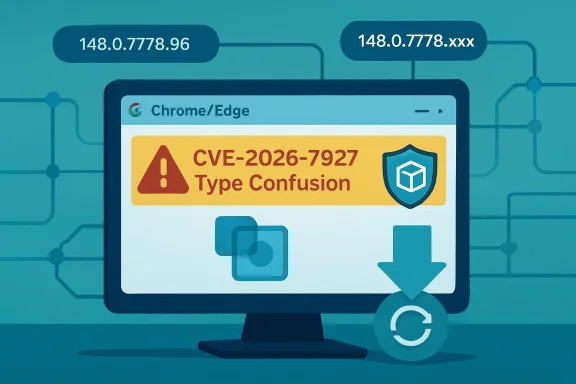
CVE-2026-7927 is a high-severity Chromium type-confusion vulnerability in Chrome’s Runtime component, disclosed on May 6–7, 2026, fixed in Google Chrome 148.0.7778.96 or later and documented by Microsoft because Edge inherits the same Chromium code. The short version is simple: patch Chrome and Edge now. The longer version is more interesting, because this is the kind of browser bug that exposes how much of modern Windows security now depends on a shared, fast-moving open-source substrate. For IT teams, the risk is not just one crafted HTML page; it is the operational gap between upstream Chromium fixes and the managed browsers actually running on endpoints.
Microsoft did not assign CVE-2026-7927. Chrome did. But Microsoft’s Security Update Guide lists it anyway, because Microsoft Edge is now a Chromium-based browser and therefore consumes the codebase in which the flaw lived.
That fact still matters years after the EdgeHTML-to-Chromium transition. In the old browser wars, a Chrome memory-safety bug and an Internet Explorer or Edge bug were usually separate patch stories. In 2026, the boundary is blurrier: a vulnerability in Chromium can become a Chrome issue, an Edge issue, and potentially a downstream issue for other Chromium-derived browsers in the same news cycle.
The MSRC page is careful in its wording. It says the CVE was assigned by Chrome, that Edge ingests Chromium, and that Microsoft documents the item to announce that the latest Chromium-based Edge is no longer vulnerable. That is not Microsoft claiming ownership of the defect; it is Microsoft acknowledging the supply chain.
That distinction is important for admins who still think in vendor silos. The browser installed on a Windows fleet may be “Microsoft Edge,” but a large part of its security posture is tied to the Chromium release train. When Chrome moves, Edge has to move with it, and the lag between those two motions is where enterprise risk quietly accumulates.
A type confusion bug occurs when software treats a resource as though it were one type of object when it is actually another. In memory-safe terms, it is a category error. In exploit terms, it can be the first domino in corrupting memory, steering execution, and converting a web page from passive content into hostile code.
The “crafted HTML page” requirement is both reassuring and not reassuring at all. It means the bug is not described as a no-click worm or a remote network attack against a listening service. But browsers exist to load untrusted HTML from the public internet, from webmail, from collaboration suites, from ad networks, from SaaS dashboards, and from internal portals nobody has audited in years.
The CVSS 3.1 vector tells the same story in more formal language: network attack vector, low attack complexity, no privileges required, user interaction required, unchanged scope, and high impact to confidentiality, integrity, and availability. That combination produced an 8.8 high score. In plain English, the victim has to visit or be induced to visit something, but the attacker does not need credentials, local access, or an unusually fragile target.
There is one phrase in the advisory that should stop readers from over-claiming the danger: “inside a sandbox.” Chrome’s sandbox is designed precisely to contain renderer compromise and make full system takeover harder. A sandboxed arbitrary-code-execution bug is still serious, but it is often one stage in a chain rather than the whole chain by itself.
That is not a reason to delay patching. It is a reason to be precise. The realistic enterprise concern is not that this one CVE, standing alone, means instant domain compromise. The concern is that browser exploit chains often pair a renderer bug with a sandbox escape, privilege escalation, credential theft path, or post-exploitation technique that turns a “visit this page” event into a meaningful intrusion.
That split personality is normal for Chrome. Major versions arrive on schedule, with features, standards work, developer-facing changes, performance improvements, and security fixes packed into the same train. The consumer sees a browser update. The enterprise sees a dependency bundle with a deadline.
CVE-2026-7927 is not the only security issue in the Chrome 148 orbit. Reporting around the release has described a large batch of fixes, including critical vulnerabilities elsewhere in the browser stack. That context matters because organizations should resist the temptation to triage this CVE in isolation, as though only “Runtime” users or only a certain feature population were exposed.
Modern browsers are too integrated for that. Runtime, Blink, V8, networking, extensions, WebRTC, graphics, media, password managers, sync, and enterprise policy enforcement all interact in a platform that looks like an app but behaves like an operating system subsystem. A single high-severity CVE is often just the visible edge of a larger browser servicing event.
The version number is therefore the most practical fact in the entire advisory. For Chrome, the fixed line begins at 148.0.7778.96. For Edge, Microsoft’s page identifies the fixed build family as 148.0.7778.xxx, reflecting the Chromium ingestion rather than a traditional Windows KB-style patch.
For vulnerability management teams, CPEs are not trivia. They are the machine-readable glue between a CVE and an asset inventory. If a scanner maps CVE-2026-7927 only to Google Chrome, it may miss Microsoft Edge, Brave, Vivaldi, Opera, Electron-based apps, or embedded Chromium runtimes unless those products publish their own advisories, version mappings, or detection logic.
Microsoft’s MSRC entry is effectively Microsoft filling that gap for Edge, but it does not necessarily mean NVD’s CPE list will immediately express the downstream relationship in the way every scanner expects. This is a recurring weakness in vulnerability management for shared components: the code is common, the products are branded differently, and the databases often lag the real dependency graph.
That lag can produce two opposite errors. One scanner may over-report every Chromium CVE against every Chromium-adjacent application, creating noise. Another may under-report because it keys too narrowly on a Chrome CPE and ignores Edge until Microsoft’s metadata is separately ingested.
The answer, then, is yes in the operational sense: if your tooling is only looking for the Google Chrome CPE, you may be missing affected or newly remediated Chromium-based software. But no in the narrow NVD sense: the initial CPE configuration for Google Chrome is not necessarily “wrong” just because it does not enumerate every downstream consumer on day one. The inventory model is catching up to the software supply chain, and it has been catching up for years.
That means the existence of an MSRC page is not the same thing as saying “install this month’s Windows cumulative update and you are done.” For managed endpoints, admins need to verify the actual Edge version on disk. The relevant path is the browser’s About page for manual verification, and enterprise tooling should query installed version data at scale.
The customer-action-required field on Microsoft’s page is the important administrative signal. Microsoft is saying there is something for customers to do: get to the current Edge build line that includes the Chromium fix. In a small office, that might be a relaunch. In a fleet, it may involve policy, rings, update deadlines, and exception reporting.
The phrase “148.0.7778.xxx” is also worth reading carefully. It indicates Microsoft’s fixed Edge build family, not necessarily the exact Chrome patch number. Edge and Chrome share Chromium version ancestry, but their build identifiers and release timing are not always identical in the way administrators might wish.
This is why asset inventory should not simply ask, “Is Chrome patched?” It should ask which Chromium-based browsers exist, what versions are installed, which update channels they are on, whether auto-update is working, and how many endpoints have not relaunched since receiving the update. Browser patching is as much about process completion as package availability.
The correct reading is more disciplined. A sandboxed renderer compromise is a serious beachhead. It may allow code to run in the context of a constrained browser process, inspect or tamper with accessible page data, attack browser IPC surfaces, or stage a second exploit. It is not automatically the same as unrestricted code execution as the user or administrator.
Chrome’s security model assumes that renderer bugs will happen. The point of site isolation, sandboxing, privilege separation, and brokered access is to make those bugs less decisive. But attackers also know this model, which is why high-end browser exploit chains often combine multiple vulnerabilities.
That should shape response priorities. CVE-2026-7927 deserves urgent browser patching, especially on exposed user workstations, privileged admin systems, developer machines, help-desk endpoints, and high-risk users. It does not justify panic claims that every unpatched machine is already owned.
The right mental model is layered risk. The browser bug opens the first door. The sandbox may keep the attacker in the entryway. Other bugs, misconfigurations, extensions, credentials, tokens, and user data decide how far the intrusion can travel.
In many organizations, the browser also crosses trust boundaries constantly. It loads internet content and intranet applications in the same workday, sometimes in the same session. It handles single sign-on tokens, passwordless authentication flows, WebAuthn prompts, OAuth grants, downloaded documents, and administrative portals.
That is why “user interaction required” should not lull anyone into complacency. User interaction is the default state of web browsing. A vulnerability that requires a user to visit a crafted page is still operating in the most trafficked application path on the endpoint.
There is also the patch-friction problem. Chrome and Edge update quickly, but they still need restarts to fully apply updates. In environments where users keep browsers open for weeks, the update may be downloaded but not active. The endpoint looks mostly healthy until someone checks the running version rather than the available package.
This is where enterprise policy earns its keep. Relaunch notifications, deadline enforcement, extension governance, isolation for risky browsing, and privileged-access workstation discipline are not bureaucratic overhead. They are the practical controls that turn a vendor patch into an actual reduction in exposure.
Today, Chrome and Edge dominate the managed Windows browser conversation, and both are Chromium-based. Several other popular browsers are also Chromium derivatives. This creates a paradox: browser compatibility is better than it used to be, but monoculture risk is harder to ignore.
The point is not that Chromium is uniquely insecure. Chromium benefits from enormous scrutiny, aggressive fuzzing, sandbox engineering, rapid patching, and a mature security response culture. The point is that its very success makes each high-severity bug more broadly relevant.
For IT, browser diversity now requires more thought than simply installing a second Chromium browser. Firefox remains the obvious alternative engine for organizations that want genuine rendering-engine diversity, though adopting it at scale brings its own compatibility and management tradeoffs. Safari provides diversity in Apple environments, but not on Windows.
Most enterprises will not abandon Chromium because of CVE-2026-7927, nor should they. But they should be honest about what standardizing on Chrome plus Edge means. It is operationally convenient, and it is also a bet that the Chromium security machine will keep finding, fixing, and distributing patches faster than attackers can exploit the installed base.
This frustrates defenders who want to know whether a bug is being exploited, how reliable an exploit might be, and which mitigations matter most. But it is also a rational tradeoff in browser security. Publishing enough detail for defenders may also publish enough detail for attackers.
The public record does not, from the available advisory text, establish active exploitation in the wild for CVE-2026-7927. That absence should be treated as absence of public confirmation, not proof of safety. Browser bugs can move from patch diff to proof of concept quickly, particularly when the affected code is open source and the fixed version can be compared against prior builds.
This creates a familiar timing problem. The most dangerous window may open after the patch ships, not before. Once attackers can study the fix, organizations that delay rollout become easier targets because the vulnerability is known, the patch exists, and defenders have already signaled what versions are safe.
That is why a high-severity browser CVE with no public exploitation claim still deserves a short patch window. The defense advantage comes from being faster than opportunistic weaponization, not from waiting for confirmation that someone else has been hit.
The why is usually where the real work lives. The browser may be blocked by a stale enterprise policy, a broken updater service, a gold image problem, a VDI non-persistence issue, a disconnected laptop, a user who refuses to relaunch, or a security product that interferes with updates. The CVE number is the symptom; the patch pipeline is the system.
This is especially true for organizations that maintain multiple browser channels. Stable, Extended Stable, Beta, Dev, and Canary have different risk profiles and update cadences. A developer machine on an experimental channel may be “newer” but not necessarily governed in the same way as production endpoints, while Extended Stable may trade feature churn for a different servicing rhythm.
For regulated environments, documentation matters too. Teams should be able to show not merely that a patch was released, but when it was approved, when deployment began, what percentage of endpoints reached fixed versions, and which exceptions remain. CVE-2026-7927 is a manageable event; unmanaged exceptions are how manageable events become audit findings or incidents.
The practical test is simple: if asked today which machines are still running vulnerable Chrome or Edge builds, can the organization answer in minutes? If not, this CVE is less about Runtime and more about visibility.
This is one reason browser vulnerabilities remain attractive. They meet users where users already are. The attacker does not need to persuade someone to run an EXE if the exploit path can begin in a tab.
Defenders should not respond by pretending users can reliably distinguish safe web pages from unsafe ones. They cannot, and modern attacks often depend on legitimate infrastructure, redirects, and compromised sites that look ordinary. The more realistic strategy is to reduce exposure through patching, browser isolation for risky categories, exploit mitigations, and limiting the blast radius of browser sessions.
Credential protection is part of that story. A browser compromise that cannot escape the sandbox may still be dangerous if it can touch sensitive web session data, phish within a trusted flow, or help steal tokens through adjacent techniques. The browser is both a rendering engine and the front end of corporate identity.
This is where WindowsForum readers should connect the CVE to broader endpoint hardening. Keep browsers patched, yes. But also keep Windows patched, restrict local admin rights, monitor suspicious child processes, control extensions, and separate administrative browsing from ordinary web use. Browser security is no longer just browser security.
But speed imposes costs on enterprises. Every rapid fix asks IT to trust automated updating, absorb occasional regressions, and enforce relaunches without breaking workflows. The alternative is worse, but the friction is real.
Microsoft’s Chromium-based Edge inherits both sides of that bargain. Edge benefits from Chromium’s security machinery and Microsoft’s enterprise integration, but it also requires customers to track browser builds as living software rather than static Windows components. The days when a browser update could wait comfortably for a monthly ritual are gone.
The best organizations have stopped treating browser updates as exceptional events. They use rings, telemetry, forced relaunch deadlines, and rollback plans. They know which business apps are sensitive to browser changes and test them continuously rather than blocking security updates ad hoc.
That approach is not glamorous. It is also the difference between reading CVE-2026-7927 as a routine patch note and treating it as a fire drill. Mature browser operations make high-severity browser bugs boring, and boring is the goal.
Admins should verify both installed and running versions. A browser that has staged an update but not restarted may still be executing old code. A device that checks in with a fixed installer but keeps a long-lived session open may not be as safe as the dashboard suggests.
The same applies to unmanaged pockets of the environment. Contractors, lab systems, kiosks, shared workstations, VDI images, jump boxes, and developer machines often fall outside the clean lines of enterprise policy. Those are exactly the endpoints where browser exposure can become disproportionate.
It is also worth checking whether non-Chrome Chromium-based browsers are present. CVE naming and CPE mapping may not surface every downstream product immediately. If the software embeds Chromium or tracks Chromium stable, its vendor’s security notes and version mapping matter.
Patch management is often described in strategic language, but on days like this it becomes brutally literal: find the old build, replace it, relaunch it, prove it, and chase the exceptions.
The more durable story is that Chromium has become a core dependency of the Windows endpoint. Not officially in the way the NT kernel or Win32 are core dependencies, but practically, because the browser mediates so much user work and because Edge is now part of the Chromium world.
That dependency is mostly a strength. Shared engineering means bugs found by one part of the ecosystem can be fixed for many. Security research against Chromium benefits a vast user base. Vendor coordination can move faster than the old world of isolated browser engines.
But shared dependencies also concentrate attention. When a Chromium CVE lands, defenders have to ask where Chromium exists, not merely where Chrome is installed. That question is still harder than it should be in many enterprises.
The lesson of CVE-2026-7927 is not that Chromium is failing. It is that the browser has succeeded so completely that its vulnerabilities now function like platform vulnerabilities. The patch belongs in the same mental bucket as urgent OS and identity fixes, not in the dusty corner reserved for optional desktop applications.
Source: NVD / Chromium Security Update Guide - Microsoft Security Response Center
 A Browser Bug Becomes a Windows Problem the Moment Edge Ingests Chromium
Microsoft did not assign CVE-2026-7927. Chrome did. But Microsoft’s Security Update Guide lists it anyway, because Microsoft Edge is now a Chromium-based browser and therefore consumes the codebase in which the flaw lived.That fact still matters years after the EdgeHTML-to-Chromium transition. In the old browser wars, a Chrome memory-safety bug and an Internet Explorer or Edge bug were usually separate patch stories. In 2026, the boundary is blurrier: a vulnerability in Chromium can become a Chrome issue, an Edge issue, and potentially a downstream issue for other Chromium-derived browsers in the same news cycle.
The MSRC page is careful in its wording. It says the CVE was assigned by Chrome, that Edge ingests Chromium, and that Microsoft documents the item to announce that the latest Chromium-based Edge is no longer vulnerable. That is not Microsoft claiming ownership of the defect; it is Microsoft acknowledging the supply chain.
That distinction is important for admins who still think in vendor silos. The browser installed on a Windows fleet may be “Microsoft Edge,” but a large part of its security posture is tied to the Chromium release train. When Chrome moves, Edge has to move with it, and the lag between those two motions is where enterprise risk quietly accumulates.
The Exploit Path Is Familiar Because the Web Is the Attack Surface
The vulnerability description is terse but loaded: type confusion in Runtime allowed a remote attacker to execute arbitrary code inside a sandbox via a crafted HTML page. Every word in that sentence should ring familiar to anyone who has watched browser security advisories over the last decade.A type confusion bug occurs when software treats a resource as though it were one type of object when it is actually another. In memory-safe terms, it is a category error. In exploit terms, it can be the first domino in corrupting memory, steering execution, and converting a web page from passive content into hostile code.
The “crafted HTML page” requirement is both reassuring and not reassuring at all. It means the bug is not described as a no-click worm or a remote network attack against a listening service. But browsers exist to load untrusted HTML from the public internet, from webmail, from collaboration suites, from ad networks, from SaaS dashboards, and from internal portals nobody has audited in years.
The CVSS 3.1 vector tells the same story in more formal language: network attack vector, low attack complexity, no privileges required, user interaction required, unchanged scope, and high impact to confidentiality, integrity, and availability. That combination produced an 8.8 high score. In plain English, the victim has to visit or be induced to visit something, but the attacker does not need credentials, local access, or an unusually fragile target.
There is one phrase in the advisory that should stop readers from over-claiming the danger: “inside a sandbox.” Chrome’s sandbox is designed precisely to contain renderer compromise and make full system takeover harder. A sandboxed arbitrary-code-execution bug is still serious, but it is often one stage in a chain rather than the whole chain by itself.
That is not a reason to delay patching. It is a reason to be precise. The realistic enterprise concern is not that this one CVE, standing alone, means instant domain compromise. The concern is that browser exploit chains often pair a renderer bug with a sandbox escape, privilege escalation, credential theft path, or post-exploitation technique that turns a “visit this page” event into a meaningful intrusion.
Chrome 148 Is a Security Release Wearing a Feature Release Jacket
Google promoted Chrome 148 to the stable channel for Windows, macOS, and Linux on May 5, 2026, with builds 148.0.7778.96 for Linux and 148.0.7778.96/97 for Windows and Mac. The release also brought ordinary platform work and feature changes, but the security payload is the part admins should care about first.That split personality is normal for Chrome. Major versions arrive on schedule, with features, standards work, developer-facing changes, performance improvements, and security fixes packed into the same train. The consumer sees a browser update. The enterprise sees a dependency bundle with a deadline.
CVE-2026-7927 is not the only security issue in the Chrome 148 orbit. Reporting around the release has described a large batch of fixes, including critical vulnerabilities elsewhere in the browser stack. That context matters because organizations should resist the temptation to triage this CVE in isolation, as though only “Runtime” users or only a certain feature population were exposed.
Modern browsers are too integrated for that. Runtime, Blink, V8, networking, extensions, WebRTC, graphics, media, password managers, sync, and enterprise policy enforcement all interact in a platform that looks like an app but behaves like an operating system subsystem. A single high-severity CVE is often just the visible edge of a larger browser servicing event.
The version number is therefore the most practical fact in the entire advisory. For Chrome, the fixed line begins at 148.0.7778.96. For Edge, Microsoft’s page identifies the fixed build family as 148.0.7778.xxx, reflecting the Chromium ingestion rather than a traditional Windows KB-style patch.
The CPE Question Is Less Pedantry Than Patch Governance
The user-visible NVD data raises a good question: are we missing a CPE? The listed vulnerable configuration describes Google Chrome versions before 148.0.7778.96 and ties the application to Windows, Linux, and macOS. That makes sense for Chrome itself, but it does not fully capture the downstream Chromium ecosystem.For vulnerability management teams, CPEs are not trivia. They are the machine-readable glue between a CVE and an asset inventory. If a scanner maps CVE-2026-7927 only to Google Chrome, it may miss Microsoft Edge, Brave, Vivaldi, Opera, Electron-based apps, or embedded Chromium runtimes unless those products publish their own advisories, version mappings, or detection logic.
Microsoft’s MSRC entry is effectively Microsoft filling that gap for Edge, but it does not necessarily mean NVD’s CPE list will immediately express the downstream relationship in the way every scanner expects. This is a recurring weakness in vulnerability management for shared components: the code is common, the products are branded differently, and the databases often lag the real dependency graph.
That lag can produce two opposite errors. One scanner may over-report every Chromium CVE against every Chromium-adjacent application, creating noise. Another may under-report because it keys too narrowly on a Chrome CPE and ignores Edge until Microsoft’s metadata is separately ingested.
The answer, then, is yes in the operational sense: if your tooling is only looking for the Google Chrome CPE, you may be missing affected or newly remediated Chromium-based software. But no in the narrow NVD sense: the initial CPE configuration for Google Chrome is not necessarily “wrong” just because it does not enumerate every downstream consumer on day one. The inventory model is catching up to the software supply chain, and it has been catching up for years.
Edge’s Presence in MSRC Changes the Patch Conversation
Edge is not patched through Windows Update in exactly the way old browser components were, and that has confused organizations since the Chromium transition. It updates through Microsoft Edge’s own servicing mechanisms, enterprise policies, offline installers, and management channels, depending on how the environment is configured.That means the existence of an MSRC page is not the same thing as saying “install this month’s Windows cumulative update and you are done.” For managed endpoints, admins need to verify the actual Edge version on disk. The relevant path is the browser’s About page for manual verification, and enterprise tooling should query installed version data at scale.
The customer-action-required field on Microsoft’s page is the important administrative signal. Microsoft is saying there is something for customers to do: get to the current Edge build line that includes the Chromium fix. In a small office, that might be a relaunch. In a fleet, it may involve policy, rings, update deadlines, and exception reporting.
The phrase “148.0.7778.xxx” is also worth reading carefully. It indicates Microsoft’s fixed Edge build family, not necessarily the exact Chrome patch number. Edge and Chrome share Chromium version ancestry, but their build identifiers and release timing are not always identical in the way administrators might wish.
This is why asset inventory should not simply ask, “Is Chrome patched?” It should ask which Chromium-based browsers exist, what versions are installed, which update channels they are on, whether auto-update is working, and how many endpoints have not relaunched since receiving the update. Browser patching is as much about process completion as package availability.
The Sandbox Is a Seat Belt, Not a Permission Slip
The advisory says arbitrary code execution occurred “inside a sandbox,” and that phrase can be misread in both directions. Optimists may dismiss the bug because the sandbox contains it. Pessimists may ignore the sandbox because arbitrary code execution sounds catastrophic.The correct reading is more disciplined. A sandboxed renderer compromise is a serious beachhead. It may allow code to run in the context of a constrained browser process, inspect or tamper with accessible page data, attack browser IPC surfaces, or stage a second exploit. It is not automatically the same as unrestricted code execution as the user or administrator.
Chrome’s security model assumes that renderer bugs will happen. The point of site isolation, sandboxing, privilege separation, and brokered access is to make those bugs less decisive. But attackers also know this model, which is why high-end browser exploit chains often combine multiple vulnerabilities.
That should shape response priorities. CVE-2026-7927 deserves urgent browser patching, especially on exposed user workstations, privileged admin systems, developer machines, help-desk endpoints, and high-risk users. It does not justify panic claims that every unpatched machine is already owned.
The right mental model is layered risk. The browser bug opens the first door. The sandbox may keep the attacker in the entryway. Other bugs, misconfigurations, extensions, credentials, tokens, and user data decide how far the intrusion can travel.
Enterprises Keep Learning the Same Browser Lesson
The browser is now the universal client for corporate computing. Email, identity, device enrollment, HR, finance, source control, CRM, cloud consoles, remote access, security dashboards, and AI tools all sit behind tabs. That makes a browser vulnerability different from a bug in some rarely used desktop utility.In many organizations, the browser also crosses trust boundaries constantly. It loads internet content and intranet applications in the same workday, sometimes in the same session. It handles single sign-on tokens, passwordless authentication flows, WebAuthn prompts, OAuth grants, downloaded documents, and administrative portals.
That is why “user interaction required” should not lull anyone into complacency. User interaction is the default state of web browsing. A vulnerability that requires a user to visit a crafted page is still operating in the most trafficked application path on the endpoint.
There is also the patch-friction problem. Chrome and Edge update quickly, but they still need restarts to fully apply updates. In environments where users keep browsers open for weeks, the update may be downloaded but not active. The endpoint looks mostly healthy until someone checks the running version rather than the available package.
This is where enterprise policy earns its keep. Relaunch notifications, deadline enforcement, extension governance, isolation for risky browsing, and privileged-access workstation discipline are not bureaucratic overhead. They are the practical controls that turn a vendor patch into an actual reduction in exposure.
The Shared Chromium Stack Has Turned Browser Diversity Into a More Complicated Bet
There was a time when using a non-Microsoft browser on Windows was a form of diversification. If Internet Explorer had a bug, Firefox or Chrome might not. If Chrome had a bug, EdgeHTML might not. That world has largely disappeared on the mainstream Windows desktop.Today, Chrome and Edge dominate the managed Windows browser conversation, and both are Chromium-based. Several other popular browsers are also Chromium derivatives. This creates a paradox: browser compatibility is better than it used to be, but monoculture risk is harder to ignore.
The point is not that Chromium is uniquely insecure. Chromium benefits from enormous scrutiny, aggressive fuzzing, sandbox engineering, rapid patching, and a mature security response culture. The point is that its very success makes each high-severity bug more broadly relevant.
For IT, browser diversity now requires more thought than simply installing a second Chromium browser. Firefox remains the obvious alternative engine for organizations that want genuine rendering-engine diversity, though adopting it at scale brings its own compatibility and management tradeoffs. Safari provides diversity in Apple environments, but not on Windows.
Most enterprises will not abandon Chromium because of CVE-2026-7927, nor should they. But they should be honest about what standardizing on Chrome plus Edge means. It is operationally convenient, and it is also a bet that the Chromium security machine will keep finding, fixing, and distributing patches faster than attackers can exploit the installed base.
The Disclosure Tells Us Almost as Much as the Bug
The Chromium issue tracker link for CVE-2026-7927 is restricted, which is common for recently patched browser vulnerabilities. Vendors often limit technical details until a majority of users have updated, because a full bug report can become exploit-development material.This frustrates defenders who want to know whether a bug is being exploited, how reliable an exploit might be, and which mitigations matter most. But it is also a rational tradeoff in browser security. Publishing enough detail for defenders may also publish enough detail for attackers.
The public record does not, from the available advisory text, establish active exploitation in the wild for CVE-2026-7927. That absence should be treated as absence of public confirmation, not proof of safety. Browser bugs can move from patch diff to proof of concept quickly, particularly when the affected code is open source and the fixed version can be compared against prior builds.
This creates a familiar timing problem. The most dangerous window may open after the patch ships, not before. Once attackers can study the fix, organizations that delay rollout become easier targets because the vulnerability is known, the patch exists, and defenders have already signaled what versions are safe.
That is why a high-severity browser CVE with no public exploitation claim still deserves a short patch window. The defense advantage comes from being faster than opportunistic weaponization, not from waiting for confirmation that someone else has been hit.
The Scanner Will Not Save You From a Broken Update Process
Vulnerability scanners are useful, but they are not a substitute for browser update governance. A scanner can tell you that Chrome is below 148.0.7778.96 or that Edge is not in the fixed 148.0.7778.xxx family. It may not tell you why.The why is usually where the real work lives. The browser may be blocked by a stale enterprise policy, a broken updater service, a gold image problem, a VDI non-persistence issue, a disconnected laptop, a user who refuses to relaunch, or a security product that interferes with updates. The CVE number is the symptom; the patch pipeline is the system.
This is especially true for organizations that maintain multiple browser channels. Stable, Extended Stable, Beta, Dev, and Canary have different risk profiles and update cadences. A developer machine on an experimental channel may be “newer” but not necessarily governed in the same way as production endpoints, while Extended Stable may trade feature churn for a different servicing rhythm.
For regulated environments, documentation matters too. Teams should be able to show not merely that a patch was released, but when it was approved, when deployment began, what percentage of endpoints reached fixed versions, and which exceptions remain. CVE-2026-7927 is a manageable event; unmanaged exceptions are how manageable events become audit findings or incidents.
The practical test is simple: if asked today which machines are still running vulnerable Chrome or Edge builds, can the organization answer in minutes? If not, this CVE is less about Runtime and more about visibility.
The HTML Page Is the New Attachment
Security awareness training spent decades teaching users not to open suspicious attachments. That advice is still valid, but the browser era has changed the shape of the lure. A malicious page can arrive through a link in email, a compromised legitimate site, a poisoned ad slot, a chat message, a QR code, or a SaaS workflow.This is one reason browser vulnerabilities remain attractive. They meet users where users already are. The attacker does not need to persuade someone to run an EXE if the exploit path can begin in a tab.
Defenders should not respond by pretending users can reliably distinguish safe web pages from unsafe ones. They cannot, and modern attacks often depend on legitimate infrastructure, redirects, and compromised sites that look ordinary. The more realistic strategy is to reduce exposure through patching, browser isolation for risky categories, exploit mitigations, and limiting the blast radius of browser sessions.
Credential protection is part of that story. A browser compromise that cannot escape the sandbox may still be dangerous if it can touch sensitive web session data, phish within a trusted flow, or help steal tokens through adjacent techniques. The browser is both a rendering engine and the front end of corporate identity.
This is where WindowsForum readers should connect the CVE to broader endpoint hardening. Keep browsers patched, yes. But also keep Windows patched, restrict local admin rights, monitor suspicious child processes, control extensions, and separate administrative browsing from ordinary web use. Browser security is no longer just browser security.
Chrome’s Fast Patch Culture Is Both the Cure and the Burden
Google’s browser security model depends on speed. Bugs are found, fixed, shipped, and rolled out with a tempo that most legacy enterprise software never matched. That speed is a major reason the web has remained usable despite being one of the largest attack surfaces in computing.But speed imposes costs on enterprises. Every rapid fix asks IT to trust automated updating, absorb occasional regressions, and enforce relaunches without breaking workflows. The alternative is worse, but the friction is real.
Microsoft’s Chromium-based Edge inherits both sides of that bargain. Edge benefits from Chromium’s security machinery and Microsoft’s enterprise integration, but it also requires customers to track browser builds as living software rather than static Windows components. The days when a browser update could wait comfortably for a monthly ritual are gone.
The best organizations have stopped treating browser updates as exceptional events. They use rings, telemetry, forced relaunch deadlines, and rollback plans. They know which business apps are sensitive to browser changes and test them continuously rather than blocking security updates ad hoc.
That approach is not glamorous. It is also the difference between reading CVE-2026-7927 as a routine patch note and treating it as a fire drill. Mature browser operations make high-severity browser bugs boring, and boring is the goal.
The Version Number Is the Policy
For all the abstraction in vulnerability management, the operational answer lands on a version string. Chrome before 148.0.7778.96 is the exposed side of the line. Chrome at or beyond that build is on the fixed side for this CVE. Edge needs to be on Microsoft’s corresponding 148.0.7778.xxx fixed build family.Admins should verify both installed and running versions. A browser that has staged an update but not restarted may still be executing old code. A device that checks in with a fixed installer but keeps a long-lived session open may not be as safe as the dashboard suggests.
The same applies to unmanaged pockets of the environment. Contractors, lab systems, kiosks, shared workstations, VDI images, jump boxes, and developer machines often fall outside the clean lines of enterprise policy. Those are exactly the endpoints where browser exposure can become disproportionate.
It is also worth checking whether non-Chrome Chromium-based browsers are present. CVE naming and CPE mapping may not surface every downstream product immediately. If the software embeds Chromium or tracks Chromium stable, its vendor’s security notes and version mapping matter.
Patch management is often described in strategic language, but on days like this it becomes brutally literal: find the old build, replace it, relaunch it, prove it, and chase the exceptions.
The Real Story Is the Chromium Supply Chain, Not One Runtime Bug
CVE-2026-7927 is easy to summarize and harder to contextualize. A high-severity type-confusion bug was fixed. A crafted HTML page was the attack vehicle. Chrome and Edge users need current builds. That is the news hook.The more durable story is that Chromium has become a core dependency of the Windows endpoint. Not officially in the way the NT kernel or Win32 are core dependencies, but practically, because the browser mediates so much user work and because Edge is now part of the Chromium world.
That dependency is mostly a strength. Shared engineering means bugs found by one part of the ecosystem can be fixed for many. Security research against Chromium benefits a vast user base. Vendor coordination can move faster than the old world of isolated browser engines.
But shared dependencies also concentrate attention. When a Chromium CVE lands, defenders have to ask where Chromium exists, not merely where Chrome is installed. That question is still harder than it should be in many enterprises.
The lesson of CVE-2026-7927 is not that Chromium is failing. It is that the browser has succeeded so completely that its vulnerabilities now function like platform vulnerabilities. The patch belongs in the same mental bucket as urgent OS and identity fixes, not in the dusty corner reserved for optional desktop applications.
The 148.0.7778 Line Draws the Admin Boundary
The concrete response to this CVE is refreshingly narrow, but the discipline around it is not. Organizations that can answer version, channel, relaunch, and exception questions will handle this well. Organizations that cannot will be left hoping their auto-updaters did the right thing.- Chrome should be updated to 148.0.7778.96 or later on Windows, macOS, and Linux systems where it is installed.
- Microsoft Edge should be updated to Microsoft’s fixed 148.0.7778.xxx build family or later, not merely assumed safe because Windows Update ran.
- Vulnerability teams should check whether their scanners map this CVE only to Google Chrome or also account for Edge and other Chromium-derived products.
- Administrators should verify running browser versions after relaunch, because staged updates do not always mean active protection.
- High-risk user groups, admin workstations, developer systems, kiosks, and VDI images should be prioritized for explicit validation rather than left to best-effort auto-update.
- The absence of public exploitation confirmation should shorten, not lengthen, the patch window, because patch availability gives attackers a roadmap for diffing and weaponization.
Source: NVD / Chromium Security Update Guide - Microsoft Security Response Center


