

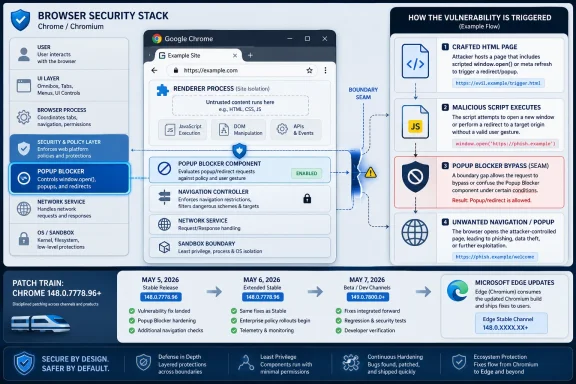
Google and Microsoft disclosed CVE-2026-7934 in early May 2026 as a medium-severity Chromium Popup Blocker input-validation flaw fixed in Chrome 148.0.7778.96 and later, with Microsoft Edge receiving protection through its Chromium-based update stream on May 7, 2026. The bug is not the sort of browser hole that deserves instant panic, but it is exactly the sort that deserves disciplined patching. Its real lesson is that the modern browser security model is no longer a single wall; it is a stack of assumptions, and attackers increasingly look for the seam between them.
CVE-2026-7934 is described as insufficient validation of untrusted input in Chromium’s Popup Blocker. In plain English, Chrome accepted or processed something from a web page without checking it tightly enough, and that weakness could allow an attacker to bypass navigation restrictions after already compromising the renderer process.
That last clause matters. This is not described as a one-click remote code execution bug that starts from a clean tab and ends with arbitrary code running on the machine. The attacker first needs a foothold in the renderer, the process Chrome uses to handle web content with reduced privileges.
But browser exploitation is rarely a one-bug sport anymore. A medium-severity navigation bypass can become more interesting when paired with a memory corruption bug, a sandbox escape, a permissive enterprise policy, or a malicious page designed to exploit user trust. Chromium’s architecture is built around compartmentalization; CVE-2026-7934 is a reminder that attackers do not always need to smash the front door when they can step through a poorly guarded internal doorway.
The vector tells a more nuanced story. Network attack vector, no privileges required, user interaction required, high attack complexity, low confidentiality and integrity impact, and no availability impact. That combination says “harder to exploit and limited in direct effect,” not “irrelevant.”
For enterprises, the danger is not that CVE-2026-7934 alone topples the fleet. The danger is that it gets buried in a browser update backlog because it sounds mundane. Browser security is cumulative; the difference between a resilient environment and a soft target is often whether medium flaws are cleaned up before exploit chains mature.
Not quite. Chrome’s process isolation model exists precisely because the renderer is a dangerous place. Web content is hostile by default, and the browser assumes that renderer bugs will happen. The sandbox, site isolation, navigation controls, permission prompts, and process boundaries are all meant to keep a renderer compromise from becoming a broader browser or system compromise.
A post-renderer navigation bypass is therefore not redundant. It may help an attacker move the user into an unexpected navigation path, defeat a restriction intended to contain malicious content, or create conditions for a second-stage attack. In modern exploit development, the first bug opens the room; the second bug decides which door the attacker can reach next.
Over time, however, pop-up and navigation controls became part of the browser’s security plumbing. They influence which windows can open, which pages can redirect, how user gestures are interpreted, and when a web page is allowed to move a person from one context to another. Those decisions are security-relevant because the web is built on deception as much as code.
A crafted HTML page that can influence navigation beyond intended restrictions is not merely irritating. It can shape the user’s path through authentication flows, permission prompts, embedded content, federated sign-in pages, and enterprise web apps. The line between nuisance prevention and security boundary has become thin, and Chromium’s own CVE language reflects that reality.
That context matters because patch urgency is rarely determined by a single CVE in isolation. Chrome 148 reportedly included more than 100 security fixes, including critical vulnerabilities elsewhere in the browser stack. Even if an organization would not rush for CVE-2026-7934 alone, the surrounding release gives administrators a stronger reason to move quickly.
This is one of the awkward truths of browser patching. Users and admins want clean narratives: one bug, one risk, one fix. Chromium releases do not behave that way. They are trains carrying dozens or hundreds of changes, some public, some partially withheld, and some understood only by the engineers and researchers closest to the code.
This is a strength and a liability. The strength is that Edge benefits from Chromium’s security research, patch velocity, and broad scrutiny. The liability is that Microsoft customers cannot treat Edge browser security as somehow separate from Chrome’s release rhythm. If Chromium has a navigation, rendering, V8, WebRTC, or Blink issue, Edge admins need to care.
Microsoft’s Security Update Guide entry listed Microsoft Edge as the affected product line and marked customer action as required, with the fixed build family shown as 148.0.7778.xxx. That is the practical instruction hiding inside the advisory prose: do not merely read the CVE; verify that Edge has actually updated.
CPE data is useful, but it is not reality. It is a naming and matching system layered on top of messy software distribution, multi-channel release models, embedded components, and products that inherit code from upstream projects. Chromium-based browsers make that mess especially visible.
For defenders, the right response is not to debate whether the CPE line looks pretty. The right response is to map the vulnerable component to actual deployed software. Chrome, Edge, and other Chromium-derived browsers may not all update on the same clock, and scanners may not recognize them with equal precision. Asset inventory beats taxonomy every time.
This is where consumer advice and enterprise advice diverge. A home user can open the browser’s About page and let the updater do its work. A large organization has to account for rings, deferrals, VDI images, offline machines, lab systems, packaged browser installers, browser extensions, kiosk profiles, and security tools that may pin or delay updates.
The operational question is not “Did Google patch it?” or “Did Microsoft list it?” The question is “What percentage of our fleet is actually running the fixed build?” Vulnerability management lives or dies on that distinction.
A user believes they are moving from one page to another under a set of visible rules. A web application believes certain transitions are allowed and others are not. The browser enforces rules around pop-ups, redirects, opener relationships, user activation, sandboxed frames, and cross-origin behavior. When validation fails in that machinery, an attacker may gain influence over what the user sees next and under what assumptions.
That influence is valuable. Phishing pages, OAuth abuse, fake update prompts, malicious file flows, and prompt confusion all benefit from controlling navigation context. CVE-2026-7934 is not described as a phishing bug, but it lives in the same neighborhood of browser behavior where user intent, page intent, and browser enforcement collide.
That ordinariness is the point. The browser is the universal interpreter for untrusted code, untrusted markup, untrusted media, untrusted scripts, and untrusted business logic. Every workday, employees feed it identity provider portals, SaaS dashboards, document viewers, ticketing systems, banking pages, vendor portals, and random search results.
An HTML-triggered bug with user interaction requirements fits the way people actually work. Users click links. They authenticate. They follow redirects. They dismiss warnings. They trust familiar browser chrome. Attackers build around those habits, and browser security bugs become force multipliers for social engineering rather than replacements for it.
Chrome bugs often arrive with restricted details because public exploit recipes would create unnecessary risk before users update. That is standard practice. It also means defenders are sometimes asked to patch from a partial description, trusting the vendor’s severity judgment and release cadence rather than a full technical autopsy.
Attackers can afford to be patient. They can diff patches, watch bug trackers when restrictions eventually lift, and test whether organizations lag behind. A medium bug patched today may become a useful chain component tomorrow precisely because too many systems remain unpatched after everyone moved on to the next headline.
That creates friction in managed environments. Change boards want predictability. App owners want testing. Security teams want speed. Users want their tabs preserved. The browser sits in the middle as both a productivity tool and one of the most exposed attack surfaces in the enterprise.
CVE-2026-7934 is a useful test case because it is not a screaming critical zero-day. If an organization can only move quickly when the internet is on fire, it does not have a browser patch process; it has a panic process. Mature operations should be able to absorb a medium Chromium security update quickly, quietly, and measurably.
That is not a criticism of Edge. The Chromium switch made Edge more compatible, more modern, and more competitive. But it also means Windows shops must think like Chromium shops. A Chrome security bulletin is often an Edge planning signal.
The Microsoft advisory for CVE-2026-7934 makes this explicit. Edge ingests Chromium, Chromium addresses the vulnerability, and Microsoft documents the issue so customers know the latest Edge build is no longer vulnerable. The handoff is clean on paper, but the fleet still needs to move.
That does not mean every Chromium-derived product is automatically vulnerable to CVE-2026-7934. Product-specific integration matters. Components can be patched, disabled, modified, or shipped on different schedules. But it does mean administrators should resist the false comfort of checking only the two obvious browser icons.
The modern endpoint is full of browser engines hiding inside applications. A vulnerability in Chromium’s navigation or rendering behavior may be fixed in the main browser while lingering in an app framework, kiosk shell, or vendor bundle. The industry has become very good at saying “Chromium-based” and less good at inventorying what that actually means.
A vulnerability that requires user interaction is less automatable than a wormable network bug. That is a meaningful difference. But it does not make exploitation implausible. Attackers routinely obtain interaction through email, chat, search ads, compromised websites, watering holes, malicious documentation, and fake collaboration invites.
The right lesson is not to dismiss user-driven browser bugs. The right lesson is to combine patching with controls that reduce the quality of attacker interaction: safer link handling, isolation for unknown sites, strong identity protections, least-privilege browsing, extension governance, and better detection around suspicious navigation and authentication flows.
CVE-2026-7934’s public description is therefore sparse. We get the affected component, the class of weakness, the prerequisite renderer compromise, the crafted HTML trigger, the navigation restriction bypass, the fixed version, and the severity. That is enough to prioritize patching, but not enough to fully model exploitability.
This information asymmetry is frustrating but normal. It puts more weight on process than interpretation. If your organization waits for exploit code before patching browsers, it has inverted the purpose of coordinated disclosure.
For enterprise admins, confirmation needs to move beyond hope. Endpoint management tools should report installed browser versions, update channel, last update time, and machines stuck on stale builds. Security teams should reconcile scanner findings with management telemetry, because either source can be wrong.
The painful cases are predictable. Persistent VDI images revert to old builds. Shared kiosks do not restart. Users keep sessions alive for weeks. App compatibility teams hold a channel back. A software packaging system deploys Chrome but not Edge, or vice versa. These are not edge cases in the operational sense; they are the places where browser vulnerabilities survive.
CVE-2026-7934 should rank higher where users browse untrusted sites, where browser isolation is weak, where extensions are loosely governed, or where other Chromium vulnerabilities are already waiting for patch deployment. It should rank lower on systems where the browser is controlled, restricted, updated, and monitored. That is not special pleading; that is risk management.
The bigger point is that browser exposure is now a primary attribute of endpoint risk. We still talk about operating systems as if they define the perimeter of the workstation. In practice, the browser often defines it more directly.
That cadence is both impressive and demanding. The ecosystem can identify, assign, publish, enrich, and downstream a Chromium vulnerability in a matter of days. But the value of that machinery depends on the final mile: whether endpoints actually update before attackers catch up.
This is where organizations should measure themselves. Not by whether they can write a ticket. Not by whether a scanner eventually turns green. By how quickly they can move a browser security release from vendor bulletin to verified fleet coverage.
The industry is relatively good at reacting to catastrophic bugs. It is less good at handling the steady accumulation of medium browser flaws that attackers may later combine, reinterpret, or use against lagging environments. CVE-2026-7934 asks whether we have learned to patch browsers as living infrastructure rather than desktop accessories.
The answer should be yes. Chrome and Edge are not optional conveniences at the edge of the Windows estate. They are execution environments for the modern enterprise, and their security updates deserve the same operational seriousness as operating system fixes.
Source: NVD / Chromium Security Update Guide - Microsoft Security Response Center
 The Pop-Up Bug Is Really a Browser Boundary Story
CVE-2026-7934 is described as insufficient validation of untrusted input in Chromium’s Popup Blocker. In plain English, Chrome accepted or processed something from a web page without checking it tightly enough, and that weakness could allow an attacker to bypass navigation restrictions after already compromising the renderer process.That last clause matters. This is not described as a one-click remote code execution bug that starts from a clean tab and ends with arbitrary code running on the machine. The attacker first needs a foothold in the renderer, the process Chrome uses to handle web content with reduced privileges.
But browser exploitation is rarely a one-bug sport anymore. A medium-severity navigation bypass can become more interesting when paired with a memory corruption bug, a sandbox escape, a permissive enterprise policy, or a malicious page designed to exploit user trust. Chromium’s architecture is built around compartmentalization; CVE-2026-7934 is a reminder that attackers do not always need to smash the front door when they can step through a poorly guarded internal doorway.
“Medium” Is Not a Synonym for “Ignore”
Security teams are trained to triage, and triage often begins with severity. That is necessary, but it can become lazy. A CVSS 3.1 score of 4.2, as assigned by CISA’s ADP enrichment, looks modest beside the high and critical Chrome bugs that usually dominate patch headlines.The vector tells a more nuanced story. Network attack vector, no privileges required, user interaction required, high attack complexity, low confidentiality and integrity impact, and no availability impact. That combination says “harder to exploit and limited in direct effect,” not “irrelevant.”
For enterprises, the danger is not that CVE-2026-7934 alone topples the fleet. The danger is that it gets buried in a browser update backlog because it sounds mundane. Browser security is cumulative; the difference between a resilient environment and a soft target is often whether medium flaws are cleaned up before exploit chains mature.
Renderer Compromise Changes the Conversation
The phrase “who had compromised the renderer process” will cause some readers to mentally downgrade this vulnerability. That instinct is understandable. If the attacker already compromised the renderer, haven’t we already lost?Not quite. Chrome’s process isolation model exists precisely because the renderer is a dangerous place. Web content is hostile by default, and the browser assumes that renderer bugs will happen. The sandbox, site isolation, navigation controls, permission prompts, and process boundaries are all meant to keep a renderer compromise from becoming a broader browser or system compromise.
A post-renderer navigation bypass is therefore not redundant. It may help an attacker move the user into an unexpected navigation path, defeat a restriction intended to contain malicious content, or create conditions for a second-stage attack. In modern exploit development, the first bug opens the room; the second bug decides which door the attacker can reach next.
Popup Blocking Became Security Plumbing by Accident
Pop-up blockers began life as a quality-of-life feature. They were the browser’s answer to the worst habits of the early commercial web: ad storms, fake download windows, and noisy pages that treated every click as permission to spawn chaos. Users experienced them as an annoyance filter.Over time, however, pop-up and navigation controls became part of the browser’s security plumbing. They influence which windows can open, which pages can redirect, how user gestures are interpreted, and when a web page is allowed to move a person from one context to another. Those decisions are security-relevant because the web is built on deception as much as code.
A crafted HTML page that can influence navigation beyond intended restrictions is not merely irritating. It can shape the user’s path through authentication flows, permission prompts, embedded content, federated sign-in pages, and enterprise web apps. The line between nuisance prevention and security boundary has become thin, and Chromium’s own CVE language reflects that reality.
Chrome 148 Was a Big Patch Train, Not a Single-CVE Event
CVE-2026-7934 landed in the context of Chrome 148, a release that brought version 148.0.7778.96 for Linux and 148.0.7778.96 or 148.0.7778.97 for Windows and macOS. Google’s stable channel update was not framed around this one flaw; it was part of a much broader security refresh.That context matters because patch urgency is rarely determined by a single CVE in isolation. Chrome 148 reportedly included more than 100 security fixes, including critical vulnerabilities elsewhere in the browser stack. Even if an organization would not rush for CVE-2026-7934 alone, the surrounding release gives administrators a stronger reason to move quickly.
This is one of the awkward truths of browser patching. Users and admins want clean narratives: one bug, one risk, one fix. Chromium releases do not behave that way. They are trains carrying dozens or hundreds of changes, some public, some partially withheld, and some understood only by the engineers and researchers closest to the code.
Microsoft Edge Inherits the Fix and the Operational Burden
Microsoft’s advisory exists because Edge is built on Chromium. Microsoft did not assign this CVE; Chrome did. But Microsoft Edge consumes Chromium code, and when the vulnerable component is in that shared codebase, Edge becomes part of the patching story.This is a strength and a liability. The strength is that Edge benefits from Chromium’s security research, patch velocity, and broad scrutiny. The liability is that Microsoft customers cannot treat Edge browser security as somehow separate from Chrome’s release rhythm. If Chromium has a navigation, rendering, V8, WebRTC, or Blink issue, Edge admins need to care.
Microsoft’s Security Update Guide entry listed Microsoft Edge as the affected product line and marked customer action as required, with the fixed build family shown as 148.0.7778.xxx. That is the practical instruction hiding inside the advisory prose: do not merely read the CVE; verify that Edge has actually updated.
The CPE Oddity Is Bureaucratic, Not Comforting
The NVD entry surfaced a familiar bit of vulnerability-management weirdness: a generated configuration indicating Google Chrome versions before 148.0.7778.96 across Windows, Linux, and macOS, along with a prompt asking whether a CPE is missing. Anyone who has lived inside scanner output knows this territory well.CPE data is useful, but it is not reality. It is a naming and matching system layered on top of messy software distribution, multi-channel release models, embedded components, and products that inherit code from upstream projects. Chromium-based browsers make that mess especially visible.
For defenders, the right response is not to debate whether the CPE line looks pretty. The right response is to map the vulnerable component to actual deployed software. Chrome, Edge, and other Chromium-derived browsers may not all update on the same clock, and scanners may not recognize them with equal precision. Asset inventory beats taxonomy every time.
Version Numbers Are the Only Language Your Fleet Understands
The cleanest security guidance for CVE-2026-7934 is brutally simple: Chrome should be at 148.0.7778.96 or later, and Edge should be on Microsoft’s fixed 148.0.7778.xxx line or later. Anything below that deserves attention. Anything that cannot report its version reliably deserves even more attention.This is where consumer advice and enterprise advice diverge. A home user can open the browser’s About page and let the updater do its work. A large organization has to account for rings, deferrals, VDI images, offline machines, lab systems, packaged browser installers, browser extensions, kiosk profiles, and security tools that may pin or delay updates.
The operational question is not “Did Google patch it?” or “Did Microsoft list it?” The question is “What percentage of our fleet is actually running the fixed build?” Vulnerability management lives or dies on that distinction.
Navigation Restrictions Are a Soft Target for Harder Attacks
Navigation sounds less dramatic than memory corruption. It lacks the cinematic quality of arbitrary code execution and the obvious urgency of a zero-day being exploited in the wild. But navigation is where the browser mediates trust.A user believes they are moving from one page to another under a set of visible rules. A web application believes certain transitions are allowed and others are not. The browser enforces rules around pop-ups, redirects, opener relationships, user activation, sandboxed frames, and cross-origin behavior. When validation fails in that machinery, an attacker may gain influence over what the user sees next and under what assumptions.
That influence is valuable. Phishing pages, OAuth abuse, fake update prompts, malicious file flows, and prompt confusion all benefit from controlling navigation context. CVE-2026-7934 is not described as a phishing bug, but it lives in the same neighborhood of browser behavior where user intent, page intent, and browser enforcement collide.
The “Crafted HTML Page” Remains the Web’s Oldest Weapon
The advisory’s reference to a crafted HTML page is almost comically ordinary. There is no exotic attachment format, no hardware driver, no malicious macro, and no privileged network position. Just a web page.That ordinariness is the point. The browser is the universal interpreter for untrusted code, untrusted markup, untrusted media, untrusted scripts, and untrusted business logic. Every workday, employees feed it identity provider portals, SaaS dashboards, document viewers, ticketing systems, banking pages, vendor portals, and random search results.
An HTML-triggered bug with user interaction requirements fits the way people actually work. Users click links. They authenticate. They follow redirects. They dismiss warnings. They trust familiar browser chrome. Attackers build around those habits, and browser security bugs become force multipliers for social engineering rather than replacements for it.
Exploit Chains Reward the Patient Attacker
There is no public indication in the advisory text that CVE-2026-7934 is being exploited in the wild. That distinction matters, and we should not inflate the risk beyond the evidence. But absence of known exploitation is not the same as absence of usefulness.Chrome bugs often arrive with restricted details because public exploit recipes would create unnecessary risk before users update. That is standard practice. It also means defenders are sometimes asked to patch from a partial description, trusting the vendor’s severity judgment and release cadence rather than a full technical autopsy.
Attackers can afford to be patient. They can diff patches, watch bug trackers when restrictions eventually lift, and test whether organizations lag behind. A medium bug patched today may become a useful chain component tomorrow precisely because too many systems remain unpatched after everyone moved on to the next headline.
Browser Patch Latency Is Now an Enterprise Exposure Metric
For years, Windows administrators thought in Patch Tuesday cycles. Browser security has broken that calendar. Chrome and Edge updates arrive when they arrive, and emergency browser patches do not politely wait for monthly maintenance windows.That creates friction in managed environments. Change boards want predictability. App owners want testing. Security teams want speed. Users want their tabs preserved. The browser sits in the middle as both a productivity tool and one of the most exposed attack surfaces in the enterprise.
CVE-2026-7934 is a useful test case because it is not a screaming critical zero-day. If an organization can only move quickly when the internet is on fire, it does not have a browser patch process; it has a panic process. Mature operations should be able to absorb a medium Chromium security update quickly, quietly, and measurably.
Edge Makes Windows Shops Part of the Chromium Security Economy
WindowsForum readers know the old Microsoft patching world: Windows Update, KB numbers, cumulative updates, servicing stacks, and the occasional driver surprise. Edge complicates that world by tying a Microsoft-branded browser to an upstream open-source project moving at web speed.That is not a criticism of Edge. The Chromium switch made Edge more compatible, more modern, and more competitive. But it also means Windows shops must think like Chromium shops. A Chrome security bulletin is often an Edge planning signal.
The Microsoft advisory for CVE-2026-7934 makes this explicit. Edge ingests Chromium, Chromium addresses the vulnerability, and Microsoft documents the issue so customers know the latest Edge build is no longer vulnerable. The handoff is clean on paper, but the fleet still needs to move.
Other Chromium Browsers Should Not Be an Afterthought
Chrome and Edge dominate the immediate conversation because Google and Microsoft published the relevant advisories. But Chromium’s reach is broader than those two brands. Brave, Opera, Vivaldi, Arc, Electron-based desktop apps, embedded webviews, and specialized browsers all exist somewhere in the Chromium orbit, though not every vulnerability maps to every downstream product in the same way.That does not mean every Chromium-derived product is automatically vulnerable to CVE-2026-7934. Product-specific integration matters. Components can be patched, disabled, modified, or shipped on different schedules. But it does mean administrators should resist the false comfort of checking only the two obvious browser icons.
The modern endpoint is full of browser engines hiding inside applications. A vulnerability in Chromium’s navigation or rendering behavior may be fixed in the main browser while lingering in an app framework, kiosk shell, or vendor bundle. The industry has become very good at saying “Chromium-based” and less good at inventorying what that actually means.
User Interaction Is Not a Security Control
The CVSS vector includes user interaction, which often reassures managers who prefer risks that require “someone to click something.” Unfortunately, clicking things is the job description for half the modern workforce.A vulnerability that requires user interaction is less automatable than a wormable network bug. That is a meaningful difference. But it does not make exploitation implausible. Attackers routinely obtain interaction through email, chat, search ads, compromised websites, watering holes, malicious documentation, and fake collaboration invites.
The right lesson is not to dismiss user-driven browser bugs. The right lesson is to combine patching with controls that reduce the quality of attacker interaction: safer link handling, isolation for unknown sites, strong identity protections, least-privilege browsing, extension governance, and better detection around suspicious navigation and authentication flows.
The Public Details Are Thin by Design
Security professionals often want the one thing vendors are least likely to provide immediately: a detailed exploit narrative. With browser bugs, restraint is usually deliberate. Publishing too much too early helps defenders understand the risk, but it also helps attackers reproduce it before patch adoption is high.CVE-2026-7934’s public description is therefore sparse. We get the affected component, the class of weakness, the prerequisite renderer compromise, the crafted HTML trigger, the navigation restriction bypass, the fixed version, and the severity. That is enough to prioritize patching, but not enough to fully model exploitability.
This information asymmetry is frustrating but normal. It puts more weight on process than interpretation. If your organization waits for exploit code before patching browsers, it has inverted the purpose of coordinated disclosure.
The Patch Is Simple; Proving It Landed Is Not
For individual users, the prescription is straightforward: restart Chrome or Edge after the browser downloads the update, then confirm the version. Browsers often stage updates in the background, but the fix is not fully in force until the updated process is running. The oldest unclosed browser window can be the weakest link.For enterprise admins, confirmation needs to move beyond hope. Endpoint management tools should report installed browser versions, update channel, last update time, and machines stuck on stale builds. Security teams should reconcile scanner findings with management telemetry, because either source can be wrong.
The painful cases are predictable. Persistent VDI images revert to old builds. Shared kiosks do not restart. Users keep sessions alive for weeks. App compatibility teams hold a channel back. A software packaging system deploys Chrome but not Edge, or vice versa. These are not edge cases in the operational sense; they are the places where browser vulnerabilities survive.
Risk Ranking Should Follow Exposure, Not Just Severity
A medium browser vulnerability on a locked-down lab machine with no internet access is not the same as a medium browser vulnerability on the laptop of a finance employee who lives in SaaS tools all day. CVSS is a starting point, not a substitute for asset context.CVE-2026-7934 should rank higher where users browse untrusted sites, where browser isolation is weak, where extensions are loosely governed, or where other Chromium vulnerabilities are already waiting for patch deployment. It should rank lower on systems where the browser is controlled, restricted, updated, and monitored. That is not special pleading; that is risk management.
The bigger point is that browser exposure is now a primary attribute of endpoint risk. We still talk about operating systems as if they define the perimeter of the workstation. In practice, the browser often defines it more directly.
The May 2026 Timing Adds Pressure
The timeline is tight. Google’s stable desktop update arrived on May 5, 2026. NVD and CISA enrichment activity followed on May 6. Microsoft’s Edge advisory was published on May 7. By May 8, security teams had enough information to know the fix existed and that action was required.That cadence is both impressive and demanding. The ecosystem can identify, assign, publish, enrich, and downstream a Chromium vulnerability in a matter of days. But the value of that machinery depends on the final mile: whether endpoints actually update before attackers catch up.
This is where organizations should measure themselves. Not by whether they can write a ticket. Not by whether a scanner eventually turns green. By how quickly they can move a browser security release from vendor bulletin to verified fleet coverage.
The Small CVE That Tests a Big Habit
CVE-2026-7934 will probably not become the defining browser vulnerability of 2026. It is too conditional, too medium, too buried among louder Chrome 148 fixes. That makes it more useful as a mirror.The industry is relatively good at reacting to catastrophic bugs. It is less good at handling the steady accumulation of medium browser flaws that attackers may later combine, reinterpret, or use against lagging environments. CVE-2026-7934 asks whether we have learned to patch browsers as living infrastructure rather than desktop accessories.
The answer should be yes. Chrome and Edge are not optional conveniences at the edge of the Windows estate. They are execution environments for the modern enterprise, and their security updates deserve the same operational seriousness as operating system fixes.
The Version Check Is the Story This Time
The practical reading of CVE-2026-7934 is not complicated, but it does require discipline. Treat it as a browser-boundary fix, validate actual versions, and do not let the medium label become an excuse for drift.- Chrome installations should be updated to 148.0.7778.96 or later, with Windows and macOS systems also potentially seeing the 148.0.7778.97 build line.
- Microsoft Edge should be updated onto Microsoft’s fixed 148.0.7778.xxx line or later because Edge consumes the relevant Chromium code.
- The vulnerability requires a compromised renderer process, which lowers standalone exploitability but makes the bug relevant as part of a chained browser attack.
- The public impact is a bypass of navigation restrictions through a crafted HTML page, not a direct claim of full system compromise.
- Organizations should verify deployment through endpoint telemetry rather than assuming browser auto-update has completed everywhere.
- Other Chromium-derived software should be reviewed where it is business-critical, externally exposed, or slow to inherit upstream fixes.
Source: NVD / Chromium Security Update Guide - Microsoft Security Response Center
