

Google published CVE-2026-7990 on May 6, 2026 for a Windows-only Chrome Updater flaw fixed in Chrome 148.0.7778.96, and NVD’s initial configuration models it as Google Chrome before that version running on Microsoft Windows. That is probably not a missing CPE so much as an awkward but defensible CPE expression for a browser component whose vulnerable behavior depends on the Windows platform. The real story is that Chrome’s updater, usually treated as plumbing, has again become part of the attack surface Windows administrators must inventory, patch, and explain.
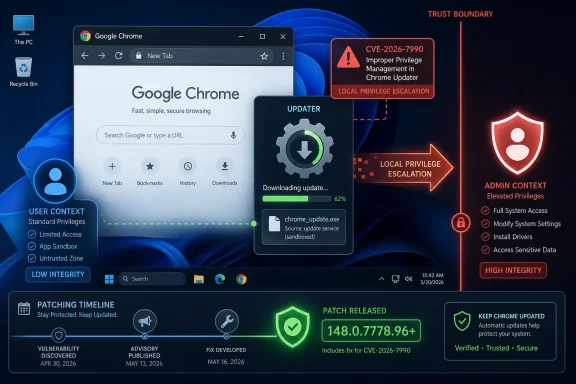
CVE-2026-7990 is not the kind of Chrome vulnerability that lends itself to a dramatic demo. It is not a remote JavaScript engine escape with a sleek proof-of-concept page. It is described as “insufficient validation of untrusted input” in the Chrome Updater on Windows, allowing a local attacker to perform OS-level privilege escalation by way of a malicious file.
That phrasing matters. The vulnerable component is not Blink rendering HTML, V8 running JavaScript, or ANGLE translating graphics calls. It is the updater, the administrative machinery that keeps Chrome moving faster than most enterprise change-control calendars would prefer.
Chrome classifies the bug as Medium severity, while CISA’s ADP enrichment gives it a CVSS 3.1 base score of 7.8, squarely in High territory. That split is not unusual. Browser vendors often score within their own exploitation model, while CVSS emphasizes the technical impact if the preconditions are met. Here the precondition is local access and user interaction; the impact, if exploited, is compromise of confidentiality, integrity, and availability at the OS level.
The result is a vulnerability that looks modest in a Chrome release note but sharpens considerably when viewed from a Windows operations desk. Local privilege escalation bugs are rarely the first move in an intrusion, but they are often the move that turns a foothold into persistence, lateral movement, and administrative control.
The answer is in the CVE description itself: “Google Chrome on Windows prior to 148.0.7778.96.” This is a Windows-specific issue in the updater, not a cross-platform browser-engine flaw. Chrome’s stable release for desktop covers Windows, macOS, and Linux, but individual CVEs inside the release can be narrower than the release vehicle.
That means the configuration is likely trying to say: a vulnerable installation requires both an affected Chrome version and the Windows operating system. In CPE terms, that is reasonably expressed as an application CPE for Chrome joined with an operating-system CPE for Windows. It is not saying Windows alone is vulnerable, nor that every Chrome platform is affected.
Could the CPE be more precise? Absolutely. NVD platform matching is a blunt instrument, and “microsoft:windows:-” is broad enough to make scanner teams wince. It does not distinguish Windows client from server, Windows 10 from Windows 11, or managed enterprise deployments from consumer desktops. But a broad Windows platform qualifier is still better than incorrectly marking Linux and macOS Chrome builds as affected by an updater bug described as Windows-only.
For vulnerability-management teams, the practical interpretation is simple: if you are scanning Windows endpoints with Chrome installed below 148.0.7778.96, treat CVE-2026-7990 as applicable. If you are scanning Linux or macOS Chrome below the same version, this specific CVE should not be the reason for the finding, though the Chrome 148 release contains many other fixes that may still apply.
When a browser engine mishandles memory, defenders think in terms of sandboxing, site isolation, exploit chains, and renderer compromise. When an updater mishandles a file, defenders have to think about local file placement, service behavior, path validation, installer logic, access-control lists, and the difference between user-writable and administrator-writable locations.
That is why the phrase “via a malicious file” is doing a lot of work. It implies an attacker must get a file into the right place or convince a user or process to place it there, and then rely on the updater’s insufficient validation to turn that file into a privilege boundary violation. The details remain restricted, as is common immediately after Chrome security releases, but the shape is familiar to anyone who has debugged Windows installer vulnerabilities.
Windows has a long history of privilege-escalation bugs involving update services, repair operations, DLL search order, symbolic links, junctions, weak directory permissions, and file replacement races. Not every updater flaw uses those techniques, and we should not assume CVE-2026-7990 does. But the category exists because update systems routinely combine local file handling with elevated execution.
In enterprise terms, that makes the updater a privileged subsystem even when the application it serves is “just a browser.” Chrome may be deployed as user-facing software, but its update path belongs in the same risk conversation as endpoint agents, VPN clients, EDR tools, and office-suite auto-updaters.
A local privilege escalation vulnerability becomes more serious when attackers already have common ways to land code as a standard user. Phishing, malicious document workflows, exposed remote-access tools, browser extension abuse, and credential theft all create the kind of initial foothold that makes LPE bugs valuable. In that sense, CVE-2026-7990 belongs to the second stage of an attack rather than the first.
The CISA-ADP CVSS vector captures this tension. The attack vector is local, attack complexity is low, privileges required are none, user interaction is required, and the impact ratings are high across confidentiality, integrity, and availability. That is a classic “not remotely wormable, but dangerous after contact” profile.
For home users, the answer is mundane: update Chrome and restart the browser. For managed Windows fleets, the better answer is to verify that Chrome’s actual installed version has advanced to at least 148.0.7778.96, that the updater itself is functioning, and that stale per-user or machine-wide installations are not hiding outside the main inventory view.
This is especially important because Chrome updates are often assumed to be automatic. Automatic is not the same as complete. Laptops sleep, users defer restarts, enterprise policies pin versions, VDI images drift, and broken updater services can leave machines quietly stranded.
That context matters because patch prioritization should not isolate CVE-2026-7990 from the rest of the release. An administrator who says “this is only a Medium local bug” is missing that the same target version remediates a much broader browser attack surface. Chrome 148 is not merely an updater patch; it is a browser security rollup with critical engine and remote-access-adjacent fixes.
The presence of Chromoting fixes is especially notable for WindowsForum readers. Chrome Remote Desktop has long blurred the boundary between browser ecosystem and remote administration tool. When Chrome’s release notes include both updater and Chromoting vulnerabilities, the patch belongs on the radar of desktop engineering, security operations, and help-desk teams alike.
The volume of fixes also underlines an uncomfortable reality of the modern browser. Chrome is no longer a single application in the old sense. It is a rendering engine, JavaScript runtime, graphics stack, media framework, PDF and codec host, credential surface, extension platform, update service, and remote-access adjunct. A defect in any one of those layers can produce a very different operational risk.
That is why Chrome patching has become less like updating an app and more like servicing a platform. Microsoft learned this lesson with Windows. Google now lives it with Chrome.
For this CVE, the source is Chrome, and the described affected product is Google Chrome on Windows. The fix is Chrome 148.0.7778.96 or later, not a Windows cumulative update. MSRC’s presence is best understood as ecosystem visibility: Microsoft tracks vulnerabilities that affect Windows environments, even when the vulnerable code is not Microsoft’s.
That distinction matters in patch governance. If your organization relies on Windows Update compliance dashboards alone, CVE-2026-7990 may not be remediated just because the operating system is current. Chrome has its own versioning, update channels, enterprise policies, and deployment tools. Microsoft’s listing helps the vulnerability show up in the Windows security conversation, but it does not make Windows Update the delivery mechanism for Google Chrome.
The Edge question should be handled carefully. Microsoft Edge is Chromium-based, but CVE applicability depends on whether the affected component and implementation are present in Edge and whether Microsoft has assigned or mapped the issue in its own servicing model. A Chrome Updater vulnerability is not automatically an Edge vulnerability, because Edge uses Microsoft’s update infrastructure rather than Google’s Chrome Updater.
That is another reason the CPE matters. The CPE points to Google Chrome on Windows, not to Chromium generically and not to Microsoft Edge. Vulnerability scanners that flatten all Chromium-family browsers into one bucket will produce noisy results here.
For security teams, this is a useful test of asset intelligence. Can the organization distinguish Google Chrome from Edge? Can it distinguish Chrome Stable from Extended Stable? Can it see both machine-wide and per-user installs? Can it identify the updater state, not merely the browser executable?
In modern endpoint security, local means code execution in a user context. A malicious attachment, a compromised developer dependency, a fake installer, a trojanized productivity tool, a rogue browser extension, or a living-off-the-land script can all provide that starting position. Once an attacker is executing as a standard user, privilege escalation becomes the shortest path to disabling defenses and harvesting better credentials.
That is why local privilege escalation bugs retain high operational value. Attackers do not need every vulnerability to be remote. They need chains. A browser or document exploit gets execution, an updater flaw gets elevation, a credential theft technique gets movement, and a persistence mechanism keeps the campaign alive after the first reboot.
CVE-2026-7990’s user-interaction requirement also should not be overread. User interaction in CVSS can mean the attacker needs a user to open, download, execute, or otherwise touch something. That requirement is a speed bump, not a barricade. Security teams spend much of their working lives cleaning up after incidents that began with perfectly ordinary user interaction.
The malicious-file detail reinforces the endpoint nature of the risk. This is not a pure network exposure. It is a file-handling and trust-boundary issue, which means controls like application allowlisting, download restrictions, attachment sandboxing, controlled folder permissions, and least-privilege user configurations can reduce opportunity even before the patch lands.
But none of those controls should become an excuse for delay. Defense in depth is not a substitute for fixing the component that mishandles trust.
That is how you get tickets that say “Chrome vulnerable on Linux” when the specific CVE says Windows. It is how you get duplicate findings for Chrome, Chromium, Edge, and WebView. It is how you get remediation owners arguing over whether this belongs to desktop engineering, security engineering, server engineering, or application packaging.
The fix is not to ignore the finding. The fix is to normalize it. Treat the vulnerable condition as Google Chrome on Windows below 148.0.7778.96. Then separately evaluate the rest of Chrome 148’s CVEs for other platforms and related Chromium-based products.
Administrators should also remember that CPE matching is not the same as installed-software evidence. A CPE is a standardized name used by vulnerability systems. It does not prove that a particular machine has a particular updater configuration, install scope, or channel. It is an index, not an autopsy.
For Windows fleets, the installed version is the decisive fact. Chrome’s browser version can be checked through the UI, registry inventory, enterprise management, software inventory agents, or command-line collection. The key is to avoid relying on a single source that might miss per-user installations or stale copies.
The best remediation report will not say “CVE closed because scanner plugin no longer fires.” It will say Chrome has been updated to 148.0.7778.96 or later on affected Windows endpoints, update policies remain enabled, and exceptions are documented by device, owner, and business reason.
That tension often resolves into version pinning, delayed rollout rings, or Extended Stable channels. Those strategies can be rational, especially in organizations with fragile browser-dependent workflows. But they also convert the browser from a self-healing security surface into a managed liability.
CVE-2026-7990 is a reminder that the cost of delay is not limited to web content. Even if an organization believes its browsing exposure is controlled, the updater itself is part of the installed attack surface. Pinning Chrome below 148.0.7778.96 leaves the vulnerable updater behavior in place on Windows.
The tradeoff is particularly acute for shared workstations, lab systems, call-center desktops, and kiosks. These environments often have tighter application compatibility constraints but higher user turnover and broader exposure to untrusted files. Local privilege escalation flaws are more attractive when many users touch the same machine or when a standard account is assumed to be a meaningful containment boundary.
Virtual desktops and golden images add another wrinkle. Updating the live browser inside a session is not enough if the base image rolls back to a vulnerable build. Chrome patching must be baked into image maintenance, not treated solely as an endpoint self-update problem.
The same applies to offline or intermittently connected systems. A laptop that misses the rollout window does not become safe because the organization’s patch dashboard looks green for always-on devices. Chrome’s release note says the update will roll out over coming days or weeks; enterprise risk management has to decide whether that pace is good enough for its threat model.
The operational checklist is familiar but worth doing precisely. Confirm installed versions. Force update where policy allows. Restart Chrome so the new build actually runs. Re-scan after update. Investigate machines that fail to move. Check whether update services are disabled, blocked by policy, broken by packaging, or stranded by old install methods.
Administrators should pay particular attention to environments where Chrome was installed manually years ago, where users have local admin rights, or where software deployment tools coexist uneasily with Google’s updater. Those are the places where “Chrome updates automatically” becomes folklore rather than fact.
For managed Chrome, enterprise policies can control update behavior, target channels, rollback, and relaunch notifications. Those controls are useful only if they are audited. A policy that delays updates may have been created for a compatibility incident that no longer exists, while still quietly extending exposure to current CVEs.
Security teams should also review local file-handling controls. Since the CVE requires a malicious file, controls that reduce the ability to place or execute untrusted files in sensitive locations can help. But this should be framed as compensating control during rollout, not as a permanent exception to patching.
The boring answer is the correct one: update Chrome, verify it, and clean up the machines that cannot update.
A perfect data model would express all of that cleanly. It would identify Google Chrome, the affected updater component, the Windows platform dependency, the version boundary, the installation scope, and perhaps even channel-specific behavior. Most public vulnerability metadata does not get that granular.
So scanners approximate. NVD approximates. Vendors approximate. Then administrators are left reconciling approximations against their real asset estate.
In this case, the broad Windows CPE should not be mistaken for evidence that a Windows component is vulnerable. Nor should the Chrome CPE be interpreted as applying equally to every operating system. The AND relationship is the important part: Chrome plus Windows plus a version below the fixed build.
If anything is “missing,” it is not necessarily another CPE. It is the richer product-state language that vulnerability management still lacks. Security teams need to know not just what software is installed, but which component, which updater, which channel, which policy state, and which platform-specific code path is in play.
Until that ecosystem improves, defenders will keep doing interpretation work that machines should be able to do.
Source: NVD / Chromium Security Update Guide - Microsoft Security Response Center
 The Browser Bug That Lives Below the Browser
CVE-2026-7990 is not the kind of Chrome vulnerability that lends itself to a dramatic demo. It is not a remote JavaScript engine escape with a sleek proof-of-concept page. It is described as “insufficient validation of untrusted input” in the Chrome Updater on Windows, allowing a local attacker to perform OS-level privilege escalation by way of a malicious file.That phrasing matters. The vulnerable component is not Blink rendering HTML, V8 running JavaScript, or ANGLE translating graphics calls. It is the updater, the administrative machinery that keeps Chrome moving faster than most enterprise change-control calendars would prefer.
Chrome classifies the bug as Medium severity, while CISA’s ADP enrichment gives it a CVSS 3.1 base score of 7.8, squarely in High territory. That split is not unusual. Browser vendors often score within their own exploitation model, while CVSS emphasizes the technical impact if the preconditions are met. Here the precondition is local access and user interaction; the impact, if exploited, is compromise of confidentiality, integrity, and availability at the OS level.
The result is a vulnerability that looks modest in a Chrome release note but sharpens considerably when viewed from a Windows operations desk. Local privilege escalation bugs are rarely the first move in an intrusion, but they are often the move that turns a foothold into persistence, lateral movement, and administrative control.
NVD’s CPE Is Clumsy, But the Platform Logic Holds
The user-facing confusion comes from the NVD configuration: an AND relationship containing Google Chrome versions up to but excluding 148.0.7778.96 and Microsoft Windows. At a glance, that can look incomplete. If Chrome ships on macOS and Linux too, why is the operating-system CPE only Windows?The answer is in the CVE description itself: “Google Chrome on Windows prior to 148.0.7778.96.” This is a Windows-specific issue in the updater, not a cross-platform browser-engine flaw. Chrome’s stable release for desktop covers Windows, macOS, and Linux, but individual CVEs inside the release can be narrower than the release vehicle.
That means the configuration is likely trying to say: a vulnerable installation requires both an affected Chrome version and the Windows operating system. In CPE terms, that is reasonably expressed as an application CPE for Chrome joined with an operating-system CPE for Windows. It is not saying Windows alone is vulnerable, nor that every Chrome platform is affected.
Could the CPE be more precise? Absolutely. NVD platform matching is a blunt instrument, and “microsoft:windows:-” is broad enough to make scanner teams wince. It does not distinguish Windows client from server, Windows 10 from Windows 11, or managed enterprise deployments from consumer desktops. But a broad Windows platform qualifier is still better than incorrectly marking Linux and macOS Chrome builds as affected by an updater bug described as Windows-only.
For vulnerability-management teams, the practical interpretation is simple: if you are scanning Windows endpoints with Chrome installed below 148.0.7778.96, treat CVE-2026-7990 as applicable. If you are scanning Linux or macOS Chrome below the same version, this specific CVE should not be the reason for the finding, though the Chrome 148 release contains many other fixes that may still apply.
The Updater Is a Privileged Trust Boundary Wearing Work Clothes
Updater bugs are uncomfortable because they sit at the seam between application security and operating-system security. Chrome’s update mechanism needs enough privilege to replace binaries, schedule services, manipulate install directories, and keep the browser current without requiring every user to become a package manager. That convenience creates a trust boundary.When a browser engine mishandles memory, defenders think in terms of sandboxing, site isolation, exploit chains, and renderer compromise. When an updater mishandles a file, defenders have to think about local file placement, service behavior, path validation, installer logic, access-control lists, and the difference between user-writable and administrator-writable locations.
That is why the phrase “via a malicious file” is doing a lot of work. It implies an attacker must get a file into the right place or convince a user or process to place it there, and then rely on the updater’s insufficient validation to turn that file into a privilege boundary violation. The details remain restricted, as is common immediately after Chrome security releases, but the shape is familiar to anyone who has debugged Windows installer vulnerabilities.
Windows has a long history of privilege-escalation bugs involving update services, repair operations, DLL search order, symbolic links, junctions, weak directory permissions, and file replacement races. Not every updater flaw uses those techniques, and we should not assume CVE-2026-7990 does. But the category exists because update systems routinely combine local file handling with elevated execution.
In enterprise terms, that makes the updater a privileged subsystem even when the application it serves is “just a browser.” Chrome may be deployed as user-facing software, but its update path belongs in the same risk conversation as endpoint agents, VPN clients, EDR tools, and office-suite auto-updaters.
Medium Severity Does Not Mean Middle Priority
Chrome’s Medium severity label should not be read as a request to relax. Vendor severity is a triage signal, not an environmental risk rating. The vendor is considering exploitability, prevalence, default configuration, and the browser’s internal security model; your environment has its own attack paths.A local privilege escalation vulnerability becomes more serious when attackers already have common ways to land code as a standard user. Phishing, malicious document workflows, exposed remote-access tools, browser extension abuse, and credential theft all create the kind of initial foothold that makes LPE bugs valuable. In that sense, CVE-2026-7990 belongs to the second stage of an attack rather than the first.
The CISA-ADP CVSS vector captures this tension. The attack vector is local, attack complexity is low, privileges required are none, user interaction is required, and the impact ratings are high across confidentiality, integrity, and availability. That is a classic “not remotely wormable, but dangerous after contact” profile.
For home users, the answer is mundane: update Chrome and restart the browser. For managed Windows fleets, the better answer is to verify that Chrome’s actual installed version has advanced to at least 148.0.7778.96, that the updater itself is functioning, and that stale per-user or machine-wide installations are not hiding outside the main inventory view.
This is especially important because Chrome updates are often assumed to be automatic. Automatic is not the same as complete. Laptops sleep, users defer restarts, enterprise policies pin versions, VDI images drift, and broken updater services can leave machines quietly stranded.
Chrome 148 Was Not a One-CVE Release
CVE-2026-7990 arrived as part of Chrome 148, a large desktop stable release that fixed 127 security issues. Google’s release notes highlighted three Critical vulnerabilities: an integer overflow in Blink and use-after-free issues in Mobile and Chromoting. The same release also carried a long list of High and Medium findings across V8, ANGLE, Skia, WebRTC, DevTools, GPU, ServiceWorker, UI, and other components.That context matters because patch prioritization should not isolate CVE-2026-7990 from the rest of the release. An administrator who says “this is only a Medium local bug” is missing that the same target version remediates a much broader browser attack surface. Chrome 148 is not merely an updater patch; it is a browser security rollup with critical engine and remote-access-adjacent fixes.
The presence of Chromoting fixes is especially notable for WindowsForum readers. Chrome Remote Desktop has long blurred the boundary between browser ecosystem and remote administration tool. When Chrome’s release notes include both updater and Chromoting vulnerabilities, the patch belongs on the radar of desktop engineering, security operations, and help-desk teams alike.
The volume of fixes also underlines an uncomfortable reality of the modern browser. Chrome is no longer a single application in the old sense. It is a rendering engine, JavaScript runtime, graphics stack, media framework, PDF and codec host, credential surface, extension platform, update service, and remote-access adjunct. A defect in any one of those layers can produce a very different operational risk.
That is why Chrome patching has become less like updating an app and more like servicing a platform. Microsoft learned this lesson with Windows. Google now lives it with Chrome.
The MSRC Listing Is a Signal, Not a Microsoft Patch
The Microsoft Security Response Center entry can also create confusion. Seeing a Chrome CVE in Microsoft’s update guide may lead some administrators to ask whether Microsoft is shipping the fix, whether Edge is affected, or whether Windows Update will handle remediation.For this CVE, the source is Chrome, and the described affected product is Google Chrome on Windows. The fix is Chrome 148.0.7778.96 or later, not a Windows cumulative update. MSRC’s presence is best understood as ecosystem visibility: Microsoft tracks vulnerabilities that affect Windows environments, even when the vulnerable code is not Microsoft’s.
That distinction matters in patch governance. If your organization relies on Windows Update compliance dashboards alone, CVE-2026-7990 may not be remediated just because the operating system is current. Chrome has its own versioning, update channels, enterprise policies, and deployment tools. Microsoft’s listing helps the vulnerability show up in the Windows security conversation, but it does not make Windows Update the delivery mechanism for Google Chrome.
The Edge question should be handled carefully. Microsoft Edge is Chromium-based, but CVE applicability depends on whether the affected component and implementation are present in Edge and whether Microsoft has assigned or mapped the issue in its own servicing model. A Chrome Updater vulnerability is not automatically an Edge vulnerability, because Edge uses Microsoft’s update infrastructure rather than Google’s Chrome Updater.
That is another reason the CPE matters. The CPE points to Google Chrome on Windows, not to Chromium generically and not to Microsoft Edge. Vulnerability scanners that flatten all Chromium-family browsers into one bucket will produce noisy results here.
For security teams, this is a useful test of asset intelligence. Can the organization distinguish Google Chrome from Edge? Can it distinguish Chrome Stable from Extended Stable? Can it see both machine-wide and per-user installs? Can it identify the updater state, not merely the browser executable?
Local Attackers Are Not Hypothetical in 2026
“Local attacker” used to be a phrase that made some executives tune out. The mental model was physical access: someone sitting at a keyboard, already inside the building, doing something exotic. That model is obsolete.In modern endpoint security, local means code execution in a user context. A malicious attachment, a compromised developer dependency, a fake installer, a trojanized productivity tool, a rogue browser extension, or a living-off-the-land script can all provide that starting position. Once an attacker is executing as a standard user, privilege escalation becomes the shortest path to disabling defenses and harvesting better credentials.
That is why local privilege escalation bugs retain high operational value. Attackers do not need every vulnerability to be remote. They need chains. A browser or document exploit gets execution, an updater flaw gets elevation, a credential theft technique gets movement, and a persistence mechanism keeps the campaign alive after the first reboot.
CVE-2026-7990’s user-interaction requirement also should not be overread. User interaction in CVSS can mean the attacker needs a user to open, download, execute, or otherwise touch something. That requirement is a speed bump, not a barricade. Security teams spend much of their working lives cleaning up after incidents that began with perfectly ordinary user interaction.
The malicious-file detail reinforces the endpoint nature of the risk. This is not a pure network exposure. It is a file-handling and trust-boundary issue, which means controls like application allowlisting, download restrictions, attachment sandboxing, controlled folder permissions, and least-privilege user configurations can reduce opportunity even before the patch lands.
But none of those controls should become an excuse for delay. Defense in depth is not a substitute for fixing the component that mishandles trust.
Scanner Findings Will Be Messier Than the Vulnerability
The first wave of scanner content for a newly published CVE is often rough, and CVE-2026-7990 has several ingredients for messy reporting. The NVD assessment was not initially complete, the CISA-ADP score differs from Chrome’s severity label, the affected component is platform-specific, and the vulnerable product is a cross-platform browser with a Windows-only condition.That is how you get tickets that say “Chrome vulnerable on Linux” when the specific CVE says Windows. It is how you get duplicate findings for Chrome, Chromium, Edge, and WebView. It is how you get remediation owners arguing over whether this belongs to desktop engineering, security engineering, server engineering, or application packaging.
The fix is not to ignore the finding. The fix is to normalize it. Treat the vulnerable condition as Google Chrome on Windows below 148.0.7778.96. Then separately evaluate the rest of Chrome 148’s CVEs for other platforms and related Chromium-based products.
Administrators should also remember that CPE matching is not the same as installed-software evidence. A CPE is a standardized name used by vulnerability systems. It does not prove that a particular machine has a particular updater configuration, install scope, or channel. It is an index, not an autopsy.
For Windows fleets, the installed version is the decisive fact. Chrome’s browser version can be checked through the UI, registry inventory, enterprise management, software inventory agents, or command-line collection. The key is to avoid relying on a single source that might miss per-user installations or stale copies.
The best remediation report will not say “CVE closed because scanner plugin no longer fires.” It will say Chrome has been updated to 148.0.7778.96 or later on affected Windows endpoints, update policies remain enabled, and exceptions are documented by device, owner, and business reason.
The Enterprise Risk Is Version Pinning by Another Name
Chrome’s rapid update model creates a recurring tension for enterprise IT. Security teams want the newest stable build quickly. Application owners want predictable behavior. Regulated environments want testing. Developers want reproducibility. Help desks want fewer surprises on Monday morning.That tension often resolves into version pinning, delayed rollout rings, or Extended Stable channels. Those strategies can be rational, especially in organizations with fragile browser-dependent workflows. But they also convert the browser from a self-healing security surface into a managed liability.
CVE-2026-7990 is a reminder that the cost of delay is not limited to web content. Even if an organization believes its browsing exposure is controlled, the updater itself is part of the installed attack surface. Pinning Chrome below 148.0.7778.96 leaves the vulnerable updater behavior in place on Windows.
The tradeoff is particularly acute for shared workstations, lab systems, call-center desktops, and kiosks. These environments often have tighter application compatibility constraints but higher user turnover and broader exposure to untrusted files. Local privilege escalation flaws are more attractive when many users touch the same machine or when a standard account is assumed to be a meaningful containment boundary.
Virtual desktops and golden images add another wrinkle. Updating the live browser inside a session is not enough if the base image rolls back to a vulnerable build. Chrome patching must be baked into image maintenance, not treated solely as an endpoint self-update problem.
The same applies to offline or intermittently connected systems. A laptop that misses the rollout window does not become safe because the organization’s patch dashboard looks green for always-on devices. Chrome’s release note says the update will roll out over coming days or weeks; enterprise risk management has to decide whether that pace is good enough for its threat model.
The Right Remediation Is Boring, Which Is the Point
There is no clever mitigation that beats installing the fixed version. Chrome 148.0.7778.96 is the threshold named in the CVE, and Windows machines below it should be moved forward. On Windows and macOS, Google also lists 148.0.7778.97 as part of the stable channel rollout, but the CVE’s fixed-before line is clear: below 148.0.7778.96 is vulnerable.The operational checklist is familiar but worth doing precisely. Confirm installed versions. Force update where policy allows. Restart Chrome so the new build actually runs. Re-scan after update. Investigate machines that fail to move. Check whether update services are disabled, blocked by policy, broken by packaging, or stranded by old install methods.
Administrators should pay particular attention to environments where Chrome was installed manually years ago, where users have local admin rights, or where software deployment tools coexist uneasily with Google’s updater. Those are the places where “Chrome updates automatically” becomes folklore rather than fact.
For managed Chrome, enterprise policies can control update behavior, target channels, rollback, and relaunch notifications. Those controls are useful only if they are audited. A policy that delays updates may have been created for a compatibility incident that no longer exists, while still quietly extending exposure to current CVEs.
Security teams should also review local file-handling controls. Since the CVE requires a malicious file, controls that reduce the ability to place or execute untrusted files in sensitive locations can help. But this should be framed as compensating control during rollout, not as a permanent exception to patching.
The boring answer is the correct one: update Chrome, verify it, and clean up the machines that cannot update.
The CPE Debate Exposes a Bigger Inventory Problem
The specific question — are we missing a CPE? — is useful because it points to a deeper weakness in vulnerability management. CPEs are necessary for automation, but they are often too coarse to model how software actually fails. CVE-2026-7990 is a browser CVE, an updater CVE, a Windows CVE in practical deployment terms, and a Google product CVE in ownership terms.A perfect data model would express all of that cleanly. It would identify Google Chrome, the affected updater component, the Windows platform dependency, the version boundary, the installation scope, and perhaps even channel-specific behavior. Most public vulnerability metadata does not get that granular.
So scanners approximate. NVD approximates. Vendors approximate. Then administrators are left reconciling approximations against their real asset estate.
In this case, the broad Windows CPE should not be mistaken for evidence that a Windows component is vulnerable. Nor should the Chrome CPE be interpreted as applying equally to every operating system. The AND relationship is the important part: Chrome plus Windows plus a version below the fixed build.
If anything is “missing,” it is not necessarily another CPE. It is the richer product-state language that vulnerability management still lacks. Security teams need to know not just what software is installed, but which component, which updater, which channel, which policy state, and which platform-specific code path is in play.
Until that ecosystem improves, defenders will keep doing interpretation work that machines should be able to do.
What Windows Admins Should Carry Into the Patch Window
The important lesson of CVE-2026-7990 is not that Chrome suddenly became uniquely dangerous. It is that the browser’s maintenance layer is now part of the Windows privilege story, and it must be treated with the same seriousness as more obvious endpoint agents.- CVE-2026-7990 applies to Google Chrome on Windows before 148.0.7778.96, not to Windows by itself.
- The NVD CPE configuration appears to be modeling a combined vulnerable condition: affected Chrome installed on Microsoft Windows.
- The vulnerability is local privilege escalation through the Chrome Updater via a malicious file, so it is most relevant after an attacker has gained some user-level foothold.
- Chrome’s Medium severity label should be weighed against the CISA-ADP 7.8 High CVSS score and the operational value of privilege escalation.
- Chrome 148 fixes 127 security issues, so the remediation case is broader than this single updater flaw.
- Enterprises should verify installed Chrome versions on Windows endpoints rather than assuming automatic updates completed successfully.
Source: NVD / Chromium Security Update Guide - Microsoft Security Response Center
