

17a-4 LLC announced on July 1, 2026, from New York that its DataParser connector for Microsoft Teams now collects call recordings, meeting transcripts, and SMS content for archiving, eDiscovery, and regulated communications review. The feature list sounds narrow, but the signal is broader: Teams compliance capture is moving beyond chat logs into the messier record of how work actually happens. For banks, broker-dealers, public agencies, healthcare groups, and other supervised environments, the compliance boundary is no longer the inbox or even the chat thread. It is the meeting, the call, the mobile workflow, and increasingly the AI-generated residue around them.
Microsoft Teams began its enterprise takeover as a collaboration hub, but in many organizations it is now closer to a communications operating system. It carries direct messages, channel threads, calls, meetings, shared files, recordings, transcripts, webinars, and external collaboration. That sprawl has been good for productivity and brutal for records management.
The compliance problem is not that Teams lacks native governance tooling. Microsoft has invested heavily in Purview, retention policies, eDiscovery, audit, DLP, and Graph-based export paths. The problem is that regulated organizations rarely live inside a single vendor’s ideal architecture. They have legacy archives, WORM storage, outside counsel workflows, supervision queues, data residency demands, and examiners who care less about product elegance than about whether the record can be produced.
That is where connectors such as DataParser sit. They are not glamorous software. They are plumbing, normalization, chain-of-custody machinery, and format translation. But in compliance, plumbing is policy made real.
17a-4’s announcement matters because it expands the universe of collectable Teams evidence. Chat messages are only one slice of the record. A broker can make a recommendation in a call, a manager can approve a decision in a meeting, a participant can clarify intent in a transcript, and a mobile user can continue the same business conversation over SMS. If those fragments are not collected together, the archive becomes less a record of business conduct than a curated shadow of it.
A chat message preserves words. A transcript preserves words with timing and speaker context. A recording preserves tone, hesitation, screen-sharing context, and what was said before anyone thought to type it. That makes recordings valuable, but also heavy. They are large, sensitive, difficult to review at scale, and potentially full of personal, confidential, or privileged material.
The industry has spent years telling workers that “meetings should have notes.” Teams and similar platforms have quietly changed that expectation into “meetings may have artifacts.” Recording, transcription, attendance metadata, shared files, reactions, and follow-up chats can all become discoverable data points. For WindowsForum’s IT pro audience, the immediate question is not whether users like that reality. It is whether the organization’s governance model acknowledges it.
17a-4 says DataParser can now capture call recordings for retention in archives or blob storage. That distinction is practical. Some firms will want recordings pushed into a supervision or eDiscovery platform. Others will want immutable object storage, especially where cost, scale, or retention periods make full archive ingestion unattractive. The connector’s job is to turn Teams media into defensible records without forcing every customer into the same repository.
There is a catch. Recording capture is only as useful as the policies that create, label, retain, and secure those recordings. If a meeting was never recorded, a connector cannot invent the artifact. If transcription was disabled, there may be no transcript to collect. If permissions are misconfigured, retention labels are inconsistent, or users scatter collaboration across tenants and devices, capture becomes a false comfort.
This is why transcript collection is a major step for Teams governance. The traditional archive model grew up around email, a medium that is naturally text-first and sender-recipient structured. Teams meetings are not like that. They have organizers, invitees, guests, late joiners, screen shares, side chats, recurring series, and post-meeting artifacts. Transcripts provide a bridge between the human messiness of meetings and the machine requirements of compliance review.
17a-4’s announcement frames transcripts as being collected alongside related Teams communications. That phrasing is doing real work. A transcript in isolation is useful, but a transcript connected to the meeting chat, channel conversation, attachments, and participant events is much more useful. Compliance review often turns on context: who was present, when they joined, what document was referenced, and whether a statement was part of a broader exchange.
The new participant join and leave indicators for chat and channel messages point in the same direction. Regulators and litigators rarely ask only what was said. They ask who had access to it, who saw it, and whether the record shows the boundaries of the conversation. Presence and participation metadata can turn a pile of messages into an intelligible timeline.
This is where Teams governance becomes difficult for admins. Users experience Teams as a continuous flow. Systems experience it as multiple object types with different APIs, storage locations, permissions, and retention behaviors. Connectors can help flatten that complexity for archives, but they do not eliminate the need for disciplined tenant configuration.
SMS is not new technology, but it remains stubbornly relevant. Workers still use phone numbers, mobile workflows, appointment reminders, client outreach, and text-based communication outside neat enterprise collaboration boundaries. The more Microsoft pushes Teams into telephony and mobile use cases, the more SMS becomes part of the compliance conversation rather than an adjacent exception.
By adding SMS collection “as part of mobile users’ communications oversight,” DataParser is acknowledging that the modern business record follows the user, not the app icon. This is not just about Teams as a desktop client. It is about Teams as part of a broader Microsoft 365 communications fabric that includes calling, meetings, mobile endpoints, and possibly third-party or carrier-integrated messaging workflows.
For IT departments, SMS collection raises sharper governance questions than chat capture. Which numbers are in scope? Are personal devices involved? Are employees notified? How are consent, privacy, labor rules, and regional requirements handled? What is the boundary between regulated business communication and personal communication?
A connector cannot answer those questions for the organization. It can only collect what the organization has decided it is lawful and necessary to collect. That distinction matters because compliance technology often tempts executives into thinking capability equals policy. It does not. SMS capture needs legal, HR, compliance, security, and IT alignment before it becomes defensible.
This is a better world than the old era of brittle scraping, journaling hacks, or unsupported back-end access. Official APIs create clearer security boundaries, admin consent flows, and auditability. They also create new dependencies. If an API is metered, limited, in beta, or restricted by licensing, the connector’s real-world behavior depends on Microsoft’s platform rules.
For administrators, this means a Teams compliance project is not simply “buy connector, archive data.” It is an architecture exercise. You need to understand the Microsoft 365 license requirements, application permissions, consent model, protected API access, throttling behavior, retention configuration, and where Teams artifacts are stored. Recordings and transcripts often involve OneDrive and SharePoint storage realities as much as Teams interface realities.
That makes vendor claims worth reading carefully. A connector may support collection of a data type, but an organization still needs the underlying Microsoft configuration that makes the artifact available. The difference between “supported by the product” and “available in your tenant under your policies” is where many deployments get painful.
This is also why third-party connectors continue to exist despite Microsoft’s own compliance stack. Purview is powerful, but enterprises are heterogeneous. Some use Proofpoint, Mimecast, Archive360, Google Vault, AWS storage, Azure Blob, or sector-specific archives. A connector that can normalize Teams content into those destinations is not competing only with Microsoft. It is mediating between Microsoft’s platform and the customer’s existing control environment.
That is the unromantic truth of compliance systems. The hardest problems are often volume, format, sequencing, and exceptions. A regulator may ask for a date range. A legal team may need all communications for a custodian. An archive may reject oversized payloads. An eDiscovery platform may need messages grouped differently than the source application presents them.
Teams makes those problems worse because a “conversation” is not always a neat object. It can include edits, deletes, replies, files, emojis, reactions, meetings, transcripts, recordings, external users, and mobile extensions. The source system was designed for collaboration, not necessarily for downstream legal review. The archive wants a stable, searchable, reproducible record.
DataParser’s value proposition is that it collects from source APIs and delivers formatted communications to a chosen archive, storage platform, or eDiscovery system. That means the product is operating in the gap between user experience and evidentiary record. The more Teams becomes the front door for work, the more valuable that gap becomes.
This is also where chain of custody matters. 17a-4 emphasizes verifiable chain of custody and regulatory compliance, which is expected given its customer base and even its name. But chain of custody is not a magic phrase. It depends on logging, access controls, timestamps, transformation transparency, storage immutability, and the ability to explain the path from source system to archive.
Healthcare organizations care about patient data and internal investigations. Energy firms care about operational risk and critical infrastructure. Government agencies care about records laws and public accountability. Universities increasingly have to manage investigations, grants, public records requests, and distributed collaboration. The compliance archive has become a general-purpose institutional memory machine.
The trade-off is that broader capture narrows the informal space inside enterprise tools. Users may still think of Teams as casual compared with email. Regulators, litigators, and internal investigators do not. If a conversation happens in Teams, especially in a work tenant, it may become part of the organization’s official record.
That reality should make IT leaders cautious about training and disclosure. Users need to know which channels are monitored, retained, and reviewable. Managers need to understand that switching from email to meetings does not necessarily reduce discoverability. Compliance teams need to avoid creating surveillance programs so broad that they become impossible to govern.
The best deployments will not treat capture as a dragnet. They will define populations, use cases, retention periods, access rights, and review workflows. They will distinguish between regulated users and ordinary collaboration where appropriate. They will also test retrieval, because an archive that cannot produce records on demand is just expensive storage.
Those AI-generated artifacts may become compliance records in their own right. If an AI summary says a customer approved a change, is that a business record? If it omits a caveat spoken in the meeting, does the transcript control? If a user edits a recap before sharing it, which version matters? If Copilot produces action items based on a transcript, should those action items be retained with the meeting?
These questions are not theoretical for long. Enterprises are adopting AI meeting assistance because it saves time, and Microsoft is giving those features privileged placement inside the collaboration workflow. The compliance stack will have to decide whether AI output is metadata, communication, work product, or evidence. In practice, it may be all four depending on context.
For Windows and Microsoft 365 administrators, this is the next governance frontier. Today’s problem is collecting Teams recordings, transcripts, chats, and SMS. Tomorrow’s problem is preserving the machine-generated interpretation layered on top of them. The compliance archive will have to store not just what humans said, but what software concluded they meant.
That raises the bar for explainability. A raw transcript can be challenged, searched, and replayed against a recording. An AI summary is a transformation. It needs provenance: what source data produced it, when it was generated, under which model or service configuration, and whether it was modified. If vendors cannot provide that trail, compliance teams will hesitate to rely on the output.
A Teams capture project should start with scope. Which users require supervision? Which modalities are required: chats, channels, meetings, recordings, transcripts, SMS? Which regions have privacy restrictions? Which archives receive which data? Which teams are excluded? Which guest or external communications are in scope?
Then comes validation. Administrators should test sample meetings, calls, transcripts, SMS messages, attachments, edits, deletes, and historical backfills. They should compare source artifacts against archived output and document exceptions. They should test retrieval by custodian, date range, conversation, meeting, and data type.
Finally, there is governance around failure. API errors, throttling, permission changes, expired credentials, storage failures, and schema changes can all interrupt capture. A defensible process needs monitoring, retry logic, alerting, and periodic reconciliation. If a gap appears, the organization should know when it began, what it affected, and how it was remediated.
This is where products such as DataParser succeed or fail in practice. Feature support matters, but operational transparency matters more. A compliance connector should not be a black box. It should be able to show what it collected, what it transformed, where it delivered it, and what failed.
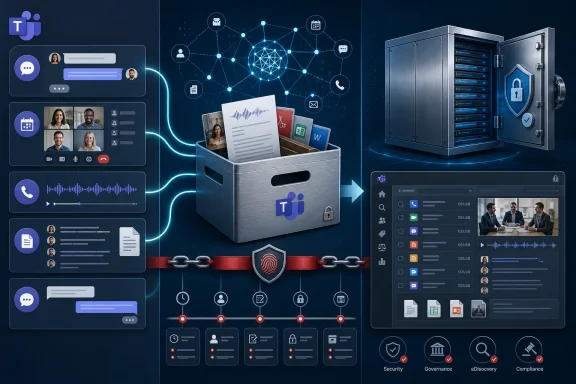 Teams Has Outgrown the Chat Archive
Microsoft Teams began its enterprise takeover as a collaboration hub, but in many organizations it is now closer to a communications operating system. It carries direct messages, channel threads, calls, meetings, shared files, recordings, transcripts, webinars, and external collaboration. That sprawl has been good for productivity and brutal for records management.The compliance problem is not that Teams lacks native governance tooling. Microsoft has invested heavily in Purview, retention policies, eDiscovery, audit, DLP, and Graph-based export paths. The problem is that regulated organizations rarely live inside a single vendor’s ideal architecture. They have legacy archives, WORM storage, outside counsel workflows, supervision queues, data residency demands, and examiners who care less about product elegance than about whether the record can be produced.
That is where connectors such as DataParser sit. They are not glamorous software. They are plumbing, normalization, chain-of-custody machinery, and format translation. But in compliance, plumbing is policy made real.
17a-4’s announcement matters because it expands the universe of collectable Teams evidence. Chat messages are only one slice of the record. A broker can make a recommendation in a call, a manager can approve a decision in a meeting, a participant can clarify intent in a transcript, and a mobile user can continue the same business conversation over SMS. If those fragments are not collected together, the archive becomes less a record of business conduct than a curated shadow of it.
The Recording Is Becoming the Record
The most important addition is call and meeting recording capture. Recordings sit in an uneasy place in modern collaboration. They are often treated by users as convenience artifacts — a way to catch up, share with absentees, or revisit a demo. For legal and compliance teams, they can be the most complete evidence available.A chat message preserves words. A transcript preserves words with timing and speaker context. A recording preserves tone, hesitation, screen-sharing context, and what was said before anyone thought to type it. That makes recordings valuable, but also heavy. They are large, sensitive, difficult to review at scale, and potentially full of personal, confidential, or privileged material.
The industry has spent years telling workers that “meetings should have notes.” Teams and similar platforms have quietly changed that expectation into “meetings may have artifacts.” Recording, transcription, attendance metadata, shared files, reactions, and follow-up chats can all become discoverable data points. For WindowsForum’s IT pro audience, the immediate question is not whether users like that reality. It is whether the organization’s governance model acknowledges it.
17a-4 says DataParser can now capture call recordings for retention in archives or blob storage. That distinction is practical. Some firms will want recordings pushed into a supervision or eDiscovery platform. Others will want immutable object storage, especially where cost, scale, or retention periods make full archive ingestion unattractive. The connector’s job is to turn Teams media into defensible records without forcing every customer into the same repository.
There is a catch. Recording capture is only as useful as the policies that create, label, retain, and secure those recordings. If a meeting was never recorded, a connector cannot invent the artifact. If transcription was disabled, there may be no transcript to collect. If permissions are misconfigured, retention labels are inconsistent, or users scatter collaboration across tenants and devices, capture becomes a false comfort.
Transcripts Turn Compliance From Search to Context
Meeting transcripts are less visually dramatic than recordings, but they may be more operationally important. A transcript is searchable, reviewable, and easier to route into eDiscovery workflows than a video file. It also gives reviewers something they have lacked in the voice era: text that can be indexed, sampled, filtered, supervised, and retained alongside adjacent communications.This is why transcript collection is a major step for Teams governance. The traditional archive model grew up around email, a medium that is naturally text-first and sender-recipient structured. Teams meetings are not like that. They have organizers, invitees, guests, late joiners, screen shares, side chats, recurring series, and post-meeting artifacts. Transcripts provide a bridge between the human messiness of meetings and the machine requirements of compliance review.
17a-4’s announcement frames transcripts as being collected alongside related Teams communications. That phrasing is doing real work. A transcript in isolation is useful, but a transcript connected to the meeting chat, channel conversation, attachments, and participant events is much more useful. Compliance review often turns on context: who was present, when they joined, what document was referenced, and whether a statement was part of a broader exchange.
The new participant join and leave indicators for chat and channel messages point in the same direction. Regulators and litigators rarely ask only what was said. They ask who had access to it, who saw it, and whether the record shows the boundaries of the conversation. Presence and participation metadata can turn a pile of messages into an intelligible timeline.
This is where Teams governance becomes difficult for admins. Users experience Teams as a continuous flow. Systems experience it as multiple object types with different APIs, storage locations, permissions, and retention behaviors. Connectors can help flatten that complexity for archives, but they do not eliminate the need for disciplined tenant configuration.
SMS Is the Small Feature With the Long Shadow
The SMS addition may be the most politically sensitive part of the announcement. Mobile messaging has been a compliance headache for years, especially in financial services, where regulators have repeatedly penalized firms for off-channel communications. The lesson from those enforcement waves has been blunt: if employees conduct business on a communications channel, the organization may be expected to preserve and supervise it.SMS is not new technology, but it remains stubbornly relevant. Workers still use phone numbers, mobile workflows, appointment reminders, client outreach, and text-based communication outside neat enterprise collaboration boundaries. The more Microsoft pushes Teams into telephony and mobile use cases, the more SMS becomes part of the compliance conversation rather than an adjacent exception.
By adding SMS collection “as part of mobile users’ communications oversight,” DataParser is acknowledging that the modern business record follows the user, not the app icon. This is not just about Teams as a desktop client. It is about Teams as part of a broader Microsoft 365 communications fabric that includes calling, meetings, mobile endpoints, and possibly third-party or carrier-integrated messaging workflows.
For IT departments, SMS collection raises sharper governance questions than chat capture. Which numbers are in scope? Are personal devices involved? Are employees notified? How are consent, privacy, labor rules, and regional requirements handled? What is the boundary between regulated business communication and personal communication?
A connector cannot answer those questions for the organization. It can only collect what the organization has decided it is lawful and necessary to collect. That distinction matters because compliance technology often tempts executives into thinking capability equals policy. It does not. SMS capture needs legal, HR, compliance, security, and IT alignment before it becomes defensible.
Microsoft Graph Is the Gatekeeper, Not the Afterthought
DataParser’s Teams collection relies on Microsoft Graph APIs, and that dependency is central to the story. Graph is the control plane through which Microsoft exposes Teams data for export, compliance, and integration scenarios. It gives vendors a sanctioned route into Teams content, but it also means Microsoft defines much of what can be captured, when it can be captured, and under what permissions.This is a better world than the old era of brittle scraping, journaling hacks, or unsupported back-end access. Official APIs create clearer security boundaries, admin consent flows, and auditability. They also create new dependencies. If an API is metered, limited, in beta, or restricted by licensing, the connector’s real-world behavior depends on Microsoft’s platform rules.
For administrators, this means a Teams compliance project is not simply “buy connector, archive data.” It is an architecture exercise. You need to understand the Microsoft 365 license requirements, application permissions, consent model, protected API access, throttling behavior, retention configuration, and where Teams artifacts are stored. Recordings and transcripts often involve OneDrive and SharePoint storage realities as much as Teams interface realities.
That makes vendor claims worth reading carefully. A connector may support collection of a data type, but an organization still needs the underlying Microsoft configuration that makes the artifact available. The difference between “supported by the product” and “available in your tenant under your policies” is where many deployments get painful.
This is also why third-party connectors continue to exist despite Microsoft’s own compliance stack. Purview is powerful, but enterprises are heterogeneous. Some use Proofpoint, Mimecast, Archive360, Google Vault, AWS storage, Azure Blob, or sector-specific archives. A connector that can normalize Teams content into those destinations is not competing only with Microsoft. It is mediating between Microsoft’s platform and the customer’s existing control environment.
The Archive Is No Longer a Mailbox With Better Retention
The announcement’s smaller features are easy to skim past, but they reveal the mundane pressure points of enterprise archiving. “Split Messages by Date” and “Split Conversations by Number of Attachments” are not headline-grabbing capabilities. They are the sort of ingestion controls that matter when a historical collection job threatens to overwhelm an archive or produce unreviewable chunks.That is the unromantic truth of compliance systems. The hardest problems are often volume, format, sequencing, and exceptions. A regulator may ask for a date range. A legal team may need all communications for a custodian. An archive may reject oversized payloads. An eDiscovery platform may need messages grouped differently than the source application presents them.
Teams makes those problems worse because a “conversation” is not always a neat object. It can include edits, deletes, replies, files, emojis, reactions, meetings, transcripts, recordings, external users, and mobile extensions. The source system was designed for collaboration, not necessarily for downstream legal review. The archive wants a stable, searchable, reproducible record.
DataParser’s value proposition is that it collects from source APIs and delivers formatted communications to a chosen archive, storage platform, or eDiscovery system. That means the product is operating in the gap between user experience and evidentiary record. The more Teams becomes the front door for work, the more valuable that gap becomes.
This is also where chain of custody matters. 17a-4 emphasizes verifiable chain of custody and regulatory compliance, which is expected given its customer base and even its name. But chain of custody is not a magic phrase. It depends on logging, access controls, timestamps, transformation transparency, storage immutability, and the ability to explain the path from source system to archive.
Regulated Firms Are Buying Less Freedom and More Proof
The obvious market for this feature expansion is financial services. SEC and FINRA retention expectations have trained broker-dealers and investment firms to think in terms of preserved communications, supervisory review, and defensible retrieval. But the announcement also names government, education, energy, healthcare, HR, security, legal, remote work, IP, and corporate policy use cases. That is not marketing sprawl so much as a sign that regulated communication has escaped its old industry boxes.Healthcare organizations care about patient data and internal investigations. Energy firms care about operational risk and critical infrastructure. Government agencies care about records laws and public accountability. Universities increasingly have to manage investigations, grants, public records requests, and distributed collaboration. The compliance archive has become a general-purpose institutional memory machine.
The trade-off is that broader capture narrows the informal space inside enterprise tools. Users may still think of Teams as casual compared with email. Regulators, litigators, and internal investigators do not. If a conversation happens in Teams, especially in a work tenant, it may become part of the organization’s official record.
That reality should make IT leaders cautious about training and disclosure. Users need to know which channels are monitored, retained, and reviewable. Managers need to understand that switching from email to meetings does not necessarily reduce discoverability. Compliance teams need to avoid creating surveillance programs so broad that they become impossible to govern.
The best deployments will not treat capture as a dragnet. They will define populations, use cases, retention periods, access rights, and review workflows. They will distinguish between regulated users and ordinary collaboration where appropriate. They will also test retrieval, because an archive that cannot produce records on demand is just expensive storage.
AI Meeting Summaries Are Waiting Just Offstage
The announcement briefly points to upcoming versions for Copilot and AI meeting summaries. That is a small line with large implications. Microsoft’s push to embed Copilot across Microsoft 365 means meetings increasingly generate not only raw artifacts but synthesized ones: recaps, action items, summaries, decisions, and inferred follow-ups.Those AI-generated artifacts may become compliance records in their own right. If an AI summary says a customer approved a change, is that a business record? If it omits a caveat spoken in the meeting, does the transcript control? If a user edits a recap before sharing it, which version matters? If Copilot produces action items based on a transcript, should those action items be retained with the meeting?
These questions are not theoretical for long. Enterprises are adopting AI meeting assistance because it saves time, and Microsoft is giving those features privileged placement inside the collaboration workflow. The compliance stack will have to decide whether AI output is metadata, communication, work product, or evidence. In practice, it may be all four depending on context.
For Windows and Microsoft 365 administrators, this is the next governance frontier. Today’s problem is collecting Teams recordings, transcripts, chats, and SMS. Tomorrow’s problem is preserving the machine-generated interpretation layered on top of them. The compliance archive will have to store not just what humans said, but what software concluded they meant.
That raises the bar for explainability. A raw transcript can be challenged, searched, and replayed against a recording. An AI summary is a transformation. It needs provenance: what source data produced it, when it was generated, under which model or service configuration, and whether it was modified. If vendors cannot provide that trail, compliance teams will hesitate to rely on the output.
The Practical Test Lands on Administrators
For all the vendor positioning, the operational burden falls on admins and compliance engineers. They must map users, permissions, archives, retention policies, and legal requirements into a system that runs every day without losing data or flooding reviewers. That is not a one-time setup. It is an ongoing control.A Teams capture project should start with scope. Which users require supervision? Which modalities are required: chats, channels, meetings, recordings, transcripts, SMS? Which regions have privacy restrictions? Which archives receive which data? Which teams are excluded? Which guest or external communications are in scope?
Then comes validation. Administrators should test sample meetings, calls, transcripts, SMS messages, attachments, edits, deletes, and historical backfills. They should compare source artifacts against archived output and document exceptions. They should test retrieval by custodian, date range, conversation, meeting, and data type.
Finally, there is governance around failure. API errors, throttling, permission changes, expired credentials, storage failures, and schema changes can all interrupt capture. A defensible process needs monitoring, retry logic, alerting, and periodic reconciliation. If a gap appears, the organization should know when it began, what it affected, and how it was remediated.
This is where products such as DataParser succeed or fail in practice. Feature support matters, but operational transparency matters more. A compliance connector should not be a black box. It should be able to show what it collected, what it transformed, where it delivered it, and what failed.
The New Teams Archive Has Six Moving Parts
The significance of 17a-4’s update is not that one vendor added three checkboxes. It is that Teams compliance capture is becoming a multi-artifact discipline, and organizations that still treat it as chat journaling are already behind.- Organizations now need to preserve Teams calls, meetings, transcripts, chats, attachments, participant context, and mobile communications as parts of the same business record.
- Microsoft Graph gives vendors an official path into Teams data, but licensing, permissions, API limits, and tenant configuration still determine what can actually be collected.
- Recordings and transcripts increase evidentiary value while also increasing privacy, storage, review, and access-control risk.
- SMS capture is a reminder that regulated communication follows employees across devices and workflows, not just across Microsoft 365 apps.
- Features for splitting historical data and attachment-heavy conversations matter because ingestion failures are often where compliance programs break.
- AI-generated meeting summaries are likely to become the next archive frontier, because synthesized collaboration artifacts may become records that organizations must explain and retain.
References
- Primary source: The Manila Times
Published: Wed, 01 Jul 2026 07:21:13 GMT
17a-4 Announces New DataParser Capabilities for Microsoft Teams to Collect Call Recordings, Transcripts and SMS | The Manila Times
NEW YORK, July 01, 2026 (GLOBE NEWSWIRE) -- 17a-4 LLC has expanded Microsoft Teams support for DataParser, enabling regulated organizations to collect Teams call recordings, meeting transcripts and SMS content for archiving, eDiscovery and compliance review. www.manilatimes.net
- Related coverage: 17a-4.com
Microsoft Teams DataParser - Data Connector - 17a-4 Compliance
Microsoft Teams DataParser collects chats, files and more for delivery to any archive. Free trial licenses are available. www.17a-4.com
- Official source: marketplace.microsoft.com
Microsoft Marketplace | cloud solutions, AI apps, and agents
marketplace.microsoft.com
- Official source: learn.microsoft.com
Set up a connector to archive Slack data in Microsoft 365 | Microsoft Learn
Learn how to set up and use a 17a-4 Slack DataParser connector to import and archive Slack data in Microsoft 365.learn.microsoft.com - Official source: appsource.microsoft.com
Webex DataParser
Collect and manage Webex data for archiving, ediscovery, legal, HR or compliance needs with ease.appsource.microsoft.com
- Related coverage: globenewswire.com
DataParser for Microsoft Teams adds collection of
The collection of polls, code snippets, transcripts, and recordings has been added to DataParser for Microsoft Teams....www.globenewswire.com
- Related coverage: thetalake.com
- Related coverage: support.nuclei.ai
Compliance Archiving for Microsoft Teams – Nuclei, Inc.
OverviewNuclei provides Microsoft customers with the ability to automatically export and archive all chat communications occurring within...support.nuclei.ai - Official source: microsoft.com
- Related coverage: smarsh.com
- Official source: techcommunity.microsoft.com
