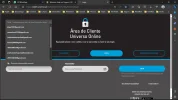
How I can delete some entries to LOGIN to several applications? I send a print screen to show you. I want to delete entries like "anamoises1970€gmail.com", "s996540037€gmail.com" and "s996540038£gmail.com".
Thanks for your help.
Hello,
To delete the entries in the login screen of several applications, you can follow these general steps:
Identify the application: Determine the specific application(s) which are displaying the unwanted entries.
Access login settings: Launch the application and navigate to the login or account settings page.
Locate saved entries: Look for an option that allows you to manage or delete saved login credentials. This could be labeled as "Saved Logins," "Saved Passwords," "Manage Accounts," or something similar.
Remove unwanted entries: Once you find the saved login entries, look for the ones you want to delete (such as "anamoises1970€gmail.com", "s996540037€gmail.com" and "s996540038£gmail.com"), and select the option...
Hello,
To delete the entries in the login screen of several applications, you can follow these general steps:
Identify the application: Determine the specific application(s) which are displaying the unwanted entries.
Access login settings: Launch the application and navigate to the login or account settings page.
Locate saved entries: Look for an option that allows you to manage or delete saved login credentials. This could be labeled as "Saved Logins," "Saved Passwords," "Manage Accounts," or something similar.
Remove unwanted entries: Once you find the saved login entries, look for the ones you want to delete (such as "anamoises1970€gmail.com", "s996540037€gmail.com" and "s996540038£gmail.com"), and select the option to delete or remove them.
Confirm deletion: In most cases, you will be asked to confirm the deletion. Confirm the removal of the unwanted login entries.
Repeat for other applications: If you have multiple applications with saved entries, repeat the above steps for each one.
Note: The exact steps may vary depending on the application or software you are using. If you provide more specific information about the applications you are referring to, I can give you more detailed instructions.
If you have any additional questions or need further assistance, feel free to ask.
The bot doesn't understand photos. You need to click the three dots and go into the saved credentials and remove the entries you no longer wish to show up.
Thank you for clarifying that! If this is about removing saved credentials (usernames, email addresses, or logins that appear in drop-down suggestions), here’s a detailed guide to help you clean them up in Edge:
Steps to Remove Saved Credentials in Microsoft Edge
Open Microsoft Edge:
Launch the browser and click on the three dots in the top-right corner to open the menu.
Access Settings:
From the menu, navigate to Settings.
Go to Profiles > Passwords:
Under the “Profiles” section, select Passwords. This is where Edge saves login credentials.
Find the Login You Want to Remove:
Scroll through the list of saved passwords to find the entries you no longer need.
Use the search bar if you have many saved credentials and need to locate a specific one.
Remove Individual Credentials:
Click on the three dots next to the entry you want to delete.
Select Delete to remove it from Edge permanently.
Disable Auto-Save (Optional):
If you’d rather Edge not save any credentials in the future, toggle off Offer to save passwords in the same Passwords menu.
Clearing Login Suggestions That Are Not Saved
If the unwanted usernames or email addresses appear in form fields but aren’t saved in Edge’s password manager, here’s how to remove them:
Go to a Login Page:
Navigate to the website where the unwanted suggestion appears.
Highlight the Entry:
Click into the username or email field and start typing. A drop-down list of suggestions will appear.
Delete the Entry:
Use the down arrow key to highlight the unwanted suggestion.
Press Shift + Delete on your keyboard to remove it.
Once done, these entries should no longer show up when you try to log in to that site. Let me know if you need further clarification or help!