

Upgrading to modern, AI‑ready PCs is no longer a niche IT initiative — it’s a strategic business decision that Dell and Microsoft are now selling as essential for productivity, security, and long‑term manageability in the enterprise. This IT Pro brief distills that pitch: move employees to Windows 11 Pro on AI‑enhanced Dell devices — including the new Copilot+ and “Plus” series — to gain faster workflows, built‑in hardware security, and simplified lifecycle management that support mission‑critical apps and hybrid work.
The upside is real — faster task completion, smoother hybrid work, and stronger hardware‑backed defenses — but the upside must be balanced against compatibility risks, costs, and the evolving nature of on‑device AI features. Treat vendor metrics and marketing claims as starting points for measurement, not guarantees, and build your refresh plan around verified wins that deliver measurable ROI and secure, manageable outcomes for the business.
Source: IT Pro Outshine with Dell PCs and Windows 11 - BANT
 Background
Why this matters now
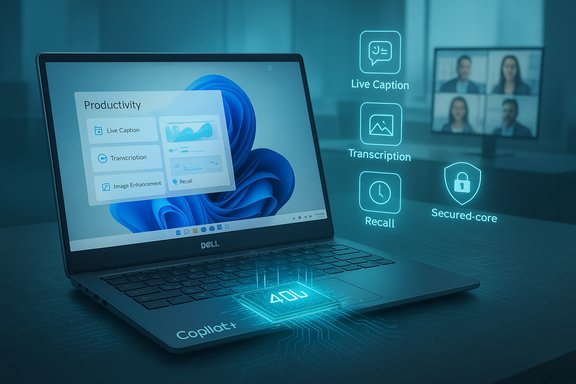
The PC market is pivoting from raw CPU/GPU performance to system designs that include dedicated neural processing hardware — NPUs (Neural Processing Units) — to accelerate on‑device AI features such as real‑time transcription, image processing, and enhanced video collaboration. Microsoft has defined a new device class called Copilot+ PCs that includes an NPU capable of 40+ TOPS (trillions of operations per second) alongside CPU and GPU silicon, and OEMs including Dell have incorporated those requirements into product lines marketed to businesses. Dell’s commercial messaging — reiterated in the IT Pro brief — recommends Windows 11 Pro for business and positions its modern hardware and services as a combined upgrade path that addresses performance, security, and manageability. Dell’s product pages and retail catalogs already highlight Copilot+‑qualified models, Windows 11 Pro bundles, and classification of devices into consumer, Pro, and Pro Max segments to help IT buyers decide at scale.What the IT Pro brief says (short summary)
- Upgrading to AI‑powered Dell PCs plus Windows 11 Pro can transform business productivity with AI‑enhanced tools.
- Windows 11 Pro devices make security and management simpler for hybrid workforces.
- Dell recommends Windows 11 Pro for business and highlights Copilot+ experiences that rely on NPUs and compatible silicon.
What is a Copilot+ PC and why NPUs matter
The technical baseline
A Copilot+ PC is a Windows 11 device that adds a high‑performance NPU to the traditional CPU/GPU stack. Microsoft’s published guidance specifies that many advanced Copilot+ experiences expect an NPU rated at 40+ TOPS, plus a minimum config of 16 GB RAM and 256 GB storage for full feature compatibility. These NPUs are intended to run inference and light model workloads locally, reducing latency, preserving privacy, and improving energy efficiency compared with cloud‑only processing.Real user benefits from on‑device AI
- Faster, offline‑capable features: live captioning, on‑device transcription, image coercion tasks, and assistance features such as Recall and Cocreate run with reduced round‑trip to cloud services.
- Power and performance balance: offloading suitable AI workloads to an NPU can free CPU/GPU cycles and improve battery life for typical office tasks.
- Privacy and latency: on‑device processing keeps sensitive content local and delivers immediate responsiveness in meeting and creative workflows.
Dell’s pitch: security, simplicity, and AI productivity
Security first — the Windows 11 Pro story
Dell’s brief emphasizes that Windows 11 Pro is "secure by design" and that modern devices ship with hardware‑backed protections such as TPM 2.0, BitLocker, virtualization‑based security, and options for Secured‑core PCs and Microsoft Pluton. Microsoft materials underline claims that organizations moving to Windows 11 report meaningful reductions in incidents in vendor‑commissioned surveys — a figure commonly cited as a 62% drop in security incidents — while also recommending Windows 11 Pro for business deployments. These security features are a cornerstone of Dell’s argument for hardware refresh. Caveat: the 62% figure originates from commissioned research and should be treated as directional rather than an absolute guarantee — it signals improved outcomes tied to modern hardware and enabled features, but real‑world results will vary by configuration, operations, and security posture.Simpler management and faster deployment
Dell and Microsoft both present Windows 11 Pro as easier to deploy and manage in business environments, citing faster setup and improved compatibility with existing management tools (e.g., Microsoft Endpoint Manager/Intune). The vendor narrative stresses that modern devices with Windows 11 Pro reduce administrative friction for imaging, policy enforcement, and automated update control — a practical benefit for IT teams juggling hybrid fleets.Productivity with built‑in AI features
Dell’s product pages and marketing highlight Copilot+ and other on‑device AI features (e.g., smarter video calls, automatic framing, local background removal, creative tools) as differentiators that can save time across common workflows. The promise: employees spend less time on repetitive tasks and more time on higher‑value work because the device itself helps with summarization, editing, and context recall.Strengths of Dell + Windows 11 Pro combination
- Integrated hardware/software stack: Dell’s alignment with Microsoft’s Copilot+ program yields devices that ship with certified NPUs and firmware tuned for Windows 11 AI features, enabling predictable behavior for supported experiences.
- Security posture: Out‑of‑the‑box protections such as TPM 2.0, BitLocker, and Secured‑core options reduce attack surface for endpoints and make centralized management of security features more straightforward.
- Manageability: Windows 11 Pro supports established enterprise management tooling, zero‑touch deployment, and automated updates, which simplifies rollouts of large device fleets. Dell ties these capabilities to lifecycle services and commercial support to reduce the operational burden on IT.
- Workplace productivity gains: For knowledge workers and creators, on‑device AI—when applicable—streamlines tasks like meeting notes, image edits, and content summarization, often with tangible time savings. Dell showcases examples that align with real‑world use cases in its marketing material.
- Device variety and roadmap: Dell’s revamped product taxonomy (Dell, Dell Pro, Dell Pro Max) and Copilot+ certified models offer choices across price and performance tiers for different teams and workloads. Community coverage reinforces that this clarity helps procurement and lifecycle planning.
Practical risks, limitations, and what IT should watch
1) Feature availability and NPU dependency
Many Copilot+ experiences explicitly require an NPU rated at 40+ TOPS. That means not every Windows 11 device will deliver the same features: organizations should verify which AI experiences require Copilot+ hardware, and whether those experiences are critical to the business case. Microsoft and OEMs note that some features arrive via Windows updates over time and may be region‑ or wave‑limited.2) App compatibility and the ARM question
ARM‑based Copilot+ devices (initially popular with Qualcomm silicon) can deliver excellent battery life, but legacy x86 apps, certain drivers, and GPU‑intensive workloads may face compatibility or performance pitfalls. Vendors claim upcoming Intel and AMD Copilot+ SKUs will address many of these concerns, but IT teams must test critical applications under target configurations before wide deployment. Independent commentary has repeatedly flagged ARM compatibility as a real, practical barrier for some businesses.3) Vendor research and performance claims
Some headline metrics — faster deployment percentages, incident reductions, and battery‑life claims — are derived from vendor‑commissioned studies or lab conditions. These figures are useful for directional planning but require validation in real workflows and with real user mixes. Treat benchmark and marketing numbers as starting points for pilot programs rather than guaranteed outcomes.4) Cost, procurement, and lifecycle complexity
Upgrading fleets to Copilot+‑capable hardware can be materially more expensive than traditional refreshes. Enterprises must balance the value of AI features against device TCO, support costs, and the timeline for ROI. Dell’s tiered nomenclature and modular repair features can help, but procurement teams need strict criteria to avoid overbuying for functions that will not be broadly used.5) Privacy, compliance, and data governance
While on‑device AI reduces cloud exposure for some workloads, Copilot features such as Recall and integrated assistants raise privacy and retention policy questions. IT teams must map data flows, retention windows, and legal/compliance implications before enabling broad recall or AI automation features across a regulated workforce.Deployment guidance for IT professionals
- Inventory and capability mapping
- Identify which endpoints physically can be upgraded to Windows 11 Pro and which require replacement.
- Map critical applications and test them on target Copilot+ SKUs (ARM, Intel, AMD) to detect compatibility or performance issues early.
- Define the business cases that need Copilot+
- Separate “must‑have” features (e.g., secure credential storage, BitLocker) from “nice‑to‑have” AI experiences.
- Pilot Copilot+ hardware in teams where AI features clearly accelerate workflows (e.g., creative teams, sales with heavy transcription needs, or localized translation).
- Run a controlled pilot
- Deploy a manageable pilot group (50–200 devices depending on size) with defined success metrics: time saved per task, compatibility incidents, security posture, and user satisfaction.
- Use MDM tools and Microsoft Endpoint Manager to measure deployment velocity and update behavior.
- Address security and compliance up front
- Enable hardware‑backed protections (TPM, Secure Boot), secure sign‑in (Windows Hello for Business), and centralized BitLocker key escrow for managed devices.
- Draft explicit policies for features that process personal or sensitive data — particularly any functionality that stores or indexes content locally.
- Procurement & lifecycle planning
- Negotiate flexible refresh terms and consider modular or service‑based support offerings where repairability and future‑proofing matter.
- Set upgrade windows aligned with Windows 10 end‑of‑support dates and budget cycles to avoid rushed, costly purchases. Vendor pages and industry commentary suggest focusing purchases on clear use cases in year one while monitoring software feature rollouts.
Cost vs. value: balancing the ledger
- Short‑term cost: Copilot+ models are priced at a premium versus standard business laptops, particularly for Pro Max or high‑NPU configurations. Buying decisions must weigh the incremental cost against measurable productivity gains.
- Mid‑term value: For roles that can reduce time spent on repetitive tasks (e.g., legal, marketing, HR), ROI timelines can compress as AI features cut hours from recurring processes.
- Operational savings: Improved security posture and simpler deployment can reduce incident‑driven downtime and administrative labor, but those savings depend on disciplined policy and patching practices.
- Procurement levers: Leasing, buyback, and step‑up programs help smooth refresh cycles. Dell’s tiered lineup and service bundles are designed to make these options available to business buyers.
The market picture: adoption signals and skepticism
Industry coverage and market analysts show growing interest in AI PCs but uneven adoption. Awareness among channel partners is high, yet many businesses are cautious because use cases are still emerging and some technical trade‑offs (ARM compatibility, app support) remain unresolved. Canalys and trade coverage indicate that while AI‑capable PCs are taking share, the subset that meets Copilot+ standards is smaller and adoption is concentrated in early‑adopter segments. This mixed picture argues for pragmatic pilots rather than wholesale early migration for every team. WindowsForum and community reporting also reflect the conversation: Dell’s rebrand, Copilot+ emphasis, and modular hardware moves make for positive reactions on ease of buying and repairability, while questions about AMD/Qualcomm options, battery claims, and pricing persist in public discussions.Recommendations — a short, actionable checklist
- Start with a targeted pilot focused on teams with the clearest AI productivity pathways (e.g., content creation, knowledge work, customer support).
- Validate critical line‑of‑business apps on your chosen Copilot+ SKU (ARM vs x86) before scaling.
- Treat vendor security claims as directional; perform technical verification against your compliance and threat models.
- Use Windows 11 Pro features (BitLocker, Windows Hello, TPM, Secured‑core where needed) as baseline controls on new devices.
- Negotiate flexible refresh and support terms with OEMs to avoid overcommitment while maintaining access to Copilot+ hardware.
Conclusion
Dell’s IT Pro brief captures a decisive industry pivot: business PCs are becoming AI endpoints, not just general compute devices, and Windows 11 Pro is being positioned as the management and security foundation for that shift. For enterprises, the practical path forward is deliberate: evaluate specific productivity gains from Copilot+ features, pilot with representative workloads, verify app compatibility, and then scale while enforcing robust security and governance.The upside is real — faster task completion, smoother hybrid work, and stronger hardware‑backed defenses — but the upside must be balanced against compatibility risks, costs, and the evolving nature of on‑device AI features. Treat vendor metrics and marketing claims as starting points for measurement, not guarantees, and build your refresh plan around verified wins that deliver measurable ROI and secure, manageable outcomes for the business.
Source: IT Pro Outshine with Dell PCs and Windows 11 - BANT
