

Dell’s PowerEdge R4715 and R5715 are single-socket AMD EPYC 9005 rack servers launched in March 2026 for SMB and midmarket buyers that need configurable compute, storage, virtualization, database, and backup infrastructure without stepping into Dell’s higher-end accelerator-ready PowerEdge systems. That sounds like a conventional product-positioning sentence, but the more interesting story is economic rather than architectural. Dell is selling these boxes as workload-fit machines at a moment when many smaller organizations are trying to cut licensing waste, simplify operations, and avoid betting the business on one hypervisor. The result is less a pair of servers than a practical menu for organizations that can no longer afford to buy infrastructure by habit.
The R4715 and R5715 are not the PowerEdge systems Dell would lead with for GPU acceleration, dense AI development, or exotic I/O builds. That is the point. These machines live in the space where most SMB infrastructure actually exists: databases that need predictable throughput, file services that need enough IOPS to keep users from complaining, virtualization hosts that must be boringly dependable, and backup targets that should not cost more than the workloads they protect.
The useful way to read the two products is as a matrix. The R4715 is the 1U choice when compute density and flash performance matter more than front-bay capacity. The R5715 is the 2U choice when 3.5-inch storage, larger internal capacity, and more expansion headroom become the priority. Both use a single 5th Generation AMD EPYC 9005 processor, support up to 24 DDR5 RDIMMs, and sit inside Dell’s current management and support stack.
That common platform matters because SMB purchasing is rarely as clean as enterprise architecture diagrams imply. A customer may need one host for a line-of-business database, another for shared storage, and a third for backup or edge consolidation. The channel partner designing that environment wants a small number of repeatable patterns, not a sprawling parts catalog that turns every quote into a new engineering exercise.
Dell’s bet is that two chassis and four CPU options can cover a wide range of practical deployments without forcing buyers into the false economy of overbuying. In a world where software licensing is often tied to cores, sockets, or virtualization rights, the right server is not always the one with the largest number in the benchmark table. Sometimes it is the one that gives an IT generalist enough performance with the fewest expensive consequences.
The R5715’s 2U design tells a different story. It supports the same processor family and memory ceiling, but adds a fourth PCIe Gen5 slot and much more front-bay storage flexibility. In the 12-bay 3.5-inch configuration, it can reach 288TB of raw capacity, which puts it squarely in the territory of backup repositories, bulk file storage, surveillance, branch-office consolidation, and capacity-heavy virtualization support roles.
That distinction is not merely cosmetic. A 1U all-flash server and a 2U hard-drive-heavy server may share a CPU family, a management plane, and a sales brochure, but they solve different problems. Treating them as interchangeable would be the first mistake; treating them as two ends of a configurable SMB platform is much closer to the truth.
The absence of GPU, DPU, and Fibre Channel support is also clarifying. Dell is not pretending these are universal platforms. Customers that need accelerators, more cores, or broader expansion can move up to systems such as the R6715 and R7715, which sit higher in the AMD PowerEdge stack. That segmentation may annoy buyers who want every feature in every chassis, but it gives partners a cleaner decision tree.
For SMBs, clean decision trees are valuable. The wrong system in this market is often not dramatically underpowered; it is slightly too complicated, slightly too expensive to license, and slightly too hard for a lean team to maintain. The R4715 and R5715 try to avoid that trap by narrowing the question to a more useful one: is this workload hungry for fast storage and compute density, or is it hungry for capacity and operational simplicity?
The 32-core part is the obvious top choice for compute-bound workloads. It gives the R4715 the most headroom in database testing and leaves the most room for consolidation. But the economic question is whether the workload and the licensing model justify those extra cores over the life of the server.
The 24-core EPYC 9255 looks like the interesting middle. In the provided HammerDB testing, it pushed the R4715 beyond one million NOPM in the CPU-intensive MariaDB profile and reached 740,574 NOPM in the I/O-intensive profile. That makes it the sort of SKU a partner can recommend when the customer genuinely needs transactional throughput but does not want to pay for cores that produce diminishing returns.
The 16-core EPYC 9135 may be the most politically useful part in Windows-heavy environments. It aligns naturally with the minimum Windows Server core licensing floor, which makes it easier to explain to a buyer who understands invoices better than CPU topology. It also delivered a substantial jump over the 8-core option in database testing, reaching 737,445 NOPM in the CPU-intensive profile and 493,093 NOPM in the I/O-intensive profile.
The 8-core EPYC 9015 is not the weak member of the family; it is the honest one. It is the chip for storage-forward workloads, backup targets, small virtualization nodes, and roles where the processor should not be the most expensive part of the design. In an SMB budget meeting, “enough CPU” is not a compromise if it avoids years of unnecessary per-core software cost.
The 8-core EPYC 9015 reached 480,818 NOPM in the CPU-intensive profile and 296,105 NOPM in the I/O-intensive profile. Those are not headline-grabbing numbers next to the larger parts, but they are respectable for smaller workloads, departmental databases, and roles where cost containment matters. More importantly, they define the low end of the usable range rather than a token configuration to fill a price point.
The 16-core EPYC 9135 produced the largest subjective shift in the curve, because it moved the platform from modest to broadly capable. That jump is the one many SMBs will feel most clearly: enough threads to absorb concurrency, enough frequency to keep latency-sensitive work moving, and enough licensing sanity to survive procurement scrutiny. It is the CPU that says, “We bought what the workload needed,” rather than, “We bought what looked safest.”
The 24-core EPYC 9255 crossed the one-million NOPM line in the CPU-intensive test, which gives it a psychological advantage as well as a performance one. Round-number thresholds are not architecture, but they do influence buying behavior. The more meaningful point is that it reached that level without making the 32-core part look mandatory for many SMB database deployments.
The 32-core EPYC 9335, unsurprisingly, topped the chart with 1,133,714 NOPM in the CPU-intensive workload and 910,321 NOPM in the I/O-intensive workload. That makes it the best choice when the database host is expected to carry heavier concurrency or consolidate multiple application back ends. But the data also shows why a competent partner will not automatically spec the largest CPU: the best benchmark result is not always the best business result.
That last phrase is doing a lot of work. Hard drives are not dead; they are just badly misused when buyers expect them to behave like NVMe. The R5715’s 3.5-inch bays are compelling for capacity economics, especially for backups, archives, bulk shares, and workloads that are sequential or moderately concurrent. They become less compelling when small random I/O defines the user experience.
The FIO results make the difference impossible to finesse. The R5715 RAID 6 HDD array delivered sequential write bandwidth up to 3.7GB/s and sequential read bandwidth up to 2.2GB/s in the 4-thread tests. For traditional file serving and backup ingestion, that is useful performance, not nostalgia.
The random numbers tell the harder truth. The HDD array stayed under 1,300 IOPS in 4K random-write testing, with latency rising above 100ms in the 4-thread case. The SSD-equipped R4715, by contrast, delivered more than 4 million IOPS in 4K random workloads with sub-millisecond latency. That is not a small tier difference; it is a different class of user experience.
For SMBs, the implication is simple but often ignored. If the workload is backup, bulk storage, or large sequential movement, the R5715 with hard drives is rational. If the workload is active VM storage, multi-user application data, or anything with painful random I/O, all-flash is not a luxury feature. It is the difference between a server that benchmarks adequately and one that users stop complaining about.
The R4715 and R5715 support the familiar spread: VMware ESXi, Microsoft Hyper-V, Proxmox VE, and Linux KVM distributions. The value is not merely that these operating environments can run. It is that Dell’s management and provisioning layer remains consistent underneath them.
That consistency matters when organizations run two hypervisors in parallel. A shop might keep production workloads on VMware while piloting Proxmox, run Hyper-V for Windows-centric roles, and use KVM for a specific Linux-heavy application. The more the hypervisor layer fragments, the more valuable the hardware layer’s consistency becomes.
This is where Dell’s channel story becomes more than a sales slide. A VAR supporting dozens of small customers cannot afford a unique management model for every customer’s virtualization preference. If iDRAC, firmware workflows, health monitoring, and support escalation remain familiar, the partner can tolerate more variation above the hardware line.
The broader lesson is that hypervisor flexibility is no longer just a feature checkbox. It is a hedge. For SMBs with limited staff and limited patience for platform drama, a server that can follow the customer’s virtualization strategy rather than dictate it has real value.
iDRAC10 and OpenManage Enterprise give the R4715 and R5715 the same management vocabulary as the rest of the 17th Generation PowerEdge family. Remote console access, firmware management, hardware health monitoring, and Redfish automation are not glamorous features, but they are the features that prevent a two-person IT team from burning an afternoon on a task that should have taken ten minutes. For channel partners, they are the difference between scalable support and endless bespoke heroics.
The security story also lands differently in SMB environments than it does in large enterprises. Silicon root of trust, signed firmware, secured component verification, TPM 2.0, and FIPS-related capabilities may sound like compliance boilerplate until a customer has to prove procurement integrity, answer an insurance questionnaire, or explain how firmware updates are controlled. Dell’s advantage is that these features arrive as part of a known platform rather than as a research project.
Support and supply chain are similarly unromantic but decisive. ProSupport and ProDeploy services give lean organizations access to skills they do not employ internally. Predictable lead times help partners close deals without building every proposal around availability risk. None of that shows up in HammerDB, but all of it affects whether a server is a good SMB product.
This is why the R4715 and R5715 should not be judged only as hardware. They are hardware wrapped in a management, support, and procurement model. For large enterprises, that may be table stakes. For SMBs, it is often the difference between infrastructure that can be managed and infrastructure that merely can be purchased.
The tested deployment used Proxmox Backup Server 4.2.0 to protect the virtual machines behind a Proxmox community Discord server environment. That is not a Fortune 100 disaster recovery simulation, but it is exactly the kind of real-world workload SMBs and community-scale infrastructure operators run. Backup systems are judged by consistency, capacity, restore practicality, and network fit more than by synthetic peak numbers.
The reported bottleneck was 1GbE networking, not the server’s core architecture. That is an important finding because it points to the most obvious upgrade path. Moving the R5715 to 10GbE or 25GbE via OCP networking would likely improve backup and restore throughput far more than swapping in a larger CPU.
That is the kind of result buyers should want. If the system’s next constraint is a straightforward networking upgrade, the platform has been sized sensibly. If the next constraint were an overloaded CPU, a starved memory configuration, or an underspecified chassis, the original design would look much less defensible.
Backup infrastructure is often where SMBs make emotional purchasing mistakes. Some underbuy because backups feel like insurance rather than production. Others overbuy because restore anxiety is real. The R5715’s appeal is that it can be configured into a middle path: enough capacity, enough manageability, enough upgrade headroom, and no pretense that every backup target must be an all-flash performance appliance.
That sales motion is simpler than asking a small customer to understand the entire PowerEdge portfolio. It also gives the partner a growth path. A customer can begin with these value-optimized single-socket systems and later move into R6715, R7715, or larger dual-socket systems if the workload evolves into acceleration, higher core density, or heavier expansion requirements.
The key is that Dell keeps the management plane consistent across that path. The customer does not have to relearn hardware operations when moving up the stack, and the partner does not need to retrain every technician for every incremental upsell. That reduces friction, which is one of the most underrated forces in SMB infrastructure decisions.
This is also why Dell’s single-socket message has renewed force. Many older environments still carry dual-socket habits from a time when performance, memory capacity, and I/O demanded it. Modern single-socket EPYC platforms can satisfy many of those roles with fewer sockets, fewer cores to license, and less platform complexity. The R4715 and R5715 are not revolutionary for making that argument, but they are timely.
The caution is that “single socket” should not become a new superstition replacing the old one. Some workloads genuinely need more cores, more memory, more PCIe devices, or accelerator support. Dell’s portfolio acknowledges that. The job for buyers and partners is to resist both forms of laziness: buying too much because that is how it was always done, and buying too little because the savings look good on the first quote.
The data supports Dell’s positioning, with an important caveat: the right configuration matters more than the logo on the bezel. An R5715 full of hard drives is a sensible backup and capacity platform, but it is the wrong answer for latency-sensitive random I/O. An R4715 with NVMe can push serious transactional and file-service performance, but it will not win a cost-per-terabyte fight against a 12-bay 3.5-inch R5715. A 32-core CPU wins the top-line database result, but a 16-core or 24-core chip may win the lifetime-cost argument.
That is the SMB reality Dell is aiming at. Smaller organizations do not need miniature versions of hyperscale infrastructure; they need systems that map cleanly to the jobs they actually run, with management tools that do not assume a deep bench of specialists. The PowerEdge R4715 and R5715 make their case by accepting that constraint rather than trying to wish it away, and their long-term success will depend on whether buyers and partners keep making those configuration choices with the same discipline.
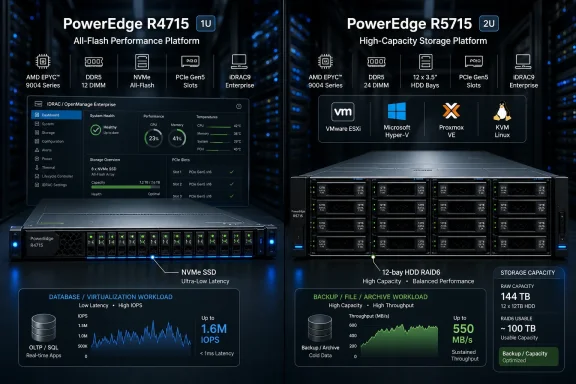 Dell’s Real Pitch Is Right-Sizing, Not Raw Horsepower
The R4715 and R5715 are not the PowerEdge systems Dell would lead with for GPU acceleration, dense AI development, or exotic I/O builds. That is the point. These machines live in the space where most SMB infrastructure actually exists: databases that need predictable throughput, file services that need enough IOPS to keep users from complaining, virtualization hosts that must be boringly dependable, and backup targets that should not cost more than the workloads they protect.The useful way to read the two products is as a matrix. The R4715 is the 1U choice when compute density and flash performance matter more than front-bay capacity. The R5715 is the 2U choice when 3.5-inch storage, larger internal capacity, and more expansion headroom become the priority. Both use a single 5th Generation AMD EPYC 9005 processor, support up to 24 DDR5 RDIMMs, and sit inside Dell’s current management and support stack.
That common platform matters because SMB purchasing is rarely as clean as enterprise architecture diagrams imply. A customer may need one host for a line-of-business database, another for shared storage, and a third for backup or edge consolidation. The channel partner designing that environment wants a small number of repeatable patterns, not a sprawling parts catalog that turns every quote into a new engineering exercise.
Dell’s bet is that two chassis and four CPU options can cover a wide range of practical deployments without forcing buyers into the false economy of overbuying. In a world where software licensing is often tied to cores, sockets, or virtualization rights, the right server is not always the one with the largest number in the benchmark table. Sometimes it is the one that gives an IT generalist enough performance with the fewest expensive consequences.
The Chassis Split Is a Workload Argument in Metal
The R4715’s 1U design makes sense for organizations that are short on rack space or trying to concentrate compute into fewer rack units. It supports up to three PCIe Gen5 slots and storage options that include small-form-factor SAS/SATA and U.2 NVMe configurations. In the tested flash build, eight Samsung PM9D3a NVMe SSDs gave the platform the kind of storage substrate that can actually keep up with a transactional database or high-performance Windows Server workload.The R5715’s 2U design tells a different story. It supports the same processor family and memory ceiling, but adds a fourth PCIe Gen5 slot and much more front-bay storage flexibility. In the 12-bay 3.5-inch configuration, it can reach 288TB of raw capacity, which puts it squarely in the territory of backup repositories, bulk file storage, surveillance, branch-office consolidation, and capacity-heavy virtualization support roles.
That distinction is not merely cosmetic. A 1U all-flash server and a 2U hard-drive-heavy server may share a CPU family, a management plane, and a sales brochure, but they solve different problems. Treating them as interchangeable would be the first mistake; treating them as two ends of a configurable SMB platform is much closer to the truth.
The absence of GPU, DPU, and Fibre Channel support is also clarifying. Dell is not pretending these are universal platforms. Customers that need accelerators, more cores, or broader expansion can move up to systems such as the R6715 and R7715, which sit higher in the AMD PowerEdge stack. That segmentation may annoy buyers who want every feature in every chassis, but it gives partners a cleaner decision tree.
For SMBs, clean decision trees are valuable. The wrong system in this market is often not dramatically underpowered; it is slightly too complicated, slightly too expensive to license, and slightly too hard for a lean team to maintain. The R4715 and R5715 try to avoid that trap by narrowing the question to a more useful one: is this workload hungry for fast storage and compute density, or is it hungry for capacity and operational simplicity?
Four EPYC Choices Make the Licensing Conversation Unavoidable
Dell offers four AMD EPYC 9005 options across both systems: the 32-core EPYC 9335, 24-core EPYC 9255, 16-core EPYC 9135, and 8-core EPYC 9015. All four sit on AMD’s Zen 5 architecture and share the same basic platform advantages around memory and PCIe connectivity. The spread is deliberate enough to look less like a CPU menu and more like a licensing strategy.The 32-core part is the obvious top choice for compute-bound workloads. It gives the R4715 the most headroom in database testing and leaves the most room for consolidation. But the economic question is whether the workload and the licensing model justify those extra cores over the life of the server.
The 24-core EPYC 9255 looks like the interesting middle. In the provided HammerDB testing, it pushed the R4715 beyond one million NOPM in the CPU-intensive MariaDB profile and reached 740,574 NOPM in the I/O-intensive profile. That makes it the sort of SKU a partner can recommend when the customer genuinely needs transactional throughput but does not want to pay for cores that produce diminishing returns.
The 16-core EPYC 9135 may be the most politically useful part in Windows-heavy environments. It aligns naturally with the minimum Windows Server core licensing floor, which makes it easier to explain to a buyer who understands invoices better than CPU topology. It also delivered a substantial jump over the 8-core option in database testing, reaching 737,445 NOPM in the CPU-intensive profile and 493,093 NOPM in the I/O-intensive profile.
The 8-core EPYC 9015 is not the weak member of the family; it is the honest one. It is the chip for storage-forward workloads, backup targets, small virtualization nodes, and roles where the processor should not be the most expensive part of the design. In an SMB budget meeting, “enough CPU” is not a compromise if it avoids years of unnecessary per-core software cost.
The Database Results Reward Balance More Than Bragging Rights
The HammerDB MariaDB testing is the cleanest example of why Dell’s configuration matrix matters. On the R4715 with eight NVMe SSDs, the database workload scaled predictably as the CPUs moved from 8 to 16 to 24 to 32 cores. That is exactly what a buyer wants to see from a flash-backed database host: the storage does not choke early, and additional CPU capacity translates into usable work.The 8-core EPYC 9015 reached 480,818 NOPM in the CPU-intensive profile and 296,105 NOPM in the I/O-intensive profile. Those are not headline-grabbing numbers next to the larger parts, but they are respectable for smaller workloads, departmental databases, and roles where cost containment matters. More importantly, they define the low end of the usable range rather than a token configuration to fill a price point.
The 16-core EPYC 9135 produced the largest subjective shift in the curve, because it moved the platform from modest to broadly capable. That jump is the one many SMBs will feel most clearly: enough threads to absorb concurrency, enough frequency to keep latency-sensitive work moving, and enough licensing sanity to survive procurement scrutiny. It is the CPU that says, “We bought what the workload needed,” rather than, “We bought what looked safest.”
The 24-core EPYC 9255 crossed the one-million NOPM line in the CPU-intensive test, which gives it a psychological advantage as well as a performance one. Round-number thresholds are not architecture, but they do influence buying behavior. The more meaningful point is that it reached that level without making the 32-core part look mandatory for many SMB database deployments.
The 32-core EPYC 9335, unsurprisingly, topped the chart with 1,133,714 NOPM in the CPU-intensive workload and 910,321 NOPM in the I/O-intensive workload. That makes it the best choice when the database host is expected to carry heavier concurrency or consolidate multiple application back ends. But the data also shows why a competent partner will not automatically spec the largest CPU: the best benchmark result is not always the best business result.
Spinning Disks Still Have a Job, Just Not Every Job
The R5715 configuration tested with 12 20TB hard drives in RAID 6 and the 8-core EPYC 9015 makes the other side of the argument. In the CPU-intensive HammerDB profile, the system reached 484,715 NOPM, very close to the 8-core R4715 flash result. In the I/O-intensive profile, it peaked at 308,012 NOPM, showing that a large HDD array can still support moderate transactional work when expectations are realistic.That last phrase is doing a lot of work. Hard drives are not dead; they are just badly misused when buyers expect them to behave like NVMe. The R5715’s 3.5-inch bays are compelling for capacity economics, especially for backups, archives, bulk shares, and workloads that are sequential or moderately concurrent. They become less compelling when small random I/O defines the user experience.
The FIO results make the difference impossible to finesse. The R5715 RAID 6 HDD array delivered sequential write bandwidth up to 3.7GB/s and sequential read bandwidth up to 2.2GB/s in the 4-thread tests. For traditional file serving and backup ingestion, that is useful performance, not nostalgia.
The random numbers tell the harder truth. The HDD array stayed under 1,300 IOPS in 4K random-write testing, with latency rising above 100ms in the 4-thread case. The SSD-equipped R4715, by contrast, delivered more than 4 million IOPS in 4K random workloads with sub-millisecond latency. That is not a small tier difference; it is a different class of user experience.
For SMBs, the implication is simple but often ignored. If the workload is backup, bulk storage, or large sequential movement, the R5715 with hard drives is rational. If the workload is active VM storage, multi-user application data, or anything with painful random I/O, all-flash is not a luxury feature. It is the difference between a server that benchmarks adequately and one that users stop complaining about.
Hypervisor Choice Has Become an Infrastructure Risk
The article’s virtualization angle is more important than it might have been a few years ago. SMBs and midmarket organizations are reevaluating virtualization assumptions, whether because of cost, licensing changes, platform strategy, or the simple desire to avoid being trapped. That does not mean every organization is abandoning VMware, nor does it mean every alternative is automatically mature enough for every environment. It means the default answer is no longer as default as it used to be.The R4715 and R5715 support the familiar spread: VMware ESXi, Microsoft Hyper-V, Proxmox VE, and Linux KVM distributions. The value is not merely that these operating environments can run. It is that Dell’s management and provisioning layer remains consistent underneath them.
That consistency matters when organizations run two hypervisors in parallel. A shop might keep production workloads on VMware while piloting Proxmox, run Hyper-V for Windows-centric roles, and use KVM for a specific Linux-heavy application. The more the hypervisor layer fragments, the more valuable the hardware layer’s consistency becomes.
This is where Dell’s channel story becomes more than a sales slide. A VAR supporting dozens of small customers cannot afford a unique management model for every customer’s virtualization preference. If iDRAC, firmware workflows, health monitoring, and support escalation remain familiar, the partner can tolerate more variation above the hardware line.
The broader lesson is that hypervisor flexibility is no longer just a feature checkbox. It is a hedge. For SMBs with limited staff and limited patience for platform drama, a server that can follow the customer’s virtualization strategy rather than dictate it has real value.
Dell’s Management Stack Is the Quiet Moat
The PowerEdge story often begins with silicon, because processors are easy to compare and benchmarks make clean charts. But SMB infrastructure usually fails or succeeds in the operational middle: patching firmware, diagnosing hardware faults, replacing components, documenting configurations, and getting help before a small outage becomes a business event. That is where Dell’s ecosystem does its most important work.iDRAC10 and OpenManage Enterprise give the R4715 and R5715 the same management vocabulary as the rest of the 17th Generation PowerEdge family. Remote console access, firmware management, hardware health monitoring, and Redfish automation are not glamorous features, but they are the features that prevent a two-person IT team from burning an afternoon on a task that should have taken ten minutes. For channel partners, they are the difference between scalable support and endless bespoke heroics.
The security story also lands differently in SMB environments than it does in large enterprises. Silicon root of trust, signed firmware, secured component verification, TPM 2.0, and FIPS-related capabilities may sound like compliance boilerplate until a customer has to prove procurement integrity, answer an insurance questionnaire, or explain how firmware updates are controlled. Dell’s advantage is that these features arrive as part of a known platform rather than as a research project.
Support and supply chain are similarly unromantic but decisive. ProSupport and ProDeploy services give lean organizations access to skills they do not employ internally. Predictable lead times help partners close deals without building every proposal around availability risk. None of that shows up in HammerDB, but all of it affects whether a server is a good SMB product.
This is why the R4715 and R5715 should not be judged only as hardware. They are hardware wrapped in a management, support, and procurement model. For large enterprises, that may be table stakes. For SMBs, it is often the difference between infrastructure that can be managed and infrastructure that merely can be purchased.
The Backup Use Case Shows the R5715 at Its Most Sensible
The Proxmox Backup Server test is a useful corrective to benchmark maximalism. The R5715 with an 8-core EPYC 9015 and 12 hard drives is not trying to beat an all-flash host at random I/O. It is trying to be a large, economical, manageable target for virtual machine backups. In that role, the configuration makes sense.The tested deployment used Proxmox Backup Server 4.2.0 to protect the virtual machines behind a Proxmox community Discord server environment. That is not a Fortune 100 disaster recovery simulation, but it is exactly the kind of real-world workload SMBs and community-scale infrastructure operators run. Backup systems are judged by consistency, capacity, restore practicality, and network fit more than by synthetic peak numbers.
The reported bottleneck was 1GbE networking, not the server’s core architecture. That is an important finding because it points to the most obvious upgrade path. Moving the R5715 to 10GbE or 25GbE via OCP networking would likely improve backup and restore throughput far more than swapping in a larger CPU.
That is the kind of result buyers should want. If the system’s next constraint is a straightforward networking upgrade, the platform has been sized sensibly. If the next constraint were an overloaded CPU, a starved memory configuration, or an underspecified chassis, the original design would look much less defensible.
Backup infrastructure is often where SMBs make emotional purchasing mistakes. Some underbuy because backups feel like insurance rather than production. Others overbuy because restore anxiety is real. The R5715’s appeal is that it can be configured into a middle path: enough capacity, enough manageability, enough upgrade headroom, and no pretense that every backup target must be an all-flash performance appliance.
The Channel Wins When the Menu Is Small Enough to Explain
For VARs and system integrators, the R4715/R5715 matrix is attractive because it turns infrastructure planning into a set of repeatable conversations. Is the customer constrained by rack space, transactional performance, and random I/O? Start with the R4715. Is the customer constrained by capacity, backup windows, and cost per terabyte? Start with the R5715. Is the software bill tied to cores? Be careful before moving past 16 or 24.That sales motion is simpler than asking a small customer to understand the entire PowerEdge portfolio. It also gives the partner a growth path. A customer can begin with these value-optimized single-socket systems and later move into R6715, R7715, or larger dual-socket systems if the workload evolves into acceleration, higher core density, or heavier expansion requirements.
The key is that Dell keeps the management plane consistent across that path. The customer does not have to relearn hardware operations when moving up the stack, and the partner does not need to retrain every technician for every incremental upsell. That reduces friction, which is one of the most underrated forces in SMB infrastructure decisions.
This is also why Dell’s single-socket message has renewed force. Many older environments still carry dual-socket habits from a time when performance, memory capacity, and I/O demanded it. Modern single-socket EPYC platforms can satisfy many of those roles with fewer sockets, fewer cores to license, and less platform complexity. The R4715 and R5715 are not revolutionary for making that argument, but they are timely.
The caution is that “single socket” should not become a new superstition replacing the old one. Some workloads genuinely need more cores, more memory, more PCIe devices, or accelerator support. Dell’s portfolio acknowledges that. The job for buyers and partners is to resist both forms of laziness: buying too much because that is how it was always done, and buying too little because the savings look good on the first quote.
The Numbers Point to a Practical Buying Pattern
The most useful lesson from the testing is that each configuration has a natural home, and those homes are not interchangeable.- The R4715 with NVMe storage is the better fit when low latency, high random I/O, and dense compute matter more than raw drive capacity.
- The R5715 with 3.5-inch hard drives is the better fit when capacity economics, backup retention, and sequential throughput dominate the workload.
- The 24-core EPYC 9255 appears to be the strongest database middle ground when the buyer wants high transactional throughput without immediately jumping to the 32-core licensing footprint.
- The 16-core EPYC 9135 is especially compelling for Windows-centric SMBs because it aligns with the practical licensing floor while offering a major performance step over the 8-core part.
- The 8-core EPYC 9015 should not be dismissed, because backup targets and storage-forward roles often need platform reliability and capacity more than additional cores.
- The first upgrade for a backup-focused R5715 may be networking rather than CPU, especially where 1GbE still limits backup and restore windows.
Dell’s SMB Bet Depends on Discipline
The R4715 and R5715 are strongest when they are treated as workload-specific tools rather than generic “new servers.” Dell has built enough flexibility into the pair to cover databases, virtualization, Windows file services, and backup targets, but not so much that the products lose their shape. That discipline is refreshing in a market where every system is often marketed as capable of everything.The data supports Dell’s positioning, with an important caveat: the right configuration matters more than the logo on the bezel. An R5715 full of hard drives is a sensible backup and capacity platform, but it is the wrong answer for latency-sensitive random I/O. An R4715 with NVMe can push serious transactional and file-service performance, but it will not win a cost-per-terabyte fight against a 12-bay 3.5-inch R5715. A 32-core CPU wins the top-line database result, but a 16-core or 24-core chip may win the lifetime-cost argument.
That is the SMB reality Dell is aiming at. Smaller organizations do not need miniature versions of hyperscale infrastructure; they need systems that map cleanly to the jobs they actually run, with management tools that do not assume a deep bench of specialists. The PowerEdge R4715 and R5715 make their case by accepting that constraint rather than trying to wish it away, and their long-term success will depend on whether buyers and partners keep making those configuration choices with the same discipline.
References
- Primary source: storagereview.com
Published: 2026-06-05T14:40:14.918233
From Database and Virtualized Workloads to Backup: Dell PowerEdge R4715 and R5715 for SMB Realities - StorageReview.com
SMB AMD EPYC Workload Guide: We test Dell PowerEdge R4715 and R5715 across database, backup, and Windows shared storage. www.storagereview.com
- Related coverage: dell.com
Cut costs, not performance with single-socket PowerEdge | Dell
Discover how single-socket Dell PowerEdge R4715 and R5715 servers deliver dual-socket-class performance, reduce licensing costs, and boost efficiency for SMB and midmarket IT teams.www.dell.com - Related coverage: feedit.cz
Dell Technologies uvedla dva nové jednosocketové servery s procesory AMD EPYC – FeedIT.cz
Praha, 28. dubna 2026 – Společnost Dell Technologies uvádí na český trh dva nové modely serverů 17. generace v jednosocketovém provedení. Modely PowerEdge R4715 a R5715 využívají procesory AMD EPYC 5 a nabízí výkon, který dokáže nahradit i starší modely se dvěma CPU. Jsou tak vhodné například pro vy www.feedit.cz
- Related coverage: letsdatascience.com
Dell Targets SMBs With PowerEdge R4715 | Let's Data Science
Dell on March 31, 2026 introduces the PowerEdge R4715, a 1U single-socket server based on 5th Generation AMD EPYC processors targeting SMB and midmarket customers. The R4715 emphasizes licensing efficiency, operational simplicity, and storage/I/O flexibility with up to a 32-core EPYC 9335, 24... letsdatascience.com
- Related coverage: delltechnologies.com
- Related coverage: enterprisetechprovider.com
How Dell PowerEdge Single‑Socket Servers with AMD EPYC Processors Help Partners Grow
The Dell PowerEdge R4715 and R5715 with AMD EPYC processors help you stay competitive in situations where AMD is the preferred platformwww.enterprisetechprovider.com
- Related coverage: datacenterdynamics.com
Dell announces PowerStore Elite storage platform, unveils 18th generation of PowerEdge servers - DCD
Company says the hardware represents a "reimagining" of the modern data centerwww.datacenterdynamics.com - Related coverage: crn.com
2223853459
Two professionals discuss work-related tasks in a modern office space, highlighting teamwork, collaboration, and productivity in a contemporary corporate setting.www.crn.com
