

Dell’s SupportAssist Remediation 5.5.16.0 update, released at the end of April 2026, is reportedly triggering CRITICAL_PROCESS_DIED blue screens and reboot loops on some Windows 11 Dell and Alienware PCs, with users tracing crashes to DellSupportAssistRemediationService.exe rather than Windows itself. The fix, for now, is not a Windows rollback or a BIOS ritual. It is to disable or uninstall the Dell recovery component that was supposed to make the machine safer.
That irony is doing a lot of work here. SupportAssist exists to diagnose, repair, and recover Dell systems when things go wrong; in this case, it appears to be the thing making systems unusable. The larger lesson is uncomfortable for every PC vendor: when deeply privileged helper software breaks, it does not fail like an ordinary app — it can fail like infrastructure.
The emerging pattern is specific enough to be useful. Users in Dell’s own community forums, Reddit threads, and subsequent reports from Windows-focused outlets describe machines that crash roughly every 30 to 40 minutes, often with the stop code CRITICAL_PROCESS_DIED. Several reports point to Dell SupportAssist Remediation version 5.5.16.0 and the related Dell SupportAssist OS Recovery Plugin, both tied to an April 30 release.
The affected hardware list is still being assembled from user reports rather than a formal Dell advisory with a complete matrix. XPS 15 9530 systems are among the clearest examples, and Alienware systems have also appeared in reports. The important point for administrators is not that one model is cursed; it is that a shared support component appears capable of taking down otherwise different machines.
That is why this is not just another “blue screen after an update” story. Windows users have been conditioned to suspect Patch Tuesday, drivers, firmware, or the latest cumulative update whenever a PC suddenly starts misbehaving. Here, crash dump analysis by users using Microsoft’s WinDbg reportedly points toward Dell’s own remediation service, not a Windows component as the initiating culprit.
Dell has reportedly acknowledged that version 5.5.16.0 of Dell SupportAssist Remediation or Alienware SupportAssist Remediation can cause BSODs and is working on a resolution. Until that resolution arrives, the company’s practical advice is blunt: remove the software. That is not the sort of sentence any vendor wants attached to its recovery stack.
But it matters. Modern Windows PCs are not just Windows PCs; they are bundles of firmware services, driver packages, telemetry agents, update orchestrators, recovery environments, warranty tools, audio consoles, battery managers, hotkey daemons, and vendor-branded “experiences.” Much of it runs quietly, with privileges users rarely understand and schedules users never configured.
That is the hidden bargain of the OEM Windows ecosystem. Vendors promise a more supported machine by adding layers of automation above and below Windows. The user gets driver updates, hardware diagnostics, service-tag awareness, recovery images, and sometimes proactive support; the cost is a larger trusted computing base made up of software that is not always scrutinized like the operating system itself.
When that bargain works, nobody notices. When it breaks, a background recovery service becomes indistinguishable from malware in its practical effect: the machine reboots without permission, work disappears, and the owner loses confidence in the device. Dell is hardly alone in shipping such utilities, but SupportAssist is a particularly sharp example because it is supposed to be the thing users turn to when everything else fails.
That depth is the point of SupportAssist Remediation. It is not merely a tray icon with a friendly logo. It is part of a recovery and repair pipeline designed to monitor the system and help restore it when something goes wrong. The service runs in the background and interacts with parts of Windows that ordinary applications never touch.
The CRITICAL_PROCESS_DIED stop code is especially brutal in this context because it communicates that Windows has lost a process it considers essential to safe operation. Whether the exact chain involves a service failure, dependency failure, driver interaction, or recovery component misbehavior is for Dell and Microsoft’s debugging teams to fully untangle. For users, the observable fact is simpler: the remediation service is correlated with repeated bugchecks, and disabling or removing it appears to stop the loop for many affected machines.
That is the operational nightmare for IT teams. A component installed for resilience becomes a scheduled crash generator. Worse, the cadence reported by users — about every half hour in many cases — makes the machine just stable enough to log in and attempt a fix, but not stable enough to ignore.
After a reboot, affected systems should no longer be starting the problematic service automatically. This is the lighter-touch approach because it leaves other Dell tools in place while stopping the component most closely associated with the crash reports.
The more aggressive route is to remove Dell SupportAssist Remediation or Alienware SupportAssist Remediation from Windows Settings under Installed apps. Some users are also removing the broader SupportAssist components, especially where they do not rely on Dell’s consumer-facing diagnostic workflow. Dell’s warning is important, however: uninstalling the remediation service may make Dell OS SupportAssist Recovery repair points unavailable.
That tradeoff is exactly why this incident is more annoying than a normal bad app update. The workaround that restores stability can also remove a recovery feature some users may have expected to rely on later. In other words, the user must choose between a working machine today and a vendor recovery convenience tomorrow.
For home users, that may be an easy call. For managed fleets, it is messier. IT administrators must decide whether to push a service-disable command, uninstall the package, block the affected version, wait for Dell’s fix, or preserve recovery tooling for support workflows. Every hour spent making that choice is an hour the “automated support” layer has handed back to humans.
OEMs benefit from that ambiguity when users blame Microsoft for a vendor problem. They also suffer from it because their software becomes part of the undifferentiated Windows experience. A Dell laptop that blue-screens every 30 minutes is, to most people, a broken Windows laptop.
That is why vendors should treat bundled support utilities with the same seriousness they apply to firmware and driver updates. A recovery service is not harmless simply because it has a friendly name. If it runs persistently, updates automatically, touches system state, and can participate in a crash path, it belongs in the same risk category as the lower-level plumbing users never see.
The industry has a tendency to call preinstalled vendor utilities bloatware when they are merely irritating. That undersells the issue. The real problem is not that a support app consumes memory or advertises warranties; it is that vendors keep adding privileged, always-on software to machines that users and admins are trying to standardize, secure, and keep predictable.
SupportAssist complicates that calculus because it is not useless. For many Dell owners, it can simplify driver discovery, warranty checks, hardware scans, and recovery options. For less technical users, that may be valuable enough to justify its presence.
But this incident strengthens the case for a more selective approach. Users do not need every OEM helper service running all the time. Businesses do not need consumer support flows on managed devices. Administrators do not need automatic remediation components they cannot confidently explain during an incident review.
The clean-install crowd can sometimes sound absolutist, but events like this make their paranoia look practical. The fewer privileged vendor services running in the background, the fewer surprise failure domains exist between the power button and a stable desktop.
The timing matters too. A machine that crashes every half hour may still check in with management tools, receive commands, and appear alive in inventory systems. That can create a misleading picture where devices are technically online but practically unusable. Help desks then face scattered symptoms: random reboots, CRITICAL_PROCESS_DIED, users blaming Windows updates, and machines that stay up just long enough to waste everyone’s time.
Administrators should resist the temptation to troubleshoot this as a generic Windows instability problem if the affected systems are Dell or Alienware machines with SupportAssist Remediation 5.5.16.0 installed. The faster path is to inventory the SupportAssist Remediation version, check crash timing, review Event Viewer and dump analysis where available, and disable or remove the suspect service while Dell prepares a fix.
There is also a policy question. If an organization already uses Dell Command Update, Windows Update for Business, Intune, Configuration Manager, or another managed update path, it should ask whether consumer-style SupportAssist remediation belongs on endpoints at all. Duplicate update and recovery mechanisms are convenient until they conflict, fail, or update outside the cadence administrators expect.
That does not mean SupportAssist is malicious or that this BSOD issue is a security incident. It means reliability and security are linked by privilege. The more power a component has, the more catastrophic its failures become.
Dell has dealt with SupportAssist-related security scrutiny in previous years, as have other OEMs with their own utilities. The lesson is not that every vendor tool should be banished from every PC. The lesson is that privileged vendor utilities need conservative update practices, rapid rollback mechanisms, transparent advisories, and administrative controls that match their power.
Users should not have to learn the name of a remediation service because it is crashing their machine. Administrators should not have to rely on forum archaeology to determine whether a vendor component is safe to run. A support stack that ships broadly should have a clear public health page, version guidance, known-issue tracking, and a reliable way to pause or revert a bad release.
That is not a perfect fix because it may remove Dell-created OS recovery repair points. It is, however, better than a machine that repeatedly crashes before a user can complete basic work. Stability comes before convenience.
IT teams should package the workaround rather than walk users through it one by one. A scripted service disable can be deployed quickly, logged, and later reversed once Dell ships a corrected version. Full removal may be appropriate for unmanaged or lightly managed systems, but administrators should weigh that against internal recovery procedures.
The broader recommendation is to audit OEM utilities with the same skepticism applied to browser extensions and startup apps. If a tool is not needed, remove it. If it is needed only occasionally, prevent it from running persistently. If it is needed for fleet operations, make sure it is governed by the same change-control expectations as any other critical endpoint component.
The public perception problem will remain asymmetric. Microsoft gets blamed because the crash screen is Microsoft’s. Dell gets blamed by those who dig into the dumps. The user just loses time.
That is why Dell’s response needs to be more than a quiet fix. The company should publish clear guidance on affected versions, affected products where known, mitigation steps, and whether the bad package has been pulled or superseded. It should also make the recovery implications of uninstalling the remediation service easy to understand, because users should not have to choose blindly between stopping crashes and preserving repair points.
A bad update can happen to any vendor. A good response reduces ambiguity quickly. In a world where OEM services update silently and run deeply, silence is what turns a bug into a trust problem.
Source: Windows Central Dell SupportAssist is crashing Windows 11 PCs, but we explain how to stop the reboot loop
That irony is doing a lot of work here. SupportAssist exists to diagnose, repair, and recover Dell systems when things go wrong; in this case, it appears to be the thing making systems unusable. The larger lesson is uncomfortable for every PC vendor: when deeply privileged helper software breaks, it does not fail like an ordinary app — it can fail like infrastructure.
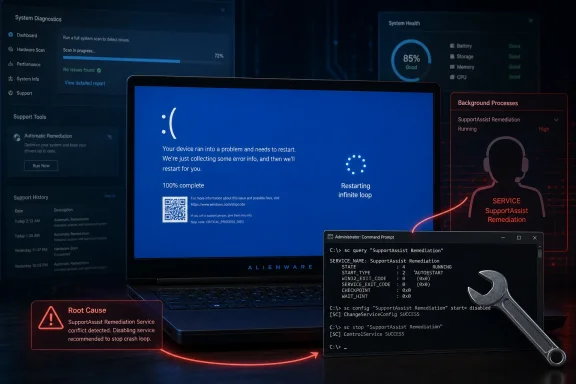 The Recovery Tool Became the Outage
The emerging pattern is specific enough to be useful. Users in Dell’s own community forums, Reddit threads, and subsequent reports from Windows-focused outlets describe machines that crash roughly every 30 to 40 minutes, often with the stop code CRITICAL_PROCESS_DIED. Several reports point to Dell SupportAssist Remediation version 5.5.16.0 and the related Dell SupportAssist OS Recovery Plugin, both tied to an April 30 release.The affected hardware list is still being assembled from user reports rather than a formal Dell advisory with a complete matrix. XPS 15 9530 systems are among the clearest examples, and Alienware systems have also appeared in reports. The important point for administrators is not that one model is cursed; it is that a shared support component appears capable of taking down otherwise different machines.
That is why this is not just another “blue screen after an update” story. Windows users have been conditioned to suspect Patch Tuesday, drivers, firmware, or the latest cumulative update whenever a PC suddenly starts misbehaving. Here, crash dump analysis by users using Microsoft’s WinDbg reportedly points toward Dell’s own remediation service, not a Windows component as the initiating culprit.
Dell has reportedly acknowledged that version 5.5.16.0 of Dell SupportAssist Remediation or Alienware SupportAssist Remediation can cause BSODs and is working on a resolution. Until that resolution arrives, the company’s practical advice is blunt: remove the software. That is not the sort of sentence any vendor wants attached to its recovery stack.
Windows Gets the Blame Because OEM Software Runs in Its Shadow
The first instinct to blame Windows 11 is understandable. The operating system is the visible surface of the crash, and the blue screen carries Microsoft’s typography, Microsoft’s stop code, and Microsoft’s reboot behavior. To the user staring at a half-finished document or a failed remote meeting, the distinction between Windows crashing and something crashing Windows is academic.But it matters. Modern Windows PCs are not just Windows PCs; they are bundles of firmware services, driver packages, telemetry agents, update orchestrators, recovery environments, warranty tools, audio consoles, battery managers, hotkey daemons, and vendor-branded “experiences.” Much of it runs quietly, with privileges users rarely understand and schedules users never configured.
That is the hidden bargain of the OEM Windows ecosystem. Vendors promise a more supported machine by adding layers of automation above and below Windows. The user gets driver updates, hardware diagnostics, service-tag awareness, recovery images, and sometimes proactive support; the cost is a larger trusted computing base made up of software that is not always scrutinized like the operating system itself.
When that bargain works, nobody notices. When it breaks, a background recovery service becomes indistinguishable from malware in its practical effect: the machine reboots without permission, work disappears, and the owner loses confidence in the device. Dell is hardly alone in shipping such utilities, but SupportAssist is a particularly sharp example because it is supposed to be the thing users turn to when everything else fails.
Deep Integration Turns Small Bugs Into System Failures
A normal desktop application can crash without taking Windows down with it. That is one of the operating system’s oldest promises: applications are isolated from each other and from the kernel, at least in theory. Support and recovery tools are different because their job often requires deeper hooks into system health, boot repair, diagnostics, drivers, storage, and update state.That depth is the point of SupportAssist Remediation. It is not merely a tray icon with a friendly logo. It is part of a recovery and repair pipeline designed to monitor the system and help restore it when something goes wrong. The service runs in the background and interacts with parts of Windows that ordinary applications never touch.
The CRITICAL_PROCESS_DIED stop code is especially brutal in this context because it communicates that Windows has lost a process it considers essential to safe operation. Whether the exact chain involves a service failure, dependency failure, driver interaction, or recovery component misbehavior is for Dell and Microsoft’s debugging teams to fully untangle. For users, the observable fact is simpler: the remediation service is correlated with repeated bugchecks, and disabling or removing it appears to stop the loop for many affected machines.
That is the operational nightmare for IT teams. A component installed for resilience becomes a scheduled crash generator. Worse, the cadence reported by users — about every half hour in many cases — makes the machine just stable enough to log in and attempt a fix, but not stable enough to ignore.
The Fix Is Simple, But the Trust Damage Is Not
The immediate workaround is refreshingly direct: disable the Dell SupportAssist Remediation service or uninstall the remediation package entirely. Users have reported success with an elevated Command Prompt command that disables the service:sc.exe config "Dell SupportAssist Remediation" start= disabledAfter a reboot, affected systems should no longer be starting the problematic service automatically. This is the lighter-touch approach because it leaves other Dell tools in place while stopping the component most closely associated with the crash reports.
The more aggressive route is to remove Dell SupportAssist Remediation or Alienware SupportAssist Remediation from Windows Settings under Installed apps. Some users are also removing the broader SupportAssist components, especially where they do not rely on Dell’s consumer-facing diagnostic workflow. Dell’s warning is important, however: uninstalling the remediation service may make Dell OS SupportAssist Recovery repair points unavailable.
That tradeoff is exactly why this incident is more annoying than a normal bad app update. The workaround that restores stability can also remove a recovery feature some users may have expected to rely on later. In other words, the user must choose between a working machine today and a vendor recovery convenience tomorrow.
For home users, that may be an easy call. For managed fleets, it is messier. IT administrators must decide whether to push a service-disable command, uninstall the package, block the affected version, wait for Dell’s fix, or preserve recovery tooling for support workflows. Every hour spent making that choice is an hour the “automated support” layer has handed back to humans.
Dell Is Learning the Same Lesson Microsoft Learned in Public
Microsoft has spent the last several years being reminded that update reliability is not just an engineering metric; it is a trust metric. Every botched cumulative update, driver regression, Start menu bug, BitLocker surprise, or compatibility hold adds to a cultural memory among Windows users. Once that memory forms, users do not carefully apportion blame between Redmond, Intel, Realtek, Dell, NVIDIA, and the BIOS team. They say, “Windows broke again.”OEMs benefit from that ambiguity when users blame Microsoft for a vendor problem. They also suffer from it because their software becomes part of the undifferentiated Windows experience. A Dell laptop that blue-screens every 30 minutes is, to most people, a broken Windows laptop.
That is why vendors should treat bundled support utilities with the same seriousness they apply to firmware and driver updates. A recovery service is not harmless simply because it has a friendly name. If it runs persistently, updates automatically, touches system state, and can participate in a crash path, it belongs in the same risk category as the lower-level plumbing users never see.
The industry has a tendency to call preinstalled vendor utilities bloatware when they are merely irritating. That undersells the issue. The real problem is not that a support app consumes memory or advertises warranties; it is that vendors keep adding privileged, always-on software to machines that users and admins are trying to standardize, secure, and keep predictable.
This Is Why Clean Windows Images Refuse to Die
Enthusiasts have long preferred clean Windows installs because they remove the vendor layer and start from a more legible baseline. Enterprise administrators do the same thing at scale with custom images, Autopilot provisioning, endpoint management policies, and driver catalogs. The goal is not minimalism for its own sake; it is reducing the number of actors with permission to change the system underneath the user.SupportAssist complicates that calculus because it is not useless. For many Dell owners, it can simplify driver discovery, warranty checks, hardware scans, and recovery options. For less technical users, that may be valuable enough to justify its presence.
But this incident strengthens the case for a more selective approach. Users do not need every OEM helper service running all the time. Businesses do not need consumer support flows on managed devices. Administrators do not need automatic remediation components they cannot confidently explain during an incident review.
The clean-install crowd can sometimes sound absolutist, but events like this make their paranoia look practical. The fewer privileged vendor services running in the background, the fewer surprise failure domains exist between the power button and a stable desktop.
The Enterprise Risk Is Bigger Than the Consumer Annoyance
For a single home user, a reboot loop is infuriating. For a business, it is an availability incident with a vendor logo on it. Reports of fleets experiencing repeated crashes are especially concerning because they transform a nuisance update into a support-desk surge.The timing matters too. A machine that crashes every half hour may still check in with management tools, receive commands, and appear alive in inventory systems. That can create a misleading picture where devices are technically online but practically unusable. Help desks then face scattered symptoms: random reboots, CRITICAL_PROCESS_DIED, users blaming Windows updates, and machines that stay up just long enough to waste everyone’s time.
Administrators should resist the temptation to troubleshoot this as a generic Windows instability problem if the affected systems are Dell or Alienware machines with SupportAssist Remediation 5.5.16.0 installed. The faster path is to inventory the SupportAssist Remediation version, check crash timing, review Event Viewer and dump analysis where available, and disable or remove the suspect service while Dell prepares a fix.
There is also a policy question. If an organization already uses Dell Command Update, Windows Update for Business, Intune, Configuration Manager, or another managed update path, it should ask whether consumer-style SupportAssist remediation belongs on endpoints at all. Duplicate update and recovery mechanisms are convenient until they conflict, fail, or update outside the cadence administrators expect.
The Security Angle Is the One Nobody Should Ignore
Support and recovery tools are attractive targets because they are trusted, privileged, and widely deployed. Even when a problem is “only” a stability bug, it reminds us how much authority these tools often possess. A vendor service that can participate in system recovery may also have broad access to device identity, diagnostics, update state, and repair operations.That does not mean SupportAssist is malicious or that this BSOD issue is a security incident. It means reliability and security are linked by privilege. The more power a component has, the more catastrophic its failures become.
Dell has dealt with SupportAssist-related security scrutiny in previous years, as have other OEMs with their own utilities. The lesson is not that every vendor tool should be banished from every PC. The lesson is that privileged vendor utilities need conservative update practices, rapid rollback mechanisms, transparent advisories, and administrative controls that match their power.
Users should not have to learn the name of a remediation service because it is crashing their machine. Administrators should not have to rely on forum archaeology to determine whether a vendor component is safe to run. A support stack that ships broadly should have a clear public health page, version guidance, known-issue tracking, and a reliable way to pause or revert a bad release.
The Temporary Cure Is to Remove the Thing That Promised the Cure
For affected Dell and Alienware owners, the practical advice is straightforward. If the system is crashing with CRITICAL_PROCESS_DIED after the late-April SupportAssist Remediation update, disable the remediation service first if you want the least disruptive workaround. If crashes continue, uninstall Dell SupportAssist Remediation or Alienware SupportAssist Remediation and reboot.That is not a perfect fix because it may remove Dell-created OS recovery repair points. It is, however, better than a machine that repeatedly crashes before a user can complete basic work. Stability comes before convenience.
IT teams should package the workaround rather than walk users through it one by one. A scripted service disable can be deployed quickly, logged, and later reversed once Dell ships a corrected version. Full removal may be appropriate for unmanaged or lightly managed systems, but administrators should weigh that against internal recovery procedures.
The broader recommendation is to audit OEM utilities with the same skepticism applied to browser extensions and startup apps. If a tool is not needed, remove it. If it is needed only occasionally, prevent it from running persistently. If it is needed for fleet operations, make sure it is governed by the same change-control expectations as any other critical endpoint component.
Dell’s Bug Leaves Windows Holding the Blue Bag
This episode is a reminder that Windows reliability is now a supply-chain property. Microsoft can harden the kernel, improve driver models, refine update deployment, and add recovery features, but the actual PC on a desk is still a federation of vendor code. When that code fails with enough privilege, Windows is the place where the failure becomes visible.The public perception problem will remain asymmetric. Microsoft gets blamed because the crash screen is Microsoft’s. Dell gets blamed by those who dig into the dumps. The user just loses time.
That is why Dell’s response needs to be more than a quiet fix. The company should publish clear guidance on affected versions, affected products where known, mitigation steps, and whether the bad package has been pulled or superseded. It should also make the recovery implications of uninstalling the remediation service easy to understand, because users should not have to choose blindly between stopping crashes and preserving repair points.
A bad update can happen to any vendor. A good response reduces ambiguity quickly. In a world where OEM services update silently and run deeply, silence is what turns a bug into a trust problem.
What Dell Owners Should Do Before the Next Half-Hour Crash
The immediate story is a workaround, but the lasting value is in changing how users and administrators think about vendor utilities. Treat SupportAssist Remediation 5.5.16.0 as suspect if the timing and symptoms match, but do not stop there. Use the incident as a reason to decide which OEM components deserve a permanent place on your Windows image.- Check whether Dell SupportAssist Remediation or Alienware SupportAssist Remediation version 5.5.16.0 is installed on any crashing Dell or Alienware Windows 11 system.
- Disable the “Dell SupportAssist Remediation” service from an elevated command prompt if you need a fast mitigation that can be reversed later.
- Uninstall the remediation component if disabling the service does not stop the crashes or if you do not rely on Dell’s OS recovery repair points.
- Expect Dell-created SupportAssist OS Recovery repair points to be unavailable after removing the remediation service.
- In managed environments, inventory Dell support utilities and decide whether they belong on endpoints already governed by enterprise update and recovery tools.
- Watch for Dell’s corrected package or advisory before re-enabling the remediation service across a fleet.
Source: Windows Central Dell SupportAssist is crashing Windows 11 PCs, but we explain how to stop the reboot loop
