

Dell owners began reporting repeated Windows blue-screen crashes and reboot loops in early May 2026 after recent Dell SupportAssist-related updates, with users on Dell’s own community forums and elsewhere tracing at least some failures to Dell’s support and recovery software rather than Windows 11 itself. The episode is a useful corrective to the reflex that every modern Windows disaster must be a Patch Tuesday problem. It also exposes a quieter risk in today’s PC ecosystem: the vendor utilities installed to keep machines healthy have become powerful enough to break them.
The important distinction is not that Windows 11 is blameless in every boot-loop story. It is that the Windows PC is now a layered stack of Microsoft code, OEM drivers, firmware updaters, recovery agents, telemetry services, and “helpful” maintenance tools, any one of which can make the user see the same terrifying result: a blue screen, a recovery prompt, and a machine that refuses to stay up. For Dell customers hit by this latest wave, the first place to look may not be Windows Update at all.
A blue screen still feels like a verdict from Windows. The sad-face crash screen, the abrupt reboot, the Event Viewer entries about Kernel-Power, and the ominous dump files all point back to the operating system in the mind of the ordinary user. That instinct is understandable, because Windows is the thing that dies in public.
But the cause of a Windows crash is often not the Windows component that happened to be holding the steering wheel when the car left the road. Kernel-mode drivers, firmware interfaces, hardware monitoring services, endpoint security tools, storage filters, and OEM recovery components can all push the system into conditions where Windows has no safe path but to stop. The crash screen is the operating system’s last act of containment, not necessarily the original crime scene.
That matters because the Dell reports arriving this month follow a pattern that administrators have learned to distrust. A machine is stable, a vendor maintenance component updates, then crashes begin on a predictable cadence. Users describe BSODs every half-hour or so, reboot loops, and failures that recur even when no obvious Windows patch is being installed.
The Neowin report that pulled these threads together leaned on forum analysis from users who inspected minidumps with WinDbg and pointed at Dell SupportAssist components, including related remediation and OS recovery pieces. That is not the same as a formal Dell root-cause analysis, and Dell had not publicly resolved the matter at the time of the report. But it is enough to change the working assumption for troubleshooting: on affected systems, SupportAssist should be treated as a suspect, not a bystander.
That is precisely why these utilities are attractive to OEMs. They reduce support costs, automate common maintenance, and give less technical customers a single branded route to diagnostics. A user who cannot tell a chipset driver from a BIOS revision can still click a Dell tool that promises to keep the machine healthy.
The tradeoff is that such tools are not low-risk conveniences. A browser crashing is annoying; a support agent that meddles with low-level services, recovery plugins, and drivers can turn into an availability incident. The more “automatic” the maintenance layer becomes, the more it resembles the thing enterprise IT departments have spent decades trying to control: privileged software that changes state on endpoints at scale.
That is why the current Dell situation lands harder than a normal application bug. If a vendor utility can push users into repeated bug checks or reboot loops, then the utility is part of the platform’s reliability boundary. It should be tested, staged, logged, rolled back, and documented accordingly.
Consumers rarely think in those terms. Enterprises do. The uncomfortable point for Dell is that SupportAssist sits in both worlds, wearing a friendly consumer face while performing work that sysadmins would normally subject to change-management discipline.
But reflexive blame can slow down repair. If an administrator assumes every reboot loop is tied to the latest cumulative update, they may spend hours uninstalling patches, rolling back images, or hunting Microsoft known-issue pages while the actual trigger is an OEM service that keeps reloading at startup. Worse, the system may be blamed on a Microsoft patch simply because the Dell utility happened to update around the same maintenance window.
The April 2026 Windows update chatter made this environment even noisier. Reports circulated about some HP and Dell machines falling into boot loops after a cumulative update, and users understandably began grouping every blue-screen reboot story into the same mental bucket. That is the danger of modern endpoint troubleshooting: symptoms converge even when causes diverge.
The Dell SupportAssist reports are a reminder that the PC update chain is no longer a single pipeline. Microsoft ships Windows servicing updates. Dell ships BIOS updates, firmware packages, drivers, support tools, recovery plugins, and management services. The Microsoft Store may update components. Third-party security and management vendors add their own filters. The machine that fails on Thursday may have changed in five different ways since Monday.
For IT pros, the lesson is not to absolve Microsoft. It is to stop letting the Windows logo on the crash screen dictate the investigation. Event logs, dump analysis, installed-program timelines, driver versions, and service histories matter more than brand instinct.
Minidumps are not magic. They can implicate a component that was active at the time of failure without proving it was the sole root cause. They can be misleading when memory corruption, storage failure, or driver interactions are involved. But they are still a better witness than Event Viewer’s generic Kernel-Power entries, which often tell you only that the machine did not shut down cleanly.
Kernel-Power events tend to be overread by panicked users. They look severe because they are marked critical, but they usually describe the consequence of an unexpected restart, not the initiating failure. In a reboot-loop scenario, they are the chalk outline, not the weapon.
A dump file, by contrast, can show the stop code, the stack, the modules involved, and the timing. It can point investigators toward a driver, service, or subsystem that deserves attention. When multiple users produce similar dumps after the same vendor update, the pattern becomes harder to dismiss as isolated hardware failure.
This is where enthusiast forums still matter. Microsoft, Dell, HP, Lenovo, and security vendors all run formal support channels, but the first coherent root cause often emerges from technically literate users comparing dump files in public. That informal forensics layer is messy, but it is often faster than corporate acknowledgment.
That history does not prove the May 2026 issue has the same root cause. It does, however, make the pattern believable. When the same family of software repeatedly appears near the center of BSOD reports, the burden shifts. Dell does not get the benefit of being treated as a random third party unlucky enough to be nearby.
The irony is sharp because SupportAssist exists to reduce friction. It is supposed to detect hardware trouble, simplify updates, and make recovery less frightening. When such a tool becomes associated with crashes or reboot loops, it undermines the trust required for users to accept automated maintenance at all.
This is a particular problem for OEMs because their utilities already fight a reputation as bloatware. Many power users uninstall them on day one, preferring Windows Update, direct driver downloads, or enterprise tools such as Dell Command Update. When SupportAssist behaves well, Dell can argue that ordinary users benefit from a guided support layer. When it behaves badly, it confirms every enthusiast’s instinct to strip a new PC back to the Microsoft baseline.
The company’s challenge is not merely to fix a bug. It is to prove that the Dell layer adds reliability rather than subtracting it.
There is also a previously reported workaround from the December 2024 incident in which running a SupportAssist hardware scan appeared to stop subsequent crashes for some users. That sounds counterintuitive, but not impossible if the crash involves a stuck remediation state, incomplete scan, or scheduled action that clears after a successful run. It should be treated as a workaround, not a guarantee.
For administrators, the question is bigger than which uninstall button to press. If an organization permits OEM support tools to update themselves freely, then it has created an alternate update channel outside normal Windows patch governance. That channel may not be visible in the same dashboards as Windows Update for Business, Intune update rings, WSUS, or endpoint management reports.
The political difficulty is that OEM tools sometimes solve real problems. Firmware and driver lifecycle management is not optional on large fleets, especially on laptops where docks, Thunderbolt, power management, storage firmware, and BIOS revisions affect stability and security. The answer cannot simply be “never install Dell software.”
The answer is to separate consumer convenience software from managed update infrastructure. Dell Command Update, enterprise catalogs, driver packs, and controlled deployment rings exist because business endpoints need predictable change. SupportAssist’s consumer-oriented automation is a poor fit for machines where availability matters more than one-click help.
SupportAssist-style utilities are especially sensitive because they bridge user space, vendor cloud logic, system diagnostics, driver update mechanisms, and recovery tooling. They are expected to inspect hardware and software deeply enough to be useful. That depth makes failures consequential.
The industry has normalized this because OEMs need differentiation and support cost reduction. A Dell, HP, Lenovo, or ASUS machine is not simply “Windows plus drivers.” It is a branded maintenance environment wrapped around Windows. Sometimes that environment is helpful; sometimes it is the difference between a clean Microsoft install and a machine with half a dozen extra agents competing to be useful.
Microsoft has spent years trying to make Windows servicing more predictable, and OEMs have spent the same years adding parallel servicing layers. Those goals are not always aligned. Microsoft wants a consistent platform; OEMs want device-specific support experiences; users want the machine not to crash. In a failure like this, the user’s desire is the only one that matters.
The reliability conversation should therefore widen. We should ask not only whether Windows updates are safe, but whether OEM update utilities meet the same standards of staged rollout, telemetry monitoring, rollback, and public incident communication that we demand from Microsoft.
Silence creates a vacuum, and the internet fills vacuums with theories. Some users will blame Windows 11. Others will blame a BIOS update. Others will reinstall Windows unnecessarily. A few will replace hardware that may be perfectly fine. The cost of slow acknowledgment is not just reputational; it is practical waste.
A modern OEM should have a public incident pattern for this kind of event. If a SupportAssist update is suspected of causing crashes, Dell should say what versions are involved, which systems are known to be affected, whether the update has been paused, and what safe mitigation steps users should take. Even a preliminary advisory is better than leaving customers to scrape dump files and forum posts.
The bar is higher because Dell sells into businesses, schools, governments, and healthcare environments where reboot loops are not a weekend annoyance. In those contexts, a vague “try uninstalling SupportAssist” forum answer is not an incident response. It is a scavenger hunt.
This is an area where Microsoft, for all its flaws, has improved. Known issue rollbacks, health dashboards, and documented safeguards are imperfect but visible. OEMs need comparable transparency for the software they preinstall and auto-update, especially when that software has privileged access to the machine.
The Dell SupportAssist reports strengthen the old argument. The fewer resident vendor tools on a machine, the fewer background actors can surprise you. A clean Windows install is not immune to driver bugs, firmware problems, or Microsoft regressions, but it narrows the blast radius.
Still, the clean-install answer does not scale neatly. Many users rely on OEM utilities because they do not know where to find firmware updates. Some recovery tools are useful when a machine is already broken. Enterprises need vendor catalogs and support telemetry. Accessibility, warranty workflows, and diagnostics can be easier through OEM apps.
The real distinction is not “OEM software bad, clean Windows good.” It is whether an installed utility justifies its privileges. A manual diagnostic app that runs when summoned is one thing. A constantly resident remediation stack that can update itself and interact with recovery components is another.
Power users can uninstall first and ask questions later. Everyone else needs Dell to make the default safe.
The first practical move is to check whether Dell SupportAssist or related components were updated shortly before the crashes began. Installed Apps, Programs and Features, Reliability Monitor, and Event Viewer can all help reconstruct the timeline. Reliability Monitor is particularly useful for non-specialists because it presents application failures, Windows failures, and installs on a simple calendar.
If the machine is stable for a few minutes, uninstall Dell SupportAssist and related SupportAssist Remediation or OS Recovery plugin entries. If it crashes too quickly, booting into Safe Mode may allow removal. If BitLocker is enabled, users should make sure they have their recovery key before making recovery-environment changes, because a boot repair or firmware-level change can trigger a recovery prompt.
Users should also avoid stacking fixes blindly. Uninstalling Windows updates, updating BIOS firmware, removing drivers, and running recovery resets all in one session can erase the timeline and introduce new variables. The goal is to change one meaningful thing, test stability, and then proceed.
For anyone managing multiple systems, the more important move is to pause deployment or auto-update of the implicated Dell components until Dell clarifies the issue. A single laptop crash is troubleshooting; twenty laptops entering reboot loops is an outage.
That is a warning sign for Dell’s product and support teams. Enthusiast communities should not have to become the primary observability layer for a vendor’s privileged endpoint software. If SupportAssist telemetry is good enough to justify its presence, it should also be good enough to detect a crash spike after an update.
The company should treat this as a trust incident even if the technical fix is small. A tool named SupportAssist carries an implicit promise: when something goes wrong, it helps. If the tool itself becomes the suspected cause, the brand damage is disproportionate to the code defect.
Dell also needs to be careful about the tendency to view these events as support-edge cases. A blue-screen loop is not a mere app crash. It interrupts work, can strand users away from recovery media, may trigger BitLocker anxiety, and can send less technical customers into expensive repair channels. The severity is defined by the user’s loss of control.
That loss of control is the real story. Windows PCs have become better at self-maintenance, but every automated maintenance layer asks users to surrender a little agency. When the automation fails, the user needs a clear off-ramp. SupportAssist needs one that is obvious, documented, and safe.
The concrete takeaways are refreshingly unglamorous:
Source: Neowin Dell PCs are running into constant BSOD reboot loops and Windows 11 isn't the culprit
The important distinction is not that Windows 11 is blameless in every boot-loop story. It is that the Windows PC is now a layered stack of Microsoft code, OEM drivers, firmware updaters, recovery agents, telemetry services, and “helpful” maintenance tools, any one of which can make the user see the same terrifying result: a blue screen, a recovery prompt, and a machine that refuses to stay up. For Dell customers hit by this latest wave, the first place to look may not be Windows Update at all.
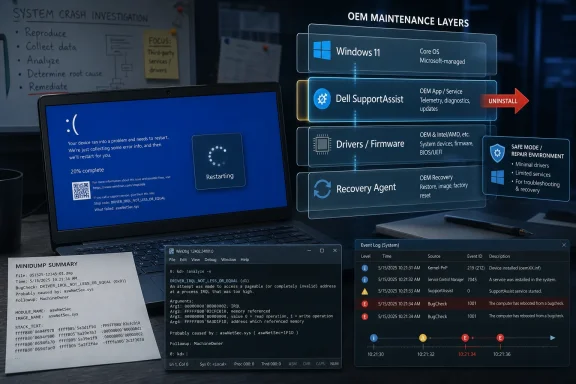 The Blue Screen Became a Blunt Instrument
A blue screen still feels like a verdict from Windows. The sad-face crash screen, the abrupt reboot, the Event Viewer entries about Kernel-Power, and the ominous dump files all point back to the operating system in the mind of the ordinary user. That instinct is understandable, because Windows is the thing that dies in public.But the cause of a Windows crash is often not the Windows component that happened to be holding the steering wheel when the car left the road. Kernel-mode drivers, firmware interfaces, hardware monitoring services, endpoint security tools, storage filters, and OEM recovery components can all push the system into conditions where Windows has no safe path but to stop. The crash screen is the operating system’s last act of containment, not necessarily the original crime scene.
That matters because the Dell reports arriving this month follow a pattern that administrators have learned to distrust. A machine is stable, a vendor maintenance component updates, then crashes begin on a predictable cadence. Users describe BSODs every half-hour or so, reboot loops, and failures that recur even when no obvious Windows patch is being installed.
The Neowin report that pulled these threads together leaned on forum analysis from users who inspected minidumps with WinDbg and pointed at Dell SupportAssist components, including related remediation and OS recovery pieces. That is not the same as a formal Dell root-cause analysis, and Dell had not publicly resolved the matter at the time of the report. But it is enough to change the working assumption for troubleshooting: on affected systems, SupportAssist should be treated as a suspect, not a bystander.
Dell’s Helper App Has Too Much Privilege to Be Casual Software
SupportAssist is not just another tray icon nagging users to register a warranty. It is part of Dell’s broader support plumbing, designed to scan hardware, identify drivers, update system components, collect diagnostics, and connect a PC to recovery workflows. In other words, it lives close to the same sensitive territory where firmware updates, storage checks, driver changes, and recovery environments intersect.That is precisely why these utilities are attractive to OEMs. They reduce support costs, automate common maintenance, and give less technical customers a single branded route to diagnostics. A user who cannot tell a chipset driver from a BIOS revision can still click a Dell tool that promises to keep the machine healthy.
The tradeoff is that such tools are not low-risk conveniences. A browser crashing is annoying; a support agent that meddles with low-level services, recovery plugins, and drivers can turn into an availability incident. The more “automatic” the maintenance layer becomes, the more it resembles the thing enterprise IT departments have spent decades trying to control: privileged software that changes state on endpoints at scale.
That is why the current Dell situation lands harder than a normal application bug. If a vendor utility can push users into repeated bug checks or reboot loops, then the utility is part of the platform’s reliability boundary. It should be tested, staged, logged, rolled back, and documented accordingly.
Consumers rarely think in those terms. Enterprises do. The uncomfortable point for Dell is that SupportAssist sits in both worlds, wearing a friendly consumer face while performing work that sysadmins would normally subject to change-management discipline.
The Windows Update Reflex Is Now a Liability
Microsoft has earned a certain amount of suspicion. Windows updates have broken printers, VPNs, domain joins, taskbars, BitLocker flows, and more over the years. When a user says, “My PC rebooted and now it is stuck,” blaming Windows Update is not irrational.But reflexive blame can slow down repair. If an administrator assumes every reboot loop is tied to the latest cumulative update, they may spend hours uninstalling patches, rolling back images, or hunting Microsoft known-issue pages while the actual trigger is an OEM service that keeps reloading at startup. Worse, the system may be blamed on a Microsoft patch simply because the Dell utility happened to update around the same maintenance window.
The April 2026 Windows update chatter made this environment even noisier. Reports circulated about some HP and Dell machines falling into boot loops after a cumulative update, and users understandably began grouping every blue-screen reboot story into the same mental bucket. That is the danger of modern endpoint troubleshooting: symptoms converge even when causes diverge.
The Dell SupportAssist reports are a reminder that the PC update chain is no longer a single pipeline. Microsoft ships Windows servicing updates. Dell ships BIOS updates, firmware packages, drivers, support tools, recovery plugins, and management services. The Microsoft Store may update components. Third-party security and management vendors add their own filters. The machine that fails on Thursday may have changed in five different ways since Monday.
For IT pros, the lesson is not to absolve Microsoft. It is to stop letting the Windows logo on the crash screen dictate the investigation. Event logs, dump analysis, installed-program timelines, driver versions, and service histories matter more than brand instinct.
The Minidump Is the User’s Best Witness
The most useful detail in the Neowin account is not the outrage, but the use of WinDbg. A forum member reportedly analyzed minidumps and connected the crash path to Dell’s SupportAssist stack. That is how these stories move from “my laptop is cursed” to “this component is probably involved.”Minidumps are not magic. They can implicate a component that was active at the time of failure without proving it was the sole root cause. They can be misleading when memory corruption, storage failure, or driver interactions are involved. But they are still a better witness than Event Viewer’s generic Kernel-Power entries, which often tell you only that the machine did not shut down cleanly.
Kernel-Power events tend to be overread by panicked users. They look severe because they are marked critical, but they usually describe the consequence of an unexpected restart, not the initiating failure. In a reboot-loop scenario, they are the chalk outline, not the weapon.
A dump file, by contrast, can show the stop code, the stack, the modules involved, and the timing. It can point investigators toward a driver, service, or subsystem that deserves attention. When multiple users produce similar dumps after the same vendor update, the pattern becomes harder to dismiss as isolated hardware failure.
This is where enthusiast forums still matter. Microsoft, Dell, HP, Lenovo, and security vendors all run formal support channels, but the first coherent root cause often emerges from technically literate users comparing dump files in public. That informal forensics layer is messy, but it is often faster than corporate acknowledgment.
SupportAssist’s History Makes the New Reports More Plausible
The latest reports do not appear from a clean slate. Dell SupportAssist has previously drawn complaints for crashes, resource usage, update loops, and problematic remediation behavior. A December 2024 SupportAssist-related incident generated strikingly similar user descriptions, including blue screens after an update and community-discovered workarounds.That history does not prove the May 2026 issue has the same root cause. It does, however, make the pattern believable. When the same family of software repeatedly appears near the center of BSOD reports, the burden shifts. Dell does not get the benefit of being treated as a random third party unlucky enough to be nearby.
The irony is sharp because SupportAssist exists to reduce friction. It is supposed to detect hardware trouble, simplify updates, and make recovery less frightening. When such a tool becomes associated with crashes or reboot loops, it undermines the trust required for users to accept automated maintenance at all.
This is a particular problem for OEMs because their utilities already fight a reputation as bloatware. Many power users uninstall them on day one, preferring Windows Update, direct driver downloads, or enterprise tools such as Dell Command Update. When SupportAssist behaves well, Dell can argue that ordinary users benefit from a guided support layer. When it behaves badly, it confirms every enthusiast’s instinct to strip a new PC back to the Microsoft baseline.
The company’s challenge is not merely to fix a bug. It is to prove that the Dell layer adds reliability rather than subtracting it.
The Consumer Fix Is Simple, but the Enterprise Fix Is Political
For a home user caught in this particular crash cycle, the emerging advice is straightforward: remove SupportAssist and its related components if Windows stays alive long enough to do so. Reports mention uninstalling SupportAssist, SupportAssist Remediation, and the OS Recovery plugin. If the system cannot remain stable, Safe Mode or Windows Recovery Environment may be needed to get enough control to remove the offending pieces.There is also a previously reported workaround from the December 2024 incident in which running a SupportAssist hardware scan appeared to stop subsequent crashes for some users. That sounds counterintuitive, but not impossible if the crash involves a stuck remediation state, incomplete scan, or scheduled action that clears after a successful run. It should be treated as a workaround, not a guarantee.
For administrators, the question is bigger than which uninstall button to press. If an organization permits OEM support tools to update themselves freely, then it has created an alternate update channel outside normal Windows patch governance. That channel may not be visible in the same dashboards as Windows Update for Business, Intune update rings, WSUS, or endpoint management reports.
The political difficulty is that OEM tools sometimes solve real problems. Firmware and driver lifecycle management is not optional on large fleets, especially on laptops where docks, Thunderbolt, power management, storage firmware, and BIOS revisions affect stability and security. The answer cannot simply be “never install Dell software.”
The answer is to separate consumer convenience software from managed update infrastructure. Dell Command Update, enterprise catalogs, driver packs, and controlled deployment rings exist because business endpoints need predictable change. SupportAssist’s consumer-oriented automation is a poor fit for machines where availability matters more than one-click help.
OEM Recovery Tools Are Becoming Part of the Attack Surface of Reliability
Security people talk about attack surface; reliability engineers should borrow the phrase. Every resident service, scheduled task, recovery agent, and update helper increases the number of ways a system can be destabilized. The risk is not only malicious exploitation. It is also accidental self-harm.SupportAssist-style utilities are especially sensitive because they bridge user space, vendor cloud logic, system diagnostics, driver update mechanisms, and recovery tooling. They are expected to inspect hardware and software deeply enough to be useful. That depth makes failures consequential.
The industry has normalized this because OEMs need differentiation and support cost reduction. A Dell, HP, Lenovo, or ASUS machine is not simply “Windows plus drivers.” It is a branded maintenance environment wrapped around Windows. Sometimes that environment is helpful; sometimes it is the difference between a clean Microsoft install and a machine with half a dozen extra agents competing to be useful.
Microsoft has spent years trying to make Windows servicing more predictable, and OEMs have spent the same years adding parallel servicing layers. Those goals are not always aligned. Microsoft wants a consistent platform; OEMs want device-specific support experiences; users want the machine not to crash. In a failure like this, the user’s desire is the only one that matters.
The reliability conversation should therefore widen. We should ask not only whether Windows updates are safe, but whether OEM update utilities meet the same standards of staged rollout, telemetry monitoring, rollback, and public incident communication that we demand from Microsoft.
Dell’s Silence Leaves Users Doing Incident Response in Public
At the time these reports were circulating, Dell had not provided a definitive public explanation. The Neowin piece speculated that timing may have played a role because the issue surfaced around a weekend, when support response can lag. That may be true, but it is not much comfort to users whose systems reboot every thirty minutes.Silence creates a vacuum, and the internet fills vacuums with theories. Some users will blame Windows 11. Others will blame a BIOS update. Others will reinstall Windows unnecessarily. A few will replace hardware that may be perfectly fine. The cost of slow acknowledgment is not just reputational; it is practical waste.
A modern OEM should have a public incident pattern for this kind of event. If a SupportAssist update is suspected of causing crashes, Dell should say what versions are involved, which systems are known to be affected, whether the update has been paused, and what safe mitigation steps users should take. Even a preliminary advisory is better than leaving customers to scrape dump files and forum posts.
The bar is higher because Dell sells into businesses, schools, governments, and healthcare environments where reboot loops are not a weekend annoyance. In those contexts, a vague “try uninstalling SupportAssist” forum answer is not an incident response. It is a scavenger hunt.
This is an area where Microsoft, for all its flaws, has improved. Known issue rollbacks, health dashboards, and documented safeguards are imperfect but visible. OEMs need comparable transparency for the software they preinstall and auto-update, especially when that software has privileged access to the machine.
The Clean Install Crowd Was Not Entirely Paranoid
There is a long-running ritual among Windows enthusiasts: buy a new OEM PC, wipe it, install a clean copy of Windows, and add only the drivers you actually need. For years, that ritual was mocked as excessive. OEM images became less awful, Windows Update got better at drivers, and some vendor apps genuinely improved.The Dell SupportAssist reports strengthen the old argument. The fewer resident vendor tools on a machine, the fewer background actors can surprise you. A clean Windows install is not immune to driver bugs, firmware problems, or Microsoft regressions, but it narrows the blast radius.
Still, the clean-install answer does not scale neatly. Many users rely on OEM utilities because they do not know where to find firmware updates. Some recovery tools are useful when a machine is already broken. Enterprises need vendor catalogs and support telemetry. Accessibility, warranty workflows, and diagnostics can be easier through OEM apps.
The real distinction is not “OEM software bad, clean Windows good.” It is whether an installed utility justifies its privileges. A manual diagnostic app that runs when summoned is one thing. A constantly resident remediation stack that can update itself and interact with recovery components is another.
Power users can uninstall first and ask questions later. Everyone else needs Dell to make the default safe.
A Practical Triage Path for Dell Owners
Users who are currently affected should resist the urge to perform the most destructive fix first. A Windows reinstall may eventually be necessary in rare cases, but it should not be step one if the system can still boot long enough to remove a suspected vendor component. The more targeted response is to identify recent Dell software changes, preserve crash evidence if possible, and then remove the likely trigger.The first practical move is to check whether Dell SupportAssist or related components were updated shortly before the crashes began. Installed Apps, Programs and Features, Reliability Monitor, and Event Viewer can all help reconstruct the timeline. Reliability Monitor is particularly useful for non-specialists because it presents application failures, Windows failures, and installs on a simple calendar.
If the machine is stable for a few minutes, uninstall Dell SupportAssist and related SupportAssist Remediation or OS Recovery plugin entries. If it crashes too quickly, booting into Safe Mode may allow removal. If BitLocker is enabled, users should make sure they have their recovery key before making recovery-environment changes, because a boot repair or firmware-level change can trigger a recovery prompt.
Users should also avoid stacking fixes blindly. Uninstalling Windows updates, updating BIOS firmware, removing drivers, and running recovery resets all in one session can erase the timeline and introduce new variables. The goal is to change one meaningful thing, test stability, and then proceed.
For anyone managing multiple systems, the more important move is to pause deployment or auto-update of the implicated Dell components until Dell clarifies the issue. A single laptop crash is troubleshooting; twenty laptops entering reboot loops is an outage.
The Signal Dell Should Hear From Its Own Customers
The striking part of these reports is not that software broke. Software breaks. The striking part is that users were able to articulate a credible causal chain before the vendor did: Dell update, repeated BSODs, minidump analysis, SupportAssist components, uninstall workaround.That is a warning sign for Dell’s product and support teams. Enthusiast communities should not have to become the primary observability layer for a vendor’s privileged endpoint software. If SupportAssist telemetry is good enough to justify its presence, it should also be good enough to detect a crash spike after an update.
The company should treat this as a trust incident even if the technical fix is small. A tool named SupportAssist carries an implicit promise: when something goes wrong, it helps. If the tool itself becomes the suspected cause, the brand damage is disproportionate to the code defect.
Dell also needs to be careful about the tendency to view these events as support-edge cases. A blue-screen loop is not a mere app crash. It interrupts work, can strand users away from recovery media, may trigger BitLocker anxiety, and can send less technical customers into expensive repair channels. The severity is defined by the user’s loss of control.
That loss of control is the real story. Windows PCs have become better at self-maintenance, but every automated maintenance layer asks users to surrender a little agency. When the automation fails, the user needs a clear off-ramp. SupportAssist needs one that is obvious, documented, and safe.
The Narrow Lesson From This Dell Mess
This episode is not a referendum on Windows 11, and it is not proof that every Dell utility should be purged from every machine. It is a narrower but more useful lesson: when crashes follow an OEM support update, the OEM layer belongs at the center of the investigation.The concrete takeaways are refreshingly unglamorous:
- Dell users seeing repeated BSODs or reboot loops after recent Dell software updates should consider SupportAssist and its related remediation or recovery plugins as possible causes.
- Event Viewer’s Kernel-Power errors usually confirm that the system restarted unexpectedly, but they do not by themselves identify the root cause.
- WinDbg analysis of minidumps remains one of the best ways to move from speculation to a plausible suspect.
- Home users may be able to restore stability by uninstalling Dell SupportAssist-related components, while managed environments should pause or control those updates until Dell provides clarity.
- Administrators should treat OEM support utilities as privileged update channels, not harmless convenience apps.
- Dell needs to publish version-specific guidance quickly when its own support stack is credibly linked to crash loops.
Source: Neowin Dell PCs are running into constant BSOD reboot loops and Windows 11 isn't the culprit
