

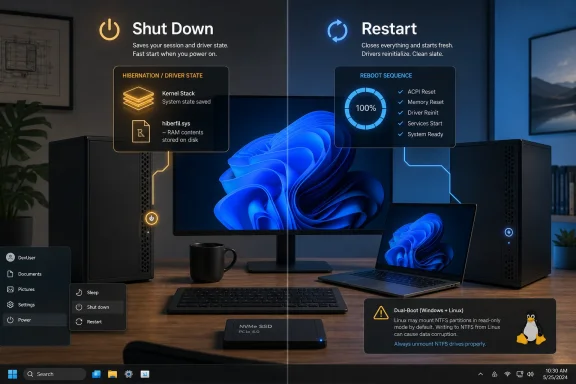
When Windows users press Shut Down on most modern Windows 10 and Windows 11 PCs, the system typically logs out user sessions but preserves the Windows kernel and loaded drivers in a hibernation file so the next boot can resume faster. That behavior is not a bug; it is the operating system doing what Microsoft designed Fast Startup to do. The problem is that the word shutdown still carries a promise Windows no longer reliably keeps. On today’s SSD-equipped machines, that semantic trick increasingly looks less like clever engineering and more like a legacy optimization with a long tail of avoidable trouble.
Fast Startup arrived in the Windows 8 era, when Microsoft was trying to make PCs feel more appliance-like. Tablets were ascendant, laptops were judged by how quickly they woke, and the traditional Windows boot sequence looked embarrassingly slow next to phones and iPads. The company’s answer was a hybrid shutdown: close the user session, keep the system session, and write the kernel state to disk.
Technically, this was a defensible move. Windows could skip part of the cold-start work the next time the machine powered on, especially on systems with mechanical hard drives. The desktop appeared sooner, the spinning dots spun for less time, and the machine felt more modern.
But the feature also changed a basic contract. For decades, Shut Down meant the operating system was finished, drivers were unloaded, RAM was cleared, and the next power-on would begin from a clean slate. With Fast Startup enabled, Windows can look off while still carrying forward a saved slice of its previous operating state.
That distinction matters because users do not troubleshoot abstractions. They troubleshoot keyboards that stop working, Bluetooth radios that disappear, updates that seem to apply and then back out, and Linux partitions that refuse to mount. In those moments, the cleverness of hybrid boot becomes invisible; only the mismatch between expectation and behavior remains.
That argument is weaker in 2026. NVMe storage has made boot-time disk reads far less painful, CPU initialization is faster, firmware is generally better, and many PCs spend more of their lives sleeping than truly powering down. A modern Windows laptop or desktop can often reach the sign-in screen quickly enough that the human benefit of Fast Startup is hard to perceive.
This is not to say the feature is useless everywhere. Old machines with spinning disks still exist, and for them Fast Startup can remain a practical compromise. But the population of systems where it is meaningfully helpful is shrinking, while the population of systems where it creates confusion includes almost every enthusiast, dual-booter, repair technician, and administrator who expects shutdown to mean reset.
That is the heart of the How-To Geek argument, and it lands because it reflects a common Windows reality: a feature built to solve yesterday’s performance problem now complicates today’s reliability problem. The average PC no longer needs a clever fake shutdown to feel fast. It needs predictable state transitions.
When a user chooses Restart, Windows performs a full reboot path instead of preserving the same hybrid shutdown state used by Fast Startup. That is why help desk scripts, Microsoft support pages, and every experienced Windows user eventually says the same thing: do not shut down and turn it back on; restart it. The advice sounds pedantic until you understand that, on modern Windows, those are not equivalent actions.
This has created one of the strangest pieces of folk wisdom in personal computing. The “turn it off and on again” ritual, once the universal shorthand for clearing transient faults, has been replaced by a more specific incantation: click Restart, not Shut Down. For ordinary users, that distinction is ridiculous. For IT staff, it is another small ambiguity that turns simple support into unnecessary explanation.
The operating system’s language is doing users no favors here. If the Start menu says Shut Down, the reasonable assumption is that Windows is ending the running system. If Microsoft wants a hybrid power state, it should be labeled as such, or at least exposed with clearer defaults. Instead, Windows has trained power users to distrust one of the oldest buttons in the interface.
That is not magic, and it is not always the hardware’s fault. Fast Startup preserves the kernel session and loaded kernel-mode drivers, which means the next boot is not necessarily the same as a fresh driver initialization. If a driver, firmware component, or device stack dislikes being carried across that boundary, the user may get a machine that appears newly started but behaves as if it never quite let go of yesterday.
This is why a restart so often fixes “random” Windows problems. Restart forces a cleaner initialization path. It does what many users assumed Shut Down was doing all along.
The trouble is not merely that Fast Startup can trigger bugs. All operating systems have edge cases. The deeper issue is that the feature makes the machine’s state harder to reason about, especially for people trying to diagnose intermittent faults. A clean boot should be a baseline. Fast Startup makes it a conditional event.
This is where Microsoft’s consumer-friendly optimization collides with the habits of enthusiasts. Many WindowsForum readers keep Linux around for development, recovery, security work, or plain curiosity. They expect to move files between operating systems, inspect partitions, or mount shared storage without Windows silently preserving a state that another OS must treat with suspicion.
The confusion is made worse by naming overlap. Firmware “Fast Boot” and Windows “Fast Startup” are different things, but they are often discussed in the same breath. One shortens hardware initialization; the other changes what Windows means by shutdown. A dual-booter chasing one setting can easily miss the other.
For anyone running Windows alongside Linux, disabling Fast Startup is not a tweak for marginal performance purity. It is basic hygiene. The moment another operating system may touch a Windows-mounted NTFS volume, hybrid shutdown stops being clever and starts being dangerous.
That is why the feature appears in troubleshooting guidance more often than its reputation suggests. Disable Fast Startup. Restart instead of shutting down. Clear hibernation. These are not fringe recommendations from forum obsessives; they are practical responses to the fact that hybrid shutdown can obscure whether the machine has actually started fresh.
The situation is especially irritating because the failure mode is so unintuitive. A user may shut down every night and believe they have been giving Windows a clean start every morning. In reality, the system may have gone days or weeks without the kind of kernel-level reset that a restart would have provided.
For administrators, this matters at scale. A single confused home user is one support call. A fleet of laptops with inconsistent driver state, pending updates, docking oddities, and user-initiated shutdowns that do not behave like clean shutdowns is operational noise. Fast Startup may save seconds; troubleshooting it can burn hours.
There is also a more surgical path through Control Panel power settings, where Fast Startup can be toggled if hibernation remains enabled. That route preserves the ability to hibernate while disabling the hybrid shutdown behavior. The catch is that Microsoft has buried this in legacy UI layers that many users will never find without a guide.
Enterprises have broader options through policy and device management, but they also have a more complicated decision. Some fleets may still include hardware where Fast Startup meaningfully improves perceived boot performance. Some organizations may rely on hibernation for mobile workers. Others may decide that reliability and predictability are worth more than a faster cold boot benchmark.
The key is not that every Windows installation must disable Fast Startup immediately. It is that Fast Startup should be an intentional choice, not an inherited default nobody remembers exists. Defaults matter most when users do not know there is a choice being made for them.
But UI language should describe consequences. If Shut Down means “log off users, preserve the kernel session, write driver state to disk, and resume it next time,” then it is not the same action users historically understood. Microsoft does not need to explain all of that in the Start menu, but it should not bury the distinction so deeply that users discover it only after something breaks.
A better design would make full shutdown easier to access and clearer to understand. It could expose a plain-language setting during setup on systems with SSDs. It could recommend disabling Fast Startup when Windows detects another bootable operating system. It could make Restart’s special status more visible in troubleshooting flows.
Instead, Windows carries forward a default from an era when boot speed was a reputational emergency. That default now survives mostly because defaults survive. The industry moved from hard drives to SSDs; Windows kept the old bargain.
 Microsoft Optimized the Boot Screen, Not the User’s Mental Model
Fast Startup arrived in the Windows 8 era, when Microsoft was trying to make PCs feel more appliance-like. Tablets were ascendant, laptops were judged by how quickly they woke, and the traditional Windows boot sequence looked embarrassingly slow next to phones and iPads. The company’s answer was a hybrid shutdown: close the user session, keep the system session, and write the kernel state to disk.Technically, this was a defensible move. Windows could skip part of the cold-start work the next time the machine powered on, especially on systems with mechanical hard drives. The desktop appeared sooner, the spinning dots spun for less time, and the machine felt more modern.
But the feature also changed a basic contract. For decades, Shut Down meant the operating system was finished, drivers were unloaded, RAM was cleared, and the next power-on would begin from a clean slate. With Fast Startup enabled, Windows can look off while still carrying forward a saved slice of its previous operating state.
That distinction matters because users do not troubleshoot abstractions. They troubleshoot keyboards that stop working, Bluetooth radios that disappear, updates that seem to apply and then back out, and Linux partitions that refuse to mount. In those moments, the cleverness of hybrid boot becomes invisible; only the mismatch between expectation and behavior remains.
The Old Trade-Off Made Sense on Hardware Most People No Longer Use
The strongest case for Fast Startup was always speed. On a 2012-era laptop with a slow hard drive, a partially restored kernel session could make Windows feel dramatically quicker. Even shaving half a minute from a boot process had real value when users were opening lids, rushing into meetings, or trying to revive aging consumer hardware.That argument is weaker in 2026. NVMe storage has made boot-time disk reads far less painful, CPU initialization is faster, firmware is generally better, and many PCs spend more of their lives sleeping than truly powering down. A modern Windows laptop or desktop can often reach the sign-in screen quickly enough that the human benefit of Fast Startup is hard to perceive.
This is not to say the feature is useless everywhere. Old machines with spinning disks still exist, and for them Fast Startup can remain a practical compromise. But the population of systems where it is meaningfully helpful is shrinking, while the population of systems where it creates confusion includes almost every enthusiast, dual-booter, repair technician, and administrator who expects shutdown to mean reset.
That is the heart of the How-To Geek argument, and it lands because it reflects a common Windows reality: a feature built to solve yesterday’s performance problem now complicates today’s reliability problem. The average PC no longer needs a clever fake shutdown to feel fast. It needs predictable state transitions.
Restart Became the Real Shutdown, Which Is Absurd
The most awkward part of Fast Startup is that Windows already has a clean reset path. It is called Restart.When a user chooses Restart, Windows performs a full reboot path instead of preserving the same hybrid shutdown state used by Fast Startup. That is why help desk scripts, Microsoft support pages, and every experienced Windows user eventually says the same thing: do not shut down and turn it back on; restart it. The advice sounds pedantic until you understand that, on modern Windows, those are not equivalent actions.
This has created one of the strangest pieces of folk wisdom in personal computing. The “turn it off and on again” ritual, once the universal shorthand for clearing transient faults, has been replaced by a more specific incantation: click Restart, not Shut Down. For ordinary users, that distinction is ridiculous. For IT staff, it is another small ambiguity that turns simple support into unnecessary explanation.
The operating system’s language is doing users no favors here. If the Start menu says Shut Down, the reasonable assumption is that Windows is ending the running system. If Microsoft wants a hybrid power state, it should be labeled as such, or at least exposed with clearer defaults. Instead, Windows has trained power users to distrust one of the oldest buttons in the interface.
Drivers Are Where the Abstraction Leaks
Fast Startup’s most visible failures often show up as hardware weirdness. A USB device is missing after power-on. Audio refuses to initialize. A Bluetooth peripheral that worked yesterday no longer pairs. A Wi-Fi adapter behaves as if it has carried a bad mood across the night.That is not magic, and it is not always the hardware’s fault. Fast Startup preserves the kernel session and loaded kernel-mode drivers, which means the next boot is not necessarily the same as a fresh driver initialization. If a driver, firmware component, or device stack dislikes being carried across that boundary, the user may get a machine that appears newly started but behaves as if it never quite let go of yesterday.
This is why a restart so often fixes “random” Windows problems. Restart forces a cleaner initialization path. It does what many users assumed Shut Down was doing all along.
The trouble is not merely that Fast Startup can trigger bugs. All operating systems have edge cases. The deeper issue is that the feature makes the machine’s state harder to reason about, especially for people trying to diagnose intermittent faults. A clean boot should be a baseline. Fast Startup makes it a conditional event.
Dual-Boot Users Pay the Highest Price for Microsoft’s Convenience
For dual-boot systems, Fast Startup is less of an annoyance and more of a trap. Windows can leave NTFS volumes in a state that Linux interprets as hibernated or not safely closed. The best outcome is that the Linux side refuses to mount the partition read-write. The worse outcome is that a user forces access and risks file-system damage.This is where Microsoft’s consumer-friendly optimization collides with the habits of enthusiasts. Many WindowsForum readers keep Linux around for development, recovery, security work, or plain curiosity. They expect to move files between operating systems, inspect partitions, or mount shared storage without Windows silently preserving a state that another OS must treat with suspicion.
The confusion is made worse by naming overlap. Firmware “Fast Boot” and Windows “Fast Startup” are different things, but they are often discussed in the same breath. One shortens hardware initialization; the other changes what Windows means by shutdown. A dual-booter chasing one setting can easily miss the other.
For anyone running Windows alongside Linux, disabling Fast Startup is not a tweak for marginal performance purity. It is basic hygiene. The moment another operating system may touch a Windows-mounted NTFS volume, hybrid shutdown stops being clever and starts being dangerous.
Updates and Troubleshooting Expose the Cost of a Stale Kernel
Windows servicing has become more sophisticated, but it still depends on state transitions. Some updates need a clean boot path, driver updates may need hardware to reinitialize, and firmware-related changes often assume the machine is not dragging forward a preserved kernel state. Fast Startup does not break every update, but it adds another variable when updates fail in confusing ways.That is why the feature appears in troubleshooting guidance more often than its reputation suggests. Disable Fast Startup. Restart instead of shutting down. Clear hibernation. These are not fringe recommendations from forum obsessives; they are practical responses to the fact that hybrid shutdown can obscure whether the machine has actually started fresh.
The situation is especially irritating because the failure mode is so unintuitive. A user may shut down every night and believe they have been giving Windows a clean start every morning. In reality, the system may have gone days or weeks without the kind of kernel-level reset that a restart would have provided.
For administrators, this matters at scale. A single confused home user is one support call. A fleet of laptops with inconsistent driver state, pending updates, docking oddities, and user-initiated shutdowns that do not behave like clean shutdowns is operational noise. Fast Startup may save seconds; troubleshooting it can burn hours.
The Command-Line Fix Is Simple, but the Policy Choice Is Not
The blunt fix is familiar: run an elevated terminal and disable hibernation withpowercfg /h off. Because Fast Startup depends on the hibernation file, turning hibernation off removes Fast Startup as well. It can also reclaim disk space otherwise reserved for hiberfil.sys.There is also a more surgical path through Control Panel power settings, where Fast Startup can be toggled if hibernation remains enabled. That route preserves the ability to hibernate while disabling the hybrid shutdown behavior. The catch is that Microsoft has buried this in legacy UI layers that many users will never find without a guide.
Enterprises have broader options through policy and device management, but they also have a more complicated decision. Some fleets may still include hardware where Fast Startup meaningfully improves perceived boot performance. Some organizations may rely on hibernation for mobile workers. Others may decide that reliability and predictability are worth more than a faster cold boot benchmark.
The key is not that every Windows installation must disable Fast Startup immediately. It is that Fast Startup should be an intentional choice, not an inherited default nobody remembers exists. Defaults matter most when users do not know there is a choice being made for them.
Microsoft Should Stop Pretending the Button Means What It Used to Mean
The case against Fast Startup is ultimately less about implementation than honesty. Hybrid shutdown is not inherently evil. Hibernation is useful. Sleep is useful. Modern Standby, for all its controversies, reflects a real desire for PCs to behave more like connected devices. Power management is a hard problem.But UI language should describe consequences. If Shut Down means “log off users, preserve the kernel session, write driver state to disk, and resume it next time,” then it is not the same action users historically understood. Microsoft does not need to explain all of that in the Start menu, but it should not bury the distinction so deeply that users discover it only after something breaks.
A better design would make full shutdown easier to access and clearer to understand. It could expose a plain-language setting during setup on systems with SSDs. It could recommend disabling Fast Startup when Windows detects another bootable operating system. It could make Restart’s special status more visible in troubleshooting flows.
Instead, Windows carries forward a default from an era when boot speed was a reputational emergency. That default now survives mostly because defaults survive. The industry moved from hard drives to SSDs; Windows kept the old bargain.
The Shutdown Button Now Comes With Fine Print
For most WindowsForum readers, the practical lesson is not complicated. Fast Startup is a performance feature with reliability side effects, and the balance has shifted as hardware has improved. If you maintain PCs, troubleshoot devices, dual-boot Linux, swap external drives often, or simply want shutdown to mean shutdown, the feature deserves scrutiny.- Fast Startup does not preserve your full desktop session, but it does preserve the Windows kernel session and loaded drivers through the hibernation file.
- Restart remains the safest everyday way to force a clean Windows boot without changing power settings.
- Disabling hibernation with
powercfg /h offalso disables Fast Startup and removes the hibernation file. - Dual-boot users should treat Fast Startup as a risk, especially when sharing or mounting NTFS partitions outside Windows.
- Older systems with mechanical hard drives are the clearest remaining case for leaving Fast Startup enabled.
- On modern SSD-equipped PCs, the reliability benefits of disabling Fast Startup often outweigh the small boot-time gain.
References
- Primary source: How-To Geek
Published: Sat, 30 May 2026 11:00:16 GMT
Pressing Shut Down on Windows doesn't actually shut down your PC—and its breaking things
Saving 5 seconds isn't worth the potential problems. www.howtogeek.com
- Official source: learn.microsoft.com
Distinguishing Fast Startup from Wake-from-Hibernation - Windows drivers | Microsoft Learn
Starting with Windows 8, a fast startup mode is available to start a computer in less time than is typically required for a traditional, cold startup.learn.microsoft.com - Official source: support.microsoft.com
Shut down, sleep, or hibernate your PC - Microsoft Support
Learn how to shut down, sleep, or hibernate your PCsupport.microsoft.com - Related coverage: windowsforum.com
Why Fast Startup Might Be Slowing Down Your Windows PC in 2025 | Windows Forum
Many Windows users looking for every possible edge in boot speed have encountered Fast Startup—a feature Microsoft touts as a clever way to slash the time...windowsforum.com - Related coverage: techyorker.com
What is Windows Fast Startup? Should You Disable It - TechYorker
×AIChipps - Easy Way to Repair your PC Issues + AI AssistantFix My PC with AI →⚙️PC Running Slow or... techyorker.com
- Related coverage: dsaviour.com
How Fast Startup and Incomplete Shutdowns Cause Data Corruption
Fast Startup in Windows can cause hidden file system issues. Learn how hybrid shutdown works, why corruption happens, and when to disable it safely.www.dsaviour.com
- Related coverage: windowscentral.com
How to enable or disable Fast Startup on Windows 11 | Windows Central
If you notice boot issues, Fast Startup may be the culprit – here are the steps to disable (or enable) it on Windows 11.www.windowscentral.com
