

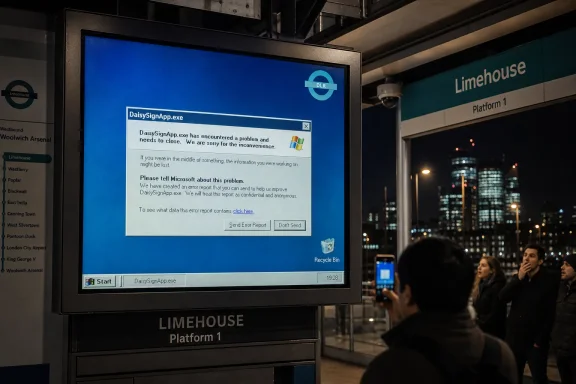
On June 13, 2026, The Register reported that a Docklands Light Railway information screen at Limehouse station in London had exposed an application error from DaisySignApp.exe on what appeared to be Windows XP or Windows Server 2003. The sight is funny because it is familiar, but it is also revealing: public infrastructure often runs less on the shiny platforms vendors market than on old, purpose-built systems nobody wants to touch. The real story is not that a station sign crashed. It is that the Windows desktop, even stripped to its bones, remains embedded in places where failure is public, budgets are constrained, and “upgrade” can mean breaking a working service.
The clue that caught the eye was not a train delay, a signal fault, or a safety incident. It was a desktop artifact: a Recycle Bin icon that looked old enough to have voted in several elections, sitting near an application error box on a display meant to serve passengers rather than advertise the operating system beneath it.
That is why this sort of failure travels so well online. A hidden computer becomes visible for a moment, and suddenly a public information screen is no longer a neutral appliance. It is a Windows box, with a process name, a shell, an error dialog, and all the cultural baggage that comes with two decades of corporate desktop computing.
The reported executable name, DaisySignApp.exe, also matters. This does not look like Windows itself failing in some mysterious kernel-level drama. It looks like a signage application threw an exception and let the operating system do what desktop operating systems do: display an error in the most literal, least commuter-friendly way possible.
That distinction is important because the temptation is to laugh at Microsoft, or at the DLR, or at whoever let an old image stay in production. But in the world of embedded Windows, the application is often the real platform. The operating system may be obsolete in vendor terms while remaining only one component in a stack that includes drivers, display controllers, remote management tools, procurement contracts, and a vendor who may or may not still exist in the same form.
The obvious security lecture writes itself: unsupported operating systems no longer receive the normal stream of security fixes, platform hardening, browser updates, driver support, and ecosystem testing that keep modern endpoints tolerably defensible. For a home PC connected to the open internet, that is a flashing red light. For a public infrastructure device, the answer is more complicated but not more comforting.
Many such systems are not general-purpose PCs in the way users imagine them. They may be locked down, network-segmented, firewalled, physically enclosed, and used for a single job. They may not browse the web, open email, or run arbitrary user-supplied code. In the best case, they are treated less like desktops and more like appliances.
But “appliance” is too often a comforting word for “computer we stopped thinking about.” The fact that a screen is doing one narrow job does not mean it has no attack surface. Remote administration, content updates, VPN access, file shares, vendor maintenance channels, USB ports, and misconfigured management agents can all turn a boring display box into a foothold.
The trouble is that “not broken” is often defined too narrowly. A sign that displays information 99.9 percent of the time may look operationally successful even if it is running an operating system that has been out of support for more than a decade. The visible service works, so the invisible risk is deferred.
That deferral can be rational in the short term. A transport operator may reasonably decide that ripping and replacing a fleet of signage endpoints is lower priority than track work, rolling stock, accessibility upgrades, station staffing, or signaling resilience. Public systems live inside procurement realities, not inside clean-room IT architecture diagrams.
But the bill still comes due. Legacy platforms accumulate hidden costs in spare hardware, vendor lock-in, compensating controls, incident response planning, audit exceptions, and the dwindling pool of people who remember how the thing was built. The longer a system remains untouched, the more each eventual change feels like archaeology.
That publicness changes the meaning of the fault. The actual operational impact may have been trivial; one display at Limehouse station exposing one application error does not mean the DLR’s train control systems are compromised or that passengers were unsafe. The Docklands Light Railway’s automated operation is a separate and far more safety-critical domain than a customer information screen.
Still, passengers do not parse architecture diagrams while standing on a platform. They see an old Windows shell and infer neglect. That may be unfair, but it is predictable, and it is why user-facing infrastructure needs failure modes designed for human trust.
A good signage system should fail gracefully. If the application dies, the passenger should see a neutral service message, a reboot screen with transport branding, or nothing at all. What they should not see is a raw exception dialog that names an executable and invites the public to speculate about the condition of the estate.
That mixture is not a contradiction. It is how infrastructure works. Railway systems are layered over older alignments, stations are renamed and rebuilt, control systems are modernized in phases, and passenger-facing technologies are added as budgets and contracts allow.
Seen that way, an XP-era interface on a display is not an anomaly so much as a small visual leak from the stack. The future of the 1980s was built on old viaducts. The passenger information systems of the 2000s were built on Windows. The transport network of the 2020s still contains both.
This is why the screenshot resonates beyond nostalgia. Windows XP is not merely an old operating system; it is an icon of a long period when Microsoft’s desktop platform became the default substrate for everything from reception desks to medical equipment to ATMs to factory terminals. When those systems age, they do not vanish. They become infrastructure.
That was the pitch, even when nobody called it a pitch. Use the platform everyone already knows. Hire from the market. Reuse development tools. Plug into existing management practices. Avoid exotic embedded systems that only a specialist vendor can maintain.
For many organizations, that was the right decision at the time. A Windows-based signage system could be developed quickly, integrated with existing back-end systems, and supported by ordinary IT staff. It could run on commodity hardware and survive through the normal replacement cycles of displays, PCs, and network equipment.
The catch is that the very ordinariness of Windows encouraged deployments that were not treated like long-lived infrastructure. A system built like a desktop application can end up living like a railway asset. The support lifecycle of the operating system and the replacement lifecycle of public infrastructure then drift apart, and eventually the calendar becomes the vulnerability.
Windows was designed for interactive users who could read a message, click a button, report a fault, or restart an application. Public signage has no such user. Its audience cannot remediate the problem; commuters can only look at it, photograph it, and wonder why the transport operator’s systems are exposing their underwear.
That mismatch is an old sin in kiosk and embedded design. Developers build on a general-purpose OS, leave desktop behaviors intact, and trust the application to stay alive. When it does not, the machine falls back to a user experience meant for a person at a keyboard.
A mature deployment assumes failure and hides it well. Watchdog services restart applications. Shell replacement prevents the normal desktop from appearing. Error reporting is redirected to logs. Management agents alert operators silently. The public display either recovers or presents a controlled message.
None of that requires a modern design language or a cloud-native architecture. It requires the basic discipline of treating public endpoints as public endpoints. The operating system can be old; the failure philosophy should not be.
Security risk is contextual. A disconnected display controller with no inbound access, a locked-down image, and a tightly controlled update path is different from an XP machine on a flat corporate network with domain credentials and remote desktop exposed. Architecture matters.
But support status also matters because unsupported platforms lose the benefit of the wider defensive ecosystem. New vulnerabilities may remain unpatched. Security tools may stop supporting agents. Modern authentication methods may be unavailable. Logging may be weak. Administrators may need exceptions for everything from TLS support to endpoint monitoring.
In other words, unsupported Windows is not automatically a catastrophe, but it is almost always a debt instrument. The organization is borrowing against segmentation, operational discipline, and the hope that nothing else in the environment changes. Over enough years, something always changes.
For WindowsForum readers, this is the practical lesson. The question is not whether one railway sign was exploitable from the platform. The question is whether your own organization has devices everyone classifies as “just a screen,” “just a controller,” or “just a terminal” while granting them network trust they no longer deserve.
There may also be a contract problem. The organization that installed the system may have outsourced maintenance, then renegotiated, merged suppliers, or allowed the original expertise to evaporate. A component that looks like an ordinary Windows executable to outsiders may be part of a larger commercial system whose upgrade path is expensive, disruptive, or unclear.
Then there is the certification problem. Transport environments do not change technology with the casual rhythm of home computing. Even when a passenger information display is not safety-critical in the same way as signaling, it still belongs to an operational estate that prizes predictability. Testing, deployment windows, rollback planning, and stakeholder signoff all slow down change.
This is where Microsoft’s lifecycle messaging collides with the installed base. The vendor can say, correctly, that support ended in 2014 or 2015. But the operator may be dealing with a system bought under a procurement cycle that assumed a longer practical life than the OS vendor’s patch calendar. Nobody owns the mismatch cleanly, so the mismatch persists.
That nostalgia softens the reaction to seeing it in the wild. People smile at the icons. They remember the Start menu. They treat the error box as a charming fossil.
But nostalgia can become a sedative. XP-era systems are not museum pieces when they are connected to live operational environments. They are production assets running old assumptions about networking, identity, graphics, storage, and application behavior.
The same applies to Windows Server 2003. It lacks XP’s consumer sentimentality, but it shares the same broad-generation problem: it belongs to a security and management era that predates many of the assumptions now baked into enterprise defense. Keeping it alive requires conscious containment, not affectionate neglect.
The Limehouse image is amusing because the stakes appear low. It would be less amusing if the same estate contained backend servers, update shares, or domain relationships that had aged just as quietly. Public screens are often where the rot becomes visible first.
Yet the underlying tension has not disappeared. If anything, it has sharpened. Microsoft wants Windows to move continuously; infrastructure wants to move cautiously. Users want stability; security teams want velocity. Hardware requirements, feature updates, driver models, and management tooling all keep evolving.
Windows 10’s own end-of-support milestone in October 2025 made this tension impossible to ignore for many organizations. Plenty of machines that worked perfectly well for their users were pushed into replacement planning because they did not meet Windows 11’s requirements or because the organization did not want to pay for extended support. That is not the same as XP lingering on railway signage, but it rhymes.
The lesson is that lifecycle policy is not merely a vendor document. It is a force that reshapes budgets, hardware inventories, application portfolios, and risk registers. Organizations that do not plan around it eventually discover that “later” has become a project with no good options.
For Microsoft, the image of old Windows in public infrastructure is awkward but also a reminder of its own success. The company’s platforms became so entrenched that they outlived the business assumptions around them. Dominance has an afterlife, and sometimes that afterlife is an error dialog at a London station.
Public display systems, badge terminals, print controllers, lab machines, building management workstations, warehouse scanners, and manufacturing PCs often sit in organizational blind spots. They may be patched irregularly, excluded from endpoint detection, or placed on networks that grew organically over many years. Their owners may be unclear because they were purchased as part of a larger non-IT project.
The first job is to make them visible. That means asset discovery, network mapping, contract review, and a willingness to ask impolite questions about the machines that “never cause trouble.” If a device cannot be upgraded, the organization still needs to know what it talks to, who can reach it, how credentials are managed, and what happens when it fails.
The second job is to design containment around reality rather than aspiration. Some legacy systems cannot be replaced quickly. That does not excuse flat networks, shared administrator passwords, unmanaged remote access, or unmonitored vendor tunnels. A system can be old and still be governed.
The third job is to make failure less embarrassing. Even if a replacement project is years away, a public-facing Windows endpoint should not dump raw exceptions into the passenger experience. Watchdogs, shell lockdown, remote restart, and controlled fallback screens are not glamorous, but neither is a viral photograph of your application crash.
It shows how easily old Windows survives in public view. It shows how application-layer failures can reveal platform age. It shows how infrastructure estates accumulate exceptions until those exceptions become normal.
It also shows why lifecycle conversations should be anchored in systems, not slogans. “Upgrade everything” is not a plan. “Leave it because it works” is not a strategy. The real work sits between those slogans: classify, isolate, monitor, replace where feasible, and document the risk where replacement is not yet possible.
That work is dull, which is why it is so often postponed. But dull work is what keeps public systems boring in the right way. The goal is not to ensure that commuters never see Windows. The goal is to ensure that when they do, it is not because an abandoned application has fallen through the floorboards.
 The Ghost in the Station Sign Was Not Really the Recycle Bin
The clue that caught the eye was not a train delay, a signal fault, or a safety incident. It was a desktop artifact: a Recycle Bin icon that looked old enough to have voted in several elections, sitting near an application error box on a display meant to serve passengers rather than advertise the operating system beneath it.That is why this sort of failure travels so well online. A hidden computer becomes visible for a moment, and suddenly a public information screen is no longer a neutral appliance. It is a Windows box, with a process name, a shell, an error dialog, and all the cultural baggage that comes with two decades of corporate desktop computing.
The reported executable name, DaisySignApp.exe, also matters. This does not look like Windows itself failing in some mysterious kernel-level drama. It looks like a signage application threw an exception and let the operating system do what desktop operating systems do: display an error in the most literal, least commuter-friendly way possible.
That distinction is important because the temptation is to laugh at Microsoft, or at the DLR, or at whoever let an old image stay in production. But in the world of embedded Windows, the application is often the real platform. The operating system may be obsolete in vendor terms while remaining only one component in a stack that includes drivers, display controllers, remote management tools, procurement contracts, and a vendor who may or may not still exist in the same form.
Unsupported Windows Is a Calendar Problem and an Engineering Problem
If the machine really is Windows XP, it is running an operating system whose mainstream consumer mythology ended long ago and whose official support ended on April 8, 2014. If it is Windows Server 2003, as The Register reasonably suggested was also possible, that platform’s support ended on July 14, 2015. Either way, this is not a case of a slightly stale Windows 10 build missing a cumulative update.The obvious security lecture writes itself: unsupported operating systems no longer receive the normal stream of security fixes, platform hardening, browser updates, driver support, and ecosystem testing that keep modern endpoints tolerably defensible. For a home PC connected to the open internet, that is a flashing red light. For a public infrastructure device, the answer is more complicated but not more comforting.
Many such systems are not general-purpose PCs in the way users imagine them. They may be locked down, network-segmented, firewalled, physically enclosed, and used for a single job. They may not browse the web, open email, or run arbitrary user-supplied code. In the best case, they are treated less like desktops and more like appliances.
But “appliance” is too often a comforting word for “computer we stopped thinking about.” The fact that a screen is doing one narrow job does not mean it has no attack surface. Remote administration, content updates, VPN access, file shares, vendor maintenance channels, USB ports, and misconfigured management agents can all turn a boring display box into a foothold.
The Best Argument for Legacy Systems Is Also the Worst One
Every administrator knows the phrase: if it is not broken, do not fix it. In infrastructure, that is not laziness; it is institutional memory. Upgrades break drivers, vendors disappear, certification cycles are slow, and a screen that tells passengers where the next train is going may be less glamorous than the project competing for the same budget.The trouble is that “not broken” is often defined too narrowly. A sign that displays information 99.9 percent of the time may look operationally successful even if it is running an operating system that has been out of support for more than a decade. The visible service works, so the invisible risk is deferred.
That deferral can be rational in the short term. A transport operator may reasonably decide that ripping and replacing a fleet of signage endpoints is lower priority than track work, rolling stock, accessibility upgrades, station staffing, or signaling resilience. Public systems live inside procurement realities, not inside clean-room IT architecture diagrams.
But the bill still comes due. Legacy platforms accumulate hidden costs in spare hardware, vendor lock-in, compensating controls, incident response planning, audit exceptions, and the dwindling pool of people who remember how the thing was built. The longer a system remains untouched, the more each eventual change feels like archaeology.
Public Screens Fail Differently Because They Fail in Front of Everyone
A crash on an office kiosk is annoying. A crash on a railway information screen becomes a photograph, a joke, and a small act of civic X-ray vision. It shows passengers that behind the transport authority’s branding is a very ordinary machine capable of producing a very ordinary Windows error.That publicness changes the meaning of the fault. The actual operational impact may have been trivial; one display at Limehouse station exposing one application error does not mean the DLR’s train control systems are compromised or that passengers were unsafe. The Docklands Light Railway’s automated operation is a separate and far more safety-critical domain than a customer information screen.
Still, passengers do not parse architecture diagrams while standing on a platform. They see an old Windows shell and infer neglect. That may be unfair, but it is predictable, and it is why user-facing infrastructure needs failure modes designed for human trust.
A good signage system should fail gracefully. If the application dies, the passenger should see a neutral service message, a reboot screen with transport branding, or nothing at all. What they should not see is a raw exception dialog that names an executable and invites the public to speculate about the condition of the estate.
The DLR Has Always Been a Mixture of Future and Leftovers
The setting gives the story its charm. The Docklands Light Railway opened in 1987 as a symbol of automated urban transport and east London redevelopment. Limehouse connects the DLR with National Rail services, and like much of London’s transport fabric, it sits in a landscape where Victorian railway inheritance, late-20th-century regeneration, and present-day commuter expectations overlap.That mixture is not a contradiction. It is how infrastructure works. Railway systems are layered over older alignments, stations are renamed and rebuilt, control systems are modernized in phases, and passenger-facing technologies are added as budgets and contracts allow.
Seen that way, an XP-era interface on a display is not an anomaly so much as a small visual leak from the stack. The future of the 1980s was built on old viaducts. The passenger information systems of the 2000s were built on Windows. The transport network of the 2020s still contains both.
This is why the screenshot resonates beyond nostalgia. Windows XP is not merely an old operating system; it is an icon of a long period when Microsoft’s desktop platform became the default substrate for everything from reception desks to medical equipment to ATMs to factory terminals. When those systems age, they do not vanish. They become infrastructure.
Microsoft Won the Embedded World by Being Boring Enough to Trust
The late Windows XP and Windows Server 2003 era was Microsoft at peak institutional ubiquity. Windows was familiar to developers, support staff, procurement departments, hardware makers, and line-of-business software vendors. If you needed to build a kiosk, a display controller, a terminal, or a dedicated appliance, Windows gave you drivers, tooling, remote management options, and an enormous labor pool.That was the pitch, even when nobody called it a pitch. Use the platform everyone already knows. Hire from the market. Reuse development tools. Plug into existing management practices. Avoid exotic embedded systems that only a specialist vendor can maintain.
For many organizations, that was the right decision at the time. A Windows-based signage system could be developed quickly, integrated with existing back-end systems, and supported by ordinary IT staff. It could run on commodity hardware and survive through the normal replacement cycles of displays, PCs, and network equipment.
The catch is that the very ordinariness of Windows encouraged deployments that were not treated like long-lived infrastructure. A system built like a desktop application can end up living like a railway asset. The support lifecycle of the operating system and the replacement lifecycle of public infrastructure then drift apart, and eventually the calendar becomes the vulnerability.
The Error Dialog Is a Design Failure, Not Just a Maintenance Failure
The most damning part of the Limehouse sighting is not necessarily the age of the OS. It is the failure mode. An application error dialog on a public screen is a decision, even if it is an accidental one inherited from defaults.Windows was designed for interactive users who could read a message, click a button, report a fault, or restart an application. Public signage has no such user. Its audience cannot remediate the problem; commuters can only look at it, photograph it, and wonder why the transport operator’s systems are exposing their underwear.
That mismatch is an old sin in kiosk and embedded design. Developers build on a general-purpose OS, leave desktop behaviors intact, and trust the application to stay alive. When it does not, the machine falls back to a user experience meant for a person at a keyboard.
A mature deployment assumes failure and hides it well. Watchdog services restart applications. Shell replacement prevents the normal desktop from appearing. Error reporting is redirected to logs. Management agents alert operators silently. The public display either recovers or presents a controlled message.
None of that requires a modern design language or a cloud-native architecture. It requires the basic discipline of treating public endpoints as public endpoints. The operating system can be old; the failure philosophy should not be.
Security Risk Is Not Binary, but Unsupported Means You Are Spending Trust
There is a lazy version of this debate in which any unsupported Windows device is treated as a flaming breach waiting to happen. There is also a lazy counterargument in which operators insist that isolation, obscurity, and narrow function make age irrelevant. Both positions dodge the hard part.Security risk is contextual. A disconnected display controller with no inbound access, a locked-down image, and a tightly controlled update path is different from an XP machine on a flat corporate network with domain credentials and remote desktop exposed. Architecture matters.
But support status also matters because unsupported platforms lose the benefit of the wider defensive ecosystem. New vulnerabilities may remain unpatched. Security tools may stop supporting agents. Modern authentication methods may be unavailable. Logging may be weak. Administrators may need exceptions for everything from TLS support to endpoint monitoring.
In other words, unsupported Windows is not automatically a catastrophe, but it is almost always a debt instrument. The organization is borrowing against segmentation, operational discipline, and the hope that nothing else in the environment changes. Over enough years, something always changes.
For WindowsForum readers, this is the practical lesson. The question is not whether one railway sign was exploitable from the platform. The question is whether your own organization has devices everyone classifies as “just a screen,” “just a controller,” or “just a terminal” while granting them network trust they no longer deserve.
The Procurement Trap Keeps Old Windows Alive
Why are systems like this still around? Because replacing them is rarely as simple as installing a new OS. The software may depend on old libraries, unsupported drivers, fixed screen resolutions, serial adapters, proprietary display hardware, or a vendor package certified only against an ancient Windows build.There may also be a contract problem. The organization that installed the system may have outsourced maintenance, then renegotiated, merged suppliers, or allowed the original expertise to evaporate. A component that looks like an ordinary Windows executable to outsiders may be part of a larger commercial system whose upgrade path is expensive, disruptive, or unclear.
Then there is the certification problem. Transport environments do not change technology with the casual rhythm of home computing. Even when a passenger information display is not safety-critical in the same way as signaling, it still belongs to an operational estate that prizes predictability. Testing, deployment windows, rollback planning, and stakeholder signoff all slow down change.
This is where Microsoft’s lifecycle messaging collides with the installed base. The vendor can say, correctly, that support ended in 2014 or 2015. But the operator may be dealing with a system bought under a procurement cycle that assumed a longer practical life than the OS vendor’s patch calendar. Nobody owns the mismatch cleanly, so the mismatch persists.
Nostalgia Makes the Screenshot Funny, but Familiarity Makes It Dangerous
Windows XP occupies a strange place in the collective memory of computing. For many users, it was the last Windows that felt both modern and uncomplicated. Its visual language became shorthand for an era before subscription services, forced account flows, cloud prompts, and the operating system as an advertising surface.That nostalgia softens the reaction to seeing it in the wild. People smile at the icons. They remember the Start menu. They treat the error box as a charming fossil.
But nostalgia can become a sedative. XP-era systems are not museum pieces when they are connected to live operational environments. They are production assets running old assumptions about networking, identity, graphics, storage, and application behavior.
The same applies to Windows Server 2003. It lacks XP’s consumer sentimentality, but it shares the same broad-generation problem: it belongs to a security and management era that predates many of the assumptions now baked into enterprise defense. Keeping it alive requires conscious containment, not affectionate neglect.
The Limehouse image is amusing because the stakes appear low. It would be less amusing if the same estate contained backend servers, update shares, or domain relationships that had aged just as quietly. Public screens are often where the rot becomes visible first.
The Windows 11 Era Has Not Escaped the XP Lesson
It is tempting for modern Windows users to treat this as ancient history. After all, Microsoft’s current platform story is Windows 11, cloud management, hardware-backed security, virtualization-based protections, modern deployment rings, and a far more aggressive servicing cadence than XP administrators ever faced.Yet the underlying tension has not disappeared. If anything, it has sharpened. Microsoft wants Windows to move continuously; infrastructure wants to move cautiously. Users want stability; security teams want velocity. Hardware requirements, feature updates, driver models, and management tooling all keep evolving.
Windows 10’s own end-of-support milestone in October 2025 made this tension impossible to ignore for many organizations. Plenty of machines that worked perfectly well for their users were pushed into replacement planning because they did not meet Windows 11’s requirements or because the organization did not want to pay for extended support. That is not the same as XP lingering on railway signage, but it rhymes.
The lesson is that lifecycle policy is not merely a vendor document. It is a force that reshapes budgets, hardware inventories, application portfolios, and risk registers. Organizations that do not plan around it eventually discover that “later” has become a project with no good options.
For Microsoft, the image of old Windows in public infrastructure is awkward but also a reminder of its own success. The company’s platforms became so entrenched that they outlived the business assumptions around them. Dominance has an afterlife, and sometimes that afterlife is an error dialog at a London station.
Administrators Should Inventory the Boring Stuff First
The practical response to stories like this is not mockery. It is inventory. The most dangerous legacy systems are often not the famous ones. They are the ones nobody includes in the endpoint count because they are mounted above head height, locked in cabinets, or managed by a facilities vendor rather than central IT.Public display systems, badge terminals, print controllers, lab machines, building management workstations, warehouse scanners, and manufacturing PCs often sit in organizational blind spots. They may be patched irregularly, excluded from endpoint detection, or placed on networks that grew organically over many years. Their owners may be unclear because they were purchased as part of a larger non-IT project.
The first job is to make them visible. That means asset discovery, network mapping, contract review, and a willingness to ask impolite questions about the machines that “never cause trouble.” If a device cannot be upgraded, the organization still needs to know what it talks to, who can reach it, how credentials are managed, and what happens when it fails.
The second job is to design containment around reality rather than aspiration. Some legacy systems cannot be replaced quickly. That does not excuse flat networks, shared administrator passwords, unmanaged remote access, or unmonitored vendor tunnels. A system can be old and still be governed.
The third job is to make failure less embarrassing. Even if a replacement project is years away, a public-facing Windows endpoint should not dump raw exceptions into the passenger experience. Watchdogs, shell lockdown, remote restart, and controlled fallback screens are not glamorous, but neither is a viral photograph of your application crash.
A Small Crash Carries a Big Reminder for the Windows Estate
The Limehouse incident should not be inflated into a panic about railway safety. A passenger information display is not proof that train control is running on the same box, and the visible application failure points more toward signage software than toward the core operating system. The sensible reading is narrower and more useful.It shows how easily old Windows survives in public view. It shows how application-layer failures can reveal platform age. It shows how infrastructure estates accumulate exceptions until those exceptions become normal.
It also shows why lifecycle conversations should be anchored in systems, not slogans. “Upgrade everything” is not a plan. “Leave it because it works” is not a strategy. The real work sits between those slogans: classify, isolate, monitor, replace where feasible, and document the risk where replacement is not yet possible.
That work is dull, which is why it is so often postponed. But dull work is what keeps public systems boring in the right way. The goal is not to ensure that commuters never see Windows. The goal is to ensure that when they do, it is not because an abandoned application has fallen through the floorboards.
Limehouse’s Error Box Leaves a To-Do List for Every Legacy Windows Shop
The episode is small enough to laugh at and specific enough to learn from. For IT teams, the value is not in guessing whether the display was XP or Server 2003 from an icon, but in using the sighting as a prompt to examine the forgotten Windows machines that still perform one job too reliably to attract attention.- Public-facing endpoints should be configured to fail into a controlled user experience rather than a raw Windows desktop or application error dialog.
- Unsupported Windows systems should be treated as explicit risk exceptions with documented ownership, network boundaries, and replacement plans.
- Legacy signage, kiosk, and control-adjacent devices should be included in asset inventories even when they are owned by facilities, operations, or external vendors.
- Network segmentation and monitored remote access matter more when old operating systems cannot be upgraded on a normal schedule.
- Application resilience is part of security posture because crashes can expose process names, platform details, and operational neglect to the public.
- Replacement planning should begin before vendor support ends, because procurement and certification cycles routinely outlast operating-system lifecycles.
References
- Primary source: The Register
Published: Sat, 13 Jun 2026 08:30:00 GMT
XP-era Windows spotted haunting London's driverless railway
A blast from the past greets commuterswww.theregister.com - Official source: blogs.microsoft.com
Support for Windows XP Set to End in April 2014 - The Official Microsoft Blog
A year from now will mark the final milestone for Windows XP – that of its end of support date. Starting April 8, 2014, Microsoft will no longer provide support for Windows XP users. This means that customers and partners will no longer receive security updates to the operating system or...blogs.microsoft.com - Official source: learn.microsoft.com
Support for Windows XP, Office 2003 and Exchange 2003 ended - Microsoft Lifecycle | Microsoft Learn
Announcing that support for Windows XP, Office 2003 and Exchange 2003 has ended.learn.microsoft.com - Related coverage: techspot.com
Microsoft has finally ended support for Windows XP | TechSpot
After what has felt like an eternity, Microsoft has finally ended all forms of official support for Windows XP, more than 12 years after the operating system...www.techspot.com - Official source: microsoft.com
Migration is Worth It! Support for Windows Server 2003 Ends Today | Microsoft Windows Server Blog
It’s hard to believe that, after 12 great years, Windows Server 2003 extended support ends today. Over the last year, many customers have prepared and planned their migrations and have migrated to a modern infrastructure.www.microsoft.com - Official source: support.microsoft.com
What does it mean if Windows isn't supported? | Microsoft Support
Learn what it means if you have an older version of Windows that's no longer supported.support.microsoft.com
- Official source: news.microsoft.com
Windows XP llega a su fin – Centro de noticias
 news.microsoft.com
- Related coverage: railway-technology.com
- Related coverage: techradar.com
Windows Server 2008 is finally gone, after Microsoft pulls support at last | TechRadar
Windows Server 2008 (and Vista) are gone foreverwww.techradar.com - Related coverage: availabilitydigest.com
- Related coverage: exigent.net
- Related coverage: time.com
Microsoft Ends Windows XP Support, Updates Windows 8.1
The tech giant is done supporting its ancient, malware-prone operating system Windows XP, which still accounts for about one-fourth of laptop and desktop usage worldwide, and it won't patch any future security holes eithertime.com - Related coverage: oit.alabama.gov
- Related coverage: unifiedbiz.com
