

Registry cleaners are Windows maintenance utilities that scan the Registry for supposedly invalid or unnecessary entries and delete them, but on modern Windows 10 and Windows 11 PCs they rarely improve performance and can break applications or Windows itself when they remove entries still in use. That is the uncomfortable truth behind a category of software that has survived long after its best argument expired. The Registry is real, its messiness is real, and abandoned entries do exist; the leap from that fact to “run a cleaner regularly” is where the sales pitch outruns the evidence. Registry cleaners persist because they offer a simple ritual for a complicated machine, not because Windows still needs them.
The Windows Registry is one of those pieces of the operating system that sounds more mysterious than it usually is. It is a structured database of configuration information used by Windows, drivers, services, user profiles, hardware, and applications. If a program needs to remember a file association, a service startup setting, a licensing flag, or a shell integration, the Registry is one of the places it may store that information.
That makes it powerful, and power invites mythology. To a normal user, the Registry looks like the engine room of Windows: hierarchical keys, cryptic values, long class identifiers, and enough unfamiliar names to make even a careful person hesitate. It is not hard for a utility vendor to point at that complexity and say, in effect, this is why your PC feels slow.
The problem is that this framing turns a database into a villain. A large Registry is not inherently a sick Registry, and an old entry is not inherently a dangerous entry. Windows is designed to tolerate unused configuration data in much the same way a file system tolerates old folders, cached thumbnails, and application leftovers.
The stronger claim made by registry cleaners is not simply that they find leftovers. It is that leftovers are a meaningful cause of slowness, instability, crashes, freezes, and vague “PC health” decline. That claim may have sounded plausible in the Windows 95, Windows 98, and early Windows XP era, but it is a much weaker case on today’s hardware and operating systems.
Anyone who supported family PCs in that era remembers the pattern. A machine arrived filled with trialware, toolbars, half-removed ISP software, printer suites, game launchers, and “helper” programs that started with Windows. Removing the application through Control Panel did not always remove the debris. Sometimes reinstalling an application failed because remnants of the previous installation still convinced the installer that the product was already present.
In that environment, a targeted Registry fix could genuinely solve a problem. If an uninstall entry was broken, a file association was corrupted, or an installer was blocked by a stale product key, editing or removing the right Registry entry could get the machine unstuck. The phrase “clean the Registry” emerged from a world where manual cleanup was sometimes part of practical Windows repair.
The crucial word is targeted. The useful act was not a ritual purge of hundreds of “invalid” entries. It was finding the specific setting connected to the specific failure. Registry cleaners took that kernel of truth and productized it into a broad promise: if one bad entry can cause a problem, then removing many questionable entries must prevent many problems.
That logic is emotionally satisfying and technically sloppy. Modern Windows does not become faster simply because a cleaner deletes an abandoned key for a program you uninstalled two years ago. The operating system is not reading every obsolete entry at boot, and SSD-era storage latency has changed the practical cost of small bits of configuration clutter.
This is where registry cleaners run into the central difficulty of automated maintenance: they often cannot know intent. A key may look unused because a file path no longer exists, but that does not prove the entry is safe to delete. A COM registration, shared library reference, application compatibility setting, driver value, or installer marker can look like debris to a generic scanner while still mattering to a program, updater, service, or future reinstall.
False positives are not a side issue. They are the whole risk model. A cleaner that deletes only truly irrelevant data is merely unnecessary most of the time; a cleaner that occasionally deletes something important becomes an intermittent source of hard-to-diagnose breakage.
The failure mode is particularly unpleasant because the symptom often appears later. A user runs a cleaner, sees a triumphant report that 684 issues were fixed, and the PC appears fine. Days later, a game will not launch, an application throws a missing component error, a context-menu handler disappears, an installer refuses to upgrade, or Windows starts behaving oddly after a reboot.
At that point, causality has gone cold. The user blames Windows, the app vendor, the latest update, or a driver. The registry cleaner has already taken its victory lap and left the scene.
On a modern Windows 11 PC with an NVMe SSD and enough memory, the practical performance benefit of removing a few hundred or a few thousand obsolete Registry entries is usually indistinguishable from zero. The Registry may be large, but “large” here does not mean what marketing copy wants it to mean. It is not a directory full of high-resolution video files, nor is Windows constantly parsing every stale entry during normal operation.
Startup performance problems are far more likely to come from actual startup apps, services, drivers, scheduled tasks, firmware delays, network waits, security software, or update activity. Application crashes are more likely to come from bugs, missing dependencies, damaged files, incompatible drivers, corrupt profiles, bad extensions, or hardware instability. Disk space problems are more likely to come from downloads, caches, games, virtual machines, Windows update files, restore points, and media libraries.
The Registry can be involved in all kinds of failures, but not usually in the way cleaners imply. The bad Registry problem that matters is typically a wrong value, a missing required value, a broken association, a damaged service configuration, or a stale installer record tied to one product. Deleting unrelated “junk” does not fix that.
This is the maintenance equivalent of removing old receipts from a filing cabinet because your car will not start. The filing cabinet may be messy. It may even contain receipts for a mechanic you no longer use. But unless the problem is inside that paper trail, cleaning it is displacement activity.
The labels often do even more work than the scan. “Invalid,” “obsolete,” “broken,” and “orphaned” sound like defects, not possibilities. A user who would never manually delete a Registry key in Registry Editor may happily approve a bulk fix because the interface has translated ambiguity into diagnosis.
This is one reason the category has survived despite repeated warnings. The software does not need to prove that cleaning the Registry made Windows faster. It only needs to show that it found something. In a system as complex as Windows, it will always find something.
That loop is psychologically powerful. Scan, discover, fix, repeat. The user gets a sense of control, and the tool gets another opportunity to upsell, nag, or demonstrate value. If nothing breaks, the user may credit the cleaner for continued stability. If something does break, the connection may be too obscure to notice.
The most successful registry cleaners are not selling database hygiene. They are selling relief from uncertainty. Windows troubleshooting can be maddening even for professionals, and a one-click cure is attractive precisely because the real diagnostic process is slow, conditional, and often inconclusive.
This framing borrows from real maintenance categories that users understand. Dust in a PC can cause heat problems. Too many startup apps can slow boot. A full disk can make Windows miserable. Malware can hijack settings and degrade performance. Registry cleaners attach themselves to that common-sense maintenance model and imply that unused entries are another form of grime.
But unused configuration data is not dust. It is not heat. It is not a background process consuming CPU time. It is often just inert information sitting in a database until something asks for it, which may be never.
That distinction is not intuitive, especially to users trained by years of Windows folklore. Many people learned to defragment hard drives, clear temp files, uninstall toolbars, update drivers, run antivirus scans, and remove suspicious startup entries. Registry cleaning entered that same ritual calendar, and rituals are hard to retire.
There is also a generational factor. People who maintained Windows machines in the early 2000s remember real gains from aggressive cleanup, even if those gains came mostly from removing startup junk and bundled software rather than deleting Registry keys. The memory becomes compressed: “I cleaned the PC and it ran better.” The Registry cleaner then inherits credit for a broader cleanup operation.
That bundling matters. If a user ran CCleaner and recovered several gigabytes by clearing caches, the experience reinforced trust in the whole application. The Registry cleaner, sitting next to obviously useful cleanup categories, borrowed legitimacy from tasks that were easier to validate.
Over time, the Windows ecosystem changed. Browsers improved their own cache controls. Windows gained Storage Sense and better built-in cleanup tools. SSDs reduced the old obsession with defragmentation. Application packaging improved in some areas, though not all. Meanwhile, third-party maintenance suites often expanded into update checkers, driver tools, privacy toggles, telemetry switches, browser add-ons, and paid subscriptions.
That evolution left the registry cleaner looking like a legacy feature in a utility category still trying to justify its place. Some users still swear by it because it has not visibly harmed them. Others avoid it because the downside is asymmetric: the benefit is tiny or imaginary, while the worst-case failure can consume hours.
The fairest reading is not that every registry cleaner instantly ruins PCs. Many runs do nothing dramatic at all. That is part of the problem. A tool can be low-yield most of the time and still be too risky to recommend as routine maintenance.
This is not a case for carpet-bombing the Registry. It is a case for precision. If the problem is Apollo, Sunshine, Adobe, Autodesk, a VPN client, a game anti-cheat driver, or a printer suite, the fix should be constrained to that product’s files, services, scheduled tasks, drivers, and Registry entries. The name of the target matters.
That is why tools such as BCUninstaller make more sense than generic registry cleaners in modern troubleshooting. BCUninstaller’s purpose is not to declare the entire Registry unclean; it is to remove applications and then identify leftovers related to the application being removed. That is a narrower, more defensible job.
Even then, caution is warranted. A leftover scanner can still misidentify shared files or related entries. The difference is that the user is operating inside a known context: this program was removed, these remnants appear associated with it, and the tool can ask before deleting them. A restore point or backup is not a magic shield, but it is at least an acknowledgment that deleting configuration data carries risk.
Manual Registry editing sits at the far end of the precision spectrum. It can be the right answer for administrators and advanced users who know exactly which key is blocking an install or preserving a bad setting. It is also a terrible place for guesswork. Registry Editor has no moral sense; it will delete the wrong thing just as politely as the right one.
Task Manager’s Startup apps view is a better first stop than a Registry cleaner. So are Settings, Installed apps, Storage Sense, Windows Update history, Reliability Monitor, Event Viewer, Device Manager, and the vendor tools for storage health or firmware updates. None of these is as emotionally satisfying as one big “Fix all issues” button, but they are closer to the real causes.
For disk cleanup, Windows’ built-in tools are generally safer than utilities that promise deep system optimization. Storage Sense can clear temporary files, recycle bin contents, and old downloads according to user-selected rules. Disk Cleanup still exists for certain old-school tasks. Browser settings can handle browser data without a third-party app guessing what matters.
For application removal, the best practice is to use the program’s own uninstaller or Windows’ Installed apps interface first, then reach for a targeted uninstaller when the standard path fails or leaves visible trouble. For stubborn enterprise software, security tools, VPN clients, printer drivers, and developer stacks, vendor cleanup tools are often better than generic cleaners because they understand their own products’ footprints.
For system corruption, Windows has specific repair tools. System File Checker and DISM are not glamour products, but they address Windows component integrity rather than unrelated Registry leftovers. For recurring blue screens, memory diagnostics, driver analysis, firmware updates, and hardware checks matter more than deleting obsolete keys.
The broader point is that maintenance should follow symptoms. A slow boot calls for startup analysis. A crashing app calls for logs, updates, dependencies, and profile testing. A failed install calls for installer records and leftovers for that app. A full disk calls for storage analysis. A registry cleaner flattens those distinctions, and that is precisely why it feels easy.
Administrators do modify the Registry, of course. Group Policy, MDM configuration profiles, deployment scripts, application installers, hardening baselines, and remediation packages all touch Registry-backed settings. The difference is that those changes are intentional and documented. They set known values for known reasons.
A registry cleaner does the opposite. It removes values because they appear unnecessary according to a vendor’s scan logic. That may be tolerable on a hobby PC with a recent image backup. It is reckless on a workstation running accounting software, CAD tools, endpoint security, VPN clients, smart card middleware, or medical and industrial applications.
The cost of a mistake is also different. A home user may lose an evening repairing a broken app. An organization may lose technician time across dozens of machines, trigger support escalations, or create subtle inconsistencies that only surface during patching or upgrades. The Registry is not a place where fleet operators should welcome probabilistic cleanup.
This is why professional Windows maintenance has moved toward configuration management, endpoint analytics, application control, patch compliance, and device health telemetry. The goal is not to make every machine aesthetically clean. The goal is to make every machine predictable.
The danger is not touching the Registry. The danger is touching it without a reason. Deleting entries because they look old, unfamiliar, or numerous is not maintenance. It is superstition with an interface.
A healthy attitude is somewhere between fear and bravado. The Registry deserves respect because mistakes can be consequential. It does not deserve mystical dread because it is just a database with keys, values, permissions, hives, and backups. The right question is not “should the Registry be cleaned?” but “what exact problem am I solving, and which exact entry is involved?”
That question kills most registry-cleaner marketing. A one-click cleaner depends on abstraction. It turns hundreds of small judgments into one big act of trust. The user is not evaluating each key; the user is outsourcing judgment to software whose business model often benefits from finding problems.
If a tool cannot clearly explain why an entry is safe to remove, what created it, what depends on it, and how to undo the change, the conservative answer is to leave it alone. In modern Windows, inert clutter is usually safer than confident deletion.
BCUninstaller fits this more honest pattern because it starts with application inventory and removal rather than a generalized claim that Windows is sick. Its value is clearest when the built-in uninstaller list is incomplete, when multiple bundled applications need to be removed, or when an app has left behind obvious leftovers. That is a practical workflow, not a ritual.
Still, even better utilities should not be treated as autopilot. The moment a tool proposes deleting Registry entries, the user should slow down. Create a restore point. Read the list. Prefer entries clearly tied to the removed program. Avoid broad matches that sweep in shared vendor components unless you understand the consequences.
This is especially true with games, development tools, VPNs, virtualization software, device drivers, and security products. These categories often install services, certificates, drivers, scheduled tasks, shell extensions, firewall rules, and background components. Leftovers can be annoying, but incomplete cleanup can be worse.
The cleaner future for Windows maintenance is not a smarter universal registry cleaner. It is better uninstallers, better app packaging, clearer ownership of settings, safer rollback, and tools that treat cleanup as a narrow operation with context.
In that environment, folk remedies flourish. The Registry cleaner sits alongside driver updaters, debloat scripts, RAM optimizers, “privacy” toggle packs, and miracle performance suites. Each promises to reduce a complex system to a single action. Each draws power from the user’s suspicion that Windows contains hidden messes they cannot see.
Some of that suspicion is earned. Windows does accumulate leftovers. Uninstallers are imperfect. Vendors still install too much. OEM images still ship with promotional software. Microsoft itself keeps moving settings between Control Panel, Settings, web experiences, Store apps, inbox apps, and policy surfaces. The system can feel messier than it should.
But a real diagnosis of that mess does not vindicate registry cleaners. It points to more specific reforms: applications should uninstall cleanly, Windows should expose startup and background activity more clearly, Microsoft should continue improving storage cleanup, and vendors should stop treating every installation as permission to colonize the system.
Registry cleaners are popular because they give users a visible enemy. The better answer is to give users better visibility.
That advice will disappoint anyone looking for a secret speed switch. It will also save some users from needless damage. The modern Windows PC is not made faster by deleting random historical traces from its configuration database.
A good cleanup strategy is less dramatic and more effective: remove apps you do not use, disable unnecessary startup entries, keep Windows and drivers current through trusted channels, check storage usage, investigate errors with logs, and back up before making invasive changes. That is not as marketable as “fix 1,000 Registry problems,” but it maps better to reality.
The hardest part is accepting that not every mess matters. Windows can contain old entries, abandoned folders, cached data, and compatibility scaffolding without being broken. A clean-looking scan result is not the same thing as a healthier PC.
Source: How-To Geek The truth about Windows registry cleaners (and why people still use them)
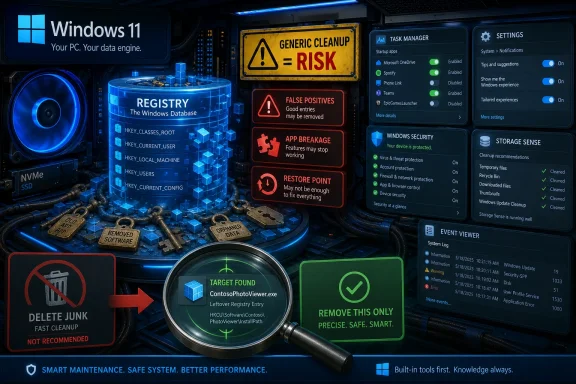 The Registry Became a Perfect Place to Sell Anxiety
The Windows Registry is one of those pieces of the operating system that sounds more mysterious than it usually is. It is a structured database of configuration information used by Windows, drivers, services, user profiles, hardware, and applications. If a program needs to remember a file association, a service startup setting, a licensing flag, or a shell integration, the Registry is one of the places it may store that information.That makes it powerful, and power invites mythology. To a normal user, the Registry looks like the engine room of Windows: hierarchical keys, cryptic values, long class identifiers, and enough unfamiliar names to make even a careful person hesitate. It is not hard for a utility vendor to point at that complexity and say, in effect, this is why your PC feels slow.
The problem is that this framing turns a database into a villain. A large Registry is not inherently a sick Registry, and an old entry is not inherently a dangerous entry. Windows is designed to tolerate unused configuration data in much the same way a file system tolerates old folders, cached thumbnails, and application leftovers.
The stronger claim made by registry cleaners is not simply that they find leftovers. It is that leftovers are a meaningful cause of slowness, instability, crashes, freezes, and vague “PC health” decline. That claim may have sounded plausible in the Windows 95, Windows 98, and early Windows XP era, but it is a much weaker case on today’s hardware and operating systems.
The Old Case for Cleaning Was Not Entirely Imaginary
It is tempting to dismiss registry cleaners as pure snake oil from the start, but that misses why the habit took root. Decades ago, Windows PCs were slower, storage was slower, uninstallers were often sloppy, and consumer software had a more cavalier relationship with system integration. Some applications created sprawling sets of Registry entries, shell hooks, startup commands, file associations, browser add-ons, and shared component references that were painful to remove cleanly.Anyone who supported family PCs in that era remembers the pattern. A machine arrived filled with trialware, toolbars, half-removed ISP software, printer suites, game launchers, and “helper” programs that started with Windows. Removing the application through Control Panel did not always remove the debris. Sometimes reinstalling an application failed because remnants of the previous installation still convinced the installer that the product was already present.
In that environment, a targeted Registry fix could genuinely solve a problem. If an uninstall entry was broken, a file association was corrupted, or an installer was blocked by a stale product key, editing or removing the right Registry entry could get the machine unstuck. The phrase “clean the Registry” emerged from a world where manual cleanup was sometimes part of practical Windows repair.
The crucial word is targeted. The useful act was not a ritual purge of hundreds of “invalid” entries. It was finding the specific setting connected to the specific failure. Registry cleaners took that kernel of truth and productized it into a broad promise: if one bad entry can cause a problem, then removing many questionable entries must prevent many problems.
That logic is emotionally satisfying and technically sloppy. Modern Windows does not become faster simply because a cleaner deletes an abandoned key for a program you uninstalled two years ago. The operating system is not reading every obsolete entry at boot, and SSD-era storage latency has changed the practical cost of small bits of configuration clutter.
Microsoft’s Position Has Been Boring, Consistent, and Mostly Right
Microsoft’s support position on registry cleaning utilities has long been cautious to the point of discouragement. The company does not support problems caused by utilities that modify the Registry using unsupported methods, and it warns that such tools can cause serious issues requiring repair or reinstallation. That stance is not glamorous, but it is the stance of the vendor that has to support Windows after third-party utilities have guessed wrong.This is where registry cleaners run into the central difficulty of automated maintenance: they often cannot know intent. A key may look unused because a file path no longer exists, but that does not prove the entry is safe to delete. A COM registration, shared library reference, application compatibility setting, driver value, or installer marker can look like debris to a generic scanner while still mattering to a program, updater, service, or future reinstall.
False positives are not a side issue. They are the whole risk model. A cleaner that deletes only truly irrelevant data is merely unnecessary most of the time; a cleaner that occasionally deletes something important becomes an intermittent source of hard-to-diagnose breakage.
The failure mode is particularly unpleasant because the symptom often appears later. A user runs a cleaner, sees a triumphant report that 684 issues were fixed, and the PC appears fine. Days later, a game will not launch, an application throws a missing component error, a context-menu handler disappears, an installer refuses to upgrade, or Windows starts behaving oddly after a reboot.
At that point, causality has gone cold. The user blames Windows, the app vendor, the latest update, or a driver. The registry cleaner has already taken its victory lap and left the scene.
The Performance Pitch Collapsed Under Modern Hardware
The most common promise of registry cleaners is speed. They claim to reduce clutter, improve responsiveness, accelerate startup, and restore performance. That pitch depends on an old mental model of Windows as a machine dragging a giant sack of bad entries behind it.On a modern Windows 11 PC with an NVMe SSD and enough memory, the practical performance benefit of removing a few hundred or a few thousand obsolete Registry entries is usually indistinguishable from zero. The Registry may be large, but “large” here does not mean what marketing copy wants it to mean. It is not a directory full of high-resolution video files, nor is Windows constantly parsing every stale entry during normal operation.
Startup performance problems are far more likely to come from actual startup apps, services, drivers, scheduled tasks, firmware delays, network waits, security software, or update activity. Application crashes are more likely to come from bugs, missing dependencies, damaged files, incompatible drivers, corrupt profiles, bad extensions, or hardware instability. Disk space problems are more likely to come from downloads, caches, games, virtual machines, Windows update files, restore points, and media libraries.
The Registry can be involved in all kinds of failures, but not usually in the way cleaners imply. The bad Registry problem that matters is typically a wrong value, a missing required value, a broken association, a damaged service configuration, or a stale installer record tied to one product. Deleting unrelated “junk” does not fix that.
This is the maintenance equivalent of removing old receipts from a filing cabinet because your car will not start. The filing cabinet may be messy. It may even contain receipts for a mechanic you no longer use. But unless the problem is inside that paper trail, cleaning it is displacement activity.
The Cleaner’s Interface Turns Guesswork Into Theater
Registry cleaners are designed to feel authoritative. They scan quickly, produce long lists of findings, categorize them into alarming buckets, and assign a number to the mess. The number matters. It gives the user something concrete to react to: 37 errors, 512 problems, 1,208 invalid entries.The labels often do even more work than the scan. “Invalid,” “obsolete,” “broken,” and “orphaned” sound like defects, not possibilities. A user who would never manually delete a Registry key in Registry Editor may happily approve a bulk fix because the interface has translated ambiguity into diagnosis.
This is one reason the category has survived despite repeated warnings. The software does not need to prove that cleaning the Registry made Windows faster. It only needs to show that it found something. In a system as complex as Windows, it will always find something.
That loop is psychologically powerful. Scan, discover, fix, repeat. The user gets a sense of control, and the tool gets another opportunity to upsell, nag, or demonstrate value. If nothing breaks, the user may credit the cleaner for continued stability. If something does break, the connection may be too obscure to notice.
The most successful registry cleaners are not selling database hygiene. They are selling relief from uncertainty. Windows troubleshooting can be maddening even for professionals, and a one-click cure is attractive precisely because the real diagnostic process is slow, conditional, and often inconclusive.
The Fear Was Always the Product
The How-To Geek argument lands because it identifies the emotional core of the market: fear, uncertainty, and doubt. Registry cleaners thrive by making normal Windows complexity feel pathological. They present the Registry not as a configuration store that naturally accumulates history, but as a clogged artery.This framing borrows from real maintenance categories that users understand. Dust in a PC can cause heat problems. Too many startup apps can slow boot. A full disk can make Windows miserable. Malware can hijack settings and degrade performance. Registry cleaners attach themselves to that common-sense maintenance model and imply that unused entries are another form of grime.
But unused configuration data is not dust. It is not heat. It is not a background process consuming CPU time. It is often just inert information sitting in a database until something asks for it, which may be never.
That distinction is not intuitive, especially to users trained by years of Windows folklore. Many people learned to defragment hard drives, clear temp files, uninstall toolbars, update drivers, run antivirus scans, and remove suspicious startup entries. Registry cleaning entered that same ritual calendar, and rituals are hard to retire.
There is also a generational factor. People who maintained Windows machines in the early 2000s remember real gains from aggressive cleanup, even if those gains came mostly from removing startup junk and bundled software rather than deleting Registry keys. The memory becomes compressed: “I cleaned the PC and it ran better.” The Registry cleaner then inherits credit for a broader cleanup operation.
CCleaner Became the Symbol Because It Was Useful Enough to Trust
No discussion of registry cleaners avoids CCleaner for long. For many Windows users, CCleaner was not just a registry cleaner; it was the default household utility for clearing temporary files, browser caches, recycle bin contents, log files, and other cruft. Its Registry module sat inside a broader tool that often did provide visible disk cleanup.That bundling matters. If a user ran CCleaner and recovered several gigabytes by clearing caches, the experience reinforced trust in the whole application. The Registry cleaner, sitting next to obviously useful cleanup categories, borrowed legitimacy from tasks that were easier to validate.
Over time, the Windows ecosystem changed. Browsers improved their own cache controls. Windows gained Storage Sense and better built-in cleanup tools. SSDs reduced the old obsession with defragmentation. Application packaging improved in some areas, though not all. Meanwhile, third-party maintenance suites often expanded into update checkers, driver tools, privacy toggles, telemetry switches, browser add-ons, and paid subscriptions.
That evolution left the registry cleaner looking like a legacy feature in a utility category still trying to justify its place. Some users still swear by it because it has not visibly harmed them. Others avoid it because the downside is asymmetric: the benefit is tiny or imaginary, while the worst-case failure can consume hours.
The fairest reading is not that every registry cleaner instantly ruins PCs. Many runs do nothing dramatic at all. That is part of the problem. A tool can be low-yield most of the time and still be too risky to recommend as routine maintenance.
The Real Registry Problem Is Usually a Specific Program
There remains one scenario where the Registry deserves attention: a specific application fails because of specific leftovers. An installer thinks a program is already installed when it is not. A game launcher refuses to reinstall cleanly. A broken uninstaller leaves behind product records. A file association points to a removed executable. A shell extension lingers after its parent app is gone.This is not a case for carpet-bombing the Registry. It is a case for precision. If the problem is Apollo, Sunshine, Adobe, Autodesk, a VPN client, a game anti-cheat driver, or a printer suite, the fix should be constrained to that product’s files, services, scheduled tasks, drivers, and Registry entries. The name of the target matters.
That is why tools such as BCUninstaller make more sense than generic registry cleaners in modern troubleshooting. BCUninstaller’s purpose is not to declare the entire Registry unclean; it is to remove applications and then identify leftovers related to the application being removed. That is a narrower, more defensible job.
Even then, caution is warranted. A leftover scanner can still misidentify shared files or related entries. The difference is that the user is operating inside a known context: this program was removed, these remnants appear associated with it, and the tool can ask before deleting them. A restore point or backup is not a magic shield, but it is at least an acknowledgment that deleting configuration data carries risk.
Manual Registry editing sits at the far end of the precision spectrum. It can be the right answer for administrators and advanced users who know exactly which key is blocking an install or preserving a bad setting. It is also a terrible place for guesswork. Registry Editor has no moral sense; it will delete the wrong thing just as politely as the right one.
Windows Already Has Better Maintenance Habits
The decline of registry cleaners does not mean Windows needs no maintenance. It means the useful maintenance moved elsewhere. If a Windows 11 machine is slow, the first places to look are not abandoned keys but the things actually running, loading, updating, indexing, scanning, syncing, or failing.Task Manager’s Startup apps view is a better first stop than a Registry cleaner. So are Settings, Installed apps, Storage Sense, Windows Update history, Reliability Monitor, Event Viewer, Device Manager, and the vendor tools for storage health or firmware updates. None of these is as emotionally satisfying as one big “Fix all issues” button, but they are closer to the real causes.
For disk cleanup, Windows’ built-in tools are generally safer than utilities that promise deep system optimization. Storage Sense can clear temporary files, recycle bin contents, and old downloads according to user-selected rules. Disk Cleanup still exists for certain old-school tasks. Browser settings can handle browser data without a third-party app guessing what matters.
For application removal, the best practice is to use the program’s own uninstaller or Windows’ Installed apps interface first, then reach for a targeted uninstaller when the standard path fails or leaves visible trouble. For stubborn enterprise software, security tools, VPN clients, printer drivers, and developer stacks, vendor cleanup tools are often better than generic cleaners because they understand their own products’ footprints.
For system corruption, Windows has specific repair tools. System File Checker and DISM are not glamour products, but they address Windows component integrity rather than unrelated Registry leftovers. For recurring blue screens, memory diagnostics, driver analysis, firmware updates, and hardware checks matter more than deleting obsolete keys.
The broader point is that maintenance should follow symptoms. A slow boot calls for startup analysis. A crashing app calls for logs, updates, dependencies, and profile testing. A failed install calls for installer records and leftovers for that app. A full disk calls for storage analysis. A registry cleaner flattens those distinctions, and that is precisely why it feels easy.
The Enterprise Lesson Is About Change Control, Not Cleanliness
In business environments, registry cleaners are even harder to justify. Enterprise IT lives by repeatability, supportability, and change control. A tool that bulk-modifies endpoints based on opaque heuristics is a poor fit for managed fleets where every change may affect compliance, security tooling, line-of-business apps, and help desk workflows.Administrators do modify the Registry, of course. Group Policy, MDM configuration profiles, deployment scripts, application installers, hardening baselines, and remediation packages all touch Registry-backed settings. The difference is that those changes are intentional and documented. They set known values for known reasons.
A registry cleaner does the opposite. It removes values because they appear unnecessary according to a vendor’s scan logic. That may be tolerable on a hobby PC with a recent image backup. It is reckless on a workstation running accounting software, CAD tools, endpoint security, VPN clients, smart card middleware, or medical and industrial applications.
The cost of a mistake is also different. A home user may lose an evening repairing a broken app. An organization may lose technician time across dozens of machines, trigger support escalations, or create subtle inconsistencies that only surface during patching or upgrades. The Registry is not a place where fleet operators should welcome probabilistic cleanup.
This is why professional Windows maintenance has moved toward configuration management, endpoint analytics, application control, patch compliance, and device health telemetry. The goal is not to make every machine aesthetically clean. The goal is to make every machine predictable.
The Registry Is Not Sacred, but It Is Not a Trash Can
There is a counterreaction in some tech circles that treats the Registry as untouchable. That is not right either. The Registry is a working part of Windows, and advanced users sometimes need to inspect or edit it. Microsoft documents Registry-backed settings, vendors publish cleanup steps, and administrators deploy Registry changes at scale every day.The danger is not touching the Registry. The danger is touching it without a reason. Deleting entries because they look old, unfamiliar, or numerous is not maintenance. It is superstition with an interface.
A healthy attitude is somewhere between fear and bravado. The Registry deserves respect because mistakes can be consequential. It does not deserve mystical dread because it is just a database with keys, values, permissions, hives, and backups. The right question is not “should the Registry be cleaned?” but “what exact problem am I solving, and which exact entry is involved?”
That question kills most registry-cleaner marketing. A one-click cleaner depends on abstraction. It turns hundreds of small judgments into one big act of trust. The user is not evaluating each key; the user is outsourcing judgment to software whose business model often benefits from finding problems.
If a tool cannot clearly explain why an entry is safe to remove, what created it, what depends on it, and how to undo the change, the conservative answer is to leave it alone. In modern Windows, inert clutter is usually safer than confident deletion.
The Better Utilities Are Becoming More Honest
The interesting development in Windows cleanup is not the survival of registry cleaners but the emergence of tools that explicitly reject “fake Registry magic.” Some newer utilities focus on transparent cleanup of caches, temporary files, known application debris, and user-selected categories. Open-source tools can be audited, debated, forked, and criticized in public, which does not make them automatically safe but does improve the trust model.BCUninstaller fits this more honest pattern because it starts with application inventory and removal rather than a generalized claim that Windows is sick. Its value is clearest when the built-in uninstaller list is incomplete, when multiple bundled applications need to be removed, or when an app has left behind obvious leftovers. That is a practical workflow, not a ritual.
Still, even better utilities should not be treated as autopilot. The moment a tool proposes deleting Registry entries, the user should slow down. Create a restore point. Read the list. Prefer entries clearly tied to the removed program. Avoid broad matches that sweep in shared vendor components unless you understand the consequences.
This is especially true with games, development tools, VPNs, virtualization software, device drivers, and security products. These categories often install services, certificates, drivers, scheduled tasks, shell extensions, firewall rules, and background components. Leftovers can be annoying, but incomplete cleanup can be worse.
The cleaner future for Windows maintenance is not a smarter universal registry cleaner. It is better uninstallers, better app packaging, clearer ownership of settings, safer rollback, and tools that treat cleanup as a narrow operation with context.
The Habit Survives Because Windows Still Feels Unknowable
The persistence of registry cleaners says as much about Windows as it does about users. Windows remains a vast compatibility machine, carrying decades of application models, driver assumptions, management layers, and user expectations. Even on Windows 11, a normal user can encounter cryptic errors, failed installs, broken updates, vanishing context menus, and performance dips with no obvious explanation.In that environment, folk remedies flourish. The Registry cleaner sits alongside driver updaters, debloat scripts, RAM optimizers, “privacy” toggle packs, and miracle performance suites. Each promises to reduce a complex system to a single action. Each draws power from the user’s suspicion that Windows contains hidden messes they cannot see.
Some of that suspicion is earned. Windows does accumulate leftovers. Uninstallers are imperfect. Vendors still install too much. OEM images still ship with promotional software. Microsoft itself keeps moving settings between Control Panel, Settings, web experiences, Store apps, inbox apps, and policy surfaces. The system can feel messier than it should.
But a real diagnosis of that mess does not vindicate registry cleaners. It points to more specific reforms: applications should uninstall cleanly, Windows should expose startup and background activity more clearly, Microsoft should continue improving storage cleanup, and vendors should stop treating every installation as permission to colonize the system.
Registry cleaners are popular because they give users a visible enemy. The better answer is to give users better visibility.
The Sensible Rule Is Boring Enough to Be Useful
The practical guidance is simple, which is probably why the registry-cleaner industry has spent decades complicating it. Do not run a generic registry cleaner as routine maintenance on Windows 10 or Windows 11. If you have a specific application problem that appears tied to leftover entries, use a targeted uninstall or cleanup tool, create a restore point, and remove only entries clearly associated with that application.That advice will disappoint anyone looking for a secret speed switch. It will also save some users from needless damage. The modern Windows PC is not made faster by deleting random historical traces from its configuration database.
A good cleanup strategy is less dramatic and more effective: remove apps you do not use, disable unnecessary startup entries, keep Windows and drivers current through trusted channels, check storage usage, investigate errors with logs, and back up before making invasive changes. That is not as marketable as “fix 1,000 Registry problems,” but it maps better to reality.
The hardest part is accepting that not every mess matters. Windows can contain old entries, abandoned folders, cached data, and compatibility scaffolding without being broken. A clean-looking scan result is not the same thing as a healthier PC.
The Registry Cleaner Myth Finally Meets Its Replacement
The real lesson from the registry-cleaner debate is not that users should never clean anything. It is that maintenance has to be tied to evidence, not anxiety.- Generic registry cleaners are not useful routine maintenance tools for modern Windows 10 and Windows 11 systems.
- The biggest risk is not that they delete junk, but that they misclassify something important as junk.
- Old Registry entries can occasionally block reinstalling or running a specific application, but that calls for targeted cleanup rather than a whole-system scan.
- Tools such as BCUninstaller are more defensible when they remove leftovers tied to a known application and offer rollback precautions.
- Built-in Windows tools and symptom-driven troubleshooting are better first steps for slowdowns, crashes, failed updates, and disk-space problems.
- A Registry backup or restore point should be treated as mandatory whenever manual or automated Registry deletion is on the table.
Source: How-To Geek The truth about Windows registry cleaners (and why people still use them)
