

DPAPISnoop, a Windows forensics and offensive-security tool described by Cryptika in June 2026, targets the DPAPI CREDHIST file to extract historical password hashes that can be attacked offline, turning an obscure Windows recovery mechanism into a practical credential-recovery and credential-theft concern for defenders. The important part is not that Windows suddenly started storing secrets; it is that an old design tradeoff is being made more approachable. DPAPI has always sat in the awkward space between convenience, recoverability, and secrecy. Tools like this force administrators to treat that space as part of the attack surface, not merely as Microsoft plumbing.
Windows users are trained to think of a password change as a security event with a hard boundary. Yesterday’s password is dead, today’s password is alive, and the old secret has been replaced. That mental model is useful for help-desk scripts, but it is not how Windows data protection has historically worked underneath the interface.
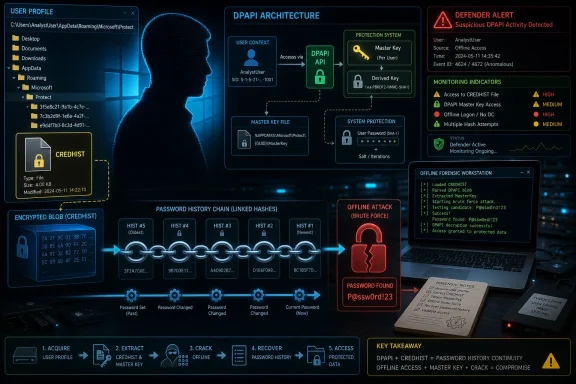
The Data Protection API, better known as DPAPI, exists so applications do not have to invent their own local encryption systems. Browsers, credential stores, certificate stores, Wi-Fi profiles, application secrets, and other bits of Windows software can hand data to the operating system and ask it to protect that data for a user or machine context. That bargain is sensible: centralized cryptographic machinery is usually better than every developer rolling their own.
But DPAPI also has to survive the ordinary mess of real Windows life. Users change passwords. Domain accounts move. Cached credentials linger. Administrators need recovery paths. Applications expect encrypted secrets to remain decryptable after a routine password rotation. CREDHIST is one of the mechanisms that helps bridge that gap by retaining information tied to previous user passwords.
That is why DPAPISnoop matters. It does not reveal a brand-new cryptographic apocalypse so much as it makes a quiet historical record easier to harvest and weaponize. In security, that distinction is not comforting. The difference between “possible” and “packaged” is often the difference between a conference trick and a line item in an incident-response report.
In simple terms, the file can contain a chain of historical password-derived hashes. The current password can help unlock the prior link, that prior link can unlock the one before it, and so on. The intent is continuity, not espionage. But continuity is a double-edged property when the continuity includes material useful for password recovery.
The uncomfortable part is that historical password hashes are often more valuable than defenders would like to admit. Users reuse passwords across internal systems, VPNs, SaaS services, local admin accounts, personal accounts, and shadow IT. Even when a recovered hash does not directly yield the current Windows password, it may expose a pattern, a reused secret, or a stepping stone into another system.
That is why CREDHIST deserves attention beyond the narrow DPAPI niche. It is a reminder that password history is not just a policy setting in Active Directory. It can also be an artifact on disk, wrapped in cryptography, waiting for the right tool, privileges, and patience.
Offline attacks change the defender’s problem. If an attacker can copy relevant DPAPI material from a compromised machine and leave, the noisy part of the operation can happen elsewhere. Password guessing, hash cracking, and chain analysis no longer have to touch the endpoint being monitored. That is attractive to intruders and frustrating for blue teams.
This is also why the usual “but it requires access first” dismissal is too glib. Many credential-theft techniques require access first. The point is what the attacker can do after that access is obtained, especially on workstations where users have accumulated years of protected browser secrets, VPN credentials, certificates, saved RDP entries, and application tokens.
DPAPISnoop sits in the post-compromise phase, but post-compromise tooling is exactly where modern Windows defense often succeeds or fails. Endpoint detection teams spend enormous effort watching LSASS access, token theft, browser credential dumping, and suspicious file reads. CREDHIST belongs in that same conversation because it can turn old passwords into fresh intelligence.
The tradeoff is recoverability. Windows needs a way to maintain access to protected data even as account secrets evolve. Enterprise environments also need recovery and migration behavior that does not strand encrypted material every time a password reset happens. A pristine security model that destroys access to legitimate data after routine account maintenance would be operationally unacceptable.
What has changed is the surrounding threat model. Workstations are no longer just local productivity boxes. They are identity-rich endpoints connected to cloud services, password managers, developer platforms, privileged admin workflows, and hybrid identity systems. A user profile is often a map of the organization.
That makes obscure local artifacts more consequential. DPAPI-protected data may be old technology, but it protects modern secrets. When attackers can combine local collection, offline cracking, password reuse, and cloud sign-in attempts, a CREDHIST file stops looking like a dusty compatibility feature and starts looking like another identity exposure point.
That does not mean CREDHIST access is invisible. It means defenders need to know what they are looking for. File access to CREDHIST by unusual processes is suspicious, particularly when paired with reads of DPAPI master keys, browser credential stores, Vault files, SAM, SYSTEM, SECURITY hives, or profile directories at scale.
The challenge is separating legitimate administration and forensics from malicious collection. Incident responders, backup agents, EDR tools, and migration utilities may all touch sensitive areas of the profile. The goal is not to generate an alert every time a protected folder is opened. The goal is to identify combinations of behavior that make sense only in credential harvesting.
This is where Windows defenders often need better telemetry discipline. Sysmon, EDR file telemetry, command-line logging, PowerShell logging, and process ancestry all matter. A CREDHIST read by a known forensic collector during an approved investigation is one thing. A CREDHIST read by a renamed binary launched from a user-writable path after a phishing event is another.
CREDHIST attacks benefit from that reality. A cracked historical password may reveal a user’s naming pattern, seasonal rotation habit, base word, appended year, or favorite symbol. Even if the exact old password is dead in Active Directory, it can inform guesses against systems without modern lockout controls or against personal accounts later used in social-engineering chains.
This is especially relevant for long-lived Windows profiles. A laptop that has followed an employee through years of password changes can carry more historical context than anyone remembers. The device becomes not just a current identity endpoint but an archive of identity decisions.
Security teams often focus password policy on the domain controller: length, complexity, history count, expiration, lockout, and banned-password lists. Those controls still matter, but they do not erase every derivative artifact from every endpoint. The more useful view is lifecycle-based: what secrets are created, where they are cached, what survives rotation, and what remains after compromise?
Credential Guard can reduce exposure of certain secrets in memory, particularly in environments configured to use it correctly. It does not mean every file under a user profile is immune to collection. Nor does it mean that password-derived historical material has no value once an attacker can read the right data from disk.
Windows Hello for Business and passwordless strategies can also change the economics of these attacks, but they do not instantly eliminate legacy behavior. Hybrid estates are full of exceptions: traditional passwords still exist, cached credentials still matter, legacy apps still call old APIs, and users still authenticate to services outside the neat boundaries of Microsoft’s current identity architecture.
The lesson is not that Microsoft’s newer protections are useless. The lesson is that they are layered controls, not absolution. If administrators deploy them while leaving endpoints overprivileged, backups exposed, local admin reuse unresolved, and user profiles loosely protected, the old weaknesses continue to leak through the new architecture.
That dual-use reality is not a reason to suppress discussion. Windows administrators are better served by understanding the mechanics than by pretending the mechanics are too sensitive to mention. Attackers already trade in these techniques; defenders suffer when the knowledge remains confined to offensive circles.
The more mature response is to operationalize the knowledge. If a red team can use CREDHIST extraction in a controlled assessment, the blue team should get detection coverage, tabletop scenarios, and a hardening backlog from the exercise. If incident responders can recover useful historical credentials during an investigation, identity teams should ask where those credentials would still have worked.
This is also a good moment to revisit how organizations handle forensic access. Security teams often grant broad endpoint collection powers to tools and personnel because investigations demand speed. That access is necessary, but it should be governed, logged, and reviewed. A tool capable of extracting sensitive historical material should not become another unmanaged executable on a shared admin drive.
Password policy still matters, though not in the old complexity-theater sense. Length, banned-password screening, and resistance to predictable rotations matter more than forcing users into marginal symbol substitutions. If users rotate from “CompanySpring2025!” to “CompanySummer2025!”, historical recovery becomes a guessing accelerator.
Local administrator control matters too. If an attacker has administrative access to a workstation, many local secrets become collectible one way or another. LAPS-style management for local administrator passwords, removal of standing local admin rights, and careful separation of privileged admin workstations from daily browsing machines all reduce the blast radius.
Endpoint monitoring should include sensitive DPAPI-related file access patterns. That does not require panic over every read operation, but it does require a baseline of normal activity and an escalation path for abnormal combinations. The more an environment already monitors credential dumping, the easier it is to add CREDHIST and DPAPI master-key collection to the same analytic family.
An attacker who recovers an old Windows password may not be able to walk directly into Microsoft 365 if multifactor authentication and conditional access are well designed. But that same password might unlock an old VPN, a developer portal, a password-protected archive, a network device, a forgotten SaaS tenant, or a personal account used for recovery. Identity attacks are rarely linear.
This is why security teams should avoid treating DPAPISnoop as merely a local Windows curiosity. It is part of the larger identity archaeology problem. Attackers sift through endpoint residue because residue explains people: their habits, their password patterns, their tools, their shortcuts, and their forgotten trust relationships.
The right response is to shorten the value of residue. Passwordless authentication, phishing-resistant MFA, device compliance, token protection, privileged access workstations, and session-risk policies all reduce the usefulness of a recovered historical secret. None of them eliminates the need to secure the endpoint, but they make the attacker’s next step harder.
That framing matters because it leads to better decisions. Panic produces blocklists and one-off detections. Analysis produces asset understanding, detection engineering, password hygiene, and identity hardening. The latter is less exciting, but it is what actually survives first contact with a real estate.
The practical checklist is compact:
 Windows Password Changes Were Never a Clean Break
Windows users are trained to think of a password change as a security event with a hard boundary. Yesterday’s password is dead, today’s password is alive, and the old secret has been replaced. That mental model is useful for help-desk scripts, but it is not how Windows data protection has historically worked underneath the interface.The Data Protection API, better known as DPAPI, exists so applications do not have to invent their own local encryption systems. Browsers, credential stores, certificate stores, Wi-Fi profiles, application secrets, and other bits of Windows software can hand data to the operating system and ask it to protect that data for a user or machine context. That bargain is sensible: centralized cryptographic machinery is usually better than every developer rolling their own.
But DPAPI also has to survive the ordinary mess of real Windows life. Users change passwords. Domain accounts move. Cached credentials linger. Administrators need recovery paths. Applications expect encrypted secrets to remain decryptable after a routine password rotation. CREDHIST is one of the mechanisms that helps bridge that gap by retaining information tied to previous user passwords.
That is why DPAPISnoop matters. It does not reveal a brand-new cryptographic apocalypse so much as it makes a quiet historical record easier to harvest and weaponize. In security, that distinction is not comforting. The difference between “possible” and “packaged” is often the difference between a conference trick and a line item in an incident-response report.
CREDHIST Is a Recovery Feature With an Attacker’s Aftertaste
CREDHIST is the kind of Windows artifact most users never see and many administrators never have reason to inspect. It lives under the user profile’s Microsoft protection data and participates in DPAPI’s effort to keep protected secrets accessible across password changes. When a user changes a password, Windows can retain cryptographic material related to earlier passwords so older DPAPI-protected blobs remain recoverable.In simple terms, the file can contain a chain of historical password-derived hashes. The current password can help unlock the prior link, that prior link can unlock the one before it, and so on. The intent is continuity, not espionage. But continuity is a double-edged property when the continuity includes material useful for password recovery.
The uncomfortable part is that historical password hashes are often more valuable than defenders would like to admit. Users reuse passwords across internal systems, VPNs, SaaS services, local admin accounts, personal accounts, and shadow IT. Even when a recovered hash does not directly yield the current Windows password, it may expose a pattern, a reused secret, or a stepping stone into another system.
That is why CREDHIST deserves attention beyond the narrow DPAPI niche. It is a reminder that password history is not just a policy setting in Active Directory. It can also be an artifact on disk, wrapped in cryptography, waiting for the right tool, privileges, and patience.
DPAPISnoop Lowers the Friction Around a Niche Attack
The security world has long had tools and research around DPAPI, including forensic utilities, proof-of-concept scripts, and well-known post-exploitation frameworks. DPAPISnoop enters that lineage by focusing attention on CREDHIST hash extraction and offline recovery workflows. Its significance is less about inventing the category than about sharpening one part of it.Offline attacks change the defender’s problem. If an attacker can copy relevant DPAPI material from a compromised machine and leave, the noisy part of the operation can happen elsewhere. Password guessing, hash cracking, and chain analysis no longer have to touch the endpoint being monitored. That is attractive to intruders and frustrating for blue teams.
This is also why the usual “but it requires access first” dismissal is too glib. Many credential-theft techniques require access first. The point is what the attacker can do after that access is obtained, especially on workstations where users have accumulated years of protected browser secrets, VPN credentials, certificates, saved RDP entries, and application tokens.
DPAPISnoop sits in the post-compromise phase, but post-compromise tooling is exactly where modern Windows defense often succeeds or fails. Endpoint detection teams spend enormous effort watching LSASS access, token theft, browser credential dumping, and suspicious file reads. CREDHIST belongs in that same conversation because it can turn old passwords into fresh intelligence.
Microsoft’s Design Tradeoff Still Makes Sense, but the Risk Has Shifted
It is tempting to treat every artifact useful to an attacker as a design failure. That would be too easy here. DPAPI was created to solve a real and persistent problem: protecting local secrets in a way that applications can actually use. If the system breaks every time a user changes a password, users and developers will route around it.The tradeoff is recoverability. Windows needs a way to maintain access to protected data even as account secrets evolve. Enterprise environments also need recovery and migration behavior that does not strand encrypted material every time a password reset happens. A pristine security model that destroys access to legitimate data after routine account maintenance would be operationally unacceptable.
What has changed is the surrounding threat model. Workstations are no longer just local productivity boxes. They are identity-rich endpoints connected to cloud services, password managers, developer platforms, privileged admin workflows, and hybrid identity systems. A user profile is often a map of the organization.
That makes obscure local artifacts more consequential. DPAPI-protected data may be old technology, but it protects modern secrets. When attackers can combine local collection, offline cracking, password reuse, and cloud sign-in attempts, a CREDHIST file stops looking like a dusty compatibility feature and starts looking like another identity exposure point.
The Offline Angle Is Where Defenders Should Pay Attention
A live credential dump triggers alarms in many mature environments. LSASS access is heavily watched. Known tools are fingerprinted. Suspicious process behavior near browser databases or Windows Vault files may be detected. But copying files for later analysis can blend into the broader noise of local discovery, backup abuse, profile collection, or forensic-looking activity.That does not mean CREDHIST access is invisible. It means defenders need to know what they are looking for. File access to CREDHIST by unusual processes is suspicious, particularly when paired with reads of DPAPI master keys, browser credential stores, Vault files, SAM, SYSTEM, SECURITY hives, or profile directories at scale.
The challenge is separating legitimate administration and forensics from malicious collection. Incident responders, backup agents, EDR tools, and migration utilities may all touch sensitive areas of the profile. The goal is not to generate an alert every time a protected folder is opened. The goal is to identify combinations of behavior that make sense only in credential harvesting.
This is where Windows defenders often need better telemetry discipline. Sysmon, EDR file telemetry, command-line logging, PowerShell logging, and process ancestry all matter. A CREDHIST read by a known forensic collector during an approved investigation is one thing. A CREDHIST read by a renamed binary launched from a user-writable path after a phishing event is another.
Password Reuse Turns History Into Leverage
The most important practical risk is not always recovery of the current Windows password. It is the recovery of old passwords that still work somewhere else. Enterprises spend years telling users not to reuse passwords, then discover during incident response that reuse persists in service accounts, legacy portals, local admin passwords, test environments, network appliances, and third-party systems.CREDHIST attacks benefit from that reality. A cracked historical password may reveal a user’s naming pattern, seasonal rotation habit, base word, appended year, or favorite symbol. Even if the exact old password is dead in Active Directory, it can inform guesses against systems without modern lockout controls or against personal accounts later used in social-engineering chains.
This is especially relevant for long-lived Windows profiles. A laptop that has followed an employee through years of password changes can carry more historical context than anyone remembers. The device becomes not just a current identity endpoint but an archive of identity decisions.
Security teams often focus password policy on the domain controller: length, complexity, history count, expiration, lockout, and banned-password lists. Those controls still matter, but they do not erase every derivative artifact from every endpoint. The more useful view is lifecycle-based: what secrets are created, where they are cached, what survives rotation, and what remains after compromise?
Credential Guard Does Not Magically Solve This Class of Problem
Credential Guard, virtualization-based security, TPM-backed protections, Windows Hello for Business, and modern identity controls have made many classic Windows credential attacks harder. That is good news. But defenders should not collapse all credential theft into one mental bucket. DPAPI artifacts on disk are a different problem from dumping live credentials out of LSASS.Credential Guard can reduce exposure of certain secrets in memory, particularly in environments configured to use it correctly. It does not mean every file under a user profile is immune to collection. Nor does it mean that password-derived historical material has no value once an attacker can read the right data from disk.
Windows Hello for Business and passwordless strategies can also change the economics of these attacks, but they do not instantly eliminate legacy behavior. Hybrid estates are full of exceptions: traditional passwords still exist, cached credentials still matter, legacy apps still call old APIs, and users still authenticate to services outside the neat boundaries of Microsoft’s current identity architecture.
The lesson is not that Microsoft’s newer protections are useless. The lesson is that they are layered controls, not absolution. If administrators deploy them while leaving endpoints overprivileged, backups exposed, local admin reuse unresolved, and user profiles loosely protected, the old weaknesses continue to leak through the new architecture.
Forensics and Offense Keep Sharing the Same Tool Shelf
DPAPISnoop also illustrates an old tension in security tooling. A utility that extracts CREDHIST hashes can be useful for legitimate forensic recovery, password auditing, research, and incident response. The same capability can support post-exploitation credential harvesting. The binary does not know which side of the engagement letter it is on.That dual-use reality is not a reason to suppress discussion. Windows administrators are better served by understanding the mechanics than by pretending the mechanics are too sensitive to mention. Attackers already trade in these techniques; defenders suffer when the knowledge remains confined to offensive circles.
The more mature response is to operationalize the knowledge. If a red team can use CREDHIST extraction in a controlled assessment, the blue team should get detection coverage, tabletop scenarios, and a hardening backlog from the exercise. If incident responders can recover useful historical credentials during an investigation, identity teams should ask where those credentials would still have worked.
This is also a good moment to revisit how organizations handle forensic access. Security teams often grant broad endpoint collection powers to tools and personnel because investigations demand speed. That access is necessary, but it should be governed, logged, and reviewed. A tool capable of extracting sensitive historical material should not become another unmanaged executable on a shared admin drive.
The Real Mitigation Is Boring Identity Hygiene
There is no single toggle that makes CREDHIST risk disappear across a messy Windows estate. That may disappoint anyone looking for a patch-style answer, but it is also clarifying. The best mitigations are the same practices security teams already claim to value: reduce password reuse, protect endpoints, limit privilege, monitor sensitive access, and move users toward stronger authentication models.Password policy still matters, though not in the old complexity-theater sense. Length, banned-password screening, and resistance to predictable rotations matter more than forcing users into marginal symbol substitutions. If users rotate from “CompanySpring2025!” to “CompanySummer2025!”, historical recovery becomes a guessing accelerator.
Local administrator control matters too. If an attacker has administrative access to a workstation, many local secrets become collectible one way or another. LAPS-style management for local administrator passwords, removal of standing local admin rights, and careful separation of privileged admin workstations from daily browsing machines all reduce the blast radius.
Endpoint monitoring should include sensitive DPAPI-related file access patterns. That does not require panic over every read operation, but it does require a baseline of normal activity and an escalation path for abnormal combinations. The more an environment already monitors credential dumping, the easier it is to add CREDHIST and DPAPI master-key collection to the same analytic family.
Cloud Identity Makes Local Artifacts More, Not Less, Interesting
A common mistake in modern Windows security is assuming that cloud identity has made old local mechanisms irrelevant. In practice, cloud identity has made endpoint compromise more valuable. The Windows device is now a broker for tokens, browser sessions, single sign-on state, synced passwords, certificates, and conditional-access trust.An attacker who recovers an old Windows password may not be able to walk directly into Microsoft 365 if multifactor authentication and conditional access are well designed. But that same password might unlock an old VPN, a developer portal, a password-protected archive, a network device, a forgotten SaaS tenant, or a personal account used for recovery. Identity attacks are rarely linear.
This is why security teams should avoid treating DPAPISnoop as merely a local Windows curiosity. It is part of the larger identity archaeology problem. Attackers sift through endpoint residue because residue explains people: their habits, their password patterns, their tools, their shortcuts, and their forgotten trust relationships.
The right response is to shorten the value of residue. Passwordless authentication, phishing-resistant MFA, device compliance, token protection, privileged access workstations, and session-risk policies all reduce the usefulness of a recovered historical secret. None of them eliminates the need to secure the endpoint, but they make the attacker’s next step harder.
The Signal Hiding in the CREDHIST Noise
DPAPISnoop is not a reason to declare DPAPI broken. It is a reason to admit that Windows credential protection is a layered, historical system with artifacts that deserve modern scrutiny. For Windows enthusiasts and administrators, the story is less “new tool steals passwords” and more “old compatibility logic remains relevant in a post-passwordless world.”That framing matters because it leads to better decisions. Panic produces blocklists and one-off detections. Analysis produces asset understanding, detection engineering, password hygiene, and identity hardening. The latter is less exciting, but it is what actually survives first contact with a real estate.
The practical checklist is compact:
- Organizations should monitor unusual access to CREDHIST, DPAPI master keys, Vault data, browser credential stores, and registry hives commonly used in offline credential recovery.
- Administrators should assume that cracked historical passwords may still have value in legacy systems, third-party services, local accounts, archives, and user password patterns.
- Security teams should prioritize long, unique passwords and banned-password controls over forced rotation schemes that encourage predictable seasonal changes.
- Endpoint hardening should reduce local administrator exposure, separate privileged work from daily-use machines, and keep sensitive profile data out of casual reach.
- Incident responders should treat CREDHIST collection as credential-access behavior and investigate it alongside other post-exploitation activity rather than as an isolated file read.
- Passwordless and phishing-resistant authentication reduce the payoff of recovered secrets, but they do not remove the need to monitor and protect Windows endpoints.
References
- Primary source: Cryptika Cybersecurity
Published: 2026-06-15T16:40:10.040663
- Related coverage: passcape.com
Credential history (CREDHIST) ahalysis
Windows Password Recovery - credential history (CREDHIST) ahalysiswww.passcape.com
- Related coverage: docs.dissect.tools

dpapi.keyprovider.credhist - Dissect 3.21-7-g390d64a documentation
docs.dissect.tools
- Related coverage: detection.fyi
Access To Windows Credential History File By Uncommon Applications | Detection.FYI
Detects file access requests to the Windows Credential History File by an uncommon application. This can be a sign of credential stealing. Example case would be …detection.fyi - Related coverage: elie.net
- Official source: learn.microsoft.com
CryptProtectData function (dpapi.h) - Win32 apps | Microsoft Learn
Performs encryption on the data in a DATA_BLOB structure.learn.microsoft.com

- Related coverage: threathunterplaybook.com
Data Protection API — Threat Hunter Playbook
threathunterplaybook.com
