

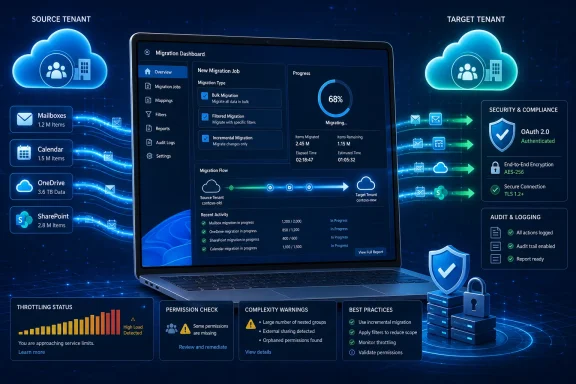
DRS Softech, a Noida, India-based software vendor, has announced an Office 365 Migration Tool intended to move Microsoft 365 mailboxes, email, contacts, calendars, shared mailboxes, OneDrive files, and SharePoint data between cloud environments with bulk, filtered, and incremental migration support. The launch is less interesting as a single product announcement than as a sign of where the Microsoft 365 ecosystem has landed. Tenant moves are no longer exotic events reserved for enterprise carve-outs; they are routine consequences of mergers, rebrands, MSP transitions, compliance projects, and cloud cleanups. That makes migration tooling a practical battleground, where the promise of “fast and secure” needs to be judged against the messy reality of Microsoft 365 itself.
The phrase “Office 365 migration” used to suggest a one-time journey from on-premises Exchange to Microsoft’s cloud. That era is mostly over. The harder work now is moving data inside the cloud: tenant to tenant, mailbox to archive, SharePoint site to SharePoint site, OneDrive account to successor account, or Microsoft 365 to a backup/export format that can survive administrative mistakes and business restructuring.
That shift matters because Microsoft 365 is no longer just email. It is identity, files, permissions, retention, audit history, collaboration sprawl, and user muscle memory wrapped together. A mailbox migration that leaves behind calendar fidelity, shared mailbox access, OneDrive ownership, or SharePoint permissions can succeed technically while still failing the business.
DRS Softech is positioning its new tool directly into that gap. The company says the software can migrate mailboxes, contacts, calendars, shared mailboxes, OneDrive files, and SharePoint data while preserving folder hierarchy, metadata, permissions, and attachments. Those are exactly the details administrators care about after the sales demo ends, because the help desk is not flooded by abstract migration errors; it is flooded by missing folders, broken access, duplicate mail, and users who cannot find yesterday’s files.
The company’s announcement also reflects a broader truth: Microsoft 365 migrations are increasingly delegated to specialist utilities, MSP runbooks, and migration platforms because the native path is rarely a single button. Microsoft has improved its cross-tenant migration capabilities, but administrators still have to plan identity mapping, licensing, permissions, coexistence, cutover timing, and workload-specific limitations. In that environment, third-party tools thrive by promising a more manageable operating surface.
Bulk migration support is the first practical feature in the announcement. The tool is advertised as able to process multiple user accounts in a single operation, which is essential for organizations that cannot afford mailbox-by-mailbox administration. Even small businesses now run Microsoft 365 as a layered environment of executives, shared mailboxes, delegated access, service accounts, and department archives; moving one identity at a time is not a plan, it is a delay machine.
Filtering is the second operationally meaningful promise. DRS Softech says administrators can migrate selected mailbox data by folder or date range. That can be useful in acquisitions, legal separations, storage reduction projects, or staged migrations where older content is archived separately and recent content is moved first to shorten the cutover window.
Incremental migration may be the most important claim. A proper incremental run transfers only new or modified data after the initial pass, reducing duplicates and allowing administrators to pre-stage most content before a final synchronization. Without that model, migrations either require long downtime or force teams into brittle manual reconciliation after users continue working in the source tenant.
The announcement says the tool preserves folder hierarchy, metadata, permissions, and attachments. That is the sort of sentence every migration vendor writes, but it is also the sentence every buyer should test hardest. Preserving content is table stakes; preserving context is what determines whether users trust the new environment on Monday morning.
Microsoft’s retirement of Basic Authentication in Exchange Online changed the migration and backup market. Older utilities that depended on username-and-password access patterns became liabilities, especially in environments using multifactor authentication, conditional access, and tighter identity governance. A tool that cannot operate cleanly with OAuth is not just old-fashioned; it may be unusable in a properly secured tenant.
But OAuth does not magically make a migration safe. It changes the trust model. Instead of handing a tool a password, administrators grant an application permission to access organizational data, which means the real questions become consent scope, token handling, auditability, least privilege, and revocation.
That is where buyers need to look past the phrase “OAuth 2.0.” An enterprise-grade Microsoft 365 migration tool should make it clear what permissions it requests, whether it uses delegated or application permissions, how consent is granted, how tokens are stored, and how access is removed after the project. “Modern Authentication” is necessary, but it is not a substitute for a security review.
This is especially relevant because attackers increasingly target cloud identity flows rather than traditional passwords alone. OAuth tokens, malicious consent grants, device-code phishing, and app abuse are now part of the Microsoft 365 threat landscape. The same ecosystem that enables secure automation also creates a new attack surface when administrators approve broad access too casually.
Exchange Online mailbox movement is often the most visible piece because email remains the system users notice first. But the modern tenant is not centered on Exchange alone. OneDrive carries personal work files, SharePoint carries team content and document libraries, Teams binds chats, meetings, files, and groups, and Entra ID ties the whole thing to identity and access policy.
DRS Softech’s tool claims coverage for mailboxes, OneDrive, and SharePoint, which puts it in the right territory for many Microsoft 365 projects. The announcement does not, however, describe Teams chat migration, Planner data, Power Platform assets, Purview retention artifacts, sensitivity labels, or complex Entra ID dependencies. That omission is not necessarily a flaw in the product; it is a reminder that Microsoft 365 is too broad for any single migration claim to be accepted at face value.
Administrators should treat tenant-to-tenant tooling as one component of a migration architecture, not the architecture itself. Domain cutover, MX records, user principal names, mailbox delegation, shared mailbox access, OneDrive ownership, SharePoint permissions, and post-move validation all require planning outside the migration executable. A tool can reduce toil, but it cannot abolish governance.
The best use case for software like this may be the middle tier of Microsoft 365 migrations: too large and risky for manual export/import, too small or time-sensitive for a bespoke consultancy-heavy project, and too practical to wait for every native Microsoft workflow to become simple. That is a real market, especially among MSPs serving businesses that have enterprise-grade cloud complexity without enterprise migration budgets.
A 50-item test will not reveal throttling behavior under load. It will not show how the tool handles a mailbox with years of calendar recurrence exceptions, deeply nested folders, malformed items, large attachments, unusual encodings, or a user with delegated access to multiple shared mailboxes. It will not show whether SharePoint permissions survive when users are remapped across tenants or whether OneDrive ownership transitions cleanly after a source account is retired.
Still, a demo is better than a blind purchase, and it gives administrators a way to test authentication, reporting, export options, and workflow clarity. In the migration market, usability is not cosmetic. A confusing interface can produce destructive mistakes when an admin is under deadline pressure and moving live business data.
The important question is whether the demo encourages proper testing or merely showcases a happy path. IT teams should build a pilot that includes ordinary users, executives, shared mailboxes, large mailboxes, active calendars, OneDrive-heavy users, and SharePoint libraries with permission complexity. If a tool handles only the clean test cases, it is not ready for the ugly production cases.
Reporting is another area to scrutinize. DRS Softech advertises detailed migration reports, which are vital for troubleshooting and sign-off. Administrators need item-level failure visibility, retry behavior, exportable logs, and a clear distinction between skipped, duplicated, failed, and successfully migrated items.
A Windows-based migration tool fits the way many small and mid-sized IT teams actually operate. They spin up a dedicated workstation or server, authenticate into source and target tenants, run batches overnight, check logs in the morning, and repeat until cutover. The desktop app model remains attractive because it feels controllable in a way that opaque cloud-to-cloud automation sometimes does not.
That model also has risks. A migration workstation becomes a high-value administrative endpoint. If it stores tokens, logs sensitive paths, caches mailbox data, or runs under an overprivileged admin account, it deserves hardening equal to its importance.
At minimum, administrators should treat the migration machine as temporary privileged infrastructure. It should be patched, encrypted, monitored, and restricted; it should not be someone’s everyday browsing laptop. If the tool creates local backups or intermediate files, those files should be protected and deleted or archived according to policy after the project.
The same is true for MSPs. A vendor tool that can access multiple customer tenants is powerful, but it also magnifies operational risk. Separation between customers, documentation of consent grants, secure credential handling, and post-project cleanup are not optional housekeeping; they are part of the service.
For buyers, however, the distinction matters. A migration tool moves data from one working environment to another. A backup tool creates recoverable copies with retention, versioning, search, and restore semantics. A compliance archive has still different requirements. Vendors often bundle these ideas, but IT teams should be clear about which problem they are solving.
Microsoft 365 itself is resilient, but resilience is not the same as backup. Microsoft protects service availability and infrastructure durability; customers remain responsible for many forms of data loss, including accidental deletion, malicious activity, misconfiguration, retention mistakes, and business-driven export needs. That shared-responsibility reality has kept the Microsoft 365 backup market alive despite Microsoft’s own expanding native capabilities.
A tool that can both migrate and back up mailbox data may be useful for smaller organizations that want a single utility for cloud exits, tenant moves, and local exports. Larger organizations will likely evaluate it against established backup platforms, retention requirements, and audit expectations. In either case, the product should be judged by restore quality as much as copy speed.
The most dangerous migration is the one that looks successful until someone needs an old calendar item, a departed employee’s mailbox, or a document version with legal significance. Backup thinking forces teams to ask what can be recovered, who can recover it, how long it remains available, and whether the recovery process has actually been tested.
The competitive challenge for DRS Softech will be trust. Migration tools touch the crown jewels of a business: executive email, HR documents, finance files, customer records, contracts, calendars, and often regulated data. Buyers will want more than feature claims. They will want documentation, support responsiveness, data handling transparency, update cadence, and a credible security posture.
The company’s announcement leans on familiar migration promises: automation, speed, security, reliability, folder preservation, duplicate prevention, and minimal downtime. Those are reasonable claims to make, but they are also the exact claims every rival makes. Differentiation will depend on how the product behaves under Microsoft throttling, partial failures, permission conflicts, and messy real-world tenants.
There is also a naming issue that administrators should watch carefully. The announcement refers to an Office 365 Migration Tool, the product page emphasizes a Microsoft 365 Backup Tool, and the feature list mentions an Office 365 Email Backup Tool. That may be simple marketing overlap, but clear naming matters when software is being procured, documented, and approved by security teams.
None of this means the product should be dismissed. It means the announcement should be read as an invitation to evaluate, not as proof of enterprise readiness. In migration, the only meaningful benchmark is a pilot against your own tenant’s worst data.
The first area is permissions. A migration tool may need broad access to read and write mailboxes, files, and site data, but the scope should still be understandable and documented. If a tool asks for more access than the project requires, admins need a reason.
The second area is data residency during migration. Does the tool copy data directly between Microsoft services from the admin’s machine, stage content locally, or route anything through vendor infrastructure? The answer changes the privacy, compliance, and risk profile.
The third area is logging. Logs are essential for troubleshooting, but they can also leak sensitive subject lines, file names, user identifiers, and path structures. A good product should explain what it logs, where logs are stored, and how they can be sanitized or retained.
The fourth area is post-migration cleanup. OAuth grants, temporary admin accounts, migration endpoints, exported files, and local caches should not linger indefinitely. A secure migration ends with access being removed as deliberately as it was granted.
These questions are not hostile; they are normal due diligence. Any vendor serving Microsoft 365 administrators should be ready for them, because the modern cloud admin has learned that convenience without governance becomes technical debt.
The caution is that migration products must be validated by workload, not by brochure. Email is not calendars, calendars are not OneDrive, OneDrive is not SharePoint, and SharePoint is not permissions inheritance across a reorganized company. Each workload has its own ways of breaking.
A sensible evaluation would start with nonproduction or low-risk accounts, then move to representative pilot users. Administrators should test date filtering, duplicate handling, failed-item reporting, permission preservation, shared mailbox behavior, and incremental reruns before committing to a cutover plan. They should also document rollback assumptions, because “we can just rerun it” is not a rollback strategy.
The tool’s stated demo limit of 50 mailbox items is enough for a first look, but not enough for go/no-go confidence. Treat it as a connectivity and interface trial. The real proof comes from staged migration testing with realistic accounts and written acceptance criteria.
 Microsoft 365 Migration Has Become an Everyday Operational Risk
The phrase “Office 365 migration” used to suggest a one-time journey from on-premises Exchange to Microsoft’s cloud. That era is mostly over. The harder work now is moving data inside the cloud: tenant to tenant, mailbox to archive, SharePoint site to SharePoint site, OneDrive account to successor account, or Microsoft 365 to a backup/export format that can survive administrative mistakes and business restructuring.That shift matters because Microsoft 365 is no longer just email. It is identity, files, permissions, retention, audit history, collaboration sprawl, and user muscle memory wrapped together. A mailbox migration that leaves behind calendar fidelity, shared mailbox access, OneDrive ownership, or SharePoint permissions can succeed technically while still failing the business.
DRS Softech is positioning its new tool directly into that gap. The company says the software can migrate mailboxes, contacts, calendars, shared mailboxes, OneDrive files, and SharePoint data while preserving folder hierarchy, metadata, permissions, and attachments. Those are exactly the details administrators care about after the sales demo ends, because the help desk is not flooded by abstract migration errors; it is flooded by missing folders, broken access, duplicate mail, and users who cannot find yesterday’s files.
The company’s announcement also reflects a broader truth: Microsoft 365 migrations are increasingly delegated to specialist utilities, MSP runbooks, and migration platforms because the native path is rarely a single button. Microsoft has improved its cross-tenant migration capabilities, but administrators still have to plan identity mapping, licensing, permissions, coexistence, cutover timing, and workload-specific limitations. In that environment, third-party tools thrive by promising a more manageable operating surface.
The Tool’s Pitch Is Speed, but Its Real Promise Is Fewer Surprises
DRS Softech’s headline claim is speed: a faster, less manual way to move cloud data. That is understandable marketing, but speed is only the visible part of the migration problem. In production Microsoft 365 environments, predictability usually matters more than raw throughput.Bulk migration support is the first practical feature in the announcement. The tool is advertised as able to process multiple user accounts in a single operation, which is essential for organizations that cannot afford mailbox-by-mailbox administration. Even small businesses now run Microsoft 365 as a layered environment of executives, shared mailboxes, delegated access, service accounts, and department archives; moving one identity at a time is not a plan, it is a delay machine.
Filtering is the second operationally meaningful promise. DRS Softech says administrators can migrate selected mailbox data by folder or date range. That can be useful in acquisitions, legal separations, storage reduction projects, or staged migrations where older content is archived separately and recent content is moved first to shorten the cutover window.
Incremental migration may be the most important claim. A proper incremental run transfers only new or modified data after the initial pass, reducing duplicates and allowing administrators to pre-stage most content before a final synchronization. Without that model, migrations either require long downtime or force teams into brittle manual reconciliation after users continue working in the source tenant.
The announcement says the tool preserves folder hierarchy, metadata, permissions, and attachments. That is the sort of sentence every migration vendor writes, but it is also the sentence every buyer should test hardest. Preserving content is table stakes; preserving context is what determines whether users trust the new environment on Monday morning.
OAuth Is Now the Price of Admission
DRS Softech says its tool uses Microsoft’s Modern Authentication, based on OAuth 2.0, and secure encrypted communication protocols. That is not merely a security flourish. In the current Microsoft 365 world, modern authentication is the baseline requirement for serious tooling.Microsoft’s retirement of Basic Authentication in Exchange Online changed the migration and backup market. Older utilities that depended on username-and-password access patterns became liabilities, especially in environments using multifactor authentication, conditional access, and tighter identity governance. A tool that cannot operate cleanly with OAuth is not just old-fashioned; it may be unusable in a properly secured tenant.
But OAuth does not magically make a migration safe. It changes the trust model. Instead of handing a tool a password, administrators grant an application permission to access organizational data, which means the real questions become consent scope, token handling, auditability, least privilege, and revocation.
That is where buyers need to look past the phrase “OAuth 2.0.” An enterprise-grade Microsoft 365 migration tool should make it clear what permissions it requests, whether it uses delegated or application permissions, how consent is granted, how tokens are stored, and how access is removed after the project. “Modern Authentication” is necessary, but it is not a substitute for a security review.
This is especially relevant because attackers increasingly target cloud identity flows rather than traditional passwords alone. OAuth tokens, malicious consent grants, device-code phishing, and app abuse are now part of the Microsoft 365 threat landscape. The same ecosystem that enables secure automation also creates a new attack surface when administrators approve broad access too casually.
Tenant-to-Tenant Work Is Where Simple Claims Go to Die
The announcement’s support for tenant-to-tenant migration is the feature most likely to attract IT teams dealing with mergers, divestitures, domain changes, MSP handoffs, or regional restructuring. It is also the area where marketing language can drift furthest from deployment reality. A tenant-to-tenant move is not one migration; it is a choreography of identity, mail flow, files, permissions, and user expectations.Exchange Online mailbox movement is often the most visible piece because email remains the system users notice first. But the modern tenant is not centered on Exchange alone. OneDrive carries personal work files, SharePoint carries team content and document libraries, Teams binds chats, meetings, files, and groups, and Entra ID ties the whole thing to identity and access policy.
DRS Softech’s tool claims coverage for mailboxes, OneDrive, and SharePoint, which puts it in the right territory for many Microsoft 365 projects. The announcement does not, however, describe Teams chat migration, Planner data, Power Platform assets, Purview retention artifacts, sensitivity labels, or complex Entra ID dependencies. That omission is not necessarily a flaw in the product; it is a reminder that Microsoft 365 is too broad for any single migration claim to be accepted at face value.
Administrators should treat tenant-to-tenant tooling as one component of a migration architecture, not the architecture itself. Domain cutover, MX records, user principal names, mailbox delegation, shared mailbox access, OneDrive ownership, SharePoint permissions, and post-move validation all require planning outside the migration executable. A tool can reduce toil, but it cannot abolish governance.
The best use case for software like this may be the middle tier of Microsoft 365 migrations: too large and risky for manual export/import, too small or time-sensitive for a bespoke consultancy-heavy project, and too practical to wait for every native Microsoft workflow to become simple. That is a real market, especially among MSPs serving businesses that have enterprise-grade cloud complexity without enterprise migration budgets.
The Free Demo Is Useful, but It Should Not Be Mistaken for Proof
DRS Softech says the software is available with a free demo edition and that the demo can back up 50 mailbox items for free. That is enough to evaluate the interface and confirm basic connectivity, but it is not enough to prove migration reliability in the conditions that matter most.A 50-item test will not reveal throttling behavior under load. It will not show how the tool handles a mailbox with years of calendar recurrence exceptions, deeply nested folders, malformed items, large attachments, unusual encodings, or a user with delegated access to multiple shared mailboxes. It will not show whether SharePoint permissions survive when users are remapped across tenants or whether OneDrive ownership transitions cleanly after a source account is retired.
Still, a demo is better than a blind purchase, and it gives administrators a way to test authentication, reporting, export options, and workflow clarity. In the migration market, usability is not cosmetic. A confusing interface can produce destructive mistakes when an admin is under deadline pressure and moving live business data.
The important question is whether the demo encourages proper testing or merely showcases a happy path. IT teams should build a pilot that includes ordinary users, executives, shared mailboxes, large mailboxes, active calendars, OneDrive-heavy users, and SharePoint libraries with permission complexity. If a tool handles only the clean test cases, it is not ready for the ugly production cases.
Reporting is another area to scrutinize. DRS Softech advertises detailed migration reports, which are vital for troubleshooting and sign-off. Administrators need item-level failure visibility, retry behavior, exportable logs, and a clear distinction between skipped, duplicated, failed, and successfully migrated items.
The Windows Angle Is Not Cosmetic
The tool is described as compatible with the latest Windows operating systems, which may sound like a routine checkbox. For WindowsForum.com readers, it is more consequential than that. Microsoft 365 administration may live in the cloud, but much of the work still happens from Windows endpoints in IT offices, MSP shops, and temporary migration war rooms.A Windows-based migration tool fits the way many small and mid-sized IT teams actually operate. They spin up a dedicated workstation or server, authenticate into source and target tenants, run batches overnight, check logs in the morning, and repeat until cutover. The desktop app model remains attractive because it feels controllable in a way that opaque cloud-to-cloud automation sometimes does not.
That model also has risks. A migration workstation becomes a high-value administrative endpoint. If it stores tokens, logs sensitive paths, caches mailbox data, or runs under an overprivileged admin account, it deserves hardening equal to its importance.
At minimum, administrators should treat the migration machine as temporary privileged infrastructure. It should be patched, encrypted, monitored, and restricted; it should not be someone’s everyday browsing laptop. If the tool creates local backups or intermediate files, those files should be protected and deleted or archived according to policy after the project.
The same is true for MSPs. A vendor tool that can access multiple customer tenants is powerful, but it also magnifies operational risk. Separation between customers, documentation of consent grants, secure credential handling, and post-project cleanup are not optional housekeeping; they are part of the service.
Backup, Migration, and Recovery Are Converging
One interesting wrinkle in the DRS Softech announcement is the overlap between migration and backup. The linked product branding emphasizes Microsoft 365 backup and restore, while the announcement frames the release around Office 365 migration. That ambiguity is common in this market because the underlying mechanics are related: authenticate, enumerate data, copy it somewhere else, preserve structure, and produce logs.For buyers, however, the distinction matters. A migration tool moves data from one working environment to another. A backup tool creates recoverable copies with retention, versioning, search, and restore semantics. A compliance archive has still different requirements. Vendors often bundle these ideas, but IT teams should be clear about which problem they are solving.
Microsoft 365 itself is resilient, but resilience is not the same as backup. Microsoft protects service availability and infrastructure durability; customers remain responsible for many forms of data loss, including accidental deletion, malicious activity, misconfiguration, retention mistakes, and business-driven export needs. That shared-responsibility reality has kept the Microsoft 365 backup market alive despite Microsoft’s own expanding native capabilities.
A tool that can both migrate and back up mailbox data may be useful for smaller organizations that want a single utility for cloud exits, tenant moves, and local exports. Larger organizations will likely evaluate it against established backup platforms, retention requirements, and audit expectations. In either case, the product should be judged by restore quality as much as copy speed.
The most dangerous migration is the one that looks successful until someone needs an old calendar item, a departed employee’s mailbox, or a document version with legal significance. Backup thinking forces teams to ask what can be recovered, who can recover it, how long it remains available, and whether the recovery process has actually been tested.
The Market Is Crowded Because Microsoft 365 Is Complicated
DRS Softech enters a crowded space. Microsoft 365 migration and backup already includes specialist vendors, MSP-standard tools, large SaaS backup platforms, and Microsoft-native options. The crowding itself is evidence of the problem: if Microsoft 365 migration were simple, there would not be so many products promising to make it less painful.The competitive challenge for DRS Softech will be trust. Migration tools touch the crown jewels of a business: executive email, HR documents, finance files, customer records, contracts, calendars, and often regulated data. Buyers will want more than feature claims. They will want documentation, support responsiveness, data handling transparency, update cadence, and a credible security posture.
The company’s announcement leans on familiar migration promises: automation, speed, security, reliability, folder preservation, duplicate prevention, and minimal downtime. Those are reasonable claims to make, but they are also the exact claims every rival makes. Differentiation will depend on how the product behaves under Microsoft throttling, partial failures, permission conflicts, and messy real-world tenants.
There is also a naming issue that administrators should watch carefully. The announcement refers to an Office 365 Migration Tool, the product page emphasizes a Microsoft 365 Backup Tool, and the feature list mentions an Office 365 Email Backup Tool. That may be simple marketing overlap, but clear naming matters when software is being procured, documented, and approved by security teams.
None of this means the product should be dismissed. It means the announcement should be read as an invitation to evaluate, not as proof of enterprise readiness. In migration, the only meaningful benchmark is a pilot against your own tenant’s worst data.
Security Claims Need Evidence, Not Adjectives
“Secure” is one of the most overused words in cloud software. DRS Softech says the tool uses OAuth 2.0 and encrypted communication, which are important baseline controls. But administrators should ask for specifics before letting any migration product touch production Microsoft 365 data.The first area is permissions. A migration tool may need broad access to read and write mailboxes, files, and site data, but the scope should still be understandable and documented. If a tool asks for more access than the project requires, admins need a reason.
The second area is data residency during migration. Does the tool copy data directly between Microsoft services from the admin’s machine, stage content locally, or route anything through vendor infrastructure? The answer changes the privacy, compliance, and risk profile.
The third area is logging. Logs are essential for troubleshooting, but they can also leak sensitive subject lines, file names, user identifiers, and path structures. A good product should explain what it logs, where logs are stored, and how they can be sanitized or retained.
The fourth area is post-migration cleanup. OAuth grants, temporary admin accounts, migration endpoints, exported files, and local caches should not linger indefinitely. A secure migration ends with access being removed as deliberately as it was granted.
These questions are not hostile; they are normal due diligence. Any vendor serving Microsoft 365 administrators should be ready for them, because the modern cloud admin has learned that convenience without governance becomes technical debt.
The Practical Read for Windows Admins Is Cautious Interest
For Windows admins and MSPs, the DRS Softech release is worth watching because it targets a genuine operational pain point. Businesses are moving between Microsoft 365 tenants more often, and the native tooling story remains fragmented enough to leave room for third-party utilities. A Windows-compatible tool with bulk migration, filters, incremental sync, OAuth support, and reporting has an obvious place in the toolbox.The caution is that migration products must be validated by workload, not by brochure. Email is not calendars, calendars are not OneDrive, OneDrive is not SharePoint, and SharePoint is not permissions inheritance across a reorganized company. Each workload has its own ways of breaking.
A sensible evaluation would start with nonproduction or low-risk accounts, then move to representative pilot users. Administrators should test date filtering, duplicate handling, failed-item reporting, permission preservation, shared mailbox behavior, and incremental reruns before committing to a cutover plan. They should also document rollback assumptions, because “we can just rerun it” is not a rollback strategy.
The tool’s stated demo limit of 50 mailbox items is enough for a first look, but not enough for go/no-go confidence. Treat it as a connectivity and interface trial. The real proof comes from staged migration testing with realistic accounts and written acceptance criteria.
The Admin’s Checklist Hiding Inside the Announcement
The announcement reads like a product launch, but the useful message for IT teams is more concrete: Microsoft 365 migration has enough sharp edges that tooling decisions deserve the same discipline as endpoint security or backup procurement. Before trusting any utility with a tenant, admins should turn the marketing claims into testable requirements.- The tool should be tested against mailboxes, shared mailboxes, calendars, OneDrive accounts, and SharePoint sites that reflect real production complexity.
- The security review should confirm OAuth permission scope, token handling, logging behavior, local storage use, and post-project access removal.
- The pilot should include incremental migration runs so administrators can see whether duplicate prevention and changed-item handling work as advertised.
- The migration plan should account for identity mapping, domain cutover, permissions, user communication, and rollback rather than treating the tool as the whole project.
- The demo edition should be used to evaluate workflow and authentication, not to infer performance or reliability at production scale.
- The final sign-off should depend on item-level reporting and user validation, not only on a successful completion message.
References
- Primary source: openpr.com
Published: 2026-06-30T07:12:14.491325
DRS Softech Launches Advanced Office 365 Migration Tool for Fast
Press release - DRS Softech - DRS Softech Launches Advanced Office 365 Migration Tool for Fast and Secure Cloud Data Transfer - published on openPR.comwww.openpr.com - Related coverage: drssoftech.com
DRS Softech Microsoft 365 Backup Tool to Backup & Restore Office 365
Best utility to backup or migrate Office 365 to PST, MBOX, EML & more. Supports Gmail, Yahoo, Thunderbird, AOL, Hotmail, Zoho, iCloud, IMAP & Yandex Mail easily.www.drssoftech.com - Official source: learn.microsoft.com
Cross-tenant OneDrive migration overview | Microsoft Learn
Cross-tenant OneDrive migration overview article. Information about migrating content from one tenant to another, including requirements, limitations, licensing, and government clouds, including GCC (government community cloud), GCC High, and DoD.learn.microsoft.com - Related coverage: sharepointsupport.com
Tenant-to-Tenant Migration: Complete M365 Guide — SPS
Complete 2026 guide to Microsoft 365 tenant-to-tenant migration for M&A covering identity federation, mail coexistence, SharePoint, Teams, OneDrive, and.sharepointsupport.com
- Official source: marketplace.microsoft.com
DRS Softech Office 365 Backup and Restore Tool
Reliable & Secure Backup Solution for Your Office 365 Mailboxmarketplace.microsoft.com
- Related coverage: druva.com
Druva for Microsoft 365 Backup & Cyber Resilience
Druva for Microsoft 365: 100% SaaS, air-gapped backup to prevent data loss, simplify compliance, and speed recovery from cyber threats. Download datasheet!www.druva.com
- Related coverage: freeviewer.org
