

Stellar Migrator for Outlook is a Windows migration utility for moving PST and OST mailbox data into Microsoft 365, Exchange Server, or new PST archives, using a wizard-driven workflow that supports mailbox mapping, filtering, incremental runs, and batch jobs for small businesses and larger IT deployments. That puts it in the crowded but very real gap between Outlook’s one-user-at-a-time import wizard and Microsoft’s more administrative PST Import Service. The promise is not magic; it is fewer moving parts, fewer CSV headaches, and a migration process that looks like something an IT generalist can actually operate. The more interesting question is whether that convenience is worth paying for when Microsoft already gives administrators native tools.
For years, Microsoft has been trying to move business email into managed cloud mailboxes, retention policies, and searchable compliance boundaries. Yet PST files remain the undead storage format of Windows offices: copied to laptops, left on file shares, backed up badly, forgotten during tenant migrations, and rediscovered only when someone needs a decade-old contract thread.
That is why PST-to-Microsoft 365 migration tools still exist in 2026. They are not solving a fashionable problem. They are solving a persistent operational mess created by old Outlook habits, POP mailboxes, local archives, mergers, departed employees, and small-business IT shortcuts that made sense at the time.
Microsoft’s own options cover part of the job. Outlook’s Import/Export wizard can bring a PST into a mailbox, but it is built for individual users and relatively controlled scenarios. Microsoft 365’s organizational PST import path is more scalable, but it expects administrators to deal with staging, mapping, and process discipline. For a five-person shop, that can feel like overkill; for a 500-mailbox cleanup, it can still feel too manual.
Stellar Migrator for Outlook enters that space with a clear pitch: keep the work local, give administrators a guided interface, and remove the worst friction from bulk mailbox imports. It is not trying to replace a full enterprise migration suite. It is trying to make the specific job of moving Outlook data into Microsoft 365 less brittle.
The Microsoft 365 Import Service is a more serious administrative route. It supports organizational PST imports through network upload or drive shipping, with files staged in Microsoft cloud storage before being ingested into Exchange Online mailboxes. It also gives admins mapping and filtering capabilities, which matter when old archive data does not belong in a user’s primary working mailbox.
The trade-off is complexity. Network upload depends on tools and steps that are not hard for seasoned Microsoft 365 administrators, but they are still easy to get wrong. CSV mapping becomes a point of failure. Oversized PST files can slow or destabilize the process. The import rate is not instant, and Microsoft’s own guidance has long encouraged keeping PST files within practical size boundaries for performance.
That matters because real-world PST collections are rarely tidy. Users do not name files consistently. Former employees’ archives may sit in departmental shares with unclear ownership. Some organizations want old data moved into archive mailboxes, some want it separated into folders, and some simply want it visible in Microsoft 365 before the next audit. The native tools can get you there, but they do not make the trip feel short.
That sounds ordinary until you compare it with the alternatives. A good migration tool is not just a data mover; it is a guardrail. It should show which source files are included, where they are going, what will be skipped, and whether the job completed cleanly enough to trust.
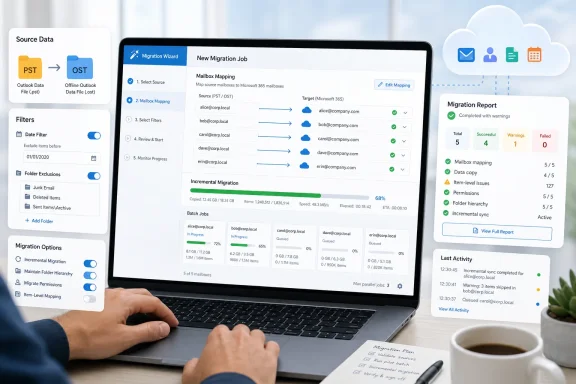
In the reviewed workflow, Stellar starts with a migration job and allows either single-mailbox or multi-mailbox operation. CSV support is available for larger batches, which is the right compromise. CSV mapping is valuable when an IT team has already prepared a migration roster, but making it mandatory for small jobs would punish the very users who are likely to buy this kind of tool.
The source selection is similarly straightforward. PST and OST files can be added, with filename, path, and size shown before proceeding. That visibility is basic, but it matters. In mailbox migrations, boring confirmation screens prevent expensive mistakes.
For IT teams recovering data from old machines, departed-user laptops, or broken Exchange-era profiles, OST support can be the difference between a migration project and a data recovery project. It also widens Stellar’s usefulness beyond the classic “we have a folder full of PSTs” scenario.
That does not mean OST migration should be treated casually. Administrators still need to understand ownership, consent, retention obligations, and whether the source data should be moved at all. A tool that can extract and migrate old offline mailbox data can be extremely helpful, but it also increases the need for process discipline.
This is where Stellar’s local, wizard-driven model cuts both ways. It is convenient because the administrator can work directly with source files. It is risky if the organization treats that convenience as a substitute for governance.
Manual registration is the more enterprise-friendly option. Administrators can create and manage the Entra ID application themselves, then provide the required application and tenant details to the tool. That gives security-conscious organizations more control over what is being authorized and how the access is governed.
This distinction matters because modern Microsoft 365 administration is increasingly about app permissions, not just usernames and passwords. A migration tool that relies on modern authentication is table stakes now. A tool that lets administrators handle app registration manually is better aligned with how serious tenants are managed.
The annoyance is that connection details are not saved between jobs, at least in the workflow described. That is not fatal, and some administrators may even prefer the forced reauthentication from a security standpoint. But for repeated batch migrations against the same tenant, it adds friction that the rest of the product is clearly trying to remove.
In a clean environment, automatic mapping can reduce a large amount of repetitive work. Matched accounts are displayed clearly, while unmatched items can be assigned manually. That is the right pattern: automate the obvious, expose the exceptions, and let the administrator fix them before migration begins.
The tool also supports selecting destination mailbox types, including primary mailboxes, archive mailboxes, and public folders. That flexibility is important because PST data is not always current working mail. Often it is historical material that belongs in an archive or a separated folder structure rather than dumped into the user’s active Inbox.
There is one important boundary: Stellar does not create new Microsoft 365 mailboxes from source files. The destination mailboxes need to exist. That is a reasonable limitation for a PST migration tool, but it means administrators still need to provision users, archives, and public-folder destinations before the migration stage.
The date filter is the obvious example. Many organizations do not need every message from every local archive imported into active cloud mailboxes. Being able to move only recent data, or split historical data into a separate phase, gives administrators a practical way to manage mailbox size and user experience.
Folder-type selection also matters. Email, contacts, calendars, tasks, notes, and journals do not all carry the same value in every migration. In the reviewed scenario, older calendar data was not important, and folders like Junk E-Mail, Deleted Items, and Drafts could be excluded. That is exactly the sort of choice that prevents a migration from becoming a landfill operation.
The missing attachment-exclusion option is notable. Attachments are often the largest contributor to mailbox bloat, and many organizations would benefit from the ability to exclude or separately handle large attachments. Stellar’s filters are useful, but that absence leaves one of the biggest storage levers out of reach.
That matters when the source data is still active or when a migration has to be spread across maintenance windows. It also helps when bandwidth, throttling, or business schedules prevent a clean one-night cutover. Not every organization can freeze email workflows while old data is imported.
For enterprises and managed service providers, incremental behavior reduces risk. The first pass can move the bulk of the data. A later pass can catch the delta. Users get a shorter disruption window, and administrators get a less dramatic final migration event.
The value is not only speed. It is psychological. Migration projects become less terrifying when they can be broken into repeatable, reportable runs.
Small organizations may choose a conservative number of concurrent mailboxes to avoid saturating the network. Larger IT teams with better connectivity and dedicated migration windows can raise the limit to move more data in parallel. The important part is that the software exposes the control instead of pretending every environment is the same.
Still, concurrency is not magic. If the source PSTs live on a slow network share, if the tenant is being throttled, or if mailboxes are enormous, a higher parallelism setting may simply create more contention. Administrators should treat concurrency as a tuning knob, not a turbo button.
This is where migration tools sometimes oversell speed. Stellar appears better framed as a tool for reducing manual work and improving control. Faster completion may follow, but physics and Microsoft service limits still get a vote.
Stellar’s job summary and completion reporting are therefore part of the core value proposition. In small migrations, reports provide confidence. In larger migrations, they become the paper trail that helps IT defend the process when users ask where their mail went or compliance teams ask what was moved.
The real-time progress view also helps during execution. Seeing mailbox status, completed items, and warnings allows administrators to spot trouble before the whole project is over. That is especially important when moving multiple mailboxes, where one bad source file should not obscure the progress of the rest.
A migration tool that lacks reporting is a file copier with ambition. Stellar’s reporting features make it feel more like an operational tool.
It is also a little old-fashioned in a cloud-first world. Enterprises increasingly prefer centrally managed SaaS migration platforms with role-based access, centralized audit trails, and integration into broader project workflows. A local utility can be easier to start, but harder to standardize across a large distributed organization unless the team imposes its own process.
That does not make Stellar the wrong tool. It clarifies the buyer. This is best suited to small and midsize businesses, consultants, MSPs, and internal IT teams dealing with scattered Outlook data. It is less obviously the center of gravity for a global enterprise migration program with thousands of mailboxes and strict change-management workflows.
The product’s strength is immediacy. You install it, define the job, and move the data. For the right migration problem, that is exactly the point.
That pricing model makes sense for a migration utility. If you only need to move one user’s archive, the built-in Outlook wizard may be good enough. If you need to move dozens or hundreds of mailboxes, the software cost starts to look small compared with administrator hours.
The better comparison is not “paid tool versus free Microsoft tool.” It is “paid tool versus the cost of doing this manually, slowly, and inconsistently.” If Stellar prevents a consultant from spending days on mapping, retrying, and babysitting imports, the license can justify itself quickly.
The caveat is that buyers should test with representative data before committing. PST files are notoriously variable. A demo run against clean sample files is not the same as migrating a decade of mail from laptops, file shares, and former employees’ machines.
The lack of attachment-exclusion filtering is also a meaningful limitation. Many organizations moving old mail would like to reduce storage impact without abandoning message metadata entirely. Attachment-aware filtering would make the product more useful for cleanup-driven migrations rather than simple lift-and-shift imports.
There is also the broader trust question that applies to every third-party mailbox migration tool. Administrators are granting access to business communications, so vendor reputation, app permissions, auditability, and post-migration cleanup all matter. The easier a tool makes migration, the more carefully its access should be reviewed.
None of these issues cancels the tool’s usefulness. They simply keep the verdict grounded. Stellar Migrator for Outlook is not a complete information-governance platform. It is a focused migration tool, and it should be judged as one.
For those environments, Stellar’s appeal is obvious. It provides a guided process, handles PST and OST sources, maps mailboxes automatically when it can, allows manual correction when it must, and gives administrators enough filtering to avoid importing obvious junk. It turns a sprawling cleanup into a sequence of manageable jobs.
The tool is also attractive for MSPs. Client environments are rarely standardized, and a utility that can handle scattered Outlook data without requiring each client to master Microsoft’s import process has practical value. The mailbox-based pricing also maps naturally to client projects.
For large enterprises, the decision is more nuanced. Stellar may still be useful for edge cases, departmental cleanups, legal archive imports, or post-merger data recovery. But it will need to fit inside a broader governance and change-control process rather than replace one.
That is why the filtering, mapping, archive targeting, and incremental migration features matter more than the branding. The product’s best argument is not that Microsoft’s tools are bad. It is that Microsoft’s tools are general-purpose, while many real-world PST migrations are messy, local, and operationally awkward.
The review scenario reflects that reality. A small migration project was configured, source files were selected, Microsoft 365 was connected, mailbox mapping worked automatically where addresses matched, filters reduced unnecessary data, and the job completed without much intervention. That is the experience buyers are paying for.
The question is not whether a determined administrator could do the same work with native tools. Often, yes. The question is how much time, risk, and repetition the organization wants to absorb along the way.
Its strongest features are the ones that reduce human error. Automatic mailbox mapping prevents repetitive assignment work. Manual mapping handles the inevitable exceptions. Date and folder filters reduce clutter. Incremental migration makes staged work less risky. Reports give the migration a record.
Its weakest points are the places where the product could give administrators more control. Saving tenant connection profiles securely would improve repeat work. Attachment filtering would make cleanup migrations smarter. More explicit governance-oriented reporting would help larger IT teams.
Even so, the value proposition is clear. If the job is a handful of clean PSTs, save the money and use Outlook or Microsoft’s native import options. If the job involves multiple mailboxes, mixed PST and OST sources, archive targeting, filtering, and repeatable runs, Stellar becomes much easier to justify.
The software’s interface, mapping, filtering, concurrency controls, and incremental migration support make it a credible option for small businesses, MSPs, and IT departments facing accumulated Outlook data. It is especially useful where source files are large, scattered, or tied to old profiles.
The criticisms are real but not fatal. Reauthentication can become tedious. Attachment exclusion would be welcome. Organizations should review app permissions carefully before giving any third-party tool access to Microsoft 365 mailboxes.
The final judgment is practical: Stellar is not necessary for every PST import, but it is useful precisely where the native experience starts to feel like unpaid labor.
 The PST Problem Never Really Went Away
For years, Microsoft has been trying to move business email into managed cloud mailboxes, retention policies, and searchable compliance boundaries. Yet PST files remain the undead storage format of Windows offices: copied to laptops, left on file shares, backed up badly, forgotten during tenant migrations, and rediscovered only when someone needs a decade-old contract thread.That is why PST-to-Microsoft 365 migration tools still exist in 2026. They are not solving a fashionable problem. They are solving a persistent operational mess created by old Outlook habits, POP mailboxes, local archives, mergers, departed employees, and small-business IT shortcuts that made sense at the time.
Microsoft’s own options cover part of the job. Outlook’s Import/Export wizard can bring a PST into a mailbox, but it is built for individual users and relatively controlled scenarios. Microsoft 365’s organizational PST import path is more scalable, but it expects administrators to deal with staging, mapping, and process discipline. For a five-person shop, that can feel like overkill; for a 500-mailbox cleanup, it can still feel too manual.
Stellar Migrator for Outlook enters that space with a clear pitch: keep the work local, give administrators a guided interface, and remove the worst friction from bulk mailbox imports. It is not trying to replace a full enterprise migration suite. It is trying to make the specific job of moving Outlook data into Microsoft 365 less brittle.
Microsoft’s Native Tools Are Capable, But Not Gentle
The built-in Outlook wizard is still useful when one person has one PST file and plenty of patience. It is familiar, it is free, and it does not require a procurement discussion. But it quickly stops feeling like a migration strategy once the job involves multiple users, multiple source files, archive destinations, or predictable reporting.The Microsoft 365 Import Service is a more serious administrative route. It supports organizational PST imports through network upload or drive shipping, with files staged in Microsoft cloud storage before being ingested into Exchange Online mailboxes. It also gives admins mapping and filtering capabilities, which matter when old archive data does not belong in a user’s primary working mailbox.
The trade-off is complexity. Network upload depends on tools and steps that are not hard for seasoned Microsoft 365 administrators, but they are still easy to get wrong. CSV mapping becomes a point of failure. Oversized PST files can slow or destabilize the process. The import rate is not instant, and Microsoft’s own guidance has long encouraged keeping PST files within practical size boundaries for performance.
That matters because real-world PST collections are rarely tidy. Users do not name files consistently. Former employees’ archives may sit in departmental shares with unclear ownership. Some organizations want old data moved into archive mailboxes, some want it separated into folders, and some simply want it visible in Microsoft 365 before the next audit. The native tools can get you there, but they do not make the trip feel short.
Stellar’s Real Product Is Workflow, Not File Conversion
The most persuasive part of Stellar Migrator for Outlook is not that it can read PST and OST files. Many utilities can do that. The useful part is that it turns a messy migration into a job-based workflow: create a migration, add sources, choose a target, authenticate, map mailboxes, set filters, review the summary, and run.That sounds ordinary until you compare it with the alternatives. A good migration tool is not just a data mover; it is a guardrail. It should show which source files are included, where they are going, what will be skipped, and whether the job completed cleanly enough to trust.
In the reviewed workflow, Stellar starts with a migration job and allows either single-mailbox or multi-mailbox operation. CSV support is available for larger batches, which is the right compromise. CSV mapping is valuable when an IT team has already prepared a migration roster, but making it mandatory for small jobs would punish the very users who are likely to buy this kind of tool.
The source selection is similarly straightforward. PST and OST files can be added, with filename, path, and size shown before proceeding. That visibility is basic, but it matters. In mailbox migrations, boring confirmation screens prevent expensive mistakes.
OST Support Is the Feature That Changes the Audience
PST import tools are common. OST support is more consequential because OST files are not portable archives in the same way. They are offline cache files tied to an Outlook profile and mailbox relationship, which makes them awkward when the original mailbox, profile, or server connection is gone.For IT teams recovering data from old machines, departed-user laptops, or broken Exchange-era profiles, OST support can be the difference between a migration project and a data recovery project. It also widens Stellar’s usefulness beyond the classic “we have a folder full of PSTs” scenario.
That does not mean OST migration should be treated casually. Administrators still need to understand ownership, consent, retention obligations, and whether the source data should be moved at all. A tool that can extract and migrate old offline mailbox data can be extremely helpful, but it also increases the need for process discipline.
This is where Stellar’s local, wizard-driven model cuts both ways. It is convenient because the administrator can work directly with source files. It is risky if the organization treats that convenience as a substitute for governance.
The Microsoft 365 Connection Is Modern, But Not Effortless
Stellar supports connecting to Microsoft 365 through administrator authentication, with both automatic and manual registration options. Auto registration is the faster path: authenticate in the browser, let the software discover the tenant environment, and proceed. For smaller IT teams, that is the path most likely to be used.Manual registration is the more enterprise-friendly option. Administrators can create and manage the Entra ID application themselves, then provide the required application and tenant details to the tool. That gives security-conscious organizations more control over what is being authorized and how the access is governed.
This distinction matters because modern Microsoft 365 administration is increasingly about app permissions, not just usernames and passwords. A migration tool that relies on modern authentication is table stakes now. A tool that lets administrators handle app registration manually is better aligned with how serious tenants are managed.
The annoyance is that connection details are not saved between jobs, at least in the workflow described. That is not fatal, and some administrators may even prefer the forced reauthentication from a security standpoint. But for repeated batch migrations against the same tenant, it adds friction that the rest of the product is clearly trying to remove.
Mailbox Mapping Is Where Time Gets Saved or Lost
Mailbox mapping is the heart of any batch PST migration. If the source file lands in the wrong destination mailbox, every other feature becomes secondary. Stellar’s automatic matching by email address is therefore one of its most practical features.In a clean environment, automatic mapping can reduce a large amount of repetitive work. Matched accounts are displayed clearly, while unmatched items can be assigned manually. That is the right pattern: automate the obvious, expose the exceptions, and let the administrator fix them before migration begins.
The tool also supports selecting destination mailbox types, including primary mailboxes, archive mailboxes, and public folders. That flexibility is important because PST data is not always current working mail. Often it is historical material that belongs in an archive or a separated folder structure rather than dumped into the user’s active Inbox.
There is one important boundary: Stellar does not create new Microsoft 365 mailboxes from source files. The destination mailboxes need to exist. That is a reasonable limitation for a PST migration tool, but it means administrators still need to provision users, archives, and public-folder destinations before the migration stage.
Filters Are the Difference Between Migration and Data Hoarding
A bad PST migration simply moves everything from one mess into another. A good migration uses the move as a chance to make decisions. Stellar’s filtering options are therefore more than convenience features; they are how the tool avoids becoming a shovel for digital clutter.The date filter is the obvious example. Many organizations do not need every message from every local archive imported into active cloud mailboxes. Being able to move only recent data, or split historical data into a separate phase, gives administrators a practical way to manage mailbox size and user experience.
Folder-type selection also matters. Email, contacts, calendars, tasks, notes, and journals do not all carry the same value in every migration. In the reviewed scenario, older calendar data was not important, and folders like Junk E-Mail, Deleted Items, and Drafts could be excluded. That is exactly the sort of choice that prevents a migration from becoming a landfill operation.
The missing attachment-exclusion option is notable. Attachments are often the largest contributor to mailbox bloat, and many organizations would benefit from the ability to exclude or separately handle large attachments. Stellar’s filters are useful, but that absence leaves one of the biggest storage levers out of reach.
Incremental Migration Makes the Tool More Than a One-Shot Importer
Incremental migration is one of the features that pushes Stellar from a convenience utility into something more viable for staged projects. In practical terms, it means a migration job can be run again without duplicating everything already moved, transferring only new or changed mailbox data.That matters when the source data is still active or when a migration has to be spread across maintenance windows. It also helps when bandwidth, throttling, or business schedules prevent a clean one-night cutover. Not every organization can freeze email workflows while old data is imported.
For enterprises and managed service providers, incremental behavior reduces risk. The first pass can move the bulk of the data. A later pass can catch the delta. Users get a shorter disruption window, and administrators get a less dramatic final migration event.
The value is not only speed. It is psychological. Migration projects become less terrifying when they can be broken into repeatable, reportable runs.
Concurrency Is Useful, But It Does Not Defeat Physics
Stellar includes concurrency settings that let administrators decide how many mailboxes migrate simultaneously. This is a practical feature for larger projects because the fastest possible setting is not always the best setting. Microsoft 365 throttling, WAN bandwidth, local disk performance, and source-file location all affect the outcome.Small organizations may choose a conservative number of concurrent mailboxes to avoid saturating the network. Larger IT teams with better connectivity and dedicated migration windows can raise the limit to move more data in parallel. The important part is that the software exposes the control instead of pretending every environment is the same.
Still, concurrency is not magic. If the source PSTs live on a slow network share, if the tenant is being throttled, or if mailboxes are enormous, a higher parallelism setting may simply create more contention. Administrators should treat concurrency as a tuning knob, not a turbo button.
This is where migration tools sometimes oversell speed. Stellar appears better framed as a tool for reducing manual work and improving control. Faster completion may follow, but physics and Microsoft service limits still get a vote.
Reports Turn a Migration From Hope Into Evidence
Migration reports are not glamorous, but they are essential. Once a job completes, administrators need more than a green check mark. They need to know what ran, what succeeded, what produced warnings, and whether anything needs to be retried.Stellar’s job summary and completion reporting are therefore part of the core value proposition. In small migrations, reports provide confidence. In larger migrations, they become the paper trail that helps IT defend the process when users ask where their mail went or compliance teams ask what was moved.
The real-time progress view also helps during execution. Seeing mailbox status, completed items, and warnings allows administrators to spot trouble before the whole project is over. That is especially important when moving multiple mailboxes, where one bad source file should not obscure the progress of the rest.
A migration tool that lacks reporting is a file copier with ambition. Stellar’s reporting features make it feel more like an operational tool.
The Local Tool Model Is Both Comforting and Old-Fashioned
There is something appealing about a local Windows application for this job. Administrators can point it at PST and OST files, authenticate to Microsoft 365, and run a controlled migration without building a larger migration platform. For many WindowsForum readers, that model will feel familiar and efficient.It is also a little old-fashioned in a cloud-first world. Enterprises increasingly prefer centrally managed SaaS migration platforms with role-based access, centralized audit trails, and integration into broader project workflows. A local utility can be easier to start, but harder to standardize across a large distributed organization unless the team imposes its own process.
That does not make Stellar the wrong tool. It clarifies the buyer. This is best suited to small and midsize businesses, consultants, MSPs, and internal IT teams dealing with scattered Outlook data. It is less obviously the center of gravity for a global enterprise migration program with thousands of mailboxes and strict change-management workflows.
The product’s strength is immediacy. You install it, define the job, and move the data. For the right migration problem, that is exactly the point.
Pricing Rewards Scale, But Still Demands a Real Use Case
Stellar’s pricing is mailbox-based, with a free demo available and per-mailbox cost declining as volume rises. The example pricing in the reviewed material starts at 5 mailboxes for $79.99, or $15.99 per mailbox, and scales to 500 mailboxes for $995, or $1.99 per mailbox.That pricing model makes sense for a migration utility. If you only need to move one user’s archive, the built-in Outlook wizard may be good enough. If you need to move dozens or hundreds of mailboxes, the software cost starts to look small compared with administrator hours.
The better comparison is not “paid tool versus free Microsoft tool.” It is “paid tool versus the cost of doing this manually, slowly, and inconsistently.” If Stellar prevents a consultant from spending days on mapping, retrying, and babysitting imports, the license can justify itself quickly.
The caveat is that buyers should test with representative data before committing. PST files are notoriously variable. A demo run against clean sample files is not the same as migrating a decade of mail from laptops, file shares, and former employees’ machines.
The Weaknesses Are Annoying, Not Disqualifying
The biggest workflow irritation is repeated authentication for new jobs against the same Microsoft 365 environment. Security teams may not hate that, but migration operators will. If a tool is designed around repeatable jobs, it should make safe reuse of connection profiles possible.The lack of attachment-exclusion filtering is also a meaningful limitation. Many organizations moving old mail would like to reduce storage impact without abandoning message metadata entirely. Attachment-aware filtering would make the product more useful for cleanup-driven migrations rather than simple lift-and-shift imports.
There is also the broader trust question that applies to every third-party mailbox migration tool. Administrators are granting access to business communications, so vendor reputation, app permissions, auditability, and post-migration cleanup all matter. The easier a tool makes migration, the more carefully its access should be reviewed.
None of these issues cancels the tool’s usefulness. They simply keep the verdict grounded. Stellar Migrator for Outlook is not a complete information-governance platform. It is a focused migration tool, and it should be judged as one.
The Cleanest Case for Stellar Is the Messiest Office
The organizations most likely to benefit are not the ones with pristine Exchange Online environments and disciplined retention from day one. They are the offices that accumulated PSTs over years and now need to get serious about Microsoft 365. They have archives on desktops, shared drives, external disks, and old profiles. They may not have a full-time Exchange specialist.For those environments, Stellar’s appeal is obvious. It provides a guided process, handles PST and OST sources, maps mailboxes automatically when it can, allows manual correction when it must, and gives administrators enough filtering to avoid importing obvious junk. It turns a sprawling cleanup into a sequence of manageable jobs.
The tool is also attractive for MSPs. Client environments are rarely standardized, and a utility that can handle scattered Outlook data without requiring each client to master Microsoft’s import process has practical value. The mailbox-based pricing also maps naturally to client projects.
For large enterprises, the decision is more nuanced. Stellar may still be useful for edge cases, departmental cleanups, legal archive imports, or post-merger data recovery. But it will need to fit inside a broader governance and change-control process rather than replace one.
The Migration Lesson Hidden Inside the Review
The larger lesson here is that Microsoft 365 migrations are no longer just about moving mailboxes. They are about cleaning up years of unmanaged user data and deciding what deserves to live in the cloud. Tools like Stellar become valuable when they help administrators make those decisions deliberately instead of simply dragging the past into Exchange Online.That is why the filtering, mapping, archive targeting, and incremental migration features matter more than the branding. The product’s best argument is not that Microsoft’s tools are bad. It is that Microsoft’s tools are general-purpose, while many real-world PST migrations are messy, local, and operationally awkward.
The review scenario reflects that reality. A small migration project was configured, source files were selected, Microsoft 365 was connected, mailbox mapping worked automatically where addresses matched, filters reduced unnecessary data, and the job completed without much intervention. That is the experience buyers are paying for.
The question is not whether a determined administrator could do the same work with native tools. Often, yes. The question is how much time, risk, and repetition the organization wants to absorb along the way.
Where This Tool Fits in the Windows Admin’s Kit
Stellar Migrator for Outlook is best understood as a tactical tool for a stubborn Microsoft 365 problem. It is not glamorous infrastructure. It is not a strategic platform. It is the sort of utility that earns its keep when someone finally says, “We need all these Outlook archives in the cloud, and we need it done properly.”Its strongest features are the ones that reduce human error. Automatic mailbox mapping prevents repetitive assignment work. Manual mapping handles the inevitable exceptions. Date and folder filters reduce clutter. Incremental migration makes staged work less risky. Reports give the migration a record.
Its weakest points are the places where the product could give administrators more control. Saving tenant connection profiles securely would improve repeat work. Attachment filtering would make cleanup migrations smarter. More explicit governance-oriented reporting would help larger IT teams.
Even so, the value proposition is clear. If the job is a handful of clean PSTs, save the money and use Outlook or Microsoft’s native import options. If the job involves multiple mailboxes, mixed PST and OST sources, archive targeting, filtering, and repeatable runs, Stellar becomes much easier to justify.
The Verdict Belongs to the Admin With the Messy File Share
Stellar Migrator for Outlook succeeds because it treats PST and OST migration as an administrative workflow rather than a one-off Outlook task. That is the right framing. The old way of importing archives one mailbox at a time does not scale, and Microsoft’s native organizational import path, while capable, still demands comfort with a more procedural toolchain.The software’s interface, mapping, filtering, concurrency controls, and incremental migration support make it a credible option for small businesses, MSPs, and IT departments facing accumulated Outlook data. It is especially useful where source files are large, scattered, or tied to old profiles.
The criticisms are real but not fatal. Reauthentication can become tedious. Attachment exclusion would be welcome. Organizations should review app permissions carefully before giving any third-party tool access to Microsoft 365 mailboxes.
The final judgment is practical: Stellar is not necessary for every PST import, but it is useful precisely where the native experience starts to feel like unpaid labor.
The Admin’s Shortlist Before Trusting the Import Button
Before buying or deploying Stellar Migrator for Outlook, administrators should treat the tool as part of a migration plan rather than the plan itself. The software can simplify the mechanics, but it cannot decide data ownership, retention policy, mailbox provisioning, or whether old archives should be imported at all.- Test the demo with real PST or OST samples that reflect the worst files in the environment, not just the cleanest archive available.
- Create destination Microsoft 365 mailboxes, archive mailboxes, or public-folder targets before starting the migration workflow.
- Use date and folder filters deliberately so the project does not move obsolete junk into cloud mailboxes by default.
- Review Entra ID app permissions and decide whether automatic or manual registration better fits the organization’s security model.
- Run large migrations in phases, using incremental migration and reports to validate progress before final cutover.
- Treat concurrency settings as a capacity control, not a guarantee that Microsoft 365 ingestion will run at maximum speed.
References
- Primary source: Windows Report
Published: 2026-06-16T14:12:07.424293
Stellar Migrator for Outlook Review: Import PST to Office 365 Easily
Stellar Migrator for Outlook is a utility that migrates Outlook PST and OST data to Microsoft 365, Live Exchange Server, or PST files. windowsreport.com
- Official source: support.microsoft.com
Import email, contacts, and calendar from an Outlook .pst file | Microsoft Support
Import all of your Outlook email, contacts, or calendar events that you saved to a .pst so you can view them in Outlook.support.microsoft.com - Official source: learn.microsoft.com
Learn about importing organization PST files | Microsoft Learn
Learn how to use the Import service in the Microsoft Purview portal to bulk-import email data (PST files) to user mailboxes.learn.microsoft.com - Official source: microsoft.com
Making email archive migration easier with the Office 365 Import Service | Microsoft 365 Blog
We are thrilled to announce the public preview of the new Office 365 Import Service, which provides two new options for speeding up the process of importing PST files into Exchange Online mailboxes.www.microsoft.com - Related coverage: stellarinfo.com
How to Import PST into Office 365 Using Network Upload
Import PST files to O365 - Assign Roles to User, Create PST Import Job, upload PST to Azure storage, Verify Uploaded PST, Create Mapping or using PST migration toolwww.stellarinfo.com - Official source: techcommunity.microsoft.com
Do all versions of 365 support importing PST files from Outlook desktop? | Microsoft Community Hub
I wish to migrate email from Outlook / Office Pro 2013 to Office 365.  I am hopeful the version I select can support both an Outlook email address as... techcommunity.microsoft.com
- Official source: answers.microsoft.com
Importing Classic Outlook PST to New Outlook on new computer - Microsoft Q&A
I purchased a new computer, Windows 11. The new computer will not accept "Classic" Outlook. How do I import my old PST file from my old computer that has Outlook "Classic" to my new computer which will only run "New"…answers.microsoft.com - Related coverage: techyorker.com
How to Create PST File in Outlook 365: A Step-by-Step Guide - TechYorker
×Recommended: Maximize Your PC's Performance with Chipps AI Assistant →Recommended: Click Here to Fix Windows Issues and Optimize System Performance... techyorker.com
- Related coverage: ablebits.com
Outlook OST & PST file size limit and how to change / increase it
Learn how to change Outlook OST and PST file size limits — increase them via the registry or reduce the file size to avoid "Outlook data file has reached its maximum size" errors.www.ablebits.com - Related coverage: petri.com
How to Import PST Files to Office 365 | Petri
Here's how to import PST files to Office 365 using either Outlook or the Microsoft Purview Compliance portal and Azure AzCopy. petri.com
- Related coverage: ctrlaltnod.com
How to Upload PST Files to Office 365
Learn how to migrate PST files to Office 365 with this comprehensive guide covering preparation, multiple methods, and verification steps.www.ctrlaltnod.com - Related coverage: shoviv.com
How to Import OST File into Outlook On Windows 11/10
Get a step-by-step guide to import OST file into Outlook 2021, 2019, 2016, 2013 and 2010. Get an easy solution for your offline storage table.www.shoviv.com - Related coverage: lazyadmin.nl
Stellar Migrator for Outlook Review - How to Import PST to Office 365 (Step-by-Step) — LazyAdmin
#sponsored PST files never really went away, even though mailbox sizes have increased over the past years, they still keep popping up on file servers, old laptops, or in user profiles. Most of the time,lazyadmin.nl - Related coverage: keys.express
Stellar Migrator for Outlook - Keys Support
This guide provides a detailed step-by-step installation process for Stellar Migrator for Outlook on Windows. Each step includes one official Stellar reference. 1) Check system requirements Confirm your PC meets the tool’s specifications (64-bit Windows, RAM, and disk space) as listed in the...keys.express - Related coverage: techtricksworld.com
Stellar Migrator for Outlook Review - A Powerful PST to Office 365 Migration Tool
If you are in a business, you would never deny the fact that emails are an integral part of your communication. But there are times when you are in need of switching from one email client to another. This is an area that can be quite daunting. Migrating from one email client to another can...www.techtricksworld.com - Related coverage: stellar-info.com
