

Microsoft Edge is testing a new “Web Remix” feature that can restyle webpages locally, including applying a dark appearance to sites that do not offer one of their own. The option is currently part of a limited Edge Canary experiment, not a broadly released Edge feature.
Windows Central first highlighted the forced-dark-mode use case, which sits alongside Web Remix tools for changing page colors, font styling and text size. Microsoft’s own support documentation describes Web Remix as a way to alter the current page view with preset appearance controls or a custom prompt, rather than a setting that changes the website itself.
Web Remix is positioned as a page transformation tool, not merely another browser theme. Microsoft says the feature can simplify long articles, add summaries to detailed pages, turn recipes into shopping lists, and convert displayed prices to a local currency.
For visual changes, users can enable dark mode, adjust the background color, and modify font size and style. Microsoft also says a remix can be applied to an individual page or an entire domain, although outcomes may vary by site and scenario.
The browser processes the remix locally. That means it changes only what the user sees during their browsing session; it does not alter the publisher’s original page, upload a revised version, or affect what other visitors see. Microsoft compares the approach to Reading mode, dark mode, and browser extensions.
Windows Central reports that Web Remix can be enabled in Canary through the Web Remix and Web Remix Internals flags. Even then, availability may be controlled server-side, so enabling the flags does not guarantee the feature will appear for every Canary user.
Forced dark mode has long been a difficult problem for browsers and extensions because webpages contain images, branded graphics, embedded controls, color-coded status information, and custom CSS that should not simply be inverted. Windows Central’s testing found that Web Remix can be overly aggressive, recoloring elements such as social-media icons and navigation components that arguably should retain their original appearance.
That caveat matters more to administrators and support teams than the headline suggests. A locally restyled page can make text more comfortable to read, but it can also obscure visual cues or make a web application look broken. Users relying on color-sensitive dashboards, forms, documentation, or line-of-business web tools should treat the feature as a personal display preference rather than an accessibility or compatibility guarantee.
Microsoft has not announced a rollout timetable for Web Remix beyond its current Edge Canary experiment, so most Windows users should expect to wait for broader testing before it becomes a practical alternative to dark-mode extensions.
Windows Central first highlighted the forced-dark-mode use case, which sits alongside Web Remix tools for changing page colors, font styling and text size. Microsoft’s own support documentation describes Web Remix as a way to alter the current page view with preset appearance controls or a custom prompt, rather than a setting that changes the website itself.
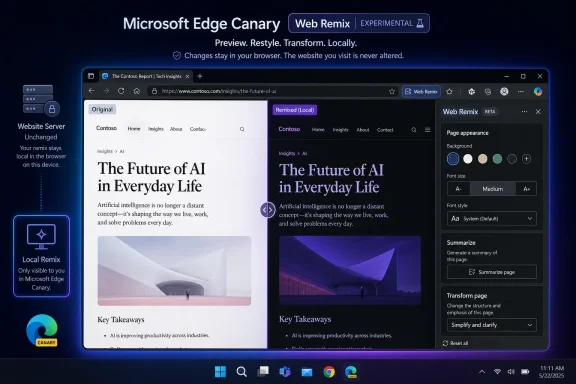 More than a dark-mode toggle
Web Remix is positioned as a page transformation tool, not merely another browser theme. Microsoft says the feature can simplify long articles, add summaries to detailed pages, turn recipes into shopping lists, and convert displayed prices to a local currency.For visual changes, users can enable dark mode, adjust the background color, and modify font size and style. Microsoft also says a remix can be applied to an individual page or an entire domain, although outcomes may vary by site and scenario.
The browser processes the remix locally. That means it changes only what the user sees during their browsing session; it does not alter the publisher’s original page, upload a revised version, or affect what other visitors see. Microsoft compares the approach to Reading mode, dark mode, and browser extensions.
Expect rough edges in Canary
The important qualifier is that this is an early preview feature. Microsoft says Web Remix is in a limited external experiment for Edge Canary and is not widely available in Edge Stable, Beta, or Dev. It is intended for consumer use and requires sign-in with a Microsoft account.Windows Central reports that Web Remix can be enabled in Canary through the Web Remix and Web Remix Internals flags. Even then, availability may be controlled server-side, so enabling the flags does not guarantee the feature will appear for every Canary user.
Forced dark mode has long been a difficult problem for browsers and extensions because webpages contain images, branded graphics, embedded controls, color-coded status information, and custom CSS that should not simply be inverted. Windows Central’s testing found that Web Remix can be overly aggressive, recoloring elements such as social-media icons and navigation components that arguably should retain their original appearance.
That caveat matters more to administrators and support teams than the headline suggests. A locally restyled page can make text more comfortable to read, but it can also obscure visual cues or make a web application look broken. Users relying on color-sensitive dashboards, forms, documentation, or line-of-business web tools should treat the feature as a personal display preference rather than an accessibility or compatibility guarantee.
Microsoft has not announced a rollout timetable for Web Remix beyond its current Edge Canary experiment, so most Windows users should expect to wait for broader testing before it becomes a practical alternative to dark-mode extensions.
References
- Primary source: Windows Central
Published: 2026-07-13T11:52:49+00:00
Force any site into dark mode with Microsoft Edge — no extension required | Windows Central
Microsoft is testing a new "Web Remix" tool in Edge Canary that can force any webpage into a dark theme, summarize long articles, and convert currencies.www.windowscentral.com - Official source: blogs.windows.com
- Official source: techcommunity.microsoft.com
- Related coverage: pfw.edu
