

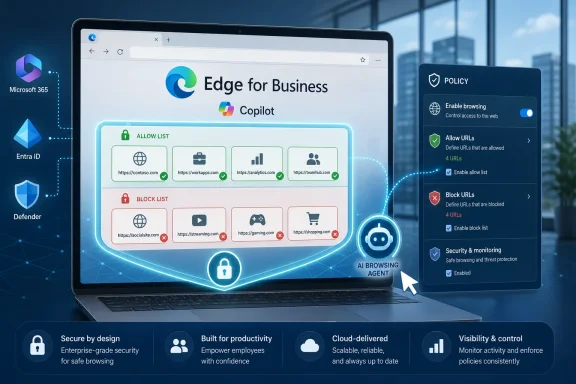
Microsoft Edge for Business now lets Microsoft 365 administrators control which websites Copilot may browse for employees, using allow and block lists in the Edge management service after Microsoft promoted the feature through its Edge Dev account on July 6, 2026. The change sounds small, almost bureaucratic, but it marks a more important turn in Microsoft’s enterprise AI strategy. Copilot is no longer being treated merely as a chat box bolted onto the browser; it is becoming an agent that needs a perimeter.
As reported by PiunikaWeb and documented by Microsoft Learn, the new controls allow organizations to decide where “Browse with Copilot” can operate, rather than simply choosing whether Copilot exists in Edge at all. That distinction matters because enterprise browsers have always been policy engines disguised as productivity tools. The more Copilot can see, summarize, click, compare, and act, the more Edge has to become a guardrail system for machine behavior, not just human behavior.
For years, browser management meant familiar things: extension controls, homepage defaults, password manager restrictions, certificate stores, site lists, and legacy compatibility. Those policies were designed around users making choices inside a browser. Microsoft’s new Copilot browsing controls are aimed at something subtly different: an AI assistant making use of the browser on behalf of the user.
Microsoft’s documentation describes three core policy pieces behind the feature. Administrators can enable or disable browsing with Copilot, define the URL list where it is allowed, and define the URL list where it is blocked. If no allow list is configured, Microsoft says browsing with Copilot is effectively unavailable, even if the broader feature is enabled.
That default is revealing. Microsoft is not treating agentic browsing as just another web search feature. It is treating it as a capability that requires explicit scoping before it becomes useful in managed environments.
The timing also fits the broader arc of Edge. Over the past year, Microsoft has folded more Copilot functionality directly into the browser after experimenting with a dedicated Copilot Mode. Windows Central and other outlets have tracked that transition: less of a separate “AI mode,” more of an always-nearby assistant woven into tabs, history, writing, study tools, and the Edge side pane.
That creates a predictable enterprise problem. The more convenient Copilot becomes, the less comfortable administrators will be with a single tenant-wide switch that says, in effect, AI on or AI off. Microsoft’s answer is to make the browser’s management plane more granular.
Microsoft’s documentation says administrators can add specific sites or domains, use a curated list of commonly used work sites, and create exceptions through blocked sites. Blocked entries take precedence over allowed ones, and more specific subdomains take precedence over broader domains. In practice, that means an organization could permit Copilot to work across a vendor portal while excluding a sensitive billing or admin subdomain.
This is the kind of detail that matters in real deployments. Enterprise web access is rarely cleanly divided between “safe” and “unsafe.” A SaaS platform can contain public documentation, customer records, invoices, admin consoles, audit logs, support tickets, HR forms, and legal correspondence under the same brand umbrella.
Microsoft’s choice to base matching on origins rather than arbitrary page paths will simplify policy enforcement, but it also limits precision. If a company wants Copilot available on a documentation site but not a particular deep URL under the same origin, this policy model may not be fine-grained enough. That is not a fatal flaw, but it is the kind of boundary admins will need to understand before assuming this is a data-loss-prevention product.
The allow list also shifts responsibility. Microsoft can say it provides the control, but the enterprise must decide which websites belong inside the AI perimeter. That is harder than it sounds, especially for organizations that barely have a current inventory of SaaS usage, let alone a risk-ranked map of where an AI browsing agent should be permitted to operate.
The Edge Copilot controls are narrower and more specific. They govern where Copilot’s browsing capability is available inside Microsoft Edge for Business. In other words, Defender can help decide whether a user or device should reach a site at all; Edge’s Copilot policies help decide whether the AI assistant is allowed to browse that site with the user.
That distinction will be important for security teams. A website can be legitimate for employees but inappropriate for AI assistance. A payroll portal, CRM, legal discovery tool, medical system, or internal incident response dashboard may be necessary for work while still being a poor candidate for automated summarization or action.
Microsoft’s documentation also says “Browse with Copilot” is explicitly invoked by users rather than automatically invoked. That helps, but it does not eliminate the governance issue. In most workplace AI incidents, the risk is not usually that a tool awakens by itself; it is that a well-meaning employee asks the tool to help with something sensitive, proprietary, regulated, or just operationally brittle.
This is why browser-level AI policy matters. It gives IT a way to shape the assistant’s usable environment before the prompt is ever written.
But controls are only valuable if someone has the time, authority, and context to use them well. A small business with Microsoft 365 Business Premium may have one overextended admin, no formal data classification program, and a SaaS estate assembled through years of departmental purchases. An education tenant may have a mixture of staff, students, research systems, learning platforms, and compliance obligations that do not map cleanly to Microsoft’s “commonly used work sites.”
This is the hidden cost of enterprise AI adoption. The vendor ships a feature, wraps it in admin controls, and calls it manageable. The customer then has to define policy, test exceptions, explain behavior to users, monitor support tickets, and revisit the configuration every time a business unit adopts a new tool.
Still, this is preferable to the alternative. A blunt Copilot switch would encourage either over-permissive deployments or outright bans. Granular controls create room for staged adoption: allow Copilot on public documentation, vendor knowledge bases, approved productivity sites, and internal wiki pages before expanding into more sensitive workflows.
That staged model is likely where mature organizations will land. The first wave of enterprise AI policy was about whether employees could use generative AI at all. The second wave is about where, with what data, under whose identity, and inside which monitored workflows.
That is strategically useful for Microsoft. If Copilot is going to act across web apps, the browser becomes the natural enforcement point. It knows the signed-in profile, the active page, the tenant policy, the URL, and the management state of the device. It can make policy decisions at the moment AI assistance is requested.
For administrators, that is both powerful and uncomfortable. Browser-level enforcement can be more immediate than network-level filtering, especially for remote workers and SaaS-heavy environments. But it also deepens dependence on Microsoft’s browser stack if an organization wants the richest version of Microsoft’s AI controls.
Microsoft says some related web controls can apply beyond Edge in certain scenarios, particularly through Defender for Endpoint. But the Copilot browsing policy described here is plainly an Edge for Business story. Organizations standardized on Chrome, Firefox, or mixed-browser fleets will need to decide whether Copilot governance is a reason to push Edge harder, or whether they will instead restrict Copilot features until cross-browser controls mature.
That is the enterprise wedge. Microsoft does not need to force every employee to love Edge. It only needs IT to conclude that Edge is where Microsoft 365 Copilot can be governed most completely.
If Copilot is allowed to browse a procurement portal, can it compare vendors without leaking pricing context into a broader model workflow? If it is allowed on a CRM, can it summarize customer history without surfacing data from accounts the user should not mix? If it is allowed on an internal knowledge base, can it safely distinguish official policy from stale drafts and employee notes?
The browser can enforce where the assistant operates, but it cannot by itself solve every downstream question of data handling, prompt interpretation, output accuracy, or business process risk. Microsoft’s policy is therefore necessary but not sufficient. It is a perimeter control, not a full governance model.
That matters because AI assistants fail differently from traditional software. A blocked website produces a clear denial. A permitted website can still produce a misleading summary, overconfident recommendation, or context collapse that blends unrelated information into a plausible answer.
The best security teams will treat Copilot browsing access as one control among several: identity governance, data classification, sensitivity labels, endpoint protection, audit logging, user training, and clear incident processes. The worst deployments will treat an allow list as a magic compliance shield.
That list reportedly includes a wide range of domains associated with productivity, cloud services, travel, news, commerce, developer platforms, and business tools. On one level, that makes sense: modern work is messy, and employees routinely use websites that do not look like classic enterprise software. On another level, broad convenience lists can become quiet policy decisions made by the vendor.
Administrators should review Microsoft’s default list before enabling it. A site that is “commonly used for work” is not necessarily appropriate for AI browsing in every workplace. A news outlet, travel site, cloud dashboard, e-commerce vendor, or file-sharing service may be harmless for one tenant and risky for another.
This is not a Microsoft-specific problem. Every enterprise AI vendor will face the same tension between usability and governance. If the default is too restrictive, users complain that the AI is useless. If the default is too permissive, security teams complain that the AI has wandered into places it does not belong.
Microsoft’s practical answer is precedence: allow broadly, block specifically, and let the most specific match win. That is a workable administrative model. It is not a substitute for judgment.
The verification process Microsoft describes is familiar to anyone who has managed Edge policy: assign a configuration profile, wait for policy propagation, check edge policy state on a targeted device, reload policies if necessary, and restart the browser. Microsoft notes that configuration updates may take time to reach devices, which means testing should not be done five minutes before a broad rollout.
There is also a licensing boundary. Microsoft says browsing with Copilot is available only for users with an active Microsoft 365 Copilot subscription. That means the feature is most relevant to organizations already paying for the higher-value Copilot experience, not every Edge user who sees AI branding in the browser.
For WindowsForum readers, the practical question is not whether this makes Edge “safe” or “unsafe.” The practical question is whether it gives administrators enough control to make a limited Copilot rollout defensible. For many organizations, the answer is probably yes, provided they do not confuse defensible with effortless.
Microsoft says the allow and block list policies are supported on Windows and macOS in Edge version 148 and later, but not on Android or iOS. That matters for organizations with mobile-heavy workforces. Mobile Edge has its own Copilot-related management story through Intune app configuration, but this specific browsing allow/block list model should not be assumed to cover every device.
There is also a subtle user-experience point. Microsoft says users can see what sites Copilot has access to in Edge settings. That transparency is useful, but it may create support questions if users do not understand why Copilot works on one site and not another. IT departments should document the policy in human language, not just push it silently.
This is where many AI rollouts stumble. Users experience governance as random breakage unless someone explains the rule. “Copilot is allowed on approved research and productivity sites, but not on payroll, legal, finance, or regulated customer systems” is a policy people can understand. “The AI button sometimes works” is a helpdesk generator.
Microsoft’s new Edge controls are not the final answer to AI governance, but they are a useful admission: when an assistant can browse with employees, the browser becomes part of the organization’s security boundary. The next phase will be less about whether Copilot can summarize a page and more about whether Microsoft can give IT enough visibility, logging, policy depth, and cross-platform consistency to trust AI agents inside everyday work.
As reported by PiunikaWeb and documented by Microsoft Learn, the new controls allow organizations to decide where “Browse with Copilot” can operate, rather than simply choosing whether Copilot exists in Edge at all. That distinction matters because enterprise browsers have always been policy engines disguised as productivity tools. The more Copilot can see, summarize, click, compare, and act, the more Edge has to become a guardrail system for machine behavior, not just human behavior.
 Microsoft Is Turning Browser Policy Into AI Policy
For years, browser management meant familiar things: extension controls, homepage defaults, password manager restrictions, certificate stores, site lists, and legacy compatibility. Those policies were designed around users making choices inside a browser. Microsoft’s new Copilot browsing controls are aimed at something subtly different: an AI assistant making use of the browser on behalf of the user.Microsoft’s documentation describes three core policy pieces behind the feature. Administrators can enable or disable browsing with Copilot, define the URL list where it is allowed, and define the URL list where it is blocked. If no allow list is configured, Microsoft says browsing with Copilot is effectively unavailable, even if the broader feature is enabled.
That default is revealing. Microsoft is not treating agentic browsing as just another web search feature. It is treating it as a capability that requires explicit scoping before it becomes useful in managed environments.
The timing also fits the broader arc of Edge. Over the past year, Microsoft has folded more Copilot functionality directly into the browser after experimenting with a dedicated Copilot Mode. Windows Central and other outlets have tracked that transition: less of a separate “AI mode,” more of an always-nearby assistant woven into tabs, history, writing, study tools, and the Edge side pane.
That creates a predictable enterprise problem. The more convenient Copilot becomes, the less comfortable administrators will be with a single tenant-wide switch that says, in effect, AI on or AI off. Microsoft’s answer is to make the browser’s management plane more granular.
The Allow List Is the Real Product
The important part of the update is not the block list. Every IT department already understands blocking. The more interesting move is the allow list, because it defines a positive operating area for Copilot rather than a blacklist of places it should avoid.Microsoft’s documentation says administrators can add specific sites or domains, use a curated list of commonly used work sites, and create exceptions through blocked sites. Blocked entries take precedence over allowed ones, and more specific subdomains take precedence over broader domains. In practice, that means an organization could permit Copilot to work across a vendor portal while excluding a sensitive billing or admin subdomain.
This is the kind of detail that matters in real deployments. Enterprise web access is rarely cleanly divided between “safe” and “unsafe.” A SaaS platform can contain public documentation, customer records, invoices, admin consoles, audit logs, support tickets, HR forms, and legal correspondence under the same brand umbrella.
Microsoft’s choice to base matching on origins rather than arbitrary page paths will simplify policy enforcement, but it also limits precision. If a company wants Copilot available on a documentation site but not a particular deep URL under the same origin, this policy model may not be fine-grained enough. That is not a fatal flaw, but it is the kind of boundary admins will need to understand before assuming this is a data-loss-prevention product.
The allow list also shifts responsibility. Microsoft can say it provides the control, but the enterprise must decide which websites belong inside the AI perimeter. That is harder than it sounds, especially for organizations that barely have a current inventory of SaaS usage, let alone a risk-ranked map of where an AI browsing agent should be permitted to operate.
Copilot Browsing Is Not the Same as Web Filtering
It is tempting to lump this feature together with Microsoft Defender for Endpoint web content filtering, but the two controls solve different problems. Defender’s web content filtering operates at a broader device and security layer, allowing organizations to block categories such as adult content, high-bandwidth sites, leisure sites, legal-liability categories, and uncategorized domains. It is about regulating human and application access to classes of web destinations.The Edge Copilot controls are narrower and more specific. They govern where Copilot’s browsing capability is available inside Microsoft Edge for Business. In other words, Defender can help decide whether a user or device should reach a site at all; Edge’s Copilot policies help decide whether the AI assistant is allowed to browse that site with the user.
That distinction will be important for security teams. A website can be legitimate for employees but inappropriate for AI assistance. A payroll portal, CRM, legal discovery tool, medical system, or internal incident response dashboard may be necessary for work while still being a poor candidate for automated summarization or action.
Microsoft’s documentation also says “Browse with Copilot” is explicitly invoked by users rather than automatically invoked. That helps, but it does not eliminate the governance issue. In most workplace AI incidents, the risk is not usually that a tool awakens by itself; it is that a well-meaning employee asks the tool to help with something sensitive, proprietary, regulated, or just operationally brittle.
This is why browser-level AI policy matters. It gives IT a way to shape the assistant’s usable environment before the prompt is ever written.
Microsoft Is Selling Trust by Giving IT More Work
The pitch from Microsoft Edge Dev on X was concise: Copilot can browse websites with employees, and IT decides which websites those are. That is a good line because it reframes enterprise AI from a privacy headache into a management feature. It says, essentially, “We know you are worried, so we made a control plane.”But controls are only valuable if someone has the time, authority, and context to use them well. A small business with Microsoft 365 Business Premium may have one overextended admin, no formal data classification program, and a SaaS estate assembled through years of departmental purchases. An education tenant may have a mixture of staff, students, research systems, learning platforms, and compliance obligations that do not map cleanly to Microsoft’s “commonly used work sites.”
This is the hidden cost of enterprise AI adoption. The vendor ships a feature, wraps it in admin controls, and calls it manageable. The customer then has to define policy, test exceptions, explain behavior to users, monitor support tickets, and revisit the configuration every time a business unit adopts a new tool.
Still, this is preferable to the alternative. A blunt Copilot switch would encourage either over-permissive deployments or outright bans. Granular controls create room for staged adoption: allow Copilot on public documentation, vendor knowledge bases, approved productivity sites, and internal wiki pages before expanding into more sensitive workflows.
That staged model is likely where mature organizations will land. The first wave of enterprise AI policy was about whether employees could use generative AI at all. The second wave is about where, with what data, under whose identity, and inside which monitored workflows.
The Browser Is Becoming the AI Enforcement Point
Microsoft’s move also says something larger about the browser’s role in enterprise computing. Edge for Business is no longer just Microsoft’s Chromium-based answer to Chrome. It is becoming a policy-controlled front end for Microsoft 365, Entra identity, Defender security, and Copilot experiences.That is strategically useful for Microsoft. If Copilot is going to act across web apps, the browser becomes the natural enforcement point. It knows the signed-in profile, the active page, the tenant policy, the URL, and the management state of the device. It can make policy decisions at the moment AI assistance is requested.
For administrators, that is both powerful and uncomfortable. Browser-level enforcement can be more immediate than network-level filtering, especially for remote workers and SaaS-heavy environments. But it also deepens dependence on Microsoft’s browser stack if an organization wants the richest version of Microsoft’s AI controls.
Microsoft says some related web controls can apply beyond Edge in certain scenarios, particularly through Defender for Endpoint. But the Copilot browsing policy described here is plainly an Edge for Business story. Organizations standardized on Chrome, Firefox, or mixed-browser fleets will need to decide whether Copilot governance is a reason to push Edge harder, or whether they will instead restrict Copilot features until cross-browser controls mature.
That is the enterprise wedge. Microsoft does not need to force every employee to love Edge. It only needs IT to conclude that Edge is where Microsoft 365 Copilot can be governed most completely.
The Security Question Is Not Just “Can Copilot See This?”
Much of the public anxiety around browser AI focuses on visibility: whether Copilot can see tabs, pages, history, screenshots, or sensitive fields. That concern is valid, but it is only one piece of the security puzzle. Once an assistant can browse with a user, the more interesting questions involve intent, authority, and action.If Copilot is allowed to browse a procurement portal, can it compare vendors without leaking pricing context into a broader model workflow? If it is allowed on a CRM, can it summarize customer history without surfacing data from accounts the user should not mix? If it is allowed on an internal knowledge base, can it safely distinguish official policy from stale drafts and employee notes?
The browser can enforce where the assistant operates, but it cannot by itself solve every downstream question of data handling, prompt interpretation, output accuracy, or business process risk. Microsoft’s policy is therefore necessary but not sufficient. It is a perimeter control, not a full governance model.
That matters because AI assistants fail differently from traditional software. A blocked website produces a clear denial. A permitted website can still produce a misleading summary, overconfident recommendation, or context collapse that blends unrelated information into a plausible answer.
The best security teams will treat Copilot browsing access as one control among several: identity governance, data classification, sensitivity labels, endpoint protection, audit logging, user training, and clear incident processes. The worst deployments will treat an allow list as a magic compliance shield.
Microsoft’s Default Work-Site List Will Need Scrutiny
Microsoft’s curated list of commonly used work domains is convenient, and convenience is always politically powerful. A toggle that enables a broad set of familiar business sites will help admins get started quickly. It will also tempt some organizations to skip the harder exercise of deciding what Copilot should actually be allowed to browse.That list reportedly includes a wide range of domains associated with productivity, cloud services, travel, news, commerce, developer platforms, and business tools. On one level, that makes sense: modern work is messy, and employees routinely use websites that do not look like classic enterprise software. On another level, broad convenience lists can become quiet policy decisions made by the vendor.
Administrators should review Microsoft’s default list before enabling it. A site that is “commonly used for work” is not necessarily appropriate for AI browsing in every workplace. A news outlet, travel site, cloud dashboard, e-commerce vendor, or file-sharing service may be harmless for one tenant and risky for another.
This is not a Microsoft-specific problem. Every enterprise AI vendor will face the same tension between usability and governance. If the default is too restrictive, users complain that the AI is useless. If the default is too permissive, security teams complain that the AI has wandered into places it does not belong.
Microsoft’s practical answer is precedence: allow broadly, block specifically, and let the most specific match win. That is a workable administrative model. It is not a substitute for judgment.
Admins Should Treat This as a Pilot Feature Even When It Ships Stable
The policy names and documentation make the feature look mature, but organizations should still approach it as a pilot capability. Not because it is necessarily unstable, but because the operational patterns around AI browsing are still new. Admins need to learn where users ask Copilot to go, which blocks create friction, and which allowed sites generate risky behavior.The verification process Microsoft describes is familiar to anyone who has managed Edge policy: assign a configuration profile, wait for policy propagation, check edge policy state on a targeted device, reload policies if necessary, and restart the browser. Microsoft notes that configuration updates may take time to reach devices, which means testing should not be done five minutes before a broad rollout.
There is also a licensing boundary. Microsoft says browsing with Copilot is available only for users with an active Microsoft 365 Copilot subscription. That means the feature is most relevant to organizations already paying for the higher-value Copilot experience, not every Edge user who sees AI branding in the browser.
For WindowsForum readers, the practical question is not whether this makes Edge “safe” or “unsafe.” The practical question is whether it gives administrators enough control to make a limited Copilot rollout defensible. For many organizations, the answer is probably yes, provided they do not confuse defensible with effortless.
The Edge Policy Names Tell the Story
The most concrete takeaway from Microsoft’s implementation is that Copilot browsing is now governed like a first-class browser capability. It has named policies, supported platform versions, precedence rules, and admin-center workflow. That is exactly what enterprise customers should demand before letting AI operate across web sessions.Microsoft says the allow and block list policies are supported on Windows and macOS in Edge version 148 and later, but not on Android or iOS. That matters for organizations with mobile-heavy workforces. Mobile Edge has its own Copilot-related management story through Intune app configuration, but this specific browsing allow/block list model should not be assumed to cover every device.
There is also a subtle user-experience point. Microsoft says users can see what sites Copilot has access to in Edge settings. That transparency is useful, but it may create support questions if users do not understand why Copilot works on one site and not another. IT departments should document the policy in human language, not just push it silently.
This is where many AI rollouts stumble. Users experience governance as random breakage unless someone explains the rule. “Copilot is allowed on approved research and productivity sites, but not on payroll, legal, finance, or regulated customer systems” is a policy people can understand. “The AI button sometimes works” is a helpdesk generator.
The New Copilot Perimeter Starts With Boring Decisions
The immediate lesson for administrators is that this feature deserves a mundane rollout plan, not a dramatic AI transformation deck. The organizations that benefit most will be the ones that start narrowly, document their rationale, and expand only after seeing how employees actually use the tool.- Organizations should enable browsing with Copilot only after defining at least a small, intentional allow list of approved domains.
- Block lists should be used for sensitive subdomains and high-risk exceptions, especially where broad vendor domains contain both ordinary and privileged workflows.
- Microsoft Defender for Endpoint web content filtering should be treated as a separate layer, not as a replacement for Copilot-specific browsing controls.
- Admins should test policy propagation and user experience before broad deployment, because delayed policy updates can make troubleshooting look like product failure.
- Mobile support should be reviewed separately, because Microsoft’s documented allow and block list policies for browsing with Copilot do not apply to Android or iOS.
- User communication should explain why Copilot can browse some work sites but not others, or the control will be perceived as arbitrary.
Microsoft’s new Edge controls are not the final answer to AI governance, but they are a useful admission: when an assistant can browse with employees, the browser becomes part of the organization’s security boundary. The next phase will be less about whether Copilot can summarize a page and more about whether Microsoft can give IT enough visibility, logging, policy depth, and cross-platform consistency to trust AI agents inside everyday work.
References
- Primary source: PiunikaWeb
Published: None
Loading…
piunikaweb.com - Official source: learn.microsoft.com
Loading…
learn.microsoft.com - Official source: support.microsoft.com
- Related coverage: techradar.com
Microsoft's Copilot can now peek into your open tabs in Edge — if you let it — as part of new AI features for the browser | TechRadar
It's a big change for Edge, but AI isn't going awaywww.techradar.com - Related coverage: techspot.com
Microsoft is baking even more Copilot functionality into the Edge browser | TechSpot
The newly announced changes focus on expanding Copilot's ability to make web browsing more seamless for users. Microsoft has recently indicated it is scaling back broader Copilot...www.techspot.com - Related coverage: windowscentral.com
Loading…
www.windowscentral.com

- Related coverage: tomshardware.com
Edge browser's new Copilot Mode lets you talk to AI about your tabs if you opt in — but it's only free for 'a limited time' | Tom's Hardware
Copilot Mode in Edge will be available on Windows and macOSwww.tomshardware.com