

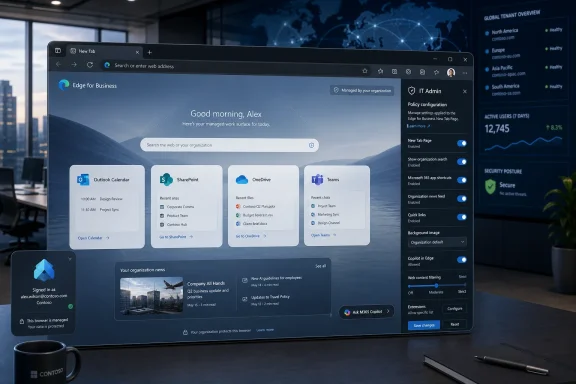
Microsoft’s latest Microsoft 365 Roadmap update says Edge for Business will receive a modernized Enterprise New Tab Page experience for worldwide commercial tenants in September 2026, with Roadmap ID 536577 now listed as in development after a July 2, 2026 refresh. The change sounds cosmetic, but the New Tab Page has become one of Microsoft’s most contested pieces of enterprise real estate. What opens when a user presses Ctrl+T is no longer just a blank canvas or a search box; it is a distribution channel for Microsoft 365, Copilot, organizational content, and browser policy. That makes this roadmap item less about a prettier start page than about Microsoft tightening the front door to work.
The modern enterprise browser used to be judged on compatibility, security controls, and how little it annoyed users. Edge for Business has steadily pushed that model into something more ambitious: a browser that acts as a Microsoft 365 shell, identity container, policy endpoint, search surface, and increasingly an AI front end.
The Enterprise New Tab Page sits at the center of that strategy because it appears constantly without asking for attention. Every new tab is a small reset in the workday, and Microsoft wants that reset to happen inside its own productivity graph rather than on a generic web search page, a corporate intranet bookmark, or a third-party dashboard. The roadmap language is brief, but the placement is unmistakable. This is Edge for Business, not consumer Edge, and it is aimed at organizations already living inside Microsoft Entra ID, Microsoft 365, SharePoint, OneDrive, Outlook, Teams, and Copilot.
That distinction matters. Consumer browser changes often provoke complaints about clutter, feeds, shopping prompts, sidebars, and unwanted suggestions. Enterprise browser changes provoke a different kind of scrutiny: administrators want to know whether the feature is controllable, whether it respects tenant boundaries, whether it creates support tickets, and whether it changes the user’s workflow without adequate warning.
Microsoft’s pitch is that the New Tab Page can reduce context switching by surfacing work content where users already are. The counterargument, familiar to many sysadmins, is that start pages become noisy precisely because every product team wants to “surface” something. The modernized Enterprise NTP will be judged on which side of that line it lands.
For IT departments, the important fact is not the exact day in September. It is that Microsoft has now put the Enterprise New Tab Page refresh far enough out to imply a broader deployment rather than a quiet experiment. A feature created in December 2025, updated on July 2, 2026, and still marked in development is probably passing through the long machinery of design validation, tenant controls, localization, policy documentation, and staged release readiness.
The “Web” platform tag is also telling. This is not merely a Windows 11 shell flourish or an Edge desktop binary change. The New Tab Page is a cloud-delivered experience rendered in the browser, shaped by service configuration, account state, tenant policy, and user licensing. That makes it more flexible for Microsoft and more slippery for admins who prefer software behavior to be tied to a specific MSI, ADMX version, or browser build.
The release ring is listed as General Availability, not a preview ring. That suggests Microsoft intends the feature to appear as a mainstream Edge for Business capability once it ships. But the phrase “in development” should keep administrators from treating the current description as the final contract. Between now and September 2026, the practical details that matter most — default state, opt-out controls, supported policies, Copilot dependencies, and user-visible toggles — may still move.
The New Tab Page is a natural extension of that identity split. A work profile can open a work-oriented NTP; a personal profile can keep a consumer page. In theory, that is cleaner than the old world where admins fought to enforce homepages, startup pages, bookmarks, and search providers across machines that were used for multiple roles.
In practice, however, the profile boundary can also make behavior harder to explain. Users do not always understand why Edge changes when they sign in with a work account, why a company logo appears in one profile but not another, why the feed changes by tenant, or why their New Tab Page differs from a colleague’s. A modern NTP will need to improve that clarity, not worsen it.
The risk is that Microsoft sees the work profile as permission to make the browser more assertive. The opportunity is that Microsoft can finally make the start page useful without contaminating the consumer browser with enterprise assumptions. The September 2026 rollout will be an early test of whether Edge for Business has matured into a genuinely separate product experience or remains a policy-flavored overlay on the same old Edge debates.
The modern experience is likely to push that idea further. Microsoft’s recent Edge documentation and release notes around Copilot New Tab Page features point toward a unified box for chat and search, suggested actions, work cards, calendar and file surfaces, and administrative control through Edge management. Even if Roadmap ID 536577 is not identical to the Copilot NTP work already documented elsewhere, it sits in the same strategic lane.
That means the refresh is not simply a visual redesign. A “modern” Enterprise NTP in Microsoft’s current vocabulary usually means a page that is personalized, graph-aware, AI-adjacent, and service-configured. The old dashboard model showed useful things; the new command-center model tries to predict what the user should do next.
That is where the stakes rise. A dashboard can be ignored. A command center asks for trust. If Edge begins foregrounding files, meetings, Copilot prompts, organizational links, and recommended actions, users will expect relevance, speed, and discretion. If it gets those wrong, the New Tab Page becomes another corporate surface employees learn to click past.
Edge for Business is particularly important to that push because the browser is where SaaS work happens. If Copilot is to act across web apps, enterprise content, and user context, Edge becomes both the viewing pane and the control surface. A modern New Tab Page gives Microsoft a persistent place to introduce those capabilities before the user has chosen a destination.
For licensed Microsoft 365 Copilot customers, this could be useful. A new tab that understands upcoming meetings, recent documents, and relevant prompts may save time if it is accurate and fast. For organizations without Copilot licenses, the same design could feel like an upsell surface or a half-powered experience, depending on how Microsoft handles feature degradation.
That distinction is not academic. IT teams are already sensitive to Microsoft placing AI entry points inside products where licensing, compliance posture, and user readiness vary widely. If the modern Enterprise NTP behaves differently based on license state, tenant configuration, geography, or profile sync health, help desks will need clear documentation before broad rollout. “Modern” should not become another word for “conditional.”
Edge already has a deep policy surface for New Tab Page behavior. Admins can control whether Microsoft content appears, configure page URLs, manage search box behavior, apply organizational branding, and use Edge management service settings in the Microsoft 365 admin center. New Copilot-oriented settings add another layer, including policies that determine whether the Copilot New Tab Page is available for Entra ID profiles.
The complication is policy precedence. Browser policies, Microsoft 365 admin settings, profile state, recommended versus mandatory controls, and user settings can interact in ways that are obvious to product engineers but maddening in the field. A policy that “wins” over an admin-center configuration may be technically correct and still generate confusion if the UI does not explain it.
The best version of this rollout would give admins a clean migration path: what changes, which users see it, what policies apply, which legacy settings still work, and how to pilot it with a group before tenant-wide exposure. The worst version would silently alter the most frequently opened page in the browser and leave admins reconstructing behavior from scattered documentation and user screenshots.
In the enterprise, the fight is less about ads than workflow gravity. If the first page in the browser points users toward Microsoft 365 apps, internal search, Copilot prompts, work files, and calendar-aware content, Microsoft gains another advantage over third-party intranets, independent knowledge tools, competing search services, and even custom corporate portals. The browser becomes the place where Microsoft can make its ecosystem feel inevitable.
That may be exactly what some organizations want. Many companies have spent years trying to get employees to use SharePoint, OneDrive, Teams, Viva, and internal search consistently. A better Edge NTP could make those investments more visible. It could also reduce the need for brittle homepage policies that point everyone to an intranet nobody reads.
But there is a tradeoff. When Microsoft owns the start surface, the organization’s own information architecture may become secondary to Microsoft’s interpretation of relevance. Admins will need to decide whether the NTP should be a Microsoft 365 discovery layer, a corporate communications surface, a minimal launcher, or something close to blank. The modern experience will only work for enterprises if it respects those different answers.
That is the danger for the modern Enterprise NTP. A page can be enterprise-grade, graph-powered, and beautifully designed while still failing the basic test: does it help the user get moving? If the page loads slowly because it is assembling cards, feeds, prompts, profile data, and tenant branding, users will blame Edge. If it surfaces irrelevant files or stale meetings, they will ignore it. If it feels like a Copilot billboard, they will resent it.
The highest compliment a New Tab Page can receive is not excitement. It is habituation. Users should understand it instantly, trust that it is safe, and feel that it reduces friction. That requires restraint, which has not always been the defining trait of modern browser start pages.
A truly good enterprise NTP would let organizations choose density. Some users need a rich dashboard because they live in Microsoft 365 all day. Others want search, a few pinned links, and silence. The modern experience should not assume that every employee wants the same relationship with the browser.
Microsoft’s enterprise story depends on identity and compliance controls carrying through the experience. If work cards show only what the user is allowed to access, if Copilot prompts respect commercial data protection boundaries, and if tenant policies govern exposure, the NTP can be defended as a secure productivity surface. If not, it becomes another place where overshared content and poor information governance become visible.
There is also a browser-management angle. Edge for Business competes partly on the claim that it offers enterprise-grade control without requiring organizations to surrender modern web features. The NTP refresh must reinforce that claim. Admins should be able to disable it, scope it, audit relevant settings, document its behavior, and explain it to risk teams without spelunking through contradictory admin portals.
The security question is therefore not simply whether the page is safe. It is whether the page makes existing security posture more legible or less legible. A start surface that exposes the consequences of bad sharing can be useful, but only if organizations are prepared to remediate what it reveals.
This is not surprising. Microsoft cannot rely on Windows alone as the interface layer for work because so much enterprise activity happens in browser tabs, including on macOS, mobile devices, virtual desktops, and unmanaged or lightly managed endpoints. Edge gives Microsoft a cross-platform foothold that can carry identity, policy, and AI experiences wherever the user signs in.
The New Tab Page is the soft launchpad for that strategy. It is less disruptive than replacing a default search engine and less complex than deploying an agentic browsing feature. It can introduce users to Microsoft 365-aware suggestions in a familiar place. It can also be rolled out, measured, and adjusted service-side.
That makes September 2026 a milestone worth watching. Microsoft may present the change as a modernization of the Enterprise NTP, but it is also a test of how much intelligence organizations are willing to accept at the browser’s starting line. If the rollout is smooth, expect more Edge surfaces to become work-aware and Copilot-adjacent. If it is noisy, admins will push back with policy.
They should also identify pilot groups. Executives, frontline workers, developers, call-center staff, finance teams, and IT admins may all use the browser differently. A feature that helps one group may annoy another. The New Tab Page is too visible to test only in a lab profile with a pristine tenant and perfect licensing.
Communications matter as well. Users are more forgiving of interface changes when they know what changed and why. If the modern NTP appears with work cards, Microsoft 365 content, or Copilot-adjacent prompts, employees should not have to guess whether the company enabled it, Microsoft enabled it, or malware changed their homepage.
For regulated organizations, the review should include privacy and information governance teams. The question is not whether Microsoft has enterprise assurances in the abstract. The question is what specific content appears on-screen, how it is permissioned, whether users can personalize it, and how admins can reduce exposure where needed.
 Microsoft Is Turning the Browser’s Blank Space Into a Managed Work Surface
The modern enterprise browser used to be judged on compatibility, security controls, and how little it annoyed users. Edge for Business has steadily pushed that model into something more ambitious: a browser that acts as a Microsoft 365 shell, identity container, policy endpoint, search surface, and increasingly an AI front end.The Enterprise New Tab Page sits at the center of that strategy because it appears constantly without asking for attention. Every new tab is a small reset in the workday, and Microsoft wants that reset to happen inside its own productivity graph rather than on a generic web search page, a corporate intranet bookmark, or a third-party dashboard. The roadmap language is brief, but the placement is unmistakable. This is Edge for Business, not consumer Edge, and it is aimed at organizations already living inside Microsoft Entra ID, Microsoft 365, SharePoint, OneDrive, Outlook, Teams, and Copilot.
That distinction matters. Consumer browser changes often provoke complaints about clutter, feeds, shopping prompts, sidebars, and unwanted suggestions. Enterprise browser changes provoke a different kind of scrutiny: administrators want to know whether the feature is controllable, whether it respects tenant boundaries, whether it creates support tickets, and whether it changes the user’s workflow without adequate warning.
Microsoft’s pitch is that the New Tab Page can reduce context switching by surfacing work content where users already are. The counterargument, familiar to many sysadmins, is that start pages become noisy precisely because every product team wants to “surface” something. The modernized Enterprise NTP will be judged on which side of that line it lands.
The September 2026 Date Gives IT a Planning Window, Not a Guarantee
The roadmap entry places general availability in September 2026 for the Worldwide standard multi-tenant cloud. That is useful, but it should not be read as a fixed launch date in the way a Patch Tuesday security release is fixed. Microsoft 365 Roadmap dates are planning signals, and Microsoft routinely adjusts them as features move through preview, staged rollout, and service-side enablement.For IT departments, the important fact is not the exact day in September. It is that Microsoft has now put the Enterprise New Tab Page refresh far enough out to imply a broader deployment rather than a quiet experiment. A feature created in December 2025, updated on July 2, 2026, and still marked in development is probably passing through the long machinery of design validation, tenant controls, localization, policy documentation, and staged release readiness.
The “Web” platform tag is also telling. This is not merely a Windows 11 shell flourish or an Edge desktop binary change. The New Tab Page is a cloud-delivered experience rendered in the browser, shaped by service configuration, account state, tenant policy, and user licensing. That makes it more flexible for Microsoft and more slippery for admins who prefer software behavior to be tied to a specific MSI, ADMX version, or browser build.
The release ring is listed as General Availability, not a preview ring. That suggests Microsoft intends the feature to appear as a mainstream Edge for Business capability once it ships. But the phrase “in development” should keep administrators from treating the current description as the final contract. Between now and September 2026, the practical details that matter most — default state, opt-out controls, supported policies, Copilot dependencies, and user-visible toggles — may still move.
Edge for Business Is No Longer Just Edge With a Briefcase Icon
Microsoft introduced Edge for Business to solve a real enterprise problem: users mix work and personal browsing, and IT needs separation without making the browser feel like a virtual desktop prison. The product’s work profile model, branding cues, and management hooks are designed to keep corporate data inside a managed identity context while letting employees use the same browser family across their day.The New Tab Page is a natural extension of that identity split. A work profile can open a work-oriented NTP; a personal profile can keep a consumer page. In theory, that is cleaner than the old world where admins fought to enforce homepages, startup pages, bookmarks, and search providers across machines that were used for multiple roles.
In practice, however, the profile boundary can also make behavior harder to explain. Users do not always understand why Edge changes when they sign in with a work account, why a company logo appears in one profile but not another, why the feed changes by tenant, or why their New Tab Page differs from a colleague’s. A modern NTP will need to improve that clarity, not worsen it.
The risk is that Microsoft sees the work profile as permission to make the browser more assertive. The opportunity is that Microsoft can finally make the start page useful without contaminating the consumer browser with enterprise assumptions. The September 2026 rollout will be an early test of whether Edge for Business has matured into a genuinely separate product experience or remains a policy-flavored overlay on the same old Edge debates.
The Old Enterprise NTP Was a Dashboard; the New One Wants to Be a Command Center
Microsoft’s existing Enterprise New Tab Page already tries to be more than a launchpad. It can show Microsoft 365 content, work feed material, organizational branding, and shortcuts tied to the user’s work account. The stated logic is straightforward: if employees constantly move between files, meetings, email, SharePoint pages, and line-of-business apps, the browser should give them a work-aware starting point.The modern experience is likely to push that idea further. Microsoft’s recent Edge documentation and release notes around Copilot New Tab Page features point toward a unified box for chat and search, suggested actions, work cards, calendar and file surfaces, and administrative control through Edge management. Even if Roadmap ID 536577 is not identical to the Copilot NTP work already documented elsewhere, it sits in the same strategic lane.
That means the refresh is not simply a visual redesign. A “modern” Enterprise NTP in Microsoft’s current vocabulary usually means a page that is personalized, graph-aware, AI-adjacent, and service-configured. The old dashboard model showed useful things; the new command-center model tries to predict what the user should do next.
That is where the stakes rise. A dashboard can be ignored. A command center asks for trust. If Edge begins foregrounding files, meetings, Copilot prompts, organizational links, and recommended actions, users will expect relevance, speed, and discretion. If it gets those wrong, the New Tab Page becomes another corporate surface employees learn to click past.
Copilot Is the Gravity Well Even When the Roadmap Does Not Say Copilot
The roadmap item’s description does not explicitly say Copilot. That omission is notable, but it does not remove Copilot from the story. Microsoft’s product direction across Edge, Microsoft 365, Windows, and admin tooling has made Copilot the organizing principle for new work experiences, especially when the interface involves search, summarization, suggestions, or “modern” productivity surfaces.Edge for Business is particularly important to that push because the browser is where SaaS work happens. If Copilot is to act across web apps, enterprise content, and user context, Edge becomes both the viewing pane and the control surface. A modern New Tab Page gives Microsoft a persistent place to introduce those capabilities before the user has chosen a destination.
For licensed Microsoft 365 Copilot customers, this could be useful. A new tab that understands upcoming meetings, recent documents, and relevant prompts may save time if it is accurate and fast. For organizations without Copilot licenses, the same design could feel like an upsell surface or a half-powered experience, depending on how Microsoft handles feature degradation.
That distinction is not academic. IT teams are already sensitive to Microsoft placing AI entry points inside products where licensing, compliance posture, and user readiness vary widely. If the modern Enterprise NTP behaves differently based on license state, tenant configuration, geography, or profile sync health, help desks will need clear documentation before broad rollout. “Modern” should not become another word for “conditional.”
Administrators Will Care Less About the Design Than the Defaults
The first question from enterprise IT will be blunt: can we control it? The second will be just as blunt: what happens if we do nothing? Microsoft’s answer will determine whether this lands as a welcome refresh or another round of policy firefighting.Edge already has a deep policy surface for New Tab Page behavior. Admins can control whether Microsoft content appears, configure page URLs, manage search box behavior, apply organizational branding, and use Edge management service settings in the Microsoft 365 admin center. New Copilot-oriented settings add another layer, including policies that determine whether the Copilot New Tab Page is available for Entra ID profiles.
The complication is policy precedence. Browser policies, Microsoft 365 admin settings, profile state, recommended versus mandatory controls, and user settings can interact in ways that are obvious to product engineers but maddening in the field. A policy that “wins” over an admin-center configuration may be technically correct and still generate confusion if the UI does not explain it.
The best version of this rollout would give admins a clean migration path: what changes, which users see it, what policies apply, which legacy settings still work, and how to pilot it with a group before tenant-wide exposure. The worst version would silently alter the most frequently opened page in the browser and leave admins reconstructing behavior from scattered documentation and user screenshots.
The New Tab Page Has Become a Proxy War Over Microsoft 365 Attention
Every major platform vendor wants the user’s starting point. Google has Chrome’s New Tab Page and Workspace integrations. Apple controls Safari’s start page and platform defaults. Microsoft has Windows, Edge, Bing, Microsoft 365, and Copilot, which makes its attention strategy both more powerful and more controversial.In the enterprise, the fight is less about ads than workflow gravity. If the first page in the browser points users toward Microsoft 365 apps, internal search, Copilot prompts, work files, and calendar-aware content, Microsoft gains another advantage over third-party intranets, independent knowledge tools, competing search services, and even custom corporate portals. The browser becomes the place where Microsoft can make its ecosystem feel inevitable.
That may be exactly what some organizations want. Many companies have spent years trying to get employees to use SharePoint, OneDrive, Teams, Viva, and internal search consistently. A better Edge NTP could make those investments more visible. It could also reduce the need for brittle homepage policies that point everyone to an intranet nobody reads.
But there is a tradeoff. When Microsoft owns the start surface, the organization’s own information architecture may become secondary to Microsoft’s interpretation of relevance. Admins will need to decide whether the NTP should be a Microsoft 365 discovery layer, a corporate communications surface, a minimal launcher, or something close to blank. The modern experience will only work for enterprises if it respects those different answers.
Users Want Less Noise, Not More Intelligence for Its Own Sake
Microsoft often frames New Tab Page improvements around productivity, and the company is right that workers lose time to context switching. But users rarely complain that their start page is insufficiently ambitious. They complain that it is busy, slow, distracting, unpredictable, or full of content they did not ask for.That is the danger for the modern Enterprise NTP. A page can be enterprise-grade, graph-powered, and beautifully designed while still failing the basic test: does it help the user get moving? If the page loads slowly because it is assembling cards, feeds, prompts, profile data, and tenant branding, users will blame Edge. If it surfaces irrelevant files or stale meetings, they will ignore it. If it feels like a Copilot billboard, they will resent it.
The highest compliment a New Tab Page can receive is not excitement. It is habituation. Users should understand it instantly, trust that it is safe, and feel that it reduces friction. That requires restraint, which has not always been the defining trait of modern browser start pages.
A truly good enterprise NTP would let organizations choose density. Some users need a rich dashboard because they live in Microsoft 365 all day. Others want search, a few pinned links, and silence. The modern experience should not assume that every employee wants the same relationship with the browser.
Security and Compliance Are the Quiet Tests Behind the Pretty Page
For security teams, the New Tab Page is not just UI. It is a surface that may display sensitive filenames, meeting titles, document metadata, organizational links, and potentially AI-generated suggestions. Even when the data is properly permission-trimmed, its visibility in a shared workspace, conference room, screen share, or support session can create risk.Microsoft’s enterprise story depends on identity and compliance controls carrying through the experience. If work cards show only what the user is allowed to access, if Copilot prompts respect commercial data protection boundaries, and if tenant policies govern exposure, the NTP can be defended as a secure productivity surface. If not, it becomes another place where overshared content and poor information governance become visible.
There is also a browser-management angle. Edge for Business competes partly on the claim that it offers enterprise-grade control without requiring organizations to surrender modern web features. The NTP refresh must reinforce that claim. Admins should be able to disable it, scope it, audit relevant settings, document its behavior, and explain it to risk teams without spelunking through contradictory admin portals.
The security question is therefore not simply whether the page is safe. It is whether the page makes existing security posture more legible or less legible. A start surface that exposes the consequences of bad sharing can be useful, but only if organizations are prepared to remediate what it reveals.
Microsoft’s Timing Suggests a Larger Edge-for-AI Campaign
A September 2026 general availability target lands after a period in which Microsoft has been steadily positioning Edge as the browser for AI-assisted work. Recent Edge for Business messaging has emphasized Copilot, managed browsing, enterprise controls, and integration with Microsoft 365 context. The modern NTP belongs to that campaign even if its roadmap entry uses restrained language.This is not surprising. Microsoft cannot rely on Windows alone as the interface layer for work because so much enterprise activity happens in browser tabs, including on macOS, mobile devices, virtual desktops, and unmanaged or lightly managed endpoints. Edge gives Microsoft a cross-platform foothold that can carry identity, policy, and AI experiences wherever the user signs in.
The New Tab Page is the soft launchpad for that strategy. It is less disruptive than replacing a default search engine and less complex than deploying an agentic browsing feature. It can introduce users to Microsoft 365-aware suggestions in a familiar place. It can also be rolled out, measured, and adjusted service-side.
That makes September 2026 a milestone worth watching. Microsoft may present the change as a modernization of the Enterprise NTP, but it is also a test of how much intelligence organizations are willing to accept at the browser’s starting line. If the rollout is smooth, expect more Edge surfaces to become work-aware and Copilot-adjacent. If it is noisy, admins will push back with policy.
The Real Deployment Work Starts Before the Feature Arrives
Organizations that standardize on Edge for Business should not wait until September 2026 to think about this. The right preparation is not dramatic, but it is practical. Admins should inventory current New Tab Page policies, confirm which settings are mandatory versus recommended, review Edge management service configurations, and decide whether the browser start experience should be centrally defined or left partly to users.They should also identify pilot groups. Executives, frontline workers, developers, call-center staff, finance teams, and IT admins may all use the browser differently. A feature that helps one group may annoy another. The New Tab Page is too visible to test only in a lab profile with a pristine tenant and perfect licensing.
Communications matter as well. Users are more forgiving of interface changes when they know what changed and why. If the modern NTP appears with work cards, Microsoft 365 content, or Copilot-adjacent prompts, employees should not have to guess whether the company enabled it, Microsoft enabled it, or malware changed their homepage.
For regulated organizations, the review should include privacy and information governance teams. The question is not whether Microsoft has enterprise assurances in the abstract. The question is what specific content appears on-screen, how it is permissioned, whether users can personalize it, and how admins can reduce exposure where needed.
The Ctrl+T Rollout Will Succeed or Fail on Five Practical Details
The roadmap entry is short, but the implications are concrete. The organizations that handle this well will treat the New Tab Page as a managed workspace component, not a cosmetic browser preference.- Microsoft is targeting September 2026 general availability for a modern Enterprise New Tab Page experience in Edge for Business across worldwide commercial tenants.
- The feature is still in development, so admins should treat the date and behavior as planning guidance rather than a final deployment contract.
- The New Tab Page is strategically important because it is becoming a Microsoft 365 and potentially Copilot-aware work surface inside the browser.
- Edge policies and Microsoft 365 admin settings will determine whether the rollout feels controlled or chaotic for enterprise customers.
- The user experience will be judged on speed, relevance, and restraint more than visual polish.
- Security teams should review what organizational content can appear on the page before broad enablement.
References
- Primary source: Microsoft 365 Roadmap
Published: 2026-07-02T23:12:48.2177075Z
Microsoft 365 Roadmap | Microsoft 365
The Microsoft 365 Roadmap lists updates that are currently planned for applicable subscribers. Check here for more information on the status of new features and updates.www.microsoft.com
- Official source: learn.microsoft.com
Microsoft Edge Enterprise new tab page | Microsoft Learn
Learn how the Enterprise new tab page supports context switching and increases worker productivity.learn.microsoft.com - Related coverage: blog-en.topedia.com
New Copilot-inspired New Tab Page in Edge for Business | Topedia Blog
Microsoft Edge 148 introduces a Copilot-inspired New Tab Page for Edge for Business, combining search, chat, and work content in a single experience. If not configured, it's currently off by default, but users can enable it in the Edge settings.blog-en.topedia.com - Official source: support.microsoft.com
Get to know Microsoft Edge | Microsoft Support
Learn what's new in Microsoft Edge like new privacy tools, language settings, and more extensions.support.microsoft.com - Related coverage: windowscentral.com
How to customize new tab page on the new Microsoft Edge | Windows Central
In this guide, we'll show you the easy steps to customize the new tab page layout and settings available with the latest version of Microsoft Edge based on the Chromium engine.www.windowscentral.com - Related coverage: computerworld.com
FAQ: What the new Edge offers the enterprise – Computerworld
Now that Microsoft has rolled out its new Chromium-based Edge browser, it's time to sort out what that means for IT admins and enterprises. Here's what's important to know. www.computerworld.com
