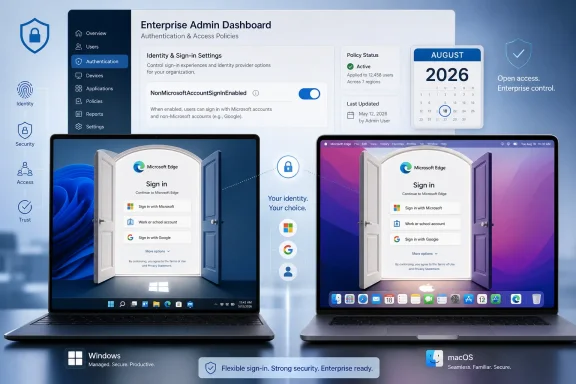
Microsoft Edge 150.0.4078.48 began rolling out on July 2, 2026, with a new option for Windows and macOS users to sign in to the browser using a Google account instead of only a Microsoft account. That is a small-looking change with outsized strategic meaning: Microsoft is lowering one of the most irritating switching costs for Chrome users. Edge is still Microsoft’s browser, still tied deeply into Windows and Microsoft 365, but this update admits something users have been saying for years. A browser that wants to compete with Chrome cannot behave as though Google accounts do not exist.
For most people, the browser is not just an application. It is the place where passwords, bookmarks, autofill details, extensions, tab habits, work research, and half-remembered workflows accumulate over years. That makes browser switching less like installing a new media player and more like moving apartments.
Edge has long had a credible technical pitch. Since Microsoft rebuilt it on Chromium, it has been fast, compatible, and familiar to anyone coming from Chrome. It has also picked up genuinely useful Windows integrations, enterprise controls, PDF features, sleeping tabs, vertical tabs, and enough battery-conscious behavior to make a reasonable case for itself on laptops.
But the account wall always complicated that pitch. A Chrome user might be willing to try Edge, especially on a Windows PC where the icon is already waiting on the taskbar. The moment Edge asked for a Microsoft account to sync the parts of the browser that mattered, the trial became a conversion funnel.
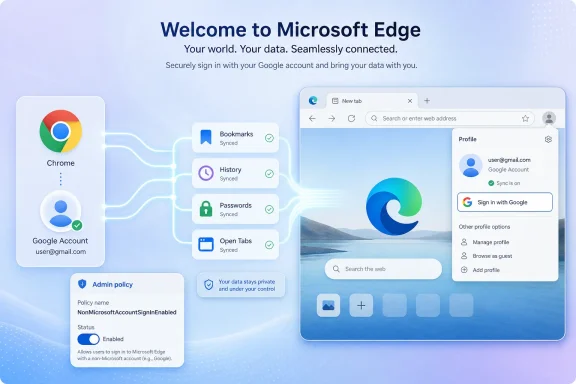
That is the roadblock Microsoft has now partially removed. Edge can now accept a Google account from the profile menu and sign-in screen, bringing Chrome-adjacent identity into Microsoft’s browser rather than demanding that users reorganize their digital life around Microsoft first.
The distinction matters. Microsoft is not merely adding another sign-in button because users like convenience. It is reducing the psychological cost of giving Edge a real chance.
That tension is why the Microsoft account requirement for full sync felt so conspicuous. If Edge is the comfortable alternative for people who already use Chrome, then requiring a Microsoft account to bring over the browsing life attached to a Google account was a self-inflicted wound. It made the browser feel less like a practical alternative and more like another node in Microsoft’s account strategy.
Users do not think about browser identity the way vendors do. A vendor sees authentication, sync services, cloud storage, device state, policy controls, and monetizable engagement. A user sees the bookmarks bar, the history search that remembers a half-forgotten article, and the saved password that prevents a five-minute detour through account recovery.
That is why the Google account sign-in option is more important than its line in the release notes suggests. It acknowledges that users arrive with existing identity systems. Microsoft may prefer a Microsoft account, but Edge can no longer pretend that preference is a realistic starting point for every user.
This is also a rare example of Microsoft removing friction in a way that does not require a speech about AI. The company’s browser messaging in recent years has often revolved around Copilot, shopping features, sidebar apps, and productivity surfaces. This update is more basic, and therefore more persuasive: sign in with the account you already use.
Microsoft says the feature is available on Windows and macOS. It appears in the profile menu and the Edge sign-in screen, and administrators can manage it through the
For home users, the story is straightforward. If the feature is enabled on their device, they can sign in to Edge with a Google account and reduce the work involved in making Edge useful. For IT departments, the question is whether allowing non-Microsoft browser sign-in creates governance, data residency, support, or compliance headaches.
The answer will vary. A small business already standardized on Google Workspace may welcome the change. A Microsoft 365-heavy enterprise with strict browser sync policies may disable it immediately. A school district or regulated organization may decide that the convenience is not worth a new identity path inside a managed browser.
That is why the policy control is essential. Microsoft is making Edge more open to users without forcing every managed environment to accept the same bargain.
Microsoft knows this because it has built similar moats elsewhere. Windows sign-in, OneDrive folder backup, Office activation, Teams presence, Outlook identity, and Microsoft 365 licensing all reinforce one another. The company is not philosophically opposed to account gravity. It is one of the best in the industry at creating it.
The difference is that Edge is trying to win users from an incumbent whose gravity is already stronger in consumer browsing. Microsoft can bundle Edge with Windows, place it in the taskbar, make it the default for certain workflows, and integrate it with Microsoft 365. But if a user’s actual browser life is tied to Google, those advantages only go so far.
Google account sign-in is therefore a concession to reality. Microsoft is not defeating Chrome by pretending the Google ecosystem is irrelevant. It is trying to make Edge useful inside that ecosystem, at least enough for users to keep it open.
That approach is more pragmatic than the old posture. It also reflects the way many people now use technology: Microsoft for work, Google for personal life, Apple for hardware, Slack or Teams depending on the organization, and a password manager or passkey provider layered across all of it. The single-vendor fantasy still exists in corporate strategy decks, but users live in mixed estates.
That is the modern browser in miniature. For consumers, the best browser is the one that gets out of the way while keeping their stuff available. For enterprises, the best browser is increasingly a managed endpoint, a policy surface, a data-loss prevention checkpoint, and an application runtime.
Edge sits uncomfortably but profitably at the center of both worlds. It wants the consumer credibility of Chrome, the enterprise manageability of Internet Explorer’s old institutional role, and the AI-adjacent positioning of Microsoft’s current platform strategy. Google account sign-in supports the first of those goals, but it cannot be isolated from the other two.
For Windows enthusiasts, this is why the change feels bigger than a profile menu update. Microsoft is loosening one kind of lock-in while tightening or refining others. Edge may become easier to enter, but the company still wants the browser to be a control plane for Microsoft services, enterprise policy, and web app infrastructure.
That does not make the Google account option a trick. It makes it a trade. Microsoft is betting that if it removes the most obvious reason Chrome users bounce off Edge, it can win them later with performance, Windows integration, Copilot, security controls, or simple habit.
In managed environments, browser sign-in is not a lifestyle preference. It can affect where data syncs, which account owns browser state, whether work and personal profiles stay separate, and how support desks troubleshoot strange profile behavior. A user signing into Edge with a personal Google account on a corporate device is not automatically a disaster, but it is a governance question.
Microsoft’s policy approach suggests it understands the risk. Organizations can control availability rather than relying on user education alone. That is especially important in environments where Edge for Business is positioned as the sanctioned browser and where Microsoft Entra ID, Microsoft 365 compliance tools, and DLP policies are part of the operating model.
There is also a support dimension. Browser profiles are already one of the messier parts of desktop administration. Users accumulate multiple profiles, half-sync one of them, sign into web services inside another, and then wonder why favorites, passwords, or extensions are not where they expected. Adding Google account sign-in may improve migration for some users while creating new profile ambiguity for others.
That is not a reason to reject the feature. It is a reason to treat it as a policy decision rather than a novelty. The best-run organizations will decide whether Google sign-in belongs in their Edge deployment and communicate that clearly before help desks inherit the confusion.
WebView2 lets Windows apps embed web content using the Edge runtime, and the Evergreen model normally keeps that runtime current. That is good for security and standards compatibility, but it also means a browser engine update can break an application that depends on specific behavior. Enterprises have wanted more practical rollback tools for exactly that reason.
With the new downgrade policy, administrators can temporarily roll back specific WebView2 applications to previous runtime versions, limited to recent releases and managed devices. The downgrade is not meant to become a permanent fork. It is designed as a safety valve when a critical business app regresses and the organization needs time to test, patch, or wait for an upstream fix.
This is the opposite side of Edge’s consumer-friendly Google account change. Microsoft is making Edge easier for Chrome users to try while making the Edge runtime safer for enterprises to depend on. The browser is both a product fighting for attention and infrastructure that cannot afford surprises.
That dual role explains why Edge release notes now read like a blend of consumer browser updates, Microsoft 365 admin notices, security advisories, and Windows platform maintenance. Users may see a new sign-in option. IT sees another month of browser governance.
What has changed is not Microsoft’s belief in accounts. What has changed is where the company is willing to be flexible. Edge has struggled for years with the perception that it is less a browser you choose than a browser Windows keeps recommending, resetting, or defending. The Google sign-in option helps soften that reputation because it gives users a path in that does not begin with surrendering to a Microsoft account prompt.
This is a meaningful shift in tone. For years, Microsoft’s default posture in Windows and Edge has often been to turn convenience into a sign-in opportunity. Sometimes that is genuinely helpful; sometimes it feels like a tax on using the PC. Edge’s new Google account support moves in the other direction by making the browser accommodate the user’s existing account reality.
Still, the larger strategy remains intact. Microsoft will continue to promote Microsoft accounts where they unlock Microsoft services. It will continue to make Edge the best-integrated browser for Windows and Microsoft 365. It will continue to use the browser as a distribution surface for Copilot and security features.
The difference is that Microsoft appears to have recognized that forcing the account conversation too early can lose the browser conversation entirely.
Browser switching rarely happens as a single dramatic event. Users try another browser for a specific reason: battery life on a laptop, better PDF handling, a workplace requirement, a broken extension, a privacy concern, or simple curiosity. If the first 10 minutes feel like rebuilding years of accumulated browser state, the experiment ends.
Google account sign-in changes that first 10 minutes. It gives Edge a better shot at becoming a secondary browser, then perhaps the default for certain workflows, and eventually maybe the browser a user keeps. Microsoft does not need every Chrome user to convert overnight. It needs enough of them to stop dismissing Edge on contact.
That is why this update is more strategically credible than yet another browser feature that tries to differentiate at the margins. Users do not switch browsers because a sidebar has one more app. They switch when the new browser lets them keep their life intact while solving a problem the old browser did not.
If Microsoft can combine lower migration friction with restrained product design, Edge has a better chance. If it uses the new influx of users as another opportunity to push prompts, services, and upsells too aggressively, the account wall will have been removed only to reveal a different kind of obstacle.
Microsoft’s release language says users can sign in to Edge using a Google account, but the practical trust model will need to be understood through Edge’s sync settings, account prompts, and administrative controls as the rollout reaches more machines. Users should not assume that a Google sign-in makes Edge behave exactly like Chrome. Nor should they assume that every category of browser data moves in the same way or under the same controls.
This is especially important for password managers and passkeys. Many advanced users already rely on third-party password managers rather than browser-native sync. Others use Chrome’s built-in password store because it is convenient and tied to their Google account. If Edge reduces migration friction but leaves users uncertain about credential behavior, that uncertainty will slow adoption.
The best version of this feature would be explicit, boring, and transparent. It would show what is being imported or synced, distinguish browser sign-in from website sign-in, and make it easy to separate work and personal profiles. The worst version would blur those lines in the name of convenience.
Microsoft has an opportunity here to earn trust by being less clever. In 2026, users are weary of account prompts that behave like legal agreements disguised as setup screens. A browser asking to become the center of someone’s web life should explain itself plainly.
Taken together, the Google sign-in addition and Sidebar app list retirement suggest a more disciplined Edge may be emerging. One change removes a barrier to entry. The other removes a feature that contributed to the sense that Edge was trying to be too many things at once. Neither turns Edge into a minimalist browser, but both move it away from the caricature of Microsoft stuffing the browser with every strategic initiative at hand.
The Workspaces migration tells a similar story, though with more caveats. Microsoft is moving Workspaces data from OneDrive and SharePoint storage toward the Edge Sync service and removing collaboration and sharing functionality. That sounds like a simplification, but it also changes how organizations and users should think about the feature.
In practice, Microsoft appears to be narrowing Edge around the features it can support and govern more cleanly. That is healthy if it results in a browser that is faster to understand and easier to trust. It is less healthy if useful features vanish faster than Microsoft explains what replaces them.
For users tired of browser bloat, the Sidebar retirement may matter almost as much as Google sign-in. Edge does not merely need to welcome Chrome users. It needs to avoid overwhelming them once they arrive.
Google account sign-in is genuinely good. It solves a real user problem, reduces an unnecessary account barrier, and gives Microsoft a better shot at competing on product quality rather than Windows distribution alone. But it will only help if the experience feels respectful.
That means Microsoft should avoid turning the Google sign-in flow into a maze of Microsoft account nudges. It should make import and sync behavior easy to understand. It should let users decline optional features without nagging. It should keep Edge’s improving enterprise controls from spilling into consumer complexity.
There is a version of Edge that wins users because it is fast, compatible, secure, and less annoying than expected. There is another version that wins installs but loses goodwill because every useful feature is wrapped in a campaign. Microsoft’s challenge is that both versions have existed at different moments in the same product.
The Google account change pushes Edge toward the first version. Whether it stays there is a product management question, not a technical one.
The rollout timing also means patience is required. Edge 150.0.4078.48 is the relevant Stable release, but controlled rollout behavior means two fully updated systems may not expose the option on the same day. That is frustrating, but normal for modern Microsoft feature deployment.
For administrators, the new policy deserves immediate review. If the organization has a clear position on personal Google accounts, browser sync, or profile separation, Edge should reflect that position before users discover the new button. If the organization supports both Microsoft 365 and Google Workspace, the feature may become a welcome simplification rather than a risk.
For power users, the most sensible approach is to treat Edge as a candidate again. Check the profile menu when the rollout reaches your machine, inspect sync settings carefully, and decide whether Edge now fits your workflow rather than dismissing it because of yesterday’s account limitation.
 Microsoft Finally Treats the Google Account as a Migration Tool
For most people, the browser is not just an application. It is the place where passwords, bookmarks, autofill details, extensions, tab habits, work research, and half-remembered workflows accumulate over years. That makes browser switching less like installing a new media player and more like moving apartments.Edge has long had a credible technical pitch. Since Microsoft rebuilt it on Chromium, it has been fast, compatible, and familiar to anyone coming from Chrome. It has also picked up genuinely useful Windows integrations, enterprise controls, PDF features, sleeping tabs, vertical tabs, and enough battery-conscious behavior to make a reasonable case for itself on laptops.
But the account wall always complicated that pitch. A Chrome user might be willing to try Edge, especially on a Windows PC where the icon is already waiting on the taskbar. The moment Edge asked for a Microsoft account to sync the parts of the browser that mattered, the trial became a conversion funnel.
That is the roadblock Microsoft has now partially removed. Edge can now accept a Google account from the profile menu and sign-in screen, bringing Chrome-adjacent identity into Microsoft’s browser rather than demanding that users reorganize their digital life around Microsoft first.
The distinction matters. Microsoft is not merely adding another sign-in button because users like convenience. It is reducing the psychological cost of giving Edge a real chance.
The Old Edge Pitch Was Technically Strong and Socially Awkward
The modern Edge has always lived with a strange contradiction. Under the hood, it shares Chromium ancestry with Chrome, so Microsoft can credibly promise a familiar web experience. Around the edges, however, Microsoft has tried to differentiate aggressively, sometimes with features users appreciate and sometimes with prompts, panels, and integrations that feel like Windows trying to close the deal.That tension is why the Microsoft account requirement for full sync felt so conspicuous. If Edge is the comfortable alternative for people who already use Chrome, then requiring a Microsoft account to bring over the browsing life attached to a Google account was a self-inflicted wound. It made the browser feel less like a practical alternative and more like another node in Microsoft’s account strategy.
Users do not think about browser identity the way vendors do. A vendor sees authentication, sync services, cloud storage, device state, policy controls, and monetizable engagement. A user sees the bookmarks bar, the history search that remembers a half-forgotten article, and the saved password that prevents a five-minute detour through account recovery.
That is why the Google account sign-in option is more important than its line in the release notes suggests. It acknowledges that users arrive with existing identity systems. Microsoft may prefer a Microsoft account, but Edge can no longer pretend that preference is a realistic starting point for every user.
This is also a rare example of Microsoft removing friction in a way that does not require a speech about AI. The company’s browser messaging in recent years has often revolved around Copilot, shopping features, sidebar apps, and productivity surfaces. This update is more basic, and therefore more persuasive: sign in with the account you already use.
A Controlled Rollout Keeps the Celebration Slightly Muted
The new option is part of a controlled feature rollout, which means many users running the right version may not see it immediately. That is not unusual for Edge, Chrome, or other modern browsers, where server-side flags and staged availability are used to limit breakage. It does mean the update will arrive with the familiar confusion of 2026 software: installed, announced, and still absent for some users.Microsoft says the feature is available on Windows and macOS. It appears in the profile menu and the Edge sign-in screen, and administrators can manage it through the
NonMicrosoftAccountSignInEnabled policy. That last detail is not incidental; it is the difference between a consumer convenience and an enterprise-supported identity change.For home users, the story is straightforward. If the feature is enabled on their device, they can sign in to Edge with a Google account and reduce the work involved in making Edge useful. For IT departments, the question is whether allowing non-Microsoft browser sign-in creates governance, data residency, support, or compliance headaches.
The answer will vary. A small business already standardized on Google Workspace may welcome the change. A Microsoft 365-heavy enterprise with strict browser sync policies may disable it immediately. A school district or regulated organization may decide that the convenience is not worth a new identity path inside a managed browser.
That is why the policy control is essential. Microsoft is making Edge more open to users without forcing every managed environment to accept the same bargain.
Chrome’s Moat Was Never Just Rendering Speed
Browser wars are often described in terms of performance, standards support, and memory use, but Chrome’s most durable moat has been identity. Google made the browser feel like a front door to a personal web account. Once users brought passwords, history, bookmarks, payment details, extensions, and cross-device continuity into Chrome, leaving became annoying even when alternatives were good.Microsoft knows this because it has built similar moats elsewhere. Windows sign-in, OneDrive folder backup, Office activation, Teams presence, Outlook identity, and Microsoft 365 licensing all reinforce one another. The company is not philosophically opposed to account gravity. It is one of the best in the industry at creating it.
The difference is that Edge is trying to win users from an incumbent whose gravity is already stronger in consumer browsing. Microsoft can bundle Edge with Windows, place it in the taskbar, make it the default for certain workflows, and integrate it with Microsoft 365. But if a user’s actual browser life is tied to Google, those advantages only go so far.
Google account sign-in is therefore a concession to reality. Microsoft is not defeating Chrome by pretending the Google ecosystem is irrelevant. It is trying to make Edge useful inside that ecosystem, at least enough for users to keep it open.
That approach is more pragmatic than the old posture. It also reflects the way many people now use technology: Microsoft for work, Google for personal life, Apple for hardware, Slack or Teams depending on the organization, and a password manager or passkey provider layered across all of it. The single-vendor fantasy still exists in corporate strategy decks, but users live in mixed estates.
The Browser Is Becoming a Negotiation Over Identity
The Google sign-in change lands at an awkward but revealing moment for Edge. In the same release family, Microsoft is also retiring the Sidebar app list, continuing Workspaces migration work, adding security alerting features for administrators, and expanding enterprise controls around WebView2 runtime downgrades. In other words, Edge is simultaneously becoming simpler for some users and more deeply managed for organizations.That is the modern browser in miniature. For consumers, the best browser is the one that gets out of the way while keeping their stuff available. For enterprises, the best browser is increasingly a managed endpoint, a policy surface, a data-loss prevention checkpoint, and an application runtime.
Edge sits uncomfortably but profitably at the center of both worlds. It wants the consumer credibility of Chrome, the enterprise manageability of Internet Explorer’s old institutional role, and the AI-adjacent positioning of Microsoft’s current platform strategy. Google account sign-in supports the first of those goals, but it cannot be isolated from the other two.
For Windows enthusiasts, this is why the change feels bigger than a profile menu update. Microsoft is loosening one kind of lock-in while tightening or refining others. Edge may become easier to enter, but the company still wants the browser to be a control plane for Microsoft services, enterprise policy, and web app infrastructure.
That does not make the Google account option a trick. It makes it a trade. Microsoft is betting that if it removes the most obvious reason Chrome users bounce off Edge, it can win them later with performance, Windows integration, Copilot, security controls, or simple habit.
Admins Get the Switch Because Microsoft Knows This Is Not Just Personal
The new policy for non-Microsoft account sign-in is the most important part of the release for IT pros. Consumer coverage will naturally focus on Google accounts and Chrome switchers, but enterprise admins will see a different headline: Edge now has another identity path that may need to be allowed, blocked, documented, and supported.In managed environments, browser sign-in is not a lifestyle preference. It can affect where data syncs, which account owns browser state, whether work and personal profiles stay separate, and how support desks troubleshoot strange profile behavior. A user signing into Edge with a personal Google account on a corporate device is not automatically a disaster, but it is a governance question.
Microsoft’s policy approach suggests it understands the risk. Organizations can control availability rather than relying on user education alone. That is especially important in environments where Edge for Business is positioned as the sanctioned browser and where Microsoft Entra ID, Microsoft 365 compliance tools, and DLP policies are part of the operating model.
There is also a support dimension. Browser profiles are already one of the messier parts of desktop administration. Users accumulate multiple profiles, half-sync one of them, sign into web services inside another, and then wonder why favorites, passwords, or extensions are not where they expected. Adding Google account sign-in may improve migration for some users while creating new profile ambiguity for others.
That is not a reason to reject the feature. It is a reason to treat it as a policy decision rather than a novelty. The best-run organizations will decide whether Google sign-in belongs in their Edge deployment and communicate that clearly before help desks inherit the confusion.
WebView2 Downgrades Tell the Other Half of the Edge Story
The same Edge 150 release also includes an enterprise WebView2 runtime downgrade mechanism through aDowngradeVersion policy. That sounds unrelated to Google sign-in, but it points to the same broader truth: Edge is no longer just a browser. It is part of the Windows application platform.WebView2 lets Windows apps embed web content using the Edge runtime, and the Evergreen model normally keeps that runtime current. That is good for security and standards compatibility, but it also means a browser engine update can break an application that depends on specific behavior. Enterprises have wanted more practical rollback tools for exactly that reason.
With the new downgrade policy, administrators can temporarily roll back specific WebView2 applications to previous runtime versions, limited to recent releases and managed devices. The downgrade is not meant to become a permanent fork. It is designed as a safety valve when a critical business app regresses and the organization needs time to test, patch, or wait for an upstream fix.
This is the opposite side of Edge’s consumer-friendly Google account change. Microsoft is making Edge easier for Chrome users to try while making the Edge runtime safer for enterprises to depend on. The browser is both a product fighting for attention and infrastructure that cannot afford surprises.
That dual role explains why Edge release notes now read like a blend of consumer browser updates, Microsoft 365 admin notices, security advisories, and Windows platform maintenance. Users may see a new sign-in option. IT sees another month of browser governance.
Microsoft’s Account Strategy Is Bending, Not Breaking
It would be tempting to frame Google account sign-in as Microsoft abandoning account lock-in. That goes too far. Microsoft accounts remain central to Windows consumer experiences, Xbox, OneDrive, Outlook.com, Store purchases, and many Edge features. Microsoft Entra ID remains foundational for business identity.What has changed is not Microsoft’s belief in accounts. What has changed is where the company is willing to be flexible. Edge has struggled for years with the perception that it is less a browser you choose than a browser Windows keeps recommending, resetting, or defending. The Google sign-in option helps soften that reputation because it gives users a path in that does not begin with surrendering to a Microsoft account prompt.
This is a meaningful shift in tone. For years, Microsoft’s default posture in Windows and Edge has often been to turn convenience into a sign-in opportunity. Sometimes that is genuinely helpful; sometimes it feels like a tax on using the PC. Edge’s new Google account support moves in the other direction by making the browser accommodate the user’s existing account reality.
Still, the larger strategy remains intact. Microsoft will continue to promote Microsoft accounts where they unlock Microsoft services. It will continue to make Edge the best-integrated browser for Windows and Microsoft 365. It will continue to use the browser as a distribution surface for Copilot and security features.
The difference is that Microsoft appears to have recognized that forcing the account conversation too early can lose the browser conversation entirely.
The Chrome User Microsoft Wants Is Not a Chrome Hater
The most likely beneficiary of this change is not the person who has sworn off Chrome forever. It is the Chrome user who is mildly annoyed, curious about Edge, or forced to use Edge occasionally at work and would like it to feel less empty. That is a much larger and more realistic audience.Browser switching rarely happens as a single dramatic event. Users try another browser for a specific reason: battery life on a laptop, better PDF handling, a workplace requirement, a broken extension, a privacy concern, or simple curiosity. If the first 10 minutes feel like rebuilding years of accumulated browser state, the experiment ends.
Google account sign-in changes that first 10 minutes. It gives Edge a better shot at becoming a secondary browser, then perhaps the default for certain workflows, and eventually maybe the browser a user keeps. Microsoft does not need every Chrome user to convert overnight. It needs enough of them to stop dismissing Edge on contact.
That is why this update is more strategically credible than yet another browser feature that tries to differentiate at the margins. Users do not switch browsers because a sidebar has one more app. They switch when the new browser lets them keep their life intact while solving a problem the old browser did not.
If Microsoft can combine lower migration friction with restrained product design, Edge has a better chance. If it uses the new influx of users as another opportunity to push prompts, services, and upsells too aggressively, the account wall will have been removed only to reveal a different kind of obstacle.
The Privacy and Trust Question Does Not Disappear
Letting users sign in with a Google account will raise predictable questions about what syncs, where data goes, and which company can see what. Those questions deserve more than reflexive answers. Browser sync is inherently sensitive because it can involve browsing history, favorites, settings, passwords, addresses, and payment-related data depending on configuration.Microsoft’s release language says users can sign in to Edge using a Google account, but the practical trust model will need to be understood through Edge’s sync settings, account prompts, and administrative controls as the rollout reaches more machines. Users should not assume that a Google sign-in makes Edge behave exactly like Chrome. Nor should they assume that every category of browser data moves in the same way or under the same controls.
This is especially important for password managers and passkeys. Many advanced users already rely on third-party password managers rather than browser-native sync. Others use Chrome’s built-in password store because it is convenient and tied to their Google account. If Edge reduces migration friction but leaves users uncertain about credential behavior, that uncertainty will slow adoption.
The best version of this feature would be explicit, boring, and transparent. It would show what is being imported or synced, distinguish browser sign-in from website sign-in, and make it easy to separate work and personal profiles. The worst version would blur those lines in the name of convenience.
Microsoft has an opportunity here to earn trust by being less clever. In 2026, users are weary of account prompts that behave like legal agreements disguised as setup screens. A browser asking to become the center of someone’s web life should explain itself plainly.
A Smaller Sidebar and a Bigger Sign-In Door Point in the Same Direction
Edge 150 also continues Microsoft’s retreat from some of the browser’s clutter. The Sidebar app list is being retired, and Microsoft says new apps can no longer be added to the sidebar, with existing pinned apps set to disappear in a future update. That is a quiet admission that not every surface in Edge needed to become an app launcher.Taken together, the Google sign-in addition and Sidebar app list retirement suggest a more disciplined Edge may be emerging. One change removes a barrier to entry. The other removes a feature that contributed to the sense that Edge was trying to be too many things at once. Neither turns Edge into a minimalist browser, but both move it away from the caricature of Microsoft stuffing the browser with every strategic initiative at hand.
The Workspaces migration tells a similar story, though with more caveats. Microsoft is moving Workspaces data from OneDrive and SharePoint storage toward the Edge Sync service and removing collaboration and sharing functionality. That sounds like a simplification, but it also changes how organizations and users should think about the feature.
In practice, Microsoft appears to be narrowing Edge around the features it can support and govern more cleanly. That is healthy if it results in a browser that is faster to understand and easier to trust. It is less healthy if useful features vanish faster than Microsoft explains what replaces them.
For users tired of browser bloat, the Sidebar retirement may matter almost as much as Google sign-in. Edge does not merely need to welcome Chrome users. It needs to avoid overwhelming them once they arrive.
The Real Test Is Whether Edge Can Resist Its Own Worst Instincts
Microsoft has had several chances to make Edge the obvious Windows browser. Some were squandered by overzealous prompts, awkward default-browser behavior, and a tendency to treat user reluctance as a design problem to route around. That history is why every genuinely good Edge change arrives with a trust deficit.Google account sign-in is genuinely good. It solves a real user problem, reduces an unnecessary account barrier, and gives Microsoft a better shot at competing on product quality rather than Windows distribution alone. But it will only help if the experience feels respectful.
That means Microsoft should avoid turning the Google sign-in flow into a maze of Microsoft account nudges. It should make import and sync behavior easy to understand. It should let users decline optional features without nagging. It should keep Edge’s improving enterprise controls from spilling into consumer complexity.
There is a version of Edge that wins users because it is fast, compatible, secure, and less annoying than expected. There is another version that wins installs but loses goodwill because every useful feature is wrapped in a campaign. Microsoft’s challenge is that both versions have existed at different moments in the same product.
The Google account change pushes Edge toward the first version. Whether it stays there is a product management question, not a technical one.
The Edge 150 Upgrade Is a Door, Not a Defection
For anyone deciding what to do with the update, the practical reading is simple: this is worth trying, but it is not magic. Edge gaining Google account sign-in does not instantly make it Chrome, and that may be the point. It makes Edge less hostile to Chrome users’ existing lives while preserving Microsoft’s own browser identity.The rollout timing also means patience is required. Edge 150.0.4078.48 is the relevant Stable release, but controlled rollout behavior means two fully updated systems may not expose the option on the same day. That is frustrating, but normal for modern Microsoft feature deployment.
For administrators, the new policy deserves immediate review. If the organization has a clear position on personal Google accounts, browser sync, or profile separation, Edge should reflect that position before users discover the new button. If the organization supports both Microsoft 365 and Google Workspace, the feature may become a welcome simplification rather than a risk.
For power users, the most sensible approach is to treat Edge as a candidate again. Check the profile menu when the rollout reaches your machine, inspect sync settings carefully, and decide whether Edge now fits your workflow rather than dismissing it because of yesterday’s account limitation.
The Part Chrome Users Should Actually Remember
This release is not a revolution, but it is a correction. Microsoft has removed a barrier that made Edge harder to evaluate on its merits, and that matters more than another performance claim or AI panel ever could.- Edge 150.0.4078.48 began rolling out on July 2, 2026, and adds Google account sign-in for Windows and macOS users.
- The feature is controlled by a staged rollout, so some updated systems will not show the option immediately.
- Administrators can manage the feature with the
NonMicrosoftAccountSignInEnabledpolicy. - The change lowers switching friction for Chrome users, especially those whose bookmarks, history, and browser habits are tied to Google identity.
- Edge 150 also brings enterprise-relevant changes, including WebView2 downgrade controls, security update alerts, Intune MAM download behavior, and the continuing retirement of the Sidebar app list.
- The feature’s success will depend less on the existence of the Google sign-in button than on whether Microsoft keeps the surrounding experience clear, restrained, and trustworthy.
References
- Primary source: Windows Central
Published: 2026-07-03T14:35:08.045970
Microsoft Edge finally lets you sign in with a Google account | Windows Central
The latest Edge update adds support for signing in with a Google account.www.windowscentral.com - Official source: learn.microsoft.com
Microsoft Edge release notes for Stable Channel | Microsoft Learn
Microsoft Edge release note for the Stable Channellearn.microsoft.com - Related coverage: windowslatest.com
Microsoft is killing the Microsoft account lock-in across products, Windows 11 may be next
Microsoft Edge will let you sign in with a Google account from July, as Microsoft steps back from its strict Microsoft Account requirements. www.windowslatest.com
- Official source: microsoft.com
Microsoft 365 Roadmap | Microsoft 365
The Microsoft 365 Roadmap lists updates that are currently planned for applicable subscribers. Check here for more information on the status of new features and updates.www.microsoft.com
- Related coverage: windowsreport.com
Microsoft Edge is Finally Getting Google Account Sign-in Support This July
Microsoft Edge will let users sign in with Google accounts starting July 2026, expanding beyond Microsoft accounts. windowsreport.com
- Related coverage: tweakers.net
- Related coverage: techdemis.com
- Related coverage: files-backend.assets.thrillshare.com
- Official source: cdn-dynmedia-1.microsoft.com