

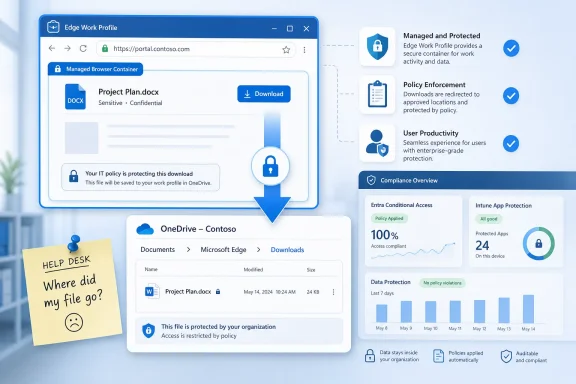
Microsoft has launched Microsoft Edge’s Intune MAM protected downloads change in General Availability for July 2026, moving protected files downloaded from Edge into the user’s OneDrive path at Documents > Microsoft Edge > Downloads instead of treating the browser download as an ordinary local-save event. It is a small folder change with a much larger management signal behind it. Microsoft is tightening the loop between Edge for Business, Intune app protection, Conditional Access, and OneDrive, making the browser less like a neutral window onto corporate data and more like a policy enforcement point.
The detail comes from Microsoft 365 Roadmap item 561551, which Microsoft marked as launched and last updated on July 7, 2026. Microsoft’s own Edge and Intune documentation has been moving in the same direction for months: Edge work profiles on Windows can enforce app protection controls such as clipboard restrictions, watermarking, leak prevention, and protected downloads without requiring full device enrollment. This latest change answers a practical question administrators have been asking since browser-level protection became more serious: if a protected file is allowed to leave the webpage, where exactly does it land?
The old browser model was brutally simple: click download, write to the local Downloads folder, and let the operating system, endpoint agent, or user discipline do the rest. That model was tolerable when work happened mainly on managed corporate laptops, but it breaks down in a world of contractors, partners, merger teams, personal Windows PCs, and cross-tenant collaboration. Microsoft’s answer is to make Edge’s managed work profile behave less like a generic Chromium shell and more like a controlled Microsoft 365 endpoint.
By sending protected downloads to OneDrive’s Documents > Microsoft Edge > Downloads folder, Microsoft is not merely changing the scenery in File Explorer. It is putting the artifact into a location that is already tied to identity, sync, retention, auditing, sharing policy, and data loss prevention expectations. The file no longer falls into the ambiguity of “somewhere on the PC”; it lands in a Microsoft 365-controlled neighborhood.
That matters because Intune MAM, or mobile application management, is really an app-scoped trust model. It protects the organizational context without necessarily taking ownership of the device. The browser becomes the managed container, the work profile becomes the boundary, and OneDrive becomes the least-surprising place to store allowed corporate downloads.
Microsoft has been explicit in its Edge for Business positioning that Intune app protection on Windows is meant to support secure access on unmanaged or cross-tenant devices. The company’s Learn documentation describes Conditional Access triggering app protection enrollment for Edge work profiles, with Intune policies then governing behaviors such as protected downloads. Roadmap item 561551 turns that architecture into a filesystem-level consequence users and admins can actually see.
The strategic shift is subtle but important. Microsoft is not saying every contractor laptop must be enrolled in Intune as a managed Windows endpoint. Instead, it is saying that the corporate session inside Edge can be governed when Entra Conditional Access requires app protection. That gives organizations a middle path between blocking unmanaged devices entirely and letting sensitive content flow through any browser session with only authentication as the control.
Protected downloads fit neatly into that middle path. A policy can allow a file to be downloaded because the workflow requires it, while still preventing the download from becoming an unmanaged local copy. It is the difference between “no downloads” as a blunt compliance stance and “downloads only into a governed work location” as an operational compromise.
That compromise is where Microsoft wants Edge to win. Chrome and Firefox can be secured in many enterprise ways, but Microsoft’s strongest argument is the integration stack: Entra ID for access decisions, Intune for app policy, Purview for data governance, Defender for security telemetry, and OneDrive for storage control. The download folder is now another place where that stack shows itself.
A local Downloads folder is fast, familiar, and dangerously informal. Users clean it sporadically, sync it inconsistently, and often forget what is in it. On unmanaged machines, it may sit outside corporate backup, retention, eDiscovery, and remote wipe controls. Even on managed devices, the Downloads folder is often a messy halfway house between the browser and the real document repository.
A OneDrive-backed Documents path changes the default assumption. If the user is signed into their work OneDrive and the tenant’s policies are configured properly, the file is more likely to remain under organizational governance. It can inherit the administrative reality around OneDrive for Business rather than becoming an orphaned browser artifact.
This is also why the specific path matters. Documents > Microsoft Edge > Downloads is understandable enough for users, but distinct enough for administrators and support desks. It says: these are not ordinary web downloads; these are protected Edge work-profile downloads. In a future incident review, that folder name may be more useful than any marketing phrase Microsoft attaches to the feature.
The newer question is whether corporate data can be kept inside a governed path after authentication. Microsoft’s answer increasingly depends on identity, app context, and data location. A personal Windows device can be untrusted as hardware while the Edge work profile is treated as a manageable application context. That is the wager behind Intune MAM on Windows.
This is not a perfect substitute for device management. A browser policy cannot make an unmanaged PC fully healthy, patched, encrypted, or free from hostile local software. But it can reduce one of the most common leakage paths: the casual download of a sensitive file into a personal file system.
That is the practical value of the protected downloads change. It narrows the gap between “user can view corporate data in the browser” and “user can save corporate data wherever they like.” Microsoft is not eliminating that gap; screenshots, external cameras, copy paths, sync conflicts, and misconfiguration remain. But it is making the default approved path more defensible.
That is the kind of change that generates tickets unless IT gets ahead of it. “Where did my file go?” is not a security incident, but enough of those questions can make a security rollout look broken. The most successful deployments will treat this as a user-experience change, not only a compliance improvement.
Administrators should expect a short phase of confusion around duplicate folders, sync icons, OneDrive availability, and offline behavior. If OneDrive is not configured cleanly, the browser’s protected download experience can inherit those problems. A control designed to reduce data leakage can look unreliable if the underlying sync client is unhealthy or if users are not signed into the correct work account.
There is also a naming nuance. Microsoft’s documentation has described protected downloads being redirected to a OneDrive for Business folder named “Microsoft Edge Downloads,” while the roadmap item describes Documents > Microsoft Edge > Downloads. That is not necessarily a contradiction; product wording and final folder structures often diverge as features ship. But it is exactly the sort of detail administrators should validate in their own tenant rather than assume from a roadmap sentence.
But the feature should not be oversold. If a user can open a file, some form of risk remains. Browser controls can restrict copy and paste, watermark pages, guide downloads, and preserve data in managed locations, but they cannot repeal the laws of endpoint reality. A compromised unmanaged device is still a compromised unmanaged device.
The more honest case for protected downloads is risk reduction through better defaults. Many data leaks are not cinematic insider attacks; they are ordinary workflows that place sensitive content in the wrong location. Moving those files into OneDrive does not make them invulnerable, but it gives administrators more policy leverage after the click.
That leverage may prove especially important for organizations that collaborate outside their tenant. Microsoft’s Edge MAM documentation highlights cross-tenant scenarios such as contractors, partners, and mergers. In those environments, the organization often cannot manage the device, may not control the host tenant, and still needs to let people work with real documents. A protected Edge profile plus OneDrive redirection is a practical answer to an ugly governance problem.
That matters because browser preference has always been emotionally loaded on Windows. Users remember the bad old days of Internet Explorer lock-in, and many still see Edge promotion as Microsoft being Microsoft. But the enterprise browser argument in 2026 is different from the consumer browser argument. IT departments are less interested in whether a browser is beloved and more interested in whether it can enforce policy without breaking work.
Microsoft’s advantage is integration. If Conditional Access can require app protection, if Intune can scope policy to the Edge work profile, if OneDrive can receive protected downloads, and if Purview can participate in broader data governance, then Edge becomes more than a browser. It becomes the front end of Microsoft’s compliance platform.
That does not make Edge the right browser for every organization. It does make Microsoft’s pitch clearer: choose the browser that turns Microsoft 365 security policy into user-visible behavior. The new downloads path is a small but concrete example of that pitch becoming real.
IT teams should validate the feature with the users most likely to stress it. Contractors with devices managed by another tenant are different from employees using personal PCs. Users with multiple Microsoft accounts are different from users with a single corporate identity. Finance teams downloading spreadsheets are different from field workers grabbing PDFs in low-connectivity environments.
The operational question is not merely whether the file saves. It is whether the user understands where it saved, whether the file is available when needed, whether sharing remains controlled, and whether support can explain the behavior in one sentence. Security controls fail politically when they create mystery.
The best rollout language may be blunt: protected work downloads from Edge now go to your work OneDrive, under Documents > Microsoft Edge > Downloads. That sentence is better than a paragraph about MAM, Conditional Access, and secure enterprise browsing. The architecture matters to administrators; the path matters to users.
That concreteness makes it useful. Administrators can inspect it, document it, train users on it, and build support scripts around it. Security teams can map it to data handling policy. Compliance teams can ask whether the location satisfies internal rules for corporate document storage on unmanaged devices.
There is also a philosophical clarity to it. Microsoft is saying that when Edge knows a download is protected by Intune MAM, the browser should not pretend the local device is just another neutral endpoint. It should place the file where Microsoft 365 policy has a better chance of following it.
Near-term, the most practical lessons are refreshingly mundane:
The detail comes from Microsoft 365 Roadmap item 561551, which Microsoft marked as launched and last updated on July 7, 2026. Microsoft’s own Edge and Intune documentation has been moving in the same direction for months: Edge work profiles on Windows can enforce app protection controls such as clipboard restrictions, watermarking, leak prevention, and protected downloads without requiring full device enrollment. This latest change answers a practical question administrators have been asking since browser-level protection became more serious: if a protected file is allowed to leave the webpage, where exactly does it land?
 Microsoft Moves the Download Folder Into the Compliance Boundary
The old browser model was brutally simple: click download, write to the local Downloads folder, and let the operating system, endpoint agent, or user discipline do the rest. That model was tolerable when work happened mainly on managed corporate laptops, but it breaks down in a world of contractors, partners, merger teams, personal Windows PCs, and cross-tenant collaboration. Microsoft’s answer is to make Edge’s managed work profile behave less like a generic Chromium shell and more like a controlled Microsoft 365 endpoint.By sending protected downloads to OneDrive’s Documents > Microsoft Edge > Downloads folder, Microsoft is not merely changing the scenery in File Explorer. It is putting the artifact into a location that is already tied to identity, sync, retention, auditing, sharing policy, and data loss prevention expectations. The file no longer falls into the ambiguity of “somewhere on the PC”; it lands in a Microsoft 365-controlled neighborhood.
That matters because Intune MAM, or mobile application management, is really an app-scoped trust model. It protects the organizational context without necessarily taking ownership of the device. The browser becomes the managed container, the work profile becomes the boundary, and OneDrive becomes the least-surprising place to store allowed corporate downloads.
Microsoft has been explicit in its Edge for Business positioning that Intune app protection on Windows is meant to support secure access on unmanaged or cross-tenant devices. The company’s Learn documentation describes Conditional Access triggering app protection enrollment for Edge work profiles, with Intune policies then governing behaviors such as protected downloads. Roadmap item 561551 turns that architecture into a filesystem-level consequence users and admins can actually see.
The Browser Is Becoming the Managed App
For years, Windows administrators treated browsers as both essential and unruly. They were the gateway to SaaS, the PDF viewer, the authentication surface, the password target, the extension runtime, and the place where corporate data most often crossed into user-controlled space. Edge for Business is Microsoft’s attempt to collapse those roles into something IT can govern without declaring war on every unmanaged device.The strategic shift is subtle but important. Microsoft is not saying every contractor laptop must be enrolled in Intune as a managed Windows endpoint. Instead, it is saying that the corporate session inside Edge can be governed when Entra Conditional Access requires app protection. That gives organizations a middle path between blocking unmanaged devices entirely and letting sensitive content flow through any browser session with only authentication as the control.
Protected downloads fit neatly into that middle path. A policy can allow a file to be downloaded because the workflow requires it, while still preventing the download from becoming an unmanaged local copy. It is the difference between “no downloads” as a blunt compliance stance and “downloads only into a governed work location” as an operational compromise.
That compromise is where Microsoft wants Edge to win. Chrome and Firefox can be secured in many enterprise ways, but Microsoft’s strongest argument is the integration stack: Entra ID for access decisions, Intune for app policy, Purview for data governance, Defender for security telemetry, and OneDrive for storage control. The download folder is now another place where that stack shows itself.
OneDrive Is Not Just Storage Here
It would be easy to read this roadmap item as a OneDrive convenience feature. That misses the point. OneDrive is being used as a policy surface, not just a sync client.A local Downloads folder is fast, familiar, and dangerously informal. Users clean it sporadically, sync it inconsistently, and often forget what is in it. On unmanaged machines, it may sit outside corporate backup, retention, eDiscovery, and remote wipe controls. Even on managed devices, the Downloads folder is often a messy halfway house between the browser and the real document repository.
A OneDrive-backed Documents path changes the default assumption. If the user is signed into their work OneDrive and the tenant’s policies are configured properly, the file is more likely to remain under organizational governance. It can inherit the administrative reality around OneDrive for Business rather than becoming an orphaned browser artifact.
This is also why the specific path matters. Documents > Microsoft Edge > Downloads is understandable enough for users, but distinct enough for administrators and support desks. It says: these are not ordinary web downloads; these are protected Edge work-profile downloads. In a future incident review, that folder name may be more useful than any marketing phrase Microsoft attaches to the feature.
BYOD Security Keeps Moving From Device Ownership to Data Gravity
The industry’s endpoint management story has been inching away from a binary question: is the device managed or unmanaged? That question still matters, especially for malware exposure, patch compliance, disk encryption, and local administrator risk. But for modern SaaS work, it is no longer the only question that determines whether access is allowed.The newer question is whether corporate data can be kept inside a governed path after authentication. Microsoft’s answer increasingly depends on identity, app context, and data location. A personal Windows device can be untrusted as hardware while the Edge work profile is treated as a manageable application context. That is the wager behind Intune MAM on Windows.
This is not a perfect substitute for device management. A browser policy cannot make an unmanaged PC fully healthy, patched, encrypted, or free from hostile local software. But it can reduce one of the most common leakage paths: the casual download of a sensitive file into a personal file system.
That is the practical value of the protected downloads change. It narrows the gap between “user can view corporate data in the browser” and “user can save corporate data wherever they like.” Microsoft is not eliminating that gap; screenshots, external cameras, copy paths, sync conflicts, and misconfiguration remain. But it is making the default approved path more defensible.
The Change Will Be Felt First by Help Desks
For end users, the visible effect is simple: protected downloads may not appear where muscle memory expects them. The file is not gone, and the download did not fail. It was redirected into a OneDrive folder under Documents, inside a Microsoft Edge downloads subfolder.That is the kind of change that generates tickets unless IT gets ahead of it. “Where did my file go?” is not a security incident, but enough of those questions can make a security rollout look broken. The most successful deployments will treat this as a user-experience change, not only a compliance improvement.
Administrators should expect a short phase of confusion around duplicate folders, sync icons, OneDrive availability, and offline behavior. If OneDrive is not configured cleanly, the browser’s protected download experience can inherit those problems. A control designed to reduce data leakage can look unreliable if the underlying sync client is unhealthy or if users are not signed into the correct work account.
There is also a naming nuance. Microsoft’s documentation has described protected downloads being redirected to a OneDrive for Business folder named “Microsoft Edge Downloads,” while the roadmap item describes Documents > Microsoft Edge > Downloads. That is not necessarily a contradiction; product wording and final folder structures often diverge as features ship. But it is exactly the sort of detail administrators should validate in their own tenant rather than assume from a roadmap sentence.
Security Teams Get a Cleaner Story, Not a Magic One
The security upside is obvious: fewer protected business files land in unmanaged local Downloads folders. That helps with accidental exposure, casual oversharing, and the long tail of files that sit forgotten on personal machines. It also aligns better with retention and discovery expectations when compared with uncontrolled local storage.But the feature should not be oversold. If a user can open a file, some form of risk remains. Browser controls can restrict copy and paste, watermark pages, guide downloads, and preserve data in managed locations, but they cannot repeal the laws of endpoint reality. A compromised unmanaged device is still a compromised unmanaged device.
The more honest case for protected downloads is risk reduction through better defaults. Many data leaks are not cinematic insider attacks; they are ordinary workflows that place sensitive content in the wrong location. Moving those files into OneDrive does not make them invulnerable, but it gives administrators more policy leverage after the click.
That leverage may prove especially important for organizations that collaborate outside their tenant. Microsoft’s Edge MAM documentation highlights cross-tenant scenarios such as contractors, partners, and mergers. In those environments, the organization often cannot manage the device, may not control the host tenant, and still needs to let people work with real documents. A protected Edge profile plus OneDrive redirection is a practical answer to an ugly governance problem.
Microsoft Is Also Selling Edge by Making Security Convenient
There is a competitive subtext here that Microsoft would probably prefer to frame as customer value. Edge for Business gains weight every time a Microsoft 365 control works more cleanly in Edge than elsewhere. Protected downloads are not only a security feature; they are another reason administrators may standardize corporate web access on Microsoft’s browser.That matters because browser preference has always been emotionally loaded on Windows. Users remember the bad old days of Internet Explorer lock-in, and many still see Edge promotion as Microsoft being Microsoft. But the enterprise browser argument in 2026 is different from the consumer browser argument. IT departments are less interested in whether a browser is beloved and more interested in whether it can enforce policy without breaking work.
Microsoft’s advantage is integration. If Conditional Access can require app protection, if Intune can scope policy to the Edge work profile, if OneDrive can receive protected downloads, and if Purview can participate in broader data governance, then Edge becomes more than a browser. It becomes the front end of Microsoft’s compliance platform.
That does not make Edge the right browser for every organization. It does make Microsoft’s pitch clearer: choose the browser that turns Microsoft 365 security policy into user-visible behavior. The new downloads path is a small but concrete example of that pitch becoming real.
Administrators Should Test the Boring Parts First
The safest assumption is that the feature will be straightforward when the Microsoft 365 stack is healthy and surprisingly irritating when it is not. OneDrive sign-in state, Known Folder Move decisions, tenant restrictions, Conditional Access scope, Edge profile separation, and app protection assignment all become part of the user’s download experience. That is a lot of plumbing for a file save.IT teams should validate the feature with the users most likely to stress it. Contractors with devices managed by another tenant are different from employees using personal PCs. Users with multiple Microsoft accounts are different from users with a single corporate identity. Finance teams downloading spreadsheets are different from field workers grabbing PDFs in low-connectivity environments.
The operational question is not merely whether the file saves. It is whether the user understands where it saved, whether the file is available when needed, whether sharing remains controlled, and whether support can explain the behavior in one sentence. Security controls fail politically when they create mystery.
The best rollout language may be blunt: protected work downloads from Edge now go to your work OneDrive, under Documents > Microsoft Edge > Downloads. That sentence is better than a paragraph about MAM, Conditional Access, and secure enterprise browsing. The architecture matters to administrators; the path matters to users.
The OneDrive Folder Is the Policy
This roadmap item deserves attention because it is concrete. Microsoft security announcements often arrive wrapped in abstract language about posture, governance, and AI-ready enterprise protection. Here, the change is a folder path.That concreteness makes it useful. Administrators can inspect it, document it, train users on it, and build support scripts around it. Security teams can map it to data handling policy. Compliance teams can ask whether the location satisfies internal rules for corporate document storage on unmanaged devices.
There is also a philosophical clarity to it. Microsoft is saying that when Edge knows a download is protected by Intune MAM, the browser should not pretend the local device is just another neutral endpoint. It should place the file where Microsoft 365 policy has a better chance of following it.
Near-term, the most practical lessons are refreshingly mundane:
- Organizations using Intune MAM with Edge should verify that protected downloads land in the expected OneDrive path after the July 2026 General Availability rollout.
- Help desks should update user guidance before tickets arrive from people looking in the traditional Downloads folder.
- Administrators should test OneDrive sign-in, sync health, and multi-account behavior because the protected-download experience now depends on that plumbing.
- Security teams should treat the feature as a leakage-reduction control, not as a replacement for full device management or endpoint protection.
- Cross-tenant and contractor scenarios deserve special validation because they are a major reason Microsoft built Edge MAM protections in the first place.
References
- Primary source: Microsoft 365 Roadmap
Published: 2026-07-07T23:01:01.6729014Z
Loading…
www.microsoft.com - Official source: learn.microsoft.com
Loading…
learn.microsoft.com - Official source: support.microsoft.com
View protected PDFs using Microsoft Edge on Windows or Mac | Microsoft Support
View protected PDFs using Microsoft Edge on Windows or Macsupport.microsoft.com - Official source: techcommunity.microsoft.com
Loading…
techcommunity.microsoft.com - Official source: blogs.windows.com
Edge for Business presents: the world’s first secure enterprise AI browser
You deserve a browser that truly understands the demands of your business. The market is getting crowded with new AI browsers, each promising productivity gains. But the truth is—they are not built for your organization's needs. In their haste, som blogs.windows.com
- Official source: download.microsoft.com
Loading…
download.microsoft.com
- Official source: cdn-dynmedia-1.microsoft.com