

Microsoft Retires the Mode and Keeps the Machine
Copilot Mode was easy to understand because it was visibly a mode. You turned it on, Edge changed shape, and the browser signaled that something experimental was happening. Microsoft’s new approach is more subtle and, in some ways, more consequential.
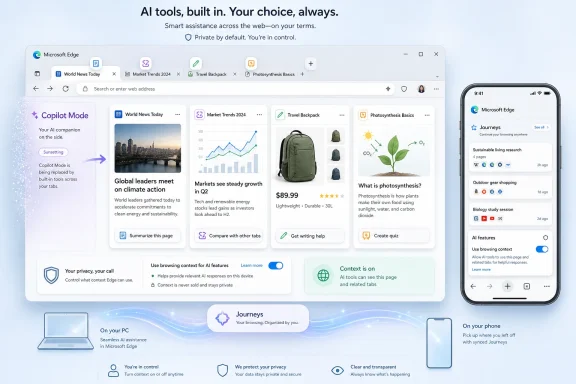
Instead of making Copilot the center of a special browsing experience, Microsoft is breaking the feature set apart and embedding it into Edge itself. Copilot can compare information across open tabs, summarize pages, help with writing, generate study sessions, produce quizzes, and, in some cases, turn page content into a podcast-style experience. On mobile, Microsoft is bringing over several of the same ideas, including cross-tab reasoning and browsing-history organization through Journeys.
The practical effect is that Edge is becoming less like a browser with an AI sidebar and more like a browser whose memory, search, writing, and navigation layers are increasingly AI-mediated. That distinction matters. A sidebar can be ignored; a browser architecture is harder to route around.
Microsoft’s framing is permission-based. The company says Copilot reads across tabs only when the user allows it, and it emphasizes that browsing history and past chats are also under user control. But the privacy debate will not be settled by the word “permission” alone, because browser context is unusually sensitive. Tabs are not just documents; they are a live map of work, health, banking, travel, politics, shopping, relationships, and unfinished thoughts.
The Browser Is Becoming the AI’s Workbench
The most interesting new Edge feature is not that Copilot can summarize a page. That has become table stakes. The more important shift is that Copilot can reason across many open pages at once.
For normal users, this sounds genuinely useful. Anyone who has compared laptop reviews, hotel rooms, flights, restaurants, insurance plans, or software documentation knows the pain of tab sprawl. A browser that can scan the open set and say, in plain English, which option is cheaper, better reviewed, closer, newer, or more compatible is solving a real annoyance.
For IT pros and power users, the same capability raises sharper questions. Open tabs often include internal dashboards, admin portals, cloud consoles, ticketing systems, webmail, intranet pages, and documentation under access control. Even if Copilot is not granted access by default, organizations will want to know exactly what content is sent where, what is retained, what policies govern it, and how this interacts with enterprise data boundaries.
That is the browser’s new tension. The more context Copilot has, the more useful it becomes. The more context it has, the more it resembles a second reader sitting beside the user.
Microsoft’s challenge is that users do not experience “AI context” as an abstract category. They experience it as the browser looking over their shoulder. That can be welcome when it saves thirty minutes of comparison shopping. It can feel invasive when the same machinery is available beside a medical portal, a payroll system, or a private message thread.
Permission Is Necessary, but It Is Not the Whole Trust Model
Microsoft is right to emphasize consent. Without a clear permission boundary, cross-tab reading would be dead on arrival. But consent dialogs have a poor reputation because users have been trained for decades to click through them.
The question is not merely whether Edge asks first. It is whether the browser makes the scope of that permission legible in the moment. Does Copilot get the current tab, all open tabs, browsing history, past Copilot chats, or some combination? Is the permission one-time, session-based, or persistent? Can users see what context was used after the fact? Can administrators disable specific context sources without disabling every AI feature?
These details will decide whether the feature feels like a productivity upgrade or another chapter in the long story of platforms expanding defaults until users complain. Microsoft says users remain in control, and that claim now has to be proven through settings design, enterprise policy, auditability, and plain-language prompts that do not blur the difference between “help me with this page” and “inspect my browsing session.”
The history component is especially sensitive. Open tabs are current context; history is behavioral memory. When Copilot can use what a person has seen before and what they have asked in past chats, the assistant begins to form a profile of intent, not just a snapshot of the screen.
That may produce better answers. It may also produce the sense that Edge has become a browser with a long memory and a short path to inference.
Copilot Mode Was the Loud Part
The retirement of Copilot Mode is easy to misread as Microsoft backing off. It is more accurate to say Microsoft is changing the packaging.
Copilot Mode made AI highly visible. It turned the new tab page into an AI-first interface and made the browser feel like an experiment. That was useful for marketing, but it also created a target for criticism. Users who disliked Microsoft’s AI push could point to the mode as the thing that had arrived uninvited, even if it was optional.
The new Edge strategy lowers the temperature by making AI feel modular. Instead of one big banner feature, there are individual tools: tab comparison, memory, Study and Learn, writing assistance, Journeys, Voice, Vision, and Browse with Copilot for certain subscribers and markets. Each can be described as solving a specific problem.
This is how platform shifts often happen. The first version arrives as a branded event. The second version becomes plumbing.
For Microsoft, that is probably the right product move. For users, it means the old question “Do I want Copilot Mode?” becomes a more complicated set of smaller questions. Do I want Copilot to see this page? Do I want it to compare my tabs? Do I want it to remember previous chats? Do I want it to organize my history? Do I want it helping inside text fields?
The answer may be yes in one context and absolutely not in another. Edge now has to support that nuance.
The Mobile Expansion Makes the Bet Harder to Ignore
Bringing these features to mobile changes the stakes because phones are more personal than desktops. A desktop browser may be a work tool, a research tool, or a gaming machine. A phone browser is often the place where users search symptoms at midnight, check bank balances, read private messages, and jump between apps in ways that blur the line between web and life.
Cross-tab reasoning on mobile could be genuinely helpful. Comparing products, planning trips, resuming research, or finding a half-remembered page across a messy mobile browsing session are all problems that conventional browser history handles badly. Journeys, which organizes browsing history into topics, aims at exactly that pain point.
But mobile also makes accidental context feel more intimate. A feature that seems efficient on a work laptop may feel creepy on a phone if it appears to connect threads the user did not consciously connect. The more Microsoft frames Copilot as a memory layer, the more it must reassure users that memory can be inspected, limited, and erased.
The U.S.-only availability of some features also hints at a controlled rollout rather than a universal switch-flip. That is sensible, but it creates another problem for IT teams and support communities: Edge will not behave identically for every user, on every device, in every market, or under every subscription. The browser is becoming a matrix of capabilities, policies, account types, and regional gates.
That complexity is familiar to Microsoft 365 administrators. It is less familiar to casual browser users.
Enterprise IT Will Read This as a Data Boundary Story
For consumers, this is a privacy story. For enterprises, it is a governance story.
Browsers are now front doors to SaaS, cloud infrastructure, identity providers, CRM systems, source repositories, financial platforms, HR systems, and internal documentation. If an AI assistant can read browser context, administrators need to understand how that context is classified. They will want to know whether Copilot in Edge respects tenant boundaries, data loss prevention rules, sensitivity labels, conditional access, browser management policies, and compliance obligations.
Microsoft has an advantage here because Edge is already part of the enterprise management stack. Admins can control many Edge features through policy, and Microsoft has spent years positioning Edge as the browser for managed Windows environments. But that advantage can become a liability if AI features appear faster than the documentation, controls, and defaults that enterprises expect.
The biggest risk is not necessarily that Copilot will mishandle data. The bigger operational risk is ambiguity. If a user asks Copilot to compare tabs that include a vendor contract, an internal Jira ticket, a SharePoint page, and a public pricing page, what exactly has happened from a compliance standpoint?
Security teams are trained to distrust ambiguous flows. They need logs, boundaries, policy switches, and predictable defaults. “With your permission” is not enough in an environment where permissions are often granted by tired humans trying to finish a task.
The Consumer Backlash Is Predictable Because Microsoft Trained Users to Expect It
The skeptical reaction to Edge’s AI push did not come out of nowhere. Microsoft has spent years putting prompts, banners, defaults, nags, widgets, and account integrations in front of Windows users. Some were useful. Many felt like growth tactics wearing productivity clothing.
That history now shadows every Copilot announcement. Even when Microsoft offers a feature that is plausibly helpful, a portion of the audience assumes there is a catch. Edge’s reputation is not determined only by its engineering quality; it is also shaped by how aggressively Microsoft has promoted it inside Windows.
This is why retiring Copilot Mode may be partly a trust maneuver. A named mode sounds like an agenda. A set of contextual features sounds like a toolkit. But users who are already suspicious will see the change as camouflage rather than restraint.
Microsoft cannot fix that with a blog post. It has to fix it with restraint in the product. Clear toggles, non-pushy onboarding, no surprise re-enablement after updates, no dark-pattern prompts, and enterprise-grade controls will matter more than any assurance that “your data stays yours.”
Trust is built when the software behaves predictably after the announcement cycle ends.
The Useful Features Are Real, Which Makes the Privacy Fight Harder
It would be easy to dismiss all of this as AI bloat, but that would miss why Microsoft keeps pushing. The browser is one of the few places where AI has immediate context and obvious utility. Users already ask questions while browsing. They already compare pages. They already write inside text boxes. They already lose track of research trails.
Study and Learn is a good example. A browser that can turn a dense article or documentation page into a guided study session, then produce a quiz, is not just a gimmick. For students, certification candidates, developers learning a new framework, or admins parsing a vendor migration guide, that can be useful.
The writing assistant is similarly obvious. People compose posts, emails, support replies, product listings, internal updates, and forms in browsers all day. Having Copilot available inline is not a strange use case; it is exactly where an assistant would live if designed around actual work.
The podcast-generation feature is more debatable, but it fits the same pattern. Microsoft is trying to turn any page into a different format: a summary, a comparison, a lesson, a quiz, a draft, or an audio briefing. That is the broader strategy. Edge is no longer just presenting the web; it is transforming it.
And that is precisely why the privacy argument matters. The features are useful because they are close to the user’s activity. They are risky for the same reason.
Edge Is Becoming Microsoft’s Test Bed for Everyday Agentic Computing
Microsoft’s broader AI strategy has moved from chatbots toward agents: tools that do not merely answer questions but help complete tasks. Edge is an obvious place to test that future because it sits between intent and action. Users browse before buying, booking, applying, researching, learning, troubleshooting, and configuring.
Browse with Copilot, available under specific subscription and regional limits, points in that direction. The browser assistant is not just reading pages; it is becoming a participant in navigation and task completion. Voice and Vision features extend the same idea into a more ambient interaction model, where the assistant can respond to what the user is doing rather than waiting for a carefully written prompt.
This is why the retirement of Copilot Mode should not be interpreted as a product failure in the usual sense. Microsoft may have decided that “AI browser mode” was the wrong abstraction. The company appears to be moving toward “AI browser capabilities” instead.
That is a more durable strategy. It is also harder for users to evaluate. A mode can be on or off. A capability mesh requires literacy.
For WindowsForum readers, the practical advice is to treat this like any other major browser capability expansion. Check the settings. Watch the defaults after updates. Review enterprise policies. Decide which context sources are acceptable. Do not assume that “Copilot” means one thing across Windows, Edge, Microsoft 365, mobile, and consumer accounts.
The Edge Update Turns Tab Hoarding Into a Privacy Decision
The concrete lesson from this update is that open tabs are no longer just clutter. They are becoming structured context for AI systems.
That changes how users should think about browsing hygiene. Leaving everything open used to be mostly a memory and organization problem. In an AI-enabled browser, it can also become a context-management problem. If Copilot is asked to reason across tabs, the contents of those tabs matter.
For many people, that will be fine. A set of restaurant pages, shopping options, documentation pages, or news articles is exactly the kind of context an assistant can help with. But mixed sessions are common. A user may have public research in one tab, a private account page in another, and an internal work system in a third.
Microsoft’s implementation details will determine how safely that mix can be handled, but the habit shift belongs to users and organizations too.
The Settings Panel Is Now Part of the Security Perimeter
The immediate action items are not dramatic, but they are real. This is one of those browser updates where the right response is neither panic nor blind acceptance.
- Users should review Edge’s Copilot and personalization settings before relying on the new features in sensitive browsing sessions.
- Administrators should test how cross-tab reasoning behaves with managed accounts, work profiles, internal web apps, and existing Edge policies.
- Organizations should decide whether browsing history, open tabs, and past chats are acceptable context sources for AI assistance.
- Users who want the convenience should separate sensitive work into distinct profiles, windows, or browsers where possible.
- Microsoft’s trust problem will depend less on the feature announcement than on whether Edge keeps permissions clear, reversible, and stable after future updates.
The important point is not that Copilot can read everything at all times. Microsoft says it cannot and that permission is required. The important point is that Edge is moving toward a model where richer assistance depends on richer browser context, and that makes context control a first-class security and privacy concern.
Microsoft is not backing away from AI in Edge; it is normalizing it. Retiring Copilot Mode removes the banner, not the strategy. If the company gets the controls right, Edge could become one of the first mainstream browsers where AI genuinely reduces the friction of everyday web work. If it gets the trust model wrong, the browser’s most useful new feature will also become the latest reason users ask why Microsoft always seems to reach one permission deeper than comfort allows.