

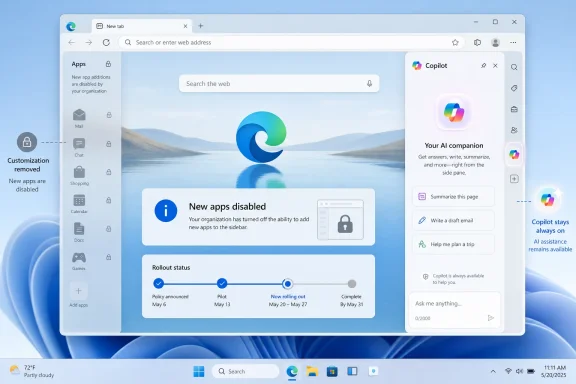
Microsoft is preparing to retire the Edge sidebar app list in upcoming browser updates starting with Microsoft account users, disabling new pinned apps now and removing existing app tower shortcuts later while leaving Copilot and the side pane available without a confirmed final retirement date.
That sounds like a housekeeping note, but it is really a statement of direction. Edge’s most interesting non-Chrome idea is being pared back at the same time Microsoft is insisting that Copilot is too central to touch. The browser is not merely being simplified; it is being re-ranked around the features Microsoft believes matter next.
The Edge sidebar app list was never the browser’s biggest feature, but it was one of its most revealing. It showed Microsoft trying to make Edge into something more than a Chromium shell: a workspace with mail, messaging, search, shopping, and web utilities living beside the active page.
That vision always had a certain Microsoft-ness to it. Edge wanted to be a browser, a productivity dock, a search surface, a shopping assistant, and eventually an AI front end. The sidebar app tower was the part of that sprawl that ordinary users could actually bend to their own habits.
Now Microsoft says the app list is going away in the name of simplification. New apps can no longer be added, existing pinned apps will disappear in a future update, and the rollout begins with users signed in using a Microsoft account. There is no final date, only the familiar staged language of a feature already past the point of reprieve.
The important detail is not that Microsoft is removing clutter. It is that Microsoft is choosing which clutter counts.
There was shopping assistance, coupon hunting, Collections, Drop, vertical tabs, sidebar apps, Bing integration, Microsoft 365 hooks, image tools, games, rewards, and then Copilot. Some of these were genuinely useful. Some felt like product managers competing for browser chrome.
The sidebar app list fit awkwardly into that mix. It was a power-user convenience, not a mass-market necessity. But it also solved a real workflow problem: users could keep WhatsApp, Outlook, Instagram, notes, or other web apps one click away without turning their tab strip into a junk drawer.
That kind of utility is easy to undervalue in telemetry. A feature used by a minority can still be central to the minority that uses it. For those users, the sidebar was not decorative; it was the reason Edge felt meaningfully different from Chrome.
It also made Edge feel more like a workbench. You could keep the main page in focus while checking a message, opening a quick tool, or referencing another service. It was not revolutionary, but it was practical in the way browser features often need to be practical.
The loss is especially noticeable because the replacement story is weak. Microsoft can point users toward installed web apps, pinned taskbar shortcuts, Favorites, or direct web access. Those options work, but they do not reproduce the same side-by-side rhythm.
Split Screen is useful for comparing pages, but it is not an app launcher. Progressive Web Apps can behave like desktop apps, but they pull users away from the browser window. Favorites are bookmarks, not a live utility rail. The sidebar app list occupied a specific middle ground, and Microsoft is choosing not to preserve it.
The company is willing to remove user-pinned app shortcuts, but not the AI assistant occupying prime browser territory. That does not prove Copilot caused the sidebar app list’s demise, but the optics are obvious. A flexible user-controlled surface is being retired while Microsoft’s preferred assistant remains.
This is the broader Windows 11 story in miniature. Microsoft has spent the past few years trying to make Copilot feel native, inevitable, and close at hand. The assistant has appeared in Windows, Edge, Microsoft 365, and Bing-adjacent experiences because Microsoft sees AI as the next organizing layer of personal computing.
The friction comes from the fact that users do not necessarily share that hierarchy. Some want a fast browser with a useful sidebar. Some want fewer prompts, fewer branded surfaces, and fewer experiments. When Microsoft removes a workflow feature while preserving an AI feature, users hear the message plainly: your customization is optional; our strategy is not.
But good simplification removes confusion while preserving capability. Bad simplification removes the wrong thing because it is easier to cut a peripheral feature than to confront the strategic bloat at the center of the product. Edge’s problem was never merely that it had too many buttons; it was that Microsoft kept trying to turn the browser into a distribution channel for everything.
That is why the sidebar retirement feels more consequential than its footprint suggests. The app list was visible clutter, yes, but it was also user-directed clutter. A user pinned the apps. A user arranged the workflow. A user decided the feature was worth the space.
By contrast, much of Edge’s less-loved complexity has arrived from above. Promotions, service integrations, AI prompts, shopping tools, and account nudges feel different because they express Microsoft’s agenda before the user’s. If simplification mostly removes the user-customizable layer while sparing the corporate-priority layer, the browser may get cleaner without feeling more respectful.
From that perspective, retirement may reduce one administrative headache. Fewer sidebar apps mean fewer places where users can open unapproved services, fewer questions about what is allowed, and fewer odd edge cases involving app surfaces inside the browser. A simpler Edge can be easier to document and support.
But there is a trust cost whenever features appear, become manageable, enter workflows, and then disappear. IT departments do not just evaluate whether a feature is useful; they evaluate whether it is stable enough to build guidance around. A browser that keeps changing its work surfaces creates soft costs even when the change is technically manageable.
The lack of a final retirement date also complicates planning. Microsoft says users will be notified before full removal, but organizations prefer dates, channels, version numbers, and policy migration paths. Gradual rollouts are friendly to consumer experimentation and unfriendly to enterprise predictability.
Removing it narrows the distinction. Edge still has vertical tabs, Microsoft account integration, enterprise management strengths, and Copilot, but the everyday “why this browser?” pitch becomes more dependent on Microsoft services. That may work for committed Microsoft 365 users. It may work less well for people who chose Edge because it let them tailor the browser around non-Microsoft web apps.
The irony is that Microsoft is simplifying Edge partly to compete better with browsers that feel cleaner. But cleanliness is not the only reason people switch browsers. They switch because of performance, privacy posture, extension compatibility, platform integration, battery life, habit, trust, and the small features that happen to fit their day.
Edge does not become more compelling merely by becoming less distinctive. If Microsoft removes too many of the practical differentiators, it risks leaving users with a browser that is Chrome-compatible, Microsoft-branded, and increasingly organized around Copilot. For some, that is enough. For others, it is exactly the wrong trade.
What makes this case sharper is that the sidebar app list was not a confusing legacy subsystem buried in settings. It was a visible tool for personal workflow. Users who pinned sites there did so because Edge invited them to.
When those pinned apps disappear, the browser is not just changing; it is overruling a set of user decisions. That distinction matters. People tolerate change better when it improves something they can feel. They resent change when it seems to clear space for priorities they did not ask for.
Microsoft’s challenge is that Copilot is still in the persuasion phase for many Windows users. If Copilot is perceived as the reason useful features are being displaced, even indirectly, the assistant inherits resentment that might otherwise attach only to a browser cleanup.
The lesson is always the same: users do not object to simplification when the destination is better. They object to being moved from a mature, flexible tool into a narrower replacement before the replacement is ready. The Edge sidebar retirement risks falling into that category.
There is no direct successor for the app tower. There is no “classic sidebar” toggle promised for those who want it. There is no sign that Microsoft plans to turn the feature into an optional advanced mode. The path is removal, not migration.
That may be defensible if usage is low and maintenance costs are high. But Microsoft has not made that argument publicly in a way users can evaluate. It has chosen the language of simplification, which is tidy but incomplete.
There is also a product coherence argument. Copilot, sidebar panes, toolbar apps, installed web apps, and browser tabs all compete to solve adjacent problems. Maintaining too many overlapping surfaces can confuse users and developers alike. A smaller set of better-supported surfaces is not inherently bad.
But coherence requires discipline. If Edge loses the sidebar app list and then gains three new Copilot entry points, users will understand that “simplification” was mostly reallocation. If Microsoft removes customizable utilities but keeps promotional prompts, the cleanup will look cosmetic.
The next few Edge releases will therefore matter more than this single removal. They will reveal whether Microsoft is genuinely reducing complexity or merely clearing the runway for AI-first browser design.
Favorites remain the simplest fallback for sites that were pinned mainly as shortcuts. They are durable, sync well, and do not depend on a special browser panel. But they lack the immediacy of a live sidebar surface.
For messaging and mail, users may move back to dedicated desktop apps or keep permanent tabs open. That is not progress; it is a return to the older clutter the sidebar was meant to reduce. Edge’s app tower may have been inelegant, but it acknowledged that the modern browser is already a multitasking environment.
Microsoft’s own alternatives show the gap. “Open it on the web” is not a replacement for “keep it beside what I am doing.” It is an instruction to stop using the workflow that made the feature valuable.
But product direction is often visible in small removals before it becomes obvious in major redesigns. Microsoft is telling us that the Edge surface will be less about user-pinned mini-apps and more about a controlled set of integrated experiences. Copilot is at the top of that set.
That aligns with Microsoft’s broader bet that AI assistants will become the connective tissue across apps, documents, search, and browsing. If that bet pays off, the old sidebar may look like a transitional artifact from the pre-agentic web. Why pin five web apps if an assistant can retrieve, summarize, act, and coordinate across them?
The problem is that today’s Copilot is not yet a universal replacement for quick access. It can help, summarize, draft, and search, but it does not substitute for the muscle memory of opening a specific service in a persistent side panel. Microsoft is asking users to give up a concrete tool for a strategic promise.
The larger lesson is about control. Edge remains a strong browser, especially in Windows-heavy environments, but its direction is increasingly shaped by Microsoft’s AI and service priorities. The sidebar app list is not being retired in isolation; it is being retired inside a browser that is learning to privilege Copilot-era design.
Source: Tech Edition Microsoft to retire Edge sidebar apps as part of Windows 11 simplification
That sounds like a housekeeping note, but it is really a statement of direction. Edge’s most interesting non-Chrome idea is being pared back at the same time Microsoft is insisting that Copilot is too central to touch. The browser is not merely being simplified; it is being re-ranked around the features Microsoft believes matter next.
 Microsoft’s Browser Cleanup Has Found Its First Real Casualty
The Edge sidebar app list was never the browser’s biggest feature, but it was one of its most revealing. It showed Microsoft trying to make Edge into something more than a Chromium shell: a workspace with mail, messaging, search, shopping, and web utilities living beside the active page.That vision always had a certain Microsoft-ness to it. Edge wanted to be a browser, a productivity dock, a search surface, a shopping assistant, and eventually an AI front end. The sidebar app tower was the part of that sprawl that ordinary users could actually bend to their own habits.
Now Microsoft says the app list is going away in the name of simplification. New apps can no longer be added, existing pinned apps will disappear in a future update, and the rollout begins with users signed in using a Microsoft account. There is no final date, only the familiar staged language of a feature already past the point of reprieve.
The important detail is not that Microsoft is removing clutter. It is that Microsoft is choosing which clutter counts.
Edge Became Crowded Because Microsoft Kept Asking It to Do Everything
Edge’s modern identity has always been contradictory. Microsoft pitched it as a faster, cleaner, more compatible successor to the old EdgeHTML browser, then steadily loaded it with services that reflected every corporate priority of the moment.There was shopping assistance, coupon hunting, Collections, Drop, vertical tabs, sidebar apps, Bing integration, Microsoft 365 hooks, image tools, games, rewards, and then Copilot. Some of these were genuinely useful. Some felt like product managers competing for browser chrome.
The sidebar app list fit awkwardly into that mix. It was a power-user convenience, not a mass-market necessity. But it also solved a real workflow problem: users could keep WhatsApp, Outlook, Instagram, notes, or other web apps one click away without turning their tab strip into a junk drawer.
That kind of utility is easy to undervalue in telemetry. A feature used by a minority can still be central to the minority that uses it. For those users, the sidebar was not decorative; it was the reason Edge felt meaningfully different from Chrome.
The Sidebar Was a Small Dock With a Big Promise
The appeal of the app tower was simple: it gave web apps a semi-permanent place without requiring them to become full desktop apps. In an era when many “apps” are just websites with notification permissions and a wrapper, that was a sensible browser-native compromise.It also made Edge feel more like a workbench. You could keep the main page in focus while checking a message, opening a quick tool, or referencing another service. It was not revolutionary, but it was practical in the way browser features often need to be practical.
The loss is especially noticeable because the replacement story is weak. Microsoft can point users toward installed web apps, pinned taskbar shortcuts, Favorites, or direct web access. Those options work, but they do not reproduce the same side-by-side rhythm.
Split Screen is useful for comparing pages, but it is not an app launcher. Progressive Web Apps can behave like desktop apps, but they pull users away from the browser window. Favorites are bookmarks, not a live utility rail. The sidebar app list occupied a specific middle ground, and Microsoft is choosing not to preserve it.
Copilot Survives Because Simplification Has a Hierarchy
Microsoft’s support language is careful: Copilot and the side pane are not affected. That sentence does more work than it first appears to. It tells users that simplification is not a neutral exercise in reducing interface weight; it is a prioritization exercise.The company is willing to remove user-pinned app shortcuts, but not the AI assistant occupying prime browser territory. That does not prove Copilot caused the sidebar app list’s demise, but the optics are obvious. A flexible user-controlled surface is being retired while Microsoft’s preferred assistant remains.
This is the broader Windows 11 story in miniature. Microsoft has spent the past few years trying to make Copilot feel native, inevitable, and close at hand. The assistant has appeared in Windows, Edge, Microsoft 365, and Bing-adjacent experiences because Microsoft sees AI as the next organizing layer of personal computing.
The friction comes from the fact that users do not necessarily share that hierarchy. Some want a fast browser with a useful sidebar. Some want fewer prompts, fewer branded surfaces, and fewer experiments. When Microsoft removes a workflow feature while preserving an AI feature, users hear the message plainly: your customization is optional; our strategy is not.
Simplification Is Easier to Announce Than to Earn
There is nothing wrong with simplifying Edge. In fact, Edge needs simplification. The browser has accumulated enough controls, panes, prompts, and service tie-ins that even sympathetic users can see why Microsoft might want to prune.But good simplification removes confusion while preserving capability. Bad simplification removes the wrong thing because it is easier to cut a peripheral feature than to confront the strategic bloat at the center of the product. Edge’s problem was never merely that it had too many buttons; it was that Microsoft kept trying to turn the browser into a distribution channel for everything.
That is why the sidebar retirement feels more consequential than its footprint suggests. The app list was visible clutter, yes, but it was also user-directed clutter. A user pinned the apps. A user arranged the workflow. A user decided the feature was worth the space.
By contrast, much of Edge’s less-loved complexity has arrived from above. Promotions, service integrations, AI prompts, shopping tools, and account nudges feel different because they express Microsoft’s agenda before the user’s. If simplification mostly removes the user-customizable layer while sparing the corporate-priority layer, the browser may get cleaner without feeling more respectful.
Enterprise IT Will Read This as Another Moving Target
For sysadmins, the sidebar app list was not just a personal convenience feature. It was another Edge surface to govern, secure, and explain. Microsoft has policy controls for sidebar behavior, including ways to block or allow sidebar apps in managed environments, and those controls matter in organizations where browsers are now front doors to SaaS estates.From that perspective, retirement may reduce one administrative headache. Fewer sidebar apps mean fewer places where users can open unapproved services, fewer questions about what is allowed, and fewer odd edge cases involving app surfaces inside the browser. A simpler Edge can be easier to document and support.
But there is a trust cost whenever features appear, become manageable, enter workflows, and then disappear. IT departments do not just evaluate whether a feature is useful; they evaluate whether it is stable enough to build guidance around. A browser that keeps changing its work surfaces creates soft costs even when the change is technically manageable.
The lack of a final retirement date also complicates planning. Microsoft says users will be notified before full removal, but organizations prefer dates, channels, version numbers, and policy migration paths. Gradual rollouts are friendly to consumer experimentation and unfriendly to enterprise predictability.
The Chrome Comparison Cuts Both Ways
Edge has always lived under Chrome’s shadow. Its best argument has been compatibility plus differentiation: all the websites work, but Microsoft adds enough productivity features to make switching worthwhile. The sidebar app list was part of that bargain.Removing it narrows the distinction. Edge still has vertical tabs, Microsoft account integration, enterprise management strengths, and Copilot, but the everyday “why this browser?” pitch becomes more dependent on Microsoft services. That may work for committed Microsoft 365 users. It may work less well for people who chose Edge because it let them tailor the browser around non-Microsoft web apps.
The irony is that Microsoft is simplifying Edge partly to compete better with browsers that feel cleaner. But cleanliness is not the only reason people switch browsers. They switch because of performance, privacy posture, extension compatibility, platform integration, battery life, habit, trust, and the small features that happen to fit their day.
Edge does not become more compelling merely by becoming less distinctive. If Microsoft removes too many of the practical differentiators, it risks leaving users with a browser that is Chrome-compatible, Microsoft-branded, and increasingly organized around Copilot. For some, that is enough. For others, it is exactly the wrong trade.
The User Backlash Is Really About Agency
The early user reaction has been predictable because the pattern is familiar. A company builds a feature, some users adopt it deeply, and then the company decides that the feature no longer fits the roadmap. The users are told to adapt.What makes this case sharper is that the sidebar app list was not a confusing legacy subsystem buried in settings. It was a visible tool for personal workflow. Users who pinned sites there did so because Edge invited them to.
When those pinned apps disappear, the browser is not just changing; it is overruling a set of user decisions. That distinction matters. People tolerate change better when it improves something they can feel. They resent change when it seems to clear space for priorities they did not ask for.
Microsoft’s challenge is that Copilot is still in the persuasion phase for many Windows users. If Copilot is perceived as the reason useful features are being displaced, even indirectly, the assistant inherits resentment that might otherwise attach only to a browser cleanup.
Microsoft Is Repeating an Old Windows Lesson
Windows history is full of simplification campaigns. Control Panel gives way to Settings. Legacy utilities are deprecated. Menus are reorganized. Duplicate tools are consolidated, sometimes elegantly and sometimes with years of awkward overlap.The lesson is always the same: users do not object to simplification when the destination is better. They object to being moved from a mature, flexible tool into a narrower replacement before the replacement is ready. The Edge sidebar retirement risks falling into that category.
There is no direct successor for the app tower. There is no “classic sidebar” toggle promised for those who want it. There is no sign that Microsoft plans to turn the feature into an optional advanced mode. The path is removal, not migration.
That may be defensible if usage is low and maintenance costs are high. But Microsoft has not made that argument publicly in a way users can evaluate. It has chosen the language of simplification, which is tidy but incomplete.
A Cleaner Edge Could Still Be the Right Goal
The charitable reading is that Microsoft is finally admitting Edge became too busy. A browser should not feel like a mall kiosk with a rendering engine attached. If the company is serious about restraint, retiring lesser-used features may be necessary.There is also a product coherence argument. Copilot, sidebar panes, toolbar apps, installed web apps, and browser tabs all compete to solve adjacent problems. Maintaining too many overlapping surfaces can confuse users and developers alike. A smaller set of better-supported surfaces is not inherently bad.
But coherence requires discipline. If Edge loses the sidebar app list and then gains three new Copilot entry points, users will understand that “simplification” was mostly reallocation. If Microsoft removes customizable utilities but keeps promotional prompts, the cleanup will look cosmetic.
The next few Edge releases will therefore matter more than this single removal. They will reveal whether Microsoft is genuinely reducing complexity or merely clearing the runway for AI-first browser design.
The App Tower’s Exit Leaves Users With Imperfect Substitutes
Users who relied on sidebar apps are not without options, but every alternative changes the workflow. Installing sites as apps can work well for frequently used services, especially on Windows 11 where they can be pinned to the taskbar or Start menu. But that turns a quick in-browser glance into an app-switching action.Favorites remain the simplest fallback for sites that were pinned mainly as shortcuts. They are durable, sync well, and do not depend on a special browser panel. But they lack the immediacy of a live sidebar surface.
For messaging and mail, users may move back to dedicated desktop apps or keep permanent tabs open. That is not progress; it is a return to the older clutter the sidebar was meant to reduce. Edge’s app tower may have been inelegant, but it acknowledged that the modern browser is already a multitasking environment.
Microsoft’s own alternatives show the gap. “Open it on the web” is not a replacement for “keep it beside what I am doing.” It is an instruction to stop using the workflow that made the feature valuable.
The Signal Hidden in a Small Browser Change
This change is easy to dismiss if you never used the sidebar app list. Many Edge users ignored it, hid it, or found it noisy. For them, retirement may look like overdue cleanup.But product direction is often visible in small removals before it becomes obvious in major redesigns. Microsoft is telling us that the Edge surface will be less about user-pinned mini-apps and more about a controlled set of integrated experiences. Copilot is at the top of that set.
That aligns with Microsoft’s broader bet that AI assistants will become the connective tissue across apps, documents, search, and browsing. If that bet pays off, the old sidebar may look like a transitional artifact from the pre-agentic web. Why pin five web apps if an assistant can retrieve, summarize, act, and coordinate across them?
The problem is that today’s Copilot is not yet a universal replacement for quick access. It can help, summarize, draft, and search, but it does not substitute for the muscle memory of opening a specific service in a persistent side panel. Microsoft is asking users to give up a concrete tool for a strategic promise.
The Browser Microsoft Wants Is Starting to Overrule the Browser Users Built
The practical lesson for Edge users is straightforward: if the sidebar app list is part of your daily routine, start moving those shortcuts now. Waiting for the final removal notice is a poor migration strategy, especially because Microsoft has not attached the retirement to a fixed date.The larger lesson is about control. Edge remains a strong browser, especially in Windows-heavy environments, but its direction is increasingly shaped by Microsoft’s AI and service priorities. The sidebar app list is not being retired in isolation; it is being retired inside a browser that is learning to privilege Copilot-era design.
- Microsoft has already stopped users from adding new apps to the Edge sidebar app list.
- Existing pinned sidebar apps are expected to be removed gradually in future Edge updates.
- Copilot and the broader side pane are not part of this retirement and will continue to be developed.
- Users who depended on sidebar apps should migrate important services to installed web apps, Favorites, taskbar pins, or dedicated desktop apps.
- Enterprise administrators should watch Edge policy changes closely because sidebar management is shifting from feature control to feature disappearance.
Source: Tech Edition Microsoft to retire Edge sidebar apps as part of Windows 11 simplification
