

Microsoft is testing in pre-release versions of Edge a guided Windows default-browser walkthrough that opens edge://default-browser, resizes the Windows Settings dialog beside instructions, and points users at the Set default button, according to Windows Report’s July 9, 2026 finding on Windows. The experiment is unfinished, unconfirmed, and may never ship, but the direction is unmistakable: browser makers are no longer content to throw users into Settings and hope they finish the job. Microsoft’s twist is more politically loaded than Google’s, because Edge is not just another Chromium browser on Windows; it is the browser Windows already recommends, preinstalls, and frequently promotes. The real story is not one new page inside Edge, but a new phase in the long-running fight over who gets to choreograph user choice.
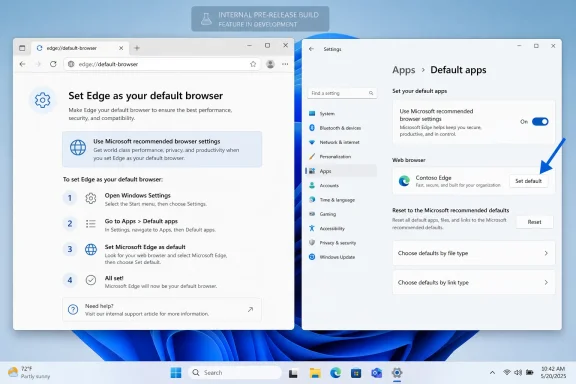
Windows Report’s Venkat found that Microsoft has prepared an edge://default-browser page in pre-release builds of Edge, and that page works as a visual walkthrough rather than a conventional settings pane. Instead of simply launching Windows Settings in a separate window, the test experience appears designed to resize the Windows Settings dialog so it can sit alongside Edge’s own instructions. In the ideal version described by the report, Edge is already selected in the Windows dialog, and an arrow points to the Set default button the user needs to click.
That is a small UI change with a large strategic meaning. For years, browser makers have had to live with the gap between “make this my default” inside the browser and the actual Windows system UI where that choice is finalized. That gap is not accidental; Microsoft’s own Windows app defaults documentation says default app settings must be set through Windows system UI, with user interaction, partly to prevent malware or unwanted software from silently hijacking defaults.
The Edge experiment tries to make that protected handoff feel less like a handoff. It does not, based on the current reporting, bypass Windows Settings or programmatically seize the default browser role. Instead, it wraps the Windows choice inside a browser-authored instructional frame: here is the dialog, here is the selected app, here is the button, click there.
The language is equally revealing. Windows Report says the page reads “Use Microsoft recommended browser settings,” carries the heading “Set Edge as your default,” and tells users: “Get easy access to the features you know, love, and trust by setting Edge as your default browser.” That phrase is not neutral operating-system copy. It is marketing copy placed next to a system-level choice.
The fallback behavior is also important. If the Windows Settings dialog does not appear, Edge reportedly falls back to a page with a link that opens Windows Settings directly. That suggests Microsoft is still operating within the architecture Windows requires: the browser can guide, prompt, and launch, but the user’s effective default-app change remains routed through Windows.
That unfinished state should temper the outrage cycle. Nothing in the report proves Microsoft has decided to ship this to stable Edge users, nor does it prove the final experience would look exactly like the build Venkat saw. The report itself is explicit: nothing here is confirmed or final.
But unfinished does not mean insignificant. Pre-release UI often shows the intent before it shows the implementation. Here, the intent is to reduce abandonment in the default-browser switch flow by keeping the user oriented at the moment Windows hands control to Settings.
That is a rational product goal. It is also the sort of rational product goal that becomes controversial when the product is Edge and the platform is Windows. A browser asking to become default is expected. The Windows vendor’s own browser visually steering the user through the system dialog is something else.
The placeholder also hints at technical ambition. Resizing or embedding the Settings dialog alongside web-style instructions is more than a link to ms-settings. It is a guided composition between browser UI and operating-system UI, which is exactly where Microsoft’s browser strategy has always been most sensitive.
The same design pattern looks different depending on who deploys it. When Chrome builds a visual guide, it is a dominant browser trying to overcome Windows friction. When Edge builds a visual guide, it is Microsoft’s browser taking advantage of deep familiarity with the platform it ships on.
That does not automatically make the Edge version abusive. Microsoft’s Windows app defaults guidance explicitly allows apps to direct users to Settings and to guide them through the process with prompts or documentation. The same guidance also says developers should prompt thoughtfully, provide clear instructions, and respect user choice. The debate, then, is not whether guidance is permitted; it is when guidance becomes pressure.
Chrome’s version gives Microsoft cover. If Google can create a walkthrough that points users through Windows Settings, Microsoft can plausibly argue that Edge deserves the same right as any other browser. The counterargument is that Edge is not situated like any other browser, because Windows already gives it privileged distribution, system integration, and default status on fresh installations.
That tension is why this experiment is more interesting than a simple browser settings tweak. It exposes a loophole in the user-choice settlement that Windows has been moving toward: if apps cannot silently change defaults, they can compete to make the manual default-change process feel scripted, branded, and conversion-optimized.
That is why Windows has increasingly treated default apps as user choices that must run through system UI. Microsoft’s documentation for the Windows app defaults platform says Windows does not allow programmatic changes to default apps without user interaction in system UI. It also notes that registry-based changes are not supported and that default-app data is protected.
Those protections are usually discussed in security terms, but they also have competition consequences. If every app could set itself as default after installation, the operating system would become a battlefield of installers, updaters, registry writes, and dark patterns. By forcing the decision into Settings, Windows creates a neutral chamber — or at least a chamber that is supposed to be neutral.
The Edge walkthrough complicates that neutrality. The Settings dialog remains the place where the user clicks, but the surrounding experience is authored by the browser seeking the default. If the page shows Edge already selected and points to the Set default button, the user’s choice is still technically voluntary, yet the process has been pre-narrated.
This is the modern version of a very old software argument. The battle has moved from “can the app change the default?” to “can the app design the path that leads to the user changing the default?” That is a subtler fight, and it is harder for policy, enterprise controls, and antitrust rules to describe cleanly.
For consumers, “recommended” can sound like advice. For enterprise admins, it can sound like an unmanaged campaign waiting to collide with carefully chosen defaults. For regulators, it may sound like the platform owner using its credibility to steer users toward its own services.
The phrase “Set Edge as your default” is clearer and less problematic. It tells the user what the page wants. But the larger copy — “features you know, love, and trust” — moves into persuasion rather than instruction. That may be ordinary marketing, but it is marketing placed at the edge of an operating-system decision.
Microsoft is hardly alone in this. Google’s Chrome messaging has long leaned on speed, safety, and account continuity. Mozilla, Brave, Opera, and others also ask users to make them default. The difference is that Microsoft’s “recommended” carries the weight of Windows itself, even when it appears inside Edge.
That distinction matters because many users do not mentally separate Microsoft the app vendor from Microsoft the operating-system vendor. A prompt from Edge on Windows can feel like a prompt from Windows. A recommendation from Microsoft can feel like the computer’s recommendation, not merely the browser maker’s pitch.
That is good usability. It is also a more effective nudge. The arrow pointing to the Set default button is helpful if the user already decided to set Edge as default; it is manipulative if the user arrived there through an unclear prompt or fatigue from repeated campaigns.
This is where repetition becomes more important than the page itself. A one-time, clearly dismissible guide after a user clicks “make default” is relatively benign. A recurring campaign that keeps asking, reframes the same choice as “recommended,” or bundles browser and search defaults would deserve far more scrutiny.
Microsoft’s existing policy language around default browser settings campaigns is relevant here. The policy documentation says that if the campaign is enabled or not configured, users can be prompted to set Edge as default and Bing as default search if they do not already have those settings. If the policy is disabled, users should not be prompted to set Edge as default or Bing as default search.
That gives admins a concrete lever, but it also confirms that Microsoft treats these prompts as campaigns, not merely support documentation. A campaign has a goal. The goal is conversion.
Microsoft gives enterprises supported ways to set Edge as default through Group Policy or MDM by using default application associations. It also gives admins Edge policy controls for browser campaigns. But those controls only help if they are actually configured, monitored, and tested against the channels users run.
The first practical question for admins is simple: who owns browser defaults in your organization? If the answer is “the user,” then a guided walkthrough may be acceptable as long as it is transparent and dismissible. If the answer is “IT,” then leaving default-browser campaigns unmanaged invites confusion.
The second question is whether your browser policy and your user experience match. It is common for organizations to set a default browser at deployment time but leave users free to change it later. It is also common to lock down extensions while ignoring default-app prompts. The result can be an environment where policy says one thing, prompts suggest another, and support tickets multiply.
That suspicion is not irrational. Browser defaults sit at the intersection of operating-system power, search revenue, identity, advertising, AI assistants, and cloud services. Microsoft wants Edge to be the browser where Copilot, Microsoft account services, Defender-oriented security messaging, shopping tools, and Bing-adjacent experiences have the least friction. Google wants Chrome to remain the browser where Google account services, Search, Gemini-related surfaces, and the Chrome Web Store feel native.
The Windows Settings dialog is supposed to be the referee. The new walkthrough model lets the contestants stand next to the referee and explain where the user should click. That may still be within the rules, but it changes the feel of the match.
The European regulatory context makes this especially sensitive, even if the current report does not claim a regional rollout or tie the feature to a particular market. Microsoft has already had to make Windows behavior more accommodating in Europe in response to platform-choice concerns. A guided Edge default flow would be evaluated against that backdrop, not as an isolated help page.
The safest version of this feature would be strictly user-initiated. If a user clicks a clear “make Edge default” control, Edge opens a walkthrough that explains the Windows Settings step and provides a fallback link if Settings fails to load. The riskiest version would be campaign-driven, repeated, and framed as Microsoft’s recommended configuration in a way that makes declining feel like making the PC less safe or less complete.
The Edge experiment is best understood as a last-inch optimization. Microsoft cannot simply set Edge as default after a user has chosen another browser, and Windows is designed to prevent silent programmatic changes. So the next frontier is reducing the cognitive distance between the browser’s ask and the user’s system-level confirmation.
Chrome’s reported walkthrough shows Google has reached the same conclusion. This is not just Microsoft being Microsoft; it is the browser market adapting to Windows’ default-app safeguards. When the gate cannot be bypassed, competitors compete over the path to the gate.
That should make Windows users both relieved and wary. Relieved, because the reported Edge flow still depends on Windows Settings and an explicit Set default click. Wary, because a guided flow can be optimized, tested, and messaged like any other conversion funnel.
The crucial design test is whether the user remains in control. Does the walkthrough appear only after a deliberate request? Is the current default clearly shown? Is declining just as easy as proceeding? Does the feature avoid bundling unrelated choices, such as search engine changes, into the same emotional appeal? Those details will determine whether this becomes a useful guide or another entry in the long catalog of Edge nagging.
That means the platform rule is no longer simply “go to Settings.” It is “go to Settings, but you may bring a map.” Every browser can bring a map. The question is whose map is clearest, whose map is most persuasive, and whether the platform owner’s map gets any special affordances.
If Edge can show a resized Windows Settings dialog beside instructions, other browser vendors will reasonably ask whether they can do the same. If they cannot, Microsoft will face accusations that Edge receives privileged composition with Windows UI. If they can, Windows users may soon see a new class of branded default-setting walkthroughs from every major browser.
That may actually be the most defensible outcome. A consistent Windows-provided guided-defaults API, available equally to all registered browsers and bounded by strict anti-abuse rules, would be better than each browser inventing its own semi-integrated experience. It would let Windows keep the final choice in system UI while giving users clearer instruction.
But the current reporting does not describe such a neutral Windows feature. It describes Edge testing an Edge page, using Microsoft-branded copy, with Edge already selected and an arrow pointing to Set default. That is not a platform-neutral design, at least not yet.
But defaults are one of the few settings ordinary users almost never revisit once they work. A feature that increases the chance of Edge becoming default by even a small percentage would matter at Microsoft scale. It would matter for search traffic, extension ecosystems, enterprise support patterns, and user perception of what Windows “wants.”
There is also a user-education upside that should not be ignored. Windows default-app settings can still confuse people, especially those switching browsers after setup. A visual walkthrough that accurately shows the Settings step could prevent frustration. The problem is that the same clarity can be used to push users harder.
That dual-use nature is why the final implementation, if Microsoft ships one, deserves close scrutiny. A helpful guide and a coercive nudge can share the same screenshot. The difference is in timing, frequency, wording, dismissibility, and whether the user’s existing choice is treated as valid.
Microsoft has a legitimate usability problem to solve and a trust problem of its own making. If Edge’s guided default-browser walkthrough ships as a clear, one-time aid for users who already asked to make Edge default, it could be a sensible modernization of a clumsy Windows handoff; if it ships as another persistent Microsoft-recommended funnel, it will confirm every suspicion users and rivals already have about Edge on Windows. The future of browser choice on Windows may not be decided by who owns the Settings button, but by who gets to stand beside it and tell users what to do next.
 Microsoft Turns a Settings Handoff Into a Guided Conversion Funnel
Windows Report’s Venkat found that Microsoft has prepared an edge://default-browser page in pre-release builds of Edge, and that page works as a visual walkthrough rather than a conventional settings pane. Instead of simply launching Windows Settings in a separate window, the test experience appears designed to resize the Windows Settings dialog so it can sit alongside Edge’s own instructions. In the ideal version described by the report, Edge is already selected in the Windows dialog, and an arrow points to the Set default button the user needs to click.That is a small UI change with a large strategic meaning. For years, browser makers have had to live with the gap between “make this my default” inside the browser and the actual Windows system UI where that choice is finalized. That gap is not accidental; Microsoft’s own Windows app defaults documentation says default app settings must be set through Windows system UI, with user interaction, partly to prevent malware or unwanted software from silently hijacking defaults.
The Edge experiment tries to make that protected handoff feel less like a handoff. It does not, based on the current reporting, bypass Windows Settings or programmatically seize the default browser role. Instead, it wraps the Windows choice inside a browser-authored instructional frame: here is the dialog, here is the selected app, here is the button, click there.
The language is equally revealing. Windows Report says the page reads “Use Microsoft recommended browser settings,” carries the heading “Set Edge as your default,” and tells users: “Get easy access to the features you know, love, and trust by setting Edge as your default browser.” That phrase is not neutral operating-system copy. It is marketing copy placed next to a system-level choice.
The fallback behavior is also important. If the Windows Settings dialog does not appear, Edge reportedly falls back to a page with a link that opens Windows Settings directly. That suggests Microsoft is still operating within the architecture Windows requires: the browser can guide, prompt, and launch, but the user’s effective default-app change remains routed through Windows.
The Placeholder Gives Away the State of the Experiment
The rough edges matter because they keep this story from becoming more definitive than the evidence allows. Windows Report says the overall experience is still unfinished, and during testing the placeholder “Your Windows settings will be resized to fit here” sometimes remained visible instead of loading the Windows Settings dialog. That is not the behavior of a polished feature awaiting a marketing blog post; it is the behavior of an active experiment.That unfinished state should temper the outrage cycle. Nothing in the report proves Microsoft has decided to ship this to stable Edge users, nor does it prove the final experience would look exactly like the build Venkat saw. The report itself is explicit: nothing here is confirmed or final.
But unfinished does not mean insignificant. Pre-release UI often shows the intent before it shows the implementation. Here, the intent is to reduce abandonment in the default-browser switch flow by keeping the user oriented at the moment Windows hands control to Settings.
That is a rational product goal. It is also the sort of rational product goal that becomes controversial when the product is Edge and the platform is Windows. A browser asking to become default is expected. The Windows vendor’s own browser visually steering the user through the system dialog is something else.
The placeholder also hints at technical ambition. Resizing or embedding the Settings dialog alongside web-style instructions is more than a link to ms-settings. It is a guided composition between browser UI and operating-system UI, which is exactly where Microsoft’s browser strategy has always been most sensitive.
Chrome Moved First, but Edge Carries the Platform Baggage
Windows Report frames Edge as the second major Windows browser testing this approach, after Google Chrome. That comparison is essential because it prevents the story from collapsing into the simplistic claim that only Microsoft wants to make default-browser switching easier for itself. Chrome, according to earlier coverage, is also working on a visual walkthrough to help Windows users set Chrome as their default browser.| Browser | Reported status | Walkthrough goal | Page or entry point named in source material | Windows Settings behavior | Caveat |
|---|---|---|---|---|---|
| Microsoft Edge | Testing in pre-release versions of Edge | Help users set Edge as default | edge://default-browser | Resizes Windows Settings to display alongside instructions, with Edge already selected and an arrow to Set default | Unfinished, under active development, not confirmed or final |
| Google Chrome | Working on a similar feature | Make it easier for Windows users to set Chrome as default | Chrome’s hidden default-browser walkthrough | Visual walkthrough approach reportedly resembles Edge’s test | Rollout details not confirmed in the provided reporting |
That does not automatically make the Edge version abusive. Microsoft’s Windows app defaults guidance explicitly allows apps to direct users to Settings and to guide them through the process with prompts or documentation. The same guidance also says developers should prompt thoughtfully, provide clear instructions, and respect user choice. The debate, then, is not whether guidance is permitted; it is when guidance becomes pressure.
Chrome’s version gives Microsoft cover. If Google can create a walkthrough that points users through Windows Settings, Microsoft can plausibly argue that Edge deserves the same right as any other browser. The counterargument is that Edge is not situated like any other browser, because Windows already gives it privileged distribution, system integration, and default status on fresh installations.
That tension is why this experiment is more interesting than a simple browser settings tweak. It exposes a loophole in the user-choice settlement that Windows has been moving toward: if apps cannot silently change defaults, they can compete to make the manual default-change process feel scripted, branded, and conversion-optimized.
Windows Defaults Are a Security Boundary and a Marketing Battlefield
Microsoft’s current Windows defaults model exists because defaults are powerful. The browser default determines where web links open, which engine mediates account sign-ins, which password manager users encounter first, which search engine gets traffic, and which AI or shopping or security features become part of daily muscle memory. A default browser is not just a preference; it is a distribution channel.That is why Windows has increasingly treated default apps as user choices that must run through system UI. Microsoft’s documentation for the Windows app defaults platform says Windows does not allow programmatic changes to default apps without user interaction in system UI. It also notes that registry-based changes are not supported and that default-app data is protected.
Those protections are usually discussed in security terms, but they also have competition consequences. If every app could set itself as default after installation, the operating system would become a battlefield of installers, updaters, registry writes, and dark patterns. By forcing the decision into Settings, Windows creates a neutral chamber — or at least a chamber that is supposed to be neutral.
The Edge walkthrough complicates that neutrality. The Settings dialog remains the place where the user clicks, but the surrounding experience is authored by the browser seeking the default. If the page shows Edge already selected and points to the Set default button, the user’s choice is still technically voluntary, yet the process has been pre-narrated.
This is the modern version of a very old software argument. The battle has moved from “can the app change the default?” to “can the app design the path that leads to the user changing the default?” That is a subtler fight, and it is harder for policy, enterprise controls, and antitrust rules to describe cleanly.
The Copy Says “Recommended,” but the User Hears “Official”
The wording Windows Report found is doing more than filling space. “Use Microsoft recommended browser settings” is familiar Microsoft language, and Microsoft already documents an Edge policy named DefaultBrowserSettingsCampaignEnabled that governs default browser settings campaigns. That policy, according to Microsoft Learn, can allow users to be prompted to set Microsoft Edge as the default browser and Microsoft Bing as the default search engine if they are not already selected.For consumers, “recommended” can sound like advice. For enterprise admins, it can sound like an unmanaged campaign waiting to collide with carefully chosen defaults. For regulators, it may sound like the platform owner using its credibility to steer users toward its own services.
The phrase “Set Edge as your default” is clearer and less problematic. It tells the user what the page wants. But the larger copy — “features you know, love, and trust” — moves into persuasion rather than instruction. That may be ordinary marketing, but it is marketing placed at the edge of an operating-system decision.
Microsoft is hardly alone in this. Google’s Chrome messaging has long leaned on speed, safety, and account continuity. Mozilla, Brave, Opera, and others also ask users to make them default. The difference is that Microsoft’s “recommended” carries the weight of Windows itself, even when it appears inside Edge.
That distinction matters because many users do not mentally separate Microsoft the app vendor from Microsoft the operating-system vendor. A prompt from Edge on Windows can feel like a prompt from Windows. A recommendation from Microsoft can feel like the computer’s recommendation, not merely the browser maker’s pitch.
A Better Walkthrough Can Still Be a More Effective Nudge
The strongest defense of the feature is also the strongest criticism of it: it probably works. Users often fail to complete default-browser changes because the path leaves the originating app, opens Settings, and asks them to interpret a system page. A visual walkthrough reduces confusion by keeping the goal, the target app, and the next click visible at the same time.That is good usability. It is also a more effective nudge. The arrow pointing to the Set default button is helpful if the user already decided to set Edge as default; it is manipulative if the user arrived there through an unclear prompt or fatigue from repeated campaigns.
This is where repetition becomes more important than the page itself. A one-time, clearly dismissible guide after a user clicks “make default” is relatively benign. A recurring campaign that keeps asking, reframes the same choice as “recommended,” or bundles browser and search defaults would deserve far more scrutiny.
Microsoft’s existing policy language around default browser settings campaigns is relevant here. The policy documentation says that if the campaign is enabled or not configured, users can be prompted to set Edge as default and Bing as default search if they do not already have those settings. If the policy is disabled, users should not be prompted to set Edge as default or Bing as default search.
That gives admins a concrete lever, but it also confirms that Microsoft treats these prompts as campaigns, not merely support documentation. A campaign has a goal. The goal is conversion.
Admins Should Read This as a Policy Hygiene Warning
For managed Windows environments, this story is less about browser preference and more about drift. Organizations standardize browsers for reasons that include identity integration, extension vetting, web-app compatibility, DLP tooling, legacy app behavior, help-desk documentation, and user training. A guided default-browser campaign can undermine that standardization even if it does not technically violate policy.Microsoft gives enterprises supported ways to set Edge as default through Group Policy or MDM by using default application associations. It also gives admins Edge policy controls for browser campaigns. But those controls only help if they are actually configured, monitored, and tested against the channels users run.
The first practical question for admins is simple: who owns browser defaults in your organization? If the answer is “the user,” then a guided walkthrough may be acceptable as long as it is transparent and dismissible. If the answer is “IT,” then leaving default-browser campaigns unmanaged invites confusion.
The second question is whether your browser policy and your user experience match. It is common for organizations to set a default browser at deployment time but leave users free to change it later. It is also common to lock down extensions while ignoring default-app prompts. The result can be an environment where policy says one thing, prompts suggest another, and support tickets multiply.
Action checklist for admins
- Review whether DefaultBrowserSettingsCampaignEnabled is configured in your Microsoft Edge policy baseline.
- If browser and search defaults are centrally managed, consider disabling default browser settings campaigns rather than relying on user dismissal.
- Confirm your default application associations policy or MDM configuration matches the browser your organization actually supports.
- Test Edge Stable, Beta, Dev, or Canary channels used in your environment, because pre-release behavior can surface before help-desk documentation catches up.
- Document the approved path for changing default browsers so users can distinguish IT-sanctioned instructions from vendor prompts.
- Watch for campaign copy that bundles browser default and search default changes, because those are related but separate governance decisions.
The Regulatory Shadow Is Impossible to Ignore
Microsoft’s browser behavior is never judged in a vacuum. Edge inherits the long memory of Internet Explorer, the more recent frustration over Windows 11’s early default-browser workflow, and continuing complaints about Edge prompts inside Windows-adjacent surfaces. Even when a specific feature is defensible, the history makes users and rivals suspicious.That suspicion is not irrational. Browser defaults sit at the intersection of operating-system power, search revenue, identity, advertising, AI assistants, and cloud services. Microsoft wants Edge to be the browser where Copilot, Microsoft account services, Defender-oriented security messaging, shopping tools, and Bing-adjacent experiences have the least friction. Google wants Chrome to remain the browser where Google account services, Search, Gemini-related surfaces, and the Chrome Web Store feel native.
The Windows Settings dialog is supposed to be the referee. The new walkthrough model lets the contestants stand next to the referee and explain where the user should click. That may still be within the rules, but it changes the feel of the match.
The European regulatory context makes this especially sensitive, even if the current report does not claim a regional rollout or tie the feature to a particular market. Microsoft has already had to make Windows behavior more accommodating in Europe in response to platform-choice concerns. A guided Edge default flow would be evaluated against that backdrop, not as an isolated help page.
The safest version of this feature would be strictly user-initiated. If a user clicks a clear “make Edge default” control, Edge opens a walkthrough that explains the Windows Settings step and provides a fallback link if Settings fails to load. The riskiest version would be campaign-driven, repeated, and framed as Microsoft’s recommended configuration in a way that makes declining feel like making the PC less safe or less complete.
The Hidden Competition Is Over the Last Inch of Choice
The most consequential software battles often happen in the last inch of UI. Not the installation, not the feature list, not the benchmark, but the small moment where a user must decide whether to accept a default, dismiss a prompt, or click a system button. Browser companies understand this because the economics of defaults are brutal: once a browser is default, inertia does most of the retention work.The Edge experiment is best understood as a last-inch optimization. Microsoft cannot simply set Edge as default after a user has chosen another browser, and Windows is designed to prevent silent programmatic changes. So the next frontier is reducing the cognitive distance between the browser’s ask and the user’s system-level confirmation.
Chrome’s reported walkthrough shows Google has reached the same conclusion. This is not just Microsoft being Microsoft; it is the browser market adapting to Windows’ default-app safeguards. When the gate cannot be bypassed, competitors compete over the path to the gate.
That should make Windows users both relieved and wary. Relieved, because the reported Edge flow still depends on Windows Settings and an explicit Set default click. Wary, because a guided flow can be optimized, tested, and messaged like any other conversion funnel.
The crucial design test is whether the user remains in control. Does the walkthrough appear only after a deliberate request? Is the current default clearly shown? Is declining just as easy as proceeding? Does the feature avoid bundling unrelated choices, such as search engine changes, into the same emotional appeal? Those details will determine whether this becomes a useful guide or another entry in the long catalog of Edge nagging.
Microsoft’s Own Rules Give Rivals a Playbook
One irony here is that Microsoft’s documented defaults model gives rivals the conceptual cover to build the same kind of guide. Windows apps can direct users to Settings, provide prompts, and include step-by-step guidance. Microsoft’s documentation also advises developers to respect user choice and avoid aggressive prompts.That means the platform rule is no longer simply “go to Settings.” It is “go to Settings, but you may bring a map.” Every browser can bring a map. The question is whose map is clearest, whose map is most persuasive, and whether the platform owner’s map gets any special affordances.
If Edge can show a resized Windows Settings dialog beside instructions, other browser vendors will reasonably ask whether they can do the same. If they cannot, Microsoft will face accusations that Edge receives privileged composition with Windows UI. If they can, Windows users may soon see a new class of branded default-setting walkthroughs from every major browser.
That may actually be the most defensible outcome. A consistent Windows-provided guided-defaults API, available equally to all registered browsers and bounded by strict anti-abuse rules, would be better than each browser inventing its own semi-integrated experience. It would let Windows keep the final choice in system UI while giving users clearer instruction.
But the current reporting does not describe such a neutral Windows feature. It describes Edge testing an Edge page, using Microsoft-branded copy, with Edge already selected and an arrow pointing to Set default. That is not a platform-neutral design, at least not yet.
The Story Is Small Because the Button Is Small — and Big Because Defaults Are Big
It is tempting to dismiss this as another minor Edge experiment. After all, the feature is unfinished, the placeholder sometimes appears, and nothing is confirmed. Many pre-release browser experiments disappear without reaching stable users.But defaults are one of the few settings ordinary users almost never revisit once they work. A feature that increases the chance of Edge becoming default by even a small percentage would matter at Microsoft scale. It would matter for search traffic, extension ecosystems, enterprise support patterns, and user perception of what Windows “wants.”
There is also a user-education upside that should not be ignored. Windows default-app settings can still confuse people, especially those switching browsers after setup. A visual walkthrough that accurately shows the Settings step could prevent frustration. The problem is that the same clarity can be used to push users harder.
That dual-use nature is why the final implementation, if Microsoft ships one, deserves close scrutiny. A helpful guide and a coercive nudge can share the same screenshot. The difference is in timing, frequency, wording, dismissibility, and whether the user’s existing choice is treated as valid.
What Windows Users Should Watch Next
The important clues are not buried in code names; they are visible in behavior. If the Edge walkthrough appears only in response to a user’s explicit attempt to make Edge default, it will be easier to defend as usability work. If it appears as part of a broader campaign to reset browser or search settings, it will revive the familiar criticism that Microsoft cannot leave user defaults alone.- Edge’s reported page is edge://default-browser, and the experience is currently tied to pre-release versions.
- The walkthrough reportedly resizes Windows Settings beside instructions, with Edge already selected and an arrow aimed at Set default.
- The feature is unfinished; the placeholder “Your Windows settings will be resized to fit here” appeared in some tests.
- Microsoft’s copy uses “Use Microsoft recommended browser settings,” which makes admin policy and user consent especially important.
- Chrome is also working on a visual walkthrough, making this a broader browser-market shift rather than a one-off Edge oddity.
- Nothing in the current reporting confirms a stable rollout, final UI, or shipping date.
Microsoft has a legitimate usability problem to solve and a trust problem of its own making. If Edge’s guided default-browser walkthrough ships as a clear, one-time aid for users who already asked to make Edge default, it could be a sensible modernization of a clumsy Windows handoff; if it ships as another persistent Microsoft-recommended funnel, it will confirm every suspicion users and rivals already have about Edge on Windows. The future of browser choice on Windows may not be decided by who owns the Settings button, but by who gets to stand beside it and tell users what to do next.
References
- Primary source: Windows Report
Published: 2026-07-09T11:10:36.830737
Loading…
windowsreport.com - Official source: support.google.com
Loading…
support.google.com - Official source: learn.microsoft.com
Set Microsoft Edge as the default browser on Windows and macOS | Microsoft Learn
Learn how to set Microsoft Edge as the default browserlearn.microsoft.com - Official source: support.microsoft.com
Update to the new Microsoft Edge | Microsoft Support
Update to the new Microsoft Edgesupport.microsoft.com - Official source: microsoft.com
Loading…
www.microsoft.com - Related coverage: piunikaweb.com
Loading…
piunikaweb.com
- Related coverage: technobezz.com
Loading…
www.technobezz.com - Related coverage: orapp.hunter.cuny.edu
Loading…
orapp.hunter.cuny.edu - Related coverage: windowscentral.com
Loading…
www.windowscentral.com - Related coverage: tomsguide.com
Searching for Chrome on Bing? Microsoft has a new clingy tactic to beg you to stay | Tom's Guide
Microsoft's latest move to convince Bing users to stop switching to Google Chrome includes a new comparison banner promoting the perks of using the default Windows browser.www.tomsguide.com - Related coverage: techradar.com
Loading…
www.techradar.com - Related coverage: firebrand.training
Loading…
firebrand.training - Related coverage: coloradomesa.edu
Loading…
www.coloradomesa.edu - Related coverage: hf-files-oregon.s3.amazonaws.com
Loading…
hf-files-oregon.s3.amazonaws.com