

If you want deeper, hands-on access to the control systems in Ford, Mazda, Lincoln, and Mercury vehicles without paying dealer prices, a low-cost modified ELM327 USB interface that includes a physical MS‑CAN/HS‑CAN switch looks like an attractive option. These adapters promise to bridge the gap between a generic OBD2 reader and the specialized requirements of FORScan, ELMConfig, and FoCCCus by letting a Windows laptop talk to both the high‑speed and medium‑speed CAN networks inside Ford‑family cars. But the reality is more complicated: compatibility, safety, and reliability vary widely between vendors and chips, and FORScan’s development team has publicly moved toward recommending more robust adapters for advanced tasks. This article unpacks what the modified ELM327 USB adapter with an MS/HS switch actually does, how and why it’s used with FORScan, what it can and cannot do, and which risks and alternatives every DIY diagnostician should weigh before they plug one into a vehicle.
Ford vehicles use multiple CAN networks with different speeds and sometimes different physical pin assignments. The high‑speed CAN (HS‑CAN), which follows the standard OBD‑II wiring, typically uses OBD pins 6 and 14 and is what most generic OBD‑II tools talk to. By contrast, Ford’s medium‑speed CAN (MS‑CAN) often lives on non‑standard pins — typically pins 3 and 11 — and carries data from modules that generic OBD tools usually don’t reach. FORScan and similar Ford/Mazda‑focused tools can read and reconfigure modules on both networks, but only if the adapter can access both buses. Several community and technical writeups describe the pin mapping and the rationale for MS/HS switching in detail.
However, for anything that involves programming, module reconfiguration, or critical repairs, FORScan’s developers and power users recommend stronger, verified adapters such as OBDLink EX, vLinker, or STN/ELS27‑based interfaces. These devices offer electronic switching, higher throughput, and a higher probability of success for the advanced FORScan operations that matter most. If you plan to use FORScan as a reliable workshop tool rather than a hobbyist toy, budget for a recommended adapter.
In short: yes, a cheap ULTRAOBD2 / ELM327 USB scanner with a physical MS/HS‑CAN switch can work with FORScan and other Ford‑centric tools for many useful diagnostics, and it’s an affordable way to explore your vehicle’s systems. But the devil is in the details — the device’s chip, firmware, wiring quality, and driver stability will determine whether it’s a useful pocket tool or a time‑consuming reliability problem. FORScan’s own guidance and decades of community experience make the risk clear: use a verified adapter for anything beyond casual probing. Choose the right tool for the job, and your vehicle — and your sanity — will thank you.
Source: noescinetodoloquereluce.com https://noescinetodoloquereluce.com...rd-Mazda-Lincoln-Diagnostics-FORScan/1278143/
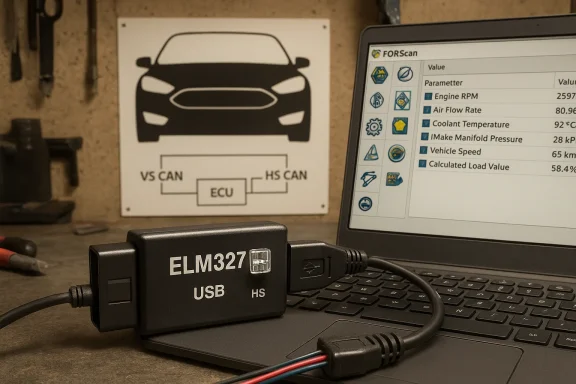 Background: why Ford diagnostics are different
Ford vehicles use multiple CAN networks with different speeds and sometimes different physical pin assignments. The high‑speed CAN (HS‑CAN), which follows the standard OBD‑II wiring, typically uses OBD pins 6 and 14 and is what most generic OBD‑II tools talk to. By contrast, Ford’s medium‑speed CAN (MS‑CAN) often lives on non‑standard pins — typically pins 3 and 11 — and carries data from modules that generic OBD tools usually don’t reach. FORScan and similar Ford/Mazda‑focused tools can read and reconfigure modules on both networks, but only if the adapter can access both buses. Several community and technical writeups describe the pin mapping and the rationale for MS/HS switching in detail.What the MS/HS switch does — in plain terms
- Physical re-routing of CAN lines. A toggle or DPDT switch inside the adapter connects the ELM327 (or compatible chip) either to the HS‑CAN pair (pins 6 & 14) or the MS‑CAN pair (pins 3 & 11). This is a hardware approach: the adapter can only listen to one bus at a time in toggle‑switch designs.
- Why FORScan needs it. FORScan is designed to interrogate Ford’s service protocols and will ask if your adapter has MS/HS switching when it detects modules that live on MS‑CAN. If the switch is present, FORScan will prompt you to toggle when needed. This is how inexpensive modified ELM327s enable some MS‑CAN access.
Anatomy of the modified ELM327 USB adapter
Modified ELM327 adapters marketed for FORScan typically advertise the following features and claims:- A USB connection to a Windows laptop (stable serial/virtual COM interface).
- ELM327 firmware version or “v1.5” on the label (a legacy designation many sellers use).
- A physical MS‑CAN/HS‑CAN switch on the enclosure.
- Compatibility with FORScan, ELMconfig, FoCCCus, and other Ford/Mazda tools.
- Support for OBD2 standard protocols plus special handling for Ford MS‑CAN.
FORScan compatibility: what the FORScan team actually says
FORScan supports several adapter types: OBDLink family adapters, ELS27/STN‑based adapters, J2534 pass‑thru devices, and ELM327‑compatible devices that truly implement the command set and timing FORScan expects. However, FORScan documentation and community posts emphasize that:- Most store‑brand ELM327 devices are not fully compatible.
- FORScan developers recommend OBDLink EX (USB) and other verified adapters for advanced functions, programming, and module configuration.
- Some ELM327 clones may appear to work for regular OBD‑II PID reads and clearing codes but fail on advanced service and programming tasks.
Real‑world reports: success stories and failure modes
Community feedback paints a mixed picture. Enthusiasts have successfully used modified ELM327 USB adapters with a physical MS/HS switch to access MS‑CAN modules and to run many FORScan procedures. Product pages and dozens of forum posts show that a toggled ELM327 can read hidden functions on models like the Focus, Mondeo, and older F‑series vehicles. But there are also many reports of:- Adapters that stop working after a FORScan update or Windows driver change.
- Devices that connect but fail to access MS‑CAN reliably, or that require fiddly baud rate tweaks.
- People who were able to use ELMConfig but found FORScan would not connect unless they opened the port with a different tool first.
Common failure scenarios
- Adapter enumerates as a COM port but FORScan times out during service requests.
- The toggle switch is mislabeled or wired with reversed polarity, causing MS‑CAN to be connected incorrectly.
- Cheap USB‑serial chips (CH340, PL2303 clones) have flaky drivers or corrupt data under sustained load.
- ELM clone firmware lacks timing accuracy for the more complex service protocols FORScan uses.
Practical guide: how to use a modified ELM327 safely with FORScan
If you decide to use a modified ELM327 USB adapter with an MS/HS switch, follow these steps and precautions to reduce risk.1. Prepare a dedicated Windows laptop
- Use a laptop that you can dedicate to vehicle diagnostics (it reduces driver and security conflicts).
- Install the latest recommended FORScan Windows build and have current backups of critical data.
- Disable automatic Windows updates during your diagnostic session to avoid sudden reboots.
2. Install the correct drivers and confirm COM port stability
- Install the adapter’s USB‑serial driver (CH340 or PL2303 as applicable) from the vendor or the chip vendor’s site.
- Verify the COM port appears and that the port settings are stable in Device Manager.
3. Confirm the adapter’s MS/HS wiring and labeling
- Before running service procedures, test the adapter on a vehicle where you only plan to read data.
- When FORScan prompts for MS/HS switching, follow the prompts. If the tool cannot find MS‑CAN modules, try toggling the switch and re‑letting FORScan rediscover the car. Community guides show FORScan will prompt for switch toggles if MS‑CAN modules are expected.
4. Start with read‑only operations
- Read vehicle configuration, log live PIDs, and note DTCs before attempting writes, programming, or configuration changes.
- If you plan to perform module programming, use a verified adapter (OBDLink EX or ELS27). FORScan’s developers recommend those for programming and complex operations.
5. Keep power steady during critical operations
- For programming or module flashing, ensure the vehicle battery and laptop battery are stable and consider a battery tender. Sudden power loss during writes can brick modules.
Testing checklist: verify your adapter before risky procedures
- Does the adapter expose a consistent COM port in Device Manager?
- Can you read ignition‑on PIDs reliably for several minutes without disconnections?
- Does FORScan detect the adapter type and ask about MS/HS switching when appropriate?
- Have you validated the adapter on a vehicle with non‑critical modules before attempting reprogramming?
Alternatives and upgrades: when to stop relying on a modified ELM327
If your diagnostic goals include programming, module configuration, or dealer‑level procedures, investing in a recommended adapter will save time and reduce risk. Recommended options include:- OBDLink EX (USB) — FORScan explicitly recommends this adapter for Windows; it has an electronic MS/HS switching mechanism and is engineered for stable throughput and advanced features. Many FORScan users report near‑dealer reliability with OBDLink EX.
- vLinker / vLinker FS — vLinker adapters are optimized for FORScan and provide auto MS/HS switching on compatible models. Reviews and buyer guides cite them as reliable alternatives.
- ELS27 (STN‑based) adapters — People have used ELS27 or STN1170‑based devices successfully; they are more robust than typical ELM clones and are often sold as “FORScan compatible.”
- J2534 pass‑thru — For professional programming or when OEM tools or reflash functions are needed, J2534 pass‑thru boxes are the most universal option, albeit pricier.
The technical truth about ELM327: what the label doesn’t tell you
The “ELM327” name originally referred to a chip and firmware from a specific vendor. In recent years, the market has been flooded with low‑cost devices that claim ELM327 compatibility but ship with reverse‑engineered firmware or outdated clones. The upshot:- Some adapters implement enough of the ELM327 command set to report PIDs and clear generic codes.
- Many do not implement the full suite of service commands or maintain the timing FORScan expects for module‑level procedures.
- FORScan developers have noted that the proportion of truly compatible ELM327 devices has decreased, and they now recommend moving to supported adapters for advanced features.
Case studies: who should choose a modified ELM327, and who shouldn’t
Good fit: hobbyists and learning projects
- You want to experiment with FORScan, read DTCs, and log live PIDs on supported models.
- You accept the risk of limited functionality and potential instability.
- You understand basic electronics and can verify adapter wiring or swap to a verified adapter if you need programming.
Not a fit: module programming, fleet maintenance, or mission‑critical repairs
- If you plan to flash ECUs, reconfigure RCM/BCM settings, or rely on diagnostics for business, choose a recommended adapter (OBDLink EX or equivalent).
- If vehicle uptime or repair liability matters, the cost savings from a cheap adapter are outweighed by the risk of a failed reflash.
Practical troubleshooting tips
- If FORScan can’t see the adapter but other tools can, check baud rates, COM port settings, and whether another application is holding the port.
- If MS‑CAN access fails, flip the MS/HS switch and let FORScan rediscover the network. Some users report needing to close and reopen FORScan after flipping the switch.
- Confirm driver stability: CH340 drivers are common but sometimes require unsigned‑driver allowances on older Windows builds.
- Use FORScan’s debug logs when diagnosing connection problems — the logs will often show whether a response was malformed or a timeout occurred.
Risks and safety: the things sellers won’t always emphasize
- Hardware wiring mistakes: a miswired MS/HS switch or swapped CAN‑H/CAN‑L pair can corrupt bus traffic or, in the worst case, cause ECU errors.
- Unreliable firmware: clone ELM327 firmware can mis-handle service commands, causing incomplete writes or corrupted sessions.
- Driver instability: cheap USB serial devices can drop packets under load.
- No manufacturer accountability: many suppliers are resellers with minimal support, and product pages often overpromise functionality for a low price. FORScan’s recommendation against generic ELM clones exists because of these real-world support and reliability issues.
Buying guide: what to verify before you buy
- Vendor transparency. Does the seller disclose the chip (CH340, FTDI, PL2303) and firmware version? Are there explicit FORScan compatibility claims or disclaimers?
- MS/HS switch labeling and wiring. Look for pictures and clear documentation showing the switch and its wiring. If the listing lacks photos, be cautious.
- Return policy and warranty. Confirm you have a way to return or get support if the adapter fails to work with FORScan.
- Community feedback. Search FORScan forums and recent posts for the exact product SKU; forum experiences are invaluable when picking a low‑cost adapter.
Final verdict: when the ULTRAOBD2 / modified ELM327 makes sense — and when it doesn’t
A modified ELM327 USB adapter with an MS/HS‑CAN switch is an economical option if your goals are limited to reading DTCs, logging live parameters, and experimenting on vehicles where you’re prepared to accept the limits and occasional instability. Product listings and community tutorials show these units can and do let enthusiasts reach MS‑CAN modules when configured correctly, and they’re useful learning tools.However, for anything that involves programming, module reconfiguration, or critical repairs, FORScan’s developers and power users recommend stronger, verified adapters such as OBDLink EX, vLinker, or STN/ELS27‑based interfaces. These devices offer electronic switching, higher throughput, and a higher probability of success for the advanced FORScan operations that matter most. If you plan to use FORScan as a reliable workshop tool rather than a hobbyist toy, budget for a recommended adapter.
Quick reference: recommended steps before doing anything risky
- Use the modified ELM327 only for read‑only and low‑risk tasks.
- Verify COM port stability and test long PID sessions.
- Confirm MS/HS switch operation on a non‑critical vehicle.
- For programming and module flash, switch to an OBDLink EX, vLinker, or J2534 solution.
- Always keep a steady vehicle power source and backups before any write operation.
In short: yes, a cheap ULTRAOBD2 / ELM327 USB scanner with a physical MS/HS‑CAN switch can work with FORScan and other Ford‑centric tools for many useful diagnostics, and it’s an affordable way to explore your vehicle’s systems. But the devil is in the details — the device’s chip, firmware, wiring quality, and driver stability will determine whether it’s a useful pocket tool or a time‑consuming reliability problem. FORScan’s own guidance and decades of community experience make the risk clear: use a verified adapter for anything beyond casual probing. Choose the right tool for the job, and your vehicle — and your sanity — will thank you.
Source: noescinetodoloquereluce.com https://noescinetodoloquereluce.com...rd-Mazda-Lincoln-Diagnostics-FORScan/1278143/
