Windows 10 Enable 'God Mode' in Windows 10

  • Thread Author
To enable God Mode, first make sure your computer has administrative privileges. Right-click on the desktop and create a new folder. (if your unsure on how to do this it might be worth thinking whether it's worth creating as a lot of damage can be done by the unwary) Name the folder 'GodMode.{ED7BA470-8E54-465E-825C-99712043E01C}' without the quote marks.
If you'd like to name the folder something else, just replace the 'GodMode' in the name with whatever you want.
An image from 'Enable 'God Mode' in Windows 10'. Windows desktop showing a GodMode folder window with system management tools listed.


Enabling this setting should only be considered by those with the experience and knowledge to do so
 

Last edited by a moderator:

kemical

Essential Member
Joined
Aug 28, 2007
Messages
36,176
Allows quick access to pretty much every setting there is..
 

Ralph Bromley

Fantastic Member
Joined
Jun 1, 2012
Messages
577
Including the secret to world domination? As a aspiring supervillain I would be most interested
 

Nimit

Honorable Member
Joined
Feb 20, 2015
Messages
141
Right-click the desktop> select New > Folder> Name it:

GodMode.{ED7BA470-8E54-465E-825C-99712043E01C}

Hit enter.

What it does: It gives you instant access to many system settings.
 

kemical

Essential Member
Joined
Aug 28, 2007
Messages
36,176
Right-click the desktop> select New > Folder> Name it:

GodMode.{ED7BA470-8E54-465E-825C-99712043E01C}

Hit enter.

What it does: It gives you instant access to many system settings.

Did you miss that this topic has already been covered?
 

Veegertx

Extraordinary Member
Joined
Nov 19, 2009
Messages
446
I prefer to see my desktop and changing wallpapers and nothing else when I'm there.
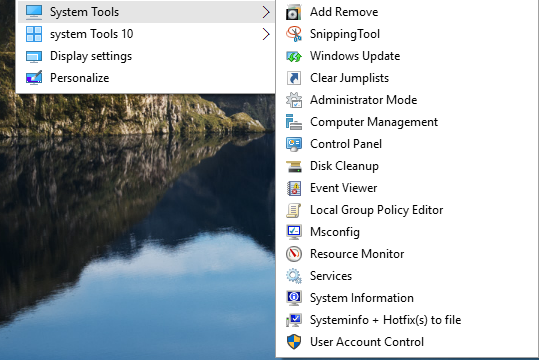
So a right click on desktop or any white space in any folder and there you have 'System Tools'
Includes Administrator Mode aka God Mode
My complete System Tools with Uninstaller can be gotten here. Working on Win 10 yes
Background_System_Tools.zip

DskMdrJ.png
 

Back
Top