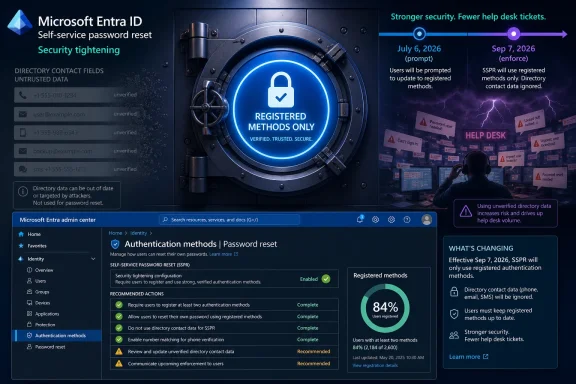
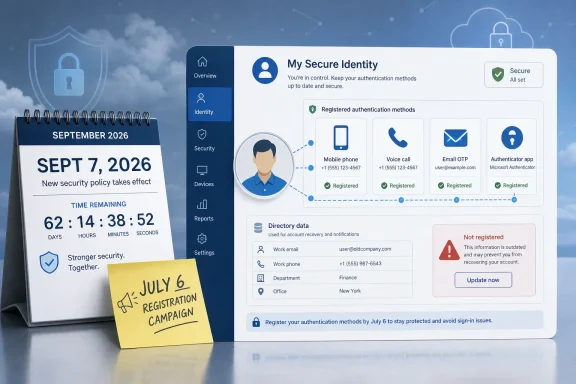
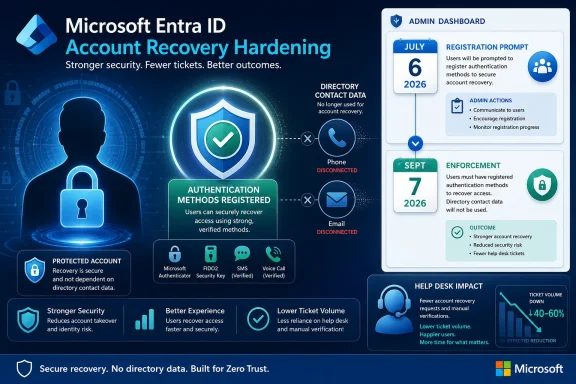
Microsoft has told Entra ID customers that, starting September 7, 2026, self-service password reset will accept only explicitly registered authentication methods, after a July 6 registration campaign begins prompting affected users to add trusted methods in the Microsoft Entra experience. The change sounds procedural, but it closes a long-standing gap between directory contact data and authentication proof. In practice, Microsoft is saying that a phone number or alternate email address should not become a recovery factor merely because it happens to exist on a user object. That is the right security instinct, and it will still create a very real help-desk problem for tenants that have treated SSPR coverage as a checkbox rather than an identity-control lifecycle.
Self-Service Password Reset has always carried a quiet contradiction. It is supposed to reduce help-desk load by letting users recover access without an administrator, but it also sits at one of the most sensitive points in the identity chain: the moment when a locked-out or compromised user tries to regain control of an account.
For years, many organizations benefited from the convenience side of that bargain. If a mobile number, business phone, or alternate email address existed in the directory, it could potentially participate in the reset journey even if the user had not gone through a deliberate authentication-method registration flow. That made SSPR easier to deploy and easier to brag about in coverage reports, but it blurred the boundary between “we know how to contact this person” and “we trust this factor to prove who this person is.”
Microsoft’s Message Center notice, tagged MC1325414, is the company’s attempt to erase that ambiguity. Beginning with the September enforcement date, SSPR will require methods that have been registered as authentication methods. The directory may still contain phone numbers and email addresses, and those channels may still be usable, but only after they have been enrolled as authentication methods rather than passively inherited from a contact field.
This is the kind of change that looks obvious after the fact. Identity systems are full of attributes that were added for HR, address book, telephony, or collaboration reasons, and enterprises have spent decades reusing those attributes for security decisions because the data was already there. The modern zero-trust answer is less forgiving: if a method is going to unlock the account, the user and tenant should have treated it like a credential.
That is enough time for a well-managed tenant to fix coverage. It is not enough time for an organization that does not know who depends on legacy contact attributes, who has stale phone numbers, who has never completed security registration, or which privileged users have no fallback method. The change punishes ambiguity more than technical debt; administrators who can identify the affected population quickly will treat this as a cleanup sprint, while administrators who cannot will discover the gap through tickets.
Microsoft says 86 percent of Entra ID SSPR users already use registered methods and should not be affected. That statistic is doing a lot of rhetorical work. It reassures the market that the change is not a mass breakage event, but it also implies that a non-trivial minority of users still rely on the old behavior. In a large tenant, 14 percent is not a rounding error. It can mean thousands of users who discover the policy only when a password expires, a device is replaced, or an account lockout interrupts a workday.
The practical instruction is straightforward: administrators should review SSPR coverage in the Entra admin center under Authentication methods and User registration details, then make sure every user — especially administrators — has at least one usable registered method. The less obvious instruction is cultural. Identity teams need to stop treating registration as an onboarding chore and start treating it as a control that must be monitored, remediated, and periodically tested.
That is why this change matters beyond SSPR itself. An attacker does not need to defeat a beautifully designed MFA policy if a recovery mechanism accepts weak, stale, or unverified data. A mobile phone number copied from HR years ago, an alternate email address set during onboarding, or a business phone tied to a shared desk may not have the same assurance value as a method the user registered through a modern security-info flow.
Microsoft is not banning phone numbers or alternate email addresses as reset factors. That distinction matters because some administrators will initially read the announcement as another step in the company’s campaign against weaker authentication methods. The actual change is narrower and more defensible: the method must be registered first. The channel is not the only issue; the provenance of the channel matters.
This is a subtle but important shift in identity language. A directory attribute is data about a user. An authentication method is a security object attached to a user. Treating those as interchangeable was convenient, but convenience is increasingly incompatible with the threat model Microsoft is trying to address.
That matters because Microsoft cannot secure the cloud merely by publishing better guidance. The company owns the defaults, the portals, the deprecation calendar, and the moment when a compatibility accommodation becomes a liability. In identity, especially, security posture is shaped not just by what administrators can configure, but by what the platform quietly continues to permit.
This SSPR enforcement fits the pattern. It does not introduce a dazzling new authentication feature. It narrows an old behavior that no longer matches Microsoft’s current security story. The change is almost bureaucratic in its mechanics, but that is how cloud security hardening often arrives: as a Message Center post, a deadline, a warning banner, and then a support spike for anyone who ignored it.
There is a risk in this approach. Microsoft’s enterprise customers are already juggling authentication method policy migration, passkey rollouts, Conditional Access changes, external authentication methods, token protection work, legacy protocol retirements, and a steady drizzle of Entra branding shifts. Security fatigue is real, and even good changes can look like churn when administrators receive them as yet another compliance deadline.
But the alternative is worse. Leaving recovery flows tied to unregistered contact attributes would preserve compatibility at the cost of an avoidable weak point. Microsoft is betting that the customer disruption is smaller than the security benefit, and on the merits, that is a reasonable bet.
Some will be seasonal employees, contractors, shared-role accounts, field workers, or users who rarely interact with Microsoft’s security-info page. Some will have phone numbers populated by automated HR syncs but no authentication methods registered. Some will be in countries or job roles where SMS, voice, and personal email policies are contentious. Some will be administrators who assumed their privileged workflows were covered because they could already pass MFA in one context.
That last group deserves special attention. Microsoft’s own SSPR guidance has long treated administrator accounts differently, including stronger method requirements for privileged roles. If an admin account cannot reset its password because its recovery methods were never properly registered, the resulting incident is embarrassing at best and dangerous at worst. Break-glass accounts, emergency access procedures, and privileged identity operations should be reviewed before the enforcement date, not after someone is locked out during an outage.
The hardest conversations may happen outside the identity team. HR, compliance, privacy, and legal teams often have opinions about whether personal phone numbers can be collected or used for corporate security. In some organizations, the old directory-attribute behavior may have quietly sidestepped those debates because the data already existed. Explicit registration makes the policy visible. That is healthier, but it may force organizations to confront choices they previously avoided.
That distinction is important because enterprises love to turn platform deadlines into compliance theater. It will be tempting to declare victory once every user has one registered method and the Entra dashboard turns green. That would miss the bigger opportunity. If an organization is already asking users to revisit security registration, it should also revisit method quality.
Microsoft’s broader identity direction is clear enough. The company wants customers moving toward stronger MFA, number matching, passwordless sign-in, passkeys, certificate-based authentication where appropriate, and policies that reduce dependence on easily intercepted or socially engineered channels. SSPR does not support every modern authentication method in every way administrators might expect, so the implementation details matter. Still, the strategic direction is not ambiguous: recovery should become more deliberate, more auditable, and less dependent on whatever value happens to sit in a legacy field.
This is also where reporting and governance come in. Administrators should not only ask whether users are registered, but which methods they have registered, whether those methods satisfy the tenant’s policy, and whether the organization can survive the loss of a phone, a device migration, or a region-specific telecom outage. Authentication resilience is not the same as authentication coverage.
The users who are unaffected will not notice the policy. The users who are affected may not understand why something that worked before no longer works. “But my phone number is in the company directory” will be a perfectly rational complaint from someone who does not live inside Entra admin blades. The service desk needs a script that explains the difference between contact information and registered security methods in plain language.
Organizations should also decide how they will handle users who cannot register independently. Temporary Access Pass can be part of that story in some tenants, as can staged registration campaigns, targeted communications, and manager-assisted identity verification. But those processes need to be defined before enforcement, because improvising recovery procedures under pressure is exactly how weak identity practices reappear through the side door.
There is also a communications lesson here. Microsoft will prompt impacted users, but a vendor prompt is not a change-management plan. Employees are trained to distrust unexpected security prompts because phishing awareness programs have taught them to do exactly that. A good tenant rollout will tell users what prompt to expect, when to expect it, why it is happening, and what to do if they cannot complete it.
That distinction matters because Entra ID is not just another Microsoft 365 dependency. It is the identity substrate for corporate SaaS access, Azure administration, Conditional Access, MFA, device-based controls, application access, and increasingly passwordless authentication. A change to password reset policy touches the recovery path for the accounts that protect nearly everything else.
The old Azure AD name carried historical baggage from on-premises Active Directory, where attributes, phone fields, and account recovery processes often grew organically over years. Entra ID is supposed to represent a more modern cloud identity architecture. Requiring registered authentication methods for SSPR is a small but concrete example of Microsoft making the product behave more like that architecture and less like a directory with security bolted onto it.
For hybrid organizations, this may be another reminder that cloud identity is not merely a synchronized reflection of on-premises identity. Data can flow from HR and Active Directory into Entra ID, but authentication trust has to be established under the rules of the cloud control plane. A phone number synced into the directory is not the same thing as a recovery factor the cloud should trust.
Auditors increasingly care about account recovery because recovery is part of access control. If a user can regain access through weak or unverified channels, the strength of normal sign-in controls is less impressive. Microsoft’s move gives security teams a clean argument: recovery methods should be explicitly registered, governed, and reviewable, not inferred from general contact records.
The compliance upside is that this change creates a measurable remediation path. Administrators can report on registration coverage, identify users without valid methods, and document communications and enforcement preparation. The compliance downside is that tenants with poor coverage may have to explain why directory contact attributes were effectively functioning as recovery factors without a more deliberate registration process.
This will be especially relevant for regulated organizations where personal contact methods are sensitive. If a company allows alternate email or mobile phone as an SSPR method, it should be able to explain user consent, acceptable use, data retention, and alternatives. The September deadline does not create those questions, but it makes them harder to ignore.
The weaker tenants will wait for the enforcement date and then treat the resulting tickets as a Microsoft problem. That response will be understandable, but not persuasive. Microsoft is giving months of notice, a visible Message Center item, and admin-center reporting paths. At some point, cloud identity operations require accepting that vendor deadlines are part of the job.
There is a broader lesson for Windows and Microsoft 365 administrators. The center of gravity has moved from endpoint configuration to identity governance. A Windows estate can be patched, encrypted, and managed, but if account recovery is sloppy, the perimeter still leaks. Entra ID has become one of the places where security posture is made or broken.
That is why this SSPR change deserves more attention than a routine admin-center notice. It is one of those small identity adjustments that reveals the direction of the platform. Microsoft is reducing implicit trust, forcing explicit registration, and making tenants own the lifecycle of the methods users depend on when passwords fail.
 Microsoft Is Finally Drawing a Line Between Contact Data and Security Data
Self-Service Password Reset has always carried a quiet contradiction. It is supposed to reduce help-desk load by letting users recover access without an administrator, but it also sits at one of the most sensitive points in the identity chain: the moment when a locked-out or compromised user tries to regain control of an account.For years, many organizations benefited from the convenience side of that bargain. If a mobile number, business phone, or alternate email address existed in the directory, it could potentially participate in the reset journey even if the user had not gone through a deliberate authentication-method registration flow. That made SSPR easier to deploy and easier to brag about in coverage reports, but it blurred the boundary between “we know how to contact this person” and “we trust this factor to prove who this person is.”
Microsoft’s Message Center notice, tagged MC1325414, is the company’s attempt to erase that ambiguity. Beginning with the September enforcement date, SSPR will require methods that have been registered as authentication methods. The directory may still contain phone numbers and email addresses, and those channels may still be usable, but only after they have been enrolled as authentication methods rather than passively inherited from a contact field.
This is the kind of change that looks obvious after the fact. Identity systems are full of attributes that were added for HR, address book, telephony, or collaboration reasons, and enterprises have spent decades reusing those attributes for security decisions because the data was already there. The modern zero-trust answer is less forgiving: if a method is going to unlock the account, the user and tenant should have treated it like a credential.
The Calendar Gives Admins Time, But Not Much Excuse
Microsoft’s schedule is notable because it is neither a surprise overnight switch nor a distant theoretical retirement. The registration campaign begins July 6, 2026, with enforcement starting September 7, 2026. That gives organizations roughly two months between the first broad user prompt and the moment when unregistered methods stop working for password reset.That is enough time for a well-managed tenant to fix coverage. It is not enough time for an organization that does not know who depends on legacy contact attributes, who has stale phone numbers, who has never completed security registration, or which privileged users have no fallback method. The change punishes ambiguity more than technical debt; administrators who can identify the affected population quickly will treat this as a cleanup sprint, while administrators who cannot will discover the gap through tickets.
Microsoft says 86 percent of Entra ID SSPR users already use registered methods and should not be affected. That statistic is doing a lot of rhetorical work. It reassures the market that the change is not a mass breakage event, but it also implies that a non-trivial minority of users still rely on the old behavior. In a large tenant, 14 percent is not a rounding error. It can mean thousands of users who discover the policy only when a password expires, a device is replaced, or an account lockout interrupts a workday.
The practical instruction is straightforward: administrators should review SSPR coverage in the Entra admin center under Authentication methods and User registration details, then make sure every user — especially administrators — has at least one usable registered method. The less obvious instruction is cultural. Identity teams need to stop treating registration as an onboarding chore and start treating it as a control that must be monitored, remediated, and periodically tested.
SSPR Is Not a Convenience Feature Anymore
The phrase “self-service password reset” still sounds like a help-desk optimization, but in Microsoft’s cloud estate it has become part of the authentication perimeter. Password reset is account recovery, and account recovery is often where attackers probe when stronger front-door controls are in place. If phishing-resistant MFA, Conditional Access, and device compliance make sign-in harder to abuse, recovery flows become more attractive targets.That is why this change matters beyond SSPR itself. An attacker does not need to defeat a beautifully designed MFA policy if a recovery mechanism accepts weak, stale, or unverified data. A mobile phone number copied from HR years ago, an alternate email address set during onboarding, or a business phone tied to a shared desk may not have the same assurance value as a method the user registered through a modern security-info flow.
Microsoft is not banning phone numbers or alternate email addresses as reset factors. That distinction matters because some administrators will initially read the announcement as another step in the company’s campaign against weaker authentication methods. The actual change is narrower and more defensible: the method must be registered first. The channel is not the only issue; the provenance of the channel matters.
This is a subtle but important shift in identity language. A directory attribute is data about a user. An authentication method is a security object attached to a user. Treating those as interchangeable was convenient, but convenience is increasingly incompatible with the threat model Microsoft is trying to address.
The Secure Future Initiative Keeps Turning Into Product Deadlines
Microsoft frames the SSPR change as part of its Secure Future Initiative, the company-wide security push launched after a series of high-profile failures and uncomfortable government scrutiny. SFI has sometimes sounded like a corporate slogan, but its most consequential form is emerging as a stream of product changes that remove old defaults, legacy shortcuts, and implicit trust paths.That matters because Microsoft cannot secure the cloud merely by publishing better guidance. The company owns the defaults, the portals, the deprecation calendar, and the moment when a compatibility accommodation becomes a liability. In identity, especially, security posture is shaped not just by what administrators can configure, but by what the platform quietly continues to permit.
This SSPR enforcement fits the pattern. It does not introduce a dazzling new authentication feature. It narrows an old behavior that no longer matches Microsoft’s current security story. The change is almost bureaucratic in its mechanics, but that is how cloud security hardening often arrives: as a Message Center post, a deadline, a warning banner, and then a support spike for anyone who ignored it.
There is a risk in this approach. Microsoft’s enterprise customers are already juggling authentication method policy migration, passkey rollouts, Conditional Access changes, external authentication methods, token protection work, legacy protocol retirements, and a steady drizzle of Entra branding shifts. Security fatigue is real, and even good changes can look like churn when administrators receive them as yet another compliance deadline.
But the alternative is worse. Leaving recovery flows tied to unregistered contact attributes would preserve compatibility at the cost of an avoidable weak point. Microsoft is betting that the customer disruption is smaller than the security benefit, and on the merits, that is a reasonable bet.
The First Breakages Will Be Human, Not Technical
The technical remediation is simple enough: get users registered. The operational challenge is that the affected users may be precisely the people least likely to respond cleanly to prompts.Some will be seasonal employees, contractors, shared-role accounts, field workers, or users who rarely interact with Microsoft’s security-info page. Some will have phone numbers populated by automated HR syncs but no authentication methods registered. Some will be in countries or job roles where SMS, voice, and personal email policies are contentious. Some will be administrators who assumed their privileged workflows were covered because they could already pass MFA in one context.
That last group deserves special attention. Microsoft’s own SSPR guidance has long treated administrator accounts differently, including stronger method requirements for privileged roles. If an admin account cannot reset its password because its recovery methods were never properly registered, the resulting incident is embarrassing at best and dangerous at worst. Break-glass accounts, emergency access procedures, and privileged identity operations should be reviewed before the enforcement date, not after someone is locked out during an outage.
The hardest conversations may happen outside the identity team. HR, compliance, privacy, and legal teams often have opinions about whether personal phone numbers can be collected or used for corporate security. In some organizations, the old directory-attribute behavior may have quietly sidestepped those debates because the data already existed. Explicit registration makes the policy visible. That is healthier, but it may force organizations to confront choices they previously avoided.
Registered Does Not Automatically Mean Strong
Microsoft’s change improves assurance, but it should not be mistaken for a complete authentication strategy. A registered SMS number is better than an unregistered SMS number for SSPR purposes, but it is still not a phishing-resistant method. A registered alternate email address may be more intentional than a stale directory value, but it still depends on the security of another mailbox.That distinction is important because enterprises love to turn platform deadlines into compliance theater. It will be tempting to declare victory once every user has one registered method and the Entra dashboard turns green. That would miss the bigger opportunity. If an organization is already asking users to revisit security registration, it should also revisit method quality.
Microsoft’s broader identity direction is clear enough. The company wants customers moving toward stronger MFA, number matching, passwordless sign-in, passkeys, certificate-based authentication where appropriate, and policies that reduce dependence on easily intercepted or socially engineered channels. SSPR does not support every modern authentication method in every way administrators might expect, so the implementation details matter. Still, the strategic direction is not ambiguous: recovery should become more deliberate, more auditable, and less dependent on whatever value happens to sit in a legacy field.
This is also where reporting and governance come in. Administrators should not only ask whether users are registered, but which methods they have registered, whether those methods satisfy the tenant’s policy, and whether the organization can survive the loss of a phone, a device migration, or a region-specific telecom outage. Authentication resilience is not the same as authentication coverage.
The Help Desk Will Feel the Difference Before the Board Does
For most users, the change will appear as another registration prompt. For the service desk, it may appear as a cluster of lockout calls after September 7. That gap between user perception and operational impact is where IT teams should focus.The users who are unaffected will not notice the policy. The users who are affected may not understand why something that worked before no longer works. “But my phone number is in the company directory” will be a perfectly rational complaint from someone who does not live inside Entra admin blades. The service desk needs a script that explains the difference between contact information and registered security methods in plain language.
Organizations should also decide how they will handle users who cannot register independently. Temporary Access Pass can be part of that story in some tenants, as can staged registration campaigns, targeted communications, and manager-assisted identity verification. But those processes need to be defined before enforcement, because improvising recovery procedures under pressure is exactly how weak identity practices reappear through the side door.
There is also a communications lesson here. Microsoft will prompt impacted users, but a vendor prompt is not a change-management plan. Employees are trained to distrust unexpected security prompts because phishing awareness programs have taught them to do exactly that. A good tenant rollout will tell users what prompt to expect, when to expect it, why it is happening, and what to do if they cannot complete it.
The Rename From Azure AD Was Cosmetic; This Is Not
It is tempting to fold this change into the long-running annoyance around Microsoft’s identity branding. Azure Active Directory became Microsoft Entra ID in 2023, and many administrators still translate the name in their heads. But this announcement is not about branding. It is about Microsoft tightening the semantics of identity inside one of its most important cloud control planes.That distinction matters because Entra ID is not just another Microsoft 365 dependency. It is the identity substrate for corporate SaaS access, Azure administration, Conditional Access, MFA, device-based controls, application access, and increasingly passwordless authentication. A change to password reset policy touches the recovery path for the accounts that protect nearly everything else.
The old Azure AD name carried historical baggage from on-premises Active Directory, where attributes, phone fields, and account recovery processes often grew organically over years. Entra ID is supposed to represent a more modern cloud identity architecture. Requiring registered authentication methods for SSPR is a small but concrete example of Microsoft making the product behave more like that architecture and less like a directory with security bolted onto it.
For hybrid organizations, this may be another reminder that cloud identity is not merely a synchronized reflection of on-premises identity. Data can flow from HR and Active Directory into Entra ID, but authentication trust has to be established under the rules of the cloud control plane. A phone number synced into the directory is not the same thing as a recovery factor the cloud should trust.
Compliance Teams Should Read This as an Audit Signal
Microsoft’s “Major Change” label is justified because the impact is not limited to user experience. Any organization with identity controls tied to audit frameworks, cyber insurance attestations, privileged access policies, or internal security baselines should treat this as evidence of a changing standard of care.Auditors increasingly care about account recovery because recovery is part of access control. If a user can regain access through weak or unverified channels, the strength of normal sign-in controls is less impressive. Microsoft’s move gives security teams a clean argument: recovery methods should be explicitly registered, governed, and reviewable, not inferred from general contact records.
The compliance upside is that this change creates a measurable remediation path. Administrators can report on registration coverage, identify users without valid methods, and document communications and enforcement preparation. The compliance downside is that tenants with poor coverage may have to explain why directory contact attributes were effectively functioning as recovery factors without a more deliberate registration process.
This will be especially relevant for regulated organizations where personal contact methods are sensitive. If a company allows alternate email or mobile phone as an SSPR method, it should be able to explain user consent, acceptable use, data retention, and alternatives. The September deadline does not create those questions, but it makes them harder to ignore.
The September Deadline Is Really a Governance Test
By early September, the best-run tenants will have done more than chase a percentage. They will have identified affected users, communicated the change, validated privileged accounts, tested recovery flows, and documented exceptions. They will know which methods are allowed and why. They will have a fallback plan that does not depend on a single overworked identity administrator.The weaker tenants will wait for the enforcement date and then treat the resulting tickets as a Microsoft problem. That response will be understandable, but not persuasive. Microsoft is giving months of notice, a visible Message Center item, and admin-center reporting paths. At some point, cloud identity operations require accepting that vendor deadlines are part of the job.
There is a broader lesson for Windows and Microsoft 365 administrators. The center of gravity has moved from endpoint configuration to identity governance. A Windows estate can be patched, encrypted, and managed, but if account recovery is sloppy, the perimeter still leaks. Entra ID has become one of the places where security posture is made or broken.
That is why this SSPR change deserves more attention than a routine admin-center notice. It is one of those small identity adjustments that reveals the direction of the platform. Microsoft is reducing implicit trust, forcing explicit registration, and making tenants own the lifecycle of the methods users depend on when passwords fail.
The Work Before September Is Smaller Than the Mess After It
The immediate lesson is not complicated, but it is easy to postpone. Organizations that use Entra ID SSPR should treat the July campaign as the beginning of enforcement, not as an early warning that can be safely ignored.- Organizations should review SSPR registration coverage in the Microsoft Entra admin center before the July 6, 2026 registration campaign begins.
- Users who rely only on directory contact attributes should be moved to explicitly registered authentication methods before September 7, 2026.
- Privileged and administrator accounts should be checked first, because a failed recovery path for an admin account can turn a routine lockout into an operational incident.
- Help-desk teams should receive clear guidance explaining why a directory phone number or alternate email address is no longer enough by itself.
- Security teams should use the registration push to evaluate method quality, not merely method presence.
- Tenant owners should document fallback and exception processes before enforcement, because emergency identity recovery is a bad place to invent policy.
References
- Primary source: Neowin
Published: 2026-05-30T22:12:10.566946
Microsoft is making a major change to Entra ID authentication - Neowin
Microsoft has announced a significant Entra ID security update that could affect password reset access for some users and IT admins. www.neowin.net
- Official source: learn.microsoft.com
Combined registration for SSPR and Microsoft Entra multifactor authentication - Microsoft Entra ID | Microsoft Learn
Learn about the combined registration experience for Microsoft Entra ID to let users register for both Microsoft Entra multifactor authentication and self-service password resetlearn.microsoft.com - Related coverage: video2.skills-academy.com
- Related coverage: docs.azure.cn
Microsoft Entra authentication overview | Azure Docs
Authentication is the process of verifying identity before granting access. Learn about the authentication methods available in Microsoft Entra ID.docs.azure.cn - Related coverage: anoopcnair.com
Complete Guide To Microsoft Entra ID Authentication Methods And Passkeys HTMD Blog
Microsoft Entra ID supports many authentication methods, including passwords, passkeys, FIDO2 security keys, Windows Hello for Business, Microsoftwww.anoopcnair.com - Official source: techcommunity.microsoft.com
Tag:"sspr" | Microsoft Community Hub
Find all posts, articles, and events tagged with "sspr" in Microsoft Community Hub. Stay informed with the latest updates from our community techcommunity.microsoft.com
- Related coverage: sek.io
SEK | Microsoft announces that enterprises must migrate to new authentication policy in Entra ID by September 2025
Microsoft has announced that, as of September 30, 2025, legacy multi-factor authentication (MFA) and self-service password reset (SSPR) configurations will be migrated to Microsoft Entra ID authentication methods. This change represents a restructuring of identity and access management in...sek.io - Related coverage: specopssoft.com
- Related coverage: cdn.bcm.edu
- Related coverage: jornada365.cloud