

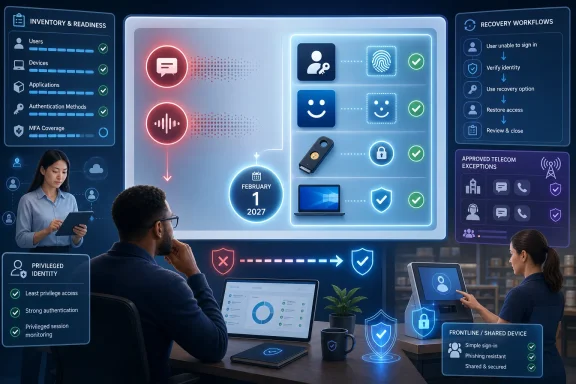
Microsoft Entra ID administrators should treat the February 1, 2027 SMS and voice retirement as a credential-placement decision, not merely a registration-campaign change. Move most users to phishing-resistant passkeys, Windows Hello for Business, or FIDO2 security keys; reserve customer-managed telecom delivery for documented regulatory or operational exceptions that genuinely require phone service.
These options are not interchangeable in every environment. Final selection depends on device ownership, portability, shared-device use, credential custody, recovery requirements, and applicable compliance controls.
Starting September 1, 2026, Microsoft plans to make passkeys the default authentication experience for users enabled for SMS or voice. Those users will be auto-enabled for passkeys, and Microsoft’s registration campaign can prompt them to register.
Treat that September change as a migration milestone, not as permission to postpone preparation. The critical enforcement date is February 1, 2027, when Microsoft-provided SMS and voice delivery retires.
The February behavior is narrower than “every user with a phone method will be blocked.” A user whose only available MFA method is SMS or voice must register a passkey during sign-in before continuing. Microsoft states that the registration step will be blocking and that tenants cannot opt out of the February enforcement.
WindowsForum’s reports on Microsoft’s May 2026 changes for personal Microsoft accounts show the same broader direction: Microsoft is steering users away from text-message authentication and recovery toward passkeys, authenticator apps, and verified alternatives. Those consumer-account reports do not define the Entra deployment procedure, but they reinforce why organizations should stop treating SMS as a durable identity strategy.
The three populations are related but not identical:
Record at least:
Do not remove a phone method merely because a replacement appears in an account record. First verify that the replacement works in the user’s normal sign-in, secondary-device, and recovery scenarios.
Before deployment:
WindowsForum’s reporting on passkeys in Windows 11 notes that Windows includes Windows Hello and passkey-management capabilities. That makes Windows a strong deployment surface, but it does not mean every Windows user should receive the same credential architecture.
Test:
For each proposed exception, require:
For shared-device failures, reproduce the issue during an actual handoff or shift change. For security-key users, verify spare-key custody and replacement. For privileged users, test emergency access separately from ordinary employee recovery.
For every persona:
Inventory SMS- and voice-dependent users now; assign each user a phishing-resistant credential plus a second registered method; document and approve any customer-managed telecom exception; and complete sign-in, recovery, and replacement testing before February 1, 2027.
| User population | Recommended direction |
|---|---|
| Privileged or highly regulated users | FIDO2 security key or another device-bound passkey |
| Most users who need portability | Synced passkey |
| Users on managed Windows devices | Windows Hello for Business or Microsoft Entra passkey on Windows |
| Populations with a documented no-passkey fit | Evaluate customer-managed SMS or voice |
 Why the September prompt is not the deadline
Starting September 1, 2026, Microsoft plans to make passkeys the default authentication experience for users enabled for SMS or voice. Those users will be auto-enabled for passkeys, and Microsoft’s registration campaign can prompt them to register.Treat that September change as a migration milestone, not as permission to postpone preparation. The critical enforcement date is February 1, 2027, when Microsoft-provided SMS and voice delivery retires.
The February behavior is narrower than “every user with a phone method will be blocked.” A user whose only available MFA method is SMS or voice must register a passkey during sign-in before continuing. Microsoft states that the registration step will be blocking and that tenants cannot opt out of the February enforcement.
WindowsForum’s reports on Microsoft’s May 2026 changes for personal Microsoft accounts show the same broader direction: Microsoft is steering users away from text-message authentication and recovery toward passkeys, authenticator apps, and verified alternatives. Those consumer-account reports do not define the Entra deployment procedure, but they reinforce why organizations should stop treating SMS as a durable identity strategy.
Build an actionable SMS and voice inventory
Use a three-part inventory covering policy scope, registered credentials, and actual operational dependence. This is a recommended operating model, not a claim that one Microsoft report provides every required field.The three populations are related but not identical:
- Enabled: Users included in an SMS or voice authentication policy.
- Registered: Users with a phone method recorded on their account.
- Dependent: Users who lack a suitable replacement or whose business process still requires phone delivery.
1. Define the inventory scope
Begin with all human and nonhuman identities that could be affected:- Identify users included in SMS or voice authentication policy scope.
- Include users who have phone methods registered, even if they appear to have another method.
- Include privileged, emergency-access, frontline, shared-device, contractor, and infrequently used accounts.
- Add owners for service-related or tenant-critical identities.
- Record users who cannot carry a personal device or use a personal credential manager.
2. Assess credential readiness
For each account, determine whether the user has a suitable phishing-resistant method and a separately registered backup method.Record at least:
- User principal name
- Account status
- Department or business unit
- Manager, sponsor, or service owner
- SMS policy status
- Voice policy status
- Phone method present
- Existing phishing-resistant method
- Second registered method
- Managed, shared, or personal-device restrictions
- Portability requirements
- Recovery owner
- Target persona
- Planned credential
- Telecom exception justification
- Pilot result
- Completion date
3. Classify dependence
Assign every account to one of four remediation states:- Ready: A suitable phishing-resistant method and second method are registered and tested.
- Registration required: The target method is known, but enrollment is incomplete.
- Design required: Device, portability, recovery, or shared-use constraints remain unresolved.
- Telecom exception candidate: Testing indicates that available passkey approaches do not meet a documented requirement.
4. Reconcile and review
Repeat the inventory during each deployment wave. Look specifically for newly hired users, returning employees, policy changes, dormant accounts, failed registrations, and users who received a replacement device.Do not remove a phone method merely because a replacement appears in an account record. First verify that the replacement works in the user’s normal sign-in, secondary-device, and recovery scenarios.
Choose credentials by persona
Microsoft’s persona guidance supports different credentials for different working conditions. WindowsForum’s coverage of Windows-first single sign-on and Windows 11 passkeys likewise highlights that organizations must combine identity policy with the devices users actually operate.Administrators and highly regulated users
Prefer FIDO2 security keys or another approved device-bound passkey. These options can provide stronger control over where a credential resides and who possesses it.Before deployment:
- Select an approved credential that satisfies organizational controls.
- Register it with a pilot administrator.
- Test routine sign-in and privileged workflows.
- Register a separate backup method.
- Define issuance, loss reporting, revocation, and replacement.
- Test emergency access independently.
Standard and portable users
Use a synced passkey where the organization permits the relevant credential manager and users need portability across devices. Register a second suitable method so loss of one device does not automatically become an account-recovery emergency.WindowsForum’s reporting on passkeys in Windows 11 notes that Windows includes Windows Hello and passkey-management capabilities. That makes Windows a strong deployment surface, but it does not mean every Windows user should receive the same credential architecture.
Managed Windows users
Evaluate Windows Hello for Business or Microsoft Entra passkey on Windows based on management, compliance, and sign-in requirements.Test:
- Enrollment on the managed device.
- Lock, unlock, and ordinary sign-in.
- Access to required applications.
- Device replacement or re-provisioning.
- Sign-in when the primary device is unavailable.
- Recovery using the separately registered method.
Shared-device and frontline users
Do not assume that a personal synced passkey is appropriate for a shared workstation. Establish:- Whether every worker has an individual account.
- Whether personal phones are permitted.
- Whether credentials must move between workstations.
- Who owns and replaces credentials.
- Whether a physical security key can be carried safely.
- How recovery works during a shift.
- Whether the actual application workflow supports the selected method.
Evaluate customer-managed telecom only for exceptions
Customer-managed SMS or voice should have a business owner, budget, and expiration review. It should not become the default response to incomplete passkey planning.For each proposed exception, require:
- A precisely defined user population.
- The regulation, contract, accessibility need, or operational constraint.
- The phishing-resistant alternatives tested.
- The result of each test.
- Expected geographic coverage and message demand.
- Security and procurement approval.
- A budget owner.
- A review or expiration date.
Run a representative pilot
Build a pilot group that exposes different failure modes:- A privileged administrator
- A managed Windows user
- A mobile or cross-device worker
- A synced-passkey user
- A FIDO2 security-key user
- A shared-device or frontline worker
- An SMS-only user
- A voice-only user
- A user who cannot use a personal mobile device
- Confirm identity and current methods.
- Assign the persona and target credential.
- Register the target phishing-resistant method.
- Register a second suitable method.
- Complete an ordinary sign-in.
- Test required applications.
- Test a second-device or unavailable-device scenario.
- Simulate credential loss.
- Complete replacement or recovery without depending on Microsoft-provided SMS or voice.
- Record the result and unresolved issue.
Verification and troubleshooting
Before closing a user’s remediation record, verify that:- The intended phishing-resistant method is registered.
- The user can complete normal sign-in with it.
- A second method is independently registered.
- Recovery instructions identify who verifies the user.
- Device loss or security-key replacement has been tested.
- Required applications and shared-device workflows still function.
- Any telecom exception has documented approval and ownership.
For shared-device failures, reproduce the issue during an actual handoff or shift change. For security-key users, verify spare-key custody and replacement. For privileged users, test emergency access separately from ordinary employee recovery.
Protect recovery and break-glass operations
A passkey rollout is incomplete when the primary credential works but its loss process does not.For every persona:
- Register a phishing-resistant primary method.
- Register a second suitable method.
- Document identity verification after device or key loss.
- Separate normal recovery from privileged emergency access.
- Test replacement without Microsoft-provided phone delivery.
- Monitor failures during each rollout wave.
- Reconcile the inventory after remediation.
Frequently Asked Questions
Will SMS-only users be locked out on February 1, 2027?
A user whose only available MFA method is SMS or voice must register a passkey during sign-in before continuing. The blocking registration requirement can cause a practical work stoppage if the user, device, or support process is unprepared.Is every user with an SMS method blocked?
Not necessarily. The verified enforcement condition concerns users whose only available MFA method is SMS or voice. That is why administrators must distinguish a merely registered phone method from actual credential dependence.Can an organization opt out of the February deadline?
No. Microsoft states that tenants cannot opt out of the February 1, 2027 enforcement. Organizations must migrate affected users or evaluate customer-managed telecom for justified exceptions.Is Microsoft Authenticator the only replacement?
No. Available directions include synced passkeys, passkeys in Microsoft Authenticator, FIDO2 security keys, Windows Hello for Business, and Microsoft Entra passkey on Windows. The correct selection depends on device, portability, custody, and compliance requirements.Should SMS or voice be removed immediately after registration?
No. First test the primary credential, second method, required applications, device-loss scenario, and recovery procedure. Remove dependence only after the complete workflow succeeds.Inventory SMS- and voice-dependent users now; assign each user a phishing-resistant credential plus a second registered method; document and approve any customer-managed telecom exception; and complete sign-in, recovery, and replacement testing before February 1, 2027.
References
- Primary source: learn.microsoft.com
Passkeys by default and retirement of Microsoft-provided SMS and voice authentication - Microsoft Entra ID | Microsoft Learn
Learn how to prepare for the retirement of Microsoft provided SMS and Voice authentication in Microsoft Entra ID and migrate users to passkeys.learn.microsoft.com - Primary source: WindowsForum
Microsoft Phases Out SMS Codes (2026): Passkeys, Authenticator, and Recovery | Windows Forum
Microsoft has confirmed in May 2026 that it will phase out SMS codes for personal Microsoft accounts, replacing text-message sign-in and recovery with...windowsforum.com
