

Microsoft made Entra-Only identities for Azure Files SMB generally available on May 19, 2026, allowing organizations to grant identity-based SMB file-share access to cloud-only Microsoft Entra ID users without deploying Active Directory, hybrid sync, Entra Domain Services, or managed domain controllers. The announcement is less about a single Azure Files feature than about Microsoft’s broader attempt to make old Windows infrastructure assumptions optional. File shares are among the stickiest pieces of enterprise plumbing, and Microsoft is now saying that even they can be pulled into a cloud-native identity model without breaking SMB compatibility. That is a meaningful shift, but it also moves several operational questions from the domain controller to Entra, Intune, RBAC, and client readiness.
For decades, the humble SMB share has been one of the places where Windows infrastructure remained stubbornly traditional. You could modernize applications, move servers into Azure, adopt cloud identity, and still find yourself preserving Active Directory because a file workload expected Kerberos tickets, NTFS access control lists, and domain-aware clients.
Azure Files has long been Microsoft’s answer to the “we still need a file server” problem in the cloud. But for many organizations, its identity story has been a compromise: use on-premises Active Directory Domain Services, use Microsoft Entra Domain Services, or use Microsoft Entra Kerberos in scenarios that still often assumed hybrid identity. Those models worked, but they kept a foot in the old world.
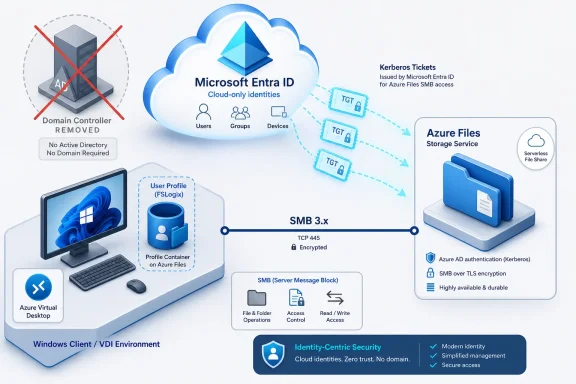
The GA of Entra-Only identities changes that pitch. Microsoft Entra ID can now serve as the Kerberos authority for Azure Files SMB access by cloud-only users, letting clients obtain Kerberos tickets from Entra rather than from a traditional domain controller. The SMB protocol remains the same; the identity system behind it changes.
That distinction matters. Microsoft is not asking admins to abandon SMB, retrain users on a new sync client, or rewrite line-of-business software around object storage APIs. It is instead trying to make cloud identity look native to one of Windows’ oldest enterprise access patterns.
That is not just a tidier diagram. Every identity dependency carries lifecycle cost. Domain controllers need patching, monitoring, backup planning, replication health checks, secure network placement, and incident response procedures. Hybrid sync adds another layer of operational coupling between an on-premises directory and the cloud tenant. Managed domain services reduce some of that burden but introduce their own service boundaries and pricing.
Entra-Only identities for Azure Files are aimed at organizations that want the file share without the estate around the file share. That includes born-in-the-cloud companies, mergers or divestitures trying to avoid directory entanglement, project-based environments, and enterprises modernizing branch or virtual desktop infrastructure. The feature is also a signal to customers that Microsoft wants Entra ID to be more than a sign-in layer for SaaS and Azure management; it wants it to be an authentication authority for classic Windows access patterns.
The most interesting phrase in Microsoft’s post is not “general availability.” It is “no Active Directory.” Microsoft has spent years softening that sentence with hybrid bridges, compatibility layers, and migration paths. Here, the company is making a cleaner promise: for supported Azure Files SMB scenarios, the domain can disappear.
When a user accesses an Azure file share, the client requests a Kerberos ticket from Microsoft Entra ID for Azure Files. That ticket includes cloud-based security identifiers and is presented during SMB session setup. Azure Files validates the ticket and establishes the session, while authorization continues to rely on share-level permissions and NTFS ACLs.
This is classic Microsoft modernization: preserve the protocol contract, change the control plane. Applications and users still see SMB. Administrators still care about permissions. Security teams still get ticket-based authentication rather than shared account sprawl. But the source of identity validation becomes Entra rather than a domain controller.
That approach is powerful because SMB compatibility remains a non-negotiable requirement in many Windows environments. File shares are used by profile containers, departmental drives, legacy applications, scripts, installers, engineering datasets, and workloads that were never designed for RESTful object storage. Replacing those systems outright is usually expensive and politically difficult.
By keeping SMB intact, Microsoft lowers the migration barrier. By moving ticket issuance to Entra, it changes the identity boundary. The result is not “cloud storage” in the consumer sense; it is a cloud-hosted file service that behaves enough like Windows infrastructure to survive contact with enterprise reality.
Microsoft’s announcement explicitly frames AVD and FSLogix as hero workloads. That is not accidental. Virtual desktop deployments are often where identity, compute, storage, and user experience collide. They also expose the awkwardness of hybrid identity most clearly: a supposedly cloud-hosted desktop can still rely on domain controllers or network paths that feel very on-premises.
With Entra-Only identities, Microsoft can describe a cleaner AVD architecture. The session hosts can be Entra-joined, the users can be cloud-only or external identities in supported scenarios, the profiles can live on Azure Files Premium, and Kerberos authentication can be handled through Entra. For service providers and enterprises delivering desktops to contractors, customers, or distributed staff, that is an attractive simplification.
The built-in B2B support is especially notable, though it should not be overgeneralized. Microsoft positions external identity support around AVD and FSLogix profile scenarios, not as a blanket promise that every cross-tenant SMB use case now works. That boundary matters because guest identity in file access is one of the places where expectations can quickly outrun supportability.
Still, the strategic direction is clear. Microsoft wants AVD to feel less like a remote extension of the old domain and more like a cloud-native desktop platform. Entra-Only Azure Files is one of the missing storage pieces in that story.
That may sound mundane, but permissions management is where cloud file services often become frustrating. Share-level RBAC is necessary but not sufficient for many enterprises. Real file environments need directory-level and file-level controls, delegated access, inheritance, and the ability to model groups in ways that reflect departments, projects, and data sensitivity.
Historically, the friction has been that administrators could move the storage account to Azure but still need old assumptions to manage the fine-grained security model. If NTFS ACLs require domain-joined clients, network access to domain controllers, or specialized workarounds, the architecture remains hybrid in practice even if the storage is cloud-hosted.
Bringing ACL management into the portal is therefore more than a convenience feature. It is part of the same dependency-reduction campaign. Microsoft is trying to close the gap between “the data lives in Azure” and “the administrative experience is cloud-native.”
There is still a distinction between management elegance and governance maturity. Portal-based ACL editing can make permissions easier to change, but it does not automatically make permissions easier to design, audit, or rationalize. Enterprises with years of nested groups and inherited file permissions will still need discipline. The cloud does not make messy ACLs clean; it just gives admins another place to manage them.
Microsoft says expanded RBAC support for specific Entra-only users and groups is available in limited regions. That regional caveat is important. GA does not mean every adjacent enhancement is globally mature on day one, and administrators should read the fine print before designing a production rollout around a specific RBAC capability.
The two-layer model is familiar to Azure Files admins, but it can still trip up teams that expect a single permission surface. A user can be blocked at the share level even if the NTFS ACL seems permissive, or allowed through the share level only to be denied deeper in the file hierarchy. This is defensible from a security architecture perspective, but it demands clarity in operations.
Entra-Only identities make the model more cloud-native, not necessarily simpler at the conceptual level. Identity source complexity decreases; authorization design remains a real job. That is the tradeoff Microsoft is making.
That is a major shift for organizations that historically treated file shares as a network and directory problem. In the old model, if a domain-joined PC could reach the file server and the user had the right ACLs, access usually worked. In the Entra-Only model, the endpoint’s join state, configuration, services, policies, and Kerberos behavior matter.
Microsoft documentation for Entra Kerberos includes prerequisites that admins cannot ignore. Supported clients differ for cloud-only and hybrid identities, and cloud-only support is centered on modern Windows releases such as Windows 11 and Windows Server 2025 with current cumulative updates. Required Windows services such as WinHTTP Web Proxy Auto-Discovery and IP Helper also matter because of how Kerberos proxying and networking components participate in the authentication flow.
This is where the feature’s promise becomes conditional. Entra-Only identities can remove domain controllers, but they increase the importance of modern endpoint management. Organizations with unmanaged PCs, older Windows builds, inconsistent patching, or complicated proxy configurations may find that the migration project is less about storage and more about client hygiene.
That is not a criticism so much as a warning. Microsoft is not selling magic SMB from anywhere; it is selling SMB access from a modern, Entra-aware, policy-managed client estate.
The same logic applies to Managed Identities support for Azure Files, which Microsoft also highlights as generally available. Applications, virtual machines, and Azure services can use managed identities rather than embedded secrets or shared keys to establish secure access. That is a much cleaner fit for DevOps workflows, AKS-based workloads, and service-to-service access patterns inside Azure.
For security teams, the appeal is not merely that Entra is “modern.” It is that Entra provides a central identity plane with lifecycle management, access review possibilities, conditional governance around the surrounding environment, logging integration, and a better story for eliminating credential sprawl. A storage account key is powerful and blunt. A managed identity or user-based Kerberos flow is more accountable.
But the feature also exposes an uncomfortable boundary: Azure Files authentication with Microsoft Entra Kerberos does not become a universal Conditional Access playground. Microsoft documentation has noted MFA incompatibilities for Azure Files authentication scenarios, meaning policies that require MFA may need exclusions for the relevant storage account application. That is the kind of caveat that matters in Zero Trust conversations.
The more honest security framing is this: Entra-Only identities reduce infrastructure dependency and improve identity alignment, but they do not automatically apply every modern sign-in control to SMB. Kerberos remains Kerberos, SMB remains SMB, and administrators still need to understand where interactive cloud access policies do and do not map to protocol authentication.
The preview status is doing a lot of work here. Limited preview means organizations should treat Mac support as something to test, not something to build a broad production dependency around. It also suggests that Microsoft sees cross-platform SMB access as strategically important, but not yet solved at the same level as the Windows client path.
Still, the direction is significant. Platform SSO has become one of Apple’s more important enterprise identity hooks, and Microsoft’s use of it for Entra Kerberos scenarios points to a future where “Entra-joined” does not simply mean a Windows PC. If Microsoft can make Azure Files access feel native on managed Macs, it will have a stronger story for departments that have historically treated Windows file services as an awkward but necessary compatibility layer.
For now, Windows remains the center of gravity. Mac support is a preview bridge to a broader endpoint world, not the foundation of the GA announcement.
Azure storage accounts can use only one identity source for Azure Files identity-based authentication at a time. That means administrators must choose between on-premises AD DS, Microsoft Entra Domain Services, and Microsoft Entra Kerberos for a given storage account. This is not a casual toggle to flip in a mixed environment without planning.
Cross-tenant and guest scenarios also require care. Microsoft is promoting B2B support in the context of AVD and FSLogix, but broader cross-tenant file access remains constrained. Enterprises with complex partner ecosystems should validate exact support boundaries rather than extrapolating from the announcement’s headline.
There are also Kerberos-scale realities, such as ticket size and group membership behavior, that do not disappear because the KDC is cloud-based. Large organizations with deeply nested group models may still hit practical limits or confusing authorization failures. Again, the cloud changes where the system runs; it does not repeal the old laws of identity design.
That makes assessment the key administrative discipline. Which users are cloud-only? Which devices are Entra-joined and properly managed? Which shares require fine-grained NTFS ACLs? Which applications rely on machine accounts, service accounts, or legacy authentication assumptions? Which workloads need low-latency access from Azure compute rather than from dispersed endpoints?
Organizations also need to decide whether they are trying to coexist with Active Directory or retire it for specific workloads. Microsoft says Entra-Only identities can coexist with hybrid identity setups during the journey away from AD. That coexistence is useful, but it can also become a permanent complexity trap if teams do not define target states.
In other words, Entra-Only Azure Files is not a universal migration button. It is a new architectural option. The value comes from applying it where it removes real dependencies without introducing unsupported edge cases.
This is why the announcement matters beyond storage. File shares are one of the last emotional anchors of the Windows Server era. If Microsoft can make SMB file access work cleanly with cloud-only identity, it can tell customers that moving to Entra is not just for web apps, cloud consoles, and modern endpoints. It is also for the workhorse infrastructure nobody gets to deprecate quickly.
The move also strengthens Azure’s position against do-it-yourself file servers in IaaS. Many organizations moved file workloads to Azure VMs because they needed familiar SMB semantics and domain integration. Azure Files has always promised a managed alternative, but identity complexity could make a VM file server seem simpler to conservative admins. Entra-Only support weakens that argument for supported scenarios.
There is a business angle as well. Reducing the need for domain controllers does not reduce Microsoft dependency; it shifts that dependency toward Entra, Azure Files, Intune, and Azure Virtual Desktop. For customers already committed to Microsoft’s cloud, that may be welcome consolidation. For those trying to avoid deeper platform lock-in, it is a reminder that “cloud-native” often means “native to a particular cloud.”
Admins should still understand Kerberos, NTFS ACLs, RBAC, group design, client configuration, and network behavior. Entra-Only identities do not eliminate those skills. They relocate them into a cloud-managed architecture where mistakes may look different but still produce familiar outcomes: access denied, profile load failures, inconsistent permissions, and support tickets that start with “it worked yesterday.”
The strongest teams will treat the GA as a chance to simplify deliberately. They will pilot with AVD profiles or a modern collaboration share, validate client requirements, document RBAC and ACL layering, test external identity boundaries, and watch logs before expanding. The weakest teams will hear “no domain controllers required” and assume the rest is automatic.
Microsoft has made the infrastructure story simpler. It has not made identity architecture optional.
The tradeoff is that the center of gravity moves decisively to Microsoft’s cloud control plane. Entra ID becomes the Kerberos authority. Intune becomes part of endpoint readiness. Azure RBAC and portal-based ACL management become part of authorization operations. Azure Files becomes the storage substrate. For many organizations, that consolidation will be the point.
For WindowsForum readers, the significance is not that Azure Files gained another checkbox. It is that Microsoft is continuing to disassemble the old domain-centered model piece by piece, while preserving enough compatibility to keep enterprise workloads moving.
 Microsoft Finally Cuts the Domain Controller Out of a Very Windows Problem
For decades, the humble SMB share has been one of the places where Windows infrastructure remained stubbornly traditional. You could modernize applications, move servers into Azure, adopt cloud identity, and still find yourself preserving Active Directory because a file workload expected Kerberos tickets, NTFS access control lists, and domain-aware clients.Azure Files has long been Microsoft’s answer to the “we still need a file server” problem in the cloud. But for many organizations, its identity story has been a compromise: use on-premises Active Directory Domain Services, use Microsoft Entra Domain Services, or use Microsoft Entra Kerberos in scenarios that still often assumed hybrid identity. Those models worked, but they kept a foot in the old world.
The GA of Entra-Only identities changes that pitch. Microsoft Entra ID can now serve as the Kerberos authority for Azure Files SMB access by cloud-only users, letting clients obtain Kerberos tickets from Entra rather than from a traditional domain controller. The SMB protocol remains the same; the identity system behind it changes.
That distinction matters. Microsoft is not asking admins to abandon SMB, retrain users on a new sync client, or rewrite line-of-business software around object storage APIs. It is instead trying to make cloud identity look native to one of Windows’ oldest enterprise access patterns.
The Real Product Is Not Azure Files, It Is Fewer Dependencies
Microsoft’s announcement leans heavily on simplification, and for once the marketing claim has a concrete architectural basis. If an organization can grant SMB access to Azure file shares using cloud-only Entra identities, it can potentially remove several moving parts: domain controllers, VPN paths to those controllers, hybrid identity synchronization for the affected users, and domain-joined management machines for certain permission workflows.That is not just a tidier diagram. Every identity dependency carries lifecycle cost. Domain controllers need patching, monitoring, backup planning, replication health checks, secure network placement, and incident response procedures. Hybrid sync adds another layer of operational coupling between an on-premises directory and the cloud tenant. Managed domain services reduce some of that burden but introduce their own service boundaries and pricing.
Entra-Only identities for Azure Files are aimed at organizations that want the file share without the estate around the file share. That includes born-in-the-cloud companies, mergers or divestitures trying to avoid directory entanglement, project-based environments, and enterprises modernizing branch or virtual desktop infrastructure. The feature is also a signal to customers that Microsoft wants Entra ID to be more than a sign-in layer for SaaS and Azure management; it wants it to be an authentication authority for classic Windows access patterns.
The most interesting phrase in Microsoft’s post is not “general availability.” It is “no Active Directory.” Microsoft has spent years softening that sentence with hybrid bridges, compatibility layers, and migration paths. Here, the company is making a cleaner promise: for supported Azure Files SMB scenarios, the domain can disappear.
Kerberos Survives the Cloud Migration
The technical sleight of hand is that Microsoft is not replacing Kerberos. It is relocating where Kerberos authority lives.When a user accesses an Azure file share, the client requests a Kerberos ticket from Microsoft Entra ID for Azure Files. That ticket includes cloud-based security identifiers and is presented during SMB session setup. Azure Files validates the ticket and establishes the session, while authorization continues to rely on share-level permissions and NTFS ACLs.
This is classic Microsoft modernization: preserve the protocol contract, change the control plane. Applications and users still see SMB. Administrators still care about permissions. Security teams still get ticket-based authentication rather than shared account sprawl. But the source of identity validation becomes Entra rather than a domain controller.
That approach is powerful because SMB compatibility remains a non-negotiable requirement in many Windows environments. File shares are used by profile containers, departmental drives, legacy applications, scripts, installers, engineering datasets, and workloads that were never designed for RESTful object storage. Replacing those systems outright is usually expensive and politically difficult.
By keeping SMB intact, Microsoft lowers the migration barrier. By moving ticket issuance to Entra, it changes the identity boundary. The result is not “cloud storage” in the consumer sense; it is a cloud-hosted file service that behaves enough like Windows infrastructure to survive contact with enterprise reality.
The Virtual Desktop Angle Is the Sharp End of the Spear
The most obvious workload for Entra-Only Azure Files is Azure Virtual Desktop. FSLogix profile containers depend on reliable SMB storage, and profile access is one of those areas where a small authentication glitch can become a visible user outage. If the profile does not attach, the desktop session may technically start, but the user experience is broken.Microsoft’s announcement explicitly frames AVD and FSLogix as hero workloads. That is not accidental. Virtual desktop deployments are often where identity, compute, storage, and user experience collide. They also expose the awkwardness of hybrid identity most clearly: a supposedly cloud-hosted desktop can still rely on domain controllers or network paths that feel very on-premises.
With Entra-Only identities, Microsoft can describe a cleaner AVD architecture. The session hosts can be Entra-joined, the users can be cloud-only or external identities in supported scenarios, the profiles can live on Azure Files Premium, and Kerberos authentication can be handled through Entra. For service providers and enterprises delivering desktops to contractors, customers, or distributed staff, that is an attractive simplification.
The built-in B2B support is especially notable, though it should not be overgeneralized. Microsoft positions external identity support around AVD and FSLogix profile scenarios, not as a blanket promise that every cross-tenant SMB use case now works. That boundary matters because guest identity in file access is one of the places where expectations can quickly outrun supportability.
Still, the strategic direction is clear. Microsoft wants AVD to feel less like a remote extension of the old domain and more like a cloud-native desktop platform. Entra-Only Azure Files is one of the missing storage pieces in that story.
The Portal Permission Story Removes an Old Admin Tax
One of the more practical changes is portal-based NTFS permissions management for Entra-Only and hybrid users and groups. Microsoft says granular file and directory ACLs can now be configured directly from the Azure portal across regions, reducing reliance on domain-joined clients and legacy tools.That may sound mundane, but permissions management is where cloud file services often become frustrating. Share-level RBAC is necessary but not sufficient for many enterprises. Real file environments need directory-level and file-level controls, delegated access, inheritance, and the ability to model groups in ways that reflect departments, projects, and data sensitivity.
Historically, the friction has been that administrators could move the storage account to Azure but still need old assumptions to manage the fine-grained security model. If NTFS ACLs require domain-joined clients, network access to domain controllers, or specialized workarounds, the architecture remains hybrid in practice even if the storage is cloud-hosted.
Bringing ACL management into the portal is therefore more than a convenience feature. It is part of the same dependency-reduction campaign. Microsoft is trying to close the gap between “the data lives in Azure” and “the administrative experience is cloud-native.”
There is still a distinction between management elegance and governance maturity. Portal-based ACL editing can make permissions easier to change, but it does not automatically make permissions easier to design, audit, or rationalize. Enterprises with years of nested groups and inherited file permissions will still need discipline. The cloud does not make messy ACLs clean; it just gives admins another place to manage them.
RBAC Expansion Shows the Two-Layer Security Model Is Still Here
Azure Files identity access continues to depend on a two-layer model: share-level authorization through Azure RBAC and file-level authorization through NTFS ACLs. Entra-Only support does not eliminate that split. Instead, it extends it to cloud-only users and groups.Microsoft says expanded RBAC support for specific Entra-only users and groups is available in limited regions. That regional caveat is important. GA does not mean every adjacent enhancement is globally mature on day one, and administrators should read the fine print before designing a production rollout around a specific RBAC capability.
The two-layer model is familiar to Azure Files admins, but it can still trip up teams that expect a single permission surface. A user can be blocked at the share level even if the NTFS ACL seems permissive, or allowed through the share level only to be denied deeper in the file hierarchy. This is defensible from a security architecture perspective, but it demands clarity in operations.
Entra-Only identities make the model more cloud-native, not necessarily simpler at the conceptual level. Identity source complexity decreases; authorization design remains a real job. That is the tradeoff Microsoft is making.
Intune Becomes Part of the File Access Story
Microsoft’s post mentions client-side Intune integration, and that detail deserves more attention than it will probably get. If Entra is the identity authority and clients need to be Entra-joined or appropriately configured, endpoint management becomes part of storage access.That is a major shift for organizations that historically treated file shares as a network and directory problem. In the old model, if a domain-joined PC could reach the file server and the user had the right ACLs, access usually worked. In the Entra-Only model, the endpoint’s join state, configuration, services, policies, and Kerberos behavior matter.
Microsoft documentation for Entra Kerberos includes prerequisites that admins cannot ignore. Supported clients differ for cloud-only and hybrid identities, and cloud-only support is centered on modern Windows releases such as Windows 11 and Windows Server 2025 with current cumulative updates. Required Windows services such as WinHTTP Web Proxy Auto-Discovery and IP Helper also matter because of how Kerberos proxying and networking components participate in the authentication flow.
This is where the feature’s promise becomes conditional. Entra-Only identities can remove domain controllers, but they increase the importance of modern endpoint management. Organizations with unmanaged PCs, older Windows builds, inconsistent patching, or complicated proxy configurations may find that the migration project is less about storage and more about client hygiene.
That is not a criticism so much as a warning. Microsoft is not selling magic SMB from anywhere; it is selling SMB access from a modern, Entra-aware, policy-managed client estate.
Security Improves Most Where Shared Secrets Disappear
The security argument for Entra-Only Azure Files is strongest when it replaces weaker operational patterns. If a workload currently depends on storage account keys, shared local credentials, VPN exposure, or broad domain trust just to reach a file share, moving to Entra-issued Kerberos tickets and identity-based authorization is a clear improvement.The same logic applies to Managed Identities support for Azure Files, which Microsoft also highlights as generally available. Applications, virtual machines, and Azure services can use managed identities rather than embedded secrets or shared keys to establish secure access. That is a much cleaner fit for DevOps workflows, AKS-based workloads, and service-to-service access patterns inside Azure.
For security teams, the appeal is not merely that Entra is “modern.” It is that Entra provides a central identity plane with lifecycle management, access review possibilities, conditional governance around the surrounding environment, logging integration, and a better story for eliminating credential sprawl. A storage account key is powerful and blunt. A managed identity or user-based Kerberos flow is more accountable.
But the feature also exposes an uncomfortable boundary: Azure Files authentication with Microsoft Entra Kerberos does not become a universal Conditional Access playground. Microsoft documentation has noted MFA incompatibilities for Azure Files authentication scenarios, meaning policies that require MFA may need exclusions for the relevant storage account application. That is the kind of caveat that matters in Zero Trust conversations.
The more honest security framing is this: Entra-Only identities reduce infrastructure dependency and improve identity alignment, but they do not automatically apply every modern sign-in control to SMB. Kerberos remains Kerberos, SMB remains SMB, and administrators still need to understand where interactive cloud access policies do and do not map to protocol authentication.
Mac Support Is a Signal, Not Yet a New Normal
Microsoft also says support for macOS clients is in limited preview, using Platform SSO to bring Entra-based identity into modern Mac workflows. That matters because file shares are not exclusively a Windows concern. Creative teams, higher education, design shops, and mixed-platform enterprises often have Mac users who still need SMB access to shared storage.The preview status is doing a lot of work here. Limited preview means organizations should treat Mac support as something to test, not something to build a broad production dependency around. It also suggests that Microsoft sees cross-platform SMB access as strategically important, but not yet solved at the same level as the Windows client path.
Still, the direction is significant. Platform SSO has become one of Apple’s more important enterprise identity hooks, and Microsoft’s use of it for Entra Kerberos scenarios points to a future where “Entra-joined” does not simply mean a Windows PC. If Microsoft can make Azure Files access feel native on managed Macs, it will have a stronger story for departments that have historically treated Windows file services as an awkward but necessary compatibility layer.
For now, Windows remains the center of gravity. Mac support is a preview bridge to a broader endpoint world, not the foundation of the GA announcement.
The Catch Is That Cloud-Native Does Not Mean Tenant-Agnostic
One risk in reading Microsoft’s announcement too optimistically is assuming that Entra-Only identities make every file-sharing scenario easy. They do not. Identity-based SMB access is deeply tied to tenant boundaries, supported client states, Kerberos ticket behavior, and Azure Files’ own identity-source limits.Azure storage accounts can use only one identity source for Azure Files identity-based authentication at a time. That means administrators must choose between on-premises AD DS, Microsoft Entra Domain Services, and Microsoft Entra Kerberos for a given storage account. This is not a casual toggle to flip in a mixed environment without planning.
Cross-tenant and guest scenarios also require care. Microsoft is promoting B2B support in the context of AVD and FSLogix, but broader cross-tenant file access remains constrained. Enterprises with complex partner ecosystems should validate exact support boundaries rather than extrapolating from the announcement’s headline.
There are also Kerberos-scale realities, such as ticket size and group membership behavior, that do not disappear because the KDC is cloud-based. Large organizations with deeply nested group models may still hit practical limits or confusing authorization failures. Again, the cloud changes where the system runs; it does not repeal the old laws of identity design.
Migration Planning Moves From “Can It Work?” to “Which Shares Deserve It?”
The best use of Entra-Only Azure Files will not be lifting every legacy share into the new model indiscriminately. Some file workloads remain tightly coupled to on-premises applications, legacy clients, domain-based service accounts, or workflows that assume LAN behavior. Others are perfect candidates: VDI profiles, modern departmental shares, remote workforce collaboration, cloud-hosted line-of-business applications, and temporary project spaces.That makes assessment the key administrative discipline. Which users are cloud-only? Which devices are Entra-joined and properly managed? Which shares require fine-grained NTFS ACLs? Which applications rely on machine accounts, service accounts, or legacy authentication assumptions? Which workloads need low-latency access from Azure compute rather than from dispersed endpoints?
Organizations also need to decide whether they are trying to coexist with Active Directory or retire it for specific workloads. Microsoft says Entra-Only identities can coexist with hybrid identity setups during the journey away from AD. That coexistence is useful, but it can also become a permanent complexity trap if teams do not define target states.
In other words, Entra-Only Azure Files is not a universal migration button. It is a new architectural option. The value comes from applying it where it removes real dependencies without introducing unsupported edge cases.
File Shares Become Another Front in Microsoft’s Entra Campaign
Microsoft has spent years turning Entra ID from a cloud directory into the central nervous system of its enterprise stack. It governs SaaS access, Azure administration, device join, workload identities, conditional policy, partner identity, and increasingly classic infrastructure protocols. Azure Files Entra-Only support fits that larger campaign.This is why the announcement matters beyond storage. File shares are one of the last emotional anchors of the Windows Server era. If Microsoft can make SMB file access work cleanly with cloud-only identity, it can tell customers that moving to Entra is not just for web apps, cloud consoles, and modern endpoints. It is also for the workhorse infrastructure nobody gets to deprecate quickly.
The move also strengthens Azure’s position against do-it-yourself file servers in IaaS. Many organizations moved file workloads to Azure VMs because they needed familiar SMB semantics and domain integration. Azure Files has always promised a managed alternative, but identity complexity could make a VM file server seem simpler to conservative admins. Entra-Only support weakens that argument for supported scenarios.
There is a business angle as well. Reducing the need for domain controllers does not reduce Microsoft dependency; it shifts that dependency toward Entra, Azure Files, Intune, and Azure Virtual Desktop. For customers already committed to Microsoft’s cloud, that may be welcome consolidation. For those trying to avoid deeper platform lock-in, it is a reminder that “cloud-native” often means “native to a particular cloud.”
The Win Is Real, But the Old Skills Still Matter
It would be easy to frame this as the beginning of the end for Active Directory. That would be premature. AD remains deeply embedded in enterprise environments, and many workloads will continue to depend on it for years. The practical story is narrower and more useful: Microsoft has removed one more reason a modern Windows estate must preserve AD for every file-access scenario.Admins should still understand Kerberos, NTFS ACLs, RBAC, group design, client configuration, and network behavior. Entra-Only identities do not eliminate those skills. They relocate them into a cloud-managed architecture where mistakes may look different but still produce familiar outcomes: access denied, profile load failures, inconsistent permissions, and support tickets that start with “it worked yesterday.”
The strongest teams will treat the GA as a chance to simplify deliberately. They will pilot with AVD profiles or a modern collaboration share, validate client requirements, document RBAC and ACL layering, test external identity boundaries, and watch logs before expanding. The weakest teams will hear “no domain controllers required” and assume the rest is automatic.
Microsoft has made the infrastructure story simpler. It has not made identity architecture optional.
The New SMB Bargain Is Clearer Than the Old One
The most concrete lesson from this release is that Microsoft is trying to separate Windows compatibility from Windows Server dependency. That is a compelling bargain for IT shops that want the behavior of SMB without the burden of running the old directory and file server stack around it.The tradeoff is that the center of gravity moves decisively to Microsoft’s cloud control plane. Entra ID becomes the Kerberos authority. Intune becomes part of endpoint readiness. Azure RBAC and portal-based ACL management become part of authorization operations. Azure Files becomes the storage substrate. For many organizations, that consolidation will be the point.
For WindowsForum readers, the significance is not that Azure Files gained another checkbox. It is that Microsoft is continuing to disassemble the old domain-centered model piece by piece, while preserving enough compatibility to keep enterprise workloads moving.
The Admin’s Shortlist Before the First Pilot
The headline promise is attractive, but the deployment reality will be won or lost in prerequisites, workload selection, and permission design. Before treating Entra-Only Azure Files as a production standard, administrators should reduce the announcement to a few operational truths.- Entra-Only identities for Azure Files SMB are generally available for cloud-only user access without requiring Active Directory, hybrid sync, Entra Domain Services, or managed domain controllers.
- Microsoft Entra ID issues the Kerberos tickets, but SMB compatibility and NTFS-style authorization remain central to how access works.
- Azure Virtual Desktop and FSLogix profile containers are the cleanest early use cases because they benefit directly from a cloud-native identity, compute, and storage stack.
- Modern client readiness matters, especially for Entra-joined Windows devices, current operating system builds, required Windows services, and Intune-managed configuration.
- Portal-based NTFS ACL management reduces old administrative dependencies, but it does not remove the need for careful group design and permission governance.
- External identity and macOS scenarios are promising but bounded, so organizations should test them against Microsoft’s stated support limits before making broad architectural commitments.
References
- Primary source: Microsoft Azure
Published: 2026-05-19T19:30:10.280991
Azure Files Entra-Only identities: Advancing cloud-native identity and security | Microsoft Azure Blog
Learn how Entra-Only identities for Azure Files SMB simplify access, remove on‑premises dependencies, and strengthen cloud‑native security. azure.microsoft.com
