

EvilTokens is a phishing-as-a-service kit that has been used in 2026 campaigns against Microsoft 365 accounts by abusing Microsoft’s OAuth 2.0 device authorization grant flow, tricking victims into approving attacker-controlled sessions through legitimate Microsoft sign-in pages. The important part is not that phishing has become clever again; it is that the attack moves the decisive moment from a fake password box to a real identity workflow. That makes EvilTokens less a novelty than a warning shot for every organization that still treats multifactor authentication as the finish line. Microsoft 365 defenders are now being forced to secure the shape of authentication, not just the credential at the center of it.
For years, enterprise phishing has been described in terms that made the password the star of the story. Users typed secrets into counterfeit portals, attackers replayed those secrets, and security teams responded with MFA, conditional access, and passwordless roadmaps. EvilTokens shows how incomplete that mental model has become.
The kit does not need to convincingly clone the Microsoft login page in the traditional way. Instead, it abuses a legitimate Microsoft workflow designed for devices that cannot easily present a full browser login experience. The victim is not merely fooled into surrendering a password; the victim is guided into completing a real authentication ceremony for the attacker’s session.
That distinction matters because many security programs still draw their comfort from the presence of MFA prompts, branded Microsoft pages, and familiar login domains. EvilTokens turns those signs of safety into part of the lure. The user sees Microsoft. Microsoft sees a valid authentication flow. The attacker sees tokens.
The result is a phishing model that feels less like credential theft and more like delegated access fraud. It is an identity attack wrapped in the language of convenience, which is exactly why it lands so neatly in modern cloud environments.
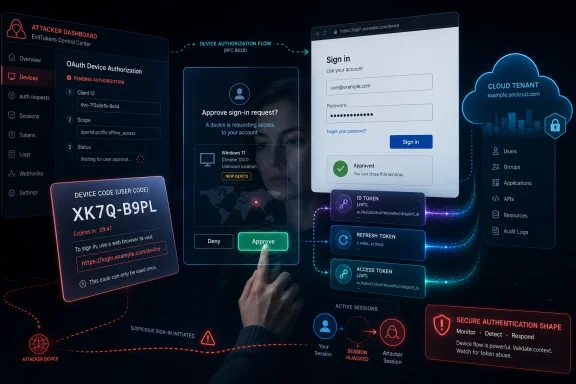
In Microsoft’s implementation, the user has a limited window to complete the process. The code is short-lived, and the device polls for completion until the authorization succeeds or expires. In the legitimate case, this is elegant. It separates the awkward device from the usable browser without asking users to type passwords on a remote control.
EvilTokens exploits that separation. The attacker generates the device code, not the user’s device. The lure then persuades the victim to enter the code and complete authentication on Microsoft’s real site. Once that happens, Microsoft issues tokens to the session that requested the code.
The engineering problem is not that Microsoft’s flow is broken. The security problem is that the flow assumes the device asking for authorization is the device the user intends to authorize. Phishing lives in that gap between technical validity and human intent.
That is what the PhaaS model does to every phishing technique it touches. It turns a playbook into a product, a product into a subscription, and a subscription into an ecosystem. Operators no longer need to understand OAuth flows deeply if a kit handles code generation, landing pages, victim tracking, token capture, and post-compromise staging.
Reports around EvilTokens describe Telegram-based advertising, phishing templates themed around invoices, shared files, SharePoint access, calendar invitations, and other workplace bait. None of those lures are exotic. They are the mundane texture of Microsoft 365 work, which is why they remain effective.
The campaign scale is what should make administrators sit up. Researchers have tied EvilTokens activity to attacks affecting more than 340 organizations across multiple countries in March 2026. Even if every number in threat reporting deserves a little caution, the direction is clear: device code phishing has moved out of the proof-of-concept drawer and into mass-market account takeover.
The uncomfortable lesson is that an attacker does not need a brilliant lure when the workflow itself does so much of the legitimizing. A victim who would distrust a fake Microsoft password page may still comply when the browser lands on a real Microsoft authentication endpoint.
That difference is more than pedantry. MFA remains one of the most important controls an organization can deploy, and removing it would be malpractice. But EvilTokens exposes a class of attack where MFA succeeds technically while failing operationally, because the user approves the attacker’s authorization request.
This is the same broader pressure that has driven the rise of adversary-in-the-middle phishing kits, session cookie theft, OAuth consent abuse, and token replay. Attackers are adapting to a world where passwords alone are less useful. They now chase sessions, grants, refresh tokens, OAuth scopes, and any workflow that produces durable access without needing to know the password again.
For defenders, that means the old hierarchy of controls has to change. MFA should be treated as a floor, not a ceiling. The question is no longer simply whether a login involved a second factor, but whether the authentication method, device context, application, risk signal, and token behavior make sense together.
EvilTokens is dangerous because it inhabits the space between “MFA was completed” and “the right user intended this access.” Many dashboards are better at recording the former than proving the latter.
That makes EvilTokens especially relevant to business email compromise. A mailbox gives attackers language, timing, and trust relationships. A calendar shows when executives are traveling. Teams and SharePoint can reveal active projects. OneDrive can expose documents that make the next lure more convincing.
This is why token theft often feels worse than password theft. A password reset may not fully end the exposure if active sessions, refresh tokens, or registered devices remain valid. The attacker’s foothold becomes less visible to users because nothing necessarily looks “wrong” from the victim’s perspective. They did not see a fake page. They did not hand over a password. They may simply remember being asked to open a document.
Administrators should treat a suspected device code phishing incident as an active session compromise, not merely a credential event. That means revoking sessions, reviewing sign-in logs, checking new inbox rules, inspecting OAuth grants, examining impossible travel or unfamiliar device patterns, and looking for post-compromise mailbox activity.
The operational difference is crucial. If the help desk response is only “reset the password and tell the user to be careful,” the attacker may already have moved deeper into the tenant.
In a device code phishing attack, the victim may be sent to a real Microsoft page to enter the code. The domain can be right. The branding can be right. The MFA prompt can be right. The user’s error is not trusting a fake page; it is authorizing the wrong session.
That makes the education problem harder. “Only sign in on Microsoft pages” is no longer precise enough. Users need to understand that codes are authorization objects, not magic ticket numbers. If a document, invoice, voicemail, or meeting invite asks them to enter a code they did not generate from a device they are actively setting up, the safe answer is no.
Still, user education should not become the dumping ground for a design problem. The more realistic answer is to reduce where device code flow is allowed, monitor where it appears, and make unusual use stand out. Humans are not reliable authentication firewalls, especially when the attacker’s path runs through a legitimate identity provider.
This is where security teams must resist the temptation to call EvilTokens a “user awareness” issue. It is partly that, but it is also a tenant configuration issue, a detection engineering issue, and a cloud identity governance issue.
Some environments use device code flow for legitimate device registration, Teams devices, shared hardware, command-line tooling, or specific operational workflows. A blanket block without audit can break things that look obscure until a conference room, kiosk, or automation path stops working. That is why report-only testing and sign-in log review matter.
But the existence of legitimate use is not an argument for leaving the door open everywhere. It is an argument for inventory. If an organization cannot name the users, devices, and applications that require device code flow, then allowing it globally is not a business requirement. It is inherited exposure.
The right pattern is boring but effective: observe, scope, exclude only what must be excluded, then block the rest. Conditional Access is no longer just about requiring MFA from risky locations. It is increasingly the policy firewall around authentication methods themselves.
The catch is that many Microsoft 365 tenants are policy museums. Conditional Access rules accumulate through mergers, rushed projects, departed admins, emergency exceptions, and half-remembered pilots. EvilTokens punishes that sprawl because the attack does not need an unpatched server. It only needs an authentication path nobody owns.
A useful detection strategy starts with device code authentication events. Organizations should know whether device code flow appears rarely, frequently, or not at all in their tenant. A sudden cluster of device code sign-ins, especially from users who do not use devices that require the flow, should be treated as suspicious.
The next layer is context. Was the sign-in tied to an unfamiliar device? Did it originate from an unexpected location or autonomous system? Did it grant access to Microsoft 365 resources shortly before mailbox rules changed, files were downloaded, or internal messages were sent? Token abuse often becomes visible through the actions it enables.
Inbox rules deserve special attention because they remain a favorite BEC tool. Rules that hide replies, forward mail externally, move messages containing financial terms, or suppress security notifications can turn a one-time compromise into a longer-running fraud operation. The same goes for new OAuth app consents, unusual SharePoint access, and sudden Teams activity from atypical clients.
Defenders also need to separate failed noise from successful compromise. Device code phishing can generate many incomplete attempts because the code expires or the user abandons the flow. The failures are useful for campaign awareness, but the successes require immediate containment.
The pattern is not subtle. Criminal services are moving up the stack from passwords to sessions and identity workflows. The kits increasingly sell not just pages but process: lure generation, token capture, victim management, infrastructure rotation, and sometimes AI-assisted content.
That changes the economics of phishing. A lone attacker with modest skills can rent capability that used to require more technical fluency. Meanwhile, defenders face campaigns that can vary infrastructure, templates, and targeting faster than traditional blocklists can keep up.
This is the same grim cycle that turned ransomware from bespoke intrusion into an affiliate economy. PhaaS is doing for identity compromise what ransomware-as-a-service did for extortion: separating specialists from operators and letting each side scale.
For Microsoft 365 customers, the practical conclusion is that tenant hardening cannot wait for a specific brand name. EvilTokens may be disrupted, renamed, copied, or superseded. The exposed surface—the authentication flow and the token model—will remain.
Every convenience feature in a platform at Microsoft’s scale is also a potential phishing primitive. The issue is not negligence so much as accumulated complexity. The more ways there are to authenticate, delegate, refresh, register, and consent, the more ways there are to trick a human into doing something technically valid but strategically disastrous.
This is where Microsoft’s secure-by-default story is being tested. Conditional Access can block device code flow, but many organizations still need licensing, expertise, and operational confidence to configure it properly. Microsoft-managed policies help, but customers often discover the messy edge cases only when enforcement meets real-world devices.
There is a product lesson here. Security controls that require each tenant to rediscover the same dangerous default are controls that will be unevenly applied. If device code flow is rarely needed for most users, Microsoft should keep pushing toward narrower defaults, clearer reporting, and stronger warnings when the flow appears in suspicious contexts.
At the same time, customers cannot outsource judgment entirely. Microsoft can provide the switches, logs, and defaults. Enterprises still have to decide which workflows are legitimate, which exceptions are justified, and who is accountable when a five-year-old policy keeps a risky path alive.
EvilTokens is a reminder that attackers study those maps too. They look for workflows that users do not understand and administrators rarely monitor. Device code flow is perfect because it was designed to make authentication easier in constrained environments, not to be interpreted by a finance employee under pressure from a fake invoice notice.
The defensive work begins with visibility. Review sign-in logs for device code flow. Identify legitimate use. Put Conditional Access policies in report-only mode where necessary, then move toward blocking for users and cloud apps that do not require it. Make exceptions explicit, owned, and time-bounded.
Incident response playbooks should also be updated. A device code phishing case should trigger session revocation, token invalidation where applicable, mailbox and file access review, audit of inbox rules, and inspection of any newly registered devices or suspicious application grants. The goal is to evict the session, not merely change the secret.
This is unglamorous work, but it is the work that decides whether EvilTokens is a near miss or a breach report.
That should recalibrate how organizations talk about account takeover. The dangerous event may be an approved code, an OAuth grant, a refresh token, a new inbox rule, or a suspicious session that looks valid in isolation. The breach begins when trust is misplaced, not necessarily when a password leaks.
Security teams should also be careful with the phrase “bypass.” EvilTokens bypasses MFA in the way a con artist bypasses a locked door by persuading someone inside to open it. The lock worked. The process failed. Both facts matter.
The response, then, is not to abandon MFA but to surround it with phishing-resistant methods, tighter flow controls, better token hygiene, and sharper detection. The future of Microsoft 365 defense is less about one perfect login prompt and more about continuous skepticism after the prompt succeeds.
 The Password Was Never the Prize
For years, enterprise phishing has been described in terms that made the password the star of the story. Users typed secrets into counterfeit portals, attackers replayed those secrets, and security teams responded with MFA, conditional access, and passwordless roadmaps. EvilTokens shows how incomplete that mental model has become.The kit does not need to convincingly clone the Microsoft login page in the traditional way. Instead, it abuses a legitimate Microsoft workflow designed for devices that cannot easily present a full browser login experience. The victim is not merely fooled into surrendering a password; the victim is guided into completing a real authentication ceremony for the attacker’s session.
That distinction matters because many security programs still draw their comfort from the presence of MFA prompts, branded Microsoft pages, and familiar login domains. EvilTokens turns those signs of safety into part of the lure. The user sees Microsoft. Microsoft sees a valid authentication flow. The attacker sees tokens.
The result is a phishing model that feels less like credential theft and more like delegated access fraud. It is an identity attack wrapped in the language of convenience, which is exactly why it lands so neatly in modern cloud environments.
Microsoft Built the Door for Good Reasons
The OAuth device code flow exists because not every device has a keyboard, browser, or sane input method. Smart TVs, printers, embedded devices, command-line tools, and shared meeting-room hardware all need some way to connect a user account to a device that cannot comfortably handle a normal sign-in. The device displays or obtains a short code, the user enters that code on another device, and the identity provider completes the authentication.In Microsoft’s implementation, the user has a limited window to complete the process. The code is short-lived, and the device polls for completion until the authorization succeeds or expires. In the legitimate case, this is elegant. It separates the awkward device from the usable browser without asking users to type passwords on a remote control.
EvilTokens exploits that separation. The attacker generates the device code, not the user’s device. The lure then persuades the victim to enter the code and complete authentication on Microsoft’s real site. Once that happens, Microsoft issues tokens to the session that requested the code.
The engineering problem is not that Microsoft’s flow is broken. The security problem is that the flow assumes the device asking for authorization is the device the user intends to authorize. Phishing lives in that gap between technical validity and human intent.
EvilTokens Industrializes a Previously Awkward Trick
Device code phishing is not new. Researchers and red teams have discussed it for years, and threat actors have increasingly used it against cloud accounts because it avoids many of the visual tells associated with fake login pages. EvilTokens is significant because it packages the technique into a service.That is what the PhaaS model does to every phishing technique it touches. It turns a playbook into a product, a product into a subscription, and a subscription into an ecosystem. Operators no longer need to understand OAuth flows deeply if a kit handles code generation, landing pages, victim tracking, token capture, and post-compromise staging.
Reports around EvilTokens describe Telegram-based advertising, phishing templates themed around invoices, shared files, SharePoint access, calendar invitations, and other workplace bait. None of those lures are exotic. They are the mundane texture of Microsoft 365 work, which is why they remain effective.
The campaign scale is what should make administrators sit up. Researchers have tied EvilTokens activity to attacks affecting more than 340 organizations across multiple countries in March 2026. Even if every number in threat reporting deserves a little caution, the direction is clear: device code phishing has moved out of the proof-of-concept drawer and into mass-market account takeover.
The uncomfortable lesson is that an attacker does not need a brilliant lure when the workflow itself does so much of the legitimizing. A victim who would distrust a fake Microsoft password page may still comply when the browser lands on a real Microsoft authentication endpoint.
MFA Is Still Necessary, but It Is Not Magic
The easiest headline is that EvilTokens “bypasses 2FA.” That is true in the practical sense, but it can be misleading if read as a cryptographic defeat. EvilTokens does not crack the second factor. It convinces the user to complete it.That difference is more than pedantry. MFA remains one of the most important controls an organization can deploy, and removing it would be malpractice. But EvilTokens exposes a class of attack where MFA succeeds technically while failing operationally, because the user approves the attacker’s authorization request.
This is the same broader pressure that has driven the rise of adversary-in-the-middle phishing kits, session cookie theft, OAuth consent abuse, and token replay. Attackers are adapting to a world where passwords alone are less useful. They now chase sessions, grants, refresh tokens, OAuth scopes, and any workflow that produces durable access without needing to know the password again.
For defenders, that means the old hierarchy of controls has to change. MFA should be treated as a floor, not a ceiling. The question is no longer simply whether a login involved a second factor, but whether the authentication method, device context, application, risk signal, and token behavior make sense together.
EvilTokens is dangerous because it inhabits the space between “MFA was completed” and “the right user intended this access.” Many dashboards are better at recording the former than proving the latter.
Tokens Are the New Beachhead
Once the attacker obtains access and refresh tokens, the compromise can move quickly from identity event to business impact. A Microsoft 365 account is not just an inbox. It is a map of relationships, files, meetings, Teams chats, SharePoint sites, OneDrive content, internal announcements, invoices, contracts, and approval chains.That makes EvilTokens especially relevant to business email compromise. A mailbox gives attackers language, timing, and trust relationships. A calendar shows when executives are traveling. Teams and SharePoint can reveal active projects. OneDrive can expose documents that make the next lure more convincing.
This is why token theft often feels worse than password theft. A password reset may not fully end the exposure if active sessions, refresh tokens, or registered devices remain valid. The attacker’s foothold becomes less visible to users because nothing necessarily looks “wrong” from the victim’s perspective. They did not see a fake page. They did not hand over a password. They may simply remember being asked to open a document.
Administrators should treat a suspected device code phishing incident as an active session compromise, not merely a credential event. That means revoking sessions, reviewing sign-in logs, checking new inbox rules, inspecting OAuth grants, examining impossible travel or unfamiliar device patterns, and looking for post-compromise mailbox activity.
The operational difference is crucial. If the help desk response is only “reset the password and tell the user to be careful,” the attacker may already have moved deeper into the tenant.
The Legitimate Microsoft Page Is the Trick
Traditional anti-phishing training leans heavily on visual suspicion. Check the URL. Look for spelling mistakes. Be wary of unfamiliar domains. Do not type credentials into strange forms. Those lessons still matter, but EvilTokens walks around them.In a device code phishing attack, the victim may be sent to a real Microsoft page to enter the code. The domain can be right. The branding can be right. The MFA prompt can be right. The user’s error is not trusting a fake page; it is authorizing the wrong session.
That makes the education problem harder. “Only sign in on Microsoft pages” is no longer precise enough. Users need to understand that codes are authorization objects, not magic ticket numbers. If a document, invoice, voicemail, or meeting invite asks them to enter a code they did not generate from a device they are actively setting up, the safe answer is no.
Still, user education should not become the dumping ground for a design problem. The more realistic answer is to reduce where device code flow is allowed, monitor where it appears, and make unusual use stand out. Humans are not reliable authentication firewalls, especially when the attacker’s path runs through a legitimate identity provider.
This is where security teams must resist the temptation to call EvilTokens a “user awareness” issue. It is partly that, but it is also a tenant configuration issue, a detection engineering issue, and a cloud identity governance issue.
Conditional Access Becomes the Policy Firewall
Microsoft’s most direct mitigation is to block device code flow with Conditional Access where it is not needed. That recommendation sounds simple, and in greenfield tenants it often is. In real enterprises, the difficulty is proving what depends on the flow before cutting it off.Some environments use device code flow for legitimate device registration, Teams devices, shared hardware, command-line tooling, or specific operational workflows. A blanket block without audit can break things that look obscure until a conference room, kiosk, or automation path stops working. That is why report-only testing and sign-in log review matter.
But the existence of legitimate use is not an argument for leaving the door open everywhere. It is an argument for inventory. If an organization cannot name the users, devices, and applications that require device code flow, then allowing it globally is not a business requirement. It is inherited exposure.
The right pattern is boring but effective: observe, scope, exclude only what must be excluded, then block the rest. Conditional Access is no longer just about requiring MFA from risky locations. It is increasingly the policy firewall around authentication methods themselves.
The catch is that many Microsoft 365 tenants are policy museums. Conditional Access rules accumulate through mergers, rushed projects, departed admins, emergency exceptions, and half-remembered pilots. EvilTokens punishes that sprawl because the attack does not need an unpatched server. It only needs an authentication path nobody owns.
Detection Has to Follow the Flow, Not the Form
Security tooling that looks only for fake credential pages will miss the point. EvilTokens may use phishing pages as staging areas, but the decisive event occurs in Microsoft’s identity infrastructure. The signal is in the authentication flow, the token issuance, and the behavior that follows.A useful detection strategy starts with device code authentication events. Organizations should know whether device code flow appears rarely, frequently, or not at all in their tenant. A sudden cluster of device code sign-ins, especially from users who do not use devices that require the flow, should be treated as suspicious.
The next layer is context. Was the sign-in tied to an unfamiliar device? Did it originate from an unexpected location or autonomous system? Did it grant access to Microsoft 365 resources shortly before mailbox rules changed, files were downloaded, or internal messages were sent? Token abuse often becomes visible through the actions it enables.
Inbox rules deserve special attention because they remain a favorite BEC tool. Rules that hide replies, forward mail externally, move messages containing financial terms, or suppress security notifications can turn a one-time compromise into a longer-running fraud operation. The same goes for new OAuth app consents, unusual SharePoint access, and sudden Teams activity from atypical clients.
Defenders also need to separate failed noise from successful compromise. Device code phishing can generate many incomplete attempts because the code expires or the user abandons the flow. The failures are useful for campaign awareness, but the successes require immediate containment.
EvilTokens Fits a Bigger 2026 Pattern
EvilTokens is not arriving in isolation. The first half of 2026 has seen repeated reporting around PhaaS kits that target Microsoft 365 and other identity platforms by stealing tokens, abusing OAuth, or automating convincing lures. Kali365, for example, has been described as another PhaaS operation aimed at cloud identity tokens and advertised to lower-skilled attackers.The pattern is not subtle. Criminal services are moving up the stack from passwords to sessions and identity workflows. The kits increasingly sell not just pages but process: lure generation, token capture, victim management, infrastructure rotation, and sometimes AI-assisted content.
That changes the economics of phishing. A lone attacker with modest skills can rent capability that used to require more technical fluency. Meanwhile, defenders face campaigns that can vary infrastructure, templates, and targeting faster than traditional blocklists can keep up.
This is the same grim cycle that turned ransomware from bespoke intrusion into an affiliate economy. PhaaS is doing for identity compromise what ransomware-as-a-service did for extortion: separating specialists from operators and letting each side scale.
For Microsoft 365 customers, the practical conclusion is that tenant hardening cannot wait for a specific brand name. EvilTokens may be disrupted, renamed, copied, or superseded. The exposed surface—the authentication flow and the token model—will remain.
Where Microsoft’s Convenience Tax Comes Due
Microsoft’s identity platform carries the burden of serving consumers, small businesses, enterprises, developers, frontline workers, kiosks, meeting rooms, and devices with terrible input methods. That breadth is why workflows like device code flow exist. It is also why they become attractive to attackers.Every convenience feature in a platform at Microsoft’s scale is also a potential phishing primitive. The issue is not negligence so much as accumulated complexity. The more ways there are to authenticate, delegate, refresh, register, and consent, the more ways there are to trick a human into doing something technically valid but strategically disastrous.
This is where Microsoft’s secure-by-default story is being tested. Conditional Access can block device code flow, but many organizations still need licensing, expertise, and operational confidence to configure it properly. Microsoft-managed policies help, but customers often discover the messy edge cases only when enforcement meets real-world devices.
There is a product lesson here. Security controls that require each tenant to rediscover the same dangerous default are controls that will be unevenly applied. If device code flow is rarely needed for most users, Microsoft should keep pushing toward narrower defaults, clearer reporting, and stronger warnings when the flow appears in suspicious contexts.
At the same time, customers cannot outsource judgment entirely. Microsoft can provide the switches, logs, and defaults. Enterprises still have to decide which workflows are legitimate, which exceptions are justified, and who is accountable when a five-year-old policy keeps a risky path alive.
The Admin’s Job Is Now Identity Cartography
The modern Microsoft 365 administrator has become a cartographer of invisible trust paths. It is not enough to know who has a password, who has MFA, and who belongs to Global Administrator. The harder question is which flows can mint tokens, which devices can register, which apps can request access, and which policies actually apply when conditions collide.EvilTokens is a reminder that attackers study those maps too. They look for workflows that users do not understand and administrators rarely monitor. Device code flow is perfect because it was designed to make authentication easier in constrained environments, not to be interpreted by a finance employee under pressure from a fake invoice notice.
The defensive work begins with visibility. Review sign-in logs for device code flow. Identify legitimate use. Put Conditional Access policies in report-only mode where necessary, then move toward blocking for users and cloud apps that do not require it. Make exceptions explicit, owned, and time-bounded.
Incident response playbooks should also be updated. A device code phishing case should trigger session revocation, token invalidation where applicable, mailbox and file access review, audit of inbox rules, and inspection of any newly registered devices or suspicious application grants. The goal is to evict the session, not merely change the secret.
This is unglamorous work, but it is the work that decides whether EvilTokens is a near miss or a breach report.
The EvilTokens Lesson Is Smaller Than Panic and Larger Than Phishing
The concrete lesson from EvilTokens is not that Microsoft 365 is uniquely doomed or that MFA has failed. It is that identity systems now contain enough legitimate delegation machinery for attackers to build convincing compromises without stealing passwords in the old sense.That should recalibrate how organizations talk about account takeover. The dangerous event may be an approved code, an OAuth grant, a refresh token, a new inbox rule, or a suspicious session that looks valid in isolation. The breach begins when trust is misplaced, not necessarily when a password leaks.
Security teams should also be careful with the phrase “bypass.” EvilTokens bypasses MFA in the way a con artist bypasses a locked door by persuading someone inside to open it. The lock worked. The process failed. Both facts matter.
The response, then, is not to abandon MFA but to surround it with phishing-resistant methods, tighter flow controls, better token hygiene, and sharper detection. The future of Microsoft 365 defense is less about one perfect login prompt and more about continuous skepticism after the prompt succeeds.
The Moves That Matter Before the Next Kit Name Arrives
EvilTokens gives administrators a narrow and actionable place to start, even if the larger identity problem is sprawling. The organizations that fare best will be the ones that treat device code flow as an exception-bearing capability, not a harmless default.- Organizations should audit Microsoft Entra sign-in logs to determine where device code flow is actually being used before enforcing a tenant-wide block.
- Conditional Access policies should block device code flow for users, groups, and applications that do not have a documented operational need for it.
- Help desk and SOC playbooks should treat suspected device code phishing as token and session compromise, not merely as a password reset event.
- Users should be trained that entering a device code is an authorization act and should only happen when they personally initiated setup on a device they recognize.
- Security monitoring should correlate device code authentication with unfamiliar devices, risky sign-ins, new inbox rules, unusual file access, and suspicious Teams or SharePoint activity.
- Exceptions for Teams devices, kiosks, command-line tools, or registration workflows should be reviewed periodically instead of becoming permanent blind spots.
References
- Primary source: TechNadu
Published: 2026-06-16T12:01:08.779713
EvilTokens: PhaaS Kit Abusing OAuth Device Code Flow on Microsoft 365 - TechNadu
EvilTokens is a phishing-as-a-service kit abusing the OAuth 2.0 device code flow to hijack Microsoft 365 accounts, bypass 2FA, and enable BEC attacks.www.technadu.com - Related coverage: innovationnetworkdesign.com
HIGH: Device Code Phishing Campaign Hammers 340+ Micr… | Innovation ND
Over 340 organizations across five countries compromised in aggressive device code phishing campaign exploiting OAuth device authorization flow. Attackers harvest tokens that survive password resets using PhaaS platform EvilTokens.www.innovationnetworkdesign.com - Related coverage: labs.cloudsecurityalliance.org
CSA research note oauth device code phishing evilTokens 20260520 csa styled
PDF documentlabs.cloudsecurityalliance.org
- Related coverage: cybersecurefox.com
EvilTokens: OAuth Device Code Phishing In Microsoft 365
In the case of OAuth consent phishing, the user themselves completes authentication with the legitimate provider. MFA triggers and is successfully passedcybersecurefox.com - Related coverage: gblock.app
EvilTokens: 340 M365 Tenants, No Password Phishing (May 2026)
340 Microsoft 365 tenants got compromised in five weeks. The attackers never asked for a password. The users authenticated on real microsoft.com and finished MFA—then handed over a refresh token. www.gblock.app
- Related coverage: cyberc4st.com
Phishing OAuth Microsoft 365 EvilTokens : 340 organisations ciblées
Phishing OAuth Microsoft 365 EvilTokens : 340 organisations ciblées depuis février 2026. MFA contourné via device code. Protégez vos tokens maintenant.cyberc4st.com
- Related coverage: csoonline.com
EvilTokens abuses Microsoft device code flow for account takeovers | CSO Online
The phishing-as-a-service toolkit leverages legitimate authentication to capture tokens and access Microsoft 365 services.www.csoonline.com
- Related coverage: gnerdsec.com
EvilTokens Turns Microsoft's Device Code Flow Into a Criminal Subscription Service || gNerdSEC Cybersecurity
A new phishing-as-a-service platform exploits Microsoft's legitimate device code authentication to hijack enterprise accounts at scale. 340+ organizations compromised across five countries.gnerdsec.com
- Related coverage: cybernewsai.com
EvilTokens PhaaS Abuses Railway PaaS for M365 Attacks | CyberNewsAI
Active device code phishing campaign attributed to the EvilTokens PhaaS platform is abusing Railway.com PaaS infrastructure to target Microsoft 365 identities, compromising over 340 organizations.www.cybernewsai.com - Related coverage: vpncentral.com
EvilTokens turns Microsoft’s device code flow into a phishing tool for account takeover
A new phishing-as-a-service platform called EvilTokens is helping cybercriminals hijack Microsoft 365 accounts by abusing Microsoft’s legitimate device code authentication flow. Sekoia says the kit began circulating in phishing-focused underground communities in early March 2026 and stands out... vpncentral.com
- Related coverage: apolocybersecurity.com
EvilTokens: The Phishing Kit That Renders Your MFA Useless and Has Already Compromised 340+ Microsoft 365 Organisations
EvilTokens is a phishing-as-a-service platform active since February 2026 that has compromised over 340 Microsoft 365 organisations across 7 countries. It does not steal passwords, trigger MFA alerts or use fake pages: the victim completes their own MFA on the real Microsoft page and hands the... www.apolocybersecurity.com
- Related coverage: burgitech.com
Microsoft 365 Phishing Attack: EvilTokens Threat (2026)
A new phishing kit called EvilTokens is hijacking Microsoft 365 accounts through a clever OAuth trick. Here's how it works and how to stop it.www.burgitech.com - Related coverage: threataft.com
EvilTokens & Tycoon 2FA: OAuth Device Code Phishing | ThreatAft
EvilTokens and Tycoon 2FA PhaaS kits abuse Microsoft's OAuth device flow to steal tokens and bypass MFA. 50K campaigns, 37x growth. Analysis and mitigations.threataft.com - Related coverage: techradar.com
FBI warns of Kali phishing scam hitting Microsoft OAuth tokens — warns 'Kali365 lowers the barrier of entry, providing less-technical attackers access to AI-generated phishing lures' | TechRadar
A new phishing kit is being offered on Telegramwww.techradar.com - Related coverage: itpro.com
FBI warns Microsoft 365 users about another phishing as a service attack – here's how to avoid it | IT Pro
Kali365 platform is serious enough to garner a warning from the FBIwww.itpro.com - Official source: learn.microsoft.com
Authentication flows as a condition in Conditional Access policy - Microsoft Entra ID | Microsoft Learn
Learn how authentication flows provide a seamless experience across all application and device typeslearn.microsoft.com - Related coverage: azuretrace.com
- Related coverage: cloudcoffee.ch
Microsoft Entra Conditional Access: Block Authentication Flows - cloudcoffee.ch
Microsoft Entra Conditional Access: Block the authentication flow for device code flow and authentication transferwww.cloudcoffee.ch - Official source: devblogs.microsoft.com
Securing identity: Exploring application types and authentication flows | Microsoft Entra Identity Platform
Building on the foundations of our IAM basics blog post, discover the world of application types and authentication flows.devblogs.microsoft.com - Related coverage: ce.prod.cloudaware.com
Description | Cloudaware Compliance Policies
Conditional Access Policies can be used to prevent the device code authentication flow. Device code flow should be permitted only for users who regularly perform duties that explicitly require the use of device code to authenticate, such as using Azure with PowerShell.ce.prod.cloudaware.com - Related coverage: purplehunt.es
CA Authentication Flows: como bloquear el Device Code Flow en Entra ID | PurpleHunt
Microsoft sustituye Block Device Code Flow por la nueva Conditional Access Authentication Flows. Guia paso a paso para configurar la policy y detectar device code phishing en Sentinel.purplehunt.es - Official source: techcommunity.microsoft.com
Microsoft Teams Devices - Device Code Flow Sign-In Issue – Remediation Guidance | Microsoft Community Hub
We're publishing additional guidance about a potential sign-in issue impacting Microsoft Teams-certified Android devices (e.g., Teams Rooms on Android, Teams... techcommunity.microsoft.com
- Related coverage: hub.prowler.com
Prowler Hub
Prowler is the Open Source Cloud Security platform. The Prowler Hub showcases all Prowler artifacts.hub.prowler.com
- Official source: cdn-dynmedia-1.microsoft.com
