
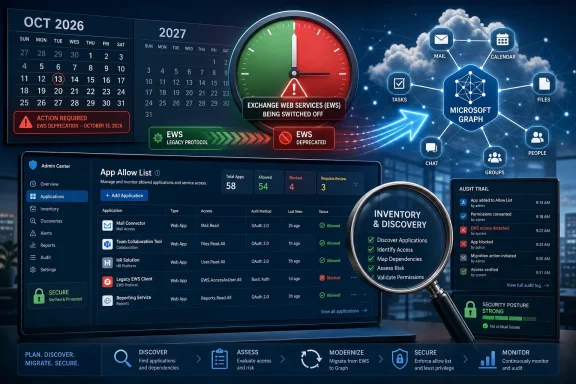
Microsoft will begin restricting Exchange Web Services access in Exchange Online in October 2026, allowing only explicitly approved applications to keep using EWS during a phased retirement that ends with a full shutdown in 2027. The move turns a long-running deprecation warning into an operational deadline. For Windows administrators, the story is not simply that an old API is going away; it is that Microsoft is forcing every tenant to prove which old integrations still deserve to exist.
Exchange Web Services has been living on borrowed time for years. Microsoft first put EWS on the glide path in 2018, when it said the API would no longer receive feature updates and urged developers to move to Microsoft Graph. In 2023, the company made the deadline harder: EWS would be disabled in Exchange Online starting October 1, 2026.
The latest control model is Microsoft’s attempt to make that transition less chaotic without making it optional. Before the deadline, administrators can use tenant-level controls to identify and preserve access for applications that still need EWS. After enforcement begins, the default posture changes from broad tolerance to explicit approval.
That is the important shift. For years, EWS has remained available because so many enterprise tools, mailbox workflows, backup products, scheduling systems, migration utilities, and line-of-business applications depended on it. Microsoft is now saying that continued dependency must be visible, deliberate, and temporary.
The company’s message is blunt in the way cloud platform changes often are blunt: if an organization has not inventoried its EWS usage, it may not know what will break until Microsoft starts blocking requests. The new allow-list mechanism is a pressure valve, but it is also a forcing function.
That invisibility is exactly why retirement is difficult. The applications still using EWS are often not shiny front-end apps with obvious owners. They may be middleware services, scripts created by a consultant years ago, journaling or compliance tools, room-booking integrations, public folder utilities, CRM connectors, or backup platforms that nobody thinks about until they fail.
Microsoft’s preferred replacement is Microsoft Graph, the unified API layer across Microsoft 365. Graph is where Microsoft is investing, and it fits the company’s modern identity, permissions, auditing, and cloud service model far better than EWS does. From Redmond’s perspective, keeping EWS alive indefinitely means maintaining a legacy surface that complicates security and platform engineering.
From the customer perspective, the argument is messier. Graph may be the strategic answer, but not every EWS workload has had a clean one-to-one migration path at the same time. Some vendors have moved quickly; others have not. Some internal development teams already rewrote integrations; others are now discovering that “deprecated” was not the same thing as “gone.”
Once enforcement begins, the model changes. A tenant that simply has EWS enabled will not necessarily enjoy broad EWS access. Applications must be explicitly present on the allow list to continue working. If no allow list is configured when enforcement arrives, EWS access is expected to be blocked.
This is a subtle but important inversion. Historically, many tenants have behaved as though EWS access is available unless somebody blocks it. Microsoft is moving Exchange Online toward a model where EWS is denied unless an administrator has consciously named the applications that can still use it.
That design serves two goals at once. It reduces accidental legacy exposure, and it creates a management artifact that tells the organization where its migration debt lives. An allow list is not just a technical setting; it is a list of unresolved conversations with vendors, developers, business units, and risk owners.
That distinction matters for procurement and planning. An administrator may be able to keep a critical EWS-dependent application alive after initial enforcement, but that does not make the application future-proof. If the vendor cannot provide a Graph-based path, the organization still has a hard stop ahead.
This is where some IT shops will get caught. The temptation will be to configure the allow list, confirm the old integration still works, and move on to the next fire. But the allow list is not the remediation; it is the containment boundary around the problem.
The better reading is that Microsoft is giving enterprises a way to avoid a cliff while still removing the bridge. The calendar now has two phases: survive October 2026, then eliminate EWS dependency before the final shutdown. Treating the first phase as success is how organizations end up in an emergency change window later.
Large Microsoft 365 tenants accumulate integrations over years. Some are centrally managed and documented. Others are attached to individual departments, acquired companies, old service accounts, or abandoned automation jobs that still run because nobody has turned them off.
EWS usage can also be politically awkward. Once the data is visible, administrators may find business-critical workflows owned by teams that assumed “Microsoft 365 integration” meant “Microsoft will keep it working.” They may also find products from vendors whose Graph migration story is incomplete, expensive, or tied to a major upgrade.
That is why administrators should avoid treating this as a purely Exchange Online configuration change. It belongs in a broader application governance process. The question is not only “Which AppIDs need EWS?” but also “Who owns this app, what business process depends on it, what data does it touch, and when will it move?”
EWS was built for an earlier era of Exchange extensibility. It has served customers well, but the modern Microsoft 365 security model is built around more granular app permissions, centralized identity controls, conditional access, auditability, and API governance. Graph is not magically risk-free, but it is where Microsoft can apply its current platform controls most coherently.
Unrestricted EWS access also creates an inventory problem. If a tenant cannot say which applications are using EWS, it cannot confidently assess the blast radius of credentials, app permissions, or compromised service principals. That is exactly the sort of ambiguity security teams are trying to eliminate.
The allow list therefore has a dual role. It is a transition mechanism for compatibility, and it is a security control that shrinks the set of applications able to use an aging interface. The best outcome for Microsoft is not that every customer builds a perfect allow list; it is that many customers discover they can turn EWS off entirely.
This is the uncomfortable middle of Microsoft’s platform strategy. The company wants Graph to be the universal API for Microsoft 365, and that has obvious benefits for consistency and long-term development. But administrators live with the applications that exist, not the applications that should exist.
For commercial software, the burden shifts to vendors. Customers should be pressing suppliers now for documented Graph support, migration timelines, and version requirements. A vague promise that an update is “planned” is not enough when a tenant-level service dependency is approaching enforcement.
For internal software, the burden shifts to development teams and business owners. If a script or service uses EWS to read mailbox data, create calendar items, process messages, or manage folders, it needs a rewrite plan. That plan must include permissions, testing, monitoring, and rollback behavior, not just a new authentication flow.
A scheduling system may stop syncing room calendars. A compliance export process may fail silently until a report is missing. A backup product may lose access to mailbox data. A CRM integration may stop creating activities from messages. A custom service account may keep authenticating successfully while its EWS calls are denied.
That kind of failure is harder to spot than a full outage. It often appears as delayed data, missing records, broken automation, or unexplained gaps. The people who notice may not know the term EWS, and the people who know EWS may not know the business process exists.
This is why pre-enforcement testing is essential. Organizations should not wait for Microsoft’s timeline to reveal dependencies through failure. They should create a controlled test posture, restrict EWS in a deliberate way, and watch what complains.
Most organizations affected by this change are affected because their mailbox data lives in Exchange Online. Moving workloads back on-premises to preserve EWS access would be an extreme response, and for most enterprises it would undermine years of cloud migration, security modernization, and operational simplification.
The more realistic hybrid complication is that some tools were designed in an era when Exchange Server and Exchange Online behaved similarly enough for EWS-based integrations to span both worlds. As Microsoft 365 becomes more cloud-native and Graph-centric, that assumption weakens.
For WindowsForum readers who still manage hybrid Exchange, the message is straightforward: do not let the on-premises exception blur the cloud deadline. If an app touches Exchange Online mailboxes through EWS, it belongs in the retirement plan.
The EWS retirement is more measured in one sense because the allow-list model provides a sanctioned way to keep specific apps alive for a limited time. But it is also more demanding because EWS sits inside a broader ecosystem of third-party and custom integrations. The tenant admin may own the switch, but not the code.
This is where Microsoft’s cloud leverage is most visible. The company does not need to persuade every vendor or every customer that Graph is better. It can change the service behavior and make continued EWS use require administrative action.
That may sound harsh, but it is also how cloud platforms retire risky or outdated dependencies at scale. The alternative is indefinite compatibility, which tends to preserve the oldest and least governed integrations long after everyone agrees they should have been replaced.
The next step is classification. Some EWS dependencies will be legitimate and time-sensitive. Some will be obsolete. Some will belong to software that already has a Graph-compatible version waiting behind a licensing or upgrade decision.
Only after that should organizations build the allow list. The list should be narrow, documented, and owned. Adding every discovered application may preserve short-term functionality, but it defeats the purpose of the control and leaves the migration problem intact.
Testing must be real, not symbolic. A lab confirmation that a service can authenticate is not enough. Administrators need to validate the actual business workflow: calendar updates, mailbox reads, message processing, exports, archiving, ticket creation, or whatever the integration exists to do.
IT buyers should be direct. Does the current product version use EWS? Which features use it? Is Graph support available now, in preview, or scheduled? Are there feature gaps? Will migration require new permissions, new licensing, or a new deployment model?
The answers matter because EWS retirement may expose hidden product dependencies. A tool may advertise Microsoft 365 support while relying on EWS for only one important feature. If that feature is the one the business actually needs, the marketing checkbox is irrelevant.
This is also a budgeting issue. Migration may involve product upgrades, professional services, redevelopment, testing cycles, and user communication. Waiting until enforcement begins compresses all of that into a riskier and more expensive window.
That mindset also helps with executive communication. “Microsoft is changing an API” sounds like a technical nuisance. “Critical business workflows may stop unless we identify and migrate legacy Exchange integrations” is a governance issue that business owners can understand.
Security teams should be natural allies here. Reducing old mailbox access paths, tightening app approval, and moving toward modern permission models are defensible goals. The risk is that security frames the change as a simple block, while operations understands that some of those legacy integrations still run real business processes.
The best program will pair both instincts. Be strict about approval, but realistic about transition. Preserve what must survive October 2026, then keep pressure on every remaining dependency until the final shutdown is no longer a threat.
 Microsoft Turns Deprecation Into Enforcement
Exchange Web Services has been living on borrowed time for years. Microsoft first put EWS on the glide path in 2018, when it said the API would no longer receive feature updates and urged developers to move to Microsoft Graph. In 2023, the company made the deadline harder: EWS would be disabled in Exchange Online starting October 1, 2026.The latest control model is Microsoft’s attempt to make that transition less chaotic without making it optional. Before the deadline, administrators can use tenant-level controls to identify and preserve access for applications that still need EWS. After enforcement begins, the default posture changes from broad tolerance to explicit approval.
That is the important shift. For years, EWS has remained available because so many enterprise tools, mailbox workflows, backup products, scheduling systems, migration utilities, and line-of-business applications depended on it. Microsoft is now saying that continued dependency must be visible, deliberate, and temporary.
The company’s message is blunt in the way cloud platform changes often are blunt: if an organization has not inventoried its EWS usage, it may not know what will break until Microsoft starts blocking requests. The new allow-list mechanism is a pressure valve, but it is also a forcing function.
EWS Was the Workhorse Microsoft Now Wants Off the Road
EWS became popular because it gave developers a practical way to work with Exchange mailbox data. Applications could read and manage email, calendars, contacts, folders, and other mailbox resources through a well-understood API surface. For many organizations, EWS became part of the invisible machinery of Microsoft 365.That invisibility is exactly why retirement is difficult. The applications still using EWS are often not shiny front-end apps with obvious owners. They may be middleware services, scripts created by a consultant years ago, journaling or compliance tools, room-booking integrations, public folder utilities, CRM connectors, or backup platforms that nobody thinks about until they fail.
Microsoft’s preferred replacement is Microsoft Graph, the unified API layer across Microsoft 365. Graph is where Microsoft is investing, and it fits the company’s modern identity, permissions, auditing, and cloud service model far better than EWS does. From Redmond’s perspective, keeping EWS alive indefinitely means maintaining a legacy surface that complicates security and platform engineering.
From the customer perspective, the argument is messier. Graph may be the strategic answer, but not every EWS workload has had a clean one-to-one migration path at the same time. Some vendors have moved quickly; others have not. Some internal development teams already rewrote integrations; others are now discovering that “deprecated” was not the same thing as “gone.”
The Allow List Is a Grace Period With Teeth
The new model revolves around two controls: the existingEWSEnabled organization-level setting and a newer application ID allow list. Before October 2026, Microsoft is keeping the behavior permissive enough that administrators can test the control plane without immediately breaking production. That matters, because the first job is not migration; it is discovery.Once enforcement begins, the model changes. A tenant that simply has EWS enabled will not necessarily enjoy broad EWS access. Applications must be explicitly present on the allow list to continue working. If no allow list is configured when enforcement arrives, EWS access is expected to be blocked.
This is a subtle but important inversion. Historically, many tenants have behaved as though EWS access is available unless somebody blocks it. Microsoft is moving Exchange Online toward a model where EWS is denied unless an administrator has consciously named the applications that can still use it.
That design serves two goals at once. It reduces accidental legacy exposure, and it creates a management artifact that tells the organization where its migration debt lives. An allow list is not just a technical setting; it is a list of unresolved conversations with vendors, developers, business units, and risk owners.
October 2026 Is Not the Finish Line
The enforcement date has grabbed attention, but October 2026 is not the final shutdown. Microsoft’s plan is phased, with disablement starting in October 2026 and a full Exchange Online EWS shutdown scheduled for 2027. The allow-list period is best understood as a managed runway, not a permanent exception system.That distinction matters for procurement and planning. An administrator may be able to keep a critical EWS-dependent application alive after initial enforcement, but that does not make the application future-proof. If the vendor cannot provide a Graph-based path, the organization still has a hard stop ahead.
This is where some IT shops will get caught. The temptation will be to configure the allow list, confirm the old integration still works, and move on to the next fire. But the allow list is not the remediation; it is the containment boundary around the problem.
The better reading is that Microsoft is giving enterprises a way to avoid a cliff while still removing the bridge. The calendar now has two phases: survive October 2026, then eliminate EWS dependency before the final shutdown. Treating the first phase as success is how organizations end up in an emergency change window later.
Discovery Is the Part Most Tenants Will Underestimate
The immediate administrative task sounds simple: identify applications still using EWS, add only approved ones to the allow list, and migrate the rest. In practice, discovery is often the hardest part of retiring any old Exchange dependency.Large Microsoft 365 tenants accumulate integrations over years. Some are centrally managed and documented. Others are attached to individual departments, acquired companies, old service accounts, or abandoned automation jobs that still run because nobody has turned them off.
EWS usage can also be politically awkward. Once the data is visible, administrators may find business-critical workflows owned by teams that assumed “Microsoft 365 integration” meant “Microsoft will keep it working.” They may also find products from vendors whose Graph migration story is incomplete, expensive, or tied to a major upgrade.
That is why administrators should avoid treating this as a purely Exchange Online configuration change. It belongs in a broader application governance process. The question is not only “Which AppIDs need EWS?” but also “Who owns this app, what business process depends on it, what data does it touch, and when will it move?”
Security Gets the Better Argument This Time
Legacy API retirements are often framed as vendor housekeeping, and sometimes that criticism is fair. Cloud providers prefer fewer old code paths, fewer compatibility promises, and fewer exceptions to maintain. But in this case, Microsoft has a stronger security argument than usual.EWS was built for an earlier era of Exchange extensibility. It has served customers well, but the modern Microsoft 365 security model is built around more granular app permissions, centralized identity controls, conditional access, auditability, and API governance. Graph is not magically risk-free, but it is where Microsoft can apply its current platform controls most coherently.
Unrestricted EWS access also creates an inventory problem. If a tenant cannot say which applications are using EWS, it cannot confidently assess the blast radius of credentials, app permissions, or compromised service principals. That is exactly the sort of ambiguity security teams are trying to eliminate.
The allow list therefore has a dual role. It is a transition mechanism for compatibility, and it is a security control that shrinks the set of applications able to use an aging interface. The best outcome for Microsoft is not that every customer builds a perfect allow list; it is that many customers discover they can turn EWS off entirely.
Graph Migration Is a Product Strategy, Not Just an API Swap
Microsoft Graph is the destination, but migration will not feel like a simple search-and-replace exercise for every developer. EWS and Graph have different permission models, different endpoint patterns, and different assumptions about how Microsoft 365 data should be accessed. Some workloads will map cleanly. Others will require design changes.This is the uncomfortable middle of Microsoft’s platform strategy. The company wants Graph to be the universal API for Microsoft 365, and that has obvious benefits for consistency and long-term development. But administrators live with the applications that exist, not the applications that should exist.
For commercial software, the burden shifts to vendors. Customers should be pressing suppliers now for documented Graph support, migration timelines, and version requirements. A vague promise that an update is “planned” is not enough when a tenant-level service dependency is approaching enforcement.
For internal software, the burden shifts to development teams and business owners. If a script or service uses EWS to read mailbox data, create calendar items, process messages, or manage folders, it needs a rewrite plan. That plan must include permissions, testing, monitoring, and rollback behavior, not just a new authentication flow.
The Risk Is Not Mail Outage, but Workflow Amnesia
Most users will not experience EWS retirement as “email is down.” Outlook, Exchange Online mail flow, and the core Microsoft 365 experience are not the center of this story. The impact is more likely to appear in the workflows wrapped around mailboxes.A scheduling system may stop syncing room calendars. A compliance export process may fail silently until a report is missing. A backup product may lose access to mailbox data. A CRM integration may stop creating activities from messages. A custom service account may keep authenticating successfully while its EWS calls are denied.
That kind of failure is harder to spot than a full outage. It often appears as delayed data, missing records, broken automation, or unexplained gaps. The people who notice may not know the term EWS, and the people who know EWS may not know the business process exists.
This is why pre-enforcement testing is essential. Organizations should not wait for Microsoft’s timeline to reveal dependencies through failure. They should create a controlled test posture, restrict EWS in a deliberate way, and watch what complains.
On-Premises Exchange Is Not the Escape Hatch for Cloud Tenants
Microsoft has emphasized that the Exchange Online EWS retirement applies to Microsoft 365 and Exchange Online, not to Exchange Server in the same way. That distinction is technically important, but it should not be misread as strategic shelter.Most organizations affected by this change are affected because their mailbox data lives in Exchange Online. Moving workloads back on-premises to preserve EWS access would be an extreme response, and for most enterprises it would undermine years of cloud migration, security modernization, and operational simplification.
The more realistic hybrid complication is that some tools were designed in an era when Exchange Server and Exchange Online behaved similarly enough for EWS-based integrations to span both worlds. As Microsoft 365 becomes more cloud-native and Graph-centric, that assumption weakens.
For WindowsForum readers who still manage hybrid Exchange, the message is straightforward: do not let the on-premises exception blur the cloud deadline. If an app touches Exchange Online mailboxes through EWS, it belongs in the retirement plan.
Microsoft Has Learned to Use the Calendar as a Control Surface
There is a familiar pattern in modern Microsoft 365 administration. Microsoft announces deprecation years in advance, customers delay because nothing immediately breaks, Microsoft introduces reporting and controls, then enforcement begins in waves. Basic authentication in Exchange Online followed a similar operational arc, and many administrators still remember the scramble.The EWS retirement is more measured in one sense because the allow-list model provides a sanctioned way to keep specific apps alive for a limited time. But it is also more demanding because EWS sits inside a broader ecosystem of third-party and custom integrations. The tenant admin may own the switch, but not the code.
This is where Microsoft’s cloud leverage is most visible. The company does not need to persuade every vendor or every customer that Graph is better. It can change the service behavior and make continued EWS use require administrative action.
That may sound harsh, but it is also how cloud platforms retire risky or outdated dependencies at scale. The alternative is indefinite compatibility, which tends to preserve the oldest and least governed integrations long after everyone agrees they should have been replaced.
The Admin Playbook Is Smaller Than the Politics Around It
The practical work starts with inventory. Administrators need to find every application, script, service account, and vendor product still making EWS calls. Usage reports, sign-in logs, application registrations, vendor documentation, and mailbox access patterns all become part of the investigation.The next step is classification. Some EWS dependencies will be legitimate and time-sensitive. Some will be obsolete. Some will belong to software that already has a Graph-compatible version waiting behind a licensing or upgrade decision.
Only after that should organizations build the allow list. The list should be narrow, documented, and owned. Adding every discovered application may preserve short-term functionality, but it defeats the purpose of the control and leaves the migration problem intact.
Testing must be real, not symbolic. A lab confirmation that a service can authenticate is not enough. Administrators need to validate the actual business workflow: calendar updates, mailbox reads, message processing, exports, archiving, ticket creation, or whatever the integration exists to do.
Vendors Now Own a Deadline They Cannot Hand-Wave
For software vendors that still depend on EWS, the next year is a credibility test. Microsoft announced the direction years ago, and the dates are now concrete enough that customers should expect detailed answers. A vendor that cannot explain its Graph migration plan is asking customers to absorb platform risk on its behalf.IT buyers should be direct. Does the current product version use EWS? Which features use it? Is Graph support available now, in preview, or scheduled? Are there feature gaps? Will migration require new permissions, new licensing, or a new deployment model?
The answers matter because EWS retirement may expose hidden product dependencies. A tool may advertise Microsoft 365 support while relying on EWS for only one important feature. If that feature is the one the business actually needs, the marketing checkbox is irrelevant.
This is also a budgeting issue. Migration may involve product upgrades, professional services, redevelopment, testing cycles, and user communication. Waiting until enforcement begins compresses all of that into a riskier and more expensive window.
The Deadline Rewards Tenants That Treat Legacy Access as Debt
The organizations that handle this well will be the ones that frame EWS usage as technical debt with a maturity date. They will not ask merely whether an app can be allowed; they will ask why it still needs to be. They will not build an allow list as a blanket exception; they will build it as a shrinking register of tolerated risk.That mindset also helps with executive communication. “Microsoft is changing an API” sounds like a technical nuisance. “Critical business workflows may stop unless we identify and migrate legacy Exchange integrations” is a governance issue that business owners can understand.
Security teams should be natural allies here. Reducing old mailbox access paths, tightening app approval, and moving toward modern permission models are defensible goals. The risk is that security frames the change as a simple block, while operations understands that some of those legacy integrations still run real business processes.
The best program will pair both instincts. Be strict about approval, but realistic about transition. Preserve what must survive October 2026, then keep pressure on every remaining dependency until the final shutdown is no longer a threat.
The EWS Clock Now Belongs on Every Exchange Admin’s Wall
The practical lesson from Microsoft’s latest move is that the EWS retirement has crossed from advisory to operational. Administrators still have time, but the useful time is the time before enforcement begins, not the frantic months after something breaks.- Organizations should identify all Exchange Online applications and services that still use EWS before October 2026 enforcement begins.
- Tenants that need temporary EWS continuity should configure a narrow application allow list rather than preserving broad access.
- Applications that remain on the allow list should have named owners, documented business justification, and a migration deadline.
- Vendors should be required to provide clear Graph migration plans, including feature gaps and version requirements.
- Testing should validate complete business workflows, not merely authentication or API connectivity.
- The allow list should be treated as a temporary control for surviving the transition, not as a long-term architecture.
References
- Primary source: Petri IT Knowledgebase
Published: 2026-06-22T14:12:14.027215
Exchange Online Limits EWS Access to Approved Apps Before Retirement
Microsoft will restrict Exchange Web Services access to approved apps before its October 2026 retirement. petri.com
- Official source: techcommunity.microsoft.com
Exchange Online EWS, Your Time is Almost Up | Microsoft Community Hub
We wanted to provide an update on Exchange Online EWS deprecation. techcommunity.microsoft.com
- Official source: learn.microsoft.com
Deprecation of Exchange Web Services in Exchange Online | Microsoft Learn
Learn about deprecation of Exchange Web Services (EWS) in Exchange Onlinelearn.microsoft.com - Related coverage: windowscentral.com
EWS is shutting down in Microsoft 365 and Exchange Online | Windows Central
It's a drawn-out affair, but that gives users plenty of time to take the necessary migration steps.www.windowscentral.com - Official source: devblogs.microsoft.com
Retirement of Exchange Web Services in Exchange Online
On October 1, 2026, we will start blocking Exchange Web Service requests from non-Microsoft apps to Exchange Online.devblogs.microsoft.com - Related coverage: trndigital.com
Exchange Online EWS Retirement: Timeline & Required Action for Admins - TrnDigital
Microsoft has confirmed the phased retirement of Exchange Web Services (EWS) in Exchange Online, with disablement beginning in October 2026 and full shutdown www.trndigital.com
- Related coverage: techradar.com
Microsoft starts the countdown for the end of Exchange Web Services | TechRadar
Exchange Web Services will be shut down from April 2027www.techradar.com - Official source: download.microsoft.com
