

Microsoft’s timetable for retiring Exchange Web Services (EWS) in Exchange Online is now concrete, and the next 14–28 months are a critical window for IT teams: you must discover which Azure AD app registrations and automation still rely on EWS today, prioritize the truly active dependencies, and move those workloads to supported alternatives — typically Microsoft Graph — before tenant-level and license-based enforcement begins to break integrations in production. m]
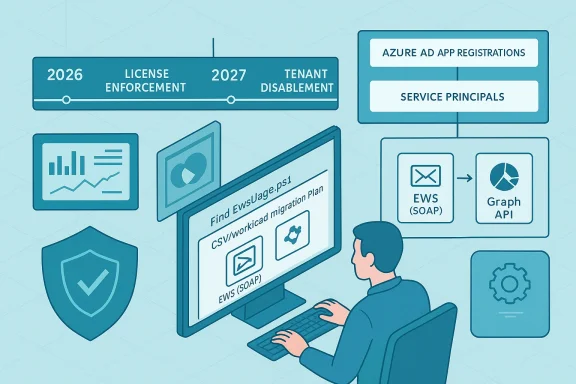
Microsoft first signaled that EWS would be deprecated years ago, but recent security events and accelerated platform hardening have shortened the operational runway. The Exchange team is rolling out a phased, admin-controllable disablement that begins in October 2026 and concludes with a permanent shutdown in 2027; separate, earlier enforcement actions target mailboxes licensed with Kiosk / Frontline SKUs and can cause failures months before the tenant-wide blocking begins. These changes are intended to reduce legacy attack surface and consolidate mailbox access around the modern Microsoft Graph API.
Why this matters now
What the script (and workflow) delivers
Practical preflight checklist
High priority (migrate immediately)
Conclusion
EWS retirement is not a distant “someday” problem; with license enforcement in mid‑2026 and tenant-level disablement starting October 1, 2026, organizations need an identity-centric inventory and a prioritized migration plan now. Use the Microsoft 365 admin reports to quantify SOAP activity, then pivot to an app-centric discovery script to identify owners, confirm active usage, and map each integration to Microsoft Graph or an approved alternative. Run the discovery, create the worklist, engage owners and vendors, and track to completion — and make sure any short-term license or allow-list exceptions are documented, minimal, and time-bound. The migration is an operational program as much as a technical exercise; the organizations that treat it as such will avoid the worst production outages and gain a more modern, secure integration posture.
Source: Microsoft Exchange Team Blog Notes From the Field: Finding and Remediating EWS App Usage Before Retirement | Microsoft Community Hub
 Background / Overview
Microsoft first signaled that EWS would be deprecated years ago, but recent security events and accelerated platform hardening have shortened the operational runway. The Exchange team is rolling out a phased, admin-controllable disablement that begins in October 2026 and concludes with a permanent shutdown in 2027; separate, earlier enforcement actions target mailboxes licensed with Kiosk / Frontline SKUs and can cause failures months before the tenant-wide blocking begins. These changes are intended to reduce legacy attack surface and consolidate mailbox access around the modern Microsoft Graph API.Why this matters now
- EWS is widely embedded in line-of-business scripts, vendor tools, multifunction printers, and long‑running automations. A surprising number of these use simple credential patterns and broad mailbox access.
- Microsoft will begin tenant-by-tenant disablement starting October 1, 2026 and is planning a complete shutdown in 2027; tenants that don’t proactively manage allow lists or migrate will experience outages.
- License-based enforcement for Kiosk / Frontline worker mailboxes (F1 / F3 / Exchange Online Kiosk) will be applied earlier — Microsoft moved the enforcement window to the end of June 2026 with requests returning HTTP 403 from July 1, 2026 if a mailbox has only those SKUs assigned. That means some integrations may fail well before October.
What Microsoft announced — the calendar you must bake into project plans
- End of June 2026 (enforcement window; requests blocked from July 1, 2026): Microsoft will start blocking EWS access for mailboxes licensed exclusively with frontline or kiosk SKU types (Exchange Online Kiosk, Microsoft 365 / Office 365 F1, Microsoft 365 / Office 365 F3). Affected requests will receive HTTP 403 responses unless the mailbox has a superior EWS-capable license assigned.
- October 1, 2026 (tenant-by-tenant disablement begins): Microsoft will start changing the EWSEnabled property tenant-by-tenant; tenants left with the default or not using the allow list will see EWS blocked unless they set EWSEnabled=True and configure the AppID Allow List. Admins who proactively configure EWSEnabled and the allow list by the end of August 2026 can delay tenant impact in October.
- April 1, 2027 (final, irrevocable shutdown): Microsoft has stated the platform will be removed/disabled entirely and tenant-level toggles will be eliminated. Any remaining EWS-based dependence after this date will have no technical exception. ([techcommunity.microsoft.com](https://techcommunity.microsoft.com/blog/exchange/exchange-online-ews-your-time-is-almost-up/4492361?utm_sourcn‑premises Exchange: this retirement applies to Exchange Online (Microsoft 365). On‑premises Exchange Server products continue to support EWS per their own lifecycles; hybrid environments must test how cloud mailboxes and hybrid features respond to Graph migration.
Why an app-centric inventory matters (and how the script fills a practical gap)
The Microsoft 365 admin center EWS usage report is useful to quantify which SOAP actions and workloads are active across the tenant, but it doesn’t tell you which app registrations (Entra ID app objects / service principals) or teams own the calling code — nor does it directly connect an operation to a mailbox license population. The Exchange-App-Usage-Reporting pattern — exemplified by the Find-EwsUsage.ps1 workflow — is intended to bridge that identity and operational context gap so you can produce action‑oriented remediation worklists.What the script (and workflow) delivers
- Identifies Azure AD app registrations / service principals that have Exchange/EWS-related permissions.
- Correlates those app objects to sign-in activity and audit logs to determine “is it still used?”
- Produces CSV export files (app-centric worklists) that you can route to owners or engineering teams.
- Outputs a user license report to flag mailbox populations with Kiosk / Frontline SKUs that will lose EWS access earlier.
- Helps you distinguish between application (app-only) permissions and delegated (user-context) patterns, which is essential for migration design.
Verifying the script environment and required permissions (do this before you run anything)
The Find-EwsUsage.ps1 pattern uses Microsoft Graph and Exchange/audit logs, and therefore requires application permissions to read directory and audit data at scale. The commonly required permissions (as described in the repository and supporting documentation) include:- AuditLogsQuery.Read.All (to query Exchange audit logs / Purview queries).
- AuditLogs.Read.All (audit log read access).
- Application.Read.All (to list app registrations and service principals).
- Directory.Read.All (to read user license information).
Practical preflight checklist
- Create an Azure AD app registration with the smallest set of application permissions required and get admin consent.
- Use certificate-based authentication for long-running automation rather than client secrets where possible.
- Ensure the PowerShell host has the Microsoft Graph PowerShell SDK and ExchangeOnlineManagement modules installed and up to date.
- Run the scriin workstation or a hardened automation host; do not run it from a workstation with an excessive attack surface.
Step-by-step: run the app-usage workflow and produce prioritized worklists
The following is a practical runbook based on the Find-EwsUsage.ps1 usage pattern (paraphrased and clarified for operational teams). Adjust the dates, app IDs, and certificate thumbprints to your environment.- Prepare the environment
- Register an Azure AD application and grant the required application permissions (AuditLogsQuery.Read.All, AuditLogs.Read.All, Application.Read.All, Directory.Read.All).
- Provision a certificate in the CurrentUser or LocalMachine certificate store and upload the public key to the app registration.
- Install or update the Microsoft Graph PowerShell SDK and ExchangeOnlineManagement modules.
- Discover applications with EWS-related permissions
- Run the script in discovery mode (Operation: GetEwsActivity) to enumerate Entra ID apps that have Exchange/EWS permissions and capture last sign-in for the associated service principal.
- Output: App-SignInActivity-<timestamp>.csv (sortable by LastSignIn). Prioritize apps with recent sign-in timestamps.
- Drill into sign-in and audit activity for an app
- For each candidate app (especially those with recent sign-ins), run the script to extract sign-in events and EWS audit log activity (Operation: GetAppUsage; QueryType: SignInLogs or AuditLogs).
- Consider narrowing StartDate/EndDate and using smaller interval windows for large tenants to make queries performant.
- Output: <AppId>-SignInEvents-<timestamp>.csv and AuditRecords-<AppId>-<timestamp>.csv.
- Cross-check user license assignments
- Use the sign-in output to create a unique user list and feed that into the GetUserLicenses operation to determine if any of the mailboxes that the app interacts with are assigned Kiosk/F1/F3 SKUs.
- Output: Combined-User-License-Report.csv to show populations that may experience blocking on July 1, 2026.
- Interpret and triage
- Sort app CSVs by LastSignIn/RecentActivity: recent = high priority.
- For each app, identify the owner (application owner, service team, or vendor).
- Determine the usage pattern (read mail, send mail, calendar, contacts, delegated vs app-only).
- Map EWS operations observed to Microsoft Graph equivalents and estimate migration effort.
How to prioritize remediation work: a risk-based playbook
Once you have a list of EWS-enabled apps and the mailboxes they touch, triage using a simple risk-priority formula:High priority (migrate immediately)
- Apps with production traffic and recent sign-ins (last 90 days).
- Apps that affect critical mailboxes or services (e.g., shared mailboxes used for incident response, compliance reporting, or customer-facing automation).
- Apps that touch Kiosk / Frontline mailboxes (they will break starting July 1, 2026).
- Apps with intermittent recent use or used in scheduled reporting.
- Vendor products that have announced Graph migration paths but are not yet deployed in your tenant.
- Dormant or internal test apps with no recent activity but unclear ownership.
- Legacy internal scripts that are scheduled rarely — these still need an owner-confirmation and an expiration or rework plan.
- Contact the owner and label each app as: Migrate, Patch (vendor update), Reconfigure (e.g., add superior license), or Decommission.
- For vendor products, request a vendor timeline for Graph support and prioritize those without clear migration options.
- Schedule an operational test that simulates the July and October enforcement windows, ideally in a staging tenant or with test mailboxes to avoid production outage.
Migration patterns: EWS → Microsoft Graph (practical mapping and pitfalls)
Common EWS operations map to Graph endpoints, but there are important operational and security differences to validate:- Mail read/write: EWS GetItem/CreateItem → Graph /users/{id}/messages and batch endpoints. Graph supports delta queries and change notifications (webhooks) for near-real-time updates, but behavior and data formats differ; test thoroughly.
- Calendar: EWS Calendar operations → Graph /users/{id}/calendar/events, with better cross-service parity on modern Graph endpoints. Recurrence and exception handling often require careful re-testing.
- Contacts: /users/{id}/contacts maps directly, but contact card attributes and change semantics vary.
- App-only vs delegated: If you used application impersonation in EWS, you must design Graph app-only or delegated flows with least privilege (and use Application Access Policies to scope mailbox access). Note Microsoft has tightened impersonation and recommended app-only OAuth.
- Throttling and batching: Graph throttling behaviors differ; design exponential backoff and batch requests for scale.
- Permission model differences: Graph uses a distinct set of scopes and claims; ensure least-privilege application permissions and avoid granting Directory.Read.All unless necessary.
- Parity gaps: While Graph covers the vast majority of EWS use cases, a few specialized operations may still need rework or alternative approaches (Power Platform, Copilot Declarative Agents, or workflow re-architecture).
- If a vendor cannot migrate in time and a small set of mailboxes must retain EWS access, scope the app via Application Access Policies or use tenant-level allow lists to reduce blast radius — but treat this as a time-limited exception only. Microsoft’s allow list and EWSEnabled toggles provide temporary breathing room but are not a substitute for migration.
Kiosk / Frontline license special handling (April–July 2026 window)
Kiosk and Frontline SKUs were historically described as not including EWS rights in their service descriptions; enforcement is now operational. Key operational steps:- Identify whether any automation or vendor workflows use frontline/Kiosk mailboxes as service accounts. These are common in retail shift handover scenarios, shop-floor shared mailboxes, or printers using a frontline mailbox for scan-to-email.
- Options to remediate:
- Assign a superior license (Exchange Online Plan 1/2, or Microsoft 365 E3/E5) to restore EWS until you fully migrate. This is a short-term mitigation because tenant-level retirement is still coming.
- Reconfigure vendor products to use Graph-based endpoints or service accounts with appropriate licenses.
- Replace frontline mailbox usage for automation with scoped service principals and app-only Graph access where allowed.
Governance, security, and operational controls during migration
- Maintain an EWS migration tracker: app owner, app ID, migration status (Not Started / In Progress / Completed), and remediation deadline. Use the CSV outputs from the app-usage script as the canonical intake for that tracker.
- Apply least-privilege principles to any app you create to query audit/sign-in logs. Audit and rotate certificates/secrets and restrict the automation host.
- Use Application Access Policies and mailbox scoping in Exchange/Graph to reduce exposure for apps that must remain temporarily.
- Schedule periodic re-runs of the discovery script (e.g., weekly during the remediation surge, monthly thereafter) to detect regressions.
- Prepare runbooks for the two enforcement events: July 1, 2026 license-based block and the October 1, 2026 tenant-level disablement. Scripting a rapid remediation path (license assignment or temporary EWSEnabled toggles and allow list changes) can reduce outage time if you discover a missed dependency.
Strengths and limitations of the Find-EwsUsage pattern
Strengths- Translates usage telemetry into identity-aware, operational worklists that you can assign to owners and track.
- Correlates sign-in and audit data with app registrations and mailbox license assignments, enabling prioritized remediation.
- Produces exportable CSVs for engineering and vendor engagement.
- Requires high-privilege application permissions to run at scale — treat consent and credential storage as high-risk assets.
- Audit and sign-in logs have retention limits; very old or very sporadic EWS usage may be invisible and require additional telemetry sources (device logs, vendor logs, or network captures) to find.
- Parity gaps between EWS and Graph mean that not every feature set will be a straightforward one-to-one migration; some workflows will require re-architecting rather than API translation.
- Running discovery in production without proper controls can reveal sensitive operational patterns — ensure output files are protected and shared on a least-privilege basis.
- Microsoft’s timelines have evolved (dates were adjusted in late 2025), and some earlier community reports referenced March 1, 2026 for certain enforcement steps. The current, official guidance from the Exchange team (as of the most recent posts) sets the license enforcement to the end of June 2026 with HTTP 403 starting July 1, 2026 and tenant-level disablement beginning October 1, 2026; always confirm the Message Center and official Exchange blog for any last-minute updates. If you find conflicting dates in community posts, rely on the Exchange team announcements and Microsoft Learn guidance for operational decisions.
Recommended remediation roadmap — a practical 6–12 month plan
Months 0–1: Discovery & triage- Run the Find-EwsUsage discovery to produce app sign-in activity and user license reports.
- Build the initial prioritized worklist (critical/high/medium/low).
- Communicate with app owners and vendors; inform security and executive stakeholders of the timeline and potential impact.
- Execute migration for high-priority apps: refactor to Graph, or deploy vendor Graph updates.
- For short-term critical needs, reassign licenses to affected mailboxes or configure tenant allow lists temporarily.
- Implement scoped application access policies for any remaining app-only scenarios.
- Finish mid-priority migrations and reconfigure scheduled automations.
- Decommission or rotate stale app registrations; establish expiration and owner validation for previously dormant apps.
- Harden governance: enforce app registration naming, owner tagging, and documented purpose for new apps.
- Re-run discovery monthly to confirm EWS usage is trending to zero.
- Remove temporary license exceptions and verify no production impacts.
- Prepare for October 2026 tenant toggles and the April 2027 final shutdown with runbook tests in pilot tenants.
Final recommendations and an operational checklist
- Start now: the license enforcement for frontline/kiosk comes into effect July 1, 2026; don’t wait for October.
- Use both the Microsoft 365 admin center EWS usage report and an app‑centric script like Find-EwsUsage.ps1 — together they provide the operation-level and identity-level perspectives you need.
- Prioritize apps by recent sign-in activity and the criticality of the mailboxes they touch.
- Favor Graph migrations but plan for parity gaps; where immediate migration isn’t possible, use scoped exceptions and license reassignment with a strict timeline.
- Protect the script’s application credentials and audit runs; treat the automation as a sensitive operational tool.
- Re-run discovery regularly during the migration period and use CSV exports to provide engineers, vendors, and business owners with clear, sortable action items.
Conclusion
EWS retirement is not a distant “someday” problem; with license enforcement in mid‑2026 and tenant-level disablement starting October 1, 2026, organizations need an identity-centric inventory and a prioritized migration plan now. Use the Microsoft 365 admin reports to quantify SOAP activity, then pivot to an app-centric discovery script to identify owners, confirm active usage, and map each integration to Microsoft Graph or an approved alternative. Run the discovery, create the worklist, engage owners and vendors, and track to completion — and make sure any short-term license or allow-list exceptions are documented, minimal, and time-bound. The migration is an operational program as much as a technical exercise; the organizations that treat it as such will avoid the worst production outages and gain a more modern, secure integration posture.
Source: Microsoft Exchange Team Blog Notes From the Field: Finding and Remediating EWS App Usage Before Retirement | Microsoft Community Hub
