

Microsoft is adding finance-oriented Skills, visible Plans, and external data connections to Copilot in Excel for paid Microsoft 365 Copilot users, with custom Skills available now in Insider builds and broader rollout expected to follow in July 2026. The move is not just another AI button in the ribbon. It is Microsoft’s attempt to make Excel Copilot look less like a clever autocomplete engine and more like a governed junior analyst. For finance teams, that distinction matters because spreadsheets do not merely describe the business; they often become the business record.
The headline feature is Skills, and the name is telling. Microsoft is no longer pitching Copilot in Excel merely as a conversational assistant that responds to whatever prompt a user happens to type. It is trying to give organizations a way to encode repeatable spreadsheet work: build a discounted cash flow model this way, prepare a variance analysis that way, update the monthly reporting model according to our conventions.
That is a meaningful shift for Excel. Spreadsheets have always been personal software hiding inside enterprise workflows. Every finance department has its model whisperers, every analyst has preferred formulas, and every workbook carries traces of whoever last maintained it. Skills are Microsoft’s answer to that mess: a reusable instruction layer that tells Copilot not only what to do, but how the organization expects the work to be done.
Brian Jones, Microsoft’s vice president for Excel, framed the feature as a way to avoid starting from scratch every time. That is the right sales pitch, but the deeper promise is standardization. A prompt is ephemeral; a Skill is policy-adjacent. If it works, the finance team gets a shared way to turn tribal knowledge into a repeatable Copilot routine.
The risk is equally obvious. Any tool that can make spreadsheet work repeatable can also make spreadsheet mistakes repeatable. A flawed assumption embedded in a reusable Skill is more dangerous than a one-off hallucination, because it gains the legitimacy of process.
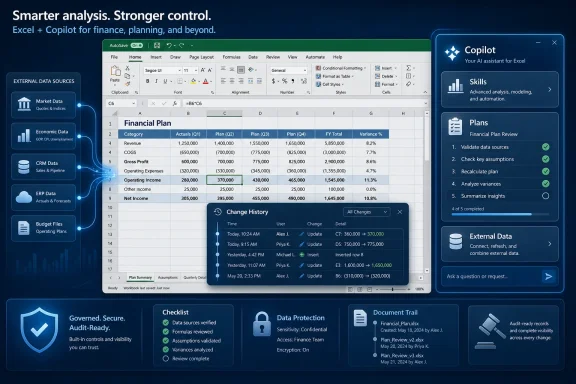
Copilot’s new finance features lean into that reality. Skills let Copilot execute a workflow. Plans let the user inspect the workflow before it happens. External data links let the workbook reach beyond itself into financial data providers such as Moody’s, CB Insights, Morningstar, PitchBook, LSEG, Ramp, and Velixo, depending on availability and partner implementation.
That combination changes the shape of the product. Excel Copilot is not just answering questions about cells anymore. It is being positioned as a work performer inside the grid, with access to instructions, data, formulas, and revision history.
This is why finance is the obvious beachhead. Finance teams already work in structured, recurring cycles: month-end close, board reporting, budget-versus-actuals, scenario planning, valuation, reconciliation. These tasks are tedious enough to automate, structured enough to template, and important enough that Microsoft needs to show serious controls.
That sounds mundane until you remember what kind of software Excel is. A word processor can tolerate a bad paragraph. A slide deck can survive an awkward chart. A spreadsheet with a wrong formula can quietly corrupt a forecast, an invoice, a compliance report, or an investment model.
Microsoft’s plan-before-edit model is an admission that generative AI in Excel cannot be treated like generative AI in chat. The grid is unforgiving. The issue is not whether Copilot can produce something plausible; it is whether a human can understand what Copilot is about to do before the numbers move.
The change history link posted back into the chat window is part of the same trust architecture. After Copilot finishes, its edits appear in the change history alongside human edits. That matters because finance work is collaborative and retrospective. People need to know not only what changed, but whether the change came from Sarah in FP&A, Mark in accounting, or an AI assistant acting under someone’s instruction.
This is where Microsoft is trying to draw a line between automation and accountability. Copilot may perform the edit, but the workflow still has to leave a trail that a manager, auditor, or skeptical colleague can follow.
Instead of the user manually finding the right data, importing it, cleaning it, and then asking questions, Copilot can become the interface between the workbook and the external source. Ask for a company profile, a market benchmark, a credit outlook, or a peer comparison, and the assistant can bring the data into the spreadsheet context where the model already lives.
For Microsoft, this is a classic platform move. Excel is already where much of the analysis happens. If Copilot can also become the broker of trusted external data, Microsoft strengthens Excel’s position as the front end for financial work, even when the underlying data originates elsewhere.
For data providers, the incentive is also clear. If analysts increasingly ask AI assistants for market and company information, premium data vendors need to appear inside those assistants without losing entitlement controls, licensing boundaries, or brand trust. The spreadsheet becomes the destination; Copilot becomes the route.
The competitive context is hard to miss. OpenAI, Google, and a growing field of finance AI startups all want to own the analyst workflow. Microsoft’s advantage is not that it invented financial modeling. Its advantage is that Excel is already installed at the center of the job.
But finance departments are not ordinary productivity buyers. Their work is tied to controls, approvals, reporting deadlines, board materials, investor communication, debt covenants, tax positions, and regulatory exposure. Saving time is useful only if the saved time does not reappear as review burden.
That is why the oversight features matter. Plans, change history, and reusable Skills are not cosmetic additions. They are Microsoft’s attempt to address the predictable objection from CFOs and IT leaders: if AI changes the workbook, how do we know what it did?
The answer is still incomplete. A visible plan helps, but it does not guarantee that the resulting formulas are semantically correct. A change history helps, but it does not explain whether an assumption was appropriate. A Skill helps standardize work, but it also needs governance around who can create, approve, update, and retire those Skills.
In other words, Microsoft has moved the problem from “Can Copilot do this?” to “Can the organization govern Copilot doing this?” That is progress, but it is not the same as solved.
For finance teams, the Insider channel creates an awkward but useful testing ground. The people most capable of evaluating Copilot Skills are often the same people responsible for production models. They understand the edge cases, but they also cannot casually risk live workbooks.
The sensible approach is to treat Skills like macros, templates, and Power Query transformations: test them against copies, validate outputs, document assumptions, and restrict who can publish reusable workflows. A Skill that builds a model should be reviewed like a model-building methodology, not like a saved prompt.
This is also where IT will have to pay attention to storage and permissions. The ability to save custom Skills to OneDrive sounds convenient, but OneDrive is both personal and organizational territory. If Skills become operational assets, companies will need policies for naming, ownership, access, retention, and offboarding.
Microsoft’s consumer-friendly packaging can obscure that point. In a large organization, “save it to OneDrive” is not merely a file location. It is a governance decision.
Those numbers matter because Copilot in Excel is not being positioned as a free enhancement to everyone’s spreadsheet. It is an add-on layer for organizations willing to pay for AI inside Microsoft 365. In finance, that may be easier to justify than in some other departments because analyst time is expensive and spreadsheet work is repetitive.
Still, licensing will shape adoption. A finance group may want every analyst to use Copilot, but procurement may prefer a smaller group of power users. That creates a split workflow where some employees can create and run Skills while others review or inherit the outputs without the same tooling.
For sysadmins, this is where the mundane details become important. Which users have Copilot licenses? Which update channel are they on? Are they using Excel for Windows, Mac, or the web? Which connectors are approved? Are external data providers licensed separately? The value of Copilot in Excel will depend less on the announcement and more on whether the tenant is actually configured to support the workflow.
The promise of AI productivity often collapses at the boundary between demo and deployment. Excel Copilot’s finance push will be no different.
Copilot Skills sit somewhere else. They are natural-language-adjacent automation assets, designed to guide an AI system through a repeatable process. That makes them more accessible than traditional scripting, but also harder to reason about in conventional software-engineering terms.
A macro is inspectable code. A Power Query step is explicit transformation logic. A Copilot Skill may be a structured instruction set, but its execution still depends on model behavior, workbook context, permissions, and available data. That makes review more subtle.
This does not make Skills bad. It makes them different. The industry is moving from deterministic automation toward guided AI execution, and Excel is where many office workers will encounter that shift first.
The macro era taught IT departments that end-user automation can run the business while simultaneously terrifying the security team. Copilot Skills may repeat that history unless Microsoft and customers build governance early rather than after the first messy incident.
If third-party vendors can ship Skills that encode best practices for their data or workflows, Excel becomes a distribution surface for specialized finance automation. A spend management provider could help analyze expenses. A financial data firm could guide valuation workflows. An ERP-adjacent tool could assist with reporting or reconciliation routines.
This is potentially powerful because finance teams rarely live inside one system. They use ERP platforms, data terminals, planning tools, procurement systems, bank portals, and endless Excel workbooks. If partner Skills help bridge those contexts, Copilot becomes more than an assistant; it becomes an orchestration layer.
But there is a trust problem here too. A vendor-authored Skill may be useful, but organizations will need to understand what it does, what data it touches, what assumptions it carries, and whether it reflects the customer’s internal policies. The fact that a Skill comes from a reputable partner does not automatically make it suitable for every reporting environment.
The likely future is a split between prebuilt Skills for common tasks and heavily customized internal Skills for sensitive workflows. Microsoft will want the former for scale. Enterprises will demand the latter for control.
That is increasingly how Microsoft’s platform strategy works. Windows remains the endpoint, identity anchor, management target, and local productivity environment. But the new value arrives through Microsoft 365 services, Copilot licensing, cloud data connectors, and app-level experiences that are updated continuously.
For admins, this means Excel feature management is no longer just a matter of Office build numbers. It intersects with Entra identity, Microsoft 365 licensing, sensitivity labels, OneDrive storage, update channels, connected experiences, data-loss prevention, and third-party service approvals.
For users, the experience will feel deceptively simple. A Copilot pane offers to build the model. A plan appears. A change history entry shows what happened. Data flows in from a provider. The complexity is hidden behind the assistant.
That hidden complexity is exactly why IT departments should not treat this as a novelty. Once Copilot can modify finance workbooks and pull external data, it becomes part of the organization’s information supply chain.
There is also the problem of confidence. AI-generated spreadsheet work can look polished before it is correct. A neatly formatted model with consistent formulas and imported market data may create an impression of authority that exceeds the reliability of the underlying assumptions.
Finance professionals already know this problem in another form. A beautiful spreadsheet has never guaranteed a sound model. Copilot raises the stakes because it can produce beauty and structure quickly.
That is why human review remains central. The best use of Copilot in Excel is not to replace financial judgment, but to compress the mechanical work around it. Draft the model, flag the variance, pull the data, format the output, expose the changes. The human still owns the assumptions, the interpretation, and the decision.
Microsoft’s challenge is to keep saying that even while marketing the product as transformative. The temptation in AI software is always to sell autonomy. In finance, the safer and more credible pitch is supervised acceleration.
Who understands the analyst’s task? Who can access the right data? Who can generate a model that follows accepted practice? Who can leave an audit trail? Who can plug into enterprise identity and compliance systems? These are the questions that matter as AI enters the spreadsheet.
Microsoft has a formidable position because Excel is the default language of business analysis. But default status can breed complacency. If Copilot feels opaque, expensive, or hard to govern, finance teams will experiment with specialized AI tools outside Microsoft’s walls. Some already are.
The new Excel Copilot features are therefore defensive as much as offensive. Microsoft wants to prevent the analyst workflow from drifting into standalone AI products that export back into Excel only at the end. By embedding Skills, Plans, and data links directly in Excel, Microsoft is trying to keep the center of gravity inside the workbook.
That is a rational strategy. It is also a reminder that the spreadsheet is not going away. It is being surrounded by agents.
A reasonable policy does not need to smother experimentation. It should identify which workbooks are safe for Copilot-assisted editing, which external connectors are approved, who may create reusable Skills, and how AI-generated changes are reviewed. The goal is to make Copilot boring enough to be useful.
That may sound unromantic, but boring is underrated in enterprise software. Finance departments do not need magic. They need reliable work completed faster, with enough transparency that reviewers can trust the path from input to output.
Microsoft is closer to that with Plans and change history than it was with simple prompt-based spreadsheet assistance. But customers still need their own process around the tool. Copilot can show its proposed steps; it cannot decide whether those steps satisfy the company’s control environment.
The organizations that benefit most will be the ones that treat Skills as managed assets, not clever shortcuts.
 Microsoft Is Teaching Excel to Follow the House Style
The headline feature is Skills, and the name is telling. Microsoft is no longer pitching Copilot in Excel merely as a conversational assistant that responds to whatever prompt a user happens to type. It is trying to give organizations a way to encode repeatable spreadsheet work: build a discounted cash flow model this way, prepare a variance analysis that way, update the monthly reporting model according to our conventions.That is a meaningful shift for Excel. Spreadsheets have always been personal software hiding inside enterprise workflows. Every finance department has its model whisperers, every analyst has preferred formulas, and every workbook carries traces of whoever last maintained it. Skills are Microsoft’s answer to that mess: a reusable instruction layer that tells Copilot not only what to do, but how the organization expects the work to be done.
Brian Jones, Microsoft’s vice president for Excel, framed the feature as a way to avoid starting from scratch every time. That is the right sales pitch, but the deeper promise is standardization. A prompt is ephemeral; a Skill is policy-adjacent. If it works, the finance team gets a shared way to turn tribal knowledge into a repeatable Copilot routine.
The risk is equally obvious. Any tool that can make spreadsheet work repeatable can also make spreadsheet mistakes repeatable. A flawed assumption embedded in a reusable Skill is more dangerous than a one-off hallucination, because it gains the legitimacy of process.
The Spreadsheet Is Becoming an Agent Workspace
Excel has survived decades of software revolutions because it is both application and programming environment. Users do not merely enter data; they build little systems. A workbook can be a forecast, a dashboard, a reconciliation engine, a pricing calculator, and a political artifact passed between departments.Copilot’s new finance features lean into that reality. Skills let Copilot execute a workflow. Plans let the user inspect the workflow before it happens. External data links let the workbook reach beyond itself into financial data providers such as Moody’s, CB Insights, Morningstar, PitchBook, LSEG, Ramp, and Velixo, depending on availability and partner implementation.
That combination changes the shape of the product. Excel Copilot is not just answering questions about cells anymore. It is being positioned as a work performer inside the grid, with access to instructions, data, formulas, and revision history.
This is why finance is the obvious beachhead. Finance teams already work in structured, recurring cycles: month-end close, board reporting, budget-versus-actuals, scenario planning, valuation, reconciliation. These tasks are tedious enough to automate, structured enough to template, and important enough that Microsoft needs to show serious controls.
The Plan Button Is Microsoft’s Admission That Trust Is the Product
The Plans feature may be less glamorous than Skills, but it is probably more important. Before Copilot touches spreadsheet data, it shows the user a list of intended actions. The user can approve the plan, revise it, or ask additional questions before the workbook changes.That sounds mundane until you remember what kind of software Excel is. A word processor can tolerate a bad paragraph. A slide deck can survive an awkward chart. A spreadsheet with a wrong formula can quietly corrupt a forecast, an invoice, a compliance report, or an investment model.
Microsoft’s plan-before-edit model is an admission that generative AI in Excel cannot be treated like generative AI in chat. The grid is unforgiving. The issue is not whether Copilot can produce something plausible; it is whether a human can understand what Copilot is about to do before the numbers move.
The change history link posted back into the chat window is part of the same trust architecture. After Copilot finishes, its edits appear in the change history alongside human edits. That matters because finance work is collaborative and retrospective. People need to know not only what changed, but whether the change came from Sarah in FP&A, Mark in accounting, or an AI assistant acting under someone’s instruction.
This is where Microsoft is trying to draw a line between automation and accountability. Copilot may perform the edit, but the workflow still has to leave a trail that a manager, auditor, or skeptical colleague can follow.
External Data Is the Real Prize
The external data integrations may prove to be the most strategically important part of the announcement. Pulling information from financial data platforms directly into Excel is not a new dream; analysts have lived with add-ins, exports, copy-paste routines, APIs, and fragile refresh workflows for years. What Microsoft is doing is recasting that problem through Copilot.Instead of the user manually finding the right data, importing it, cleaning it, and then asking questions, Copilot can become the interface between the workbook and the external source. Ask for a company profile, a market benchmark, a credit outlook, or a peer comparison, and the assistant can bring the data into the spreadsheet context where the model already lives.
For Microsoft, this is a classic platform move. Excel is already where much of the analysis happens. If Copilot can also become the broker of trusted external data, Microsoft strengthens Excel’s position as the front end for financial work, even when the underlying data originates elsewhere.
For data providers, the incentive is also clear. If analysts increasingly ask AI assistants for market and company information, premium data vendors need to appear inside those assistants without losing entitlement controls, licensing boundaries, or brand trust. The spreadsheet becomes the destination; Copilot becomes the route.
The competitive context is hard to miss. OpenAI, Google, and a growing field of finance AI startups all want to own the analyst workflow. Microsoft’s advantage is not that it invented financial modeling. Its advantage is that Excel is already installed at the center of the job.
Finance Teams Wanted Speed, but They Will Judge the Audit Trail
Microsoft’s framing emphasizes productivity, and understandably so. Building a DCF, refreshing a reporting model, or preparing variance commentary can burn hours. If Copilot can do first-pass work in a few minutes, the value proposition is simple.But finance departments are not ordinary productivity buyers. Their work is tied to controls, approvals, reporting deadlines, board materials, investor communication, debt covenants, tax positions, and regulatory exposure. Saving time is useful only if the saved time does not reappear as review burden.
That is why the oversight features matter. Plans, change history, and reusable Skills are not cosmetic additions. They are Microsoft’s attempt to address the predictable objection from CFOs and IT leaders: if AI changes the workbook, how do we know what it did?
The answer is still incomplete. A visible plan helps, but it does not guarantee that the resulting formulas are semantically correct. A change history helps, but it does not explain whether an assumption was appropriate. A Skill helps standardize work, but it also needs governance around who can create, approve, update, and retire those Skills.
In other words, Microsoft has moved the problem from “Can Copilot do this?” to “Can the organization govern Copilot doing this?” That is progress, but it is not the same as solved.
The Insider Channel Becomes a Finance Lab
Custom Skills are available immediately through the Insider channel, with public availability expected next month. That rollout pattern is familiar to Windows and Office watchers: Microsoft tests advanced capability with early adopters, gathers telemetry and feedback, then broadens access once the feature is stable enough for mainstream use.For finance teams, the Insider channel creates an awkward but useful testing ground. The people most capable of evaluating Copilot Skills are often the same people responsible for production models. They understand the edge cases, but they also cannot casually risk live workbooks.
The sensible approach is to treat Skills like macros, templates, and Power Query transformations: test them against copies, validate outputs, document assumptions, and restrict who can publish reusable workflows. A Skill that builds a model should be reviewed like a model-building methodology, not like a saved prompt.
This is also where IT will have to pay attention to storage and permissions. The ability to save custom Skills to OneDrive sounds convenient, but OneDrive is both personal and organizational territory. If Skills become operational assets, companies will need policies for naming, ownership, access, retention, and offboarding.
Microsoft’s consumer-friendly packaging can obscure that point. In a large organization, “save it to OneDrive” is not merely a file location. It is a governance decision.
Pricing Keeps Copilot in the Managed Workplace
The rollout is aimed at paid Microsoft 365 Copilot users. The enterprise price remains $30 per user per month, while the business plan for small and midsize organizations with fewer than 300 employees is priced lower at $21 per user per month.Those numbers matter because Copilot in Excel is not being positioned as a free enhancement to everyone’s spreadsheet. It is an add-on layer for organizations willing to pay for AI inside Microsoft 365. In finance, that may be easier to justify than in some other departments because analyst time is expensive and spreadsheet work is repetitive.
Still, licensing will shape adoption. A finance group may want every analyst to use Copilot, but procurement may prefer a smaller group of power users. That creates a split workflow where some employees can create and run Skills while others review or inherit the outputs without the same tooling.
For sysadmins, this is where the mundane details become important. Which users have Copilot licenses? Which update channel are they on? Are they using Excel for Windows, Mac, or the web? Which connectors are approved? Are external data providers licensed separately? The value of Copilot in Excel will depend less on the announcement and more on whether the tenant is actually configured to support the workflow.
The promise of AI productivity often collapses at the boundary between demo and deployment. Excel Copilot’s finance push will be no different.
Microsoft Is Rebuilding the Macro Bargain
Longtime Excel users should recognize the shape of this moment. Excel has always let users automate work, but the automation bargain has changed over time. Macros gave power users enormous flexibility, but also created security nightmares and maintenance problems. Power Query and Power Pivot brought more structure, but required a higher level of skill. Office Scripts moved automation toward the cloud and modern JavaScript.Copilot Skills sit somewhere else. They are natural-language-adjacent automation assets, designed to guide an AI system through a repeatable process. That makes them more accessible than traditional scripting, but also harder to reason about in conventional software-engineering terms.
A macro is inspectable code. A Power Query step is explicit transformation logic. A Copilot Skill may be a structured instruction set, but its execution still depends on model behavior, workbook context, permissions, and available data. That makes review more subtle.
This does not make Skills bad. It makes them different. The industry is moving from deterministic automation toward guided AI execution, and Excel is where many office workers will encounter that shift first.
The macro era taught IT departments that end-user automation can run the business while simultaneously terrifying the security team. Copilot Skills may repeat that history unless Microsoft and customers build governance early rather than after the first messy incident.
The Partner Ecosystem Wants a Seat Inside the Workbook
Microsoft says financial software partners such as LSEG, Ramp, and Velixo are developing their own Skills. That detail deserves attention because it points to an ecosystem play beyond Microsoft-authored templates.If third-party vendors can ship Skills that encode best practices for their data or workflows, Excel becomes a distribution surface for specialized finance automation. A spend management provider could help analyze expenses. A financial data firm could guide valuation workflows. An ERP-adjacent tool could assist with reporting or reconciliation routines.
This is potentially powerful because finance teams rarely live inside one system. They use ERP platforms, data terminals, planning tools, procurement systems, bank portals, and endless Excel workbooks. If partner Skills help bridge those contexts, Copilot becomes more than an assistant; it becomes an orchestration layer.
But there is a trust problem here too. A vendor-authored Skill may be useful, but organizations will need to understand what it does, what data it touches, what assumptions it carries, and whether it reflects the customer’s internal policies. The fact that a Skill comes from a reputable partner does not automatically make it suitable for every reporting environment.
The likely future is a split between prebuilt Skills for common tasks and heavily customized internal Skills for sensitive workflows. Microsoft will want the former for scale. Enterprises will demand the latter for control.
Windows Users Will Feel This Through Office, Not the Operating System
For the WindowsForum audience, the interesting part is that this is not a Windows feature in the traditional sense. It will not arrive as a Start menu change, a kernel improvement, or a security baseline. It will show up in the daily Office surface that many Windows users actually live in.That is increasingly how Microsoft’s platform strategy works. Windows remains the endpoint, identity anchor, management target, and local productivity environment. But the new value arrives through Microsoft 365 services, Copilot licensing, cloud data connectors, and app-level experiences that are updated continuously.
For admins, this means Excel feature management is no longer just a matter of Office build numbers. It intersects with Entra identity, Microsoft 365 licensing, sensitivity labels, OneDrive storage, update channels, connected experiences, data-loss prevention, and third-party service approvals.
For users, the experience will feel deceptively simple. A Copilot pane offers to build the model. A plan appears. A change history entry shows what happened. Data flows in from a provider. The complexity is hidden behind the assistant.
That hidden complexity is exactly why IT departments should not treat this as a novelty. Once Copilot can modify finance workbooks and pull external data, it becomes part of the organization’s information supply chain.
The New Controls Will Not Eliminate the Old Excel Problems
Microsoft’s additions address several AI-specific concerns, but they do not abolish the classic spreadsheet risks. Workbooks can still contain stale assumptions, broken links, hidden rows, inconsistent formulas, manual overrides, and undocumented logic. Copilot may help detect some of that, but it can also operate on top of it.There is also the problem of confidence. AI-generated spreadsheet work can look polished before it is correct. A neatly formatted model with consistent formulas and imported market data may create an impression of authority that exceeds the reliability of the underlying assumptions.
Finance professionals already know this problem in another form. A beautiful spreadsheet has never guaranteed a sound model. Copilot raises the stakes because it can produce beauty and structure quickly.
That is why human review remains central. The best use of Copilot in Excel is not to replace financial judgment, but to compress the mechanical work around it. Draft the model, flag the variance, pull the data, format the output, expose the changes. The human still owns the assumptions, the interpretation, and the decision.
Microsoft’s challenge is to keep saying that even while marketing the product as transformative. The temptation in AI software is always to sell autonomy. In finance, the safer and more credible pitch is supervised acceleration.
The Spreadsheet War Moves From Formulas to Workflow Ownership
The broader market signal is that spreadsheets are no longer being contested only at the feature level. For years, Excel alternatives competed on collaboration, cloud-native design, visualization, automation, or database-like structure. Now the fight is over workflow ownership.Who understands the analyst’s task? Who can access the right data? Who can generate a model that follows accepted practice? Who can leave an audit trail? Who can plug into enterprise identity and compliance systems? These are the questions that matter as AI enters the spreadsheet.
Microsoft has a formidable position because Excel is the default language of business analysis. But default status can breed complacency. If Copilot feels opaque, expensive, or hard to govern, finance teams will experiment with specialized AI tools outside Microsoft’s walls. Some already are.
The new Excel Copilot features are therefore defensive as much as offensive. Microsoft wants to prevent the analyst workflow from drifting into standalone AI products that export back into Excel only at the end. By embedding Skills, Plans, and data links directly in Excel, Microsoft is trying to keep the center of gravity inside the workbook.
That is a rational strategy. It is also a reminder that the spreadsheet is not going away. It is being surrounded by agents.
The Workbook Now Needs a Copilot Policy
The practical lesson for organizations is not to wait until Copilot-generated models appear in production folders. Finance leaders and IT teams should decide how these tools will be used before they become informal practice.A reasonable policy does not need to smother experimentation. It should identify which workbooks are safe for Copilot-assisted editing, which external connectors are approved, who may create reusable Skills, and how AI-generated changes are reviewed. The goal is to make Copilot boring enough to be useful.
That may sound unromantic, but boring is underrated in enterprise software. Finance departments do not need magic. They need reliable work completed faster, with enough transparency that reviewers can trust the path from input to output.
Microsoft is closer to that with Plans and change history than it was with simple prompt-based spreadsheet assistance. But customers still need their own process around the tool. Copilot can show its proposed steps; it cannot decide whether those steps satisfy the company’s control environment.
The organizations that benefit most will be the ones that treat Skills as managed assets, not clever shortcuts.
The Finance Copilot Checklist Writes Itself
Microsoft’s Excel update is best understood as a controlled expansion of AI from suggestion into execution. The new features are concrete enough that finance and IT teams can start planning around them now, even if rollout timing varies by tenant, platform, and update channel.- Copilot Skills are designed to make recurring finance workflows reusable, including tasks such as DCF modeling, variance analysis, and monthly reporting updates.
- Plans give users a chance to inspect and revise Copilot’s intended spreadsheet actions before edits are applied.
- Copilot-generated edits can appear in change history alongside human edits, making review and accountability more practical.
- External data integrations bring financial information from approved third-party providers into Excel workflows without relying solely on manual copy-and-paste routines.
- Custom Skills should be governed like templates, scripts, or finance models because a reusable AI workflow can spread both best practices and bad assumptions.
- Licensing, update channels, connector approvals, OneDrive storage, and data-provider entitlements will determine whether the feature works cleanly in real organizations.
References
- Primary source: 디지털투데이
Published: Sat, 27 Jun 2026 23:08:18 GMT
Microsoft adds finance skills, plans and external data links to Excel Copilot
Microsoft added three features for financial professionals to Excel Copilot: skills, plans and external data integration. Skills let users define processes Copilot will perform in Excel, while plans show a task list before Copilot changes spreadsheet data and allow users to approve or revise...www.digitaltoday.co.kr - Related coverage: digitaltrends.com
Microsoft Copilot can now handle more of your finance work in Excel with reusable skills and data connectors - Digital Trends
Microsoft added reusable Skills, new financial data connectors, and traceability features to Copilot in Excel, built specifically for finance teams.www.digitaltrends.com - Official source: support.microsoft.com
Get started with Copilot in Excel | Microsoft Support
Use Copilot in Excel to analyze data, generate formulas, create charts, and more.support.microsoft.com - Official source: microsoft.com
Your request has been blocked. This could be due to several reasons.
www.microsoft.com
- Related coverage: techmymoney.com
Copilot in Excel Gets Skills, Finance Connectors, and Traceability
Copilot in Excel now supports reusable Skills, six new financial data connectors, and full change tracking for professional finance teams. techmymoney.com
- Official source: techcommunity.microsoft.com
Introducing federated Copilot connectors for LSEG and Moody's in Excel | Microsoft Community Hub
Earlier this month, we announced Microsoft 365 Copilot federated connectors were coming to Copilot in Excel. Built on the emerging industry standard... techcommunity.microsoft.com
- Related coverage: windowsreport.com
Microsoft Brings Custom Skills and Finance Data Connectors to Excel Copilot
Microsoft expands Excel Copilot with custom Skills, FactSet and Morningstar connectors, planning mode, and improved collaboration features. windowsreport.com
- Official source: learn.microsoft.com
Finance agents in Microsoft 365 - Microsoft Excel experiences | Microsoft Learn
Microsoft 365 Copilot for Finance enables finance professionals to perform their tasks in Microsoft Excel.learn.microsoft.com - Related coverage: computerworld.com
Microsoft adds new skills — and more oversight — for Copilot in Excel – Computerworld
The new features, including connectors to third-party data sources, are aimed at making the AI assistant more useful for finance professionals. www.computerworld.com
- Official source: openai.com
Introducing ChatGPT for Excel and new financial data integrations | OpenAI
OpenAI introduces ChatGPT for Excel and new financial app integrations, powered by GPT-5.4 to accelerate modeling, research, and analysis in regulated environments.openai.com - Related coverage: morningstar.com
- Related coverage: letsdatascience.com
Microsoft Excel Adds Federated Financial Connectors and Copilot Skills | Let's Data Science
Per a Microsoft Excel blog post (May 28, 2026), Copilot in Excel can now pull live data from **LSEG** and **Moody's** using federated connectors built on the `Model Context Protocol`. The blog describes a workflow where users connect via the Sources menu with provider credentials, enable... letsdatascience.com
- Related coverage: iowainstitute.coop
</rdf:Alt> </dc:title> <dc:description> <rdf:Alt> <rdf:li xml:lang="x-default"/> </rdf:Alt> </dc:description> <dc:creator> <rdf:Seq> <rdf:li>Matthew
</rdf:Alt> </dc:description> <dc:creator> <rdf:Seq> <rdf:li>Matthew Eddyiowainstitute.coop
- Official source: cdn-dynmedia-1.microsoft.com
- Related coverage: press.spglobal.com
S&P Global Launches AI-Ready Commodities Data Integrated With Microsoft 365 Copilot - Apr 21, 2025
PDF documentpress.spglobal.com
- Related coverage: networksplus.com
- Official source: cdn.techcommunity.microsoft.com
