

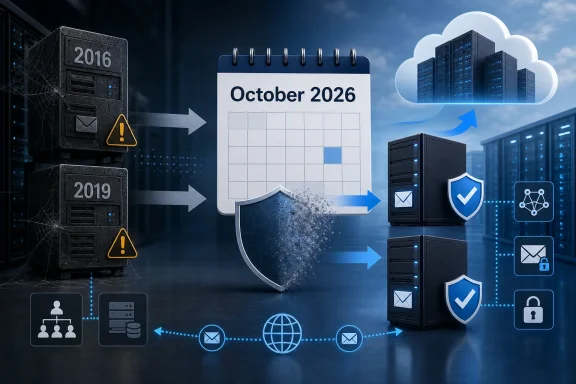
Microsoft has drawn a hard final line under Exchange Server 2016 and Exchange Server 2019: the Extended Security Update program ends when October 2026 closes, and there will be no third coverage period. Organizations enrolled in the current Period 2 program will receive no further updates for those products after that point, even if a serious vulnerability emerges later. With only a few months remaining, Exchange administrators must now treat migration to Exchange Server Subscription Edition or Exchange Online as an active production project rather than a lifecycle task that can be postponed again.
Exchange Server 2016 and Exchange Server 2019 officially reached the end of Microsoft support on October 14, 2025. That date ended the ordinary servicing lifecycle for both products, including routine security updates, non-security fixes, bug corrections, and standard technical support.
Exchange Server 2016 had been available since October 2015, while Exchange Server 2019 arrived three years later. Despite their different ages, Microsoft aligned the products on the same end-of-support date as part of its transition toward Exchange Server Subscription Edition, commonly called Exchange Server SE.
Microsoft therefore introduced a paid Extended Security Update program covering the initial post-support period. That first phase, now referred to as Period 1, ran from October 2025 through April 2026.
As April approached, some customers reported that they still needed additional time. Microsoft responded by creating Period 2, covering May through the end of October 2026. The company was clear that this was a separately purchased six-month arrangement rather than an automatic extension of existing Period 1 contracts.
There will be no Period 3, no grace period, and no continuation beyond October 2026. Once that month ends, Exchange 2016 and Exchange 2019 will no longer receive updates through the ESU mechanism.
That distinction matters because technical functionality and operational supportability are not the same thing. A server can appear healthy while exposing the organization to growing security, compliance, and recovery risks.
Network filtering, application firewalls, endpoint protection, and service isolation may reduce exposure in some cases. They cannot reliably replace a vendor-supplied correction for a flaw inside Exchange, IIS integration, transport processing, authentication, or mailbox services.
Organizations may still obtain help from consultants, support partners, or incident-response specialists. However, those parties cannot modify Microsoft’s closed product code or compel Microsoft to create a fix for an unsupported release.
Administrators should therefore avoid treating the October date as the point at which migration planning begins. It is the point by which the migration and retirement work should already be complete.
If Microsoft determines that no applicable update is required during a given month, there may be nothing to deploy. Customers are paying for eligibility and access to applicable fixes, not for a guaranteed monthly package.
That private distribution model increases the importance of internal contract ownership. Security teams, Exchange administrators, procurement staff, and Microsoft account contacts must know who receives notifications and how packages are transferred into the organization’s testing and deployment process.
That design is central to Microsoft’s claim that the supported in-place transition from Exchange 2019 is low risk. Instead of introducing a completely rewritten transport engine, database architecture, or client-access stack at the first SE release, Microsoft created a bridge into the new servicing model.
This does not mean an Exchange SE upgrade is risk-free. It means the initial product transition is more comparable to a cumulative update than to a conventional major-version replacement.
For administrators, that creates a useful but temporary planning window. The immediate objective is to enter the supported SE branch, after which future cumulative updates can deliver the evolving platform.
The operational lesson is straightforward: organizations should no longer expect to install an Exchange version and leave its cumulative-update strategy largely untouched for several years. Regular servicing becomes part of the permanent operating model.
The process resembles the installation of an Exchange cumulative update. Setup replaces product components while preserving the server’s established role in the Exchange organization.
A practical high-level sequence is:
For example, an organization cannot treat an Exchange 2019-to-SE conversion and a Windows Server 2022-to-2025 in-place upgrade as one continuous supported operation. If the organization needs a new operating-system generation, a legacy migration to new Exchange servers may be the safer and supported design.
A new-server migration can provide a cleaner boundary. It also gives administrators an opportunity to redesign storage, refresh certificates, update load balancing, review firewall exposure, and remove obsolete integrations.
This is one reason Exchange 2016 customers face significantly greater deadline pressure. Their projects involve coexistence and migration rather than a CU-like conversion on the existing machine.
In either case, the migration must account for more than user mailboxes. Administrators may need to move or reconfigure:
This creates a second source of urgency beyond the October ESU deadline. An organization that leaves Exchange 2016 in the forest for too long may find that later SE servicing requirements constrain its remaining migration options.
Abandoned server objects can complicate future setup, management, recipient administration, and support. The goal is not merely to stop using the old server; it is to remove it without leaving configuration debris.
Such servers still count. A lightly used Exchange 2016 or 2019 management server remains an unsupported Exchange installation after the ESU program ends.
The low mailbox count can create a false sense of safety. From an attacker’s perspective, directory access, service credentials, management interfaces, and transport trust may be more valuable than the local mailbox database.
Maintaining Exchange SE may therefore be necessary even when Exchange Online is the primary mail platform. Supportability affects future operational choices, not just today’s traffic pattern.
Removing the last Exchange server incorrectly and editing directory attributes manually can create long-term support and consistency problems. Hybrid simplification should be treated as an architecture project, not as a server deletion exercise.
Microsoft has emphasized that Exchange 2019 and Exchange SE have comparable underlying Server and Client Access License requirements, but SE changes the importance of maintaining an active subscription or Software Assurance position.
Organizations should obtain a written entitlement review from their licensing specialist, reseller, or Microsoft account team. Assumptions based on product names alone can be expensive, particularly where Microsoft 365 subscriptions were purchased through different channels.
Exchange Online Plan 1 and Plan 2 subscriptions can provide CAL equivalency in relevant scenarios, but they do not automatically resolve every server-license question. Server rights and user access rights must be evaluated separately.
Administrators should not mistake the ability to complete the RTM upgrade without entering a new key as evidence that licensing can be deferred indefinitely. Procurement and technical deployment must converge before later SE servicing makes entitlement enforcement more visible.
Running an unsupported Exchange server therefore carries more risk than operating an isolated legacy application with no inbound network exposure.
A proxy cannot necessarily prevent authenticated exploitation. Network segmentation may limit lateral movement but cannot repair vulnerable application logic. Endpoint detection may identify malicious behavior only after the attacker has already gained execution.
Compromise may allow an attacker to establish persistence, collect credentials, intercept communications, modify transport behavior, or move deeper into the Windows domain. Security teams should therefore classify unsupported Exchange as a material enterprise risk rather than routine technical debt.
Incident responders may ultimately recommend accelerated migration or isolation during an already disruptive security event. Completing the transition beforehand is far less costly than combining an emergency Exchange upgrade with breach containment.
A formal program should assign ownership for at least four outcomes: platform upgrade, licensing confirmation, dependency remediation, and old-server retirement. Without that structure, each team may assume another group owns the unresolved risk.
These dependencies may not appear in mailbox migration reports. Administrators should analyze message-tracking logs, connector usage, firewall flows, load-balancer records, and application inventories before changing or decommissioning servers.
Organizations should work backward from a completion date earlier than October 31. The final weeks should be reserved for rollback, cleanup, and unexpected dependencies rather than the first production upgrade.
For these environments, the danger is not architectural complexity alone. It is the possibility that no one has formally budgeted or scheduled the work.
Small organizations should avoid attempting the change as an improvised evening update. Exchange Setup can expose pre-existing directory, permission, or component problems that remained hidden during normal operation.
Managed service providers should identify every affected customer now. Waiting until October could create a surge of simultaneous emergency projects with too few experienced Exchange engineers available.
The inventory should also identify business owners for applications that relay mail. Unknown traffic must be investigated rather than carried forward automatically.
After each production change, confirm functionality from both technical and user perspectives. A successful Setup completion is not the same as a successful messaging-service migration.
Exchange SE CU2 is particularly important because Setup is expected to block coexistence with Exchange releases that are unsupported at that time. Organizations should not assume that today’s transitional coexistence options will remain available indefinitely.
Procurement teams should track this before it becomes a maintenance-window blocker. Licensing confirmation belongs in the same project plan as technical testing.
Security teams should also verify that any privately delivered update reaches every eligible Exchange 2016 CU23 and Exchange 2019 CU14 or CU15 system. Partial deployment can leave overlooked Edge Transport or secondary-site servers exposed.
Any system still running Exchange 2016 or 2019 after that internal date should be visible on an executive risk register. Silence and incomplete inventory are more dangerous than an explicitly documented exception.
Microsoft’s reminder removes the final strategic ambiguity around Exchange Server 2016 and 2019. Period 2 was a one-time accommodation, not the beginning of a recurring sequence of paid extensions, and October 2026 is the end of the security-update road. Organizations that act now can still choose between a controlled move to Exchange Server Subscription Edition, a deeper migration to Exchange Online, or a carefully designed hybrid model; those that wait risk making the same decisions during a security incident, licensing crisis, or unsupported-system failure.
 Background
Exchange Server 2016 and Exchange Server 2019 officially reached the end of Microsoft support on October 14, 2025. That date ended the ordinary servicing lifecycle for both products, including routine security updates, non-security fixes, bug corrections, and standard technical support.Exchange Server 2016 had been available since October 2015, while Exchange Server 2019 arrived three years later. Despite their different ages, Microsoft aligned the products on the same end-of-support date as part of its transition toward Exchange Server Subscription Edition, commonly called Exchange Server SE.
Why Microsoft offered extra coverage
Many organizations could not complete their migration by October 2025. On-premises Exchange estates often include more than mailbox servers: they may contain hybrid connectors, public folders, line-of-business integrations, journaling systems, transport agents, compliance tools, and complex mail-routing dependencies.Microsoft therefore introduced a paid Extended Security Update program covering the initial post-support period. That first phase, now referred to as Period 1, ran from October 2025 through April 2026.
As April approached, some customers reported that they still needed additional time. Microsoft responded by creating Period 2, covering May through the end of October 2026. The company was clear that this was a separately purchased six-month arrangement rather than an automatic extension of existing Period 1 contracts.
The final deadline is no longer ambiguous
The creation of Period 2 prompted understandable speculation that Microsoft might approve another short extension if enough large customers remained behind schedule. Microsoft has now rejected that possibility explicitly.There will be no Period 3, no grace period, and no continuation beyond October 2026. Once that month ends, Exchange 2016 and Exchange 2019 will no longer receive updates through the ESU mechanism.
What the October 2026 Deadline Actually Means
The deadline does not mean Exchange Server 2016 or 2019 will suddenly stop processing messages. Services may continue to start, databases may mount, and clients may still connect. The problem is that continued operation will take place without a supported security-servicing path.That distinction matters because technical functionality and operational supportability are not the same thing. A server can appear healthy while exposing the organization to growing security, compliance, and recovery risks.
No fixes for newly discovered vulnerabilities
After October 2026, Microsoft will not produce Exchange 2016 or Exchange 2019 updates through this ESU program. If researchers or attackers discover a new vulnerability affecting those releases, customers should not expect a product update to remediate it.Network filtering, application firewalls, endpoint protection, and service isolation may reduce exposure in some cases. They cannot reliably replace a vendor-supplied correction for a flaw inside Exchange, IIS integration, transport processing, authentication, or mailbox services.
No assurance of conventional technical support
The products already left their standard support lifecycle on October 14, 2025. ESU participation is not equivalent to restoring full product support, and it should not be interpreted as an extended period of ordinary engineering assistance.Organizations may still obtain help from consultants, support partners, or incident-response specialists. However, those parties cannot modify Microsoft’s closed product code or compel Microsoft to create a fix for an unsupported release.
Existing ESU contracts will not override the cutoff
The end date applies even to customers that purchased Period 2 coverage. An active agreement does not create an indefinite right to future security fixes, nor does it preserve update eligibility after the defined term expires.Administrators should therefore avoid treating the October date as the point at which migration planning begins. It is the point by which the migration and retirement work should already be complete.
Understanding the Limits of Period 2 ESU Coverage
The Period 2 Exchange ESU program is a narrow security bridge, not a full servicing channel. It is designed for organizations that need additional time to complete their transition, particularly qualifying customers operating under a Microsoft Enterprise Agreement.Coverage is limited to specific builds
Microsoft’s Period 2 plan covers the following Exchange configurations:- Exchange Server 2016 CU23 is the eligible Exchange 2016 release.
- Exchange Server 2019 CU14 and CU15 are the eligible Exchange 2019 releases.
- Servers running older cumulative updates do not become protected merely because the organization purchased an ESU agreement.
- Edge Transport systems and other Exchange servers must be included in lifecycle and build-level planning rather than treated as peripheral infrastructure.
Microsoft does not promise a monthly update
Period 2 covers Critical and Important security changes that Microsoft determines require an Exchange update. It does not guarantee that customers will receive a security update every Patch Tuesday.If Microsoft determines that no applicable update is required during a given month, there may be nothing to deploy. Customers are paying for eligibility and access to applicable fixes, not for a guaranteed monthly package.
Updates are privately distributed
Period 2 updates, when required, are provided privately to enrolled customers. They are not simply another public servicing stream that administrators can obtain later from the ordinary Microsoft Update Catalog.That private distribution model increases the importance of internal contract ownership. Security teams, Exchange administrators, procurement staff, and Microsoft account contacts must know who receives notifications and how packages are transferred into the organization’s testing and deployment process.
The Exchange Server Subscription Edition Destination
For organizations that need to retain Exchange on premises, Microsoft’s designated successor is Exchange Server Subscription Edition. Exchange SE changes the servicing and licensing relationship, but its initial release was deliberately designed to minimize the technical disruption for current Exchange 2019 customers.SE RTM closely follows Exchange 2019 CU15
The initial Exchange SE release is code-equivalent to Exchange Server 2019 CU15 apart from a small set of identity and licensing-related changes. These include the product name, build number, and license agreement presented by Setup.That design is central to Microsoft’s claim that the supported in-place transition from Exchange 2019 is low risk. Instead of introducing a completely rewritten transport engine, database architecture, or client-access stack at the first SE release, Microsoft created a bridge into the new servicing model.
This does not mean an Exchange SE upgrade is risk-free. It means the initial product transition is more comparable to a cumulative update than to a conventional major-version replacement.
New functionality follows the initial release
The first major feature changes are intended to arrive through Exchange SE cumulative updates rather than the RTM transition itself. This allows Microsoft to separate the migration to a supported product identity from the introduction of broader platform changes.For administrators, that creates a useful but temporary planning window. The immediate objective is to enter the supported SE branch, after which future cumulative updates can deliver the evolving platform.
Subscription Edition is a servicing strategy
The name reflects Microsoft’s intention to maintain an evergreen on-premises Exchange product rather than periodically replacing one perpetual major version with another. Customers must remain properly licensed and keep the product current to preserve their supported status.The operational lesson is straightforward: organizations should no longer expect to install an Exchange version and leave its cumulative-update strategy largely untouched for several years. Regular servicing becomes part of the permanent operating model.
The Upgrade Path for Exchange Server 2019
Exchange Server 2019 customers have the simplest route, provided their environments are already on an eligible cumulative update and their underlying operating systems remain suitable.In-place upgrades require CU14 or CU15
Microsoft supports an in-place upgrade to Exchange SE from Exchange Server 2019 CU14 or CU15. Administrators running older Exchange 2019 builds must first update to an eligible cumulative-update baseline.The process resembles the installation of an Exchange cumulative update. Setup replaces product components while preserving the server’s established role in the Exchange organization.
A practical high-level sequence is:
- Inventory every Exchange server, role, cumulative update, security update, operating system, and integration.
- Bring Exchange 2019 servers to CU14 or CU15 and install the applicable security updates.
- Verify Active Directory health, replication, backups, certificates, transport, database availability groups, and client connectivity.
- Confirm that monitoring, backup, security, and transport-agent vendors support Exchange SE.
- Perform the SE upgrade in a maintenance window using Microsoft’s supported sequence.
- Validate mail flow, database health, hybrid connectivity, client access, and application relay after each server is upgraded.
- Document the new licensing state and establish a process for future SE cumulative updates.
In-place does not mean operating-system in-place
An important limitation can easily be overlooked: Microsoft does not support upgrading the Windows Server operating system between major releases while Exchange remains installed.For example, an organization cannot treat an Exchange 2019-to-SE conversion and a Windows Server 2022-to-2025 in-place upgrade as one continuous supported operation. If the organization needs a new operating-system generation, a legacy migration to new Exchange servers may be the safer and supported design.
Some customers should still choose new servers
An in-place Exchange upgrade is attractive because it reduces mailbox movement, namespace changes, and infrastructure procurement. It may not be the best option when the current server has aging hardware, accumulated configuration debt, an unsuitable operating system, or uncertain third-party software.A new-server migration can provide a cleaner boundary. It also gives administrators an opportunity to redesign storage, refresh certificates, update load balancing, review firewall exposure, and remove obsolete integrations.
The More Demanding Path from Exchange Server 2016
Exchange Server 2016 cannot be upgraded directly in place to Exchange SE. Organizations must use a legacy migration path, introducing newer Exchange servers and moving resources away from the 2016 systems.This is one reason Exchange 2016 customers face significantly greater deadline pressure. Their projects involve coexistence and migration rather than a CU-like conversion on the existing machine.
Two broad migration strategies
An Exchange 2016 organization can deploy Exchange SE as part of a legacy upgrade where supported, or it can transition through Exchange 2019 CU14 or CU15 before moving to SE. The correct design depends on timing, available installation media and rights, coexistence rules, hardware plans, and the precise state of the organization.In either case, the migration must account for more than user mailboxes. Administrators may need to move or reconfigure:
- Arbitration and system mailboxes.
- Public-folder mailboxes and hierarchy services.
- Receive and send connectors.
- SMTP relay applications and devices.
- Client-access namespaces and certificates.
- Database availability groups and site-resilience designs.
- Hybrid configuration and Microsoft 365 connectors.
- Journaling, archiving, antispam, and compliance integrations.
- Edge Transport subscriptions and transport rules.
Coexistence has a closing window
Exchange SE RTM allows certain coexistence scenarios with Exchange 2016 CU23. However, Microsoft has also warned that Exchange SE CU2 Setup will block coexistence with Exchange versions that are unsupported when CU2 arrives.This creates a second source of urgency beyond the October ESU deadline. An organization that leaves Exchange 2016 in the forest for too long may find that later SE servicing requirements constrain its remaining migration options.
Decommissioning must be deliberate
Simply shutting down the final Exchange 2016 server does not remove it cleanly from the organization. Proper retirement requires migration of dependencies, validation that no workloads still use the server, and supported uninstallation so that Exchange configuration is removed correctly from Active Directory.Abandoned server objects can complicate future setup, management, recipient administration, and support. The goal is not merely to stop using the old server; it is to remove it without leaving configuration debris.
Hybrid Exchange Environments Need Special Attention
Many organizations describe themselves as “cloud migrated” while retaining one or more on-premises Exchange servers. These systems may support recipient management, mail relay, hybrid transport, or future mailbox movement even though almost all user mailboxes reside in Exchange Online.Such servers still count. A lightly used Exchange 2016 or 2019 management server remains an unsupported Exchange installation after the ESU program ends.
Hybrid does not eliminate on-premises exposure
A hybrid Exchange server often retains privileged relationships with Active Directory and Microsoft 365. It may also publish HTTPS services or accept SMTP traffic, making its security state relevant even if it stores no ordinary user mailboxes.The low mailbox count can create a false sense of safety. From an attacker’s perspective, directory access, service credentials, management interfaces, and transport trust may be more valuable than the local mailbox database.
Cloud offboarding can be affected
Microsoft does not support moving Exchange Online mailboxes back to unsupported on-premises Exchange versions. Organizations that preserve a hybrid deployment for reversibility, regulatory requirements, or temporary repatriation should not assume that an unsupported server remains a valid offboarding target.Maintaining Exchange SE may therefore be necessary even when Exchange Online is the primary mail platform. Supportability affects future operational choices, not just today’s traffic pattern.
Management-only options require careful validation
Microsoft provides modern approaches for managing Exchange recipient attributes without maintaining a full mailbox server in some scenarios. However, organizations must follow supported procedures and confirm that they no longer need server-based hybrid functions, SMTP relay, public folders, or mailbox hosting.Removing the last Exchange server incorrectly and editing directory attributes manually can create long-term support and consistency problems. Hybrid simplification should be treated as an architecture project, not as a server deletion exercise.
Licensing Is Part of the Migration, Not an Afterthought
Exchange SE introduces an entitlement-based licensing model. Organizations must have an active qualifying right to install, operate, and remain current with the product.Microsoft has emphasized that Exchange 2019 and Exchange SE have comparable underlying Server and Client Access License requirements, but SE changes the importance of maintaining an active subscription or Software Assurance position.
Qualifying server entitlement
A qualifying Exchange SE entitlement can generally come from active Software Assurance on eligible Exchange Server licenses or from certain Microsoft 365 agreements that include on-premises server-use rights. Exact eligibility depends on the customer’s agreement, product terms, purchasing channel, and subscription composition.Organizations should obtain a written entitlement review from their licensing specialist, reseller, or Microsoft account team. Assumptions based on product names alone can be expensive, particularly where Microsoft 365 subscriptions were purchased through different channels.
CAL requirements remain relevant
Each user or device accessing Exchange SE must have the appropriate Client Access License or qualifying CAL-equivalent subscription. Enterprise functionality may require additive Enterprise CAL rights in addition to the base access entitlement.Exchange Online Plan 1 and Plan 2 subscriptions can provide CAL equivalency in relevant scenarios, but they do not automatically resolve every server-license question. Server rights and user access rights must be evaluated separately.
Future product-key enforcement matters
Exchange SE RTM does not require a new product key during the initial upgrade. Microsoft has indicated that a future cumulative update will introduce a new product-key requirement.Administrators should not mistake the ability to complete the RTM upgrade without entering a new key as evidence that licensing can be deferred indefinitely. Procurement and technical deployment must converge before later SE servicing makes entitlement enforcement more visible.
Security Implications of Missing the Deadline
On-premises Exchange has repeatedly been targeted because it combines internet-facing services, valuable communications, Active Directory integration, and powerful administrative capabilities. Historical attack campaigns have shown how quickly Exchange vulnerabilities can move from limited exploitation to broad scanning, web-shell installation, credential theft, and ransomware activity.Running an unsupported Exchange server therefore carries more risk than operating an isolated legacy application with no inbound network exposure.
Compensating controls have limits
Organizations may attempt to protect unsupported servers by restricting internet access, placing them behind application proxies, tightening firewall rules, or increasing endpoint monitoring. These controls are worthwhile, but they do not turn unsupported software into supported software.A proxy cannot necessarily prevent authenticated exploitation. Network segmentation may limit lateral movement but cannot repair vulnerable application logic. Endpoint detection may identify malicious behavior only after the attacker has already gained execution.
Exchange servers are high-value systems
An Exchange server can expose message data, authentication flows, address-book information, service accounts, and administrative tools. It also runs components through IIS, creating a large and complex service surface.Compromise may allow an attacker to establish persistence, collect credentials, intercept communications, modify transport behavior, or move deeper into the Windows domain. Security teams should therefore classify unsupported Exchange as a material enterprise risk rather than routine technical debt.
Incident recovery becomes less predictable
If an unsupported server is compromised, the organization may not have a clean vendor-supported remediation path. Restoring from backup can return the same vulnerable code, while rebuilding the server may reproduce the weakness that enabled the intrusion.Incident responders may ultimately recommend accelerated migration or isolation during an already disruptive security event. Completing the transition beforehand is far less costly than combining an emergency Exchange upgrade with breach containment.
Enterprise Operational Impact
Large organizations are the most likely to qualify for and use the ESU arrangement, but scale also makes their migrations difficult. Multiple forests, subsidiaries, regional data centers, hybrid tenants, compliance archives, and custom transport applications can stretch a project across many teams.Governance must move beyond the messaging team
Exchange administrators cannot resolve the deadline alone. Successful migration may require decisions from security, identity, networking, legal, procurement, application owners, records management, and executive risk committees.A formal program should assign ownership for at least four outcomes: platform upgrade, licensing confirmation, dependency remediation, and old-server retirement. Without that structure, each team may assume another group owns the unresolved risk.
Application relay is a frequent hidden dependency
Printers, scanners, building systems, ERP platforms, monitoring tools, and legacy applications often send mail through an Exchange receive connector. Some use fixed IP addresses, anonymous relay, outdated TLS behavior, or hard-coded server names.These dependencies may not appear in mailbox migration reports. Administrators should analyze message-tracking logs, connector usage, firewall flows, load-balancer records, and application inventories before changing or decommissioning servers.
Change freezes can consume the remaining calendar
October is not operationally distant for enterprises that impose summer change restrictions, quarterly financial freezes, peak-season blackouts, or lengthy security approvals. A project that looks achievable on a calendar can lose several weeks to governance and testing.Organizations should work backward from a completion date earlier than October 31. The final weeks should be reserved for rollback, cleanup, and unexpected dependencies rather than the first production upgrade.
Impact on Smaller Organizations and IT Providers
Small and midsized businesses may have fewer Exchange servers, but they often have less migration capacity. A single administrator or managed service provider may be responsible for messaging, identity, backups, networking, and endpoint security simultaneously.For these environments, the danger is not architectural complexity alone. It is the possibility that no one has formally budgeted or scheduled the work.
Exchange 2019 may be manageable
A healthy Exchange 2019 CU14 or CU15 server on a supported Windows Server release may be a relatively direct candidate for an SE in-place upgrade. Even then, backups, vendor compatibility, free disk space, certificates, Active Directory health, and rollback planning require attention.Small organizations should avoid attempting the change as an improvised evening update. Exchange Setup can expose pre-existing directory, permission, or component problems that remained hidden during normal operation.
Exchange 2016 demands earlier action
A single Exchange 2016 server still requires a legacy migration. That may involve new Windows Server licensing, replacement hardware or virtual infrastructure, namespace planning, certificate work, mailbox moves, and application-relay changes.Managed service providers should identify every affected customer now. Waiting until October could create a surge of simultaneous emergency projects with too few experienced Exchange engineers available.
Building a Practical Migration Plan
The remaining time should be divided into discovery, remediation, migration, validation, and decommissioning phases. Compressing all five into the final maintenance weekend creates unnecessary risk.Phase one: establish the true inventory
Begin with every Exchange-related object and dependency, not just the visible production mailbox servers. Record version, CU, SU, Windows Server release, hardware or VM specifications, certificates, URLs, databases, connectors, load balancers, backup agents, and monitoring tools.The inventory should also identify business owners for applications that relay mail. Unknown traffic must be investigated rather than carried forward automatically.
Phase two: choose the destination
Organizations have three broad strategic choices:- Upgrade to Exchange SE and retain on-premises mailbox services.
- Move mailboxes and services to Exchange Online while preserving only supported hybrid or management components where required.
- Adopt a mixed architecture in which Exchange Online hosts users while Exchange SE supports defined on-premises functions.
Phase three: test and execute
Build a test plan that includes ordinary client access, internal and external mail flow, free/busy, Autodiscover, mobile access, SMTP relay, public folders, transport rules, journaling, archive access, backups, monitoring, and disaster recovery.After each production change, confirm functionality from both technical and user perspectives. A successful Setup completion is not the same as a successful messaging-service migration.
Strengths and Opportunities
The forced transition creates cost and workload, but it also offers an opportunity to remove years of accumulated messaging infrastructure debt.- Exchange 2019 customers can use a comparatively low-disruption transition. The code equivalence between Exchange 2019 CU15 and Exchange SE RTM reduces the architectural jump associated with a conventional major release.
- Organizations can modernize the underlying platform. A legacy migration can introduce supported Windows Server versions, updated virtualization, newer certificates, and cleaner storage designs.
- Dependency discovery can improve security. Auditing SMTP relay and hybrid connections often exposes obsolete applications, excessive anonymous relay permissions, and undocumented service accounts.
- The project can simplify hybrid architecture. Organizations that no longer need on-premises mailbox hosting may be able to reduce their Exchange footprint using supported management approaches.
- Subscription servicing can improve lifecycle discipline. Regular update planning may prevent the long periods of cumulative-update stagnation that have historically affected some Exchange environments.
- Migration can strengthen recovery readiness. Testing backups, database availability groups, namespace failover, and server rebuild procedures gives administrators more reliable operational evidence.
Risks and Concerns
The clearest risk is missing the October 2026 deadline, but several migration-related hazards also deserve attention.- Unsupported servers may remain exposed indefinitely. Continued functionality can encourage organizations to accept a risk that grows with every newly discovered vulnerability.
- Exchange 2016 migrations may overrun the available window. Mailbox moves are often straightforward; public folders, relay applications, and legacy integrations are not.
- Licensing assumptions may be wrong. Microsoft 365 ownership does not guarantee that every tenant, purchasing channel, server, and user has the necessary SE entitlement.
- Third-party products may block the upgrade. Backup agents, security tools, transport extensions, signature products, archive systems, and monitoring software require compatibility confirmation.
- In-place upgrades may preserve technical debt. A successful conversion does not fix an aging operating system, poor storage layout, undocumented configuration, or fragile hardware.
- Coexistence rules will become stricter. Later Exchange SE cumulative updates are expected to prevent coexistence with unsupported Exchange versions.
- Rushed decommissioning can damage manageability. Powering off or deleting an old Exchange server without supported removal may leave Active Directory configuration in an inconsistent state.
- Security controls may create false confidence. Firewalls and endpoint products reduce risk but cannot guarantee protection for permanently unpatched application code.
What to Watch Next
Microsoft’s immediate message is definitive, but Exchange administrators still need to monitor several developments during the remaining months of 2026.Exchange SE cumulative updates
Future SE cumulative updates will introduce the product’s substantive feature and platform changes. Administrators should watch servicing requirements, supported coexistence rules, schema updates, third-party compatibility, and any prerequisites that affect their deployment sequence.Exchange SE CU2 is particularly important because Setup is expected to block coexistence with Exchange releases that are unsupported at that time. Organizations should not assume that today’s transitional coexistence options will remain available indefinitely.
Product-key and entitlement enforcement
Microsoft has said that a future SE cumulative update will require a new product key. More detailed guidance about key acquisition, activation, and qualifying entitlements will be operationally important for customers that entered SE through the RTM in-place path.Procurement teams should track this before it becomes a maintenance-window blocker. Licensing confirmation belongs in the same project plan as technical testing.
Final Period 2 communications
Period 2 participants should maintain contact with the Microsoft channel responsible for private ESU notifications. Each Patch Tuesday through October should trigger a documented check, even when no Exchange update is released.Security teams should also verify that any privately delivered update reaches every eligible Exchange 2016 CU23 and Exchange 2019 CU14 or CU15 system. Partial deployment can leave overlooked Edge Transport or secondary-site servers exposed.
Internal completion dates
The most important date may be one set by the organization itself. A sensible internal deadline should precede the official cutoff by several weeks and require that legacy servers be migrated, validated, and either uninstalled or isolated under an approved exception.Any system still running Exchange 2016 or 2019 after that internal date should be visible on an executive risk register. Silence and incomplete inventory are more dangerous than an explicitly documented exception.
Microsoft’s reminder removes the final strategic ambiguity around Exchange Server 2016 and 2019. Period 2 was a one-time accommodation, not the beginning of a recurring sequence of paid extensions, and October 2026 is the end of the security-update road. Organizations that act now can still choose between a controlled move to Exchange Server Subscription Edition, a deeper migration to Exchange Online, or a carefully designed hybrid model; those that wait risk making the same decisions during a security incident, licensing crisis, or unsupported-system failure.
References
- Primary source: Microsoft Exchange Team Blog
Published: Mon, 20 Jul 2026 18:10:45 GMT
