

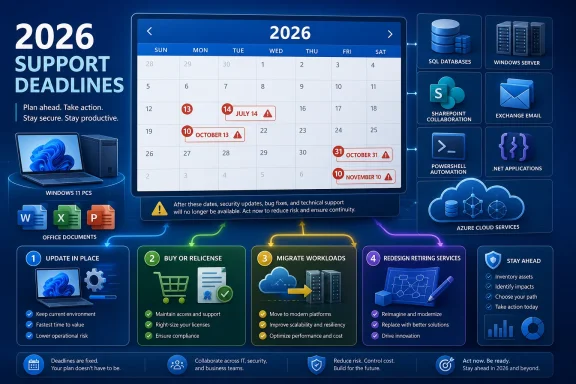
Microsoft’s 2026 support calendar spans Windows 11, Office, SQL Server, Windows Server, SharePoint, Exchange, developer tooling, and Azure services. As of this article’s July 12 publication date, the widest consumer deadline is October 13, when Windows 11 24H2 Home and Pro and the Office 2021 family reach end of support. The immediate enterprise deadline is July 14 for SQL Server 2016, SharePoint Server 2016 and 2019, Project Server 2016 and 2019, Visual Studio 2022 LTSC 17.12, InfoPath 2013, and SharePoint Designer 2013.
For WindowsForum readers, the useful way to sort this calendar is by the work required: update in place, buy or relicense, migrate a workload, or redesign something built around a retiring service. Products whose deadlines passed on January 13, April 14, or June 6 are already remediation cases, not future planning targets.
If the About page and
Do not rely on an application’s build number alone. The product or license name is necessary to distinguish a perpetual 2021 installation from a Microsoft 365 installation using a similar application interface.
For a smaller Windows client query:
On Windows Server,
To identify SQL Server, connect through SQL Server Management Studio or another SQL client and run:
For structured edition and version fields, also run:
A result identifying Microsoft SQL Server 2016 maps to the July 14 deadline.
In Configuration Manager, open the console and go to Administration > Site Configuration > Sites. Select the site and review its displayed version. You can also open About Configuration Manager from the console menu to check the console version, but the site version is the key estate-wide value. A site still on 2409 is already beyond its June 6 servicing deadline and needs remediation.
For Exchange Server, open the Exchange Management Shell and run:
Exchange Server 2016 and 2019 already reached end of support in October 2025. Organizations using their ESU bridge must account for the final October 31, 2026 cutoff.
For SharePoint, open SharePoint Central Administration, then go to Upgrade and Migration > Check product and patch installation status. SharePoint administrators can also run:
Use Microsoft’s build documentation to translate the reported build into a SharePoint release and patch level. SharePoint Server 2016 and SharePoint Server 2019 map to the July 14 deadline. Project Server deployments tied to those SharePoint generations require the same immediate review.
For installed PowerShell versions, use:
Run that command inside each installed PowerShell host. Windows PowerShell 5.1 and PowerShell 7 are separate products and can exist side by side. To find PowerShell 7 installations registered with Windows:
PowerShell 7.4 maps to November 10, 2026.
To identify installed .NET runtimes and SDKs where the .NET command-line tool is available:
Results beginning with Microsoft.NETCore.App 8. or 9. require review against the November 10 deadline. Inventory both runtimes and SDKs because application hosts and build machines have different requirements.
The better operational model is to place every affected system into one of four queues:
Microsoft offers SQL Server 2016 Extended Security Updates for up to three years after July 14, with Year 1 pricing beginning July 15. That can provide additional time for an eligible deployment, but administrators should treat it as a separately funded bridge. Confirm eligibility, enrollment, licensing, and update deployment rather than assuming that an existing SQL Server license automatically supplies ESUs.
SQL Server 2019 and SQL Server 2022 are the identified conventional upgrade targets. Before selecting one, capture the current SQL edition, product version, database compatibility levels, server-level objects, service accounts, backup jobs, and application owners. Build a test instance, restore representative databases, redirect a test application, and validate backup and recovery before changing production.
SharePoint Server 2016 and 2019 and Project Server 2016 and 2019 reach their deadlines on the same day. SharePoint Server Subscription Edition is a named on-premises route. Farms should be inventoried at both the server and solution levels: record farm build versions, databases, web applications, service applications, authentication configuration, custom solutions, and the business owners of major sites.
InfoPath 2013 and SharePoint Designer 2013 also reach their cutoffs on July 14. Their presence should trigger a search for forms, workflows, and site customizations that depend on them. The immediate objective is discovery: determine which processes are still active, who owns them, and whether the target SharePoint environment supports the required behavior.
Visual Studio 2022 LTSC 17.12 is primarily an update-in-place or tooling-standardization task. Development teams should check both interactive workstations and build agents. Updating a developer’s desktop while leaving a CI runner on an expired toolchain does not complete the remediation.
The normal response is an update to a supported Windows release, but administrators and home users should not assume every PC will complete it automatically. Check Windows Update, available disk space, update errors, safeguard messages, and organizational policies. Back up important data before forcing a feature update, and confirm that the resulting edition and version changed under Settings > System > About.
The edition split is a common source of bad inventory decisions. Windows 11 Enterprise and Education 24H2 are not governed by the Home and Pro October 2026 deadline. Inventory systems therefore need both edition and version, not a generic count of “Windows 11 24H2” devices.
Office 2021 reaches end of support on October 13 as well. This includes Office LTSC 2021 and the 2021 releases of Word, Excel, PowerPoint, Outlook, Access, OneNote, Publisher, Visio, and Project. A perpetual license may continue to authorize use after that date, but the license does not extend the product’s support lifecycle.
The supported choices identified here are Microsoft 365 or a new perpetual purchase such as Office LTSC 2024, which is supported through 2029. There is no free in-place entitlement from Office 2021 to Office LTSC 2024, so this belongs in the buy or relicense queue even when deployment itself is straightforward.
Publisher requires separate attention. Microsoft plans to retire Publisher after October 2026, there is no Publisher 2024, and its native files use the
Administrators should not treat this as a routine patch-cycle item. Start with discovery:
Active Directory data can be stale, so validate candidate systems directly with
For each 2012 or 2012 R2 server, record its workload, owner, application vendor, authentication dependencies, data location, backup status, recovery procedure, and target platform. Windows Server 2025 is the named replacement in the reported lifecycle guidance, but the actual destination must be tested against the workload’s support requirements.
Unknown ownership is not a reason to leave a server untouched. It is a risk flag. Use DNS records, listening ports, installed services, scheduled tasks, recent logons, database connections, and network-flow data to identify likely consumers before scheduling migration or retirement.
These are remediation projects now, not October planning exercises. Confirm the deployed server versions with Exchange Management Shell, verify whether the organization has valid coverage for the remaining bridge, and document the target state. Exchange Server Subscription Edition is the named supported on-premises replacement for Exchange.
Discovery should include more than server names. Record database locations, namespaces, certificates, connectors, transport rules, accepted domains, relay dependencies, public folders, backup coverage, and applications that send mail through Exchange. For Skype for Business Server, identify pools, conferencing dependencies, gateways, telephone-number handling, and client populations before selecting a supported replacement.
Windows 10 Enterprise 2016 LTSB and Windows 10 IoT Enterprise 2016 LTSB reach end of extended support on October 13. These editions may be present on kiosks, manufacturing systems, medical equipment, and other fixed-purpose devices. Check vendor support and operational requirements before changing the operating system, and distinguish ordinary enterprise PCs from devices whose complete hardware and software configuration is controlled by a supplier.
The November 10 developer deadline combines Windows and runtime servicing. Windows 11 Enterprise, Education, and IoT Enterprise 23H2 reach their deadline alongside .NET 8, .NET 9, and PowerShell 7.4. Later supported releases are the required direction, but runtime changes need application and automation testing.
Use
Configuration Manager 2409’s June 6 deadline has already passed. In the console, verify the site version under Administration > Site Configuration > Sites, review prerequisite checks and site health, and plan an update to 2503 or later. Confirm that site servers, consoles, and clients complete the transition rather than recording the project as finished when only the primary site has changed.
The Azure retirements require a different response because a hosted service retirement cannot be handled by accepting the risk of an old local binary. Azure API for FHIR and Azure FXT Edge Filer retire September 30. Azure Anomaly Detector, Azure Metrics Advisor, and Azure Personalizer retire October 1. Identify subscriptions and applications that use those services, assign an owner, obtain the applicable service retirement guidance, and plan a supported replacement architecture.
The next priorities should be:
The immediate job is July 14 remediation. The larger objective is to complete October purchasing, testing, and migration work before those deadlines become emergency change windows. Lifecycle management works best as a continuous inventory-and-ownership discipline—not as a project that begins when the last supported month appears on the calendar.
For WindowsForum readers, the useful way to sort this calendar is by the work required: update in place, buy or relicense, migrate a workload, or redesign something built around a retiring service. Products whose deadlines passed on January 13, April 14, or June 6 are already remediation cases, not future planning targets.
 Check If You’re Affected
Windows PCs
On each Windows 11 or Windows 10 PC:- Open Settings.
- Select System > About.
- Under Windows specifications, record Edition and Version.
- Press Win+R, enter
winver, and press Enter to confirm the displayed release.
- Windows 11 Home, version 24H2: October 13, 2026.
- Windows 11 Pro, version 24H2: October 13, 2026.
- Windows 11 Enterprise, version 23H2: November 10, 2026.
- Windows 11 Education, version 23H2: November 10, 2026.
- Windows 11 IoT Enterprise, version 23H2: November 10, 2026.
- Windows 11 SE: October 1, 2026.
- Windows 10 Enterprise 2016 LTSB: October 13, 2026.
- Windows 10 IoT Enterprise 2016 LTSB: October 13, 2026.
If the About page and
winver output do not agree with an inventory record, trust the information reported by the device and investigate why management data is stale.Office installations
Open Word, Excel, Outlook, PowerPoint, or another installed Office application, then:- Select File > Account.
- Review the product name under Product Information.
- Select About Word, About Excel, or About [app] to see the full product and version information.
Do not rely on an application’s build number alone. The product or license name is necessary to distinguish a perpetual 2021 installation from a Microsoft 365 installation using a similar application interface.
Servers and managed estates
Administrators can collect Windows edition, release, build, and server details with PowerShell:
Code:
Get-ComputerInfo |
    Select-Object WindowsProductName, WindowsEditionId,
                  WindowsVersion, OsName, OsVersion, OsBuildNumber
Code:
Get-ItemProperty 'HKLM:\SOFTWARE\Microsoft\Windows NT\CurrentVersion' |
    Select-Object ProductName, EditionID, DisplayVersion,
CurrentBuild, UBRwinver, systeminfo, and Get-ComputerInfo can identify whether a machine is running Windows Server 2012 or Windows Server 2012 R2. Those servers are in their final verified ESU period, which ends October 13, 2026.To identify SQL Server, connect through SQL Server Management Studio or another SQL client and run:
SELECT @@VERSION;For structured edition and version fields, also run:
Code:
SELECT
    SERVERPROPERTY('ProductVersion') AS ProductVersion,
    SERVERPROPERTY('ProductLevel') AS ProductLevel,
SERVERPROPERTY('Edition') AS Edition;In Configuration Manager, open the console and go to Administration > Site Configuration > Sites. Select the site and review its displayed version. You can also open About Configuration Manager from the console menu to check the console version, but the site version is the key estate-wide value. A site still on 2409 is already beyond its June 6 servicing deadline and needs remediation.
For Exchange Server, open the Exchange Management Shell and run:
Code:
Get-ExchangeServer |
Format-List Name, Edition, AdminDisplayVersionFor SharePoint, open SharePoint Central Administration, then go to Upgrade and Migration > Check product and patch installation status. SharePoint administrators can also run:
(Get-SPFarm).BuildVersionUse Microsoft’s build documentation to translate the reported build into a SharePoint release and patch level. SharePoint Server 2016 and SharePoint Server 2019 map to the July 14 deadline. Project Server deployments tied to those SharePoint generations require the same immediate review.
For installed PowerShell versions, use:
$PSVersionTableRun that command inside each installed PowerShell host. Windows PowerShell 5.1 and PowerShell 7 are separate products and can exist side by side. To find PowerShell 7 installations registered with Windows:
Code:
Get-ChildItem 'HKLM:\SOFTWARE\Microsoft\PowerShellCore\InstalledVersions' |
    ForEach-Object {
        Get-ItemProperty $_.PSPath
    } |
Select-Object PSChildName, SemanticVersion, InstallLocationTo identify installed .NET runtimes and SDKs where the .NET command-line tool is available:
Code:
dotnet --list-runtimes
dotnet --list-sdksTurn the Lifecycle Calendar Into Four Work Queues
End of support is not normally a kill switch. An affected Windows, Office, SQL Server, or server installation may continue to start after its deadline. That does not make continued operation equivalent to supported operation: the product has left its regular servicing lifecycle, and any available extension must be confirmed separately.The better operational model is to place every affected system into one of four queues:
- Update in place — a supported feature release, management-platform update, runtime, or tool version can be deployed to existing systems.
- Buy or relicense — continued supported use requires another perpetual purchase, a subscription, or an applicable ESU entitlement.
- Migrate workload — data, applications, databases, mail, or collaboration services must move to a supported product.
- Service retirement requiring redesign — an application depends on a service that will retire rather than remain available as an unsupported installation.
| Status and deadline | Products or families | Work classification | Required direction |
|---|---|---|---|
| Expired January 13, 2026 | Dynamics CRM 2016; Visual Studio 2022 LTSC 17.10 | Remediation: migrate workload or update tooling | Plan a supported replacement |
| Expired April 14, 2026 | Dynamics GP, NAV, and C5 2016 releases; App-V, MBAM, DaRT, and UE-V tools | Remediation: migrate workload or replace tooling | Plan a supported replacement |
| Expired June 6, 2026 | Configuration Manager 2409 | Remediation: update in place | Move to Configuration Manager 2503 or later |
| Immediate: July 14, 2026 | SQL Server 2016; SharePoint and Project Server 2016/2019; Visual Studio 2022 LTSC 17.12; InfoPath 2013; SharePoint Designer 2013 | Migrate workload, update tooling, or buy an eligible bridge | SQL Server 2019/2022; SharePoint Server Subscription Edition; supported tooling; SQL Server ESU where applicable |
| September 30, 2026 | Azure API for FHIR; Azure FXT Edge Filer | Service retirement requiring redesign | Identify dependencies and plan a supported replacement |
| October 1, 2026 | Azure Anomaly Detector; Azure Metrics Advisor; Azure Personalizer; Windows 11 SE | Service redesign or OS replacement | Plan a supported replacement |
| October 13, 2026 | Windows 11 24H2 Home/Pro; Office 2021 and Office LTSC 2021; final Windows Server 2012/2012 R2 ESU period; Windows 10 2016 LTSB variants | Update in place, buy/relicense, or migrate workload | Supported Windows release; Office LTSC 2024 or Microsoft 365; supported Windows Server release |
| October 31, 2026 | Final Exchange Server and Skype for Business Server ESU period | Migrate workload or relicense | Exchange Server Subscription Edition or another supported replacement |
| November 10, 2026 | Windows 11 23H2 Enterprise, Education, and IoT Enterprise; .NET 8; .NET 9; PowerShell 7.4 | Update in place plus application testing | Later supported Windows, .NET, and PowerShell releases |
July 14 Is an Immediate Infrastructure Deadline
SQL Server 2016 is one of the most consequential products in the July group because databases often sit beneath ERP systems, reporting stacks, line-of-business software, and integrations. A healthy-looking database server may still have application, authentication, reporting, backup, or vendor dependencies that make a rushed upgrade risky.Microsoft offers SQL Server 2016 Extended Security Updates for up to three years after July 14, with Year 1 pricing beginning July 15. That can provide additional time for an eligible deployment, but administrators should treat it as a separately funded bridge. Confirm eligibility, enrollment, licensing, and update deployment rather than assuming that an existing SQL Server license automatically supplies ESUs.
SQL Server 2019 and SQL Server 2022 are the identified conventional upgrade targets. Before selecting one, capture the current SQL edition, product version, database compatibility levels, server-level objects, service accounts, backup jobs, and application owners. Build a test instance, restore representative databases, redirect a test application, and validate backup and recovery before changing production.
SharePoint Server 2016 and 2019 and Project Server 2016 and 2019 reach their deadlines on the same day. SharePoint Server Subscription Edition is a named on-premises route. Farms should be inventoried at both the server and solution levels: record farm build versions, databases, web applications, service applications, authentication configuration, custom solutions, and the business owners of major sites.
InfoPath 2013 and SharePoint Designer 2013 also reach their cutoffs on July 14. Their presence should trigger a search for forms, workflows, and site customizations that depend on them. The immediate objective is discovery: determine which processes are still active, who owns them, and whether the target SharePoint environment supports the required behavior.
Visual Studio 2022 LTSC 17.12 is primarily an update-in-place or tooling-standardization task. Development teams should check both interactive workstations and build agents. Updating a developer’s desktop while leaving a CI runner on an expired toolchain does not complete the remediation.
October 13 Combines Windows Servicing With New License Decisions
Windows 11 24H2 has been widely installed on consumer PCs, making its October 13 deadline important beyond enthusiast systems. The verified lifecycle fact is that version 24H2 reaches end of servicing on that date for Home and Pro editions.The normal response is an update to a supported Windows release, but administrators and home users should not assume every PC will complete it automatically. Check Windows Update, available disk space, update errors, safeguard messages, and organizational policies. Back up important data before forcing a feature update, and confirm that the resulting edition and version changed under Settings > System > About.
The edition split is a common source of bad inventory decisions. Windows 11 Enterprise and Education 24H2 are not governed by the Home and Pro October 2026 deadline. Inventory systems therefore need both edition and version, not a generic count of “Windows 11 24H2” devices.
Office 2021 reaches end of support on October 13 as well. This includes Office LTSC 2021 and the 2021 releases of Word, Excel, PowerPoint, Outlook, Access, OneNote, Publisher, Visio, and Project. A perpetual license may continue to authorize use after that date, but the license does not extend the product’s support lifecycle.
The supported choices identified here are Microsoft 365 or a new perpetual purchase such as Office LTSC 2024, which is supported through 2029. There is no free in-place entitlement from Office 2021 to Office LTSC 2024, so this belongs in the buy or relicense queue even when deployment itself is straightforward.
Publisher requires separate attention. Microsoft plans to retire Publisher after October 2026, there is no Publisher 2024, and its native files use the
.pub extension. Organizations should inventory those files now and identify which ones need to be retained as final output and which must remain editable. Keep a controlled copy of source files and test any chosen conversion process before removing existing Publisher installations.The Windows Server 2012 Bridge Ends in October
Windows Server 2012 and Windows Server 2012 R2 left normal support in October 2023 and received three additional years of Extended Security Updates. The verified final cutoff for that three-year period is October 13, 2026.Administrators should not treat this as a routine patch-cycle item. Start with discovery:
Code:
Get-ADComputer -Filter * -Properties OperatingSystem,OperatingSystemVersion |
Select-Object Name, OperatingSystem, OperatingSystemVersionGet-ComputerInfo, systeminfo, or your management platform. Check virtual-machine inventories, backup consoles, monitoring systems, vulnerability scanners, and network records for servers that may not be reporting to the main endpoint tool.For each 2012 or 2012 R2 server, record its workload, owner, application vendor, authentication dependencies, data location, backup status, recovery procedure, and target platform. Windows Server 2025 is the named replacement in the reported lifecycle guidance, but the actual destination must be tested against the workload’s support requirements.
Unknown ownership is not a reason to leave a server untouched. It is a risk flag. Use DNS records, listening ports, installed services, scheduled tasks, recent logons, database connections, and network-flow data to identify likely consumers before scheduling migration or retirement.
Exchange and Skype for Business Are Already in Bridge Time
Exchange Server 2016 and 2019 reached end of support in October 2025. ESU Period 1 expired in April 2026, and ESU Period 2 ends October 31, 2026. Skype for Business Server 2015 and 2019 follow the same two-period schedule.These are remediation projects now, not October planning exercises. Confirm the deployed server versions with Exchange Management Shell, verify whether the organization has valid coverage for the remaining bridge, and document the target state. Exchange Server Subscription Edition is the named supported on-premises replacement for Exchange.
Discovery should include more than server names. Record database locations, namespaces, certificates, connectors, transport rules, accepted domains, relay dependencies, public folders, backup coverage, and applications that send mail through Exchange. For Skype for Business Server, identify pools, conferencing dependencies, gateways, telephone-number handling, and client populations before selecting a supported replacement.
Smaller Retirements Can Still Force Large Projects
Windows 11 SE reaches end of support on October 1. Microsoft announced in 2025 that further development would not continue, but the available facts do not establish an exact one-year interval between that announcement and retirement. Schools using Windows 11 SE should inventory devices, verify hardware capabilities, and plan a supported replacement rather than assuming the devices can remain indefinitely on the education-focused edition.Windows 10 Enterprise 2016 LTSB and Windows 10 IoT Enterprise 2016 LTSB reach end of extended support on October 13. These editions may be present on kiosks, manufacturing systems, medical equipment, and other fixed-purpose devices. Check vendor support and operational requirements before changing the operating system, and distinguish ordinary enterprise PCs from devices whose complete hardware and software configuration is controlled by a supplier.
The November 10 developer deadline combines Windows and runtime servicing. Windows 11 Enterprise, Education, and IoT Enterprise 23H2 reach their deadline alongside .NET 8, .NET 9, and PowerShell 7.4. Later supported releases are the required direction, but runtime changes need application and automation testing.
Use
dotnet --list-runtimes on application hosts and dotnet --list-sdks on build systems. Search deployment files, containers, CI definitions, and application configuration for explicit runtime pins. For PowerShell, inventory scheduled tasks, service accounts, module versions, remoting endpoints, and scripts with a #requires statement before changing the host version.Configuration Manager 2409’s June 6 deadline has already passed. In the console, verify the site version under Administration > Site Configuration > Sites, review prerequisite checks and site health, and plan an update to 2503 or later. Confirm that site servers, consoles, and clients complete the transition rather than recording the project as finished when only the primary site has changed.
The Azure retirements require a different response because a hosted service retirement cannot be handled by accepting the risk of an old local binary. Azure API for FHIR and Azure FXT Edge Filer retire September 30. Azure Anomaly Detector, Azure Metrics Advisor, and Azure Personalizer retire October 1. Identify subscriptions and applications that use those services, assign an owner, obtain the applicable service retirement guidance, and plan a supported replacement architecture.
Prioritized Action Plan
The January 13, April 14, and June 6 deadlines have passed. Any remaining Dynamics CRM 2016, affected Dynamics 2016 releases, legacy management tools, Visual Studio 17.10 LTSC, or Configuration Manager 2409 installations belong in an exception and remediation process now.The next priorities should be:
- By July 14: confirm the status of every SQL Server 2016 instance, SharePoint or Project Server 2016/2019 farm, affected Visual Studio installation, InfoPath dependency, and SharePoint Designer workflow.
- During July: complete Windows and Office edition-level inventory, identify Windows Server 2012/2012 R2 systems, and reconcile Exchange and Skype for Business coverage.
- Before September: finish dependency discovery for retiring Azure services and Windows 11 SE fleets.
- Before October: pilot Windows feature updates, approve Office purchasing or subscription decisions, test server migrations, and preserve required Publisher files.
- Before November: update Windows 11 23H2 enterprise fleets and validate applications, build pipelines, and automation against supported .NET and PowerShell versions.
Action checklist for admins
- [ ] Capture product, edition, version, build, servicing channel, owner, business criticality, and deadline.
- [ ] Mark January 13, April 14, and June 6 products as expired—remediation required.
- [ ] Use
SELECT @@VERSIONandSERVERPROPERTYqueries to locate and classify SQL Server 2016 instances. - [ ] Verify Configuration Manager under Administration > Site Configuration > Sites and update 2409 sites to 2503 or later.
- [ ] Use
Get-ExchangeServerand SharePoint Central Administration orGet-SPFarmto verify server generations. - [ ] Use
Get-ComputerInfo, registry queries,winver, and Active Directory discovery to identify affected Windows clients and servers. - [ ] Run
dotnet --list-runtimes,dotnet --list-sdks, and$PSVersionTableon application hosts and build systems. - [ ] Confirm SQL Server 2016 and Windows Server 2012 ESU status wherever migration will not finish before the applicable cutoff.
- [ ] Test database, SharePoint, Exchange, runtime, PowerShell, and operating-system changes against real dependencies.
- [ ] Inventory
.pubfiles and validate a retention or conversion process before Publisher’s retirement. - [ ] Give every migration a named owner, target product, budget, test plan, rollback procedure, and completion date.
- [ ] Re-scan after deployment so that stale inventory does not conceal systems that missed the change.
The immediate job is July 14 remediation. The larger objective is to complete October purchasing, testing, and migration work before those deadlines become emergency change windows. Lifecycle management works best as a continuous inventory-and-ownership discipline—not as a project that begins when the last supported month appears on the calendar.
References
- Primary source: Windows Latest
Published: 2026-07-12T17:39:07+00:00
Microsoft reveals 15+ products losing support in 2026, check if you're affected
Windows 11 24H2, Office 2021, and SQL Server 2016 headline a long list of Microsoft products losing support in 2026. See the full list. www.windowslatest.com
- Official source: learn.microsoft.com
Windows 11 Home and Pro - Microsoft Lifecycle | Microsoft Learn
Windows 11 Home and Pro follows the Modern Lifecycle Policy.learn.microsoft.com - Official source: support.microsoft.com
Microsoft Publisher will no longer be supported after October 2026 | Microsoft Support
Microsoft Publisher will no longer be supported after October 2026support.microsoft.com - Official source: microsoft.com
- Official source: techcommunity.microsoft.com
- Related coverage: cyber.gov.au
