

Microsoft’s Exchange Team said on May 21, 2026, that Exchange Online still lacks a native utilization report for resource mailboxes, leaving administrators to infer active use from calendar data through Exchange Online PowerShell, Microsoft Graph, or mailbox folder statistics. That is a small admission with a large operational shadow. Room mailboxes, equipment mailboxes, and workspaces are not decorative objects in a tenant; they are the booking layer for hybrid work, facilities planning, and, increasingly, cost control. Microsoft’s guidance is useful, but it also shows how much of Microsoft 365 administration still depends on stitching together evidence from APIs rather than clicking a report.
The primary fact in Microsoft’s post is blunt: there is no native report, at least as of the writing, that tells an organization which Exchange resource mailboxes are being actively used. For any administrator who has inherited a tenant with years of conference rooms, retired devices, ghost workspaces, and half-renamed equipment mailboxes, that gap is not academic.
Resource mailboxes are one of those Microsoft 365 features that look simple until they are not. A room mailbox can represent a physical conference room, a huddle space, a lab, a vehicle bay, or a hot desk. Equipment mailboxes can represent projectors, loaner laptops, company vehicles, AV kits, and other bookable assets. Workspaces add yet another layer for organizations trying to manage shared seating after the office became less of a default destination and more of a scheduled event.
The problem is that Exchange knows a great deal about those objects, but it does not package that knowledge as a utilization dashboard. Microsoft’s answer is therefore procedural rather than productized: query the calendar, count the events, decide what “active” means, and repeat that across the resource population. In other words, Exchange has the data; Exchange does not have the report.
That distinction matters. A built-in report would imply a supported interpretation of usage. A PowerShell or Graph query gives administrators raw evidence and asks them to supply the policy.
The appeal is speed and focus. The cmdlet targets calendar data rather than dragging through the broader debris field of mailbox content, and it can be combined with Exchange Online PowerShell filtering. An admin can retrieve every room mailbox with
That makes it a good first-pass census tool. If all the facilities team needs is a list of rooms with scheduled activity, or a rough count of items in a defined window,
But it is not a full utilization report. Microsoft notes that the meeting subject is not exposed as a property in this output. For privacy-minded admins, that may sound like a feature. For anyone trying to distinguish recurring placeholder holds from real bookings, executive events from test meetings, or legitimate utilization from noisy calendar artifacts, it is a constraint.
The deeper limitation is that the cmdlet answers a narrow question: does the resource calendar contain meetings in this window? It does not, by itself, answer whether the room was actually occupied, whether the meeting was canceled late, whether the booking pattern is healthy, or whether an asset is being monopolized by recurring meetings that no one attends. For many tenants, though, the first question is enough: is this mailbox alive or dead?
That extra detail changes the conversation. With Graph, a resource audit can move from “this room has meetings” to “this room has these meetings, organized by these people, at these times.” That is useful when the task is not just cleanup but decision-making: consolidating space, reassigning rooms, finding abandoned recurring bookings, or building a defensible utilization model for facilities leadership.
The tradeoff is setup and permissions. Microsoft’s example requires the Microsoft Graph PowerShell module, an Entra ID app registration, and calendar permissions. Delegated permissions use a signed-in user; application permissions support non-interactive scripts and automation. The latter is the more realistic model for scheduled reporting, but it is also the model that should make security teams sit up straight.
A Graph application with broad
That is why Microsoft’s note about Exchange Online RBAC for Applications is the most important security detail in the post. Instead of granting Graph permissions broadly in Entra ID and hoping everyone remembers the app’s purpose later, administrators can use Exchange application RBAC to scope the app to a defined set of mailboxes. A recipient filter can define the resource population, and a role assignment can grant the calendar-reading capability within that scope.
This is the right direction. The long-term pattern for Microsoft 365 automation should be scoped, explainable, and testable permissions rather than tenant-wide app consent casually handed to scripts. If the goal is to read room calendars, the application should not have practical access to the CEO’s mailbox calendar just because the permission model made that the path of least resistance.
This is the “is there anything in the drawer?” approach. It does not provide the event-level richness of Graph or the calendar-view specificity of Microsoft’s preferred Exchange cmdlet. But it can help identify obvious dead mailboxes, especially in older tenants where the first task is simply to separate never-used resources from possibly-used ones.
There is a reason blunt instruments survive in administration. They are easy to explain, easy to run, and often good enough for the first pass. If a resource mailbox has no meaningful calendar history, no recent item, and no future item, it belongs in the review pile. If it has activity, a deeper method can follow.
The danger is over-interpreting the output. Folder statistics can hint at activity, but it is not utilization analytics. A calendar folder containing old or future items does not prove the resource is operationally useful today. A room with a single recurring placeholder could look alive while providing no value. Conversely, a newly created but strategically important room may look unused simply because booking has not started yet.
As with many Microsoft 365 audits, the tooling gives signals, not truth. Administrators still need naming standards, owner validation, and a retention or cleanup policy that does not delete a resource merely because a query returned a low count.
That warning is not just about etiquette. Calendar diagnostic logs are designed for troubleshooting individual meetings, not gathering events at scale. Microsoft says the diagnostic data can include calendar-related information from multiple mailbox locations, including Inbox, Sent Items, Deleted Items, and Recoverable Items. A single meeting can reportedly generate more than a thousand logs.
That explains why some scripts built around calendar diagnostic logs become fragile. They may work in a lab, then fail in production when pointed at hundreds of resource mailboxes with years of bookings. They may time out, produce errors, or create support cases that end with Microsoft telling the customer to use one of the other methods.
The lesson is broader than this one cmdlet. Exchange Online has many diagnostic surfaces that expose data administrators are tempted to repurpose for reporting. Sometimes that works. Sometimes it means using a forensic tool as a data warehouse. Microsoft’s warning is a reminder that available is not the same as designed for bulk reporting.
For sysadmins, the practical rule is simple: if the goal is inventory or utilization, start with APIs and cmdlets that return the target object model directly. Save diagnostic logs for diagnostics.
A mailbox with one booking in the next twelve months is technically used. A room booked every weekday by an abandoned recurring meeting is heavily scheduled but possibly useless. A workspace with dozens of reservations may be underutilized if those bookings are routinely canceled or ignored. Exchange calendar data can tell you what was scheduled; it cannot guarantee real-world occupancy.
That means every organization needs to define usage before querying for it. For a facilities cleanup, “any event in the last six months or next six months” may be enough. For capacity planning, you may need booking hours, unique organizers, recurrence patterns, cancellation rates, and time-of-day distribution. For security cleanup, you may care less about utilization and more about orphaned resources with broad delegates or stale booking policies.
The six-month-back, six-month-forward window in Microsoft’s examples is a useful default because it straddles historical and planned use. But it is not magic. Universities, hospitals, manufacturing sites, government offices, and seasonal businesses may have very different booking rhythms. A boardroom used quarterly may be mission-critical even if it looks quiet in a casual monthly report.
The best resource mailbox audit therefore pairs automation with human ownership. Every resource mailbox should have a responsible business owner or facilities contact. The script can identify candidates; the owner should confirm whether the room, workspace, or asset still exists and should remain bookable.
That does not mean organizations should avoid Graph. It means they should treat the reporting app like any other privileged application. Use certificates where appropriate, avoid long-lived secrets where possible, document the business purpose, scope access to resource mailboxes, and store outputs carefully. A CSV of room utilization can become sensitive if it includes meeting subjects and organizers across the company.
There is also a cultural dimension. Employees may tolerate room booking analytics when they understand the purpose is space planning or cleanup. They may react differently if they discover an application has been reading calendar subjects broadly. Tenant admins should assume that visibility into calendar data requires the same seriousness as visibility into mail.
This is where Exchange RBAC for Applications is not merely a nice-to-have. It is the difference between a narrowly tailored operational tool and a broad Graph permission that future auditors will struggle to justify. Microsoft’s guidance to remove Entra ID Graph permissions and grant scoped access through Exchange Online RBAC is, in practice, the governance-safe version of the Graph approach.
Exchange resource mailboxes sit at the intersection of IT and facilities. IT owns the object, permissions, booking policy, naming, and automation. Facilities owns the room, seat, equipment, and real-world availability. The absence of a native utilization report forces these teams to build their own shared truth.
That is not necessarily bad. A homegrown report can be better aligned with local policy than a generic dashboard. But it also means many organizations will never do the work. Smaller IT teams will leave unused resources alone because the cleanup effort feels riskier than the clutter. Larger enterprises may build their own reporting pipelines, but only after app registration reviews, privacy assessments, and script hardening.
This is where Microsoft’s product gap becomes visible. Microsoft 365 has increasingly sophisticated admin portals, adoption reports, and service health experiences, yet a basic operational question — which bookable resources are being used — still falls to PowerShell and Graph. That is manageable for seasoned admins. It is less defensible as resource mailboxes become a planning substrate for the modern workplace.
Once the data exists, the real work begins. Administrators should normalize resource mailbox names, identify mailbox types, tag regions or buildings, validate booking policies, and map mailboxes back to physical assets. Otherwise, utilization output becomes another spreadsheet whose meaning decays the moment it is exported.
There is also a lifecycle issue. A one-time cleanup helps, but resource mailboxes need periodic review. Rooms close, floors move, equipment gets retired, and workspaces change names. If the tenant does not have a process for creating, owning, reviewing, and retiring resource mailboxes, the same audit will be necessary again next year.
The best outcome is not a heroic script. The best outcome is a routine.
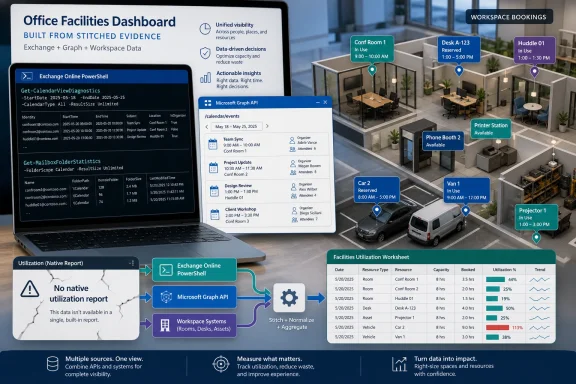 Microsoft Turns a Missing Report Into an Admin Exercise
The primary fact in Microsoft’s post is blunt: there is no native report, at least as of the writing, that tells an organization which Exchange resource mailboxes are being actively used. For any administrator who has inherited a tenant with years of conference rooms, retired devices, ghost workspaces, and half-renamed equipment mailboxes, that gap is not academic.Resource mailboxes are one of those Microsoft 365 features that look simple until they are not. A room mailbox can represent a physical conference room, a huddle space, a lab, a vehicle bay, or a hot desk. Equipment mailboxes can represent projectors, loaner laptops, company vehicles, AV kits, and other bookable assets. Workspaces add yet another layer for organizations trying to manage shared seating after the office became less of a default destination and more of a scheduled event.
The problem is that Exchange knows a great deal about those objects, but it does not package that knowledge as a utilization dashboard. Microsoft’s answer is therefore procedural rather than productized: query the calendar, count the events, decide what “active” means, and repeat that across the resource population. In other words, Exchange has the data; Exchange does not have the report.
That distinction matters. A built-in report would imply a supported interpretation of usage. A PowerShell or Graph query gives administrators raw evidence and asks them to supply the policy.
The Fastest Path Is Also the Least Revealing
Microsoft’s first suggested method isGet-CalendarViewDiagnostics, an Exchange Online PowerShell cmdlet that can inspect the calendar of a specified mailbox across a time window. The example Microsoft gives looks six months into the past and six months into the future, a sensible span for identifying both stale rooms and currently booked ones.The appeal is speed and focus. The cmdlet targets calendar data rather than dragging through the broader debris field of mailbox content, and it can be combined with Exchange Online PowerShell filtering. An admin can retrieve every room mailbox with
Get-Mailbox -RecipientTypeDetails RoomMailbox and then pipe that collection into a calendar query.That makes it a good first-pass census tool. If all the facilities team needs is a list of rooms with scheduled activity, or a rough count of items in a defined window,
Get-CalendarViewDiagnostics is likely the simplest answer. It is also the most Exchange-native answer, which means it fits naturally into the administrative muscle memory many Exchange admins already have.But it is not a full utilization report. Microsoft notes that the meeting subject is not exposed as a property in this output. For privacy-minded admins, that may sound like a feature. For anyone trying to distinguish recurring placeholder holds from real bookings, executive events from test meetings, or legitimate utilization from noisy calendar artifacts, it is a constraint.
The deeper limitation is that the cmdlet answers a narrow question: does the resource calendar contain meetings in this window? It does not, by itself, answer whether the room was actually occupied, whether the meeting was canceled late, whether the booking pattern is healthy, or whether an asset is being monopolized by recurring meetings that no one attends. For many tenants, though, the first question is enough: is this mailbox alive or dead?
Microsoft Graph Gives Better Detail at a Higher Governance Price
The second path runs through Microsoft Graph, specifically the calendar view API surfaced in PowerShell asGet-MgUserCalendarView. This is the richer option because Graph can return properties administrators actually want to see: organizer, subject, start time, end time, and other event metadata.That extra detail changes the conversation. With Graph, a resource audit can move from “this room has meetings” to “this room has these meetings, organized by these people, at these times.” That is useful when the task is not just cleanup but decision-making: consolidating space, reassigning rooms, finding abandoned recurring bookings, or building a defensible utilization model for facilities leadership.
The tradeoff is setup and permissions. Microsoft’s example requires the Microsoft Graph PowerShell module, an Entra ID app registration, and calendar permissions. Delegated permissions use a signed-in user; application permissions support non-interactive scripts and automation. The latter is the more realistic model for scheduled reporting, but it is also the model that should make security teams sit up straight.
A Graph application with broad
Calendars.Read access is powerful. It can potentially read calendar data across mailboxes, and resource mailbox calendars may still contain sensitive meeting subjects, organizers, locations, and patterns. A tenant that treats this as “just a room report” risks creating a surveillance-grade app registration for what should be a limited operational task.That is why Microsoft’s note about Exchange Online RBAC for Applications is the most important security detail in the post. Instead of granting Graph permissions broadly in Entra ID and hoping everyone remembers the app’s purpose later, administrators can use Exchange application RBAC to scope the app to a defined set of mailboxes. A recipient filter can define the resource population, and a role assignment can grant the calendar-reading capability within that scope.
This is the right direction. The long-term pattern for Microsoft 365 automation should be scoped, explainable, and testable permissions rather than tenant-wide app consent casually handed to scripts. If the goal is to read room calendars, the application should not have practical access to the CEO’s mailbox calendar just because the permission model made that the path of least resistance.
Folder Statistics Is the Blunt Instrument That Still Has a Place
The third method,Get-MailboxFolderStatistics, is the least elegant but perhaps the most familiar. By using -IncludeOldestAndNewestItems with -FolderScope Calendar, administrators can inspect the calendar folder and get enough information to understand whether it has content.This is the “is there anything in the drawer?” approach. It does not provide the event-level richness of Graph or the calendar-view specificity of Microsoft’s preferred Exchange cmdlet. But it can help identify obvious dead mailboxes, especially in older tenants where the first task is simply to separate never-used resources from possibly-used ones.
There is a reason blunt instruments survive in administration. They are easy to explain, easy to run, and often good enough for the first pass. If a resource mailbox has no meaningful calendar history, no recent item, and no future item, it belongs in the review pile. If it has activity, a deeper method can follow.
The danger is over-interpreting the output. Folder statistics can hint at activity, but it is not utilization analytics. A calendar folder containing old or future items does not prove the resource is operationally useful today. A room with a single recurring placeholder could look alive while providing no value. Conversely, a newly created but strategically important room may look unused simply because booking has not started yet.
As with many Microsoft 365 audits, the tooling gives signals, not truth. Administrators still need naming standards, owner validation, and a retention or cleanup policy that does not delete a resource merely because a query returned a low count.
The Cmdlet Microsoft Tells You Not to Use Says a Lot
The sharpest part of Microsoft’s guidance is the warning againstGet-CalendarDiagnosticObjects. The Exchange Team is unusually direct here: do not use it for bulk resource mailbox utilization checks.That warning is not just about etiquette. Calendar diagnostic logs are designed for troubleshooting individual meetings, not gathering events at scale. Microsoft says the diagnostic data can include calendar-related information from multiple mailbox locations, including Inbox, Sent Items, Deleted Items, and Recoverable Items. A single meeting can reportedly generate more than a thousand logs.
That explains why some scripts built around calendar diagnostic logs become fragile. They may work in a lab, then fail in production when pointed at hundreds of resource mailboxes with years of bookings. They may time out, produce errors, or create support cases that end with Microsoft telling the customer to use one of the other methods.
The lesson is broader than this one cmdlet. Exchange Online has many diagnostic surfaces that expose data administrators are tempted to repurpose for reporting. Sometimes that works. Sometimes it means using a forensic tool as a data warehouse. Microsoft’s warning is a reminder that available is not the same as designed for bulk reporting.
For sysadmins, the practical rule is simple: if the goal is inventory or utilization, start with APIs and cmdlets that return the target object model directly. Save diagnostic logs for diagnostics.
“Active Use” Is a Policy Decision, Not a Property
Microsoft’s post uses the phrase “actively used,” but Exchange does not hand back anIsActivelyUsed property. That is not pedantry; it is the core administrative challenge.A mailbox with one booking in the next twelve months is technically used. A room booked every weekday by an abandoned recurring meeting is heavily scheduled but possibly useless. A workspace with dozens of reservations may be underutilized if those bookings are routinely canceled or ignored. Exchange calendar data can tell you what was scheduled; it cannot guarantee real-world occupancy.
That means every organization needs to define usage before querying for it. For a facilities cleanup, “any event in the last six months or next six months” may be enough. For capacity planning, you may need booking hours, unique organizers, recurrence patterns, cancellation rates, and time-of-day distribution. For security cleanup, you may care less about utilization and more about orphaned resources with broad delegates or stale booking policies.
The six-month-back, six-month-forward window in Microsoft’s examples is a useful default because it straddles historical and planned use. But it is not magic. Universities, hospitals, manufacturing sites, government offices, and seasonal businesses may have very different booking rhythms. A boardroom used quarterly may be mission-critical even if it looks quiet in a casual monthly report.
The best resource mailbox audit therefore pairs automation with human ownership. Every resource mailbox should have a responsible business owner or facilities contact. The script can identify candidates; the owner should confirm whether the room, workspace, or asset still exists and should remain bookable.
Privacy Turns Calendar Reporting Into a Security Conversation
The moment an admin chooses Graph for richer detail, the audit becomes a privacy and governance exercise. Meeting subjects can contain customer names, legal matters, merger code names, disciplinary topics, medical references, and project details. Organizer metadata can reveal patterns that are sensitive even when the meeting content is not.That does not mean organizations should avoid Graph. It means they should treat the reporting app like any other privileged application. Use certificates where appropriate, avoid long-lived secrets where possible, document the business purpose, scope access to resource mailboxes, and store outputs carefully. A CSV of room utilization can become sensitive if it includes meeting subjects and organizers across the company.
There is also a cultural dimension. Employees may tolerate room booking analytics when they understand the purpose is space planning or cleanup. They may react differently if they discover an application has been reading calendar subjects broadly. Tenant admins should assume that visibility into calendar data requires the same seriousness as visibility into mail.
This is where Exchange RBAC for Applications is not merely a nice-to-have. It is the difference between a narrowly tailored operational tool and a broad Graph permission that future auditors will struggle to justify. Microsoft’s guidance to remove Entra ID Graph permissions and grant scoped access through Exchange Online RBAC is, in practice, the governance-safe version of the Graph approach.
The Hybrid Office Made This Gap More Expensive
Before hybrid work, stale room mailboxes were mostly clutter. After hybrid work, they are part of a larger planning problem. Organizations are trying to decide which offices need more collaboration space, which floors can be consolidated, where hot desks are oversubscribed, and whether expensive equipment is sitting idle.Exchange resource mailboxes sit at the intersection of IT and facilities. IT owns the object, permissions, booking policy, naming, and automation. Facilities owns the room, seat, equipment, and real-world availability. The absence of a native utilization report forces these teams to build their own shared truth.
That is not necessarily bad. A homegrown report can be better aligned with local policy than a generic dashboard. But it also means many organizations will never do the work. Smaller IT teams will leave unused resources alone because the cleanup effort feels riskier than the clutter. Larger enterprises may build their own reporting pipelines, but only after app registration reviews, privacy assessments, and script hardening.
This is where Microsoft’s product gap becomes visible. Microsoft 365 has increasingly sophisticated admin portals, adoption reports, and service health experiences, yet a basic operational question — which bookable resources are being used — still falls to PowerShell and Graph. That is manageable for seasoned admins. It is less defensible as resource mailboxes become a planning substrate for the modern workplace.
The Audit Script Is Only the Beginning
The most useful way to read Microsoft’s post is not as a menu of equivalent options but as a maturity ladder. Start with Exchange Online PowerShell if you need a quick count. Move to Graph if you need event details. Use folder statistics for a coarse sanity check. Avoid diagnostic logs unless you are actually troubleshooting a meeting.Once the data exists, the real work begins. Administrators should normalize resource mailbox names, identify mailbox types, tag regions or buildings, validate booking policies, and map mailboxes back to physical assets. Otherwise, utilization output becomes another spreadsheet whose meaning decays the moment it is exported.
There is also a lifecycle issue. A one-time cleanup helps, but resource mailboxes need periodic review. Rooms close, floors move, equipment gets retired, and workspaces change names. If the tenant does not have a process for creating, owning, reviewing, and retiring resource mailboxes, the same audit will be necessary again next year.
The best outcome is not a heroic script. The best outcome is a routine.
The Practical Shape of Microsoft’s Advice
Microsoft’s guidance gives administrators enough to act now, provided they choose the method that matches the job rather than defaulting to the most powerful API. The concrete decisions are less about syntax than about intent, privacy, and repeatability.Get-CalendarViewDiagnosticsis the cleanest first-pass method when the goal is to count scheduled items or determine whether room and equipment calendars have activity.- Microsoft Graph is the better fit when administrators need event-level properties such as organizer, subject, start time, and end time.
- Graph-based reporting should be scoped through Exchange Online RBAC for Applications whenever the app only needs access to resource mailboxes.
Get-MailboxFolderStatisticscan identify obvious stale calendars, but it should not be mistaken for a utilization analytics system.Get-CalendarDiagnosticObjectsshould be avoided for bulk reporting because it is designed for troubleshooting individual meetings and can generate excessive diagnostic output.
References
- Primary source: Microsoft Exchange Team Blog
Published: Thu, 21 May 2026 13:38:55 GMT
How to determine which Resource Mailboxes are being actively used | Microsoft Community Hub
Here are some tips on how to learn more about Exchange Online resource mailbox use.   techcommunity.microsoft.com
