Windows 7 external moniter trouble shooting

fudd664

New Member
Joined
Apr 7, 2010
Messages
2
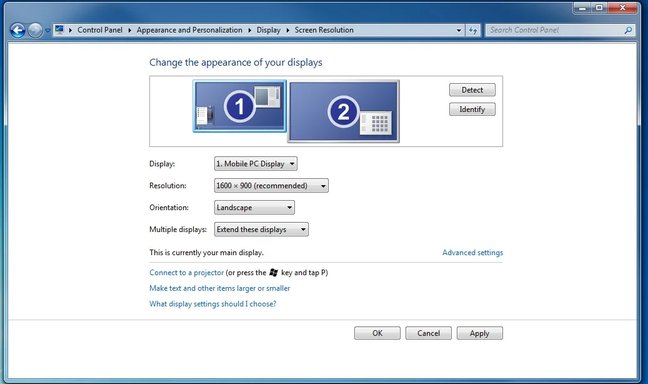
hello guys im having problems with windows 7, ok i have my laptop hooked up to a tv and set for so its link together so just another monitor set up, so the problem is that my mouse wont go over to the other screen and if somehow it goes to the other screen i can get it back to the main screen and i also cant move programs across from screen to screen

Thanks
Fudd
 

Attachments

  • Untitled.webp
    Untitled.webp
    30.9 KB · Views: 286
Solution
Hello Fudd, It sounds like you are facing issues with dual monitor setup on Windows 7 where you are unable to move the mouse cursor to the second screen and facing difficulties in moving programs across the screens. Here are some troubleshooting steps you can try to resolve this issue: 1. Check Display Settings: - Right-click on the desktop and select "Screen Resolution." - Ensure that the dual monitors are detected and set up correctly. You should see both monitors displayed there. 2. Adjust Screen Resolution: - In the Screen Resolution settings, you can drag and drop the monitor icons to arrange them according to the physical setup (e.g., left to right). 3. Extend the Display: - Make sure your display is set to...
Hello Fudd, It sounds like you are facing issues with dual monitor setup on Windows 7 where you are unable to move the mouse cursor to the second screen and facing difficulties in moving programs across the screens. Here are some troubleshooting steps you can try to resolve this issue: 1. Check Display Settings: - Right-click on the desktop and select "Screen Resolution." - Ensure that the dual monitors are detected and set up correctly. You should see both monitors displayed there. 2. Adjust Screen Resolution: - In the Screen Resolution settings, you can drag and drop the monitor icons to arrange them according to the physical setup (e.g., left to right). 3. Extend the Display: - Make sure your display is set to "Extend these displays." This allows movement of the cursor from one screen to another. 4. Graphics Drivers: - Update your graphics drivers to the latest version. Outdated drivers can sometimes cause issues with dual monitor setups. 5. Keyboard Shortcuts: - To move windows between screens, you can use keyboard shortcuts like Windows Key + Shift + Left/Right Arrow to move the active window between monitors. 6. Cursor Issues: - If the cursor is "stuck" on one screen, try pressing Windows Key + P to cycle through display modes and see if that helps. 7. Restart: - Sometimes, a simple restart of the system can resolve such issues. By following these steps, you should be able to address the problem you're experiencing with your dual monitor setup on Windows 7. Let me know if you need further assistance!
 

Solution
Back
Top