

Microsoft Threat Intelligence said on June 29, 2026, that it found a malicious Chromium-based extension called “Search for perplexity ai” that impersonated Perplexity AI, redirected browser search traffic through attacker-controlled infrastructure, and was removed after Microsoft reported it to Google. The discovery is not important because this was the most technically exotic browser attack of the year. It matters because it shows how the AI boom has handed old search-hijacking schemes a better costume, a better permission story, and a better path into everyday workstations. For Windows users and administrators, the lesson is blunt: the browser extension has become both productivity plumbing and surveillance surface.
Search hijacking has been with us for decades, usually wearing the shabby uniform of coupon bars, “secure search” add-ons, and downloadable utilities that exist mainly to monetize redirects. The Microsoft case is more contemporary because the lure was not a toolbar promising free weather or emoji packs. It was an AI-branded search assistant, a category users have been trained to treat as plausible, useful, and fast-moving.
That branding matters. “Perplexity” is not a random string to a modern web user; it is a recognizable AI answer engine with a product category that naturally belongs in a browser. A search extension that claims to connect the address bar to an AI answer service does not immediately feel absurd. It feels like the sort of thing a legitimate startup, browser vendor, or productivity team might ship.
That is the social engineering shift Microsoft is really documenting. The extension did not need to convince users to install something obviously unrelated to their browsing. It only had to borrow the visual and linguistic grammar of the AI market, then ask for permissions that sounded adjacent to its claimed purpose.
The extension name, “Search for perplexity ai,” was clumsy enough to raise eyebrows but familiar enough to work on a rushed user. Its domain,
Search queries are among the richest signals a browser produces. They reveal medical worries, financial plans, legal research, job searches, internal project names, competitor research, travel, politics, relationships, and security troubleshooting. In an enterprise environment, address-bar searches can expose the texture of a company’s work before any formal data exfiltration begins.
The extension’s observed behavior centered on intercepting search traffic and collecting data. That may sound less dramatic than ransomware or token theft, but it is precisely the kind of telemetry that powers profiling, targeting, fraud, and later-stage intrusion planning. A record of what a user searches can be a map of what they know, what they fear, and what they are about to do.
The more troubling detail is that Microsoft says the extension routed both full queries and real-time search suggestions through the suspicious infrastructure. That means the problem was not just the final search after the user pressed Enter. It included typed characters in the Omnibox as the browser generated suggestions, creating what Microsoft described as keystroke-level capture in the context of address-bar search.
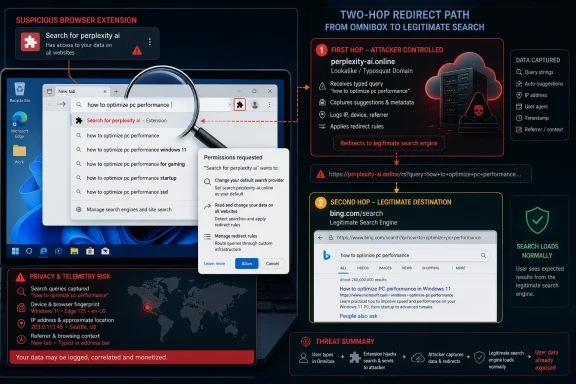
That is where this crosses from nuisanceware into a more serious privacy and security story. A visible redirect to a shady search page is at least legible to a user. A transparent two-hop path that ultimately lands on a legitimate search provider is harder to notice because the experience appears to work.
The malicious extension reportedly used
The problem is the surrounding design. The extension’s search URL and suggestion URL pointed first to infrastructure not associated with the real Perplexity service. Then the extension’s rules could redirect traffic onward to legitimate search engines such as Perplexity, Google, or Bing. The user got a normal-looking result page, but only after the first hop had already delivered valuable telemetry to an intermediary.
This is the elegance of the attack. It turns the browser’s own sanctioned mechanisms into a laundering layer for user trust. The extension does not need to pop up a fake login page or crash the browser. It simply becomes the route by which ordinary queries leave the machine.
The use of
That is why default search provider changes deserve more suspicion than they often receive. Users notice when their homepage changes, and they may notice when a new tab page looks wrong. They are less likely to inspect where suggestions are being fetched from or whether a query takes an invisible detour before landing on a familiar results page.
For sysadmins, the Omnibox should be treated as a sensitive workflow surface. In managed Windows environments, it is where users paste error messages, internal hostnames, ticket numbers, customer names, file paths, and fragments of confidential documents. Even when nothing technically classified is entered, the aggregate signal can be revealing.
The extension Microsoft analyzed exploited that ambiguity. It appeared to offer AI-enhanced search, but its manifest and runtime behavior were consistent with search override and redirect logic. Its value to an operator was not necessarily in breaking encryption or bypassing endpoint controls. It was in sitting in the path of normal browser use.
That makes the attack easier to underestimate. Security teams are conditioned to look for malware that executes binaries, establishes persistence outside the browser, or reaches known command-and-control infrastructure. A search extension that delivers the user to expected results can feel like noise until the telemetry is examined closely.
Browser extension stores operate at enormous scale. Automated review, manual escalation, developer reputation systems, and policy enforcement all help, but they cannot transform every user-facing listing into a guarantee. The malicious extension only needs a window of availability to collect data from users who install it.
This is a recurring asymmetry in extension security. A store operator has to police a large and constantly changing marketplace. A malicious publisher has to make one extension look plausible long enough to attract installs, then either cash out quickly or reappear under a variant.
The problem is sharper with AI branding because the market is crowded and chaotic. Users are accustomed to seeing new tools, new wrappers, new browser assistants, and new integrations appear with little institutional history behind them. The normal skepticism one might apply to a random PDF converter is diluted when the product claims to be part of the AI productivity wave.
For enterprise IT, that means “available in the store” should not be synonymous with “approved for work.” Store listing status is one signal. Publisher identity, requested permissions, extension purpose, update history, and network behavior are others. A mature control program has to combine them.
A legitimate AI search extension may need to send a query to a service. It may need a popup, a side panel, or page context if the user explicitly asks for summarization. It does not obviously need to become the default search provider, intercept suggestion traffic, redirect main-frame requests through a lookalike domain, and monitor whether redirect rules fired.
That mismatch is where many extension reviews should focus. The question is not whether a permission can be explained by some theoretical feature. The question is whether the permission is proportionate to the feature the user thinks they are getting.
The
The server-side code Microsoft says shipped with the extension makes the architecture harder to dismiss as accidental. According to the company’s analysis, that code logged incoming requests, including headers, and proxied suggestion queries. In other words, the interception was not merely a byproduct of sloppy design. It was embedded in the way the system was built.
The Defender angle is practical because endpoint telemetry can reveal extension artifacts and outbound communication to suspicious domains. If a managed Windows fleet is already sending browser, file, and network signals into Defender, this is exactly the kind of case where hunting queries can pay off. Extension IDs, folder paths, and remote URLs are concrete indicators, not vague advice.
The Edge angle is also relevant because Edge and Chrome share Chromium foundations but sit inside different enterprise management and reputation ecosystems. Microsoft is right that platform-level controls can reduce exposure to malicious or unwanted extensions. But the broader lesson applies across Chromium browsers: if users can freely install extensions that alter search and intercept network behavior, the browser has become an unmanaged endpoint inside the endpoint.
Security Copilot is the most optional part of the story. It may help organizations that have already bought into Microsoft’s AI security tooling, especially when correlating incidents or writing investigation prompts. But no AI assistant replaces the older and more boring disciplines: extension allow-listing, policy enforcement, telemetry review, and user education that goes beyond “don’t click suspicious links.”
This is where WindowsForum readers should separate product from principle. Microsoft’s tooling may be one way to implement the response. The response itself is broader: treat browser extensions as software supply chain components with privileged access, not as harmless user preferences.
That makes extensions a compact form of shadow IT. They are small enough to be ignored, useful enough to spread, and privileged enough to matter. In organizations where SaaS work happens mainly in the browser, extension governance is now part of endpoint governance.
The AI boom worsens this because users are actively searching for tools to accelerate work. They want summarizers, answer engines, meeting-note helpers, coding assistants, research copilots, and browser-side productivity add-ons. Attackers do not have to invent demand; the market has already done that for them.
The Perplexity-themed extension exploited a believable workflow: make search better with AI. That pitch will continue to work because browser search is exactly where users expect AI to appear. The next malicious extension may impersonate a different model provider, a document assistant, a meeting tool, or a developer helper.
Security teams that respond by banning all browser extensions may win a short-term control battle and lose the productivity war. The better answer is tiered trust. Known, reviewed, business-critical extensions get approved. Unknown extensions that alter search, request broad host permissions, or manipulate requests get blocked or escalated. Everything else is logged, reviewed, and pruned.
But the longer-term response is policy. Chrome, Edge, and other Chromium-based browsers can be managed through enterprise controls that restrict extension installation, define allowed and blocked extensions, and configure default search providers. Those controls are often less glamorous than detection engineering, but they directly reduce the attack surface.
Admins should pay particular attention to extensions that request search overrides. A default search provider is not just a preference; it is a data path. If an extension changes it, the organization should know why, who approved it, and whether the destination domain belongs to the vendor the user thinks they are using.
Network monitoring also matters, but it is not sufficient on its own. A lookalike domain may use HTTPS, plausible naming, and short-lived infrastructure. By the time a suspicious domain is blocked, some amount of query data may already have left the environment.
That is why extension inventory is the first layer. If you know what is installed, where it came from, what permissions it has, and when it changed, you have a fighting chance. If the browser is treated as a personal space outside endpoint management, the organization is already relying on luck.
A consumer who installs a fake AI search helper may not lose a password. They may lose something less visible: a stream of private intent. Searches about debt, health symptoms, immigration status, school problems, local services, or relationship issues are not trivial just because they are not credentials.
The redirection design makes the harm harder to perceive. If the browser still delivers expected results, many users will not realize anything changed. They may blame a slightly odd icon, a new onboarding page, or a changed search keyword on the normal churn of browser updates.
The advice for consumers is therefore simple but not simplistic. Install fewer extensions. Prefer official publishers. Be skeptical of brand-adjacent names and domains. Remove extensions that change default search unless that is exactly what you intended and you trust the publisher.
The AI label should not lower the bar. If anything, it should raise it. AI tools often ask for access to prompts, documents, tabs, browsing context, and identity-adjacent data. A fake AI tool does not need to compromise a model to compromise the user.
That pattern deserves wider attention because it can generalize. It could apply to shopping queries, developer documentation searches, enterprise SaaS shortcuts, AI prompt routers, or custom search assistants. Any extension that sits between user intent and a legitimate destination can collect value while leaving the final experience intact.
This is why visual inspection alone is a poor defense. The page you end up on may be real. The search results may be real. The lock icon may be present. None of that tells you whether an extension quietly inserted an intermediary step before the browser got there.
The broader security industry has spent years teaching users to inspect destination pages. That is still useful, but extension-mediated redirects move the moment of compromise earlier in the chain. The bad event may happen before the user sees the page they were warned to inspect.
For defenders, this means browser telemetry needs to include the route, not just the destination. If the expected result is Google, Bing, or Perplexity, but the path consistently touches a lookalike intermediary first, that is the story. The final page is not the evidence of innocence.
Users want AI tools to make them faster. Managers want AI adoption. Vendors are shipping copilots into every surface they can find. In that atmosphere, a browser extension claiming to enhance search with AI feels less like an intrusion and more like keeping up.
That is the attacker’s advantage. The more normal AI integration becomes, the easier it is for malicious actors to hide inside the category. They do not need to spoof the entire business; they need to spoof the part of the business users see during installation.
Security awareness training has to catch up. Telling users “AI tools can be fake too” is not enough. The training needs to show the practical tells: mismatched domains, odd publisher names, excessive permissions, search provider changes, and onboarding pages that ask for trust before explaining what is being changed.
This also puts pressure on legitimate AI companies. If a brand is popular enough to impersonate, it needs clear official distribution channels, recognizable publisher identities, and public guidance for users who are trying to distinguish real integrations from impostors. Brand protection is no longer just a legal or marketing issue; it is part of user safety.
For administrators, the first sweep should be concrete. Search for the extension ID. Review browser extension inventories. Look for outbound traffic to the suspicious domain. Check whether any endpoints had search defaults modified unexpectedly. Correlate the timing with user reports, browser history anomalies, or other suspicious activity.
The second sweep should be behavioral. Identify extensions that request default search provider control and network redirection capabilities. Review anything with host permissions tied to domains that resemble major AI brands but are not the official domains. Pay special attention to extensions that combine search override behavior with DNR rules.
The third sweep should be policy. If users can install any extension from any publisher, the organization has chosen convenience over control. That may be acceptable for a lab machine or a small unmanaged environment. It is reckless for systems that handle customer data, regulated information, privileged admin sessions, or sensitive research.
The final sweep is cultural. Users need a path to request useful extensions without resorting to self-service guesses. If IT blocks everything without offering review, users will work around the process. If IT approves everything without scrutiny, attackers will work through the process.
 The AI Costume Made an Old Browser Trick Look New
Search hijacking has been with us for decades, usually wearing the shabby uniform of coupon bars, “secure search” add-ons, and downloadable utilities that exist mainly to monetize redirects. The Microsoft case is more contemporary because the lure was not a toolbar promising free weather or emoji packs. It was an AI-branded search assistant, a category users have been trained to treat as plausible, useful, and fast-moving.That branding matters. “Perplexity” is not a random string to a modern web user; it is a recognizable AI answer engine with a product category that naturally belongs in a browser. A search extension that claims to connect the address bar to an AI answer service does not immediately feel absurd. It feels like the sort of thing a legitimate startup, browser vendor, or productivity team might ship.
That is the social engineering shift Microsoft is really documenting. The extension did not need to convince users to install something obviously unrelated to their browsing. It only had to borrow the visual and linguistic grammar of the AI market, then ask for permissions that sounded adjacent to its claimed purpose.
The extension name, “Search for perplexity ai,” was clumsy enough to raise eyebrows but familiar enough to work on a rushed user. Its domain,
perplexity-ai[.]online, sat close enough to the legitimate perplexity[.]ai brand to exploit expectation rather than beat scrutiny. That is typosquatting updated for the AI era: not merely misspelling a brand, but wrapping the misspelling in a product category users already expect to integrate deeply with search.The Extension Did Not Need to Steal Passwords to Be Dangerous
The easy mistake is to grade this incident only by the absence of confirmed credential theft. Microsoft says its analysis did not definitively confirm objectives such as password stealing, and that distinction is important. But it should not be comforting.Search queries are among the richest signals a browser produces. They reveal medical worries, financial plans, legal research, job searches, internal project names, competitor research, travel, politics, relationships, and security troubleshooting. In an enterprise environment, address-bar searches can expose the texture of a company’s work before any formal data exfiltration begins.
The extension’s observed behavior centered on intercepting search traffic and collecting data. That may sound less dramatic than ransomware or token theft, but it is precisely the kind of telemetry that powers profiling, targeting, fraud, and later-stage intrusion planning. A record of what a user searches can be a map of what they know, what they fear, and what they are about to do.
The more troubling detail is that Microsoft says the extension routed both full queries and real-time search suggestions through the suspicious infrastructure. That means the problem was not just the final search after the user pressed Enter. It included typed characters in the Omnibox as the browser generated suggestions, creating what Microsoft described as keystroke-level capture in the context of address-bar search.
That is where this crosses from nuisanceware into a more serious privacy and security story. A visible redirect to a shady search page is at least legible to a user. A transparent two-hop path that ultimately lands on a legitimate search provider is harder to notice because the experience appears to work.
Manifest V3 Was Not the Villain, but It Was Part of the Machinery
Microsoft’s analysis highlights the extension’s use of Manifest Version 3 anddeclarativeNetRequest, the Chrome extension API model designed in part to make extension behavior more constrained and auditable than the old free-for-all of web request interception. That is an uncomfortable detail for anyone who follows browser security policy. A newer extension architecture does not automatically mean safer outcomes.The malicious extension reportedly used
chrome_settings_overrides to set itself as the browser’s default search provider. On its own, that is not inherently illegitimate. Browsers allow extensions to change search behavior for cases where the extension’s purpose is to provide a search experience.The problem is the surrounding design. The extension’s search URL and suggestion URL pointed first to infrastructure not associated with the real Perplexity service. Then the extension’s rules could redirect traffic onward to legitimate search engines such as Perplexity, Google, or Bing. The user got a normal-looking result page, but only after the first hop had already delivered valuable telemetry to an intermediary.
This is the elegance of the attack. It turns the browser’s own sanctioned mechanisms into a laundering layer for user trust. The extension does not need to pop up a fake login page or crash the browser. It simply becomes the route by which ordinary queries leave the machine.
The use of
declarativeNetRequest is especially instructive because DNR is often discussed as a security and privacy improvement over older extension models. In many respects, it is. But an API that allows rule-based request redirection remains powerful, and power is still power when the extension’s declared purpose is fraudulent.The Address Bar Has Become Too Important to Treat as a Search Box
The browser Omnibox is not just a search field anymore. It is a command line for the web, a history interface, a navigation bar, a suggestion engine, and, increasingly, the front door to AI-assisted browsing. Whoever controls it controls a stream of intent.That is why default search provider changes deserve more suspicion than they often receive. Users notice when their homepage changes, and they may notice when a new tab page looks wrong. They are less likely to inspect where suggestions are being fetched from or whether a query takes an invisible detour before landing on a familiar results page.
For sysadmins, the Omnibox should be treated as a sensitive workflow surface. In managed Windows environments, it is where users paste error messages, internal hostnames, ticket numbers, customer names, file paths, and fragments of confidential documents. Even when nothing technically classified is entered, the aggregate signal can be revealing.
The extension Microsoft analyzed exploited that ambiguity. It appeared to offer AI-enhanced search, but its manifest and runtime behavior were consistent with search override and redirect logic. Its value to an operator was not necessarily in breaking encryption or bypassing endpoint controls. It was in sitting in the path of normal browser use.
That makes the attack easier to underestimate. Security teams are conditioned to look for malware that executes binaries, establishes persistence outside the browser, or reaches known command-and-control infrastructure. A search extension that delivers the user to expected results can feel like noise until the telemetry is examined closely.
Google Took It Down, but Store Removal Is Not a Complete Defense
Microsoft says it disclosed the extension to Google and that it had been taken down as of the company’s publication. That is the right outcome, and it is good evidence that the browser ecosystem’s abuse-reporting pipeline can still work. But takedown is a cleanup mechanism, not a prevention strategy.Browser extension stores operate at enormous scale. Automated review, manual escalation, developer reputation systems, and policy enforcement all help, but they cannot transform every user-facing listing into a guarantee. The malicious extension only needs a window of availability to collect data from users who install it.
This is a recurring asymmetry in extension security. A store operator has to police a large and constantly changing marketplace. A malicious publisher has to make one extension look plausible long enough to attract installs, then either cash out quickly or reappear under a variant.
The problem is sharper with AI branding because the market is crowded and chaotic. Users are accustomed to seeing new tools, new wrappers, new browser assistants, and new integrations appear with little institutional history behind them. The normal skepticism one might apply to a random PDF converter is diluted when the product claims to be part of the AI productivity wave.
For enterprise IT, that means “available in the store” should not be synonymous with “approved for work.” Store listing status is one signal. Publisher identity, requested permissions, extension purpose, update history, and network behavior are others. A mature control program has to combine them.
The Permission Request Was the Story Hiding in Plain Sight
The extension’s permission set should be the most practical clue for defenders. Microsoft called out DNR-related permissions, host access to the suspicious domain, search provider override behavior, and a content security policy that includedwasm-unsafe-eval. None of those details automatically prove maliciousness in isolation. Together, they tell a story that does not match a simple AI search helper.A legitimate AI search extension may need to send a query to a service. It may need a popup, a side panel, or page context if the user explicitly asks for summarization. It does not obviously need to become the default search provider, intercept suggestion traffic, redirect main-frame requests through a lookalike domain, and monitor whether redirect rules fired.
That mismatch is where many extension reviews should focus. The question is not whether a permission can be explained by some theoretical feature. The question is whether the permission is proportionate to the feature the user thinks they are getting.
The
suggest_url detail is particularly damning from a user-expectation standpoint. Most users understand, at least vaguely, that pressing Enter sends a search somewhere. Far fewer understand that their browser may query a suggestion endpoint as they type. Routing that stream through a lookalike intermediary changes the privacy model before the user has even committed to a search.The server-side code Microsoft says shipped with the extension makes the architecture harder to dismiss as accidental. According to the company’s analysis, that code logged incoming requests, including headers, and proxied suggestion queries. In other words, the interception was not merely a byproduct of sloppy design. It was embedded in the way the system was built.
Microsoft’s Edge Messaging Is Useful, but It Is Also Self-Interested
Microsoft’s guidance naturally points to Microsoft Defender, Microsoft Edge protections, SmartScreen, enterprise controls, and Security Copilot workflows. That is expected; vendor research almost always arrives with vendor product framing attached. The useful approach is neither to reject it as marketing nor to accept it uncritically.The Defender angle is practical because endpoint telemetry can reveal extension artifacts and outbound communication to suspicious domains. If a managed Windows fleet is already sending browser, file, and network signals into Defender, this is exactly the kind of case where hunting queries can pay off. Extension IDs, folder paths, and remote URLs are concrete indicators, not vague advice.
The Edge angle is also relevant because Edge and Chrome share Chromium foundations but sit inside different enterprise management and reputation ecosystems. Microsoft is right that platform-level controls can reduce exposure to malicious or unwanted extensions. But the broader lesson applies across Chromium browsers: if users can freely install extensions that alter search and intercept network behavior, the browser has become an unmanaged endpoint inside the endpoint.
Security Copilot is the most optional part of the story. It may help organizations that have already bought into Microsoft’s AI security tooling, especially when correlating incidents or writing investigation prompts. But no AI assistant replaces the older and more boring disciplines: extension allow-listing, policy enforcement, telemetry review, and user education that goes beyond “don’t click suspicious links.”
This is where WindowsForum readers should separate product from principle. Microsoft’s tooling may be one way to implement the response. The response itself is broader: treat browser extensions as software supply chain components with privileged access, not as harmless user preferences.
The Browser Extension Has Become Shadow IT in Miniature
Enterprise software used to announce itself with installers, admin prompts, procurement records, and inventory scans. Browser extensions changed that. A user can add meaningful code to their daily workflow with a few clicks, often without understanding that the extension may read pages, modify traffic, or change browser settings.That makes extensions a compact form of shadow IT. They are small enough to be ignored, useful enough to spread, and privileged enough to matter. In organizations where SaaS work happens mainly in the browser, extension governance is now part of endpoint governance.
The AI boom worsens this because users are actively searching for tools to accelerate work. They want summarizers, answer engines, meeting-note helpers, coding assistants, research copilots, and browser-side productivity add-ons. Attackers do not have to invent demand; the market has already done that for them.
The Perplexity-themed extension exploited a believable workflow: make search better with AI. That pitch will continue to work because browser search is exactly where users expect AI to appear. The next malicious extension may impersonate a different model provider, a document assistant, a meeting tool, or a developer helper.
Security teams that respond by banning all browser extensions may win a short-term control battle and lose the productivity war. The better answer is tiered trust. Known, reviewed, business-critical extensions get approved. Unknown extensions that alter search, request broad host permissions, or manipulate requests get blocked or escalated. Everything else is logged, reviewed, and pruned.
Windows Admins Need Policy, Not Vibes
For managed Windows environments, the immediate response should be procedural rather than theatrical. The specific extension ID Microsoft published,flkebkiofojicogddingbdmcmkpbplcd, should be searched across endpoints. Connections to perplexity-ai[.]online should be investigated. The onboarding URL on extension.tilda[.]ws/perplexityai should be treated as part of the same cluster of concern.But the longer-term response is policy. Chrome, Edge, and other Chromium-based browsers can be managed through enterprise controls that restrict extension installation, define allowed and blocked extensions, and configure default search providers. Those controls are often less glamorous than detection engineering, but they directly reduce the attack surface.
Admins should pay particular attention to extensions that request search overrides. A default search provider is not just a preference; it is a data path. If an extension changes it, the organization should know why, who approved it, and whether the destination domain belongs to the vendor the user thinks they are using.
Network monitoring also matters, but it is not sufficient on its own. A lookalike domain may use HTTPS, plausible naming, and short-lived infrastructure. By the time a suspicious domain is blocked, some amount of query data may already have left the environment.
That is why extension inventory is the first layer. If you know what is installed, where it came from, what permissions it has, and when it changed, you have a fighting chance. If the browser is treated as a personal space outside endpoint management, the organization is already relying on luck.
The Consumer Risk Is Quieter but More Personal
Home users do not have Defender hunting queries, browser policy baselines, or security teams reviewing extension permissions. They have trust, habit, and the Chrome Web Store’s install button. That makes AI-branded extension abuse especially dangerous outside the enterprise.A consumer who installs a fake AI search helper may not lose a password. They may lose something less visible: a stream of private intent. Searches about debt, health symptoms, immigration status, school problems, local services, or relationship issues are not trivial just because they are not credentials.
The redirection design makes the harm harder to perceive. If the browser still delivers expected results, many users will not realize anything changed. They may blame a slightly odd icon, a new onboarding page, or a changed search keyword on the normal churn of browser updates.
The advice for consumers is therefore simple but not simplistic. Install fewer extensions. Prefer official publishers. Be skeptical of brand-adjacent names and domains. Remove extensions that change default search unless that is exactly what you intended and you trust the publisher.
The AI label should not lower the bar. If anything, it should raise it. AI tools often ask for access to prompts, documents, tabs, browsing context, and identity-adjacent data. A fake AI tool does not need to compromise a model to compromise the user.
The Real Warning Is the Invisible First Hop
The most important architectural idea in Microsoft’s report is the two-hop redirect. The user sends a query. The query first reaches attacker-controlled infrastructure. Then the browser is redirected to a legitimate search destination, preserving the illusion of normal behavior.That pattern deserves wider attention because it can generalize. It could apply to shopping queries, developer documentation searches, enterprise SaaS shortcuts, AI prompt routers, or custom search assistants. Any extension that sits between user intent and a legitimate destination can collect value while leaving the final experience intact.
This is why visual inspection alone is a poor defense. The page you end up on may be real. The search results may be real. The lock icon may be present. None of that tells you whether an extension quietly inserted an intermediary step before the browser got there.
The broader security industry has spent years teaching users to inspect destination pages. That is still useful, but extension-mediated redirects move the moment of compromise earlier in the chain. The bad event may happen before the user sees the page they were warned to inspect.
For defenders, this means browser telemetry needs to include the route, not just the destination. If the expected result is Google, Bing, or Perplexity, but the path consistently touches a lookalike intermediary first, that is the story. The final page is not the evidence of innocence.
AI Branding Is Becoming the New “Free Download” Button
Every internet era has a lure that attackers overuse because it works. In the 2000s it was codecs, screensavers, and free utilities. Later it was Flash updates, document viewers, and shipping notifications. In this cycle, AI branding is one of the most efficient lures because it flatters both curiosity and ambition.Users want AI tools to make them faster. Managers want AI adoption. Vendors are shipping copilots into every surface they can find. In that atmosphere, a browser extension claiming to enhance search with AI feels less like an intrusion and more like keeping up.
That is the attacker’s advantage. The more normal AI integration becomes, the easier it is for malicious actors to hide inside the category. They do not need to spoof the entire business; they need to spoof the part of the business users see during installation.
Security awareness training has to catch up. Telling users “AI tools can be fake too” is not enough. The training needs to show the practical tells: mismatched domains, odd publisher names, excessive permissions, search provider changes, and onboarding pages that ask for trust before explaining what is being changed.
This also puts pressure on legitimate AI companies. If a brand is popular enough to impersonate, it needs clear official distribution channels, recognizable publisher identities, and public guidance for users who are trying to distinguish real integrations from impostors. Brand protection is no longer just a legal or marketing issue; it is part of user safety.
The Perplexity Case Leaves a Trail Windows Shops Can Act On
Microsoft’s report is unusually actionable because it names the extension, the extension ID, the lookalike domain, the onboarding URL, and the behavioral pattern. That gives defenders something better than a mood. It gives them artifacts to hunt and a model to generalize.For administrators, the first sweep should be concrete. Search for the extension ID. Review browser extension inventories. Look for outbound traffic to the suspicious domain. Check whether any endpoints had search defaults modified unexpectedly. Correlate the timing with user reports, browser history anomalies, or other suspicious activity.
The second sweep should be behavioral. Identify extensions that request default search provider control and network redirection capabilities. Review anything with host permissions tied to domains that resemble major AI brands but are not the official domains. Pay special attention to extensions that combine search override behavior with DNR rules.
The third sweep should be policy. If users can install any extension from any publisher, the organization has chosen convenience over control. That may be acceptable for a lab machine or a small unmanaged environment. It is reckless for systems that handle customer data, regulated information, privileged admin sessions, or sensitive research.
The final sweep is cultural. Users need a path to request useful extensions without resorting to self-service guesses. If IT blocks everything without offering review, users will work around the process. If IT approves everything without scrutiny, attackers will work through the process.
The Lesson Hidden Inside One Fake AI Search Add-On
This incident is small enough to understand and broad enough to matter. It is not a story about one extension alone. It is a preview of how AI-branded browser software can turn ordinary search behavior into a quiet data source.- The malicious extension Microsoft analyzed impersonated Perplexity AI and used the extension ID
flkebkiofojicogddingbdmcmkpbplcd. - The extension routed search queries and suggestion traffic through
perplexity-ai[.]online, a domain not associated with the legitimate Perplexity service. - The most sensitive behavior was the interception of address-bar suggestion traffic before the user completed a search.
- The attack used browser-native extension mechanisms, including search provider overrides and DNR-style redirection, rather than relying on noisy malware behavior.
- Google removed the extension after Microsoft reported it, but administrators should still hunt for existing installations and related network activity.
- The durable defense is extension governance: allow-listing, permission review, browser policy enforcement, and monitoring for unauthorized search setting changes.
References
- Primary source: Microsoft
Published: Mon, 29 Jun 2026 16:27:46 GMT
Chromium extension uses AI‑related branding to redirect browser search | Microsoft Security Blog
A malicious Chromium-based extension that spoofs the AI-powered answer engine Perplexity AI redirects browser search traffic using MV3 APIs and intermediary infrastructure.www.microsoft.com
