

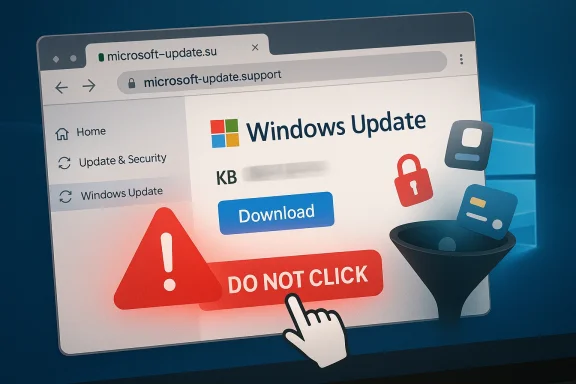
Windows PC users have been warned about a fresh fake update campaign that impersonates Microsoft support and pushes victims toward malware instead of security fixes. The lure is simple but effective: a page that looks like Windows Update or an official Microsoft support site, with a download button promising a critical cumulative update. In reality, the file is designed to steal passwords, payment details, and account access, and the page is convincing enough to fool hurried users and even some security tools. Malwarebytes says the safest response is not to follow the link at all, but to open Settings > Windows Update and check for updates from inside Windows itself. (malwarebytes.com)
This latest campaign fits squarely into one of the oldest and most effective cybercrime playbooks: exploit trust in a familiar brand, add urgency, and make the victim do the rest. Microsoft has spent years warning users that attackers routinely impersonate its support channels, whether through pop-ups, phone calls, emails, or web pages that look authentic at a glance. The company’s guidance is blunt: Microsoft does not proactively call users about support issues, and genuine error messages do not ask you to call a phone number. (support.microsoft.com)
The technique is not new, but the presentation keeps getting better. Attackers now borrow brand colors, fonts, button styles, and even plausible file properties to make their pages and installers look official. In the current campaign described by Malwarebytes, the fake domain
What has changed is the professionalization of the scam economy. The modern fake-update scam is not just a crude phishing page; it is often a full delivery chain involving typosquatted domains, carefully packaged installers, and command-and-control infrastructure that helps attackers hide their tracks. Malwarebytes says the payload in this case was a sizeable MSI installer with spoofed metadata that claimed Microsoft authorship, while the packaging itself was built on a legitimate installer framework. That combination makes the malicious file feel normal to a human and less suspicious to some automated defenses. (malwarebytes.com)
There is also a broader context here: Windows users are living through a period of elevated update anxiety. Windows 10 support ended on October 14, 2025, and Microsoft has been actively steering users toward Windows 11 and newer releases through Windows Update. When users are already primed to expect upgrade notices, feature rollouts, and security reminders, it becomes easier for attackers to insert a counterfeit “urgent update” message into the conversation.
That kind of masquerading is important because many users still assume malware has to look obviously broken. It does not. In 2026, malware often arrives wrapped in respectable packaging, and the packaging is frequently what gets it past the user. As Malwarebytes put it, the file “looks legitimate” and can slip past both users and security tools. (malwarebytes.com)
Microsoft’s own guidance describes phishing as a combination of a trusted sender, an urgent request, and a link or attachment. This fake Windows update fits the pattern perfectly. It impersonates a trusted vendor, implies the system is at risk, and offers a single click path to “fix” the problem. (support.microsoft.com)
There is also an element of routine habituation. People have seen enough legitimate update prompts that a fake one no longer needs to be perfect; it only needs to be plausible. Once a user believes the action is part of normal maintenance, the scam has already won a major part of the battle. (malwarebytes.com)
That insight matters beyond this one campaign. Criminals do not just buy stolen credentials; they buy believability. The more a scam can reflect local language, current product versions, and realistic update labels, the less effort the victim needs to exert to accept it as genuine. (malwarebytes.com)
There is a useful distinction here between a true operating-system update and a browser-delivered scam. Real Windows updates are managed by the OS, not by a web page trying to hurry you into downloading a file. Once users internalize that distinction, the fake-update scam becomes easier to spot. (support.microsoft.com)
This is also why the scam is so effective against less technical users. They do not need to be tricked into running a “hack” in the movie sense; they just need to be induced to click one button they think belongs to Microsoft. A single mistaken trust decision can cascade into a long cleanup process. (malwarebytes.com)
The practical consequence is that users should treat browser update prompts, support notices, and download pages with much more suspicion than they used to. The safest habit is to navigate to the relevant settings page directly, not through a link offered by the page itself. That rule is boring, but boring is often what keeps people safe. (support.microsoft.com)
It is also worth noting that update-themed scams can blur the line between legitimate patching and malicious social engineering. When users are constantly told to install security updates, the distinction between real maintenance and fake maintenance becomes an operational risk. That is why verification must become part of normal support culture, not a special exception. (support.microsoft.com)
It also explains why these campaigns are hard to permanently shut down. Even if one domain is blocked, the attacker can launch another that uses similar styling and different infrastructure. The real product they are selling is not malware; it is the ability to manufacture trust long enough to get a download. (malwarebytes.com)
The result is a threat model where the old distinction between “web threat” and “PC threat” becomes less useful. If a web page persuades the user to install malware, the attack has effectively crossed the browser boundary and entered the system. That is why scam detection increasingly depends on understanding the full chain, not just the final payload. (malwarebytes.com)
For Windows users, the lesson is not to fear updates but to trust them only when they come from the right place. The correct place is still the operating system’s own settings panel, not a webpage claiming to be Windows Update. The moment a software patch starts asking for trust through an unsolicited link, the safest assumption is that it is no patch at all.
Source: Daily Express Windows PC users placed on red alert and told to watch out for urgent update
 Background
This latest campaign fits squarely into one of the oldest and most effective cybercrime playbooks: exploit trust in a familiar brand, add urgency, and make the victim do the rest. Microsoft has spent years warning users that attackers routinely impersonate its support channels, whether through pop-ups, phone calls, emails, or web pages that look authentic at a glance. The company’s guidance is blunt: Microsoft does not proactively call users about support issues, and genuine error messages do not ask you to call a phone number. (support.microsoft.com)The technique is not new, but the presentation keeps getting better. Attackers now borrow brand colors, fonts, button styles, and even plausible file properties to make their pages and installers look official. In the current campaign described by Malwarebytes, the fake domain
microsoft-update[.]support was dressed up as a Microsoft support page and offered a supposed Windows 24H2 cumulative update with a believable KB-style reference number. That matters because users rarely inspect a page line by line when they think their system urgently needs attention. (malwarebytes.com)What has changed is the professionalization of the scam economy. The modern fake-update scam is not just a crude phishing page; it is often a full delivery chain involving typosquatted domains, carefully packaged installers, and command-and-control infrastructure that helps attackers hide their tracks. Malwarebytes says the payload in this case was a sizeable MSI installer with spoofed metadata that claimed Microsoft authorship, while the packaging itself was built on a legitimate installer framework. That combination makes the malicious file feel normal to a human and less suspicious to some automated defenses. (malwarebytes.com)
There is also a broader context here: Windows users are living through a period of elevated update anxiety. Windows 10 support ended on October 14, 2025, and Microsoft has been actively steering users toward Windows 11 and newer releases through Windows Update. When users are already primed to expect upgrade notices, feature rollouts, and security reminders, it becomes easier for attackers to insert a counterfeit “urgent update” message into the conversation.
What Malwarebytes Found
Malwarebytes says the campaign it observed was hosted on a typosquatted domain and presented itself as an official Microsoft support page in French, offering a fake cumulative update for Windows version 24H2. The page used the visual language of a real support site and invited users to click a large blue download button. In other words, this was not a clumsy scam built for only the least careful victims; it was engineered to pass the glance test. (malwarebytes.com)The payload looked legitimate
The downloaded file,WindowsUpdate 1.0.0.msi, was described by Malwarebytes as an 83 MB Windows Installer package with spoofed file properties. The author field read “Microsoft,” the title looked like an installation database, and the comments claimed it contained the logic and data required to install WindowsUpdate. Even the use of a legitimate installer framework was part of the deception, because it gives the file a veneer of normalcy. (malwarebytes.com)That kind of masquerading is important because many users still assume malware has to look obviously broken. It does not. In 2026, malware often arrives wrapped in respectable packaging, and the packaging is frequently what gets it past the user. As Malwarebytes put it, the file “looks legitimate” and can slip past both users and security tools. (malwarebytes.com)
Why the design is so dangerous
The danger is not just that the page resembles Microsoft branding. It is that the page aligns with expectations users already have about how Windows behaves. People expect updates to be urgent, routine, and necessary. That expectation is exactly what attackers exploit when they present a browser page that looks like a system prompt. (support.microsoft.com)- The site uses brand imitation rather than technical exploits.
- The download has credible file naming and spoofed metadata.
- The update prompt creates false urgency.
- The attack can bypass a user’s normal skepticism because it resembles a familiar Windows workflow.
- The scam’s effectiveness depends more on psychology than on software bugs. (malwarebytes.com)
Why This Scam Works
The core reason these attacks keep succeeding is painfully simple: users trust updates. Security-conscious people are taught to patch quickly, and ordinary users are repeatedly told to install critical updates to stay safe. That creates a paradox for attackers, because the very behavior that protects against real threats can be turned into a weapon when the source is fake. (support.microsoft.com)Microsoft’s own guidance describes phishing as a combination of a trusted sender, an urgent request, and a link or attachment. This fake Windows update fits the pattern perfectly. It impersonates a trusted vendor, implies the system is at risk, and offers a single click path to “fix” the problem. (support.microsoft.com)
The role of urgency
Urgency is the oldest trick in the scammer’s book because it short-circuits careful thinking. If a page says a device must be updated immediately, users are less likely to stop and ask where the page came from. That is why Microsoft repeatedly tells users to slow down, verify the sender, and avoid opening links or attachments they did not expect. (support.microsoft.com)There is also an element of routine habituation. People have seen enough legitimate update prompts that a fake one no longer needs to be perfect; it only needs to be plausible. Once a user believes the action is part of normal maintenance, the scam has already won a major part of the battle. (malwarebytes.com)
Why France was targeted
Malwarebytes noted that the campaign was initially written in French and suggested the choice was not random. The company said France has experienced a heavy accumulation of personal data exposures in recent years, creating fertile ground for targeted social engineering. In practical terms, leaked data makes a scammer’s job easier because it gives the attack a more believable local context. (malwarebytes.com)That insight matters beyond this one campaign. Criminals do not just buy stolen credentials; they buy believability. The more a scam can reflect local language, current product versions, and realistic update labels, the less effort the victim needs to exert to accept it as genuine. (malwarebytes.com)
The Microsoft Angle
Microsoft’s own advice supports the same basic conclusion as Malwarebytes: do not trust a random update prompt in a browser. The company says that if a message claims to be from a trusted organization, users should open a new tab and go directly to the official site or use their own saved bookmark. It also says suspicious browser update messages should be closed and checked through the browser’s own settings or help/about page. (support.microsoft.com)Official update paths matter
For Windows itself, the official path is Settings > Windows Update. Microsoft’s support material tells users to check Windows Update from inside the operating system when they want legitimate updates, and not to rely on unsolicited messages or third-party pages. That guidance is especially important now that Windows 10 support has ended and users may be seeing more upgrade-related notifications than before.There is a useful distinction here between a true operating-system update and a browser-delivered scam. Real Windows updates are managed by the OS, not by a web page trying to hurry you into downloading a file. Once users internalize that distinction, the fake-update scam becomes easier to spot. (support.microsoft.com)
Microsoft’s scam warning is broader than Windows
Microsoft’s support pages do not limit the warning to Windows updates. The company says technical support scams can arrive as fake pop-ups, phone calls, or messages urging immediate action, and it warns that attackers may use alarming sounds, blocked screens, or fake warnings to force compliance. In other words, the Windows-update scam is just one variation of a much broader social-engineering family. (support.microsoft.com)- Real Microsoft alerts do not include a phone number to call.
- Genuine support does not cold-call users out of the blue.
- Browser pop-ups that demand immediate software installs should be treated as suspicious.
- Official updates should be checked from system settings, not from a random link.
- If in doubt, close the page and verify independently. (support.microsoft.com)
Consumer Impact
For home users, the damage from a fake update can be immediate and personal. Malwarebytes says the goal of the campaign is to steal passwords, payment details, and account access, which means the victim may lose far more than a single device. A stolen browser session can lead to mailbox compromise, bank fraud, social media takeover, and identity theft. (malwarebytes.com)What ordinary users are most likely to lose
The biggest risk is not only the malware itself but the access it opens up. If an infostealer captures saved credentials or payment data, the attacker can reuse those details long after the original infection has been removed. That makes the incident feel like a simple download mistake when, in fact, it may be the beginning of a much wider account compromise. (malwarebytes.com)This is also why the scam is so effective against less technical users. They do not need to be tricked into running a “hack” in the movie sense; they just need to be induced to click one button they think belongs to Microsoft. A single mistaken trust decision can cascade into a long cleanup process. (malwarebytes.com)
Why browsers are part of the attack surface
Modern browsers store session cookies, credentials, and payment data, and attackers know it. Microsoft explains that phishing and malware campaigns increasingly begin with browser-based lures, including fake update pages that try to push users into installing malicious files or entering credentials into cloned sites. That means the browser is no longer just the front door; it is often the hallway through which the attacker reaches the rest of the house. (support.microsoft.com)The practical consequence is that users should treat browser update prompts, support notices, and download pages with much more suspicion than they used to. The safest habit is to navigate to the relevant settings page directly, not through a link offered by the page itself. That rule is boring, but boring is often what keeps people safe. (support.microsoft.com)
Enterprise and IT Admin Implications
For enterprises, fake-update scams are not just a consumer nuisance. They are a reminder that endpoint protection has to be paired with user behavior controls, browser hardening, and strong credential hygiene. If one employee runs a malicious installer, the downstream effect can reach shared credentials, SaaS accounts, VPN sessions, and internal support workflows. (malwarebytes.com)The helpdesk problem
Support teams should expect an uptick in confused users who have seen update prompts and want reassurance. That means the helpdesk needs a crisp playbook: verify the source, ask where the prompt appeared, and direct users to the official Windows Update interface instead of relying on screenshots or verbal descriptions alone. A well-trained helpdesk can often stop a bad click before it becomes a breach. (support.microsoft.com)It is also worth noting that update-themed scams can blur the line between legitimate patching and malicious social engineering. When users are constantly told to install security updates, the distinction between real maintenance and fake maintenance becomes an operational risk. That is why verification must become part of normal support culture, not a special exception. (support.microsoft.com)
Defensive controls that matter
Microsoft recommends SmartScreen in Edge to help block known phishing sites, and it stresses keeping operating systems and applications current. Those recommendations are especially relevant when organizations are trying to reduce the odds that a fake-update page can reach a user in the first place. In a layered defense model, browser reputation filtering, endpoint protection, and patch compliance all reinforce one another. (support.microsoft.com)- Enforce browser reputation filtering where possible.
- Restrict admin rights so users cannot casually install risky software.
- Encourage password managers and MFA to limit credential reuse.
- Monitor for unusual MSI installs and browser-originated downloads.
- Train staff that updates come from official system controls, not email links. (malwarebytes.com)
Why the Threat Is Evolving
The fake Windows update scam is part of a wider trend in which attackers increasingly avoid flashy exploits and instead lean on deceptive delivery. Malwarebytes has also reported campaigns involving fake browser updates, fake Google security checks, malvertising, and hidden malware embedded in image-based lures. The pattern is clear: if the user can be convinced to install or execute something willingly, attackers do not need to break the operating system. (support.microsoft.com)From exploit-driven to persuasion-driven attacks
That shift is important because it makes the threat more portable. A persuasion-driven attack can work across many systems, browsers, and versions because it targets human behavior rather than a specific software bug. In practice, that means the same scam can be repackaged again and again with only minor cosmetic changes.It also explains why these campaigns are hard to permanently shut down. Even if one domain is blocked, the attacker can launch another that uses similar styling and different infrastructure. The real product they are selling is not malware; it is the ability to manufacture trust long enough to get a download. (malwarebytes.com)
The browser as a social-engineering platform
Browsers now host a large share of daily computing activity, which makes them a perfect staging ground for fake system messages. Malwarebytes previously described fake Windows-update pages and fake security checks that mimic real interface elements so closely that users may not realize they are interacting with a webpage at all. That’s a subtle but powerful deception because it turns the browser into a stage for a fake operating-system event.The result is a threat model where the old distinction between “web threat” and “PC threat” becomes less useful. If a web page persuades the user to install malware, the attack has effectively crossed the browser boundary and entered the system. That is why scam detection increasingly depends on understanding the full chain, not just the final payload. (malwarebytes.com)
How Users Should Respond
The immediate advice is simple: do not click update links from emails, texts, or browser notifications if you did not initiate the check yourself. Microsoft says users should close suspicious pages, navigate manually to official settings, and avoid opening unexpected attachments or downloads. That advice is especially important when the page says the system is at risk and demands immediate action. (support.microsoft.com)A practical response checklist
If a Windows update prompt appears in the browser, users should stop, verify, and then proceed only through the operating system’s own controls. The safest approach is not to debate whether the page might be real, but to assume it is fake until independently confirmed. That mindset is not paranoia; it is sensible hygiene. (support.microsoft.com)- Close the browser tab or window.
- Open Settings > Windows Update directly.
- Check whether the system reports a real update.
- If you already downloaded something, do not run it.
- Run a trusted security scan and change compromised passwords if needed. (support.microsoft.com)
Signs that should raise suspicion
There are several recurring warning signs. A fake domain, an unexpected installer, unusually urgent wording, and a download that appears to come from a browser page rather than Windows itself are all red flags. Microsoft also notes that genuine technical support does not use unsolicited calls or pop-up warnings that push users into paying for assistance. (support.microsoft.com)- The update appears inside a browser window.
- The URL looks close to Microsoft but is not Microsoft.
- The page demands action right now.
- The file name looks official but comes from a non-official site.
- The message pushes you to install software before you can verify anything. (malwarebytes.com)
Strengths and Opportunities
The good news is that this campaign also shows how far defensive awareness has come. Malwarebytes identified the lure quickly, Microsoft continues to publish straightforward anti-scam guidance, and modern browsers plus endpoint tools can still blunt many of these attacks when users follow basic safety rules. If anything, the challenge now is less about detecting a single scam and more about building habits that withstand repeated attempts.- Users can verify updates through Windows Update without relying on web pages.
- Microsoft’s guidance on phishing and tech-support scams is clear and easy to follow.
- Security products can still help block known phishing and malware delivery sites.
- Helpdesks can turn this into a teachable moment for staff awareness.
- Enterprises can strengthen controls around downloads, scripts, and installer execution.
- The attack surface is broad, but so are the available defenses.
- A little skepticism goes a long way when update prompts appear unexpectedly.
Risks and Concerns
The worrying part is that this style of scam keeps becoming more polished while the underlying psychology stays the same. If a fake update page is translated well, branded well, and timed to coincide with real Windows release cycles, it can look legitimate enough to bypass caution. And once credentials or payment data are stolen, the harm can continue long after the infected file is removed.- Typosquatted domains can be registered faster than they are blocked.
- Spoofed installer metadata can fool users and some security tools.
- Credential theft can lead to secondary account takeover later.
- Users under time pressure are more likely to click without verifying.
- Windows update fatigue makes fake update prompts feel normal.
- The same scam framework can be reused for other brands and platforms.
- Enterprises may underestimate the business impact of a single consumer-style click.
Looking Ahead
The next phase of this threat is likely to be more adaptive rather than more sophisticated in the traditional sense. Attackers do not need to invent new malware families every time; they can keep refining the delivery chain, changing the language, swapping in new domains, and borrowing the look of whatever users currently expect to see from Microsoft or other trusted brands. That makes the update ecosystem itself a target, not just the devices being updated.For Windows users, the lesson is not to fear updates but to trust them only when they come from the right place. The correct place is still the operating system’s own settings panel, not a webpage claiming to be Windows Update. The moment a software patch starts asking for trust through an unsolicited link, the safest assumption is that it is no patch at all.
- Expect more brand impersonation around update notices.
- Watch for fake lures tied to current Windows versions and KB numbers.
- Treat browser-delivered update messages as suspicious by default.
- Use official settings paths for updates and security checks.
- Keep multi-factor authentication enabled everywhere possible.
- Report suspicious pages and messages quickly so they can be blocked.
Source: Daily Express Windows PC users placed on red alert and told to watch out for urgent update
