

A convincing fake Windows 11 24H2 update is making the rounds, and the danger is not a broken patch or a botched reboot. It is a malicious installer disguised as a Microsoft download page, built to steal passwords, browser sessions, payment data, and other sensitive information from unwary users. Malwarebytes says the campaign uses a typosquatted domain, polished branding, and a fake KB number to look legitimate at first glance, while quietly delivering infostealer malware instead .
Windows updates have always occupied a strange place in the user psyche. They are supposed to be routine, boring, and safe, which is exactly why they are so easy to weaponize. A fake update prompt does not need to invent urgency from scratch; it only needs to hijack a workflow people already trust. That is what makes this campaign so dangerous, and why it fits so neatly into the broader evolution of modern phishing and malware delivery .
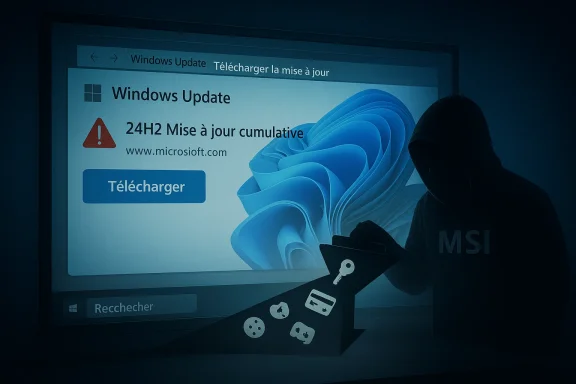
The latest scam, according to Malwarebytes, centers on a website hosted at a lookalike domain, microsoft-update.support, that imitates an official Microsoft support page and presents a believable Windows 11 24H2 cumulative update lure. The page is written in French, includes a prominent download button, and uses a plausible KB-style reference to create the impression of normal servicing. In other words, it borrows the visual grammar of Microsoft maintenance rather than the obvious branding cues that users are trained to spot .
That detail matters because Microsoft’s real update model is quite different. Official guidance directs users to Windows Update in Settings, where the system checks, downloads, and installs updates directly, and Microsoft also points people to its own support pages and Update Catalog when a standalone package is actually required. There is no legitimate reason for a random website to present itself as a Microsoft patch portal and then ask users to fetch an “update” through a big blue button.
This is also happening at a moment when Windows 11 24H2 is a recognizable and current version name, which makes it especially useful for attackers. Microsoft’s own release-health and servicing documentation shows that 24H2 is part of the active Windows 11 update story, and that makes the fake page feel more plausible to casual visitors. The more familiar the version label, the easier it is for a scam to hide in plain sight.
There is a historical pattern here that cannot be ignored. Fake Adobe updates, fake browser updates, fake antivirus renewals, and fake Windows maintenance pages have circulated for years. What has changed is the quality of the disguise. Attackers now use legitimate installer frameworks, spoofed metadata, and layered payloads so the file looks routine to users and less suspicious to some tools as well. Malwarebytes says the package in this case was built with WiX Toolset 4.0.0.5512, which is a real open-source installer framework, and that detail alone helps explain why the file does not trigger immediate alarm .
The threat is also part of a broader shift in cybercrime toward trust engineering. Rather than rely on crude malware alone, attackers increasingly imitate support flows, login pages, and maintenance screens. The scam is no longer just “click this bad link”; it is “perform this normal-looking task through a fake channel.” That subtle change is what makes it so effective against ordinary users and, at times, against basic security triage too .
The broader point is that attackers are learning how people verify software in the real world. Most users do not perform certificate analysis or cross-check KB applicability statements. They glance at filenames, icons, file size, and maybe the author metadata. The malicious package is designed to survive exactly that level of inspection, and that is enough to defeat the first line of human skepticism .
Malwarebytes also noted that the campaign appeared fresh, with the package created on April 4, 2026, only days before the warning. That matters because freshness often correlates with low detection. Attackers can rotate infrastructure quickly, publish new lures, and test whether their latest disguise has enough polish to evade both scanners and users. The cycle is fast, and defenders rarely have the luxury of waiting for perfect signatures .
This is where fake update scams become more interesting than generic phishing. They are not simply lying about identity; they are misusing legitimate Microsoft nomenclature to create contextual legitimacy. If the build number seems real and the layout seems familiar, many users assume the whole package is authentic. In reality, the scam only needs one real detail and a lot of confidence to succeed .
Microsoft’s own servicing documentation is the antidote. Legitimate update pages tie version numbers, release dates, and applicability statements together in a consistent way. Scams often fail because they treat the technical trail as decoration rather than evidence. That is why boring metadata is often the best defense against a polished lie.
That matters because many tools still lean on first-pass reputation, filename patterns, or static signatures. When an installer uses legitimate frameworks and common runtimes, static analysis can lag behind reality. The outer shell may be clean, the script may be generic, and the truly dangerous behavior may not emerge until later in execution. Security teams increasingly need process-tree visibility rather than just file-level judgment .
The use of Electron and Python is especially clever. Electron is common in mainstream desktop software, which makes it an effective camouflage layer. Python is similarly common for automation and scripting, which gives attackers a flexible way to manipulate the system while appearing unremarkable to casual inspection. The combination is not flashy, but it is highly practical for criminals who want to avoid friction .
This is where behavior-based defense becomes more valuable than traditional “looks clean” heuristics. A malicious installer that calls out to a script, spawns hidden child processes, or launches renamed runtimes is more revealing than its file name suggests. The threat is not the installer alone; it is the whole chain of trust that the installer opens up .
The French-language presentation also matters. Localized lures often convert better because they reduce obvious friction and feel more relevant to the target audience. A campaign does not need to be global on day one to be profitable; it only needs to feel native enough to a subset of users. That is a small design choice with a large payoff for the attacker .
Microsoft’s real support guidance is the correct counterpoint here. The company directs people to Settings > Windows Update, where the system checks and installs updates directly. That channel preserves the trust boundary by keeping the update process inside Windows itself. The moment a website starts offering a “Windows update” as a separate download, users should assume the burden of proof has become extraordinarily high.
It is also worth noting that the attackers did not need to create an elaborate fake product. They simply picked a recognizable maintenance event, gave it a plausible KB number, and wrapped it in Microsoft-like language. That is enough to fool people who are in a hurry, distracted, or simply conditioned to trust update workflows .
Payment data is the other major prize. If the malware reaches saved card details, autofill records, or related browser artifacts, it can support direct fraud or future resale. A victim may think the danger ended when the fake update finished installing, but in reality the downstream damage can continue long after the screen goes dark .
That is why this class of malware is so attractive to criminals. It is quiet, scalable, and easy to reuse. A single infection can seed many different kinds of abuse: email takeover, financial fraud, account resale, password spraying, and secondary phishing. The first victim is rarely the only victim .
The danger is compounded by the fact that victims may not notice anything immediately. If the malware looks like a Windows update, any odd behavior afterward can be misattributed to patching. That delay helps attackers because it buys them time to exfiltrate data, establish persistence, and use stolen credentials before the user reacts .
This is also a reminder that endpoint defenses should be treated as layered, not singular. Browser protections, DNS filtering, EDR, and user training all help, but none of them can fully compensate for a convincing fake update download if users are allowed to interact with it freely. The attack is designed to cross those boundaries one step at a time .
The practical enterprise takeaway is to make manual update downloads rare, audited, and policy-driven. When users are used to downloading software from random support pages, the attacker’s job becomes easier. When the organization limits software acquisition to approved channels, the scam loses much of its oxygen .
There is also a detection risk. Because the campaign uses a legitimate installer framework and common development tools, defenders may not notice the payload until after a user has already executed several stages. That means the window for prevention is narrower than it appears, especially if the file is opened on an unmanaged or lightly monitored endpoint .
The near-term question is how quickly defenders can adapt their habits. Users need to internalize that a real Windows update should come from Windows Update, not from a random support-looking page. Enterprises need to harden that lesson with policy, filtering, and endpoint telemetry. Security products also need to keep improving their ability to inspect execution chains instead of isolated binaries.
Source: Windows Central This fake Windows 11 24H2 update looks perfect, until it avoids antivirus and steals your passwords
 Background
Windows updates have always occupied a strange place in the user psyche. They are supposed to be routine, boring, and safe, which is exactly why they are so easy to weaponize. A fake update prompt does not need to invent urgency from scratch; it only needs to hijack a workflow people already trust. That is what makes this campaign so dangerous, and why it fits so neatly into the broader evolution of modern phishing and malware delivery .The latest scam, according to Malwarebytes, centers on a website hosted at a lookalike domain, microsoft-update.support, that imitates an official Microsoft support page and presents a believable Windows 11 24H2 cumulative update lure. The page is written in French, includes a prominent download button, and uses a plausible KB-style reference to create the impression of normal servicing. In other words, it borrows the visual grammar of Microsoft maintenance rather than the obvious branding cues that users are trained to spot .
That detail matters because Microsoft’s real update model is quite different. Official guidance directs users to Windows Update in Settings, where the system checks, downloads, and installs updates directly, and Microsoft also points people to its own support pages and Update Catalog when a standalone package is actually required. There is no legitimate reason for a random website to present itself as a Microsoft patch portal and then ask users to fetch an “update” through a big blue button.
This is also happening at a moment when Windows 11 24H2 is a recognizable and current version name, which makes it especially useful for attackers. Microsoft’s own release-health and servicing documentation shows that 24H2 is part of the active Windows 11 update story, and that makes the fake page feel more plausible to casual visitors. The more familiar the version label, the easier it is for a scam to hide in plain sight.
There is a historical pattern here that cannot be ignored. Fake Adobe updates, fake browser updates, fake antivirus renewals, and fake Windows maintenance pages have circulated for years. What has changed is the quality of the disguise. Attackers now use legitimate installer frameworks, spoofed metadata, and layered payloads so the file looks routine to users and less suspicious to some tools as well. Malwarebytes says the package in this case was built with WiX Toolset 4.0.0.5512, which is a real open-source installer framework, and that detail alone helps explain why the file does not trigger immediate alarm .
The threat is also part of a broader shift in cybercrime toward trust engineering. Rather than rely on crude malware alone, attackers increasingly imitate support flows, login pages, and maintenance screens. The scam is no longer just “click this bad link”; it is “perform this normal-looking task through a fake channel.” That subtle change is what makes it so effective against ordinary users and, at times, against basic security triage too .
What Malwarebytes Found
Malwarebytes’ analysis gives the campaign its sharpest contours. The firm says the site is hosted on a typosquatted domain and presents a fake cumulative update for Windows version 24H2 with a believable-looking KB identifier. The malware is packaged as an 83 MB MSI named WindowsUpdate 1.0.0.msi, with file properties spoofed to read as if Microsoft authored it. The intention is obvious: make the download feel mundane, official, and safe enough to install without hesitation .Spoofed metadata, real intent
The installer metadata is not just cosmetic filler. Malwarebytes says the Author field reads Microsoft, the title resembles a standard installation database, and the comments field claims the package contains the logic and data required to install WindowsUpdate. Those are the kinds of details that create a powerful false positive for trust. They look reassuring when inspected casually, yet they carry no real proof of legitimacy .The broader point is that attackers are learning how people verify software in the real world. Most users do not perform certificate analysis or cross-check KB applicability statements. They glance at filenames, icons, file size, and maybe the author metadata. The malicious package is designed to survive exactly that level of inspection, and that is enough to defeat the first line of human skepticism .
Malwarebytes also noted that the campaign appeared fresh, with the package created on April 4, 2026, only days before the warning. That matters because freshness often correlates with low detection. Attackers can rotate infrastructure quickly, publish new lures, and test whether their latest disguise has enough polish to evade both scanners and users. The cycle is fast, and defenders rarely have the luxury of waiting for perfect signatures .
- The site uses a typosquatted Microsoft-like domain.
- The download is a large MSI package with spoofed properties.
- The lure uses a fake 24H2 update narrative.
- The campaign appears to be new and actively maintained.
- The design is meant to look boring, not flashy.
The fake KB number problem
One of the easiest mistakes for attackers to make is also one of the easiest clues for defenders to spot: a mismatched KB reference. Malwarebytes says the scam used KB5034765 in a 24H2 context, even though Microsoft’s own support history places that update in the 22H2/23H2 era. That mismatch is subtle enough to miss in a hurry, but serious enough to expose the fraud to anyone who checks the details .This is where fake update scams become more interesting than generic phishing. They are not simply lying about identity; they are misusing legitimate Microsoft nomenclature to create contextual legitimacy. If the build number seems real and the layout seems familiar, many users assume the whole package is authentic. In reality, the scam only needs one real detail and a lot of confidence to succeed .
Microsoft’s own servicing documentation is the antidote. Legitimate update pages tie version numbers, release dates, and applicability statements together in a consistent way. Scams often fail because they treat the technical trail as decoration rather than evidence. That is why boring metadata is often the best defense against a polished lie.
Why Antivirus Struggles Here
The most unsettling part of the report is not that the malware exists, but that it initially looks clean. Malwarebytes says VirusTotal showed zero detections across 69 engines for the main executable and 62 for the VBS launcher at the time of analysis. No YARA rules matched, and behavioral scoring classified the activity as low risk. That does not mean the file was harmless; it means the threat was built to fit comfortably inside common trust boundaries .Layered delivery is the whole trick
The attack chain is intentionally indirect. Malwarebytes says the initial file launches a VBS script, which loads an Electron application, which then runs a renamed Python process and pulls components at runtime. Each layer is individually mundane. Together, they create a chain that can hide malicious intent until the whole sequence is executed .That matters because many tools still lean on first-pass reputation, filename patterns, or static signatures. When an installer uses legitimate frameworks and common runtimes, static analysis can lag behind reality. The outer shell may be clean, the script may be generic, and the truly dangerous behavior may not emerge until later in execution. Security teams increasingly need process-tree visibility rather than just file-level judgment .
The use of Electron and Python is especially clever. Electron is common in mainstream desktop software, which makes it an effective camouflage layer. Python is similarly common for automation and scripting, which gives attackers a flexible way to manipulate the system while appearing unremarkable to casual inspection. The combination is not flashy, but it is highly practical for criminals who want to avoid friction .
- VBS provides a small launcher stage.
- Electron supplies a familiar app shell.
- Python handles flexible payload logic.
- Runtime fetching delays full visibility.
- Legitimate tooling lowers suspicion.
Static scanning is not enough
The lesson for consumers is simple: a clean scan on the first file does not mean the whole chain is safe. The lesson for enterprises is more serious: detection must account for how a package behaves after the first stage, not just whether the outer MSI or executable matches a known bad hash. Malwarebytes’ findings show how attackers can stay a step ahead by hiding in ordinary development and deployment patterns .This is where behavior-based defense becomes more valuable than traditional “looks clean” heuristics. A malicious installer that calls out to a script, spawns hidden child processes, or launches renamed runtimes is more revealing than its file name suggests. The threat is not the installer alone; it is the whole chain of trust that the installer opens up .
How the Fake Update Wins Trust
The campaign succeeds because it does not ask the user to behave suspiciously. Quite the opposite: it asks the user to do something familiar, routine, and often recommended by software vendors. That is why fake update campaigns remain so persistent. They weaponize maintenance behavior, not technical ignorance alone .The psychology of “just install it”
Windows users have been trained for years to click through update prompts because updates usually are important. That expectation creates a reflex, and reflexes are gold for attackers. When a site looks like a Microsoft support page and says a security update is waiting, the instinct to comply can outrun the instinct to verify .The French-language presentation also matters. Localized lures often convert better because they reduce obvious friction and feel more relevant to the target audience. A campaign does not need to be global on day one to be profitable; it only needs to feel native enough to a subset of users. That is a small design choice with a large payoff for the attacker .
Microsoft’s real support guidance is the correct counterpoint here. The company directs people to Settings > Windows Update, where the system checks and installs updates directly. That channel preserves the trust boundary by keeping the update process inside Windows itself. The moment a website starts offering a “Windows update” as a separate download, users should assume the burden of proof has become extraordinarily high.
Why the domain matters more than the logo
Many users still overvalue visual polish, HTTPS, padlock icons, and Microsoft branding. Those signals are useful, but they are not decisive. A lookalike domain can still present a perfect interface, modern web hosting, and professional typography while remaining fully malicious. In this case, the hostname itself is the warning sign, because official Microsoft support does not live on a random typosquatted domain .It is also worth noting that the attackers did not need to create an elaborate fake product. They simply picked a recognizable maintenance event, gave it a plausible KB number, and wrapped it in Microsoft-like language. That is enough to fool people who are in a hurry, distracted, or simply conditioned to trust update workflows .
What the Malware Steals
This is an infostealer campaign at heart, which makes its goals brutally practical. Malwarebytes says the payload is designed to steal passwords, payment details, account access, browser-stored credentials, Discord tokens, and other sensitive data. That means the infection is less about sabotaging the machine and more about quietly monetizing the victim’s digital identity .Credentials are only the beginning
The obvious risk is password theft, but the broader problem is session theft. Browser cookies and tokens can sometimes preserve access even when passwords are changed, especially if the attacker moves quickly. That makes infostealers especially dangerous because they can leap from one account to another with very little friction once the first foothold is established .Payment data is the other major prize. If the malware reaches saved card details, autofill records, or related browser artifacts, it can support direct fraud or future resale. A victim may think the danger ended when the fake update finished installing, but in reality the downstream damage can continue long after the screen goes dark .
That is why this class of malware is so attractive to criminals. It is quiet, scalable, and easy to reuse. A single infection can seed many different kinds of abuse: email takeover, financial fraud, account resale, password spraying, and secondary phishing. The first victim is rarely the only victim .
- Browser passwords can be extracted.
- Session tokens may outlive a password reset.
- Payment details can fuel direct fraud.
- Discord and gaming tokens add resale value.
- Email access can unlock other accounts.
Why consumers are especially exposed
Home users often save credentials for convenience and keep sessions open for weeks at a time. That convenience is exactly what infostealers exploit. When an attacker can capture a browser profile in one sweep, the haul can include personal email, shopping accounts, cloud storage, entertainment services, and potentially banking access as well .The danger is compounded by the fact that victims may not notice anything immediately. If the malware looks like a Windows update, any odd behavior afterward can be misattributed to patching. That delay helps attackers because it buys them time to exfiltrate data, establish persistence, and use stolen credentials before the user reacts .
Enterprise Exposure and Detection Gaps
Enterprise environments are not immune just because they have better tooling. In some ways, they are more exposed to this kind of campaign because staff are trained to accept software updates, trust branded portals, and move quickly when maintenance is involved. A fake Microsoft support page can slip past routine habits more easily than a random malware download would .The SOC problem
For security operations teams, the challenge is visibility. If a malicious package looks like a legitimate installer, the suspicious behavior may only emerge after multiple stages have executed. That means analysts need process-tree monitoring, script inspection, and event correlation, not just a single alert on the original file. A low-risk score on the first binary is not a reliable verdict .This is also a reminder that endpoint defenses should be treated as layered, not singular. Browser protections, DNS filtering, EDR, and user training all help, but none of them can fully compensate for a convincing fake update download if users are allowed to interact with it freely. The attack is designed to cross those boundaries one step at a time .
The practical enterprise takeaway is to make manual update downloads rare, audited, and policy-driven. When users are used to downloading software from random support pages, the attacker’s job becomes easier. When the organization limits software acquisition to approved channels, the scam loses much of its oxygen .
Policy versus habit
One of the hardest problems in enterprise security is that users often know the rules and still follow habits. They click on a familiar-looking update page because the task feels legitimate. The solution is not just more warnings; it is better channel discipline, stronger filtering, and clearer guidance on what Microsoft does and does not distribute through a browser page.- Restrict software to approved update channels.
- Block typosquatted domains at the network layer.
- Inspect process chains, not just file hashes.
- Correlate script launches with user activity.
- Train users to distrust manual Windows update downloads.
Strengths and Opportunities
The upside for defenders is that this campaign is very understandable. It is not a novel kernel exploit or a previously unknown remote code execution bug; it is a social-engineering attack wrapped in a layered installer chain. That makes it easier to educate users about and easier for security teams to build detections around. It also creates a strong case for tightening the basic rules around software distribution .- Microsoft already provides a safe update path through Windows Update.
- KB mismatches can be used as quick verification clues.
- Typosquatted domains are straightforward to block.
- Behavioral EDR has a better chance than static scanning alone.
- Process-tree logging can reveal VBS, Electron, and Python chains.
- User training can focus on update impersonation specifically.
- Session hygiene can reduce post-infection damage.
Risks and Concerns
The biggest risk is that this pattern scales easily. Once criminals know a fake Windows update lure works, they can rebrand it, swap the payload, and rotate the domain without reinventing the campaign. The mechanics are cheap, the target pool is large, and the social engineering can be localized for different regions or languages .- Lookalike domains are inexpensive to register.
- Spoofed metadata can fool quick inspections.
- Legitimate runtimes make malware look benign.
- Runtime downloads complicate sandboxing.
- Session theft can survive password resets.
- Browser data theft can cascade into many accounts.
- User fatigue may dull warnings over time.
There is also a detection risk. Because the campaign uses a legitimate installer framework and common development tools, defenders may not notice the payload until after a user has already executed several stages. That means the window for prevention is narrower than it appears, especially if the file is opened on an unmanaged or lightly monitored endpoint .
Looking Ahead
This campaign is almost certainly not the last of its kind. The combination of a real Microsoft product name, a believable version number, a polished support-page layout, and a layered installer chain is too effective not to be copied. Attackers have learned that if they can make malware feel like maintenance, they can cut through some of the skepticism that usually protects ordinary users .The near-term question is how quickly defenders can adapt their habits. Users need to internalize that a real Windows update should come from Windows Update, not from a random support-looking page. Enterprises need to harden that lesson with policy, filtering, and endpoint telemetry. Security products also need to keep improving their ability to inspect execution chains instead of isolated binaries.
What to watch next
- Whether more localized fake-update pages appear in other languages.
- Whether attackers move from French-only targeting to broader regional lures.
- Whether defenders start flagging KB mismatches more aggressively.
- Whether malware authors keep using Electron and Python as camouflage.
- Whether Microsoft’s own guidance helps reinforce Windows Update-only behavior.
Source: Windows Central This fake Windows 11 24H2 update looks perfect, until it avoids antivirus and steals your passwords
