

A convincing fake Windows 11 24H2 update campaign is a reminder that the most dangerous software trick in 2026 may be the one that looks the most routine. The lure, according to the material surfaced in the file search results, uses a lookalike Microsoft support page, a believable cumulative-update story, and a layered installer chain that hides infostealer behavior behind legitimate tooling. That makes it particularly effective at the exact moment Microsoft is pushing users to patch quickly, and it is why this scam deserves to be treated as more than just another phishing page.
Windows updates are supposed to be boring. They arrive through a familiar channel, ask for a restart, and quietly remove risk from the system; that ordinariness is exactly what attackers have learned to weaponize. A fake update page does not need to invent urgency from scratch, because Microsoft’s patch cycle already provides it. If the timing is right and the branding is convincing, users are inclined to click first and verify later.
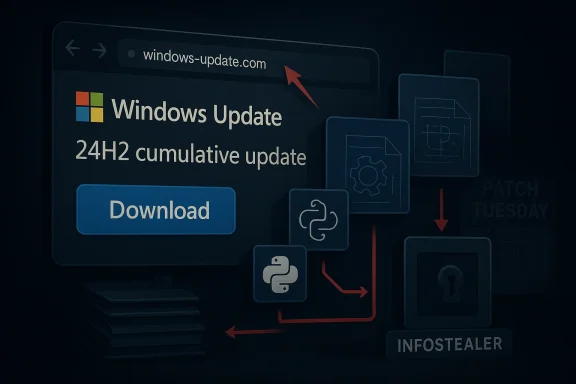
The campaign highlighted in the uploaded material revolves around a lookalike domain that imitates Microsoft support and presents a Windows 11 24H2 cumulative update lure. The page uses French localization, a prominent download button, and a fake KB-style reference to create the impression of a normal servicing workflow. That matters because most users do not perform deep checks on update metadata; they assume that if a page looks like Microsoft and talks like Microsoft, it must be Microsoft.
What makes this case more than a standard phishing story is the packaging. Malwarebytes described an 83 MB MSI file named WindowsUpdate 1.0.0.msi, with spoofed properties that made it appear Microsoft-authored, and said the installer was built with WiX Toolset, a legitimate open-source framework. That combination is important because it shifts the conversation from “bad file” to “bad workflow”: the outer shell looks ordinary, while the malicious logic is buried deeper in the chain.
The timing also amplifies the risk. The file search results point to Microsoft’s real April 2026 patch cycle and the company’s normal Windows 11 24H2 servicing rhythm, which creates just enough ambient trust for attackers to exploit. In other words, the scam is not competing with ignorance; it is competing with the user’s assumption that patch day is supposed to look exactly like this.
The misleading detail most users are least likely to notice is the mismatch between the update story and the version context. Several snippets note that the campaign used a real KB identifier in the wrong Windows 11 context, which is precisely the sort of error that reveals fraud to anyone checking the fine print. The scam succeeds because it relies on plausibility, not perfect accuracy.
The French localization is also significant. Localized scams reduce obvious red flags and can improve conversion in a specific target market, especially when the rest of the page looks polished enough to pass a quick visual check. It is a reminder that cybercrime is increasingly regional and opportunistic, not just global and noisy.
Malwarebytes’ analysis, as reflected in the file snippets, describes the malicious behavior as hidden behind an apparently clean front end. The main executable reportedly showed zero detections across dozens of antivirus engines at one stage of analysis, not because it was harmless, but because the harmful logic was delayed or obfuscated deeper in the package. That is a very different problem from a crude droplet with obvious malware signatures.
This is where the broader malware trend becomes obvious. The attacker is not trying to invent a novel file type; the attacker is trying to make the malicious workflow resemble the mundane workflow of legitimate software installation. That difference sounds small, but it is the difference between an obvious threat and one that needs layered analysis to expose.
The Malwarebytes commentary referenced in the uploaded snippets says April’s patch cycle covered a large number of vulnerabilities, including zero-days. Whether a user fully understands the vulnerability count is almost beside the point; the psychological effect is enough. The presence of real security news gives criminals a ready-made script, and the scam borrows that script with minimal effort.
It also means defenders must be careful not to overcorrect. If every update prompt is treated as suspicious, users may become reluctant to install legitimate fixes. The challenge is not to slow patching down, but to move it back to the official channel where it belongs. That is the real message behind Microsoft’s own update guidance.
Enterprises are not immune, though they have more tools to help them. The problem is that managed users often develop habits around installing updates, accepting prompts, and trusting maintenance-like workflows; those habits can become liabilities when the attack is framed as routine system upkeep. Once a malicious package lands, analysts may need process-tree visibility and script inspection rather than a single alert on the original file.
For enterprises, this also becomes a policy issue. If users are rarely allowed to download software from random support pages, the attacker’s attack surface shrinks dramatically. If software acquisition is decentralized and informal, the fake update page has room to work. The difference is discipline, not technology alone.
Microsoft’s release-health pages and update history pages matter because they create a verifiable chain of custody for patches. A real update has a build number, a release date, applicability rules, and a distribution mechanism that does not depend on random third-party branding. Fake pages often borrow those conventions, but they usually fail to keep the details internally consistent.
That is also why Microsoft’s own guidance points users toward Settings > Windows Update for normal patching and the official Update Catalog only when a standalone package is genuinely required. If the path is anything else, the burden of proof should be extraordinarily high. Convenience is not a trust model.
The analysis also suggests the operation may be relatively fresh, with the malicious package reportedly created only days before the warning. Fresh infrastructure often correlates with lower detection and faster iteration, which means the campaign could be adjusted quickly if defenders begin blocking the obvious version. That is why lookalike threats are so frustrating: the attacker can change the costume faster than the victim can build a habit.
It is also a sign of where malware delivery is heading. The more software distribution becomes standardized and invisible, the more criminals will try to clone the standardization itself. The “normal” update flow becomes the disguise, and the victim’s familiarity becomes part of the exploit.
A second advantage is that the scam leaves a lot of behavioral breadcrumbs. The use of VBS, Electron, and Python provides defenders with an execution chain they can detect via telemetry, process-tree analysis, and script inspection. The fake domain and inconsistent KB reference also give network and content-filtering teams concrete indicators to work with.
There is also a trust erosion problem. The more fake update pages circulate, the more users may hesitate when a real update is requested, especially if they have already seen polished scams using Microsoft branding. That creates a nasty feedback loop: successful impersonation can slow genuine patch adoption, which in turn leaves systems exposed longer.
Microsoft, security vendors, and enterprise defenders will likely keep pushing people toward official update pathways, because centralization reduces the room for this kind of fraud. The challenge is making that guidance actionable without making users anxious about legitimate patches. If the industry gets that balance right, it can preserve the trust that patching depends on while cutting off a very profitable scam vector.
Source: Bez Kabli Fake Windows 11 24H2 Update Warning: Avoid This Lookalike Download as Microsoft Rolls Out April Patch
 Overview
Windows updates are supposed to be boring. They arrive through a familiar channel, ask for a restart, and quietly remove risk from the system; that ordinariness is exactly what attackers have learned to weaponize. A fake update page does not need to invent urgency from scratch, because Microsoft’s patch cycle already provides it. If the timing is right and the branding is convincing, users are inclined to click first and verify later.The campaign highlighted in the uploaded material revolves around a lookalike domain that imitates Microsoft support and presents a Windows 11 24H2 cumulative update lure. The page uses French localization, a prominent download button, and a fake KB-style reference to create the impression of a normal servicing workflow. That matters because most users do not perform deep checks on update metadata; they assume that if a page looks like Microsoft and talks like Microsoft, it must be Microsoft.
What makes this case more than a standard phishing story is the packaging. Malwarebytes described an 83 MB MSI file named WindowsUpdate 1.0.0.msi, with spoofed properties that made it appear Microsoft-authored, and said the installer was built with WiX Toolset, a legitimate open-source framework. That combination is important because it shifts the conversation from “bad file” to “bad workflow”: the outer shell looks ordinary, while the malicious logic is buried deeper in the chain.
The timing also amplifies the risk. The file search results point to Microsoft’s real April 2026 patch cycle and the company’s normal Windows 11 24H2 servicing rhythm, which creates just enough ambient trust for attackers to exploit. In other words, the scam is not competing with ignorance; it is competing with the user’s assumption that patch day is supposed to look exactly like this.
How the Fake Update Lure Works
The most effective scams are often the ones that copy ordinary behavior rather than extraordinary branding. In this case, the lure reportedly uses a Microsoft-like page layout, a believable update name, and an installer download that looks like a manual fallback for users who think Windows Update is not enough. That is a subtle but powerful form of social engineering, because it trades on the idea that a “real” update can be downloaded just like any other piece of software.The misleading detail most users are least likely to notice is the mismatch between the update story and the version context. Several snippets note that the campaign used a real KB identifier in the wrong Windows 11 context, which is precisely the sort of error that reveals fraud to anyone checking the fine print. The scam succeeds because it relies on plausibility, not perfect accuracy.
Why the visual design matters
Attackers increasingly understand that trust is visual before it is technical. The fake page borrows Microsoft’s language, layout, and update vocabulary, then places a blue download button in the exact spot users expect to see action. That is a classic pattern in modern phishing: reduce friction, reduce scrutiny, and make the user feel that clicking is simply part of maintenance.The French localization is also significant. Localized scams reduce obvious red flags and can improve conversion in a specific target market, especially when the rest of the page looks polished enough to pass a quick visual check. It is a reminder that cybercrime is increasingly regional and opportunistic, not just global and noisy.
- The lure imitates a Microsoft support workflow.
- The update name is current enough to feel credible.
- The domain itself is the real giveaway, not the logo.
- The language choice appears tailored to a specific audience.
- The page is designed to reduce hesitation, not raise it.
The Installer Chain and Why It Evades Attention
Once the user clicks, the attack becomes much more interesting from a technical perspective. The uploaded material says the MSI uses a legitimate installer framework, then drops a chain involving VBS, Electron, and Python components before reaching the payload. That layered approach matters because each stage looks mundane in isolation, yet the combined sequence is exactly what defenders should fear.Malwarebytes’ analysis, as reflected in the file snippets, describes the malicious behavior as hidden behind an apparently clean front end. The main executable reportedly showed zero detections across dozens of antivirus engines at one stage of analysis, not because it was harmless, but because the harmful logic was delayed or obfuscated deeper in the package. That is a very different problem from a crude droplet with obvious malware signatures.
The role of legitimate tools
WiX and Electron are not suspicious on their own. In fact, they are widely used in normal software distribution, which is exactly why they are useful to attackers. A malicious file that looks like a routine installer and then launches common scripting or application runtimes can slide past casual inspection and, in some cases, frustrate static scanning too.This is where the broader malware trend becomes obvious. The attacker is not trying to invent a novel file type; the attacker is trying to make the malicious workflow resemble the mundane workflow of legitimate software installation. That difference sounds small, but it is the difference between an obvious threat and one that needs layered analysis to expose.
- WiX helps the package look like normal software.
- Electron gives the chain a familiar desktop-app shape.
- Python enables modular malicious logic.
- VBS launchers add another veil of ordinary behavior.
- Process chains, not just file hashes, become essential for detection.
Why Patch Tuesday Helps the Attackers
The file search results repeatedly underscore a timing problem: the scam appeared while Microsoft’s real April 2026 updates were being distributed. That is useful to attackers because patch Tuesday already creates a climate of urgency, and users are primed to think about updates, restarts, and security fixes. A fake patch feels more believable when everyone is talking about real patches.The Malwarebytes commentary referenced in the uploaded snippets says April’s patch cycle covered a large number of vulnerabilities, including zero-days. Whether a user fully understands the vulnerability count is almost beside the point; the psychological effect is enough. The presence of real security news gives criminals a ready-made script, and the scam borrows that script with minimal effort.
Timing as a social-engineering weapon
This is one of the less appreciated aspects of modern phishing. Attackers no longer need to manufacture urgency out of nowhere; they can simply parasitize the existing urgency created by vendors, advisories, and monthly servicing cycles. That makes patch-related scams especially effective because they ride inside a legitimate security conversation.It also means defenders must be careful not to overcorrect. If every update prompt is treated as suspicious, users may become reluctant to install legitimate fixes. The challenge is not to slow patching down, but to move it back to the official channel where it belongs. That is the real message behind Microsoft’s own update guidance.
- Real patch cycles create believable urgency.
- Security headlines lower user skepticism.
- Attackers exploit the overlap between caution and convenience.
- Users are less likely to question a patch if they already expect one.
Enterprise Exposure vs Consumer Risk
Consumers are the easiest target because they usually rely on visual trust and gut instinct. If a page looks like Microsoft support and offers a plausible Windows update, many home users will accept the download without checking the domain or release history. That is especially true when the page uses the same language and terminology that Microsoft itself uses in support documentation.Enterprises are not immune, though they have more tools to help them. The problem is that managed users often develop habits around installing updates, accepting prompts, and trusting maintenance-like workflows; those habits can become liabilities when the attack is framed as routine system upkeep. Once a malicious package lands, analysts may need process-tree visibility and script inspection rather than a single alert on the original file.
What makes enterprise detection harder
The file search results emphasize a detection blind spot: a package can appear safe at the first stage and only become obviously hostile after several components have executed. That means static scoring is often not enough, especially when the attack uses legitimate runtimes and a clean-looking installer wrapper. Security teams need to think in terms of behavior, not just reputation.For enterprises, this also becomes a policy issue. If users are rarely allowed to download software from random support pages, the attacker’s attack surface shrinks dramatically. If software acquisition is decentralized and informal, the fake update page has room to work. The difference is discipline, not technology alone.
- Consumer users depend heavily on visual trust.
- Enterprise users can still be fooled by routine-looking workflows.
- Static tools may miss layered malicious behavior.
- Policy control can reduce exposure faster than awareness alone.
The Microsoft Update Channel Still Matters
One of the clearest themes in the uploaded material is that genuine Windows updates should come from Windows Update or Microsoft’s own distribution channels. That sounds obvious, but it is the core of the defense here. If users are encouraged to think that a browser page can safely deliver a Windows patch, the attacker has already won part of the argument.Microsoft’s release-health pages and update history pages matter because they create a verifiable chain of custody for patches. A real update has a build number, a release date, applicability rules, and a distribution mechanism that does not depend on random third-party branding. Fake pages often borrow those conventions, but they usually fail to keep the details internally consistent.
Why channel discipline beats intuition
This is where many users and even some admins go wrong. They rely on whether the page looks legitimate rather than whether the distribution channel is legitimate. But the domain is the proof, not the logo, and the download path is the proof, not the button style.That is also why Microsoft’s own guidance points users toward Settings > Windows Update for normal patching and the official Update Catalog only when a standalone package is genuinely required. If the path is anything else, the burden of proof should be extraordinarily high. Convenience is not a trust model.
- Check the source, not just the appearance.
- Use Windows Update for routine servicing.
- Reserve standalone packages for Microsoft’s official channels.
- Treat unsolicited patch downloads as suspicious by default.
- Assume lookalike domains are malicious until proven otherwise.
What Malwarebytes’ Findings Suggest About the Threat Actor
The campaign characteristics described in the file snippets point to a threat actor that understands user psychology and basic security triage. The package is large enough to feel credible, the metadata is polished enough to survive superficial inspection, and the page is localized enough to feel meant for a real audience. That combination suggests planning, not improvisation.The analysis also suggests the operation may be relatively fresh, with the malicious package reportedly created only days before the warning. Fresh infrastructure often correlates with lower detection and faster iteration, which means the campaign could be adjusted quickly if defenders begin blocking the obvious version. That is why lookalike threats are so frustrating: the attacker can change the costume faster than the victim can build a habit.
The role of “trust engineering”
This is a better description of the campaign than simple phishing. The attacker is not just trying to make the user click; the attacker is trying to make the user believe they are doing maintenance correctly. That is a higher-order deception, because it hijacks a trusted routine rather than merely impersonating a known brand.It is also a sign of where malware delivery is heading. The more software distribution becomes standardized and invisible, the more criminals will try to clone the standardization itself. The “normal” update flow becomes the disguise, and the victim’s familiarity becomes part of the exploit.
- Fresh infrastructure can evade detection longer.
- Localized pages can improve conversion.
- Spoofed metadata helps defeat casual checks.
- The goal is to imitate routine, not just identity.
Strengths and Opportunities
The good news is that this threat is understandable, which gives defenders a real advantage. Unlike a kernel exploit or a zero-day chain buried in the OS, this is a social-engineering campaign with a visible structure, recognizable artifacts, and clear indicators that security teams can teach, hunt, and block. That makes it a strong candidate for improved awareness training and tighter update-channel policy.A second advantage is that the scam leaves a lot of behavioral breadcrumbs. The use of VBS, Electron, and Python provides defenders with an execution chain they can detect via telemetry, process-tree analysis, and script inspection. The fake domain and inconsistent KB reference also give network and content-filtering teams concrete indicators to work with.
- Security teams can train specifically on update impersonation.
- Domain filtering can block lookalike vendor infrastructure.
- Behavioral EDR can detect the multi-stage execution chain.
- Update policy can remove the need for manual downloads.
- Browser and session hygiene can reduce post-infection damage.
- KB mismatches can be used as quick verification clues.
- Process-tree logging can reveal the attack after first execution.
Risks and Concerns
The biggest concern is scalability. Once attackers prove that a fake Windows update page can work, they can clone the model, swap the locale, and rotate the infrastructure with relatively little effort. That is especially dangerous because the malicious logic is hidden behind legitimate tools, making first-pass detection less reliable than users would hope.There is also a trust erosion problem. The more fake update pages circulate, the more users may hesitate when a real update is requested, especially if they have already seen polished scams using Microsoft branding. That creates a nasty feedback loop: successful impersonation can slow genuine patch adoption, which in turn leaves systems exposed longer.
- Cheap lookalike domains can appear quickly.
- Spoofed metadata can mislead casual inspection.
- Legitimate runtimes make malicious files seem normal.
- Stolen sessions may outlive password changes if not revoked.
- User fatigue can dull attention to repeated warnings.
- Real update trust can be damaged by fake ones.
- Detection may lag until multiple stages have already run.
Looking Ahead
The most likely near-term result is not that this exact page remains online forever, but that the same method gets reused elsewhere. The underlying formula is too effective to abandon: mimic the update channel, wrap the payload in legitimate tooling, and let the user’s routine do the rest. That is why this campaign should be seen as a template, not a one-off.Microsoft, security vendors, and enterprise defenders will likely keep pushing people toward official update pathways, because centralization reduces the room for this kind of fraud. The challenge is making that guidance actionable without making users anxious about legitimate patches. If the industry gets that balance right, it can preserve the trust that patching depends on while cutting off a very profitable scam vector.
- Watch for copycat domains using other Windows version labels.
- Watch for similar campaigns localized to new languages.
- Watch for additional payloads hidden behind WiX, Electron, or Python.
- Watch for enterprise detections based on process chains, not binaries alone.
- Watch whether Microsoft and security vendors tighten user guidance around manual downloads.
Source: Bez Kabli Fake Windows 11 24H2 Update Warning: Avoid This Lookalike Download as Microsoft Rolls Out April Patch
