
A convincing fake Windows support site is using the familiar language of Windows 11 updates to deliver a much more dangerous payload: malware designed to steal passwords, payment details, and account access. The campaign matters because it does not rely on obvious red flags. Instead, it wraps the attack in a legitimate-looking installer, a spoofed Microsoft identity, and a file chain that can slip past both casual users and mainstream security tools.
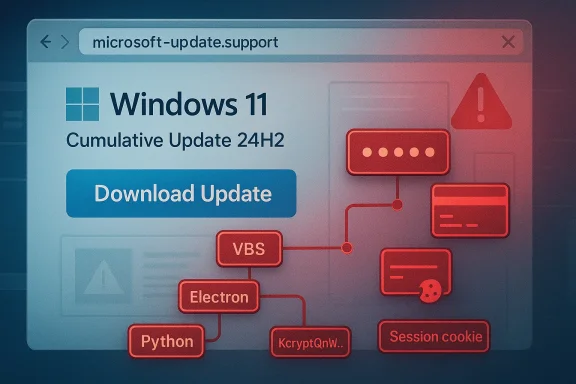
The latest warning from Malwarebytes shows how far modern social-engineering attacks have evolved. The fraudulent site impersonates Microsoft support, advertises a Windows 11 24H2 cumulative update, and offers a large Download Update button that appears routine at first glance. The site is hosted on a lookalike domain,
The malware itself is not hiding in a crude executable with suspicious naming or obvious packed code. According to Malwarebytes, the downloaded package is an 83 MB MSI named
That legitimacy is the point. Traditional antivirus products often excel at catching crude droppers, known signatures, or blatantly malicious archives. But when attackers build on trusted tools, rename processes, and move the malicious logic into obfuscated JavaScript or launcher stages, detection becomes much harder. Malwarebytes says the chain included a VBS launcher, an Electron shell, and a Python payload that only revealed its intent when the whole sequence was examined together.
This is not a niche problem. It reflects a broader trend in which attackers borrow the visual grammar of operating system maintenance, software distribution, and vendor support. The closer a scam gets to normal Windows behavior, the more likely it is to bypass both intuition and some layers of security inspection.
The file itself reinforces the illusion. Spoofed properties such as Author: Microsoft, Title: Installation Database, and a comment about installation logic are exactly the sort of details that look professional in a file inspector but mean little when viewed in isolation. For a hurried user, the package appears no different from a manual installer or a legitimate offline update.
This layered design is effective because each stage can look “normal” in isolation. Electron is widely used for mainstream desktop apps, Python is a common scripting runtime, and VBS is still encountered in enterprise and legacy environments. Security products that rely too heavily on static reputation, file name patterns, or single-stage heuristics can end up treating the package as low risk.
This is exactly where defenders need to be cautious. A tool can be technically correct in a narrow sense and still be strategically blind in a broader one. If an infostealer is assembled from trusted components and only reveals its intent after a sequence of user actions and runtime downloads, then reputation-based detection will lag behind the threat.
The most dangerous part is that victims may not realize they were compromised. If the installer appears to be a Windows update, users may assume any post-install glitches are normal patching behavior rather than signs of compromise. That delay gives attackers time to harvest data, persist on the machine, and potentially pivot into email, shopping, banking, or cloud accounts.
The detection challenge is equally important for SOC teams. If a malicious package appears to be a legitimate installer, behavior may only become obviously hostile after multiple stages have executed. That means analysts need process-tree visibility, script inspection, and telemetry correlation rather than dependence on one initial alert.
That gap matters across environments. Endpoint controls, browser defenses, and network filtering all have value, but none of them should be expected to compensate for a highly plausible installer that behaves normally until late in the chain. In that sense, this campaign is as much about deception engineering as it is about code.
Malwarebytes also noted that the site is written in French, which suggests a targeted or staged campaign rather than a random global spray-and-pray lure. The language choice may be used to increase believability for a specific audience, while still allowing the attackers to scale quickly if they decide to change locale later.
That evolution matters because Windows users are trained to expect frequent updates. The operating system encourages trust in patching, and for good reason: security updates are essential. Attackers exploit that reflex by hijacking the exact moment when users are most willing to install something quickly and without debate.
In a sense, the attackers are exploiting a user habit that Microsoft itself has tried to minimize: the need to think about patch delivery at all. When the system normally handles updates in the background, any manual prompt that asks for a download should be treated as a deviation, not a convenience.
If someone has already opened or installed the malicious package, immediate containment matters more than trying to reason about the installer’s legitimacy. Password changes, session revocation, and a full system scan should follow quickly, especially for email and financial accounts. The longer a stolen session remains active, the more useful it becomes to the attacker.
The good news is that defenders already know the core playbook for reducing risk: remove unnecessary manual downloads, harden browser credential storage practices, monitor for script-based launch chains, and verify updates through official channels only. The bad news is that user behavior still remains the weakest point, and attackers understand that better than ever. The next wave may not need to be smarter; it may only need to be more believable.
Source: Mezha Fake Windows 11 support site offers 'update' that steals data and evades antiviruses
 Overview
The latest warning from Malwarebytes shows how far modern social-engineering attacks have evolved. The fraudulent site impersonates Microsoft support, advertises a Windows 11 24H2 cumulative update, and offers a large Download Update button that appears routine at first glance. The site is hosted on a lookalike domain, microsoft-update.support, which is designed to resemble a legitimate Microsoft support destination without actually belonging to Microsoft.The malware itself is not hiding in a crude executable with suspicious naming or obvious packed code. According to Malwarebytes, the downloaded package is an 83 MB MSI named
WindowsUpdate 1.0.0.msi, with spoofed metadata that lists Microsoft as the author and describes the contents as installation logic and data. It was built with the WiX Toolset 4.0.0.5512, a real open-source installer framework, which makes the file feel authentic to both users and automated analysis systems.That legitimacy is the point. Traditional antivirus products often excel at catching crude droppers, known signatures, or blatantly malicious archives. But when attackers build on trusted tools, rename processes, and move the malicious logic into obfuscated JavaScript or launcher stages, detection becomes much harder. Malwarebytes says the chain included a VBS launcher, an Electron shell, and a Python payload that only revealed its intent when the whole sequence was examined together.
This is not a niche problem. It reflects a broader trend in which attackers borrow the visual grammar of operating system maintenance, software distribution, and vendor support. The closer a scam gets to normal Windows behavior, the more likely it is to bypass both intuition and some layers of security inspection.
What Makes This Campaign So Convincing
The fake site works because it copies the shape of a trusted experience, not just the logo. Users see a Windows 11 24H2 cumulative update, a plausible KB-style reference, and a download prompt that looks like a standard patch workflow. That combination lowers skepticism, especially for users who have been trained to think in terms of “update now” rather than “verify the source.”The file itself reinforces the illusion. Spoofed properties such as Author: Microsoft, Title: Installation Database, and a comment about installation logic are exactly the sort of details that look professional in a file inspector but mean little when viewed in isolation. For a hurried user, the package appears no different from a manual installer or a legitimate offline update.
Why the installer metadata matters
Metadata spoofing is not cosmetic. It helps attackers survive the “trust test” when the user opens file properties, inspects the signature surface, or shares the installer with a colleague for a quick sanity check. In other words, the threat is engineered to defeat quick inspection, not necessarily deep forensic review.- The filename resembles a normal Windows patch package.
- The author field is set to Microsoft.
- The comment field mimics installer boilerplate.
- The packaging uses a legitimate open-source installer platform.
The Malware Chain and Why It Evades Detection
The most important technical detail is the attack chain. Malwarebytes says the initial file launches a VBS script, which then loads an Electron application, which in turn runs a renamed Python process and pulls components at runtime. Each layer is individually mundane. Together, they create an execution path that hides the actual malicious behavior from many conventional scanners.This layered design is effective because each stage can look “normal” in isolation. Electron is widely used for mainstream desktop apps, Python is a common scripting runtime, and VBS is still encountered in enterprise and legacy environments. Security products that rely too heavily on static reputation, file name patterns, or single-stage heuristics can end up treating the package as low risk.
Why static scanning struggles
Malwarebytes noted that VirusTotal showed zero detections across 69 engines for the main executable and 62 for the VBS launcher at the time of analysis. No YARA rules matched, and behavioral scoring initially classified the activity as low risk. That does not mean the file was safe; it means the malware was built to blend into legitimate software patterns.This is exactly where defenders need to be cautious. A tool can be technically correct in a narrow sense and still be strategically blind in a broader one. If an infostealer is assembled from trusted components and only reveals its intent after a sequence of user actions and runtime downloads, then reputation-based detection will lag behind the threat.
The role of runtime assembly
The use of runtime-loaded components is especially important. By delaying malicious behavior until execution, the attackers reduce the value of pre-execution scanning and make sandbox analysis more complicated. The more the malware depends on live retrieval, renamed binaries, and obfuscated code paths, the harder it becomes for defenders to see the whole picture from any single file.- VBS serves as a lightweight launcher.
- Electron provides a legitimate-looking application shell.
- Python handles malicious functionality under a misleading process name.
- Obfuscated JavaScript hides the core logic.
- Runtime fetching blurs the boundaries between installer and payload.
The Real-World Impact on Consumers
For home users, the threat is immediate and practical. Malwarebytes says the campaign is designed to steal passwords, payment details, and account access, which means victims may lose more than just one device. Browser-saved credentials, active sessions, and financial access can all become part of the blast radius if the infostealer runs unchecked.The most dangerous part is that victims may not realize they were compromised. If the installer appears to be a Windows update, users may assume any post-install glitches are normal patching behavior rather than signs of compromise. That delay gives attackers time to harvest data, persist on the machine, and potentially pivot into email, shopping, banking, or cloud accounts.
What stolen data can enable
A password-stealing campaign is rarely about one password. Once attackers obtain saved browser data, session tokens, and autofill information, they can chain into broader identity theft or financial fraud. A stolen email login can reset other accounts, while a stolen browser session can sometimes bypass even strong passwords if the session remains valid.- Email access can become a reset point for other accounts.
- Saved payment details can support fraudulent purchases.
- Browser cookies can preserve access without a fresh login.
- Account takeover can spread to social, cloud, and shopping services.
- Compromised credentials can be reused in other breaches.
Enterprise Exposure and Security Tool Blind Spots
Enterprise environments are not immune simply because they use managed endpoints. In fact, organizations can be more vulnerable to this style of threat if employees are accustomed to installing updates, accepting prompts, and trusting software that looks operationally routine. The fake site’s use of a Microsoft-like domain and a plausible update flow gives it just enough credibility to penetrate that routine.The detection challenge is equally important for SOC teams. If a malicious package appears to be a legitimate installer, behavior may only become obviously hostile after multiple stages have executed. That means analysts need process-tree visibility, script inspection, and telemetry correlation rather than dependence on one initial alert.
Why security products can miss it
The initial results described by Malwarebytes are a reminder that low-risk scoring is not the same as safety. Security tools can miss threats that use real binaries, blend into common development stacks, and avoid obvious malware signatures. The attacker wins when the environment treats the first stage as routine administrative software instead of a potential intrusion path.That gap matters across environments. Endpoint controls, browser defenses, and network filtering all have value, but none of them should be expected to compensate for a highly plausible installer that behaves normally until late in the chain. In that sense, this campaign is as much about deception engineering as it is about code.
Why the Fake Microsoft Domain Is a Big Deal
The campaign’s domain choice,microsoft-update.support, is a textbook case of typosquatting and trust abuse. It places the brand signal directly into the hostname, which many users will glance at without parsing carefully. That is especially risky because Microsoft’s real support and update ecosystems are tightly associated with domains under microsoft.com or official Microsoft Update infrastructure.Malwarebytes also noted that the site is written in French, which suggests a targeted or staged campaign rather than a random global spray-and-pray lure. The language choice may be used to increase believability for a specific audience, while still allowing the attackers to scale quickly if they decide to change locale later.
Trust signals that users often miss
Many people know to look for padlocks, HTTPS, or familiar branding, but those signals are not enough. A malicious site can still use modern web hosting, professional design, and language that mirrors a major vendor’s support style. The decisive check is the domain itself, not the presence of a logo or a blue button.- Official Microsoft support is not served from lookalike domains.
- A plausible product name does not validate a website.
- Download buttons can be just as fake as phishing emails.
- Visual polish does not prove legitimacy.
- Localization can be used to reduce suspicion.
How This Fits the Bigger Windows Threat Landscape
This campaign does not exist in isolation. It belongs to a broader pattern in which attackers imitate update flows, software downloads, and vendor communications to distribute malware. Malwarebytes has also reported fake Windows 11 downloads on Facebook ads and other campaigns that rely on superficially credible Microsoft branding to reach victims. The tactic is not new, but it is becoming more polished and more selective.That evolution matters because Windows users are trained to expect frequent updates. The operating system encourages trust in patching, and for good reason: security updates are essential. Attackers exploit that reflex by hijacking the exact moment when users are most willing to install something quickly and without debate.
The overlap with legitimate update distribution
Microsoft’s own guidance makes clear that manual updates should come from official Microsoft services such as Windows Update or the Microsoft Update Catalog. That distinction is critical because it means any third-party website offering a downloadable “Windows update” file should raise suspicion immediately. A real update workflow does not require users to trust random support domains.In a sense, the attackers are exploiting a user habit that Microsoft itself has tried to minimize: the need to think about patch delivery at all. When the system normally handles updates in the background, any manual prompt that asks for a download should be treated as a deviation, not a convenience.
What Users Should Do Instead
The safest path is still the simplest one: open Settings > Windows Update and let Windows check for updates directly. Microsoft’s Update Catalog is appropriate only when users deliberately need a standalone package from Microsoft itself. Anything else, especially a website that claims to provide a Windows patch through a custom download button, should be viewed with extreme caution.If someone has already opened or installed the malicious package, immediate containment matters more than trying to reason about the installer’s legitimacy. Password changes, session revocation, and a full system scan should follow quickly, especially for email and financial accounts. The longer a stolen session remains active, the more useful it becomes to the attacker.
A practical response checklist
- Verify the source of any update through Windows Update or the official Microsoft Update Catalog.
- Treat any third-party Windows update download as suspicious by default.
- If you clicked the fake package, assume browser credentials and sessions may be exposed.
- Change passwords from a clean device, starting with email and banking.
- Enable multi-factor authentication where it is not already active.
- Run an up-to-date antimalware scan with behavioral detection.
Strengths and Opportunities
The upside for defenders is that this campaign also provides a clear blueprint for better user education and improved security posture. The attack is sophisticated, but its mechanics are understandable, which makes it easier to explain to users and easier to hunt for in telemetry. The more organizations teach people to distrust manual update downloads, the less effective this lure becomes.- Security awareness training can focus on update impersonation rather than generic phishing.
- Domain filtering can block lookalike vendor sites before users reach them.
- Behavioral EDR has a better chance than static scanning against layered payloads.
- Process-tree logging can expose VBS-to-Electron-to-Python execution chains.
- Browser credential hygiene can reduce the impact of infostealer infections.
- Patch management automation can eliminate the need for risky manual downloads.
- Threat intel sharing can help defenders block the infrastructure faster.
Risks and Concerns
The biggest concern is that this kind of campaign can be cloned endlessly. Once attackers know a fake update flow works, they can rebrand it, swap payloads, and rotate domains faster than many users can be educated. Because the malicious logic is hidden behind legitimate technologies, defenders may also face a growing volume of false negatives before they see a reliable pattern.- Lookalike domains can be registered cheaply and in volume.
- Spoofed file metadata can fool casual inspection.
- Legitimate runtimes make the payload look trustworthy.
- Runtime fetching delays detection and complicates sandboxes.
- Stolen sessions can outlive password resets if not revoked.
- Browser data theft can cascade into multiple accounts.
- User fatigue may lead people to ignore yet another warning.
Looking Ahead
This campaign is likely a preview, not an endpoint. Attackers have now shown that they can wrap infostealers in a believable Windows update story, package them with legitimate tools, and evade first-pass detection. If that proves profitable, expect more campaigns that imitate software vendors, system maintenance screens, and offline update installers across Windows and adjacent platforms.The good news is that defenders already know the core playbook for reducing risk: remove unnecessary manual downloads, harden browser credential storage practices, monitor for script-based launch chains, and verify updates through official channels only. The bad news is that user behavior still remains the weakest point, and attackers understand that better than ever. The next wave may not need to be smarter; it may only need to be more believable.
- Monitor for typosquatted Microsoft domains and related infrastructure.
- Strengthen detections for VBS, Electron, and Python execution chains.
- Encourage users to install updates only through Windows Update.
- Revoke active sessions quickly after suspected credential theft.
- Expand behavioral detections that look for data staging and exfiltration.
- Treat “urgent update” prompts from the web as a phishing pattern.
Source: Mezha Fake Windows 11 support site offers 'update' that steals data and evades antiviruses
