

A dangerous fake Microsoft Windows Update is being used as a malware lure, and the threat is more sophisticated than a crude phishing page or a broken installer. Instead of relying on obvious warning signs, the campaign mimics Microsoft support, borrows the language of Windows servicing, and packages the payload to look like an ordinary Windows 11 24H2 cumulative update. The real risk is not just infection, but the theft of passwords, browser sessions, payment data, and other sensitive information from users who think they are installing a routine patch.
Windows update scams work because they attack a behavior users have been trained to trust. Microsoft tells people to use Windows Update in Settings for normal servicing, and to use the Microsoft Update Catalog only when they deliberately need a standalone package from Microsoft itself; a random third-party site pretending to be a patch portal is not part of that model. The latest campaign described in the file search results leans directly into that trust gap, using a Microsoft-like domain, a believable update flow, and a fake KB reference to make the download feel legitimate.
That matters because Windows users are not wrong to expect updates. Updates are one of the few maintenance tasks the operating system has spent years trying to make boring, automatic, and frictionless. That design is good for security, but it also creates a perfect opening for attackers who know that many users will click first and verify later. In this case, the lure is framed as a Windows 11 24H2 cumulative update, which makes the scam feel current rather than suspiciously generic.
The reported campaign is especially notable because it does not stop at a simple fake web page. Malwarebytes’ analysis, as reflected in the file results, says the download is an 83 MB MSI package named WindowsUpdate 1.0.0.msi, with spoofed file properties that list Microsoft as the author and present the contents as installation logic and data. It was also built with WiX Toolset 4.0.0.5512, a legitimate open-source installer framework, which helps explain why the file can look ordinary to both users and some security tools.
That combination is important. Attackers are no longer merely impersonating a brand; they are impersonating the process of trust itself. A fake update page, a plausible version number, a genuine-sounding KB identifier, and a carefully packaged installer all work together to reduce skepticism at the exact moment caution matters most.
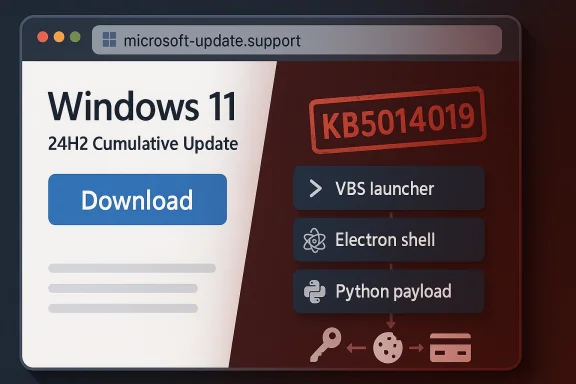
The packaging choices also matter for detection. According to the file results, the chain includes a VBS launcher, an Electron shell, and a Python payload. That layered design means the malicious intent may not become obvious until multiple stages have executed, which is why static file inspection alone is often insufficient. Security teams need process-tree visibility and execution correlation, not just a verdict on the first binary that appears.
This is a classic social-engineering tactic. The attackers do not need to invent an entirely fake update vocabulary; they only need to borrow real Microsoft terminology and place it in the wrong context. Most users will not cross-reference build numbers, release dates, or applicability statements, especially if the page feels polished and the download appears to solve a problem they already expected to fix. That is what makes the lure effective.
That is why fake update scams can be more successful than ordinary phishing in some environments. People are trained to think of updates as chores that should be completed quickly. Attackers exploit that reflex by meeting users in the exact moment when they are most willing to click “download” without a second thought. In other words, the attack is not fighting against user behavior; it is riding on top of it.
The reported use of legitimate tooling makes that problem worse. WiX Toolset is a real installer framework, and using it gives the file a more ordinary feel than a crude packed executable would. When attackers wrap malware in reputable packaging, the first line of defense often becomes human intuition — and human intuition is much easier to manipulate than a signature engine.
That creates a paradox. The more important real patches become, the more useful fake patches become as a lure. Attackers can hide inside the noise of a busy Patch Tuesday environment and exploit the fact that users already expect to see Windows update messages around this time. The real news and the fake news arrive in the same mental bucket.
For consumers, the message is simpler: install real updates through Windows Update and do it promptly. For IT teams, the story is more complex, because patch validation, rollout sequencing, and change control all matter. But in both cases, the fake-update scam only works if it can convince users to leave Microsoft’s normal update path and step into a browser-delivered imitation.
A consumer who downloads the package should assume that browser credentials and active sessions may be compromised. The file results recommend changing passwords from a clean device, starting with email and banking, enabling multi-factor authentication where possible, and running an up-to-date antimalware scan. That is sensible because the damage from an infostealer is often delayed, not immediately visible.
The file results make a strong case for policy-driven software acquisition. Manual update downloads should be rare, audited, and limited to approved channels. Security teams should block typosquatted domains, inspect process chains, and correlate script launches with user activity, because a benign-looking installer can hide malicious behavior until several stages have run.
When defenders inspect only the first executable, they may miss the real attack. A low-risk score on the initial file is not a reliable safety signal if the actual payload appears only after scripting and runtime downloads have started. This is one of those threats where the visible infection is only the beginning; the invisible account exposure is often the bigger problem.
The lesson is uncomfortable but important: legitimacy cannot be judged from presentation alone. A file can be large, polished, and full of Microsoft-looking clues while still being malicious. The decisive question is not whether the package seems professional, but whether it came from the correct distribution channel. That distinction is the whole ballgame.
For administrators, a failed server update is not just an inconvenience; it can become a compliance and exposure problem. Microsoft’s acknowledgement that it is actively investigating the issue is good news, but the reality is that patching at scale still involves troubleshooting, rollback planning, and patience. That’s a very different experience from the smooth simplicity users expect from consumer Windows Update.
The safest response is discipline, not improvisation. If a server update fails, the answer is to follow Microsoft’s guidance and remediation workflow, not to search the web for a better-looking installer. That distinction matters because the attackers are counting on urgency to override verification.
That makes the operation more professional than a throwaway phishing kit. It suggests a group willing to spend a little more effort up front to raise conversion rates. And because the core elements — fake update page, spoofed metadata, layered installer chain — are reusable, the same campaign architecture can be re-skinned for different languages and regions with relatively little work.
The result is a scam that succeeds not by looking perfect, but by looking good enough long enough. That is a dangerous standard because it turns a moment of routine maintenance into a moment of identity theft. The page may feel mundane, but the consequences are anything but.
Microsoft’s challenge is not only to keep shipping real patches, but to keep making the official path obvious enough that users do not wander off into fake update territory. The company already has the right distribution model in place through Windows Update and the Microsoft Update Catalog. The hard part is persuading users, especially hurried ones, that convenience is not the same as legitimacy.
Security teams should expect more of these campaigns, not fewer. The combination of social engineering, localized language, and layered execution is effective because it exploits the habits that normal Windows maintenance depends on. That means the response has to be equally habitual: verify the channel, check the domain, distrust manual update downloads, and assume that a professional-looking installer can still be malicious.
Source: Forbes https://www.forbes.com/sites/daveyw...osoft-windows-update-warning-do-not-download/
 Overview
Windows update scams work because they attack a behavior users have been trained to trust. Microsoft tells people to use Windows Update in Settings for normal servicing, and to use the Microsoft Update Catalog only when they deliberately need a standalone package from Microsoft itself; a random third-party site pretending to be a patch portal is not part of that model. The latest campaign described in the file search results leans directly into that trust gap, using a Microsoft-like domain, a believable update flow, and a fake KB reference to make the download feel legitimate.That matters because Windows users are not wrong to expect updates. Updates are one of the few maintenance tasks the operating system has spent years trying to make boring, automatic, and frictionless. That design is good for security, but it also creates a perfect opening for attackers who know that many users will click first and verify later. In this case, the lure is framed as a Windows 11 24H2 cumulative update, which makes the scam feel current rather than suspiciously generic.
The reported campaign is especially notable because it does not stop at a simple fake web page. Malwarebytes’ analysis, as reflected in the file results, says the download is an 83 MB MSI package named WindowsUpdate 1.0.0.msi, with spoofed file properties that list Microsoft as the author and present the contents as installation logic and data. It was also built with WiX Toolset 4.0.0.5512, a legitimate open-source installer framework, which helps explain why the file can look ordinary to both users and some security tools.
That combination is important. Attackers are no longer merely impersonating a brand; they are impersonating the process of trust itself. A fake update page, a plausible version number, a genuine-sounding KB identifier, and a carefully packaged installer all work together to reduce skepticism at the exact moment caution matters most.
What Malwarebytes Says It Found
The strongest technical details in the available material come from the Malwarebytes-driven reporting captured in the file search results. The campaign reportedly uses a lookalike domain such as microsoft-update.support or a similarly styled Microsoft-like hostname, presents the page in French, and offers a prominent download button that appears to be part of a normal servicing flow. That localization detail is not trivial; it suggests an attacker trying to increase credibility with a specific audience rather than blasting a fully generic lure everywhere at once.Spoofed metadata and believable packaging
The installer itself is crafted to look reassuring at a glance. The file properties reportedly claim Microsoft as the author, use generic installation database naming, and include comments suggesting the package contains the logic and data required to install WindowsUpdate. This is exactly the sort of metadata that can fool a hurried user inspecting file properties, because it looks professional even though it proves nothing about the source.The packaging choices also matter for detection. According to the file results, the chain includes a VBS launcher, an Electron shell, and a Python payload. That layered design means the malicious intent may not become obvious until multiple stages have executed, which is why static file inspection alone is often insufficient. Security teams need process-tree visibility and execution correlation, not just a verdict on the first binary that appears.
Why the fake KB number matters
One of the easiest tells in a campaign like this is a mismatched KB reference. The file results note that the scam used a KB identifier associated with a different Windows 11 release context, making the update story technically inconsistent even if it looks plausible to a casual visitor. That kind of mismatch is subtle enough to pass a glance test but obvious to anyone who checks Microsoft’s update history.This is a classic social-engineering tactic. The attackers do not need to invent an entirely fake update vocabulary; they only need to borrow real Microsoft terminology and place it in the wrong context. Most users will not cross-reference build numbers, release dates, or applicability statements, especially if the page feels polished and the download appears to solve a problem they already expected to fix. That is what makes the lure effective.
Why Fake Windows Updates Keep Working
Windows update scams have a long history because they exploit a universal expectation: users are conditioned to believe that maintenance prompts are normal, helpful, and safe. A fake update does not need to invent urgency from scratch; it hijacks an existing trust channel and makes the user feel as though they are doing the right thing. That is much easier than convincing someone to open a random attachment or visit a suspicious login page.The psychology of routine maintenance
The deceptive power of these campaigns is that they borrow the visual grammar of Microsoft maintenance rather than relying on flashy fake branding. A blue download button, a familiar version label, a KB-style reference, and a support-like page layout are enough to create the illusion of legitimacy. Users often look for HTTPS, padlocks, logos, or polished design, but those cues are not proof of authenticity.That is why fake update scams can be more successful than ordinary phishing in some environments. People are trained to think of updates as chores that should be completed quickly. Attackers exploit that reflex by meeting users in the exact moment when they are most willing to click “download” without a second thought. In other words, the attack is not fighting against user behavior; it is riding on top of it.
Trust engineering, not just malware delivery
The broader threat is that cybercrime is increasingly about trust engineering. The scam is no longer just “click this bad link”; it is “perform this normal-looking task through a fake channel.” That shift is significant because it means security teams are no longer only defending against malicious code, but against malicious imitation of routine software distribution.The reported use of legitimate tooling makes that problem worse. WiX Toolset is a real installer framework, and using it gives the file a more ordinary feel than a crude packed executable would. When attackers wrap malware in reputable packaging, the first line of defense often becomes human intuition — and human intuition is much easier to manipulate than a signature engine.
The April Patch Tuesday Context
The fake update story lands in the shadow of a very real and very large Microsoft security release. The file results indicate that Microsoft’s April Patch Tuesday addressed 167 vulnerabilities, including two zero-days, eight critical issues, and multiple remote-code-execution flaws. That makes the month one of the heaviest patch cycles in recent memory and reinforces the point that genuine Windows updates are not optional window dressing.Why the size of the release matters
A patch bundle this large changes the risk calculus for everyone. When Microsoft ships a major security wave, there are more reasons to update promptly, more vulnerabilities being closed, and more opportunities for attackers to race defenders to the patch. The file results note that several researchers considered the release urgent because it included active exploitation and public disclosure.That creates a paradox. The more important real patches become, the more useful fake patches become as a lure. Attackers can hide inside the noise of a busy Patch Tuesday environment and exploit the fact that users already expect to see Windows update messages around this time. The real news and the fake news arrive in the same mental bucket.
Zero-days and “exploitation more likely”
The file results also mention that CISA added two Microsoft CVEs to its Known Exploited Vulnerabilities catalog and that multiple vulnerabilities were listed as “Exploitation More Likely.” That signals a high-pressure environment for administrators, because the line between known exploitation and future exploitation can be very thin once a large patch batch lands. Enterprises are therefore being asked to triage both patch volume and exploit urgency at the same time.For consumers, the message is simpler: install real updates through Windows Update and do it promptly. For IT teams, the story is more complex, because patch validation, rollout sequencing, and change control all matter. But in both cases, the fake-update scam only works if it can convince users to leave Microsoft’s normal update path and step into a browser-delivered imitation.
Enterprise Impact Versus Consumer Risk
Consumers face immediate credential and payment theft if they click the fake package. Enterprises, however, face a broader operational and security burden because one infected endpoint can expose more than just a personal account. Browser tokens, password stores, session data, and work-related credentials can all become leverage points for follow-on intrusion or lateral movement.Consumer exposure
For home users, the risk is usually straightforward but severe. A fake update can lead to stolen email credentials, financial account access, and browser session hijacking, and those stolen sessions can remain useful even after a password change if tokens are not revoked. That is why the recovery burden is often larger than the initial click would suggest.A consumer who downloads the package should assume that browser credentials and active sessions may be compromised. The file results recommend changing passwords from a clean device, starting with email and banking, enabling multi-factor authentication where possible, and running an up-to-date antimalware scan. That is sensible because the damage from an infostealer is often delayed, not immediately visible.
Enterprise exposure
In enterprise settings, the danger compounds quickly. A user who installs a believable fake update can hand attackers access to browser-based SSO sessions, cloud dashboards, collaboration platforms, or internal web apps. That means the incident is not just an endpoint malware problem; it can become an identity and access management problem very quickly.The file results make a strong case for policy-driven software acquisition. Manual update downloads should be rare, audited, and limited to approved channels. Security teams should block typosquatted domains, inspect process chains, and correlate script launches with user activity, because a benign-looking installer can hide malicious behavior until several stages have run.
Why Security Tools Can Miss It
The reason this campaign is dangerous is not only that it is convincing to humans. It is also designed to look ordinary to machines, at least at first glance. A file built with a legitimate installer framework, carrying spoofed metadata, and staged through multiple execution layers can evade the crude assumptions that many basic scanners still make.Static detection versus behavioral detection
Static detection works best when malware is loud, obvious, or poorly packaged. This campaign reportedly does the opposite. The malicious logic is delayed behind a VBS launcher, then an Electron shell, then a Python payload, which means the suspicious behavior may not surface until the chain is already in motion. That is why behavioral EDR and process-tree logging matter so much.When defenders inspect only the first executable, they may miss the real attack. A low-risk score on the initial file is not a reliable safety signal if the actual payload appears only after scripting and runtime downloads have started. This is one of those threats where the visible infection is only the beginning; the invisible account exposure is often the bigger problem.
Why file metadata can mislead
Users are often taught to check file properties, authorship, and size as quick sanity checks. That advice is useful, but only to a point. The file results show that the malware intentionally spoofs those properties to mimic Microsoft, which means the usual “does it look official?” test can be gamed.The lesson is uncomfortable but important: legitimacy cannot be judged from presentation alone. A file can be large, polished, and full of Microsoft-looking clues while still being malicious. The decisive question is not whether the package seems professional, but whether it came from the correct distribution channel. That distinction is the whole ballgame.
The Server Update Failure Side Story
The article that prompted this discussion did not stop with the fake update warning. It also mentioned a genuine April Windows Server security update that some users reportedly cannot install, highlighting how security hygiene and update reliability can collide in messy ways. According to the file results, Microsoft is monitoring installation failures on Windows Server 2025 devices and has seen a recurring error code, 800F0983, affecting a limited number of systems.Why broken updates complicate the message
This is where the update ecosystem becomes especially frustrating. Users are told, correctly, that they must install security updates promptly, but they also sometimes encounter installation failures even when they are doing everything right. That creates just enough confusion for fake-update scams to benefit from the noise. If legitimate servicing feels unreliable, malicious lookalikes can seem less implausible than they should.For administrators, a failed server update is not just an inconvenience; it can become a compliance and exposure problem. Microsoft’s acknowledgement that it is actively investigating the issue is good news, but the reality is that patching at scale still involves troubleshooting, rollback planning, and patience. That’s a very different experience from the smooth simplicity users expect from consumer Windows Update.
Why this does not excuse manual downloads
None of that means users should start downloading Windows updates from whatever site appears most convincing. In fact, the opposite is true. If anything, patch failures make official channels even more important, because only Microsoft’s own update paths can be trusted to deliver the right package for the right build. A fake site cannot fix the patching confusion; it only adds a second layer of risk on top of it.The safest response is discipline, not improvisation. If a server update fails, the answer is to follow Microsoft’s guidance and remediation workflow, not to search the web for a better-looking installer. That distinction matters because the attackers are counting on urgency to override verification.
Why Localization Makes the Scam Stronger
One of the more interesting aspects of the campaign is the reported use of French-language pages. That does not necessarily mean the attack is limited to France, but it does suggest deliberate localization, which can make a lure feel more credible to a targeted audience. Language is a trust signal, and attackers know it.Localized scams reduce friction
A user is less likely to pause when a page appears to speak their language naturally and use region-appropriate wording. The file results point out that localization can reduce obvious red flags while still allowing the attackers to scale later if they want to adapt the same template to other audiences. In other words, the scam is built to be translated, not just to deceive.That makes the operation more professional than a throwaway phishing kit. It suggests a group willing to spend a little more effort up front to raise conversion rates. And because the core elements — fake update page, spoofed metadata, layered installer chain — are reusable, the same campaign architecture can be re-skinned for different languages and regions with relatively little work.
Why users miss the obvious clues
Most users are trained to look for logos and browser security indicators, not to scrutinize domain structure or release metadata. That is a weakness attackers exploit aggressively. A good-looking page with a familiar language and a blue download button can easily override the instinct to verify whether the host name is genuinely under Microsoft’s control.The result is a scam that succeeds not by looking perfect, but by looking good enough long enough. That is a dangerous standard because it turns a moment of routine maintenance into a moment of identity theft. The page may feel mundane, but the consequences are anything but.
Strengths and Opportunities
The upside for defenders is that this campaign is understandable, repeatable, and teachable. It does not depend on an exotic zero-day or a deeply hidden kernel exploit. It depends on social engineering, channel abuse, and user trust, which are all areas where policy, telemetry, and education can make a meaningful difference.- Windows Update is already the safest distribution path, so organizations can reinforce a simple rule rather than inventing a new one.
- KB mismatches are useful validation clues because Microsoft ties update numbers to specific releases and applicability statements.
- Typosquatted domains are easy to block once the pattern is recognized.
- Behavioral EDR is more useful than static file scanning when the payload is staged across multiple interpreters and runtimes.
- Process-tree logging can expose VBS, Electron, and Python chains that would otherwise look harmless in isolation.
- Security awareness training can focus on update impersonation specifically, which is often more effective than generic phishing advice.
- Session hygiene and MFA reduce post-compromise damage, especially when infostealers target browser tokens and saved credentials.
Risks and Concerns
The biggest concern is that this attack model scales cheaply. Once criminals know that a fake Windows update lure works, they can rebrand it, swap the payload, and rotate the domain without reinventing the campaign from scratch. That makes the threat durable, adaptable, and frustratingly inexpensive to repeat.- Lookalike domains are inexpensive to register and easy to retire when blocked.
- Spoofed metadata can fool quick inspection, especially when users are rushed.
- Legitimate runtimes make malware look benign to both people and some tools.
- Runtime downloads complicate sandboxing and first-pass detection because the malicious behavior appears later in the chain.
- Stolen browser sessions can survive password changes if token revocation is not handled properly.
- Browser data theft can cascade across many accounts, turning one click into a broad identity compromise.
- User fatigue may dull warnings over time, especially when real patching already feels noisy and repetitive.
Looking Ahead
The most likely short-term outcome is that this campaign, or a variant of it, will reappear in another language, another region, or another packaging style. The core formula is too effective to disappear quickly: use a current Windows version name, borrow Microsoft branding cues, spoof a KB-style identifier, and wrap the malware in a legitimate-looking installer. That pattern is already established, and attackers rarely abandon tactics that convert well.Microsoft’s challenge is not only to keep shipping real patches, but to keep making the official path obvious enough that users do not wander off into fake update territory. The company already has the right distribution model in place through Windows Update and the Microsoft Update Catalog. The hard part is persuading users, especially hurried ones, that convenience is not the same as legitimacy.
Security teams should expect more of these campaigns, not fewer. The combination of social engineering, localized language, and layered execution is effective because it exploits the habits that normal Windows maintenance depends on. That means the response has to be equally habitual: verify the channel, check the domain, distrust manual update downloads, and assume that a professional-looking installer can still be malicious.
- Watch for copycat fake-update pages in other languages.
- Watch for new typosquatted Microsoft-like domains.
- Watch for more use of layered installers and runtime downloads.
- Watch for broader user education around KB mismatches and update provenance.
- Watch for Microsoft and enterprise defenders to tighten channel-based policy.
Source: Forbes https://www.forbes.com/sites/daveyw...osoft-windows-update-warning-do-not-download/
Last edited:
