

Microsoft’s latest macOS threat report on Sapphire Sleet reads less like a traditional malware advisory and more like a case study in how modern intrusion campaigns are built to exploit trust. Rather than leaning on a zero-day or a platform flaw, the actor reportedly strings together social engineering, AppleScript abuse, TCC manipulation, persistence, and staged exfiltration to compromise victims who think they are simply running a software update. The result is a campaign that is technically sophisticated, operationally patient, and especially dangerous for users in finance, crypto, and other high-value environments. Microsoft’s write-up, supplied in the uploaded material, also emphasizes that Apple has already updated its protections and that the campaign’s mechanics are a reminder that user-driven execution remains one of the weakest links in macOS security.
Sapphire Sleet is not a new name in Microsoft’s threat intelligence reporting. The actor has been associated with North Korean state-aligned activity and has historically focused on targets that offer direct financial value, especially cryptocurrency, finance, venture capital, and blockchain-related organizations. The broader pattern is familiar: use persuasion, impersonation, and trust abuse to get the victim to open the door, then harvest credentials, sessions, and data that can be monetized or reused.
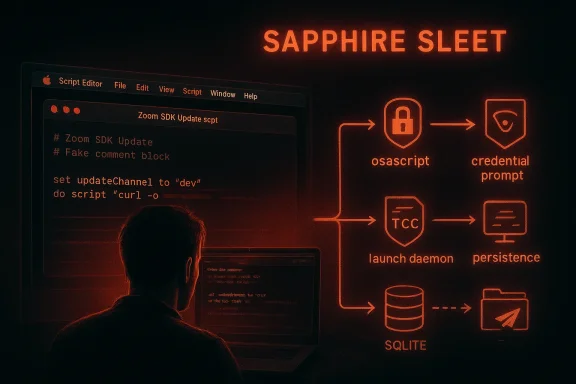
What makes this campaign notable is the platform and the execution style. Microsoft says the actor has previously been known for social engineering on other operating systems, but the macOS intrusion described here combines several execution patterns Microsoft had not previously observed from this actor on Apple systems. That includes the use of a compiled AppleScript lure, a multi-stage curl-to-osascript chain, a dedicated credential-harvesting app, TCC database manipulation, and launch daemon persistence. In other words, this is not a brute-force compromise of macOS; it is a carefully staged sequence that uses the system’s own trusted components against itself.
The lure itself is mundane by design. The user receives a file named Zoom SDK Update.scpt, which opens in Script Editor, a legitimate Apple application capable of executing arbitrary AppleScript commands. The malicious script hides its real logic far below a large decoy comment block, even inserting thousands of blank lines to make the payload harder to spot during a casual scroll. That detail matters because the campaign depends on the victim believing they are handling a normal update workflow, not executing attacker-controlled code.
The rest of the chain follows a predictable but effective rhythm: the script downloads more AppleScript stages, uses trusted binaries like curl and osascript, deploys backdoors with Apple-like or Google-like names, and ends with credential theft and broad data exfiltration. The campaign’s value lies not in novelty for its own sake, but in how well the pieces fit together. It is a reminder that on macOS, as on every other platform, trust boundaries are often the real target.
The decoy content is not just cosmetic. Microsoft notes that the script includes visible benign-looking upgrade instructions followed by huge stretches of blank space, a simple but effective trick that pushes the malicious logic out of sight. That design exploits the fact that many users judge files quickly, especially when they believe they are dealing with a routine SDK or update prompt. It does not need to be clever if it is convincing.
This staged approach does two things at once. First, it reduces the amount of suspicious content present on disk at any one time. Second, it gives the actor room to split responsibilities across different payloads: one component for monitoring, one for credential harvesting, one for persistence, and one for exfiltration. That modularity is a hallmark of mature intrusion tradecraft. The cleaner the handoffs, the harder the chain is to break.
The URL paths also matter. Microsoft distinguishes between
Microsoft also notes that the malware begins communicating with command-and-control infrastructure very early, with repeated outbound contact patterns observed in the host monitoring component. That sequencing suggests the intrusion is designed to keep a live channel open while later stages are still being assembled. In practical terms, the malware is checking in while it is still learning the environment.
This is a classic state-aligned tactic, even when the immediate goal is financial theft. Good threat operators do not treat each machine as a one-off event. They treat it as a node in an infrastructure of compromise. That is what makes the response harder than “remove malware and move on.”
That validation step matters. It means the malware is not simply dumping whatever the victim types; it is checking the credential against the local authentication database and only then sending it to attacker infrastructure. From the attacker’s perspective, that reduces noise and improves the value of the loot. It is efficient theft disguised as routine maintenance.
The campaign then follows this theft with a decoy completion prompt, softwareupdate.app, which tells the user the update is finished. That final reassurance is more than theater. It lowers the chance of immediate suspicion and buys the attacker time to continue collecting data after the victim has mentally moved on. The user thinks the task is over; the compromise is just getting started.
The naming is deliberate. Calling a backdoor “services” and storing it in user-facing locations like Application Support is meant to make the file look ordinary. This is not just about hiding from antivirus; it is about hiding from any human who might browse the filesystem and notice suspicious names. Camouflage through familiarity is one of the oldest tricks in malware design.
The persistence layer culminates in a launch daemon named com.google.webkit.service.plist, installed under
That matters because AppleEvents are central to the later data-theft phase. Once the malware can drive Finder and other system services via AppleScript, it can browse, copy, and stage data that would otherwise require explicit consent. The campaign does not need to break the platform; it needs to move the permissions just enough to let the rest of the chain run.
The broader lesson is that macOS protections are strongest when they can enforce consent boundaries. Once an attacker can manipulate those boundaries through trusted tools and local permissions, the remaining protection largely depends on detection, monitoring, and endpoint control. That is why this campaign is a warning for both consumers and enterprises.
The campaign also targets cryptocurrency desktop wallets such as Ledger Live and Exodus, plus browser extensions associated with major wallet ecosystems. That strongly reinforces Microsoft’s assessment that the actor is interested in digital assets, not just generic identity theft. In this world, a single browser profile can be worth far more than one isolated password.
The exfiltration process also seems highly structured. Data is staged into ZIP archives with predictable naming patterns, and uploads are tagged with authorization headers and machine identifiers. This suggests the campaign is organized enough to support repeated collection, triage, and downstream use. The data is not only stolen; it is packaged for workflow.
Microsoft’s own guidance reflects that reality. It recommends education around social engineering, tighter control over
Microsoft also calls out Script Editor spawning shell commands or downloads, which is a useful signal because it ties the initial lure to the subsequent malicious activity. In an enterprise environment, that process tree is more meaningful than a static file hash alone. The chain is the indicator, not just the file.
The persistence side can be hunted through LaunchDaemon and LaunchAgent paths, especially files that mimic Apple or Google service names but do not correspond to genuine software. Monitoring hidden directories such as user Library Application Support, temporary directories, and suspiciously named app bundles can also reveal staging artifacts. These are noisy only if defenders are not already watching the right locations.
The other thing to watch is whether the actor’s infrastructure and naming conventions evolve. The campaign already shows a preference for mimicry—Apple-like names, Google-like names, software-update branding, and trusted tools. If defenders get better at spotting those cues, the actor will likely respond with new naming schemes and more elaborate staging. The technical core may remain the same even when the surface changes.
Source: Microsoft Dissecting Sapphire Sleet’s macOS intrusion from lure to compromise | Microsoft Security Blog
 Background
Sapphire Sleet is not a new name in Microsoft’s threat intelligence reporting. The actor has been associated with North Korean state-aligned activity and has historically focused on targets that offer direct financial value, especially cryptocurrency, finance, venture capital, and blockchain-related organizations. The broader pattern is familiar: use persuasion, impersonation, and trust abuse to get the victim to open the door, then harvest credentials, sessions, and data that can be monetized or reused.What makes this campaign notable is the platform and the execution style. Microsoft says the actor has previously been known for social engineering on other operating systems, but the macOS intrusion described here combines several execution patterns Microsoft had not previously observed from this actor on Apple systems. That includes the use of a compiled AppleScript lure, a multi-stage curl-to-osascript chain, a dedicated credential-harvesting app, TCC database manipulation, and launch daemon persistence. In other words, this is not a brute-force compromise of macOS; it is a carefully staged sequence that uses the system’s own trusted components against itself.
The lure itself is mundane by design. The user receives a file named Zoom SDK Update.scpt, which opens in Script Editor, a legitimate Apple application capable of executing arbitrary AppleScript commands. The malicious script hides its real logic far below a large decoy comment block, even inserting thousands of blank lines to make the payload harder to spot during a casual scroll. That detail matters because the campaign depends on the victim believing they are handling a normal update workflow, not executing attacker-controlled code.
The rest of the chain follows a predictable but effective rhythm: the script downloads more AppleScript stages, uses trusted binaries like curl and osascript, deploys backdoors with Apple-like or Google-like names, and ends with credential theft and broad data exfiltration. The campaign’s value lies not in novelty for its own sake, but in how well the pieces fit together. It is a reminder that on macOS, as on every other platform, trust boundaries are often the real target.
Initial Access Through Social Engineering
The initial compromise is built around a very old idea: persuade the target to run the file themselves. Sapphire Sleet’s campaign reportedly relies on recruiter-style social engineering and fake software-update narratives, a playbook that has worked for years because it matches normal human expectations. The user is not being asked to do something obviously suspicious; they are being told to install an SDK update or finish a legitimate-looking update process.Why the lure works
A compiled AppleScript file is especially effective as a lure because .scpt files open in Script Editor by default. Script Editor is trusted, Apple-signed, and capable of launching shell commands through AppleScript’sdo shell script instruction. That means the attacker can package a payload in a format that looks like an ordinary script while still gaining command execution once the victim opens it. The user, in effect, becomes the last authentication step.The decoy content is not just cosmetic. Microsoft notes that the script includes visible benign-looking upgrade instructions followed by huge stretches of blank space, a simple but effective trick that pushes the malicious logic out of sight. That design exploits the fact that many users judge files quickly, especially when they believe they are dealing with a routine SDK or update prompt. It does not need to be clever if it is convincing.
The social-engineering playbook
The campaign also fits Sapphire Sleet’s established behavior: fake recruiter identities, professional networking approaches, interview lures, and software-installation requests. That matters because the macOS intrusion is not an isolated event; it is the Apple-flavored expression of a broader intrusion style. The actor is not pivoting into technical exploitation because it is easier than persuasion; it is using persuasion because it remains highly reliable.- Fake software-update themes lower suspicion.
- Script Editor makes malicious content look routine.
- A user-initiated launch helps evade platform guardrails.
- Social engineering scales better than exploiting a one-off bug.
- The lure is easier to localize and rebrand than a true exploit.
Execution Chain and Payload Delivery
Once the lure is opened, the attack becomes a multi-stage delivery chain. Microsoft describes a cascading curl-to-osascript workflow in which one AppleScript stage downloads the next, and each stage hands execution off to another trusted tool. This is important because it moves the attack away from a single obvious malicious file and into a sequence that only becomes clearly harmful once several steps have already occurred.Curl, osascript, and staged execution
The most striking operational detail is the repeated use of curl with campaign-specific user-agent strings such asmac-cur1 through mac-cur5. Those identifiers function as tracking labels and routing logic, helping the operators separate different payload roles. Some user agents fetch AppleScript directly for execution, while others retrieve ZIP archives that contain app bundles.This staged approach does two things at once. First, it reduces the amount of suspicious content present on disk at any one time. Second, it gives the actor room to split responsibilities across different payloads: one component for monitoring, one for credential harvesting, one for persistence, and one for exfiltration. That modularity is a hallmark of mature intrusion tradecraft. The cleaner the handoffs, the harder the chain is to break.
Why user-agent tracking matters
Microsoft says the campaign uses user-agent strings as a kind of internal campaign identifier. That suggests the infrastructure is not merely serving content; it is also tracking which stage is requesting which asset. Operationally, that is useful for the attacker because it helps coordinate downloads, conditionally deliver payloads, and potentially identify which compromise is progressing as expected.The URL paths also matter. Microsoft distinguishes between
/version/ endpoints that deliver AppleScript and /status/ endpoints that deliver ZIP archives containing app bundles. That separation implies deliberate workflow design rather than improvisation. When a campaign cleanly separates payload classes, it is easier for the actor to maintain, update, and redeploy without rewriting the entire chain.curldownloads payloads dynamically.osascriptexecutes the downloaded AppleScript.- User-agent strings help organize campaign stages.
- Different URL paths separate script and archive delivery.
- The chain minimizes obvious on-disk artifacts.
Reconnaissance and Early C2 Registration
Before heavy theft begins, the malware collects basic system details and registers the victim with attacker infrastructure. Microsoft says the campaign gathers the current user, host name, system time, OS install date, hardware model, and other system descriptors. That information is then used to create a unique identity for the compromised machine and to tie subsequent activity to a specific campaign record.Why early telemetry matters to attackers
This kind of reconnaissance is not mere curiosity. It tells the operator what type of machine has been compromised, whether the infection is progressing as expected, and how to tag the victim for follow-up actions. A threat actor that is stealing passwords and crypto assets needs reliable bookkeeping as much as code execution, because the real business process is not infection—it is inventory and monetization.Microsoft also notes that the malware begins communicating with command-and-control infrastructure very early, with repeated outbound contact patterns observed in the host monitoring component. That sequencing suggests the intrusion is designed to keep a live channel open while later stages are still being assembled. In practical terms, the malware is checking in while it is still learning the environment.
C2 registration as operational control
The registration details are particularly revealing because they show how the operator correlates a victim across multiple payloads. Microsoft describes fields such as a UUID-derived machine identifier, a campaign-level ID, and a combined user label. That means the infrastructure is not merely logging infections; it is building a target record that can support repeated use, re-entry, or selective tasking later.This is a classic state-aligned tactic, even when the immediate goal is financial theft. Good threat operators do not treat each machine as a one-off event. They treat it as a node in an infrastructure of compromise. That is what makes the response harder than “remove malware and move on.”
- System fingerprinting begins before the major theft phase.
- Campaign IDs let operators group related infections.
- UUID and hostname data improve tracking accuracy.
- Early beaconing helps confirm the payload chain is working.
- The malware treats compromise as a managed workflow.
Credential Harvesting and the Fake Password Prompt
The credential theft portion of the campaign is one of the most concerning elements because it weaponizes a native-looking macOS dialog. Microsoft says systemupdate.app presents a password prompt that appears to belong to a legitimate software update, asking the user to enter their password to complete the process. This is a straight social-engineering theft: if the user trusts the update, they will hand over the secret voluntarily.A password prompt that feels native
The prompt is effective because it matches familiar operating-system behavior. Users are conditioned to expect their password during software updates, especially when changes affect system-level components or require elevated permissions. The malware exploits that expectation, then immediately validates the password locally before exfiltrating it, ensuring the stolen credential is usable and not mistyped.That validation step matters. It means the malware is not simply dumping whatever the victim types; it is checking the credential against the local authentication database and only then sending it to attacker infrastructure. From the attacker’s perspective, that reduces noise and improves the value of the loot. It is efficient theft disguised as routine maintenance.
Why password validation is dangerous
Once the attacker has the correct password, the damage is no longer limited to the local machine. Microsoft notes that the password can be used to decrypt other secrets later, including keychain material, and it can help authenticate further operations inside the intrusion chain. A stolen password in this context is not just a login problem; it is an unlock key for the rest of the campaign.The campaign then follows this theft with a decoy completion prompt, softwareupdate.app, which tells the user the update is finished. That final reassurance is more than theater. It lowers the chance of immediate suspicion and buys the attacker time to continue collecting data after the victim has mentally moved on. The user thinks the task is over; the compromise is just getting started.
- The fake dialog mimics a normal update prompt.
- The password is checked before exfiltration.
- Stolen credentials are immediately valuable.
- The completion screen reduces user suspicion.
- The flow is engineered to feel boring and normal.
Persistence Through Backdoors and Launch Daemons
The campaign does not stop at credential theft. Microsoft describes a services backdoor that acts as the primary persistence installer and command execution component, and then a second layer involving icloudz and com.google.chromes.updaters. This layered structure is important because it gives the actor resilience: if one component is removed, another may still survive.The services backdoor
The services binary is described as the main backdoor and persistence installer. It uses hidden filenames, creates installation markers such asauth.db, and writes errors to /tmp/lg4err, leaving behind artifacts that can be useful to investigators. Microsoft also notes that the binary uses interactive zsh shells to run commands, which is particularly relevant because interactive shells are often needed for sudo-based operations.The naming is deliberate. Calling a backdoor “services” and storing it in user-facing locations like Application Support is meant to make the file look ordinary. This is not just about hiding from antivirus; it is about hiding from any human who might browse the filesystem and notice suspicious names. Camouflage through familiarity is one of the oldest tricks in malware design.
Secondary and tertiary backdoors
Microsoft says icloudz is effectively a renamed copy of the services backdoor and uses reflective loading to bring additional payloads into memory throughNSCreateObjectFileImageFromMemory. That means the malware can execute without the traditional disk-writing behavior defenders often look for. From there, it deploys com.google.chromes.updaters, another name chosen to look like benign application data.The persistence layer culminates in a launch daemon named com.google.webkit.service.plist, installed under
/Library/LaunchDaemons/. The naming is especially deceptive because it borrows from the branding conventions of both Apple and Google while remaining unrelated to genuine vendor services. For defenders, that is a useful clue; for attackers, it is just good costume design.- Hidden filenames reduce casual discovery.
- Launch daemons provide reboot persistence.
- Reflective loading avoids obvious disk artifacts.
- Interactive shells support privileged actions.
- Apple- and Google-like names are meant to blend in.
TCC Manipulation and Defense Evasion
One of the campaign’s more advanced macOS-specific steps is the manipulation of the TCC database. Microsoft says the actor bypasses local user-consent controls by exploiting Finder’s default Full Disk Access privileges to rename and temporarily move the protected TCC folder, then usessqlite3 to insert a new authorization entry. This gives osascript permission to send AppleEvents to Finder without triggering user prompts.Why TCC matters
TCC, or Transparency, Consent, and Control, is designed to stop unauthorized access to sensitive resources and interprocess operations. In practical terms, it is one of macOS’s guardrails against silent abuse. By altering the TCC database directly, the malware sidesteps the normal consent workflow and creates a permission state the user never knowingly approved.That matters because AppleEvents are central to the later data-theft phase. Once the malware can drive Finder and other system services via AppleScript, it can browse, copy, and stage data that would otherwise require explicit consent. The campaign does not need to break the platform; it needs to move the permissions just enough to let the rest of the chain run.
Why this is a serious defensive signal
This technique is important for defenders because it is not just “malware behavior” in the abstract. It produces a specific class of artifacts: renamed TCC directories, SQLite modifications, temporary staging files, and process activity that copies protected databases out of the normal location. Those are concrete hunting opportunities. If a compromise reaches this point, the defender has useful telemetry to work with.The broader lesson is that macOS protections are strongest when they can enforce consent boundaries. Once an attacker can manipulate those boundaries through trusted tools and local permissions, the remaining protection largely depends on detection, monitoring, and endpoint control. That is why this campaign is a warning for both consumers and enterprises.
- TCC protects sensitive macOS operations.
- Finder’s privileges can be abused as a stepping stone.
- Direct database edits can create unauthorized permissions.
- AppleEvents become a key enabler for later theft.
- The artifacts create a valuable detection opportunity.
Data Collection and Exfiltration
After establishing persistence and bypassing TCC, the campaign launches a large AppleScript payload that collects and exfiltrates a wide range of data. Microsoft breaks the theft into categories: Telegram session data, browser profiles and credentials, cryptocurrency wallet artifacts, SSH keys, shell history, Apple Notes, and system logs. The intent is not narrow credential theft; it is broad capture of the victim’s digital identity.What the actor wants
The most valuable targets are obvious. Browser-saved passwords, session cookies, and wallet extension data can yield immediate access to accounts and funds. Telegram session files can potentially allow session hijacking, while the user’s sign-in keychain can become far more dangerous once the attacker already has the password that protects it.The campaign also targets cryptocurrency desktop wallets such as Ledger Live and Exodus, plus browser extensions associated with major wallet ecosystems. That strongly reinforces Microsoft’s assessment that the actor is interested in digital assets, not just generic identity theft. In this world, a single browser profile can be worth far more than one isolated password.
Staging and reliability
Microsoft notes that uploads are done withnohup, which allows the transfer to continue even if the initiating session exits. That detail is easy to overlook, but it is operationally important. It means the actor designed the exfiltration to survive interruption, user logout, or terminal closure. The malware behaves like a patient operator, not a smash-and-grab thief.The exfiltration process also seems highly structured. Data is staged into ZIP archives with predictable naming patterns, and uploads are tagged with authorization headers and machine identifiers. This suggests the campaign is organized enough to support repeated collection, triage, and downstream use. The data is not only stolen; it is packaged for workflow.
- Telegram sessions are high-value for account takeover.
- Browser data can expose passwords, cookies, and history.
- Wallet artifacts can unlock crypto assets.
- SSH keys and shell history can aid lateral movement.
- Apple Notes may contain operational or personal secrets.
Defensive Response and Platform Protections
Microsoft says it shared the activity with Apple, and Apple has since implemented updates to detect and block related infrastructure and malware. The report also notes that Apple deployed protections in Safari Safe Browsing and XProtect, both of which can help reduce exposure to the campaign. That is significant because it shows a coordinated response between platform and threat-intelligence teams.What Apple and Microsoft are implicitly saying
The presence of platform-level updates is an important signal: the campaign was serious enough to warrant direct vendor action. But it also illustrates a broader truth about modern macOS attacks. Security updates help, yet the chain still begins with user execution, and no signature can fully protect a user who willingly runs a crafted script and approves a fake password prompt.Microsoft’s own guidance reflects that reality. It recommends education around social engineering, tighter control over
.scpt files and unsigned Mach-O binaries, monitoring of suspicious curl | osascript or other piped execution patterns, and careful review of TCC and LaunchDaemon modifications. Those recommendations are not glamorous, but they are the kind that work because they target the actual behavior of the intrusion.Why layered defense matters
The report also emphasizes Microsoft Defender for Endpoint on Mac, cloud-delivered protection, PUA blocking, and network protection. Those controls matter because no single control is likely to stop every stage of a campaign this layered. A user can still click; a script can still launch; a persistence mechanism can still install. The best defense is to make each step harder to complete and easier to detect.- Keep macOS devices updated with the latest security protections.
- Restrict or monitor
.scptexecution from external sources. - Watch for suspicious
curlto interpreter chains. - Audit TCC database changes and LaunchDaemon installs.
- Protect browser credentials and crypto-wallet ecosystems.
- Use endpoint detection that tracks process chains, not just file hashes.
Threat Hunting and Operational Detection
The report’s hunting guidance is one of its most practical components because it translates the intrusion into observable behaviors. Microsoft highlights suspiciousosascript launches, campaign-specific user-agent strings, network connections to known infrastructure, TCC database manipulation, LaunchDaemon creation, and reflective code loading. Those are exactly the kinds of artifacts defenders need if they are trying to separate noise from compromise.Process and script hunting
The strongest behavioral clue is the use ofcurl piped directly into osascript or related interpreter chains. That pattern is common in attacker tradecraft precisely because it avoids writing obvious payload files to disk. The tradeoff for the attacker is that the behavior becomes more visible in telemetry, especially when paired with odd user-agent strings and script editor activity.Microsoft also calls out Script Editor spawning shell commands or downloads, which is a useful signal because it ties the initial lure to the subsequent malicious activity. In an enterprise environment, that process tree is more meaningful than a static file hash alone. The chain is the indicator, not just the file.
Network and persistence telemetry
Network detections are equally important. The report names infrastructure, IPs, and ports tied to the campaign, including C2 and exfiltration endpoints. At the same time, it notes that attackers used Telegram Bot API traffic to send stolen credentials, which means defenders should not only watch for suspicious domains but also for unexpected traffic to trusted third-party services being abused as exfiltration channels.The persistence side can be hunted through LaunchDaemon and LaunchAgent paths, especially files that mimic Apple or Google service names but do not correspond to genuine software. Monitoring hidden directories such as user Library Application Support, temporary directories, and suspiciously named app bundles can also reveal staging artifacts. These are noisy only if defenders are not already watching the right locations.
curlto interpreter chains are high-signal behavior.- Script Editor spawning shell commands is suspicious.
- Odd user-agent strings can identify campaign stages.
- LaunchDaemons with fake vendor names deserve scrutiny.
- Unexpected Telegram traffic may indicate credential exfiltration.
Strengths and Opportunities
The strongest defensive opportunity here is that the campaign is understandable. It is not powered by a publicly unknown kernel flaw or a complex remote exploit chain; it is a trust abuse campaign that uses normal tools in abnormal ways. That makes it easier to teach, easier to hunt, and easier to block with policy and telemetry than a true zero-day would be.- User education can focus on fake update prompts and recruiter lures.
- Endpoint controls can watch for
osascript,curl, and shell chaining. - Network filtering can flag unusual infrastructure and Telegram API abuse.
- TCC and LaunchDaemon auditing can reveal deeper compromise.
- Crypto wallet users can adopt stronger storage and rotation practices.
- Apple and Microsoft can distribute platform protections quickly.
- Enterprises can improve software provenance controls and approval workflows.
Risks and Concerns
The biggest risk is that this attack style scales very well. Once an operator finds a lure that works, the infrastructure can be rotated, the theme can be changed, and the same core chain can be reused against different victims. That makes the campaign resilient even if one domain or hash is blocked.- Fake update stories can be rebranded quickly.
- User-agent strings and domains can be swapped cheaply.
- Session theft can outlive a password reset in some cases.
- Browser data theft can cascade across many accounts.
- Persistence can survive incomplete clean-up.
- Legitimate tools reduce user suspicion and frustrate static detection.
- Trusted services like Telegram can be abused for exfiltration.
What to Watch Next
The near-term question is whether Sapphire Sleet continues to expand this macOS playbook or retools the same ideas for other platforms and lures. The answer likely depends on how effective the current campaign proves to be and how quickly vendors, defenders, and users react. If the lure keeps working, expect refinement rather than reinvention.The other thing to watch is whether the actor’s infrastructure and naming conventions evolve. The campaign already shows a preference for mimicry—Apple-like names, Google-like names, software-update branding, and trusted tools. If defenders get better at spotting those cues, the actor will likely respond with new naming schemes and more elaborate staging. The technical core may remain the same even when the surface changes.
- New lure themes beyond Zoom or SDK updates.
- More variation in user-agent strings and endpoint paths.
- Additional persistence methods beyond LaunchDaemons.
- Broader abuse of browser and wallet data stores.
- Potentially different exfiltration channels to replace or supplement Telegram.
- Greater emphasis on in-memory loading and reduced disk artifacts.
- New decoy prompts designed to mimic other Apple system dialogs.
Source: Microsoft Dissecting Sapphire Sleet’s macOS intrusion from lure to compromise | Microsoft Security Blog
