

To reconcile Defender for Endpoint Attack Surface Reduction governance drift, inventory every ASR rule by Microsoft’s shared rule identity — Intune name, GUID, and advanced hunting action type — then compare that identity across Defender portal reporting, Intune policy, Configuration Manager policy, exclusions, and any fallback Group Policy. The practical answer is not to ask whether “Office child process blocking” is enabled somewhere, but whether the same GUID is being governed the same way everywhere. That distinction matters because ASR is now less a single switch than a policy fabric stretched across portals, agents, reports, and exception workflows.
The immediate procedure is straightforward. Start with Microsoft’s ASR rule reference matrix, build a table of every deployed rule name, GUID, intended mode, hunting action type, policy source, and exclusion source, then validate the endpoint’s effective configuration with reporting and local preference data. In Intune, check Home > Endpoint security > Attack surface reduction and review each Windows Attack Surface Reduction Rules profile. In Group Policy, check Computer configuration > Administrative templates > Windows components > Microsoft Defender Antivirus > Microsoft Defender Exploit Guard > Attack Surface Reduction. In PowerShell, read the effective local ASR identifiers and actions with
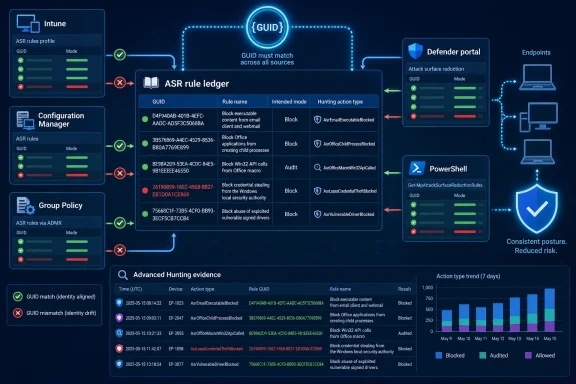
The most useful thing Microsoft gives defenders here is not another dashboard. It is the ASR reference matrix itself: the rule name, the Microsoft Intune name, the GUID, and the advanced hunting action type.
That sounds like documentation plumbing, but in a real estate of co-managed endpoints it is the difference between policy and belief. Portal labels can differ, older Configuration Manager names can vary, and administrators may remember rules by shorthand. GUIDs do not care about naming fashion, console redesigns, or whether the exception was added during a Friday outage.
This is why ASR drift should be treated like identity drift. A rule is not fully governed until its GUID, intended state, telemetry action type, and exclusion behavior line up across the place you configure it, the place you report on it, and the place you investigate it.
The deeper problem is that “enabled” is not a sufficiently precise word. A rule can be enabled in one management plane, overwritten by another, reported as compliant in a way that does not equal enforcement on some server operating systems, and then effectively neutralized by a broad exclusion. The security team sees green. The endpoint sees ambiguity.
The point is not bureaucracy. It is to make the GUID the primary key for operational security. If the Defender portal reports an action type for a detection, the hunting team should be able to trace that event back to the same GUID that Intune or Configuration Manager is supposed to be enforcing.
For a normal Windows endpoint estate, the working flow looks like this: define the intended ASR baseline, map every rule to its GUID, confirm how that GUID is configured in Intune or Configuration Manager, check whether Group Policy contains a conflicting fallback, then use Defender portal reporting and advanced hunting action types to confirm what is happening in practice. That sequence catches the most common failure mode: a team thinking it has a rule state problem when it actually has a policy-source problem.
PowerShell is the useful local sanity check.
The modes should also be normalized in the ledger. ASR can be Off, Block, Audit, Not configured, or Warn, depending on the deployment method and rule support. Treat those values as policy states, not prose descriptions, because “audit for finance laptops” and “warn for finance laptops” are different risk decisions.
It is also exactly the kind of interface that can create governance debt if it becomes the path of least resistance. Microsoft warns that excluding files or folders can severely reduce protection and suppress reporting. In operational terms, an exclusion is not just an allow decision; it is also a telemetry decision.
That second effect is easy to underestimate. If an exclusion suppresses reporting, the next analyst may not see the same signal that justified the original exception. Over time, the organization loses the ability to distinguish between “this rule stopped firing because the business process changed” and “this rule stopped firing because we carved out the interesting part.”
The safer pattern is to reconcile exclusions by GUID and path, not by anecdote. A file path added because one ASR rule created noise should not quietly become a global ASR exception unless the organization has consciously accepted that reduction in coverage. The portal makes exclusions visible across devices, but visibility is not the same as restraint.
This is where the ASR matrix becomes useful again. If a detection corresponds to a hunting action type tied to a specific rule, the exception should be reviewed against that rule identity. The question should be: which GUID is this exception meant to affect, and does the exception live in the same management plane as the rule?
This is not a bug so much as a hierarchy problem. Group Policy may be the historical source of truth, Intune may be the modern source of truth, Configuration Manager may still be managing part of the fleet, and the Defender portal may be where the security team sees the consequences. The endpoint does not care which team owns which console.
For administrators, the practical rule is brutal: do not use Group Policy as a silent second policy engine unless you have explicitly documented it as fallback. If Intune or Configuration Manager is authoritative, Group Policy should either be aligned or left not configured for the same ASR settings.
The same principle applies to PowerShell changes made during incident response. A local ASR change can be useful in an emergency, but if enterprise management overwrites it at startup, it is not durable governance. Treat local changes as temporary containment unless they are promoted back into the authoritative policy source.
Configuration Manager adds another wrinkle because some ASR rules have different names or support boundaries there. That makes the GUID-based ledger more important, not less. If the name in one console is close but not identical to the name in another, the GUID is the only safe anchor.
Compliance is a statement about policy evaluation. Enforcement is a statement about behavior. The two should overlap, but Microsoft’s own documentation says there is a known case where they may not.
For WindowsForum readers who manage mixed desktop and server estates, this is the sharp edge. ASR is often discussed as a Windows client hardening feature, but server workloads increasingly sit in the same Defender reporting and policy universe. A green compliance indicator on a server can therefore become a false comfort if the underlying rule is not actually enforced.
The practical response is to validate server ASR behavior with telemetry and controlled testing rather than relying on a compliance mark alone. If a rule is supposed to generate an advanced hunting action type when audited or blocked, the hunting data should show whether that behavior exists. If it does not, the ledger should mark the device class as unsupported, uncertain, or requiring separate validation.
This is also where exclusion discipline matters. Server administrators often have legitimate application compatibility concerns. But broad exclusions on servers, layered on top of uncertain enforcement, can create the worst possible combination: reduced protection, reduced reporting, and inflated confidence.
A rule enters audit mode during testing. A line-of-business workflow generates noise. An exclusion is added. Another team later turns the rule to block. A server group is marked compliant. A legacy GPO still contains an older value. Six months later, nobody can answer whether the organization is enforcing the rule, auditing it, bypassing it, or simply not seeing it.
That is why ASR governance should be reviewed as a loop, not as a deployment project. Plan, test, enable, monitor, and then reconcile again. Microsoft’s own deployment guidance emphasizes audit data, reporting, and exclusions before broader rollout, but the long-term operational work is keeping the rule identity consistent after rollout.
Security teams should be especially cautious when detections rise after a new rule state or policy expansion. A wave of detections often produces pressure to add exceptions quickly. Some of those exceptions are legitimate. Others are disguised policy disputes, app modernization problems, or user training issues.
The better response is to triage detections by action type and GUID first. If the same ASR rule is producing repeated detections across many devices, that is a policy decision. If one app path on one device group is producing a business-impacting false positive, that is an exception candidate. Treating both cases the same is how exception sprawl begins.
That matters because ASR is behavior-based. The rules target actions such as Office creating child processes, scripts launching executable content, suspicious obfuscation, or ransomware-like behavior. Those are not static file signatures; they are operational patterns. Governance needs telemetry that preserves the connection between the rule and the observed behavior.
A mature ASR review should therefore begin with intended state and end with observed action types. If the ledger says a GUID should be in Audit for a pilot group, hunting should show audited events for that rule when the behavior occurs. If the ledger says a GUID should be in Block for a production ring, hunting should show blocked activity or the absence of expected activity should be explainable.
This also helps separate security control tuning from vulnerability management noise. WindowsForum has already been tracking Defender-related security discussions, including endpoint vulnerabilities and broader Microsoft security hardening. ASR governance is not another CVE chase. It is the quieter discipline that determines whether your endpoint controls keep working after the patch cycle moves on.
That distinction is important. Vulnerability coverage often asks, “Did we patch the thing?” ASR governance asks, “Are the controls that would interrupt the next thing still aligned, enforced, and observable?”
If Intune owns the device, Intune should own the ASR rule and its exclusions. If Configuration Manager owns the device, Configuration Manager should be reflected in the ledger. If Group Policy is still in play, it should be documented as authoritative or intentionally subordinate. If the Defender portal is used to add exclusions, those exclusions should be reconciled back into the same governance model.
The worst pattern is console-hopping without ownership. One administrator changes Intune. Another adds a portal exclusion. A third maintains a GPO. An incident responder uses PowerShell locally. Every action may be reasonable in isolation, but the combined result is a control whose actual state nobody can prove.
This is why organizations should assign ASR ownership by outcome, not by tool. The owner is not “the Intune team” or “the SOC.” The owner is the group accountable for proving that a given ASR GUID has the intended mode, intended scope, intended exclusions, and observable telemetry.
For smaller shops, that owner may be one person. For enterprises, it may be a governance board that includes endpoint engineering, security operations, and application owners. Either way, the artifact is the same: a rule ledger that can survive portal churn and staff turnover.
The second comparison is detection telemetry versus policy state. If the advanced hunting action type says a rule is firing in audit or block, the ledger should explain why that rule is in that mode for that device group. If detections exist where the rule is supposedly off, or no detections exist where testing says they should appear, investigate the management path.
The third comparison is exclusions versus rule identity. Every exclusion should have a reason, owner, review date, scope, and relationship to either a specific ASR rule or all ASR rules. If the exception cannot be tied back to a GUID, a business process, and a risk decision, it is not governance; it is residue.
The real work is not technically exotic. It is inventory, normalization, and review. But in endpoint security, those are often the tasks that prevent the loudest incidents.
The immediate procedure is straightforward. Start with Microsoft’s ASR rule reference matrix, build a table of every deployed rule name, GUID, intended mode, hunting action type, policy source, and exclusion source, then validate the endpoint’s effective configuration with reporting and local preference data. In Intune, check Home > Endpoint security > Attack surface reduction and review each Windows Attack Surface Reduction Rules profile. In Group Policy, check Computer configuration > Administrative templates > Windows components > Microsoft Defender Antivirus > Microsoft Defender Exploit Guard > Attack Surface Reduction. In PowerShell, read the effective local ASR identifiers and actions with
Get-MpPreference, then compare those GUIDs with what Intune, Configuration Manager, and Defender reporting say should be true.
 Microsoft’s ASR Matrix Is Quietly the Governance Rosetta Stone
The most useful thing Microsoft gives defenders here is not another dashboard. It is the ASR reference matrix itself: the rule name, the Microsoft Intune name, the GUID, and the advanced hunting action type.That sounds like documentation plumbing, but in a real estate of co-managed endpoints it is the difference between policy and belief. Portal labels can differ, older Configuration Manager names can vary, and administrators may remember rules by shorthand. GUIDs do not care about naming fashion, console redesigns, or whether the exception was added during a Friday outage.
This is why ASR drift should be treated like identity drift. A rule is not fully governed until its GUID, intended state, telemetry action type, and exclusion behavior line up across the place you configure it, the place you report on it, and the place you investigate it.
The deeper problem is that “enabled” is not a sufficiently precise word. A rule can be enabled in one management plane, overwritten by another, reported as compliant in a way that does not equal enforcement on some server operating systems, and then effectively neutralized by a broad exclusion. The security team sees green. The endpoint sees ambiguity.
The First Job Is to Build the Rule Ledger Before Touching the Toggle
Administrators should begin with a rule ledger rather than a policy change. For each ASR rule in scope, record the friendly rule name, Intune name, GUID, advanced hunting action type, intended mode, management authority, assignment group, and exclusion list.The point is not bureaucracy. It is to make the GUID the primary key for operational security. If the Defender portal reports an action type for a detection, the hunting team should be able to trace that event back to the same GUID that Intune or Configuration Manager is supposed to be enforcing.
For a normal Windows endpoint estate, the working flow looks like this: define the intended ASR baseline, map every rule to its GUID, confirm how that GUID is configured in Intune or Configuration Manager, check whether Group Policy contains a conflicting fallback, then use Defender portal reporting and advanced hunting action types to confirm what is happening in practice. That sequence catches the most common failure mode: a team thinking it has a rule state problem when it actually has a policy-source problem.
PowerShell is the useful local sanity check.
Get-MpPreference exposes the ASR rule IDs and their actions on the device, which lets administrators compare what the endpoint has received with what the cloud policy says it should receive. It is not the whole governance picture, but it is a valuable lie detector when portals disagree.The modes should also be normalized in the ledger. ASR can be Off, Block, Audit, Not configured, or Warn, depending on the deployment method and rule support. Treat those values as policy states, not prose descriptions, because “audit for finance laptops” and “warn for finance laptops” are different risk decisions.
The Defender Portal’s Exclusion Tab Is a Scalpel That Looks Like a Convenience Feature
The Defender portal’s ASR reporting experience includes an Add exclusions tab that lists file detections across devices. That is exactly the kind of interface administrators need during rollout, because audit data and false positive review are central to moving ASR rules toward block mode.It is also exactly the kind of interface that can create governance debt if it becomes the path of least resistance. Microsoft warns that excluding files or folders can severely reduce protection and suppress reporting. In operational terms, an exclusion is not just an allow decision; it is also a telemetry decision.
That second effect is easy to underestimate. If an exclusion suppresses reporting, the next analyst may not see the same signal that justified the original exception. Over time, the organization loses the ability to distinguish between “this rule stopped firing because the business process changed” and “this rule stopped firing because we carved out the interesting part.”
The safer pattern is to reconcile exclusions by GUID and path, not by anecdote. A file path added because one ASR rule created noise should not quietly become a global ASR exception unless the organization has consciously accepted that reduction in coverage. The portal makes exclusions visible across devices, but visibility is not the same as restraint.
This is where the ASR matrix becomes useful again. If a detection corresponds to a hunting action type tied to a specific rule, the exception should be reviewed against that rule identity. The question should be: which GUID is this exception meant to affect, and does the exception live in the same management plane as the rule?
Intune, Configuration Manager, and Group Policy Do Not Negotiate Like Humans
Mixed management is where ASR governance gets treacherous. Microsoft documents that Intune or Configuration Manager settings overwrite conflicting Group Policy settings on startup. That means the endpoint may look configured in Group Policy, yet still receive a different effective ASR posture from enterprise management.This is not a bug so much as a hierarchy problem. Group Policy may be the historical source of truth, Intune may be the modern source of truth, Configuration Manager may still be managing part of the fleet, and the Defender portal may be where the security team sees the consequences. The endpoint does not care which team owns which console.
For administrators, the practical rule is brutal: do not use Group Policy as a silent second policy engine unless you have explicitly documented it as fallback. If Intune or Configuration Manager is authoritative, Group Policy should either be aligned or left not configured for the same ASR settings.
The same principle applies to PowerShell changes made during incident response. A local ASR change can be useful in an emergency, but if enterprise management overwrites it at startup, it is not durable governance. Treat local changes as temporary containment unless they are promoted back into the authoritative policy source.
Configuration Manager adds another wrinkle because some ASR rules have different names or support boundaries there. That makes the GUID-based ledger more important, not less. If the name in one console is close but not identical to the name in another, the GUID is the only safe anchor.
The Server Compliance Trap Is the Warning Label Everyone Should Read Twice
Microsoft documents a known applicability issue on Server OS versions where ASR can be marked compliant without actual enforcement. That should stop every server administrator from treating policy compliance as proof of protection.Compliance is a statement about policy evaluation. Enforcement is a statement about behavior. The two should overlap, but Microsoft’s own documentation says there is a known case where they may not.
For WindowsForum readers who manage mixed desktop and server estates, this is the sharp edge. ASR is often discussed as a Windows client hardening feature, but server workloads increasingly sit in the same Defender reporting and policy universe. A green compliance indicator on a server can therefore become a false comfort if the underlying rule is not actually enforced.
The practical response is to validate server ASR behavior with telemetry and controlled testing rather than relying on a compliance mark alone. If a rule is supposed to generate an advanced hunting action type when audited or blocked, the hunting data should show whether that behavior exists. If it does not, the ledger should mark the device class as unsupported, uncertain, or requiring separate validation.
This is also where exclusion discipline matters. Server administrators often have legitimate application compatibility concerns. But broad exclusions on servers, layered on top of uncertain enforcement, can create the worst possible combination: reduced protection, reduced reporting, and inflated confidence.
The Real Drift Pattern Is Usually Between Policy Intent and Exception Reality
Most ASR drift is not dramatic. It is not usually a single admin disabling a major rule across the estate. It is a gradual mismatch between policy intent and exception reality.A rule enters audit mode during testing. A line-of-business workflow generates noise. An exclusion is added. Another team later turns the rule to block. A server group is marked compliant. A legacy GPO still contains an older value. Six months later, nobody can answer whether the organization is enforcing the rule, auditing it, bypassing it, or simply not seeing it.
That is why ASR governance should be reviewed as a loop, not as a deployment project. Plan, test, enable, monitor, and then reconcile again. Microsoft’s own deployment guidance emphasizes audit data, reporting, and exclusions before broader rollout, but the long-term operational work is keeping the rule identity consistent after rollout.
Security teams should be especially cautious when detections rise after a new rule state or policy expansion. A wave of detections often produces pressure to add exceptions quickly. Some of those exceptions are legitimate. Others are disguised policy disputes, app modernization problems, or user training issues.
The better response is to triage detections by action type and GUID first. If the same ASR rule is producing repeated detections across many devices, that is a policy decision. If one app path on one device group is producing a business-impacting false positive, that is an exception candidate. Treating both cases the same is how exception sprawl begins.
Advanced Hunting Turns ASR From a Settings Page Into Evidence
The advanced hunting action type is the bridge between configuration and investigation. It tells defenders which ASR behavior was audited or blocked, and it lets them summarize activity by rule rather than by scattered endpoint anecdotes.That matters because ASR is behavior-based. The rules target actions such as Office creating child processes, scripts launching executable content, suspicious obfuscation, or ransomware-like behavior. Those are not static file signatures; they are operational patterns. Governance needs telemetry that preserves the connection between the rule and the observed behavior.
A mature ASR review should therefore begin with intended state and end with observed action types. If the ledger says a GUID should be in Audit for a pilot group, hunting should show audited events for that rule when the behavior occurs. If the ledger says a GUID should be in Block for a production ring, hunting should show blocked activity or the absence of expected activity should be explainable.
This also helps separate security control tuning from vulnerability management noise. WindowsForum has already been tracking Defender-related security discussions, including endpoint vulnerabilities and broader Microsoft security hardening. ASR governance is not another CVE chase. It is the quieter discipline that determines whether your endpoint controls keep working after the patch cycle moves on.
That distinction is important. Vulnerability coverage often asks, “Did we patch the thing?” ASR governance asks, “Are the controls that would interrupt the next thing still aligned, enforced, and observable?”
Drift Is a Management Failure Before It Is a Detection Failure
There is a temptation to treat ASR drift as a SOC problem because the pain shows up as detections, false positives, and exceptions. But the root cause is usually management architecture.If Intune owns the device, Intune should own the ASR rule and its exclusions. If Configuration Manager owns the device, Configuration Manager should be reflected in the ledger. If Group Policy is still in play, it should be documented as authoritative or intentionally subordinate. If the Defender portal is used to add exclusions, those exclusions should be reconciled back into the same governance model.
The worst pattern is console-hopping without ownership. One administrator changes Intune. Another adds a portal exclusion. A third maintains a GPO. An incident responder uses PowerShell locally. Every action may be reasonable in isolation, but the combined result is a control whose actual state nobody can prove.
This is why organizations should assign ASR ownership by outcome, not by tool. The owner is not “the Intune team” or “the SOC.” The owner is the group accountable for proving that a given ASR GUID has the intended mode, intended scope, intended exclusions, and observable telemetry.
For smaller shops, that owner may be one person. For enterprises, it may be a governance board that includes endpoint engineering, security operations, and application owners. Either way, the artifact is the same: a rule ledger that can survive portal churn and staff turnover.
The Practical Governance Runbook Starts With Three Comparisons
The first comparison is intended policy versus effective endpoint state. Use the ASR reference matrix to map every intended rule to a GUID, then compare that GUID with what the management console deploys and what the endpoint reports locally.The second comparison is detection telemetry versus policy state. If the advanced hunting action type says a rule is firing in audit or block, the ledger should explain why that rule is in that mode for that device group. If detections exist where the rule is supposedly off, or no detections exist where testing says they should appear, investigate the management path.
The third comparison is exclusions versus rule identity. Every exclusion should have a reason, owner, review date, scope, and relationship to either a specific ASR rule or all ASR rules. If the exception cannot be tied back to a GUID, a business process, and a risk decision, it is not governance; it is residue.
The real work is not technically exotic. It is inventory, normalization, and review. But in endpoint security, those are often the tasks that prevent the loudest incidents.
The ASR Audit You Should Run Before the Next Detection Wave
Before the next surge of ASR detections turns into a messy exception sprint, administrators should spend a short cycle reconciling identity, policy source, and exclusions. The goal is not to make every rule block everything immediately. The goal is to ensure that every rule has one understood identity and one understood governance path.- Create a rule ledger that maps each ASR rule’s Intune name, GUID, advanced hunting action type, intended mode, management authority, assignment group, and exclusion source.
- Treat the GUID as the primary key when comparing Defender portal detections, Intune policy, Configuration Manager policy, Group Policy settings, and PowerShell output.
- Use the Defender portal’s exclusion workflow cautiously because file and folder exclusions can reduce protection and suppress reporting.
- Do not assume Group Policy is authoritative on devices managed by Intune or Configuration Manager, because those platforms can overwrite conflicting settings on startup.
- Validate ASR behavior on Server OS versions with telemetry and testing rather than relying only on compliance status, because Microsoft documents a known issue where compliance can appear without actual enforcement.
- Review exclusions as security decisions with owners and expiration logic, not as permanent fixes for noisy detections.
References
- Primary source: learn.microsoft.com
ASR rules deployment guide - Microsoft Defender for Endpoint | Microsoft Learn
Plan, test, and deploy attack surface reduction (ASR) rules in Microsoft Defender for Endpoint to block risky software behavior and protect against advanced threats.learn.microsoft.com - Primary source: WindowsForum
Azure Front Door Elevation of Privilege: Essential SecOps Playbook | Windows Forum
Microsoft’s public signals show an Azure Front Door elevation‑of‑privilege entry in the vendor’s Security Update Guide, but the public record is...windowsforum.com
