

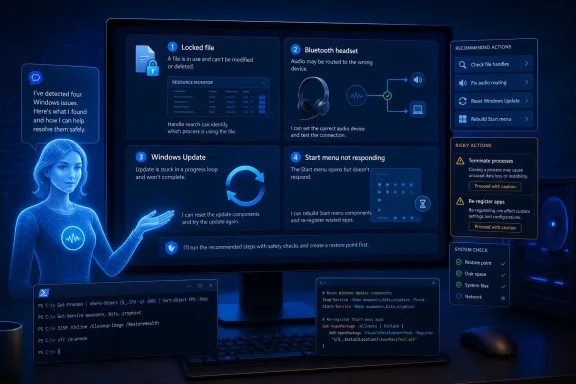
How-To Geek reports that it used Anthropic’s Claude to work through four familiar Windows failures: locked files, Bluetooth headsets connected without audio routing, Windows Update loops, and an unresponsive Start menu. The noteworthy part is not that an AI chatbot discovered secret fixes. Most of the recommendations are established Windows troubleshooting procedures, but Claude reportedly turned them into targeted, usable instructions.
For locked files, the article points to Resource Monitor’s CPU tab and its Associated Handles search. Entering a filename can identify the process holding an open handle, allowing the user to close the responsible application or end the process rather than rebooting blindly. That is a useful built-in diagnostic, although terminating a process can discard unsaved work or destabilize a dependent application.
The Windows Update advice is the most conventional. The reported script stops update-related services before clearing the contents of
Admins should still treat this as a repair step, not routine maintenance. Capturing the update error code, checking servicing logs, and confirming whether a known safeguard hold or driver issue is involved remains preferable on managed systems. Microsoft’s documented advanced procedure also renames the SoftwareDistribution and Catroot2 folders, preserving a rollback path instead of simply deleting data.
The Bluetooth example is more situational. The article says enabling the headset’s Audio Sink service through the legacy Devices and Printers properties page restored stereo output. Windows Bluetooth audio can expose separate stereo and hands-free profiles, and profile selection, default-device settings, driver behavior, firmware, and conferencing software can all affect routing. Enabling a service may solve one headset’s configuration problem, but it is not a universal cure for Bluetooth audio failures.
That is materially different from the broad “re-register every built-in app” command often circulated online. Microsoft advises that Start-menu package registration should be performed in a non-elevated PowerShell session for the affected user; running it elevated can register the package to the administrator instead. Broad AppX re-registration can also produce errors, alter app registrations, and obscure the original fault rather than diagnosing it.
The article’s practical lesson is sound: an AI assistant can be useful for translating symptoms into a shortlist of Windows tools and commands. It should not be treated as an authority on root cause, especially where it recommends registry edits, service changes, process termination, or PowerShell commands.
For home users, verify every command against Microsoft documentation and create a restore point or backup first; for managed PCs, use the AI output as a triage lead, then validate it against your support runbook.
For locked files, the article points to Resource Monitor’s CPU tab and its Associated Handles search. Entering a filename can identify the process holding an open handle, allowing the user to close the responsible application or end the process rather than rebooting blindly. That is a useful built-in diagnostic, although terminating a process can discard unsaved work or destabilize a dependent application.
 Familiar fixes, uneven risk
The Windows Update advice is the most conventional. The reported script stops update-related services before clearing the contents of C:\Windows\SoftwareDistribution, forcing Windows to build a fresh update cache. Microsoft’s own support guidance similarly recommends stopping Windows Update, clearing that directory, and restarting the service when corrupted cache files prevent updates from installing.Admins should still treat this as a repair step, not routine maintenance. Capturing the update error code, checking servicing logs, and confirming whether a known safeguard hold or driver issue is involved remains preferable on managed systems. Microsoft’s documented advanced procedure also renames the SoftwareDistribution and Catroot2 folders, preserving a rollback path instead of simply deleting data.
The Bluetooth example is more situational. The article says enabling the headset’s Audio Sink service through the legacy Devices and Printers properties page restored stereo output. Windows Bluetooth audio can expose separate stereo and hands-free profiles, and profile selection, default-device settings, driver behavior, firmware, and conferencing software can all affect routing. Enabling a service may solve one headset’s configuration problem, but it is not a universal cure for Bluetooth audio failures.
Start menu repair needs care
The Start menu case is the one that deserves the most caution. Claude reportedly suggested re-registering built-in apps with PowerShell after Start became unresponsive. Microsoft’s current Start-menu troubleshooting guidance does include checks forStartMenuExperienceHost, event logs, user-specific package registration, and a targeted Add-AppxPackage repair command.That is materially different from the broad “re-register every built-in app” command often circulated online. Microsoft advises that Start-menu package registration should be performed in a non-elevated PowerShell session for the affected user; running it elevated can register the package to the administrator instead. Broad AppX re-registration can also produce errors, alter app registrations, and obscure the original fault rather than diagnosing it.
The article’s practical lesson is sound: an AI assistant can be useful for translating symptoms into a shortlist of Windows tools and commands. It should not be treated as an authority on root cause, especially where it recommends registry edits, service changes, process termination, or PowerShell commands.
For home users, verify every command against Microsoft documentation and create a restore point or backup first; for managed PCs, use the AI output as a triage lead, then validate it against your support runbook.
References
- Primary source: How-To Geek
Published: 2026-07-17T10:30:16+00:00
Loading…
www.howtogeek.com - Official source: learn.microsoft.com
Loading…
learn.microsoft.com - Official source: support.microsoft.com
Troubleshoot problems updating Windows | Microsoft Support
Learn how to troubleshoot problems updating Windows. Find answers to common questions and issues installing Windows updates.support.microsoft.com