

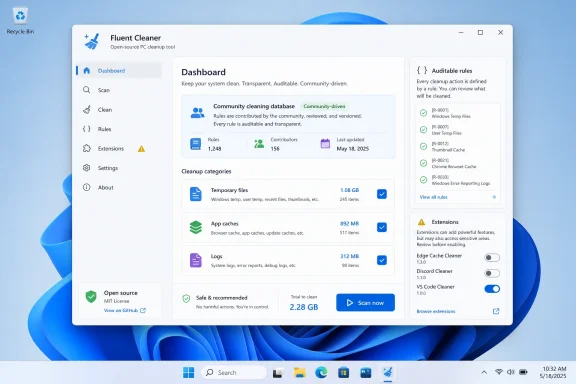
Fluent Cleaner is a new open-source Windows cleanup utility from developer Builtbybel that Windows Central highlighted on May 11, 2026, as a modern CCleaner alternative for Windows 11, offering a WinUI-style interface, portable ZIP distribution, community cleaning databases, and optional maintenance extensions. The interesting part is not that yet another cleaner exists. It is that Fluent Cleaner arrives at a moment when Windows users have become deeply skeptical of the very category it belongs to. For enthusiasts and administrators, the pitch is less “make your PC faster” than “show me what you intend to delete, and don’t insult me while doing it.”
For a long stretch of Windows history, cleanup utilities occupied a strangely important place in the home PC ritual. You installed Windows, accumulated browser caches, orphaned temporary files, installers, logs, and update leftovers, then eventually reached for a tool like CCleaner or Norton Utilities because it felt like maintenance the operating system itself was not doing well enough.
That era never fully ended, but the trust bargain changed. Many users no longer believe a third-party “optimizer” is doing them a favor when it bundles driver updaters, health scores, registry warnings, premium nags, browser add-ons, and vague promises of speed. The cleaner became its own form of clutter.
Fluent Cleaner’s appeal is that it understands this fatigue. According to Windows Central’s walkthrough, the app is distributed as a self-contained ZIP from GitHub, launches through
The app also leans into Windows 11’s visual language rather than fighting it. A WinUI-based interface does not make a utility trustworthy by itself, but it does signal that the developer is trying to build something that belongs on the modern desktop rather than something dragged forward from the Windows XP shareware economy.
The trouble is that Windows maintenance software often grows in the wrong direction. Once a cleaner has a large audience, the temptation is to add more modules, more warnings, more subscriptions, more “health” indicators, and more ways to convert anxiety into revenue. Users learned to treat the category as suspicious not because deleting temporary files is inherently dangerous, but because so many tools started behaving like sales funnels.
Fluent Cleaner’s developer appears to know that history. Windows Central notes the project’s claim that it avoids spyware, scareware, upsell garbage, dark patterns, and fake Registry magic. That phrasing is unusually direct, but it is also exactly the kind of promise this category now has to make before serious users will even download the ZIP.
The mention of “fake Registry magic” is especially pointed. Registry cleaning has long been the snake oil wing of Windows optimization, promising broad performance gains from deleting entries most users cannot evaluate. A tool that foregrounds file cleanup and declarative rules rather than mystical tuning is making an argument about what responsible Windows maintenance should look like in 2026.
This does not eliminate risk. A rule-based cleaner can still remove something a user later wishes had been preserved, particularly when dealing with application caches, session files, logs, or deeply nested user profile data. But a declarative database is at least a cleaner contract: the tool operates from defined entries rather than an opaque promise to “optimize” the system.
Windows Central’s test found Fluent Cleaner detecting 19.43GB of removable material on the author’s setup, compared with 15.9GB surfaced by Windows 11’s built-in Temporary files tool. That difference should not be read as proof that Microsoft’s tool is bad. It is better understood as evidence that Microsoft’s cleanup scope is conservative while Fluent Cleaner looks across a wider application ecosystem.
That distinction matters for administrators and power users. Windows’ built-in cleanup experience is designed for broad safety and minimal surprise. Fluent Cleaner is designed for people who want to know what else is sitting around and are willing to make more granular decisions.
That is why the old universal recommendation to install a third-party cleaner no longer makes sense. On a managed business device, a family laptop, or a PC used by someone who does not want to audit cleanup categories, the built-in tools are often the safer answer. They are supported by Microsoft, integrated with Windows servicing expectations, and less likely to delete application-specific state in surprising ways.
But Microsoft’s tools have an unavoidable limitation: they are necessarily generic. Windows can clean Windows. It is less aggressive about cleaning every browser, launcher, editor, updater, chat app, game client, package cache, and stray utility that may have passed through a user profile over the last three years.
That is where Fluent Cleaner’s broader ruleset becomes useful. It is not claiming to replace Windows maintenance so much as extend it into the messy reality of a Windows enthusiast’s machine. The modern PC is less a single operating system than a landfill of app ecosystems, each with its own cache strategy and cleanup discipline.
Still, transparency changes the bargain. With a proprietary cleaner, users are asked to trust a vendor’s incentives, claims, telemetry posture, and cleanup logic. With an open-source tool, technically inclined users and the wider community can inspect behavior, report questionable entries, fork rules, and validate whether the app’s promises match its implementation.
That matters especially because cleanup utilities operate in sensitive territory. They touch user profiles, application data, browser artifacts, logs, caches, and sometimes system-level paths. A cleaner does not need to be malware to cause harm; it only needs to be careless.
The better standard is not “open source, therefore safe.” It is open source, therefore auditable. Fluent Cleaner earns attention because it moves the conversation away from marketing claims and toward inspectable behavior.
There is obvious value in that model. Enthusiasts already collect one-off scripts, GitHub utilities, PowerShell snippets, and registry tweaks to customize Windows. Bringing some of that into a single interface can reduce friction and make maintenance less scattered.
But extension systems also blur boundaries. Cleaning temporary files is one category of action. Removing bundled apps, disabling AI features, altering Explorer behavior, or running debloat scripts is another. The first is housekeeping; the second is configuration surgery.
That difference should be explicit in any serious evaluation of Fluent Cleaner. The core app may be a tidy, focused cleanup tool, while the extension ecosystem can reach into more consequential changes. A responsible user should treat extensions not as bonus buttons but as separate tools with separate risks.
In maintenance software, “more aggressive” is not always better. It can mean deleting caches that are expensive to rebuild, removing logs useful for troubleshooting, clearing application state that users expected to persist, or changing Windows app packages in ways that complicate future updates. Disk space recovered today can become debugging time tomorrow.
Windows Central’s guidance to stick with the default configuration if users do not understand the databases is the right advice. The presence of advanced databases is not a mandate to use them. It is an escape hatch for users who understand the consequences.
For IT pros, the database model also raises policy questions. A portable open-source cleaner might be acceptable on a lab machine or personal workstation, but it is a different matter on a managed fleet. If a tool can remove app data or bundled components, administrators need repeatability, logging, rollback plans, and a clear understanding of what rules are active.
That pattern is worth watching because it reflects a broader Windows mood. Enthusiasts are not merely asking for lighter tools; they are asking for agency. They want to decide which apps remain installed, which AI features are present, which recommendations appear, and which background leftovers deserve space on disk.
Microsoft, meanwhile, is pushing Windows 11 as a more integrated service platform. Copilot, cloud tie-ins, Store-distributed inbox apps, widgets, recommendations, and account-driven experiences all make the OS feel less like a static local environment and more like a continuously refreshed product surface. Some of that is useful. Some of it feels intrusive.
Utilities like Fluent Cleaner gain traction in the gap between those two visions. They are not necessarily anti-Microsoft. They are anti-helplessness.
By that standard, Fluent Cleaner’s early reputation is promising. Its portable design reduces installation baggage. Its WinUI interface lowers friction. Its community database approach gives it reach beyond Microsoft’s built-in cleanup categories. Its open-source posture gives users a reason to trust, but also a way to verify.
The remaining question is whether the project can stay disciplined as it grows. Many utilities begin as focused tools and later accumulate the very complexity they were created to avoid. Extension ecosystems, experimental databases, automation flags, and bloatware removal modules all add power, but they also create more ways for users to misunderstand the blast radius.
That is not an argument against Fluent Cleaner. It is an argument for treating it as a serious tool rather than a toy. The fact that it looks at home on Windows 11 does not mean every option is harmless.
The more advanced databases and extensions should be approached slowly. Run analysis before cleanup. Review categories. Avoid enabling aggressive rules simply because they exist. If the machine is important, make a backup or restore point before experimenting with debloating or system-altering extensions.
Fluent Cleaner’s value is not that it magically accelerates Windows. Its value is that it revives a useful old category with a healthier set of assumptions: transparency over fear, portability over installation creep, and user choice over bundled monetization.
Source: Windows Central https://www.windowscentral.com/micr...st-ccleaner-alternative-for-windows-11-users/
 The Cleaner Utility Returns With a Smaller Ego
For a long stretch of Windows history, cleanup utilities occupied a strangely important place in the home PC ritual. You installed Windows, accumulated browser caches, orphaned temporary files, installers, logs, and update leftovers, then eventually reached for a tool like CCleaner or Norton Utilities because it felt like maintenance the operating system itself was not doing well enough.That era never fully ended, but the trust bargain changed. Many users no longer believe a third-party “optimizer” is doing them a favor when it bundles driver updaters, health scores, registry warnings, premium nags, browser add-ons, and vague promises of speed. The cleaner became its own form of clutter.
Fluent Cleaner’s appeal is that it understands this fatigue. According to Windows Central’s walkthrough, the app is distributed as a self-contained ZIP from GitHub, launches through
FCleaner.exe, and does not require a traditional installer. That matters because the installation model itself is part of the message: no background resident suite, no bundled service, no wizard full of monetization traps.The app also leans into Windows 11’s visual language rather than fighting it. A WinUI-based interface does not make a utility trustworthy by itself, but it does signal that the developer is trying to build something that belongs on the modern desktop rather than something dragged forward from the Windows XP shareware economy.
CCleaner’s Long Shadow Is Really a Trust Problem
Calling Fluent Cleaner a CCleaner alternative is useful shorthand, but it also risks underselling the deeper shift. CCleaner became famous because it solved a real problem cleanly: it found cruft across Windows and popular applications, then removed it without forcing users through twenty different settings panels. That simplicity made it a default recommendation for years.The trouble is that Windows maintenance software often grows in the wrong direction. Once a cleaner has a large audience, the temptation is to add more modules, more warnings, more subscriptions, more “health” indicators, and more ways to convert anxiety into revenue. Users learned to treat the category as suspicious not because deleting temporary files is inherently dangerous, but because so many tools started behaving like sales funnels.
Fluent Cleaner’s developer appears to know that history. Windows Central notes the project’s claim that it avoids spyware, scareware, upsell garbage, dark patterns, and fake Registry magic. That phrasing is unusually direct, but it is also exactly the kind of promise this category now has to make before serious users will even download the ZIP.
The mention of “fake Registry magic” is especially pointed. Registry cleaning has long been the snake oil wing of Windows optimization, promising broad performance gains from deleting entries most users cannot evaluate. A tool that foregrounds file cleanup and declarative rules rather than mystical tuning is making an argument about what responsible Windows maintenance should look like in 2026.
The Database Choice Is the Real Product
The most important technical detail in Fluent Cleaner is not the window dressing. It is the app’s reliance on cleaning databases, especially Winapp2.ini, the long-running community-maintained set of cleaning rules used by multiple cleanup tools. That turns Fluent Cleaner from a closed black box into a front end for a more inspectable maintenance model.This does not eliminate risk. A rule-based cleaner can still remove something a user later wishes had been preserved, particularly when dealing with application caches, session files, logs, or deeply nested user profile data. But a declarative database is at least a cleaner contract: the tool operates from defined entries rather than an opaque promise to “optimize” the system.
Windows Central’s test found Fluent Cleaner detecting 19.43GB of removable material on the author’s setup, compared with 15.9GB surfaced by Windows 11’s built-in Temporary files tool. That difference should not be read as proof that Microsoft’s tool is bad. It is better understood as evidence that Microsoft’s cleanup scope is conservative while Fluent Cleaner looks across a wider application ecosystem.
That distinction matters for administrators and power users. Windows’ built-in cleanup experience is designed for broad safety and minimal surprise. Fluent Cleaner is designed for people who want to know what else is sitting around and are willing to make more granular decisions.
Microsoft Can Clean Windows, But It Cannot Clean Every Habit
Windows 11 already includes maintenance features that are good enough for many users. Storage Sense can automatically remove temporary files, clean the Recycle Bin after a defined interval, and handle certain cloud-backed local file scenarios. The Settings app also exposes temporary file cleanup in a way that is far less arcane than the old Disk Cleanup utility.That is why the old universal recommendation to install a third-party cleaner no longer makes sense. On a managed business device, a family laptop, or a PC used by someone who does not want to audit cleanup categories, the built-in tools are often the safer answer. They are supported by Microsoft, integrated with Windows servicing expectations, and less likely to delete application-specific state in surprising ways.
But Microsoft’s tools have an unavoidable limitation: they are necessarily generic. Windows can clean Windows. It is less aggressive about cleaning every browser, launcher, editor, updater, chat app, game client, package cache, and stray utility that may have passed through a user profile over the last three years.
That is where Fluent Cleaner’s broader ruleset becomes useful. It is not claiming to replace Windows maintenance so much as extend it into the messy reality of a Windows enthusiast’s machine. The modern PC is less a single operating system than a landfill of app ecosystems, each with its own cache strategy and cleanup discipline.
Open Source Is Not a Magic Shield, But It Changes the Bargain
The open-source nature of Fluent Cleaner is central to its credibility, but it should not be treated as a guarantee of safety. Open code can still contain bugs. Community rules can still be too aggressive. Users can still click the wrong thing and remove data they did not mean to remove.Still, transparency changes the bargain. With a proprietary cleaner, users are asked to trust a vendor’s incentives, claims, telemetry posture, and cleanup logic. With an open-source tool, technically inclined users and the wider community can inspect behavior, report questionable entries, fork rules, and validate whether the app’s promises match its implementation.
That matters especially because cleanup utilities operate in sensitive territory. They touch user profiles, application data, browser artifacts, logs, caches, and sometimes system-level paths. A cleaner does not need to be malware to cause harm; it only needs to be careless.
The better standard is not “open source, therefore safe.” It is open source, therefore auditable. Fluent Cleaner earns attention because it moves the conversation away from marketing claims and toward inspectable behavior.
The Extension System Is Both the Hook and the Hazard
Fluent Cleaner’s extension support may be its most powerful feature, and also the part that deserves the most caution. Windows Central describes extensions that can load tools and scripts such as Chris Titus Tech’s debloating utility, icon cache clearing, Explorer tweaks, and Windows AI removal. That turns the app from a cleaner into a kind of maintenance cockpit.There is obvious value in that model. Enthusiasts already collect one-off scripts, GitHub utilities, PowerShell snippets, and registry tweaks to customize Windows. Bringing some of that into a single interface can reduce friction and make maintenance less scattered.
But extension systems also blur boundaries. Cleaning temporary files is one category of action. Removing bundled apps, disabling AI features, altering Explorer behavior, or running debloat scripts is another. The first is housekeeping; the second is configuration surgery.
That difference should be explicit in any serious evaluation of Fluent Cleaner. The core app may be a tidy, focused cleanup tool, while the extension ecosystem can reach into more consequential changes. A responsible user should treat extensions not as bonus buttons but as separate tools with separate risks.
The Winapp3 Option Is a Warning Label in Disguise
The app’s settings expose multiple databases, including the default Winapp2 database, an experimental Winapp3 database, and a Winappx database oriented around removing bloatware. That choice is useful, but it also introduces a classic power-user trap: the more aggressive option feels like the more complete one.In maintenance software, “more aggressive” is not always better. It can mean deleting caches that are expensive to rebuild, removing logs useful for troubleshooting, clearing application state that users expected to persist, or changing Windows app packages in ways that complicate future updates. Disk space recovered today can become debugging time tomorrow.
Windows Central’s guidance to stick with the default configuration if users do not understand the databases is the right advice. The presence of advanced databases is not a mandate to use them. It is an escape hatch for users who understand the consequences.
For IT pros, the database model also raises policy questions. A portable open-source cleaner might be acceptable on a lab machine or personal workstation, but it is a different matter on a managed fleet. If a tool can remove app data or bundled components, administrators need repeatability, logging, rollback plans, and a clear understanding of what rules are active.
The Builtbybel Pattern Is Becoming a Windows Subculture
Fluent Cleaner is not arriving in isolation. Builtbybel has become associated with small, opinionated Windows utilities such as FlyOOBE and Winslop, tools aimed at giving users more control over setup, bloat, and Microsoft’s increasingly assertive feature direction. Fluent Cleaner fits that pattern: minimal packaging, modern UI, and a clear adversarial stance toward unwanted complexity.That pattern is worth watching because it reflects a broader Windows mood. Enthusiasts are not merely asking for lighter tools; they are asking for agency. They want to decide which apps remain installed, which AI features are present, which recommendations appear, and which background leftovers deserve space on disk.
Microsoft, meanwhile, is pushing Windows 11 as a more integrated service platform. Copilot, cloud tie-ins, Store-distributed inbox apps, widgets, recommendations, and account-driven experiences all make the OS feel less like a static local environment and more like a continuously refreshed product surface. Some of that is useful. Some of it feels intrusive.
Utilities like Fluent Cleaner gain traction in the gap between those two visions. They are not necessarily anti-Microsoft. They are anti-helplessness.
The Best Cleaner Is Still the One That Does the Least Harm
A good Windows cleaner should be boring. It should analyze, explain, let the user choose, perform the requested cleanup, and then get out of the way. It should not invent emergencies, imply that every registry key is a crisis, or push unrelated paid modules into a maintenance workflow.By that standard, Fluent Cleaner’s early reputation is promising. Its portable design reduces installation baggage. Its WinUI interface lowers friction. Its community database approach gives it reach beyond Microsoft’s built-in cleanup categories. Its open-source posture gives users a reason to trust, but also a way to verify.
The remaining question is whether the project can stay disciplined as it grows. Many utilities begin as focused tools and later accumulate the very complexity they were created to avoid. Extension ecosystems, experimental databases, automation flags, and bloatware removal modules all add power, but they also create more ways for users to misunderstand the blast radius.
That is not an argument against Fluent Cleaner. It is an argument for treating it as a serious tool rather than a toy. The fact that it looks at home on Windows 11 does not mean every option is harmless.
Windows 11 Enthusiasts Finally Get a Cleaner That Respects Their Suspicion
The practical advice is straightforward: most ordinary users should start with Windows 11’s built-in cleanup tools and only reach for Fluent Cleaner if they have a specific reason to go deeper. That reason might be a cramped SSD, a development machine full of package caches, a heavily used browser profile, or an enthusiast setup with years of application residue.The more advanced databases and extensions should be approached slowly. Run analysis before cleanup. Review categories. Avoid enabling aggressive rules simply because they exist. If the machine is important, make a backup or restore point before experimenting with debloating or system-altering extensions.
Fluent Cleaner’s value is not that it magically accelerates Windows. Its value is that it revives a useful old category with a healthier set of assumptions: transparency over fear, portability over installation creep, and user choice over bundled monetization.
- Fluent Cleaner is best understood as an advanced companion to Windows 11’s built-in cleanup tools, not a mandatory replacement for them.
- The app’s use of community cleaning databases gives it broader reach than Microsoft’s Temporary files tool, but that reach also requires more judgment from the user.
- The default database is the sensible starting point, while experimental and bloatware-focused databases should be reserved for users who understand what they are changing.
- Extensions make Fluent Cleaner more powerful, but they also move it beyond simple cleanup into debloating, tweaking, and system modification.
- The project’s open-source model improves trust by making behavior auditable, but it does not remove the need for backups, caution, and review.
Source: Windows Central https://www.windowscentral.com/micr...st-ccleaner-alternative-for-windows-11-users/
