

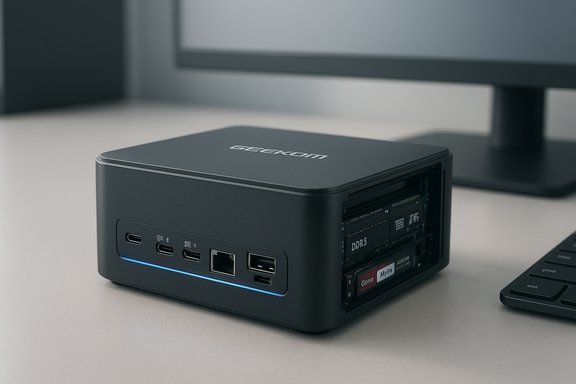
Compact, capable and aggressively priced for early‑Black‑Friday shoppers, the Geekom A8 mini PC is positioned as a genuine desktop replacement for Windows users who value small footprint, strong single‑thread and integrated‑GPU performance, and broad connectivity in a palm‑sized chassis.
Mini PCs have matured beyond basic media players and underpowered office boxes; the newest generation uses mobile H‑series APUs that deliver laptop‑class CPU performance and surprisingly capable integrated graphics. The Geekom A8 sits squarely in that evolution, shipping in Ryzen 7 and Ryzen 9 configurations with dual‑channel DDR5, PCIe Gen4 storage, USB4, 2.5GbE, and modern wireless standards — features once confined to full‑size desktop motherboards and premium laptops. Early promotional pricing has put the A8 into the spotlight, but the bigger story is how Geekom balances performance, thermals and upgradability in a 0.5‑liter chassis. This feature examines the A8 in detail: hardware breakdown, real‑world performance expectations, upgrade paths, connectivity and practical buying guidance for Windows 11 users. It cross‑checks vendor claims with independent teardowns, benchmark reporting and GPU/CPU databases so readers can evaluate whether the A8 is a useful desktop replacement or simply a catchy sale item.
That value depends on two things: the specific SKU you buy (Ryzen 7 vs Ryzen 9, SSD size) and whether you accept the limits of a compact cooling system. Independent teardowns and reviews validate the A8’s core claims about CPU, iGPU and ports, but buyers should treat some promotional storage claims as unverified until a clear teardown confirms them. If you prioritize a compact footprint with real upgrade paths (dual‑channel RAM, Gen4 NVMe) and modern I/O, the Geekom A8 is among the most compelling Windows 11 mini PCs available — particularly when found at a genuine, vetted sale price.
Source: Windows Central https://www.windowscentral.com/hard...pc-has-all-the-power-you-need-for-windows-11/
 Background / Overview
Mini PCs have matured beyond basic media players and underpowered office boxes; the newest generation uses mobile H‑series APUs that deliver laptop‑class CPU performance and surprisingly capable integrated graphics. The Geekom A8 sits squarely in that evolution, shipping in Ryzen 7 and Ryzen 9 configurations with dual‑channel DDR5, PCIe Gen4 storage, USB4, 2.5GbE, and modern wireless standards — features once confined to full‑size desktop motherboards and premium laptops. Early promotional pricing has put the A8 into the spotlight, but the bigger story is how Geekom balances performance, thermals and upgradability in a 0.5‑liter chassis. This feature examines the A8 in detail: hardware breakdown, real‑world performance expectations, upgrade paths, connectivity and practical buying guidance for Windows 11 users. It cross‑checks vendor claims with independent teardowns, benchmark reporting and GPU/CPU databases so readers can evaluate whether the A8 is a useful desktop replacement or simply a catchy sale item. What’s inside: CPU, GPU, memory and storage
CPU: AMD Ryzen 7 8845HS (and optional Ryzen 9 8945HS)
- The A8 is available in at least two APU configurations: Ryzen 7 8845HS (8 cores / 16 threads, 3.8 GHz base, up to 5.1 GHz boost) and a higher‑end Ryzen 9 8945HS (same core count, higher clocks). These are Zen‑4 Hawk Point mobile APUs with a configurable TDP in the mid‑40W class, making them unusually potent for a mini PC.
- Independent benchmark aggregators place the 8845HS in the same ballpark as high‑end laptop H‑series parts for both single‑thread and multi‑thread workloads; Cinebench R23 multi‑core results commonly land in the mid‑to‑high‑16,000s on average across published samples — enough headroom for heavy Office multitasking, batch exports and moderate content‑creation tasks.
GPU: AMD Radeon 780M integrated graphics
- The A8 relies on the Radeon 780M integrated GPU, an RDNA‑3‑generation iGPU with 768 shading units, hardware ray‑tracing support and theoretical FP32 performance that makes 1080p/medium settings gameplay feasible for many titles. TechPowerUp and other GPU databases list the 780M as a modern mobile IGP designed for this class of machines. Expect solid 2D performance, crisp desktop acceleration and surprisingly usable 3D performance at 1080p for lighter AAA games or older titles.
- Real‑world gaming results depend heavily on memory configuration: dual‑channel DDR5 (two SODIMMs) is standard in Geekom’s factory builds and is critical to unlocking the 780M’s frame‑rate potential. Review comparisons confirm single‑DIMM systems suffer large drops in iGPU throughput compared with matched dual‑channel configurations.
Memory and storage
- Factory SKUs commonly ship with 32GB DDR5 (2×16GB) running at DDR5‑5600 speeds and are user‑upgradeable to 64GB via two SODIMM sockets. This two‑DIMM design provides the dual‑channel memory bandwidth iGPU workloads require.
- The primary storage is an M.2 2280 PCIe Gen4×4 NVMe SSD (1TB typical on Ryzen 7 SKUs, 2TB on some Ryzen 9 SKUs). Vendor and teardown reporting confirm the main M.2 slot supports Gen4 performance. Several reviewers and the teardown note a single M.2 2280 slot in the chassis.
- Important caveat: some promotional copy and retail listings have suggested a secondary M.2 2242 SATA slot for expansion, but independent teardowns and multiple reviews show only space for a single 2280 NVMe drive and an SD card slot rather than a separate 2242 M.2 bay. Because published sources disagree, treat claims of a second M.2 2242 slot as unverified unless an official teardown or Geekom specification explicitly confirms it. Buyers who need dual internal SSDs should verify the exact SKU and check a teardown before purchasing.
I/O and connectivity — desktop‑class ports in a small box
One reason mini PCs like the A8 feel like desktop replacements is modern connectivity that mirrors larger systems:- USB4 (40 Gbps) port plus a second USB‑C (10 Gbps) with DisplayPort Alt Mode, multiple USB‑A 3.2 Gen2 ports, and at least one USB‑A 2.0 for legacy devices.
- Dual HDMI outputs (HDMI 2.0 or 2.1 depending on region/firmware) and support for up to four displays via combined outputs. This makes the A8 viable for multi‑monitor productivity setups or a single 8K display at reduced refresh.
- 2.5Gbps Ethernet (Realtek RTL8125 family) for faster wired networking to NAS devices or a capable home router/switch.
- Wi‑Fi 6E and Bluetooth (variously listed as Bluetooth 5.2 or 5.3 across different regional pages), giving low‑latency wireless and better coexistence in congested bands. Expect realistic throughput gains only with compatible APs and cables.
Cooling, thermals and sustained performance
A crucial question for any mini PC with H‑series silicon is how long the system can sustain high power without throttling. The A8 uses a compact “IceFlow / IceBlast” style cooling assembly (fan, heat pipes, heatsink) tuned for a 35–54W configurable PL range typical for Ryzen HS chips. Reviewers consistently note:- Short‑burst CPU performance — such as compiling, single‑threaded bursts and application launches — is excellent because the APU can hit boost clocks briefly.
- For sustained all‑core workloads (large video exports, extended rendering), the small chassis pushes thermal limits and fans ramp up; sustained multi‑core scores decline over long runs as the system hits thermal or configurable power limits. NotebookCheck’s hands‑on testing and teardown commentary highlight audible fan behavior under load and a cooling design that keeps temperatures safe but not silent at peak sustained load.
Real‑world performance: what to expect
Productivity and multitasking
With 8 CPU cores, 16 threads and 32GB DDR5, the A8 is overqualified for spreadsheets, browser tab hoards, video calls and heavy document workflows. Office suites, virtualization with one or two light VMs, and photo editing in Photoshop run smoothly in independently reported tests. CPU benchmark aggregates suggest strong single‑thread scores that translate to a snappy desktop feel.Creative workloads (photo, video editing)
The Ryzen HS APUs are laptop‑class powerhouses; for photo editing and light video timelines the A8 is very capable. For heavy 4K timelines with multiple real‑time effects, timelines will benefit from fast NVMe scratch and more RAM, but the A8 can handle most prosumer workflows when paired with fast storage and dual‑channel RAM. Export times will be longer than top‑end desktop CPUs, but acceptable for many creators who prioritize desk space and portability.Gaming (native, integrated GPU)
- For native Windows titles at 1080p, many games will run at playable settings with the Radeon 780M — especially older AAA titles or esports titles. Tests of similar systems show the 780M delivering steady 1080p/medium to high results in less demanding games and stable 60fps in some AAA games at medium settings when paired with dual‑channel RAM. Be realistic: the 780M is not a replacement for a discrete RTX 40/50 or RTX 30 class GPU if you demand ultra settings or high refresh rates.
- Memory configuration is the single biggest lever for iGPU performance. Systems with one DIMM suffer dramatic drops versus two‑DIMM configurations; Geekom’s A8 ships with dual DIMMs to avoid that bottleneck.
Upgradeability and repairability
Mini PCs trade expandability for compactness, but the A8 aims to strike a balance:- RAM: Two SODIMM slots mean straightforward RAM upgrades up to 64GB — a rare treat for mini PCs that sometimes ship with soldered memory.
- Storage: The primary M.2 2280 PCIe Gen4 slot is confirmed by teardown. Multiple independent reviews and teardowns report only one internal M.2 2280 slot and an SD card reader rather than a second 2242 M.2 slot, so plan upgrades accordingly. If you require dual NVMe drives, confirm the SKU or consider an external fast USB4 drive or networked storage. Do not assume a second internal NVMe bay without verification.
- Serviceability: Reviews indicate bottom panels and straightforward screw removal grant access to memory and M.2 slots, which eases upgrades, but compact thermal assemblies mean disassembly requires care to avoid compromising cooling or warranty.
Pricing, deals and availability
Retail pricing for the A8 has fluctuated significantly due to promotional events and regional SKUs:- Recent reporting captured a discounted Amazon price near $549 (Prime‑locked promotion) and a Best Buy listing around $599 for some configurations, but original MSRP and street prices vary by CPU SKU (Ryzen 7 vs Ryzen 9) and SSD capacity. Prices change rapidly around sales events — what you see today may differ tomorrow. Treat current advertised sale prices as time‑sensitive.
- Manufacturer and retailer pages list MSRP and periodic coupon codes; independent outlets tracked price drops ranging from modest to aggressive during promotional windows. Because the A8 competes with other mini PCs in similar price bands (GMKtec, Beelink, Minisforum and Chuwi), it is worth shopping multiple retailers and checking for bundled discounts or warranty extensions.
Strengths: where the A8 shines
- Desktop‑like performance in a tiny footprint — the Ryzen HS APUs and dual‑channel DDR5 deliver snappy responsiveness and respectable integrated GPU performance for everyday use and light gaming.
- Modern connectivity — USB4, multiple USB‑C and USB‑A ports, 2.5GbE and Wi‑Fi 6E make the A8 flexible for docking, NAS access and multi‑monitor productivity.
- User‑upgradeable RAM and NVMe — two SODIMMs and at least one Gen4 M.2 slot give a clear upgrade path compared with many sealed mini PCs.
- Good value when on sale — promotional pricing can put the A8 in a compelling spot relative to entry desktops and similarly‑equipped mini PCs.
Weaknesses and risks: what to watch out for
- Thermal limits under sustained heavy load — expect fan noise and reduced sustained multi‑core throughput compared with a full tower with a slab heatsink. This is an inherent tradeoff for the small form factor.
- Ambiguous storage expansion claims — promotional material and some retailer listings have suggested a second M.2 2242 slot; multiple teardowns show only one M.2 2280 slot. Buyers who need internal dual NVMe drives should confirm the exact hardware revision before purchase. This is a verified discrepancy across sources rather than an inventory issue.
- Price volatility and regional SKU confusion — different regions receive slightly different CPU/GPU pairings, warranty terms and software bundles; comparing SKUs is essential to avoid surprises.
- Limited discrete GPU upgrade path — like most mini PCs, the A8 cannot accept a full‑size discrete GPU, so users who need hardcore GPU compute or high‑end gaming will need an external GPU or a tower system.
Who should buy the Geekom A8?
1. Users who want a true desktop replacement for office work, content editing and casual gaming without the bulk of a tower. The A8’s CPU and dual‑channel memory make it a strong candidate for these roles. 2. Home‑office and hybrid workers who need quiet, compact systems with modern ports — especially those wanting multiple displays and fast wired networking. 3. Buyers who value portability plus upgradeability — you can move the A8 between desks, pack it for travel, and still upgrade RAM or the NVMe drive if your needs grow. Do not buy the A8 if you need continuous, heavy GPU rendering or if you rely on internal dual‑NVMe arrays without confirming the exact internal layout. For those use cases, look at tower desktops or larger small‑form‑factor systems with more internal real‑estate and active cooling.Practical buying checklist (quick)
- Confirm the exact SKU you’re buying (Ryzen 7 8845HS vs Ryzen 9 8945HS) and the included SSD capacity.
- Verify whether the advertised discounted price is tied to a Prime‑only coupon or a general sale. Compare retailer return and warranty policies.
- If you need dual NVMe drives, request a photo / teardown confirmation from the seller — don’t rely on promotional blurbs that mention a 2242 M.2 slot without proof.
- Plan for a quiet workspace: test the unit under real workloads or read multiple hands‑on reviews to understand fan noise under load.
Conclusion
The Geekom A8 is a clear statement about the direction of small‑form‑factor Windows PCs: you no longer need a bulky tower to get H‑series CPU performance, modern connectivity and decent integrated‑GPU capability. For a large class of users — home‑office professionals, content creators on a budget, and casual gamers — the A8 can replace a full desktop while reclaiming desk space.That value depends on two things: the specific SKU you buy (Ryzen 7 vs Ryzen 9, SSD size) and whether you accept the limits of a compact cooling system. Independent teardowns and reviews validate the A8’s core claims about CPU, iGPU and ports, but buyers should treat some promotional storage claims as unverified until a clear teardown confirms them. If you prioritize a compact footprint with real upgrade paths (dual‑channel RAM, Gen4 NVMe) and modern I/O, the Geekom A8 is among the most compelling Windows 11 mini PCs available — particularly when found at a genuine, vetted sale price.
Source: Windows Central https://www.windowscentral.com/hard...pc-has-all-the-power-you-need-for-windows-11/
