The latest hands‑on head‑to‑head testing that compares Google’s Gemini 3 and Microsoft’s Copilot finds a clear practical winner for everyday, web‑grounded tasks — and it isn’t even close in several categories. The hands‑on review that sparked the debate ran seven real‑world desktop prompts (itinerary planning, mapping, Windows history research, infographic/image generation, a personal finance decision, a PowerShell automation task, and movie trivia) and concluded that Gemini took four of the seven tasks while Copilot won one decisively; two tasks tied. Those findings were summarized and republished across outlets and aggregator sites, and the original hands‑on test has been widely discussed in the tech press.
These head‑to‑head tests are useful because they shift the conversation away from raw model benchmarks and toward everyday usefulness — the workflows regular Windows or Mac users actually care about. Gemini 3 is a major Google model family release positioned for reasoning and multimodal work, and Copilot has been updated to run OpenAI’s GPT‑5 in its Copilot products, with model routing that picks faster or deeper reasoning variants automatically. Both platform moves are vendor‑level facts: Google announced Gemini 3 and its Deep Think/Pro modes, and Microsoft publicly rolled GPT‑5 into Microsoft 365 Copilot. Why this matters: the practical utility of an assistant is a mix of three things — grounding (ability to fetch and use live web or tenant data accurately), tooling (maps, image generation, document/file access, scripting agents), and governance (data handling and compliance). Different vendors emphasize different axes: Google emphasizes web grounding and multimodal output; Microsoft emphasizes tenant grounding and Windows/Microsoft 365 productivity integration. The tests discussed here were intentionally practical: the prompt set reflects tasks an average desktop user might ask an assistant to perform.
Both assistants are already powerful productivity multipliers, but neither is a drop‑in replacement for human judgment. Verify outputs, manage data governance, sandbox automation, and blend tools where their strengths are complementary. These assistants are best treated as skill‑amplifiers — not autopilots — for the foreseeable future. The race between model families (GPT‑5 in Copilot vs Gemini 3 and its Deep Think modes) will continue to change the balance, but ecosystem fit, governance, and task context will remain the deciding factors for Windows users and organizations for months to come.
Conclusion
The head‑to‑head shows that raw model headlines matter, but real utility is shaped by ecosystem integration, grounding, and task fit. For travel planning, quick visuals, and web research, Gemini 3 is currently the more useful day‑to‑day assistant. For Windows automation, PowerShell scripting, and Microsoft 365 workflows, Copilot is the practical choice. Maintain a two‑assistant workflow, demand sources, sandbox scripts, and require enterprise governance when sensitive data is involved — that approach delivers the most value while minimizing the real risks these powerful assistants still present.
Source: Newswav Gemini Vs. Copilot: I Tested The AI Tools On 7 Everyday Tasks, And It Wasn’t Even Close
 Background / Overview
These head‑to‑head tests are useful because they shift the conversation away from raw model benchmarks and toward everyday usefulness — the workflows regular Windows or Mac users actually care about. Gemini 3 is a major Google model family release positioned for reasoning and multimodal work, and Copilot has been updated to run OpenAI’s GPT‑5 in its Copilot products, with model routing that picks faster or deeper reasoning variants automatically. Both platform moves are vendor‑level facts: Google announced Gemini 3 and its Deep Think/Pro modes, and Microsoft publicly rolled GPT‑5 into Microsoft 365 Copilot. Why this matters: the practical utility of an assistant is a mix of three things — grounding (ability to fetch and use live web or tenant data accurately), tooling (maps, image generation, document/file access, scripting agents), and governance (data handling and compliance). Different vendors emphasize different axes: Google emphasizes web grounding and multimodal output; Microsoft emphasizes tenant grounding and Windows/Microsoft 365 productivity integration. The tests discussed here were intentionally practical: the prompt set reflects tasks an average desktop user might ask an assistant to perform.What the test did and what it found
Test design: identical prompts, everyday scenarios
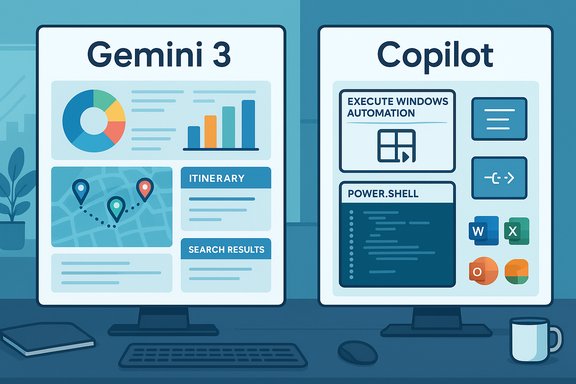
The reviewer used identical prompts against each assistant (Gemini via Google’s web/app interface; Copilot via Microsoft’s Copilot/Edge integration) and judged outputs for accuracy, creativity, and usable follow‑through. The tasks were intentionally non‑developer, desktop‑oriented, and designed to reveal ecosystem differences rather than abstract benchmark superiority. Across seven tasks the outcome was:- Gemini: winner in itinerary planning, map generation (linking), infographic/image creation, and one other scenario.
- Copilot: decisive winner in PowerShell scripting/Windows automation.
- Ties: research into Windows history, and a routine personal finance decision; movie trivia was also a tie.
Notable wins and failures
- Itinerary planning: Gemini produced a sensible, map‑aware multi‑city route that respected timing and direct‑train constraints; Copilot initially produced an overly conservative or incorrect route and only admitted alternatives after follow‑ups. This illustrated web grounding and maps integration advantages for Gemini.
- Map drawing: Gemini pragmatically provided Google Maps links and pins; Copilot attempted to render a stylized map and produced geographically inaccurate placements (serious errors like moving Stuttgart). When exact locations matter, handing off to a real map engine beats fabricated vector art.
- Infographic/image generation: Gemini’s multimodal tooling produced a usable passkey infographic quickly; Copilot produced generic icons and failed to iterate effectively. This test favored Gemini’s creative, multimodal stack.
- PowerShell automation: Copilot’s deep Windows and PowerShell familiarity shined — it produced a robust rename script with user prompts, error handling, and undo strategies, while Gemini initially suggested third‑party utilities and required multiple retries. This was Copilot’s clear domain win.
Validating vendor claims and technical facts
This feature cross‑checked the test’s load‑bearing claims with vendor announcements and independent reporting.- GPT‑5 in Copilot: Microsoft’s official blog confirms GPT‑5 is now available in Microsoft 365 Copilot and Copilot Studio, and that Copilot uses model routing to select fast vs. deeper reasoning variants depending on the prompt. Microsoft’s messaging explicitly frames GPT‑5 as a two‑mode system: high‑throughput models for routine tasks and deeper reasoning models for complex work.
- Gemini 3 release and Deep Think: Google announced Gemini 3 as a major model family upgrade with Pro and Deep Think modes; Deep Think is being positioned for the most demanding reasoning tasks and is gated behind higher‑tier subscriptions while safety testing continues for broader availability. Independent coverage highlights Deep Think’s benchmark gains and subscriber gating (AI Ultra tiers).
- Reliability and hallucinations: independent studies — notably a BBC analysis — have documented significant error rates in AI news summarization across major assistants, underscoring that hallucinations and factual distortions remain real risks. That BBC study judged more than half of AI news answers had significant issues, and it singled out varying degrees of problem behavior across tools. This aligns with the test’s cautionary remarks about verifying facts before publishing.
Deep dive: Why Gemini won the consumer creative / web tasks
Multimodal fidelity and tight Maps/Search integration
Gemini’s edge in itinerary and mapping tasks is rooted in two practical strengths:- Web grounding and maps handoffs: Gemini readily provides live map links and uses Google’s search and maps graph to surface routing options and location facts — that makes it less likely to invent or misplace cities and more likely to produce usable, clickable results.
- Multimodal creation pipeline: Gemini’s image/layout tooling is optimized for quick conceptual assets (infographics, thumbnails), which reduces iteration cycles for editorial tasks.
Instruction following and concise, usable output
In the hands‑on tests Gemini tended to follow constraints tightly and produce concise, structured replies — a quality editors and creators prize when turning drafts into publish‑ready assets. That discipline produced time savings in the infographic task and faster, accurate iteration in itinerary planning.Deep dive: Why Copilot still matters — and where it wins
Windows/Microsoft 365 grounding and platform‑specific automation
Copilot’s decisive advantage was in platform‑specific scripting: PowerShell is Microsoft’s native automation language, and Copilot’s training, integration, and tuning for Windows idioms make it more reliable for practical automation tasks. Copilot produced promptable scripts, error handling, and undo suggestions — things you want before running mass file renames on a production folder. For Windows administrators, system integrators, and power users automating Office or OS‑level workflows, Copilot’s tenant grounding (Microsoft Graph, Outlook, OneDrive) and context awareness are decisive.Model routing and GPT‑5 integration
Microsoft’s deployment of GPT‑5 inside Copilot, with an automatic router that picks faster or deeper variants, theoretically gives Copilot a flexible performance envelope: quick answers for routine tasks, deeper analysis for complex prompts. In practice that routing reduces the need for users to pick “thinking” modes manually and helps Copilot fit into interactive productivity flows. Microsoft’s announcement and subsequent coverage confirm GPT‑5’s rollout across Copilot products.Strengths, risks, and governance considerations
Strengths (observed across tests)
- Gemini: web grounding, maps integration, multimodal image/layout generation, and crisp instruction following. Better time‑to‑usable assets for editorial and creative workflows.
- Copilot: Windows/Office integration, tenant awareness, and platform‑specific scripting. Better for automation, PowerShell, and enterprise workflows with governance requirements.
Key risks to watch
- Hallucinations and factual distortion: Studies (e.g., BBC) show substantial error rates when assistants summarize news or extract facts; always verify important facts and dates independently.
- Ecosystem lock‑in: The productivity gains are tied to platform integration — Copilot locks you into Microsoft 365 workflows; Gemini favors Google Workspace and Search. Choosing an assistant becomes a data‑lifecycle and governance decision, not just a capability comparison.
- Data and privacy: Consumer tiers may still permit telemetry or training‑data use; enterprises should insist on non‑training guarantees and tenant grounding for regulated data. Use enterprise plans when sensitive or regulated information is involved.
- Image model fairness and IP: Image generation continues to raise representational and intellectual‑property questions. Independent investigations have documented inconsistent skin‑tone fidelity and cultural fit in generated images; treat generated assets as drafts until provenance and licensing are confirmed.
Practical recommendations for Windows users
- If you live inside Microsoft 365 and need tenant‑aware assistance for Outlook, Teams, OneDrive, or automated Office tasks: use Copilot. It will integrate with your data, supports governance tools, and is better for PowerShell/Windows automation. Test and sandbox any scripts before running them in production.
- If your daily work leans on web research, maps, ideation, or quick concept art and infographics: use Gemini. For creative drafts, mockups, and map‑linked itineraries, Gemini will usually be faster and more polished.
- Keep both assistants in rotation: one for research/citation tasks and the other for productivity/automation. This practical pluralism hedges vendor outages, model biases, and tool‑specific hallucinations.
- For code and scripts: prefer Copilot for Windows‑specific automation, but require code review, linting, unit tests, and an undo plan before running generated scripts. Treat all AI‑generated code as a first draft, not production‑ready.
- Always ask the assistant for sources when a factual claim matters; if it doesn’t provide links, verify externally. For legal, financial, or medical decisions, treat AI as decision‑support, not authoritative counsel.
A careful note on pricing and access tiers
Gemini 3 and its Deep Think mode are being distributed across tiered subscription plans: free/Flash variants prioritize speed and cost, while Pro/Ultra/Deep Think modes provide higher‑capacity reasoning and multimodal features at paid tiers. Google’s Deep Think gating to AI Ultra subscribers is an example: the most powerful reasoning mode is not immediately free for all users. Microsoft’s Copilot integration of GPT‑5 similarly prioritizes enterprise license holders for early access, though Microsoft has signaled broader rollouts for consumer Copilot users. These tier differences matter: free or Flash variants can behave differently from Pro/Deep‑think models in quality and fidelity.The governance and security angle (enterprise view)
Organizations evaluating assistant rollouts must think beyond capability:- Identity and access controls: map agent identities, entitlements, and least‑privilege policies.
- Data residency and non‑training guarantees: choose enterprise plans where prompt data isn’t used to further train public models unless contractually agreed.
- Audit trails and explainability: require prompt logging, source links, and traceability for decisions made by agents.
- Red‑teaming and safety testing: treat agentic workflows as production systems and run adversarial tests and incident playbooks.
Limitations and unverifiable claims
- Vendor performance numbers, precise latency deltas, or internal model‑router heuristics are hard to independently verify without controlled benchmarks. Treat those claims as vendor‑reported until third‑party evaluations corroborate them.
- Single hands‑on tests are highly informative for user workflows but are not substitutes for large‑scale benchmarks or red‑team evaluations. The ZDNet hands‑on (and its republished mirrors) provides a practical snapshot; repeating similar prompts across tiers and locations may yield different results.
Practical checklist for readers before you act on AI outputs
- For factual claims: insist on a clickable source or independent verification.
- For generated images: confirm licensing and provenance before commercial use.
- For scripts and automation: run in a sandbox, require code review and backups, and maintain an undo plan.
- For enterprise data: use tenant‑aware connectors and opt for non‑training enterprise tiers where necessary.
- For critical decisions (legal, medical, financial): use AI as decision support and consult a certified professional before acting.
Final verdict — what Windows users should take away
The headline from the hands‑on test is defensible: Gemini 3 frequently outperforms Copilot on consumer, web‑grounded, creative, and map‑aware tasks, while Copilot retains a clear advantage for Windows‑native automation and Microsoft 365 workflows. The practical user strategy is contextual pluralism — pick the assistant that best fits each workflow rather than betting everything on a single platform.Both assistants are already powerful productivity multipliers, but neither is a drop‑in replacement for human judgment. Verify outputs, manage data governance, sandbox automation, and blend tools where their strengths are complementary. These assistants are best treated as skill‑amplifiers — not autopilots — for the foreseeable future. The race between model families (GPT‑5 in Copilot vs Gemini 3 and its Deep Think modes) will continue to change the balance, but ecosystem fit, governance, and task context will remain the deciding factors for Windows users and organizations for months to come.
Conclusion
The head‑to‑head shows that raw model headlines matter, but real utility is shaped by ecosystem integration, grounding, and task fit. For travel planning, quick visuals, and web research, Gemini 3 is currently the more useful day‑to‑day assistant. For Windows automation, PowerShell scripting, and Microsoft 365 workflows, Copilot is the practical choice. Maintain a two‑assistant workflow, demand sources, sandbox scripts, and require enterprise governance when sensitive data is involved — that approach delivers the most value while minimizing the real risks these powerful assistants still present.
Source: Newswav Gemini Vs. Copilot: I Tested The AI Tools On 7 Everyday Tasks, And It Wasn’t Even Close